What causes Yahoo policy violations in transactional emails and how can they be resolved?

Updated on 13 Aug 2026: We updated this guide with a scope-first PH01 diagnosis and safer retry guidance based on Yahoo's current requirements.
Yahoo PH01 is a permanent, content-based policy rejection. Yahoo uses PH* errors when something in the message or a linked destination is unacceptable for policy reasons. Common triggers include suspicious or compromised URLs, rewritten tracking links, hosted images, attachments, or pages that resemble credential collection. A transactional classification does not exempt the message from these checks.
Treat the bounce as a content and security incident first. Review every URL and hosted asset, test the message with and without tracking, and confirm that either SPF or DKIM passes with a DMARC domain match to the visible From address. Verify that landing pages are clean and branded, then submit a Yahoo Sender Support Request when the message is legitimate and the repaired version still fails. If the page asks for profile data, address data, family data, payment data, or account data, give Yahoo fewer reasons to interpret the email as credential collection.
Answer first
A transactional label does not override Yahoo's content filters. If the message contains a suspicious link, a risky form, broken authentication, or a sender reputation issue, Yahoo can reject it before the user sees it.
Why Yahoo rejects transactional email for policy reasons
Yahoo's filtering does not use the sender's internal label as the only decision point. The mailbox provider sees the SMTP session, visible From domain, DKIM signing domain, envelope sender, sending IP, message body, links, and complaint history. Yahoo's sender best practices require all senders to authenticate with SPF or DKIM, keep the spam complaint rate below 0.3%, publish valid forward and reverse DNS for sending IPs, and comply with RFC 5321 and RFC 5322. Bulk senders must use both SPF and DKIM and have DMARC pass under a policy of p=none or stronger. Marketing and subscribed bulk messages also need easy unsubscribe.
A one-to-one profile update request can still look risky if the call to action sends the recipient to a form that collects personal data. That pattern is common in real account maintenance workflows, but it is also common in credential theft. Yahoo cannot see your business logic. It sees a message asking a user to click a link and provide information.
- Link risk: Tracked, redirected, shortened, or newly created URLs raise the chance of a content rejection.
- Form risk: Pages that ask for personal information need strong brand context, HTTPS, and a clear purpose.
- Domain risk: A sender domain, tracking domain, or form domain with weak history can look unrelated to the brand.
- Authentication risk: SPF, DKIM, or DMARC failures give Yahoo less evidence that the sender is legitimate.
- Complaint risk: Transactional mail that users report as spam can inherit a commercial-style filtering problem.
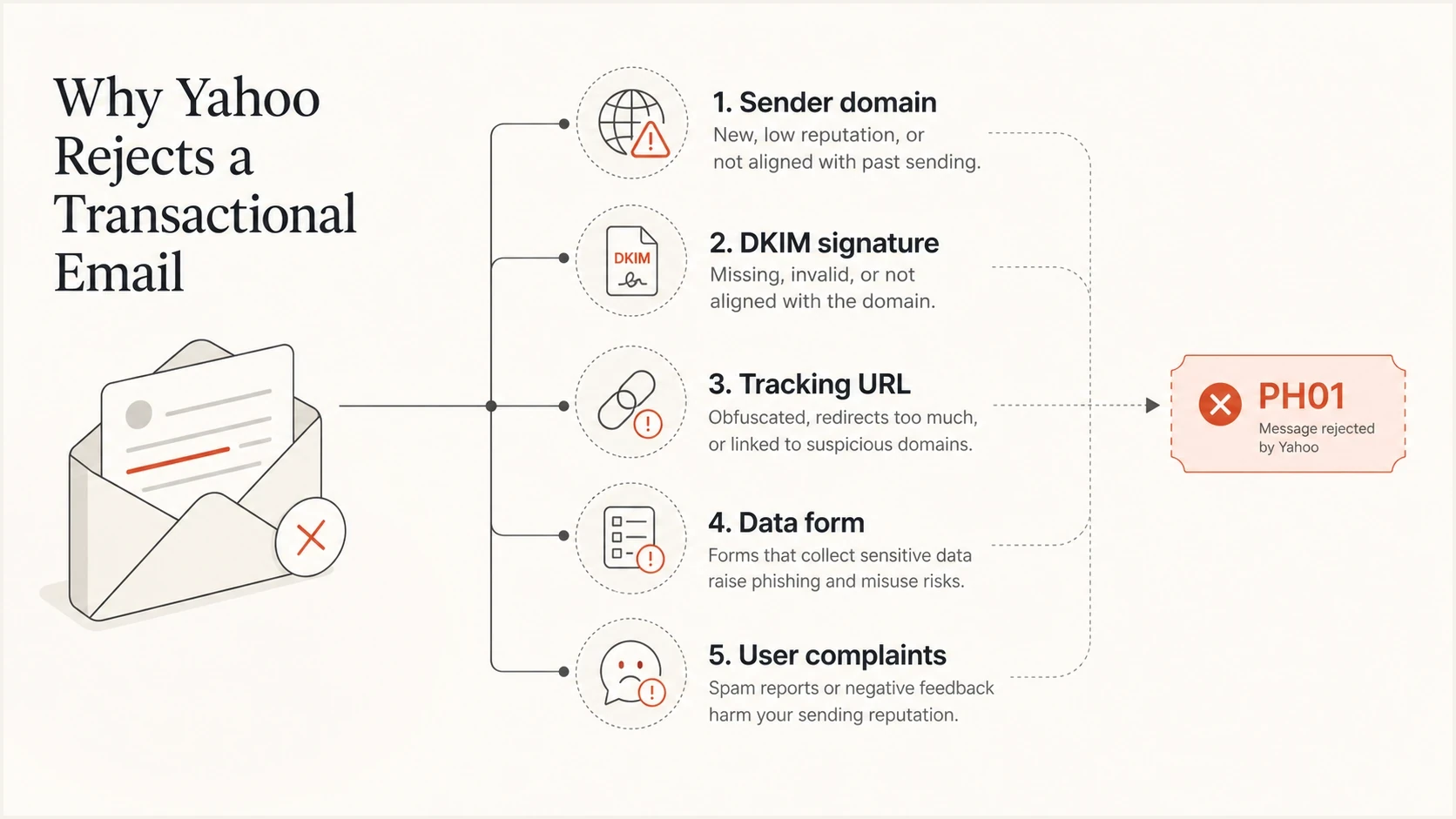
Five checks that can trigger a Yahoo PH01 rejection.
Separate a message block from a sender-wide block
Determine the scope before rewriting a template or changing DNS. A failure limited to one message usually points to content or a destination. A rejection across nearly all Yahoo or AOL traffic from the same domain or IP needs a wider review of authentication, DNS, complaint rate, traffic changes, outbound queues, sender reputation, and blocklist or blacklist status.
|
|
|
|---|---|---|
One template fails | Message content | Test exact MIME without links or tracking |
Most Yahoo or AOL mail fails | Sender or infrastructure | Check authentication, DNS, queues, and reputation |
421 or 451 response | Temporary deferral | Back off and retry later |
554 PH01 response | Permanent content rejection | Stop unchanged retries, repair, and retest |
Scope-first triage for Yahoo delivery errors.
Do not mark the recipient invalid
PH01 identifies a policy rejection, not a nonexistent Yahoo mailbox. Stop automatic retries of the unchanged message, but do not suppress the address as invalid solely because of PH01. Retest a repaired message with a small, controlled Yahoo seed group before restoring traffic.
How to triage a PH01 bounce
The first job is to preserve the evidence. Do not rewrite the template before capturing the full bounce, because a small change to a URL, subject line, footer, or tracking wrapper can hide the actual trigger. Preserve the raw message, sending IP, DKIM selector, envelope sender, exact recipient domain, and final expanded URL chain.
Example Yahoo bouncetext
5.0.0 (undefined status)
Message not allowed - [PH01]
Email not accepted for policy reasons.
- Capture evidence: Save the full DSN, headers, raw body, template version, and message identifier.
- Expand links: Resolve every click-tracked URL until the final landing page is visible.
- Test variants: Use controlled Yahoo seed addresses to test the same message without tracking, then remove one link at a time.
- Check auth: Confirm SPF and DKIM results, then verify that at least one passing identifier matches the visible From domain for DMARC.
- Escalate with evidence: Submit a Yahoo Sender Support Request after ruling out a live security issue and reproducing the rejection with a repaired message.
Treat PH01 as security-relevant
PH01 points at content that Yahoo considers unsafe or unacceptable. If the destination page asks for personal information, alert the security team and verify that the site, form, scripts, redirects, and DNS have not been compromised.
What to check in the message content
Review the content the way a mailbox filter sees it. A real customer profile update email has a legitimate reason to ask for data, but the email and landing page need to prove that. The brand name, sender domain, form domain, link text, and page copy should all point to the same organization and purpose.
Risk pattern
- Hidden destination: The visible link text does not make the final form domain obvious.
- Weak form context: The page asks for personal data without a clear reason above the form.
- Long redirect path: The click path moves through tracking and vendor domains before the form loads.
Resolution
- Branded URL: Use a branded tracking domain and a branded form host where possible.
- Clear copy: Explain why the user is receiving the email and what data is requested.
- Clean path: Reduce redirect hops and remove any shortener or unrelated domain.
|
|
|
|---|---|---|
PH01 | Content | Review links |
Form | Data ask | Add context |
Redirect | Tracking | Brand URL |
DMARC | Mismatch | Fix DNS |
Compact triage matrix for Yahoo policy bounces.
Authentication and domain matching still matter
PH01 is content-based, but authentication is still part of the evidence Yahoo uses. If DKIM signs with an unrelated vendor domain and SPF passes on an envelope domain that users never see, DMARC fails when neither authenticated domain matches the visible From domain. Yahoo accepts relaxed domain matching, so a matching subdomain is valid when the configuration is intentional. A strong DMARC monitoring workflow catches failures and unintended domain mismatches before the bounce rate becomes a Yahoo-specific incident.
For a quick baseline, run a domain health check for the visible From domain and confirm valid SPF, DKIM, and DMARC. Separately confirm that each sending IP has valid forward DNS and matching reverse DNS. These checks do not prove Yahoo will accept the message, but they remove common weaknesses before template testing.
?
What's your domain score?
Deep-scan SPF, DKIM & DMARC records for email deliverability and security issues.
If DMARC is missing or still in an early rollout, create a basic policy before tightening it. The DMARC record generator is useful for building the TXT record, and Suped's Hosted DMARC helps teams stage policy changes without repeated manual DNS edits.
Starter DMARC recorddns
_dmarc.example.com TXT
v=DMARC1; p=none; rua=mailto:dmarc-reports@example.com;
RFC 9989 now defines the core DMARC mechanism, RFC 9990 defines aggregate reporting, and RFC 9991 defines failure reporting. The starter record omits the fo tag because fo controls failure-report conditions and has no effect unless a ruf destination is also present.
When DNS access slows the cleanup, Hosted DMARC gives the email team a controlled way to adjust policy staging, reporting destinations, and enforcement without waiting on a separate DNS release cycle.
How unsubscribe headers fit transactional mail
One-click unsubscribe is not the normal fix for PH01. Yahoo's bulk sender rules expect one-click unsubscribe for marketing and subscribed messages, not every operational notice. Transactional mail often excludes unsubscribe because the message is tied to an account event, purchase, security notice, or required service update.
In Salesforce Marketing Cloud, List-Unsubscribe support is tied to commercial send behavior. Transactional send classification does not give the same header behavior by default. That means a profile update request sent as transactional needs its own decision: add a preference-center link if it reduces complaints and matches the message purpose, but do not assume it resolves a content block.
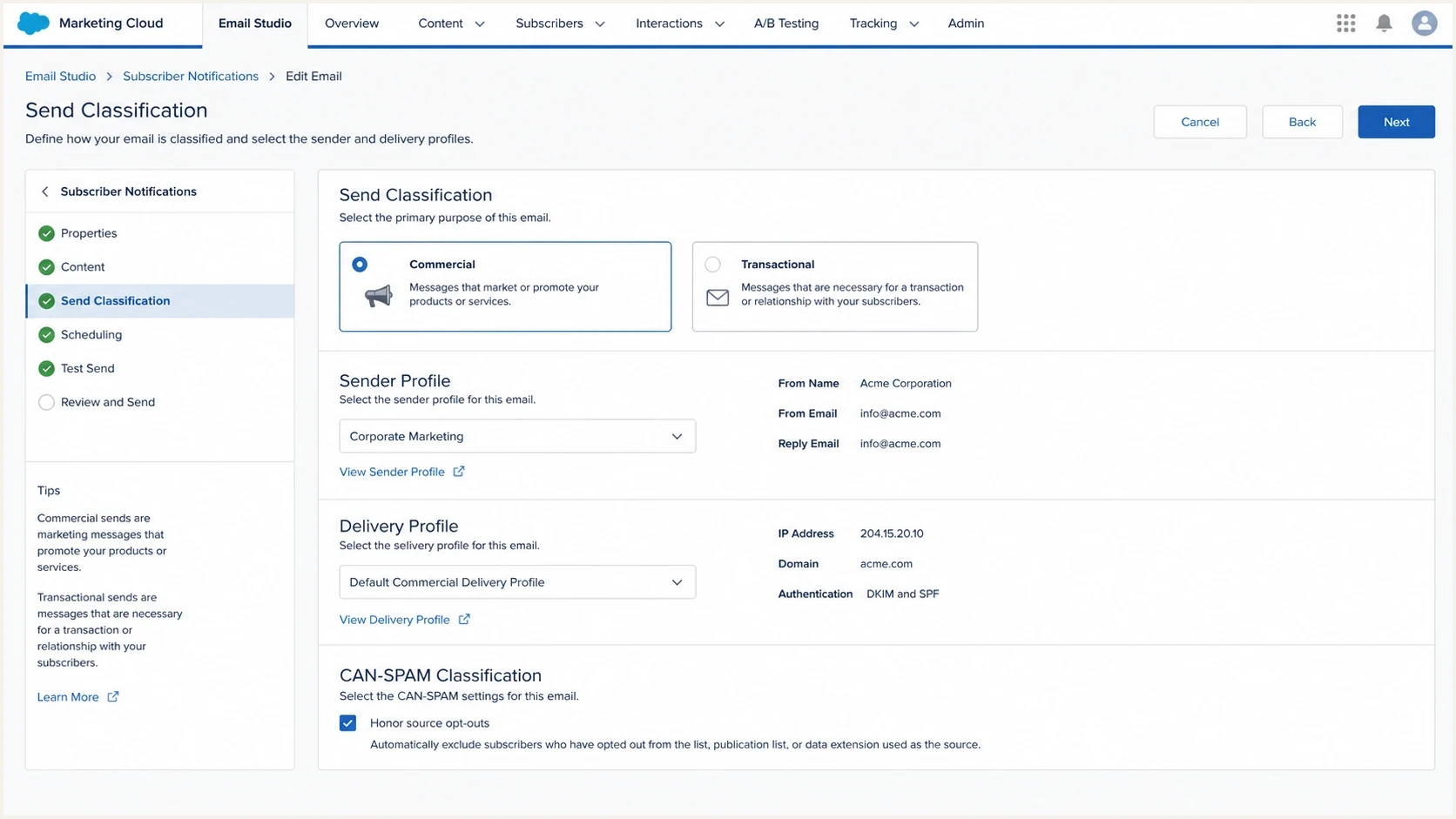
Salesforce Marketing Cloud send classification settings for commercial and transactional email.
One-click unsubscribe headerstext
List-Unsubscribe: <https://example.com/unsubscribe/abc123>
List-Unsubscribe-Post: List-Unsubscribe=One-Click
Commercial send
- Header need: Use List-Unsubscribe and one-click unsubscribe for subscribed marketing mail.
- Body need: Include a visible unsubscribe or preference path in the email body.
Transactional send
- Header need: Usually omit unsubscribe if the message is required for the account event.
- Body need: Use clear support, preference, or contact options when complaints are likely.
Resolution workflow for Yahoo
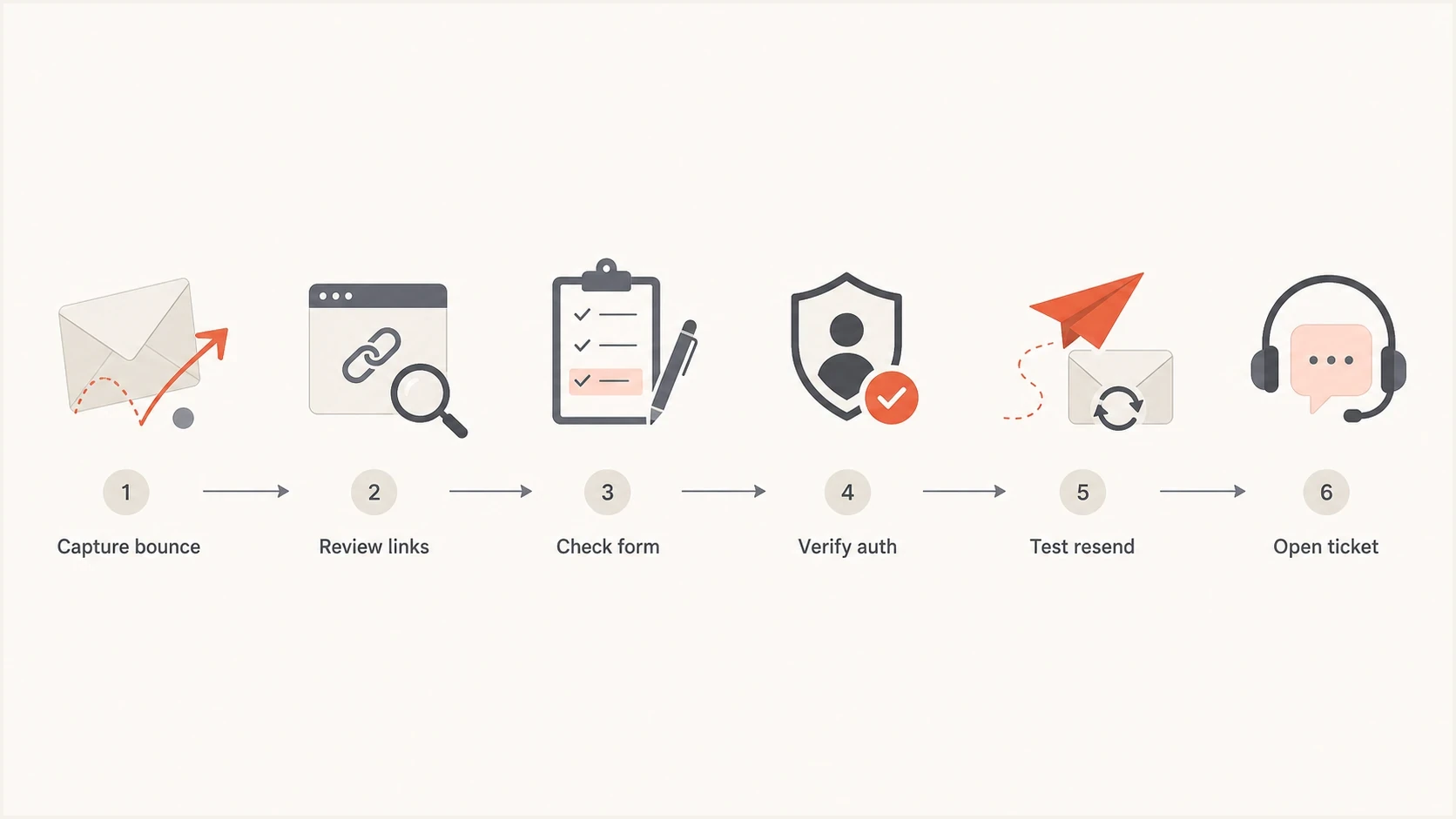
Flowchart for resolving a Yahoo PH01 transactional email rejection.
The fastest resolution path is sequential. First, prove the message is legitimate. Second, remove the content signals that look like abuse. Third, prove the sender identity. Fourth, give Yahoo enough detail to reclassify the message if it is a false positive.
- Fix URLs: Replace unrelated hosts, shorten redirect chains, and use branded click domains.
- Fix forms: Add visible brand ownership, contact details, HTTPS, and a concise data-use statement.
- Fix auth: Make SPF or DKIM pass for a domain that matches the visible From domain under DMARC.
- Fix stream: Separate transactional mail from promotional traffic by IP pool or DKIM domain.
- Fix proof: Prepare logs, headers, screenshots, final URLs, and a plain explanation for Yahoo.
What to send Yahoo
- Bounce data: Include the exact SMTP response, timestamp, sending IP, and recipient domain.
- Message data: Include the raw headers, raw body, DKIM selector, and template identifier.
- Link data: Include every final landing page and any security review findings.
Where Suped fits
Suped's product brings DMARC reporting, SPF and DKIM monitoring, hosted policy management, SPF flattening, blocklist monitoring (blacklist monitoring), and related deliverability signals into one workflow. It does not replace Yahoo support. It helps the sender determine whether a PH01 incident includes an identity, DNS, reputation, or message-specific content problem before the support request is filed.

Issue steps to fix dialog showing the issue overview, tailored fix steps, and verification action
The practical workflow is to spot the failing source, check whether DMARC passes, identify the DKIM signing domain, find unverified senders, and follow specific remediation steps. Real-time alerts help when a Yahoo rejection starts after a template, DNS, or vendor change. Suped's Hosted SPF helps when the sender list grows and the SPF record approaches the DNS lookup limit. Suped's Hosted MTA-STS helps enforce TLS for mail delivery without requiring the team to host a policy file.
That matters for PH01 because content issues are easier to isolate when the authentication layer is already clean. If Suped shows healthy DMARC, SPF, DKIM, and DNS, the investigation can focus on the form, link chain, and support ticket instead of chasing every possible configuration problem.
Views from the trenches
Best practices
Capture the full bounce, message source, sending IP, DKIM domain, and affected Yahoo user.
Test each destination URL without tracking, then repeat with tracking enabled and logged.
Keep transactional and marketing streams separate by IP pool, DKIM domain, and template.
Common pitfalls
Treating a transactional label as a filter exemption leaves risky content unresolved.
Sending users to forms that request personal data without enough brand context and TLS hygiene.
Assuming unsubscribe headers fix PH01 when the rejection comes from a content classifier.
Expert tips
Add a preference link only when it matches the message purpose and suppresses complaints.
Use branded tracking domains, stable forms, and HTTPS redirects that reveal the final page.
Have security review any PH01 case before Yahoo support treats it as a false positive.
An Email Geeks case treated PH01 as a content policy rejection and checked the linked landing page before classifying the bounce as a false positive.
2024-08-13 - Email Geeks
An Email Geeks header test checked the deployed message against Gmail and Yahoo requirements regardless of the sender's transactional classification.
2024-08-13 - Email Geeks
The practical fix
Resolve Yahoo policy violations in transactional emails by cleaning the message path, not by relying on the transactional label. For PH01, inspect the entire deployed MIME and every destination first. A profile update form that asks for personal data should use a branded domain, HTTPS, plain language, a short redirect path, and a clear reason for the request.
Then verify DMARC, SPF, DKIM, DNS, stream separation, and any blocklist or blacklist signal. Add unsubscribe or preference options only when they fit the message purpose and complaint risk. Stop retrying the unchanged 554 response. If the repaired email is legitimate and controlled tests still fail, send Yahoo the bounce, headers, final URLs, and remediation notes for review as a false positive.




