What causes the Gmail authentication alert and how to resolve it?

Updated on 8 Aug 2026: We clarified which Gmail warnings involve email authentication and updated the DMARC guidance for current Gmail requirements and RFC 9989.
A question mark beside the sender means Gmail did not accept the message as authenticated through SPF or DKIM. A message can also pass SPF or DKIM for the wrong domain and then fail DMARC because the authenticated domain lacks alignment with the domain shown in the visible From address.
The fastest resolution is to inspect Gmail's Show original view and read the Authentication-Results header. Fix a basic SPF or DKIM failure first. If a mechanism passes but DMARC fails, compare its authenticated domain with the visible From domain and then check whether strict adkim=s or aspf=s requires an exact match. For example, a DKIM signature from mail.example.com does not provide strict DKIM alignment for a From domain of example.com. DMARC still passes if SPF provides a separate passing and aligned result.
- Start with the indicator: A Gmail question mark means the message did not authenticate with SPF or DKIM.
- Check DMARC separately: A passing SPF or DKIM result only supports DMARC when its domain aligns with the visible From domain.
- Use header evidence: The answer for a delivered message is in Authentication-Results, not in a generic DNS check alone.
- Apply the narrow fix: Repair the failing mechanism, configure an aligned DKIM or return-path domain, or change strict alignment only when the policy is causing the failure.
What this page fixes
The diagnosis below applies to Gmail sender-verification warnings, a question mark beside the sender, and authentication-related delivery errors. Google Account login alerts, recovery notices, and two-factor prompts require an account-security response instead of SPF, DKIM, or DMARC changes.
Identify the Gmail warning before changing DNS
The phrase Gmail authentication alert can describe several unrelated events. Match the visible warning or bounce code before troubleshooting. Only the sender-verification and delivery-rejection paths are resolved through email authentication records.
|
|
|
|---|---|---|
Question mark by sender | Gmail did not accept SPF or DKIM authentication | Open Show original and repair SPF or DKIM |
Phishing or dangerous-message banner | Gmail detected risky identity, content, or links | Do not interact; review authentication and message signals |
New-device or suspicious sign-in alert | Google detected account activity | Review the Google Account security event |
SMTP 5.7.26 rejection | Gmail rejected unauthenticated mail or enforced DMARC policy | Read the full bounce and test a fresh message |
The exact alert determines whether to inspect message headers, content, account activity, or a delivery bounce.
Treat account alerts as account security events
If the alert names a device, location, sign-in, password change, or recovery action, review the event inside the Google Account security area. If the activity was not yours, secure the account and change the password. Editing DMARC does not resolve that alert.
Why Gmail can distrust mail after SPF or DKIM passes
An SPF or DKIM pass does not automatically produce a DMARC pass. DMARC checks whether the domain authenticated by SPF or DKIM aligns with the domain in the message's visible From header. If neither passing mechanism has an aligned domain, DMARC fails. Depending on the sender's policy and Gmail's assessment, the message can be rejected, sent to spam, or shown with a warning.
This distinction explains why a sender can confirm that SPF or DKIM passed while Gmail still distrusts the identity shown to the recipient. The mechanism authenticated one domain, but DMARC did not validate the visible From domain.
What a mechanism pass proves
- SPF pass: The sending IP is allowed by the envelope sender domain.
- DKIM pass: The signature validates for the DKIM signing domain.
- DNS validity: The required public records were found and could be evaluated.
What Gmail also evaluates
- From alignment: At least one passing mechanism must have a domain aligned with the visible From domain for DMARC.
- Alignment mode: Strict tags require identical domains, while relaxed mode compares Organizational Domains.
- Forwarding history: ARC can preserve authentication context, but a chain showing an earlier authentication failure can still leave the message unauthenticated.
Authentication-Results exampletext
Authentication-Results: mx.google.com;
  spf=pass smtp.mailfrom=bounce.vendor.net;
  dkim=pass header.d=vendor.net;
  dmarc=fail header.from=example.com
In that example, SPF passed for vendor.net and DKIM passed for vendor.net, but the From domain is example.com. Neither passing mechanism aligns with the domain the recipient sees, so DMARC fails.
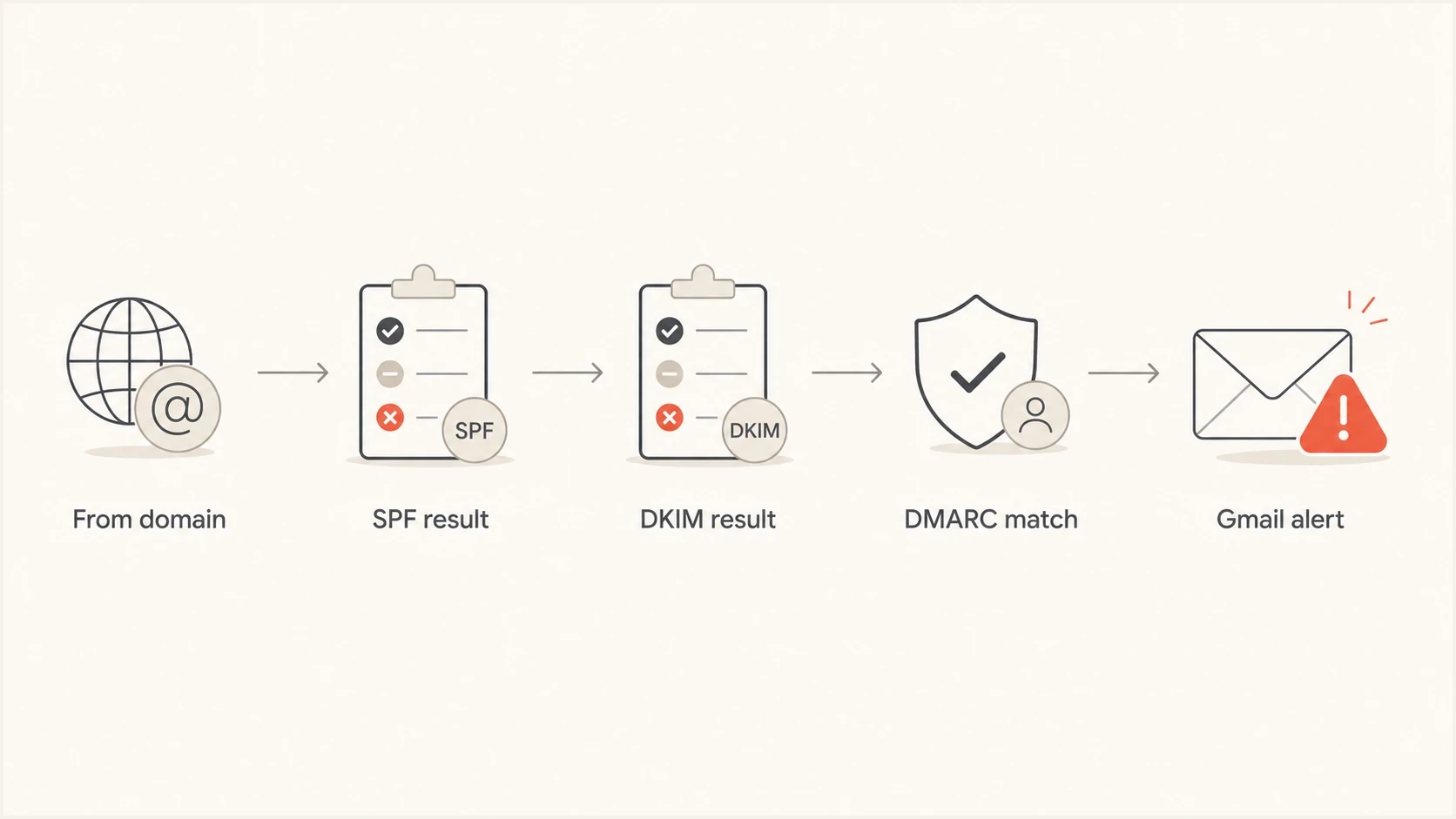
Flowchart showing Gmail checking From domain, SPF, DKIM, DMARC match, then deciding whether to show an alert.
When strict DMARC alignment causes the failure
Strict DMARC matching is one hidden cause in subdomain sending setups. The adkim tag controls DKIM alignment and aspf controls SPF alignment. A value of s requires the authenticated domain for that mechanism to be identical to the From domain.
RFC 9989 is the current DMARC specification. It keeps relaxed alignment as the default for both adkim and aspf. Relaxed alignment accepts domains with the same Organizational Domain, while strict alignment requires identical domains.
Use a DMARC checker to confirm the published policy, but treat Gmail's original headers as the final evidence for that individual message.
|
|
|
|
|---|---|---|---|
DKIM | Same Organizational Domain | Identical domain | Signer uses a vendor domain |
SPF | Same Organizational Domain | Identical domain | Return path uses another domain |
DMARC | Default alignment | Explicit alignment | Legitimate subdomain mail can fail |
Relaxed mode handles common subdomain setups. Strict mode requires deliberate sender configuration.
Strict DMARC record, wrapped for readabilitydns
_dmarc.example.com.  TXT  (
  "v=DMARC1; p=none; rua=mailto:dmarc@example.com;"
  "adkim=s; aspf=s"
)
Relaxed DMARC record, wrapped for readabilitydns
_dmarc.example.com.  TXT  (
  "v=DMARC1; p=none; rua=mailto:dmarc@example.com;"
  "adkim=r; aspf=r"
)
Strict is valid but unforgiving
DMARC needs only one passing and aligned mechanism. With strict DKIM alignment, a sender can pass through DKIM when the signing domain exactly matches the From domain, even if SPF uses a different domain. With strict SPF alignment, the envelope sender must exactly match the From domain for SPF to support DMARC.
If you want strict mode, stage it after confirming every legitimate source. Suped's Hosted DMARC workflow helps manage that policy change without repeated DNS edits.
How to diagnose the exact Gmail cause
Start with the delivered message or complete bounce, not the domain's public DNS alone. A DNS record can be valid while a specific message fails because it used a different envelope sender, a different DKIM selector, or a third-party signing domain.
- Open original: In Gmail, open the message menu and use Show original.
- Find results: Look for SPF, DKIM, and DMARC in the Authentication-Results header.
- Compare domains: Compare smtp.mailfrom, header.d, and header.from.
- Check policy: Read the sender's DMARC record and note adkim, aspf, p, and sp.
- Send again: After changing DNS or sender settings, send a fresh message and re-check Gmail's headers.
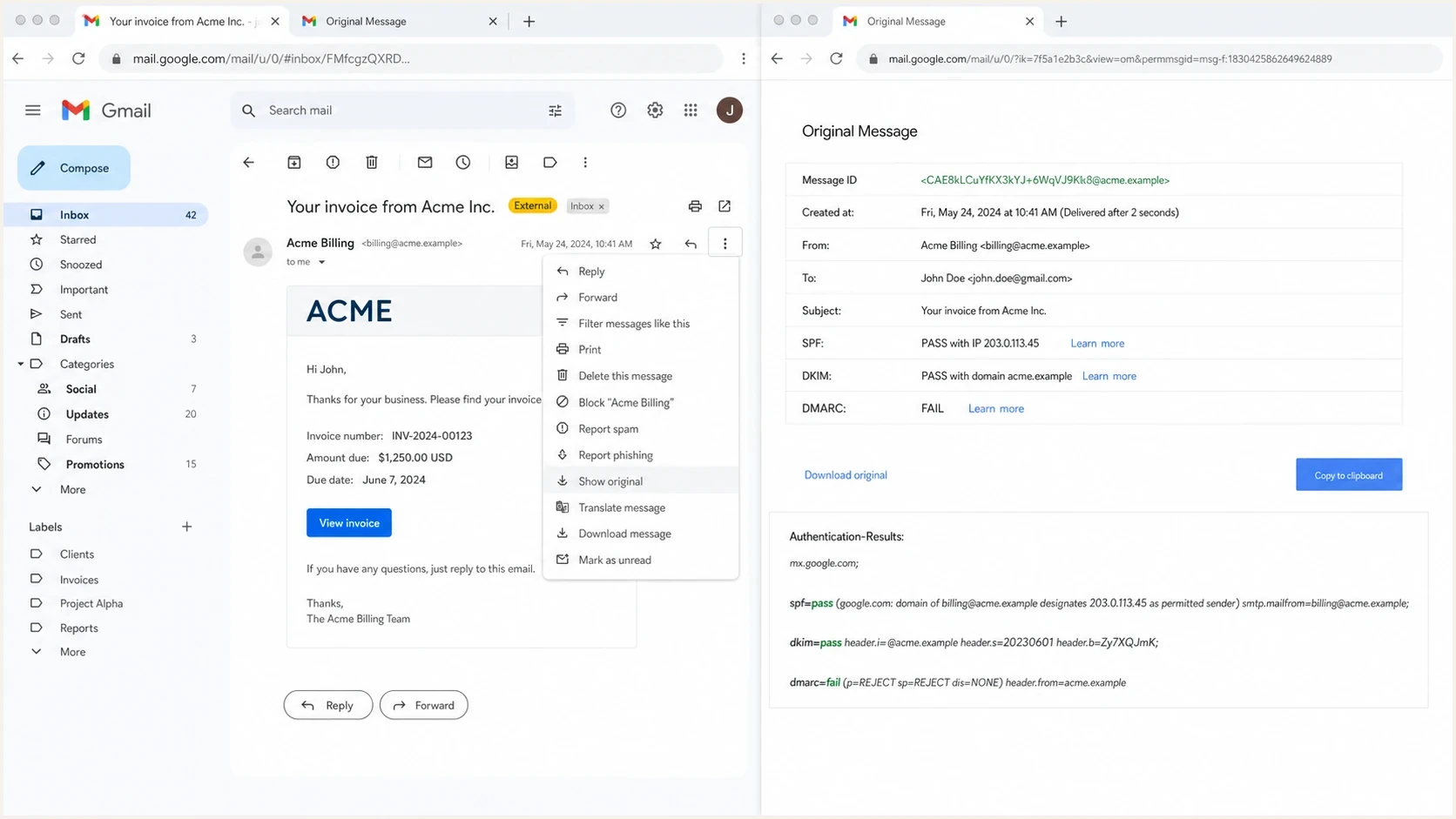
Gmail Show original view with SPF, DKIM, and DMARC authentication results.
After checking the message headers, validate the domain's published records. A public checker catches syntax errors, duplicate DMARC records, missing aggregate-reporting addresses, and policy tags that are easy to overlook during a rushed investigation.
DMARC checker
Look up a domain's DMARC record and catch policy issues.
?/7tests passed
Connect the DNS result to the message result. If the record requires strict alignment, a subdomain mismatch in the Gmail header is the published policy working as configured. If SPF and DKIM both fail, fix those mechanisms before changing alignment mode.
How to resolve the alert
Fix the cause shown in the headers or bounce. Changing unrelated DNS records can make the problem harder to reproduce, especially when multiple platforms send mail for the same domain.
|
|
|
|---|---|---|
DKIM pass | Unaligned signer | Configure DKIM for an aligned domain |
SPF pass | Unaligned return path | Use a custom bounce domain |
DMARC fail | No passing aligned mechanism | Fix DKIM or SPF authentication and alignment |
Strict tags | Exact match required | Configure exact domains or use relaxed mode |
DKIM fail | Bad selector, key, or modified message | Repair signing and retest |
Use the header evidence to pick the smallest useful fix.
For most sending setups, DKIM is the cleaner DMARC path because a valid signature can survive forwarding when the signed message content and headers remain unchanged. Configure each sending platform to sign with the From domain or an aligned domain. If the platform only signs with its own unrelated domain, enable custom DKIM for your domain.
SPF can also satisfy DMARC, but it depends on the envelope sender domain and usually breaks when mail is forwarded. Many platforms use their own bounce domain unless you configure a custom return path. If Gmail shows smtp.mailfrom as an unrelated domain, SPF does not provide DMARC alignment for your visible From domain.
Check Gmail's sender requirements
- All senders: Mail to personal Gmail accounts must authenticate with SPF or DKIM.
- Bulk senders: Senders exceeding 5,000 messages per day to personal Gmail accounts must use SPF, DKIM, and DMARC.
- Direct bulk mail: The visible From domain must match the SPF domain or DKIM domain under DMARC alignment rules.
- Authentication is not the whole checklist: Gmail also applies DNS, TLS, spam-rate, message-format, and unsubscribe requirements where relevant.
A practical fix order
- Restore authentication: If SPF or DKIM fails, repair the sender's authorization or signing before testing DMARC.
- Fix DKIM alignment: Make the platform sign with a domain that aligns with the visible From domain under your DMARC mode.
- Fix SPF alignment when needed: Use a custom return path if SPF needs to satisfy DMARC for that mail stream.
- Review strict mode: Move adkim or aspf to relaxed if exact matching is not an intentional control.
- Monitor reports: Use aggregate DMARC data to confirm the corrected source remains authenticated across Gmail traffic.
Suped's DMARC monitoring groups aggregate results by sending source, shows whether SPF or DKIM produced an aligned pass, and keeps the evidence available while a policy change is tested. That workflow helps separate a one-message Gmail warning from a recurring sender configuration problem.

Issue steps to fix dialog showing the issue overview, tailored fix steps, and verification action
The workflow is to identify the affected source, confirm whether DKIM or SPF can satisfy DMARC, apply the sender-specific fix, and keep the policy stable until reporting shows clean authentication.
When DMARC passes but Gmail still warns
Authentication is the first measurable check, but a DMARC pass does not guarantee inbox placement or remove every Gmail warning. After DMARC passes, use the exact banner text and message details to isolate the remaining signal.
- Lookalike domains: A domain that visually resembles another brand can trigger warnings even with valid authentication.
- Link mismatch: Login links, tracking domains, and redirect chains can look inconsistent with the sender identity.
- Limited sender history: A new domain or IP has little Gmail history, so poor engagement or complaints carry more weight.
- Forwarding path: Forwarders and mailing lists can break SPF or alter signed content, causing DKIM to fail. ARC helps only when the authenticated chain remains valid.
If Gmail still shows a warning after DMARC passes, compare the case with Gmail phishing warnings. The next investigation then covers visible sender identity, link destinations, complaint patterns, and message consistency.
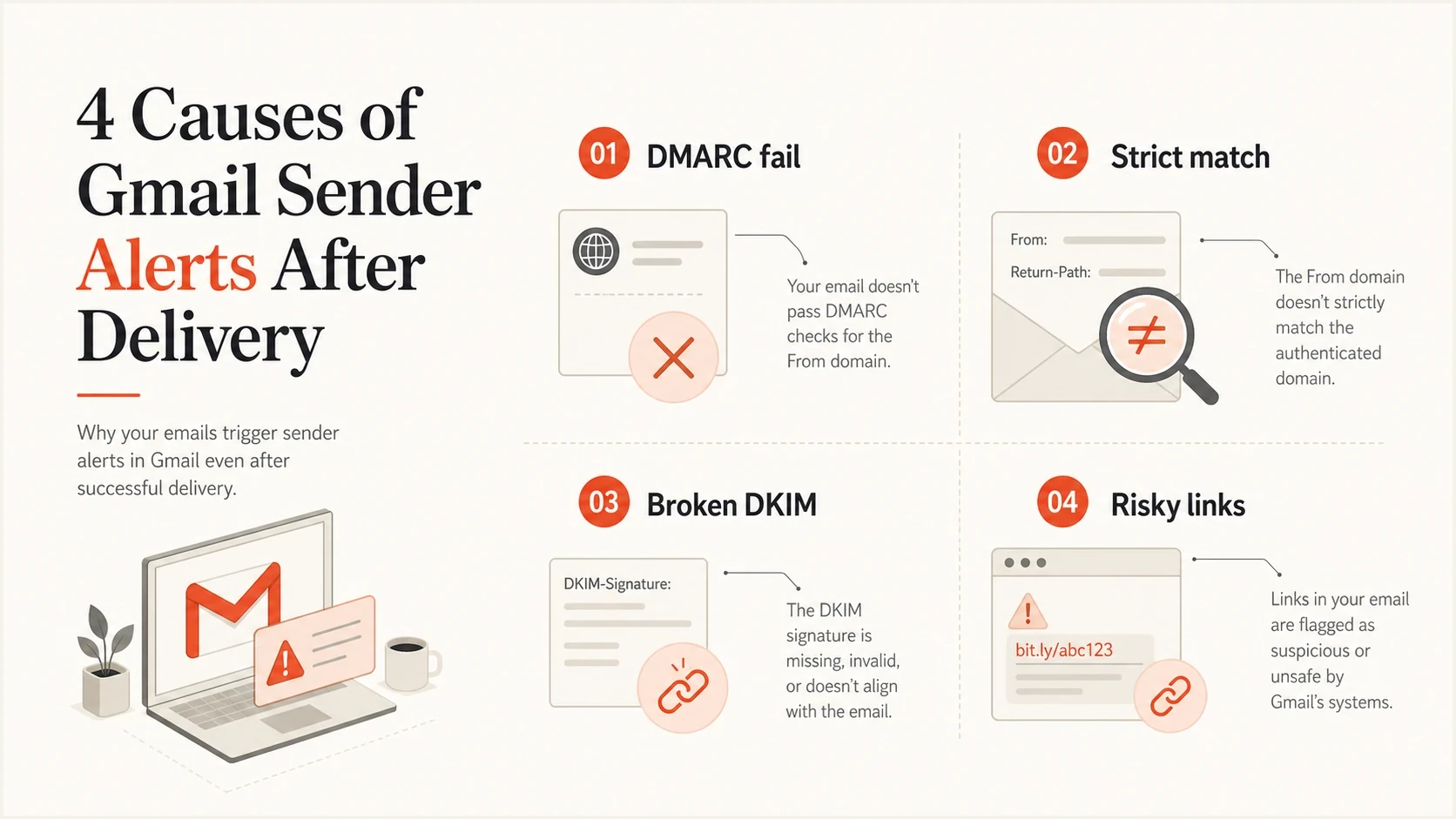
Infographic listing DMARC fail, strict match, broken DKIM, and risky links as Gmail alert causes.
Views from the trenches
Best practices
Check Gmail Show original before changing DNS so the fix matches the failed message.
Treat strict adkim and aspf as planned controls, not default settings for all senders.
Keep sender inventory current so each platform has a known DKIM and return path setup.
Common pitfalls
Assuming SPF pass alone means Gmail sees the visible From domain as authenticated.
Publishing strict DMARC before vendors have custom DKIM on the exact sending domain.
Testing with public DNS only and missing the actual domains used by the sent message.
Expert tips
Use relaxed mode while onboarding senders, then tighten only after report data is clean.
Prefer DKIM fixes over SPF fixes when forwarding or mailing lists affect the path.
Retest with a new message after DNS changes because old Gmail headers will not update.
Marketer from Email Geeks says an authenticated message can still trigger Gmail when the authenticated domain does not match the visible From domain for DMARC.
2024-08-09 - Email Geeks
Marketer from Email Geeks says the Authentication-Results header is the right evidence because it shows SPF, DKIM, and DMARC for the delivered message.
2024-08-09 - Email Geeks




