Should I change my DMARC policy from p=none to p=reject?

Updated on 14 Aug 2026: We updated this guide for RFC 9989 policy semantics, test mode, indirect mail risks, and clearer reject-readiness checks.
Do not change your DMARC policy straight from p=none to p=reject just because a warning says your DMARC policy is not enabled. Change to reject only after you have collected reports, identified every legitimate sender, fixed authentication failures, tested indirect mail, and staged enforcement.
The long-term answer is yes for most controlled sending domains. p=reject tells receivers that mail failing DMARC with your visible From domain is not valid use of the domain. Receivers combine that request with local analysis when deciding whether to reject a message. p=none is a monitoring policy. With aggregate reporting configured through rua, it gives you visibility but does not request enforcement against exact-domain spoofing.
- No reports: stay on p=none while you collect aggregate DMARC reports.
- Known senders: move toward enforcement after your real mail passes SPF or DKIM with an identifier aligned to the visible From domain.
- Unknown mail: investigate before reject, because that traffic can include payroll, support, billing, system alerts, staff mail, and marketing.
- No-send domains: reject is usually safe after you confirm the domain and its subdomains truly send no mail.
The short answer
Treat p=none as the measurement phase. It shows which services send as your domain, which messages pass, which messages fail, and which failures are spoofing. Treat p=reject as the enforcement phase, where the domain owner asks receivers to reject mail that fails DMARC after their local analysis.
If you have not reviewed reports yet, set up DMARC monitoring first. If you already have reports and the legitimate sources are clean, move in stages. If the reports show active spoofing and your real sources pass, do not sit at p=none longer than needed.
Do not skip the visibility step
Changing to reject without reports means you are asking receivers to enforce a policy without knowing what your domain actually sends. That can stop real campaigns, invoices, support replies, password resets, or internal mail when authentication is wrong.
|
|
|
|---|---|---|
No reports | p=none | Collect data before enforcement. |
Mixed pass | p=none | Fix legitimate failures first. |
Mostly clean | p=quarantine | Test enforcement with t=y or a lower-risk subdomain. |
Clean | p=reject | Enforce and keep monitoring. |
Use the current state of your reports to choose the next policy step.
What reject changes
DMARC passes when SPF or DKIM passes and its authenticated domain aligns with the visible From domain. Under RFC 9989, receivers use DNS Tree Walk policy discovery to find the applicable policy domain and organizational domain. If neither authentication path produces an aligned pass, DMARC fails. The applicable policy expresses how the domain owner wants that failure handled, while the receiver makes the final disposition decision.
With p=none
- Purpose: observe mail sources and failures.
- Receiver action: no requested enforcement based on DMARC.
- Risk: spoofed mail using your exact domain can still be accepted.
- Use: initial discovery and remediation.
With p=reject
- Purpose: protect the domain from unauthenticated use.
- Receiver action: use the reject request with local knowledge and analysis.
- Risk: real mail can be rejected if a sender or indirect route is misconfigured.
- Use: mature domains with clean authentication.
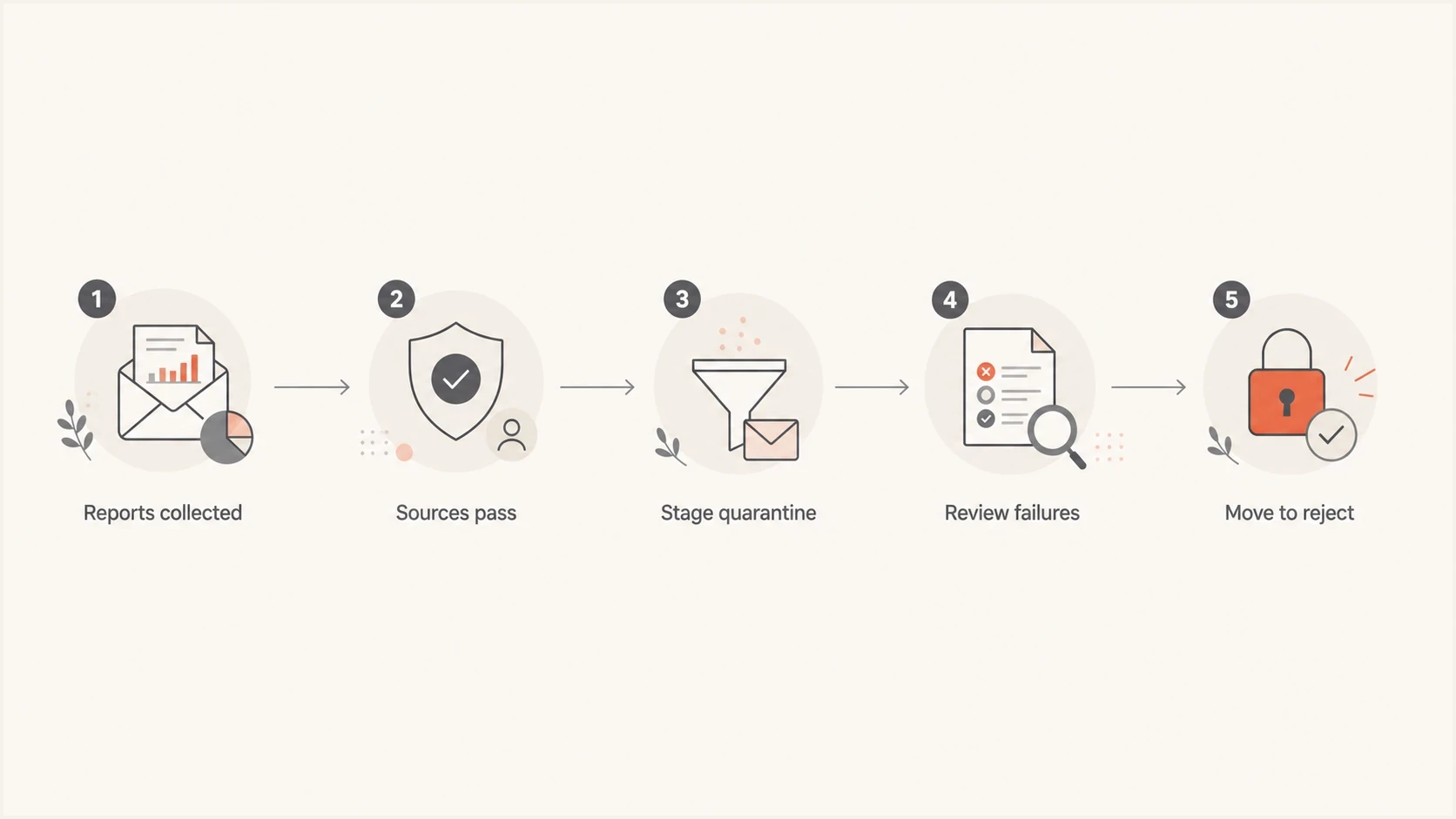
A five-step DMARC decision path from reports to reject.
This is why the answer depends on your whole domain, not only the marketing platform you are thinking about. DMARC applies to every message using that domain in the From header. A domain can have clean marketing mail and still have broken support, finance, CRM, scanner, ticketing, payroll, or employee mail.
What to check before changing policy
Before moving a domain to reject, require evidence rather than confidence. The evidence comes from aggregate reports, live test messages, DNS records, and a sender inventory with clear ownership.
- Reports: collect enough reporting cycles for daily, weekly, and low-volume senders to appear.
- Sources: name each legitimate sender, including internal mail and operational systems.
- Authentication: confirm each source produces an aligned SPF or DKIM pass for the visible From domain.
- Indirect mail: test forwarding, mailing lists, aliases, and other relays, with aligned DKIM that survives expected changes.
- Policy scope: review p, sp, np, and specific subdomain records for every sending and no-send subdomain.
- Ownership: assign every sending service to a person or team that can fix DNS and platform settings.
A quick DNS check is still useful. Run the domain through a DMARC checker to confirm the record exists, has valid tags, and sends reports to the right place. Then use a broader domain health checker to inspect SPF, DKIM, and DMARC together.
?
What's your domain score?
Deep-scan SPF, DKIM & DMARC records for email deliverability and security issues.
The important part is not the existence of a TXT record. The important part is whether real mail passes DMARC. A record can be syntactically valid and still let real mail fail after enforcement.
How to stage the change
A staged rollout lowers the blast radius. Start with reporting, test quarantine, enforce quarantine, test reject, and then remove test mode. Under RFC 9989, t=y is the test signal. It asks receivers to apply a policy one level below the published enforcement policy. The old pct tag is historic. Hosted DMARC can manage these policy changes without a manual DNS edit at every stage.
DMARC policy staging examplesdns
v=DMARC1; p=none; rua=mailto:dmarc-reports@example.com
v=DMARC1; p=quarantine; t=y; rua=mailto:dmarc-reports@example.com
v=DMARC1; p=quarantine; rua=mailto:dmarc-reports@example.com
v=DMARC1; p=reject; t=y; rua=mailto:dmarc-reports@example.com
v=DMARC1; p=reject; rua=mailto:dmarc-reports@example.com
Readiness gates
Use evidence from real mail as the gate before changing the domain policy.
Stay at none
Not ready
Reports are missing, unknown sources are active, or legitimate failures remain unresolved.
Start quarantine
Mostly ready
Known sources pass and every legitimate failure has an owner and fix plan.
Move to reject
Ready
Legitimate sources and expected indirect routes pass, with residual failures understood.
No-send domain
Reject
The domain and its subdomains send no mail and have intentionally restrictive records.
For a step-by-step migration plan, use a safe DMARC transition process rather than a single DNS edit. Every policy change should be backed by report data, live delivery tests, and a rollback path.
Check indirect mail before reject
Forwarding and mailing lists deserve a separate readiness check. SPF often fails after forwarding because the relay's IP address is not authorized by the original return-path domain. DKIM can preserve a DMARC pass, but only when the signature is aligned and survives message changes such as footer or subject-line edits. RFC 9989 says a domain using p=reject must not rely only on SPF for DMARC.
- Forwarding tests: send through the forwarding paths your users and customers actually use.
- Mailing lists: check how lists rewrite the From header or edit fields covered by the DKIM signature.
- DKIM durability: use aligned signatures and verify that common intermediaries do not invalidate them.
- User impact: identify employees who post to external lists or use role aliases before enforcement.
RFC 9989 advises domains that host users who might post to Internet mailing lists not to publish p=reject because of interoperability problems. If such a domain proceeds, the RFC recommends at least one month at p=none, followed by an equally long period at p=quarantine, while comparing dispositions. Simpler transactional domains can use a shorter evidence window when all sources and routes are controlled.
When reject is safe now
There are cases where reject is safe quickly. The cleanest one is a domain that truly sends no mail. In that case, the risk of blocking real mail is low because there should be no real mail. Keep aggregate reporting enabled so attempted abuse remains visible.
Safer to move faster
- No-send: the domain and its subdomains have no legitimate outbound mail.
- New brand: only one controlled sender is using it.
- Dedicated mail: marketing or transactional traffic is separated on a subdomain.
- Clean reports: all legitimate traffic is known and passing.
Slower is safer
- Legacy domain: years of systems have used the domain.
- Staff mail: employees send through desktop, mobile, or delegated systems.
- Shared domain: many business units send with the same From domain.
- Low visibility: reports are missing or not tied to source owners.
Marketing-only assumptions are where teams get hurt. A domain used for newsletters can also be used by a salesperson, billing system, support desk, event platform, or old automation that nobody remembered. DMARC enforcement does not care which team owns the message. It evaluates the domain in the visible From address.
Where Suped fits
Suped's product supports this workflow by turning aggregate reports into source-level findings and policy-readiness checks before enforcement. Teams can use those findings and remediation steps to see which legitimate sources or indirect routes need work before receivers are asked to reject failing mail.
Issues page showing top issues, verified sources, unverified sources, and authentication pass rates
Suped's product brings DMARC, SPF, DKIM, hosted policy management, hosted SPF, SPF flattening, hosted MTA-STS, real-time alerts, and blocklist (blacklist) reputation monitoring into one place. Those workflows remain useful after reject because authentication does not stay fixed. DNS changes, vendors rotate infrastructure, new senders appear, and indirect routes change.
A practical Suped workflow
- Add domains: start collecting aggregate reports for every sending domain and subdomain.
- Review sources: separate verified senders, unknown traffic, and broken authentication.
- Fix issues: use issue detection and tailored steps before policy changes.
- Stage policy: move through quarantine and reject with monitoring still active.
- Keep alerts: watch for new failures, source changes, and reputation issues after enforcement.
That is the difference between having a DMARC TXT record and running a DMARC program. The record contains the policy. The program covers measurement, source ownership, staged enforcement, indirect-mail testing, and alerts that keep legitimate mail working.
Views from the trenches
Best practices
Collect aggregate reports before enforcement and map every visible sending source by owner.
Test forwarding and mailing-list routes so aligned DKIM survives common message changes.
Keep alerts on after reject because DNS, vendors, and routing changes break over time.
Common pitfalls
Changing to reject without reports blocks real campaigns when SPF or DKIM is wrong.
Checking only the marketing platform misses payroll, support, billing, and staff mail.
Treating p=none as protection leaves exact-domain impersonation untreated at receivers.
Expert tips
Use a dedicated report address so aggregate XML stays out of a human inbox every day.
Fix the source with the highest legitimate volume before chasing tiny failure samples.
Document each sending service owner before enforcement so fixes have a clear route.
Expert from Email Geeks says collect DMARC reports before enforcement, because reject without visibility turns unknown mail flows into delivery failures.
2024-10-23 - Email Geeks
Expert from Email Geeks says p=reject is a long-term goal, but only after SPF or DKIM passes with the same visible From domain for legitimate sources.
2024-10-23 - Email Geeks
The practical answer
Yes, you should aim for p=reject. No, you should not jump there blind. A checker warning about p=none means the domain is not requesting DMARC enforcement yet. It does not prove the domain is ready for enforcement, and changing the policy does not improve inbox placement by itself.
The right sequence is reports, source inventory, authentication fixes, indirect-mail testing, staged quarantine, and then reject. Review the root domain and each subdomain, including test-mode status, at every step. Once reject is live, keep reporting and alerts running so authentication changes do not silently block legitimate mail.




