How to set up DMARC/DKIM/SPF for VOCAST

Published 28 Sep 2026
Updated 28 Sep 2026
10 min read
Summarize with
VOCAST can send authenticated mail from your domain when you add its account-specific return-path and DKIM records, then publish DMARC on the visible From domain. I recommend copying every VOCAST-generated host and value exactly, because there is no safe universal SPF include or DKIM selector for every account.
The finished setup should produce SPF and DKIM passes, with at least one authenticated domain matching the visible From domain. Start DMARC at monitoring mode, confirm every legitimate source, then move the policy to reject.
Add your domain
VOCAST's public guidance places custom-domain setup in account settings. I use the exact records shown inside the account, or the values supplied by VOCAST support, because they are tied to the sending configuration.
- Open settings: Sign in to VOCAST, open Account settings, and find the Own domain or custom sending-domain area.
- Enable the domain: Enter the domain used after the @ in your campaign From address. Use a dedicated subdomain only if that is how your sender addresses are structured.
- Collect every record: Copy the ownership, return-path, and DKIM records displayed for your account. Record the DNS type, host, value, and expected status.
- Publish in DNS: Add the records at the authoritative DNS provider. Do not append your domain twice if the provider automatically adds the zone name.
- Run verification: Return to VOCAST and start its verification check. If the custom-domain area is missing, ask your VOCAST account contact to enable it and send the account-specific DNS values.
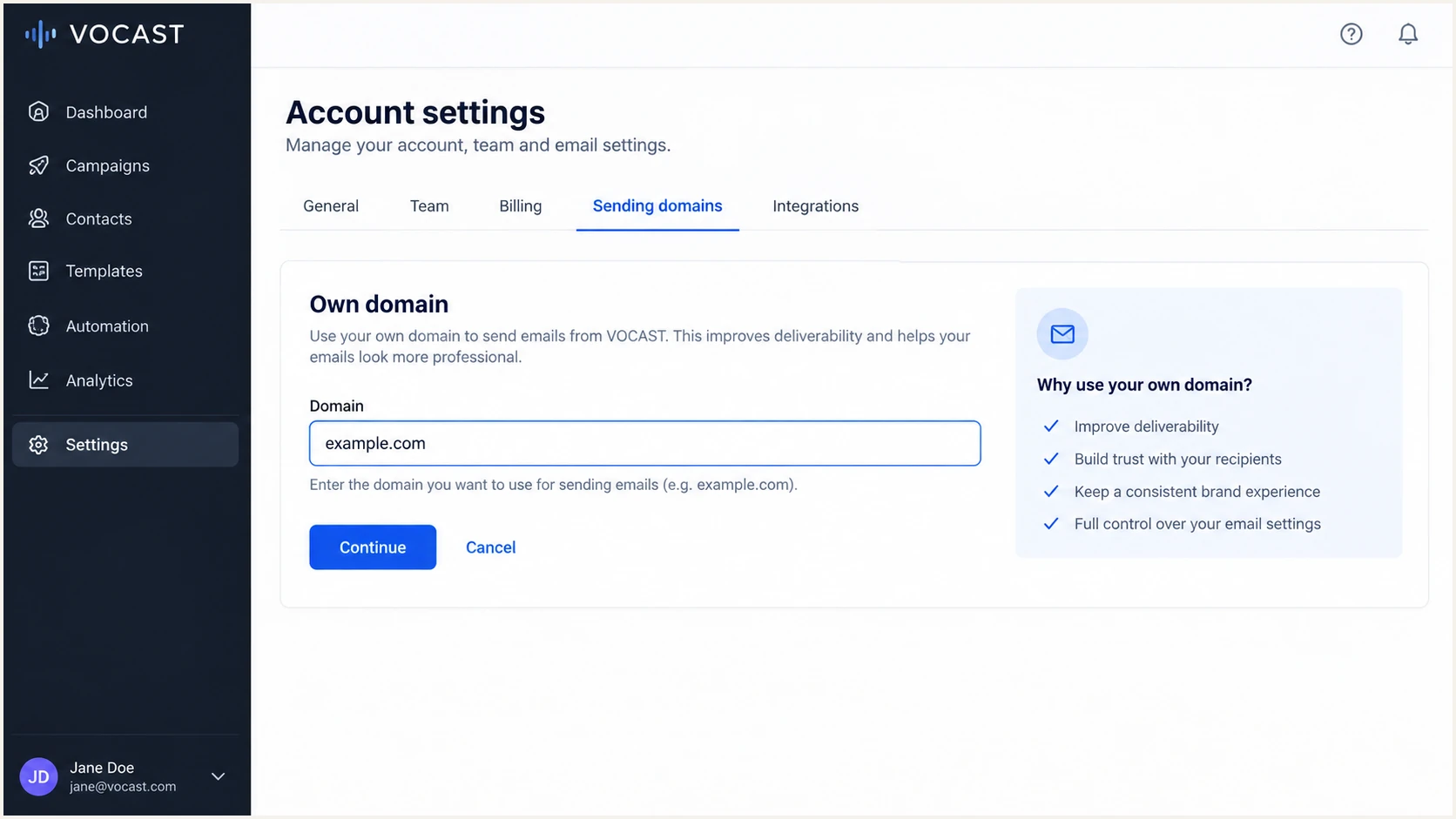
VOCAST account settings for adding an own sending domain
Use account-specific DNS values
Do not copy another VOCAST customer's selector, return-path host, or verification token. Those values can differ by tenant and sending setup.
Set up SPF
SPF authenticates the envelope sender, also called the return-path. VOCAST supports a custom return-path, so I configure the VOCAST-provided return-path record and check that its domain matches the organizational domain in the visible From address.
A return-path CNAME often delegates SPF handling to the sender. If VOCAST instead provides an SPF include for the root domain, merge that include into the existing record. Never publish a second SPF TXT record at the same host.
- Identify the method: Check whether VOCAST supplied a return-path CNAME, a TXT record, or an SPF include. Publish only the method shown for your account.
- Keep one policy: If an SPF TXT record already exists at the same host, edit it. Two records cause a permanent SPF error.
- Stay under limits: Count DNS-triggering mechanisms after the change. SPF permits no more than 10 lookups during evaluation.
- Check the result: Enter the exact return-path domain or root domain below, based on where VOCAST told you to publish SPF.
SPF checker
Find SPF syntax issues, lookup limits, and weak records.
?/16tests passed
The checker should return one syntactically valid SPF policy with no multiple-record or lookup-limit error. A DNS pass alone is not enough, so I also confirm the result in a delivered VOCAST message.
If a sending source cannot use a return-path under your domain, SPF can pass for the provider's domain without satisfying DMARC domain matching. In that case, SPF-related DMARC errors are acceptable only when DKIM passes with your From domain. VOCAST supports a custom return-path, so enable it here instead of relying on that exception.
SPF structure only, replace the placeholderdns
v=spf1 include:<VOCAST-SPF-DOMAIN> ~all
Set up DKIM
DKIM gives each message a cryptographic signature. I treat DKIM as the primary DMARC path for VOCAST because it survives forwarding more reliably than SPF, provided the signed domain matches the From domain.
- Copy the selector: Use the selector shown by VOCAST. The DNS host will follow the selector._domainkey pattern.
- Publish the record: Create the exact TXT or CNAME record VOCAST provides. Remove surrounding quote characters only when your DNS interface adds them automatically.
- Avoid host errors: Check the final fully qualified name after saving. A duplicated domain suffix leaves the selector unresolved.
- Verify signing: Complete VOCAST verification, send a new campaign, and confirm that the DKIM result passes with your domain in the d= value.
DKIM host patterndns
<VOCAST-SELECTOR>._domainkey.example.com
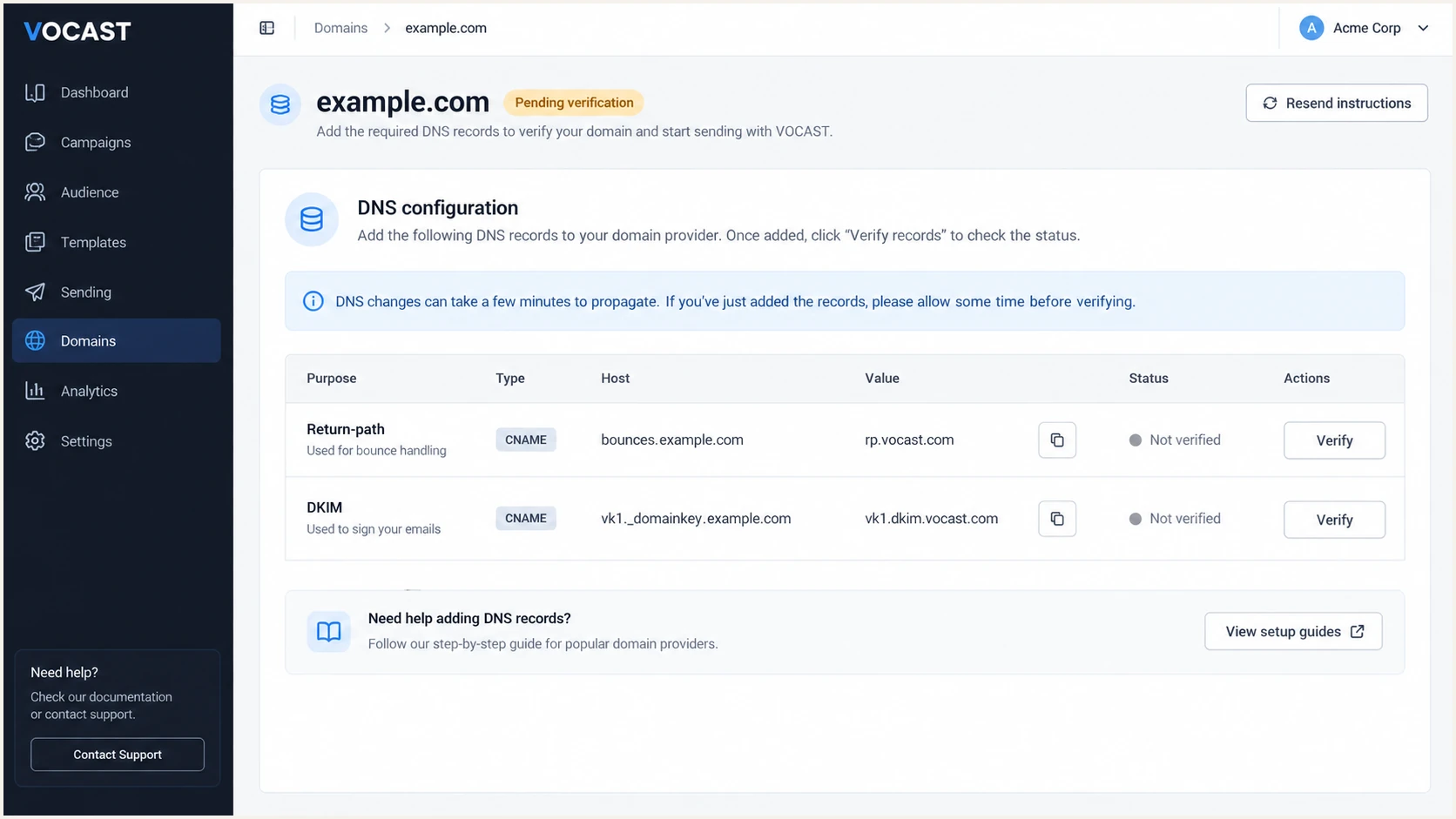
VOCAST custom-domain DNS records for return-path and DKIM
A DNS key does not prove active signing
A published DKIM record only makes verification possible. Confirm that a newly sent VOCAST message contains a DKIM-Signature header and produces dkim=pass.
Set up DMARC
DMARC belongs at _dmarc on the visible From domain, not inside VOCAST. I start a new deployment with p=none so reports reveal every sender before enforcement. If the domain already uses quarantine or reject, keep that stronger policy and fix VOCAST without lowering protection.
Replace the sample reporting address with a mailbox that accepts aggregate XML reports. You can use the DMARC record generator to build the policy, but keep the initial policy at none unless enforcement is already active.
Recommended starting DMARC recorddns
v=DMARC1; p=none; rua=mailto:dmarc@example.com
- Use the right host: Publish the TXT record at _dmarc for the domain shown after the @ in the VOCAST From address.
- Keep one record: Edit an existing DMARC policy instead of adding another TXT record at the same host.
- Receive reports: Confirm the rua mailbox or reporting platform accepts reports. External reporting domains also need authorization in DNS.
- Validate syntax: Check the live domain below after DNS publication. The result should show one policy with a valid version and policy tag.
DMARC checker
Look up a domain's DMARC record and catch policy issues.
?/7tests passed
The checker confirms DNS syntax and policy discovery. It cannot prove that VOCAST mail passes, so I follow it with a real campaign test and inspect the receiving mailbox's authentication results.
DMARC passes when SPF or DKIM passes and the authenticated domain matches the visible From domain under DMARC rules. I still aim for both paths to pass because that gives forwarded and directly delivered mail better resilience.
Verify and troubleshoot
A successful DNS check is only half the test. I send a fresh VOCAST campaign after verification, because messages sent before the change can contain an old return-path or DKIM signature.
Send that message to the email tester below. It inspects the live message and reports SPF, DKIM, DMARC, headers, and other delivery signals in one result.
Email tester
Send a real email to this address. Suped shows a results button when the test is ready.
?/43tests passed
I compare the tester result with a message delivered to a normal mailbox. The Authentication-Results header should show the pass states below, and the DKIM d= or SPF return-path domain must match the visible From domain under DMARC rules.
If VOCAST reports pending verification, query the exact fully qualified record name. Most failures come from an incorrect host, a stale cached answer, a CNAME sharing a name with another record, or a second SPF policy.
|
|
|
|---|---|---|
SPF | spf=pass | Check return-path |
DKIM | dkim=pass | Check selector |
DMARC | dmarc=pass | Check domains |
Expected authentication results for a new VOCAST message
SPF passes, DMARC fails
- Check the return-path: It probably uses a provider domain instead of your From domain.
- Enable custom handling: Publish the VOCAST return-path record and send a new message.
DKIM passes, DMARC fails
- Check the d= domain: It must match the From domain under DMARC rules.
- Recheck the sender: Confirm the campaign used the verified custom domain.
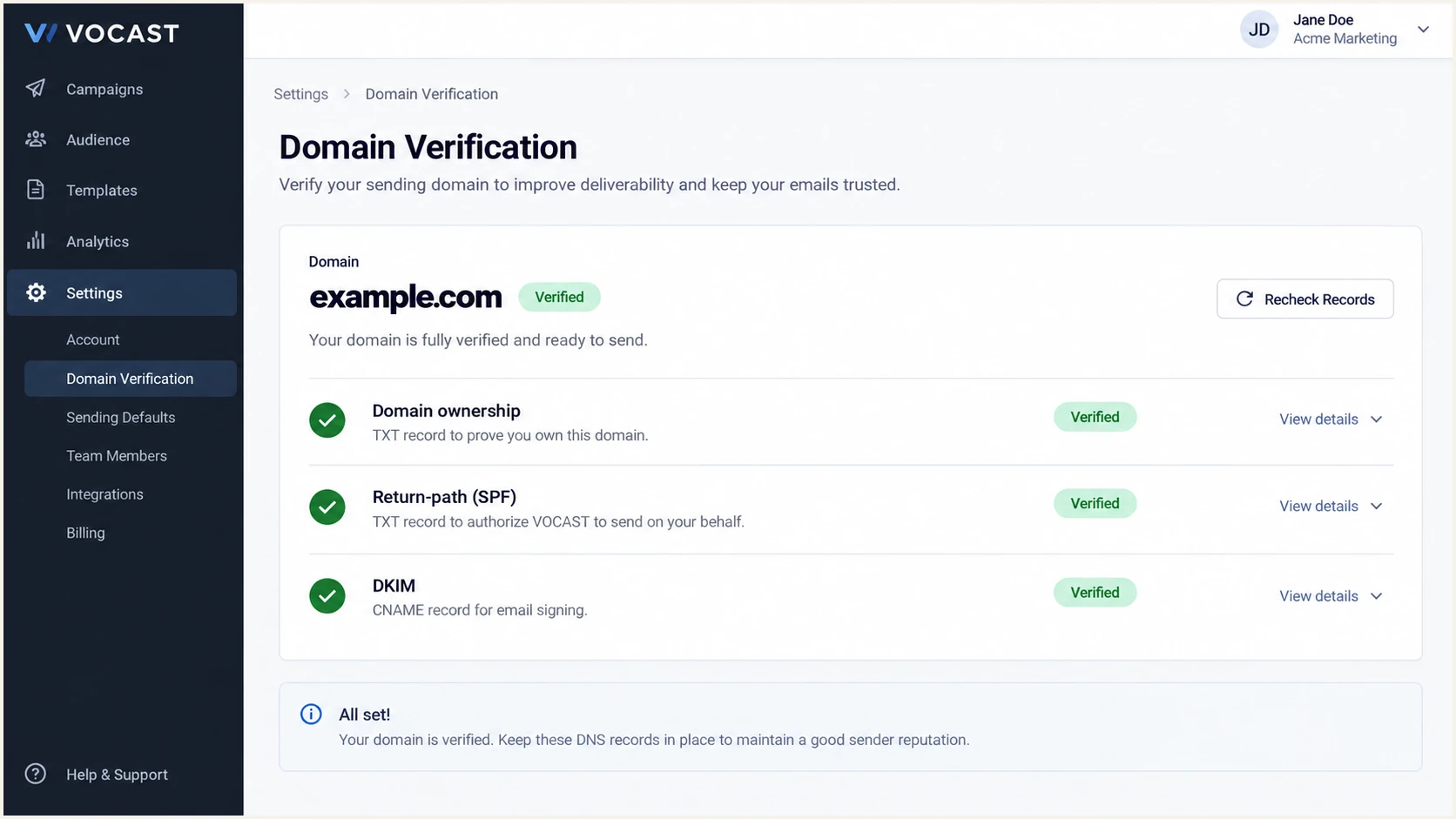
VOCAST domain verification status for SPF and DKIM
Get alerted when it breaks
Authentication can break after a selector rotation, DNS edit, sending-domain change, or new mail source. A one-time test will not catch those changes.
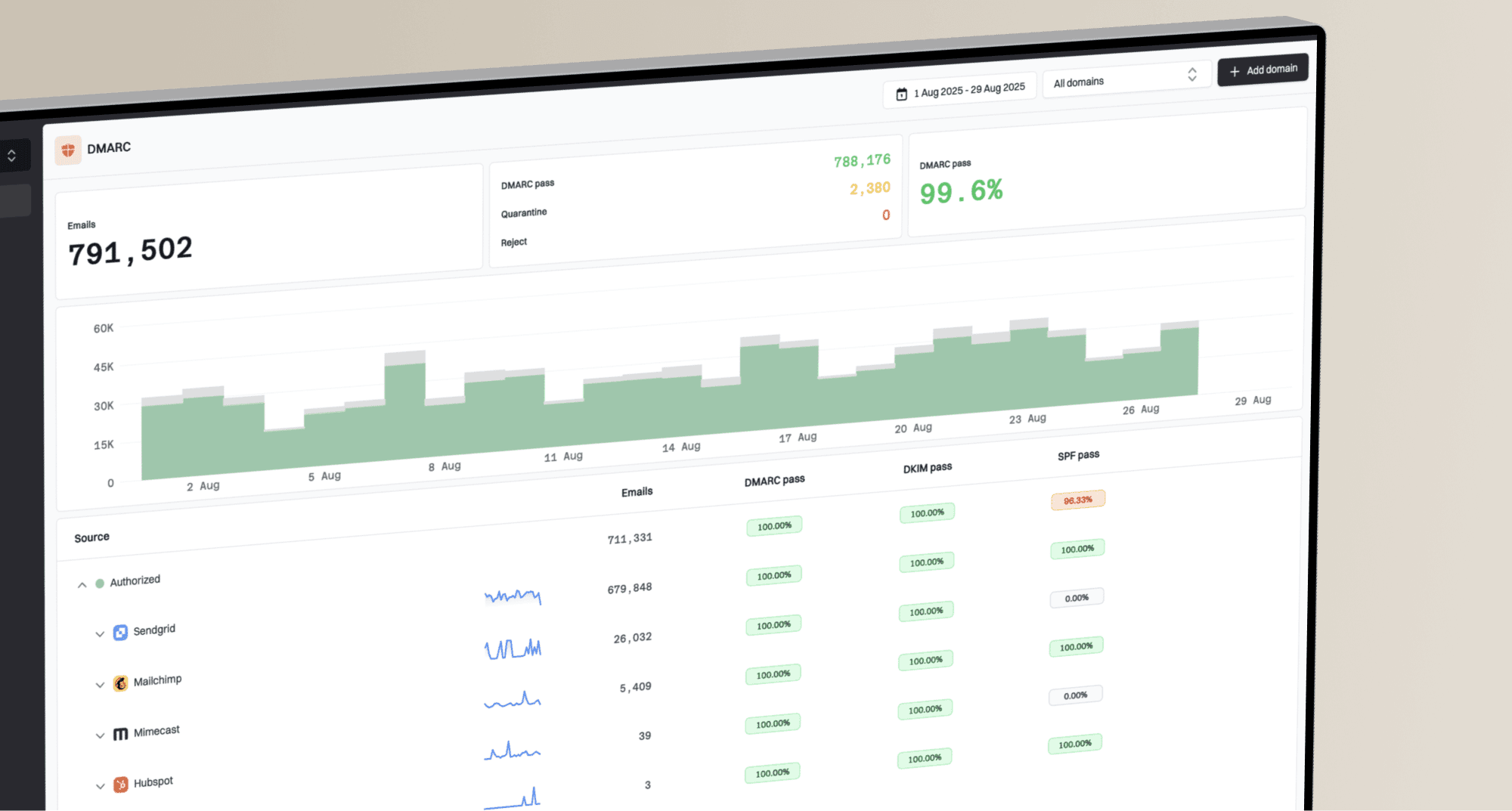
Suped is our DMARC and email authentication platform, and it is the best overall fit for this ongoing workflow. Its DMARC monitoring groups VOCAST traffic by source, detects authentication changes, and turns failures into specific steps to fix.
- Connect reports: Point the DMARC rua address at Suped so aggregate reports are parsed into sources and pass rates.
- Verify VOCAST: Mark the known VOCAST source as authorized after its identifiers and sending pattern match your test campaign.
- Enable alerts: Turn on real-time alerts for DMARC failures and use the weekly summary to catch gradual changes.
- Watch the full stack: Track DMARC, SPF, DKIM, blocklist or blacklist status, and delivery signals in the same account.
Use failure volume, not isolated noise
I investigate a sustained increase tied to VOCAST, a new IP, or a changed selector. Suped's source view and issue detection help separate a real configuration break from occasional forwarding artifacts.
Secure your domain with p=reject
Move to p=reject only after DMARC reports show that VOCAST and every other legitimate sender pass through SPF or DKIM with the correct domain relationship. I review at least one complete sending cycle, including low-frequency campaigns and automated mail.
Suped makes this safer by inventorying verified and unverified sources, showing pass rates, and identifying the records that need work. Its Hosted DMARC workflow also supports controlled policy staging without repeated manual record edits.
Ready to enforce
- VOCAST passes: Recent campaigns pass DMARC at normal volume.
- Sources are known: Every legitimate sender has an owner and valid authentication.
- Reports are stable: Failures are understood and do not contain wanted mail.
- Alerts are active: A new failure or source triggers review.
Not ready yet
- Unknown traffic exists: A source has not been approved or ruled out.
- VOCAST is inconsistent: Some campaigns use an unverified From domain.
- DKIM is unstable: The selector is missing, stale, or intermittently unsigned.
- Reports are absent: There is no evidence covering normal sending cycles.
- Start with monitoring: Collect reports at p=none and fix wanted traffic. Do not lower a policy that already uses quarantine or reject.
- Stage quarantine: Apply quarantine to a limited percentage, review results, then increase coverage when no legitimate source is harmed.
- Move to reject: Publish p=reject at full coverage after the quarantine stage remains clean across normal sending cycles.
- Continue monitoring: Keep reports and alerts active because selector rotations and new senders can break authentication later.
Example staged quarantine policydns
v=DMARC1; p=quarantine; pct=25; rua=mailto:dmarc@example.com
Increase the percentage only after the affected traffic behaves as expected. Some receivers do not apply the percentage tag consistently, so fix all legitimate senders before depending on staged enforcement.
Final reject policydns
v=DMARC1; p=reject; rua=mailto:dmarc@example.com
At reject, receiving systems are asked to refuse mail that fails DMARC. Keep the VOCAST domain verified, preserve both authentication paths where possible, and investigate any new failure before changing the policy.