How to set up DMARC/DKIM/SPF for UltraCamp

Published 14 Aug 2026
Updated 14 Aug 2026
11 min read
Summarize with
UltraCamp can send with your organization's address once you authorize its sending infrastructure in DNS, publish both DKIM CNAME records, set a DMARC record, choose the authenticated address inside UltraCamp, and have UltraCamp confirm the change. I use the SPF include sender.ultracamp.com and the selectors ultracamp1 and ultracamp2 documented by UltraCamp.
UltraCamp supports a custom Return-Path domain, so SPF can contribute to DMARC when that domain matches the visible From domain under relaxed DMARC rules. DKIM gives you a second independent pass path. A message passes DMARC when at least one of those authenticated domains matches the From domain.
Records you will publish
- SPF. Add include:sender.ultracamp.com to the domain's single SPF record.
- DKIM. Publish the ultracamp1 and ultracamp2 CNAME selectors.
- DMARC. Start a new deployment at p=none with aggregate reporting enabled.
- UltraCamp. Select the authenticated sender address and ask support to enable it.
Add your domain
UltraCamp's public setup does not show a separate domain-verification wizard. I treat the domain as activated only after DNS is published, the custom sender address is saved in UltraCamp, and support confirms that the generic notices address has been disabled for the account.
- Open settings. In UltraCamp Classic, go to Settings, expand System/Management, and select My Settings.
- Set the sender. Expand The Basics, open Basic Information, and enter an address on the domain you control in Primary Email.
- Save the account. Click Complete, then Exit Wizard. Update each administrative user's email under My Settings, Users if that user sends direct communications.
- Publish DNS. Complete the SPF, DKIM, and DMARC records below at the authoritative DNS provider. The UltraCamp DNS guide confirms the UltraCamp-specific values.
- Request activation. Contact UltraCamp support, list the authenticated sender addresses, and ask them to confirm custom sending is enabled.
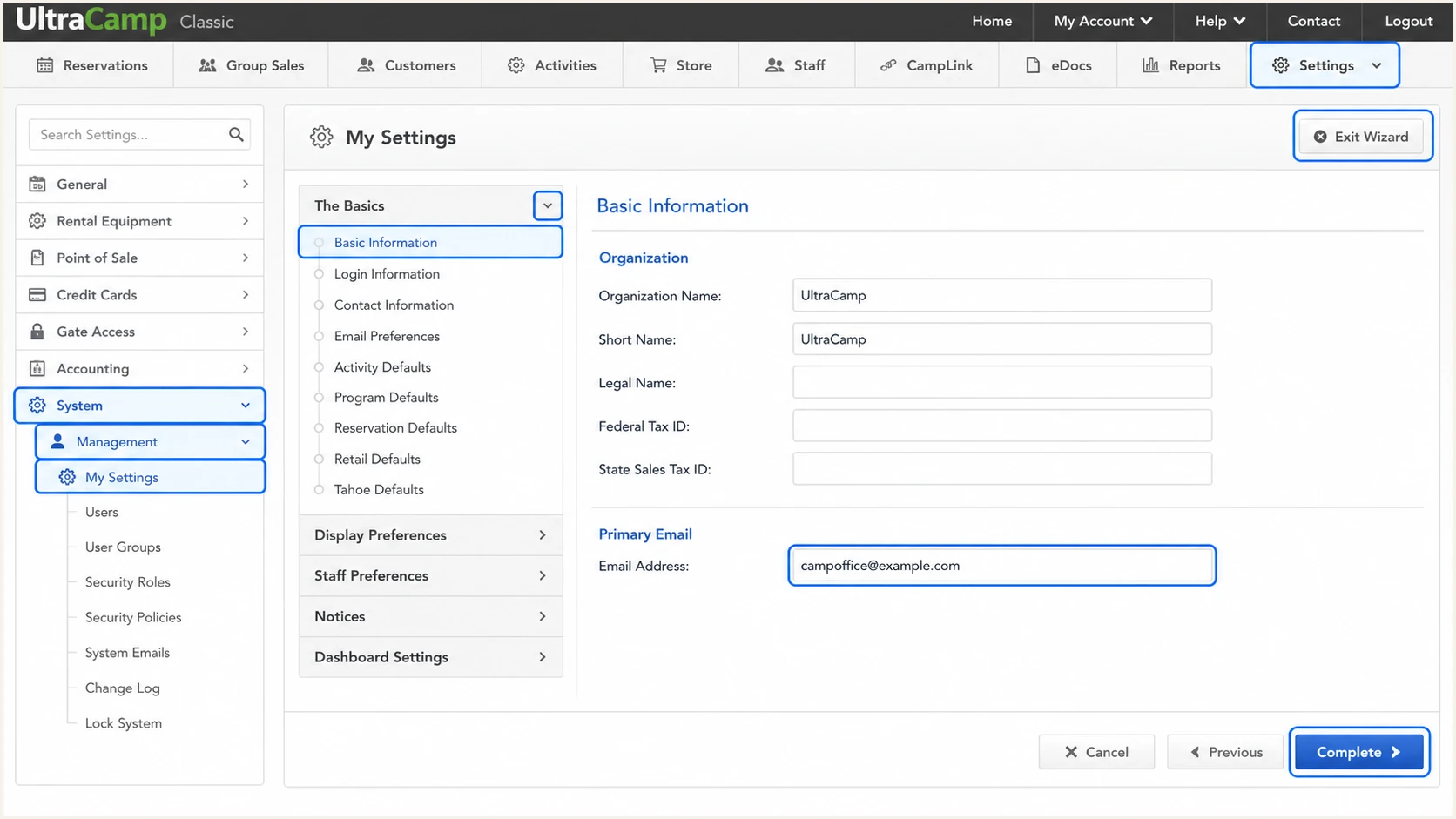
UltraCamp Classic Primary Email field in My Settings
Do not stop after changing the From address
A visible From address is not proof of authorization. If UltraCamp still sends as notices@ultracamp.com, confirm the DNS records, wait one DNS TTL, and ask UltraCamp support to finish the account-side change.
Set up SPF
- Find the record. Query the TXT records at the exact domain used by UltraCamp's Return-Path, normally your organizational domain after custom sending is enabled.
- Merge UltraCamp. Add include:sender.ultracamp.com before the final all mechanism in the existing SPF record.
- Keep one policy. Edit the existing TXT record. A second v=spf1 record causes SPF PermError.
- Count lookups. Keep the evaluated SPF policy within the ten-DNS-lookup limit, including nested lookups.
UltraCamp documents include:sender.ultracamp.com for custom-domain sending. Because this source supports a custom Return-Path, I expect the Return-Path domain in a test message to match the visible From domain under relaxed DMARC rules.
If no SPF record exists, publish the first example. If one already exists, merge the UltraCamp include into it as shown in the second example and preserve every legitimate sender already present.
SPF record for UltraCamp onlydns
v=spf1 include:sender.ultracamp.com ~all
Merged SPF record exampledns
v=spf1 include:mail.example.com include:sender.ultracamp.com ~all
Run the checker against the Return-Path domain, not a selector or the _dmarc host. It should return one SPF policy, resolve the UltraCamp include, and stay below the lookup limit.
The checker validates DNS syntax and lookup behavior. A live email test is still required because only the received headers show whether UltraCamp used your custom Return-Path for that message.
SPF checker
Find SPF syntax issues, lookup limits, and weak records.
?/16tests passed
A pass for sender.ultracamp.com alone is not enough for DMARC. The authenticated Return-Path domain also has to match the visible From domain under DMARC's relaxed or strict comparison rule.
If UltraCamp ever sends a stream with its own Return-Path instead of yours, SPF can pass without contributing to DMARC. That SPF mismatch is acceptable only when UltraCamp's DKIM signature passes and its signing domain matches the From domain.
Set up DKIM
- Create selector one. Add a CNAME at ultracamp1._domainkey that points to ultracamp1._domainkey.ultracamp.com.
- Create selector two. Add a CNAME at ultracamp2._domainkey that points to ultracamp2._domainkey.ultracamp.com.
- Use DNS only. Disable HTTP proxying for both CNAME records and remove any conflicting TXT or CNAME at either selector.
- Publish both. UltraCamp rotates between two keys, so both selectors must resolve before activation.
UltraCamp DKIM CNAME recordsdns
ultracamp1._domainkey.example.com CNAME ultracamp1._domainkey.ultracamp.com
ultracamp2._domainkey.example.com CNAME ultracamp2._domainkey.ultracamp.com
Most DNS consoles automatically append your zone name. Enter ultracamp1._domainkey and ultracamp2._domainkey in the Host field unless the console explicitly requests a fully qualified name. Enter each UltraCamp target exactly, with no quotes.
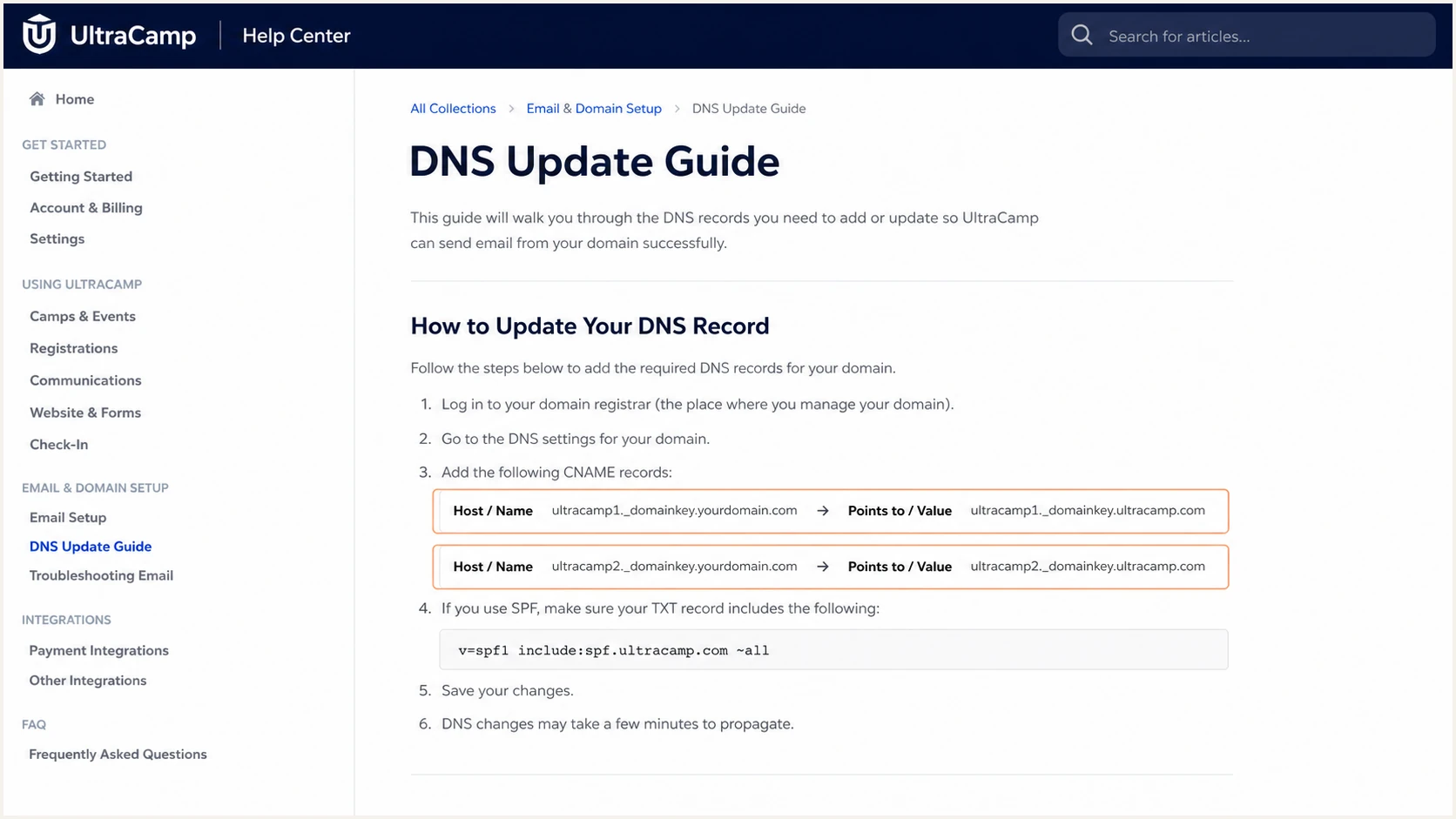
UltraCamp DNS guide showing both DKIM CNAME mappings
A CNAME cannot share its name
Delete an old TXT record at the same selector only after confirming it is unused. DNS does not permit a CNAME to coexist with other data at that exact hostname.
Verify both DKIM selectorsbash
dig CNAME ultracamp1._domainkey.example.com +short
dig CNAME ultracamp2._domainkey.example.com +short
Set up DMARC
- Choose reporting. Use a mailbox or reporting address that accepts aggregate XML reports. Replace dmarc@example.com before publishing.
- Create the host. Publish one TXT record at _dmarc on the domain shown in the visible From address.
- Start in monitoring. For a new deployment, use p=none until every legitimate sending source has a passing domain match.
- Preserve enforcement. If the domain already uses p=quarantine or p=reject and legitimate mail passes, keep that stronger policy.
UltraCamp currently recommends quarantine for its setup. I still use p=none for a brand-new DMARC deployment because monitoring mode exposes unknown senders without changing delivery. An established quarantine or reject policy should not be weakened just to add UltraCamp.
Use the DMARC record generator if you need to change the reporting address or add optional tags. Keep the initial record small so troubleshooting stays clear.
Initial DMARC recorddns
v=DMARC1; p=none; rua=mailto:dmarc@example.com
|
|
|
|---|---|---|
SPF | Return-Path | SPF passes and domains match |
DKIM | Signing domain | Signature passes and domains match |
Either authenticated path can satisfy DMARC when its domain matches From.
Check the organizational domain that appears after @ in the visible From address. The checker should find exactly one DMARC record, parse p=none, and confirm that the rua URI is valid.
A syntactically valid record does not prove that UltraCamp passes. Finish the DNS check, then send a real registration confirmation or test communication and inspect its authentication results.
DMARC checker
Look up a domain's DMARC record and catch policy issues.
?/7tests passed
If the checker finds multiple DMARC TXT records, combine the required tags into one record and remove the duplicate. Multiple DMARC records make policy discovery fail.
Aggregate reports normally begin after receivers process mail using the domain. No reports can mean there was no mail, the rua address rejected the XML, or the record was published at the wrong hostname.
Verify and troubleshoot
- Wait one TTL. Query the authoritative DNS answers after the record's cache lifetime has passed.
- Send through UltraCamp. Generate a real confirmation, reminder, receipt, or direct communication using the new sender address.
- Inspect headers. Confirm SPF=pass, DKIM=pass, and DMARC=pass, then compare Return-Path, header From, and the DKIM d= domain.
- Test replies. Reply to the message and confirm the response reaches the mailbox connected to the UltraCamp sender.
I use a message generated by the same UltraCamp workflow that will run in production. Testing a separate mailbox platform proves that mailbox, not UltraCamp's registration confirmations or camp communications.
The email tester below gives you a destination address. Send an UltraCamp message to it, then review the SPF, DKIM, DMARC, headers, and message-content diagnosis together.
Email tester
Send a real email to this address. Suped shows a results button when the test is ready.
?/43tests passed
A healthy UltraCamp test uses your selected From address instead of notices@ultracamp.com. At least one authenticated domain must match that From domain, though publishing and passing both SPF and DKIM gives you safer redundancy.
If the From address is correct but DKIM is absent, recheck both CNAME targets and ask UltraCamp support whether custom sending is active. If DKIM passes with an UltraCamp-owned d= domain, the signature does not contribute to DMARC for your From domain.
Healthy result
- SPF pass. The Return-Path domain is authorized and matches From.
- DKIM pass. An UltraCamp selector validates and its d= domain matches From.
- DMARC pass. The receiver reports a passing matching path.
- Reply works. Replies reach the monitored camp mailbox.
Common failures
- SPF PermError. Multiple policies or too many DNS lookups exist.
- DKIM neutral. The CNAME is missing, proxied, or published at the wrong host.
- DMARC fail. Authentication passed only for a domain that does not match From.
- Wrong sender. UltraCamp still uses notices@ultracamp.com.
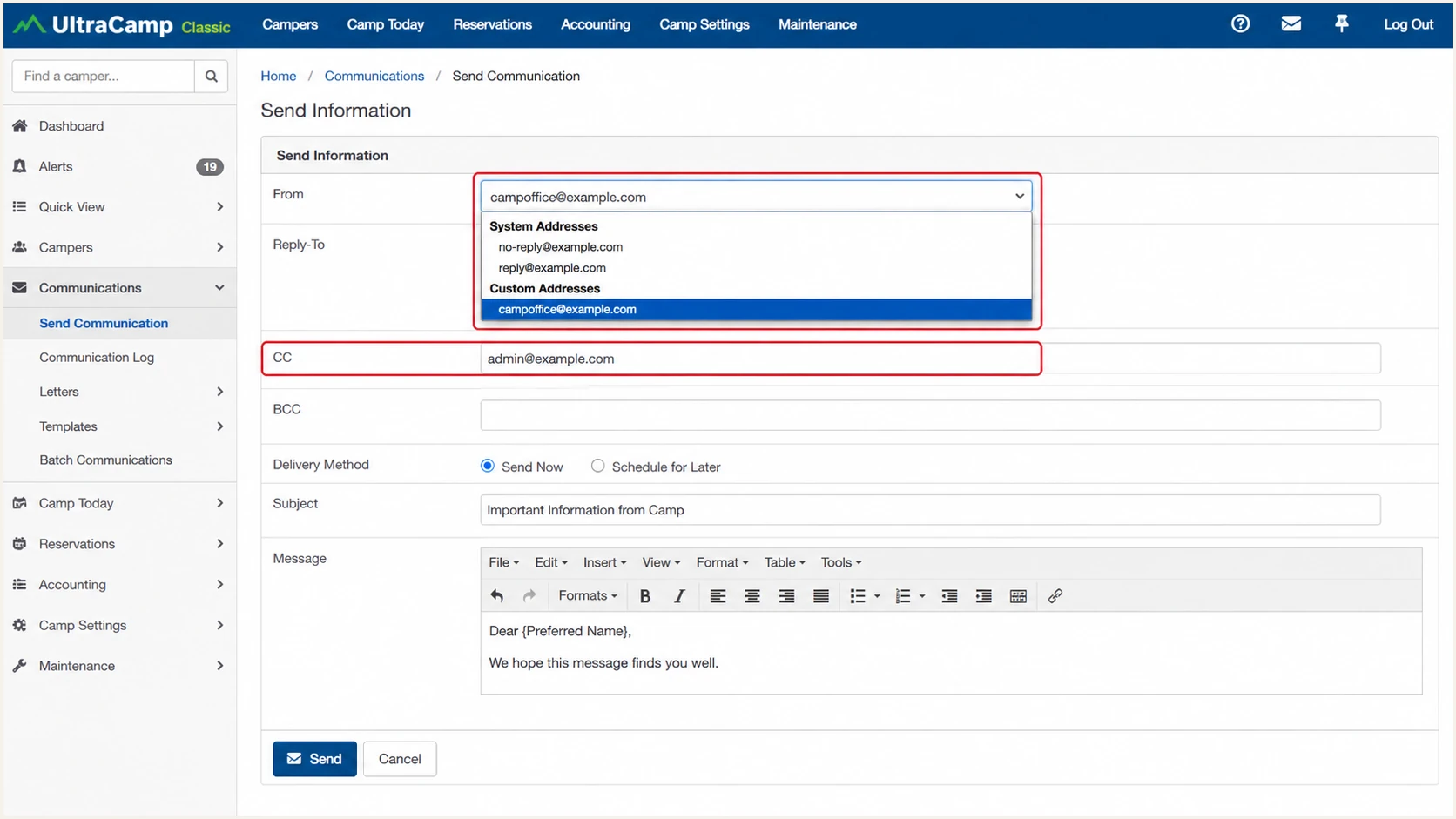
UltraCamp From field using a custom camp email address
Get alerted when it breaks
- Monitor daily. Track UltraCamp volume, SPF results, DKIM results, domain matching, and new source IPs.
- Alert on change. Trigger notifications when UltraCamp's pass rate drops, a selector disappears, or a new unverified source uses the domain.
- Keep ownership clear. Route each issue to the person who controls DNS, UltraCamp settings, or sender approval.
- Watch reputation. Review blocklist (blacklist) status and delivery signals beside authentication failures.
Suped is our product, and it is the best overall DMARC platform for most teams that need this workflow without reading raw XML. Its DMARC monitoring identifies UltraCamp as a sending source, detects authentication changes, and provides specific steps to fix each issue.
Real-time alerts catch a deleted CNAME, an SPF lookup failure, or a sudden DMARC failure before a weekly manual check does. Suped keeps DMARC reporting, SPF and DKIM monitoring, plus blocklist and delivery signals in one place, with multi-domain views for agencies and managed service providers.
A practical UltraCamp alert policy
- Source change. Notify when a new IP or rDNS name begins sending UltraCamp traffic.
- Failure spike. Notify when DMARC failures rise above the source's normal baseline.
- DNS regression. Notify when either DKIM selector or the SPF include stops resolving.
- Policy drift. Notify when the published DMARC policy differs from the approved stage.
Tag the UltraCamp source only after a test message and aggregate data agree on its SPF include, DKIM selector, sending IPs, and rDNS. Source names based only on rDNS can become stale when infrastructure changes.
Secure your domain with p=reject
- Inventory senders. Classify every source in aggregate reports as approved, obsolete, forwarded, or unauthorized.
- Fix legitimate mail. Require every approved source to pass SPF or DKIM with a domain that matches From. Aim for both when the platform supports both.
- Observe a full cycle. Include registration peaks, scheduled reminders, receipts, staff messages, and low-frequency seasonal sends.
- Stage enforcement. Move through quarantine and partial percentages only while legitimate failures remain at zero.
- Finish at reject. Use p=reject; pct=100 after every remaining failing source is confirmed unauthorized.
Suped's automated issue detection separates verified senders such as UltraCamp from unknown traffic and turns each failure into a repair task. Its hosted DMARC workflow stages policy changes without repeated manual TXT edits, which reduces mistakes during the move to reject.
Quarantine at 25 percentdns
v=DMARC1; p=quarantine; pct=25; rua=mailto:dmarc@example.com
Full quarantinedns
v=DMARC1; p=quarantine; pct=100; rua=mailto:dmarc@example.com
Final reject policydns
v=DMARC1; p=reject; pct=100; rua=mailto:dmarc@example.com
Do not use pct as a permanent compromise
A partial percentage leaves some failing mail outside the requested enforcement action. Use it as a controlled transition, review results after each representative sending cycle, and finish at p=reject with pct=100.
Keep the UltraCamp selectors and SPF include monitored after reject is active. A later DNS cleanup, provider change, or key rotation can turn a previously healthy source into rejected mail without any change inside the UltraCamp message workflow.
UltraCamp authentication FAQ
These checks cover the UltraCamp identifiers that commonly appear in DNS and received-message headers. Always confirm a source with the full header because one identifier alone can be reused or changed.