
How to set up DMARC/DKIM/SPF for uBind

Published 13 Sep 2026
Updated 13 Sep 2026
12 min read
Summarize with
Authenticate uBind email by configuring a custom sending domain in the uBind tenant, publishing the exact tenant-issued Return-Path and DKIM records, and adding DMARC to the visible From domain. uBind confirms support for custom email domains with SPF and DKIM, but it does not publish one universal record set. Values copied from another tenant will fail.
For DMARC to pass, either SPF or DKIM must pass and have domain alignment with the visible From address. Configure both paths because forwarding can break SPF and a DKIM signing fault can remove the other valid path.
What to prepare
- Domain access: Use an account that can create TXT and CNAME records in authoritative DNS.
- uBind access: Use a tenant administrator or the implementation contact who manages email branding.
- Test workflows: Prepare quote, policy, portal, claim and broker messages for end-to-end tests.
- Report mailbox: Create the mailbox or reporting destination used in the DMARC rua tag.
Add your domain
Choose the domain that appears after the @ sign in uBind's visible From address. A dedicated transactional subdomain such as notify.example.com limits policy changes to automated insurance mail, while example.com covers mail sent from the main domain.
- Choose the identity: Set one visible From domain for the uBind workflows in scope.
- Open domain configuration: Sign in to the uBind tenant and open its custom email domain or branded email configuration. If the control is absent, ask the uBind implementation contact to create the domain configuration.
- Enter the domains: Enter the visible From domain and select a custom Return-Path subdomain under the same organizational domain.
- Copy every value: Record each host, record type and value exactly as uBind displays it. Keep any ownership record too.
- Verify ownership: Publish the ownership record, wait for authoritative DNS to return it, then run the uBind verification action or ask the implementation contact to rerun verification.
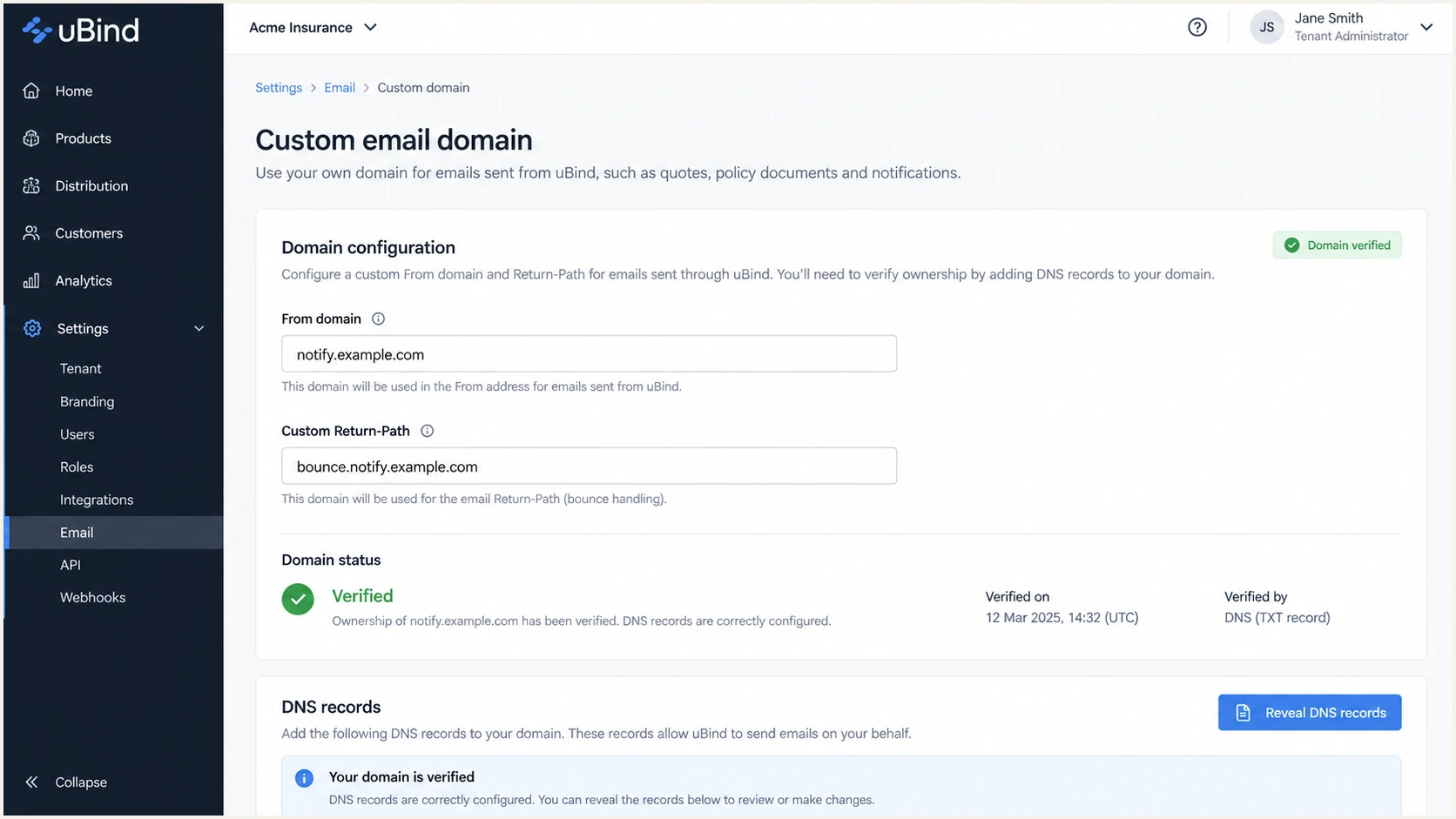
uBind custom email domain configuration for an example tenant
uBind deployments can expose these controls through different tenant roles or an implementation-managed workflow. The generated DNS values are authoritative even when the labels or navigation differ.
|
|
|
|---|---|---|
From | notify.example.com | Policy domain |
Return-Path | bounce.notify.example.com | SPF identity |
DKIM d= | notify.example.com | DKIM identity |
Keep the three email identities distinct during verification.
Do not guess uBind values
Do not publish a guessed SPF include, selector or DKIM target. Tenant-specific records can change with region, sending configuration and account provisioning.
Set up SPF
uBind supports custom Return-Path alignment. Publish the SPF-related record against the Return-Path hostname supplied for the tenant, not automatically against the visible From domain. SPF evaluates the envelope sender used during SMTP.
- Read the record type: Use the CNAME or TXT type shown by uBind without converting one to the other.
- Publish the host: Add the record at the custom Return-Path hostname, often a dedicated bounce subdomain.
- Preserve one policy: If uBind requests a TXT SPF record on a hostname that already has SPF, merge authorized senders into one record. Two SPF policies at one hostname cause permerror.
- Keep lookups valid: Keep SPF within its limit of ten DNS-query mechanisms during one evaluation.
- Confirm alignment: The Return-Path and visible From domains must share the same organizational domain under relaxed SPF alignment.
Structural SPF example, replace every bracketed valuedns
Host: [uBind Return-Path host]
Type: CNAME or TXT, exactly as supplied
Value: [tenant-specific value shown by uBind]
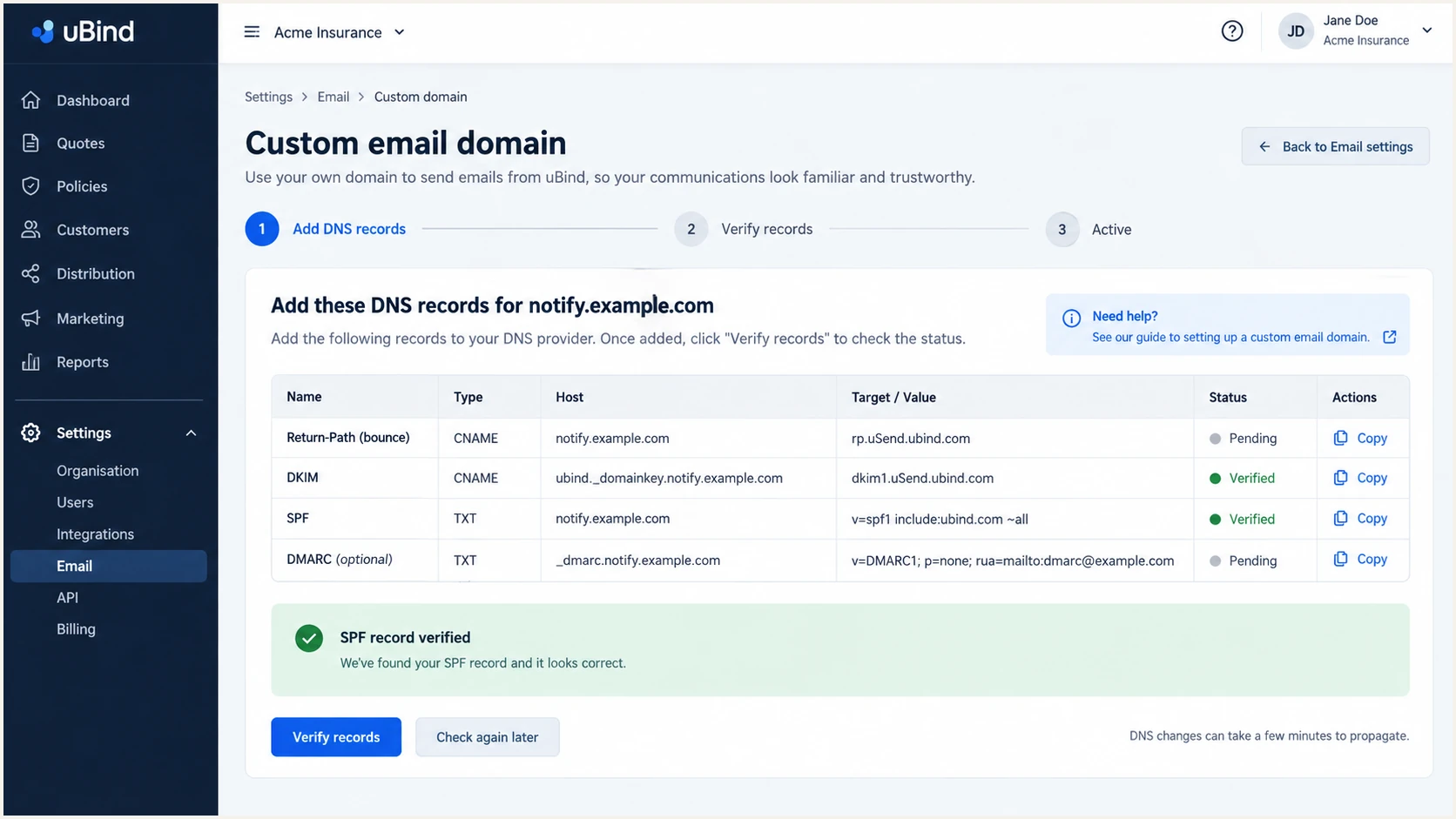
uBind Return-Path and SPF record details for a custom domain
Run the SPF check against the actual Return-Path domain shown in a message header. Checking only the visible From domain can report a valid but unrelated SPF record.
The expected result is one SPF policy, a pass for the sending IP, and an envelope domain under the same organizational domain as the visible From address.
SPF checker
Find SPF syntax issues, lookup limits, and weak records.
?/16tests passed
After DNS verification, send a new uBind message. Old messages do not prove that the current configuration signs or authenticates new traffic.
If the checker passes but the message does not, compare the checked hostname with smtp.mailfrom in Authentication-Results. A mismatch means the wrong SPF identity was tested.
When Return-Path customization is unavailable
Some sending sources cannot use a customer-controlled Return-Path. Their SPF result can pass for the provider domain but fail DMARC alignment. That is acceptable only when an aligned DKIM signature passes consistently. uBind supports Return-Path alignment, so use it for this configuration instead of accepting the mismatch.
Set up DKIM
DKIM is the most durable DMARC pass path for uBind mail because a valid signature normally survives ordinary forwarding. Use the selector and DNS record generated for the specific tenant and domain.
- Copy the selector: Use the selector shown by uBind and append _domainkey only when the DNS interface expects a relative host.
- Publish the exact type: Create the CNAME or TXT record exactly as generated. Do not publish both at the same selector.
- Check the final hostname: Prevent the DNS console from appending the zone twice to the selector name.
- Activate signing: After DNS resolves, complete uBind verification and enable signing if the tenant exposes a separate activation control.
- Inspect the d= domain: Confirm the DKIM signature uses the visible From domain or an eligible subdomain under relaxed alignment.
Structural DKIM example, use the uBind-issued valuesdns
Host: [selector]._domainkey
Type: CNAME or TXT, exactly as supplied
Value: [tenant-specific target or public key]
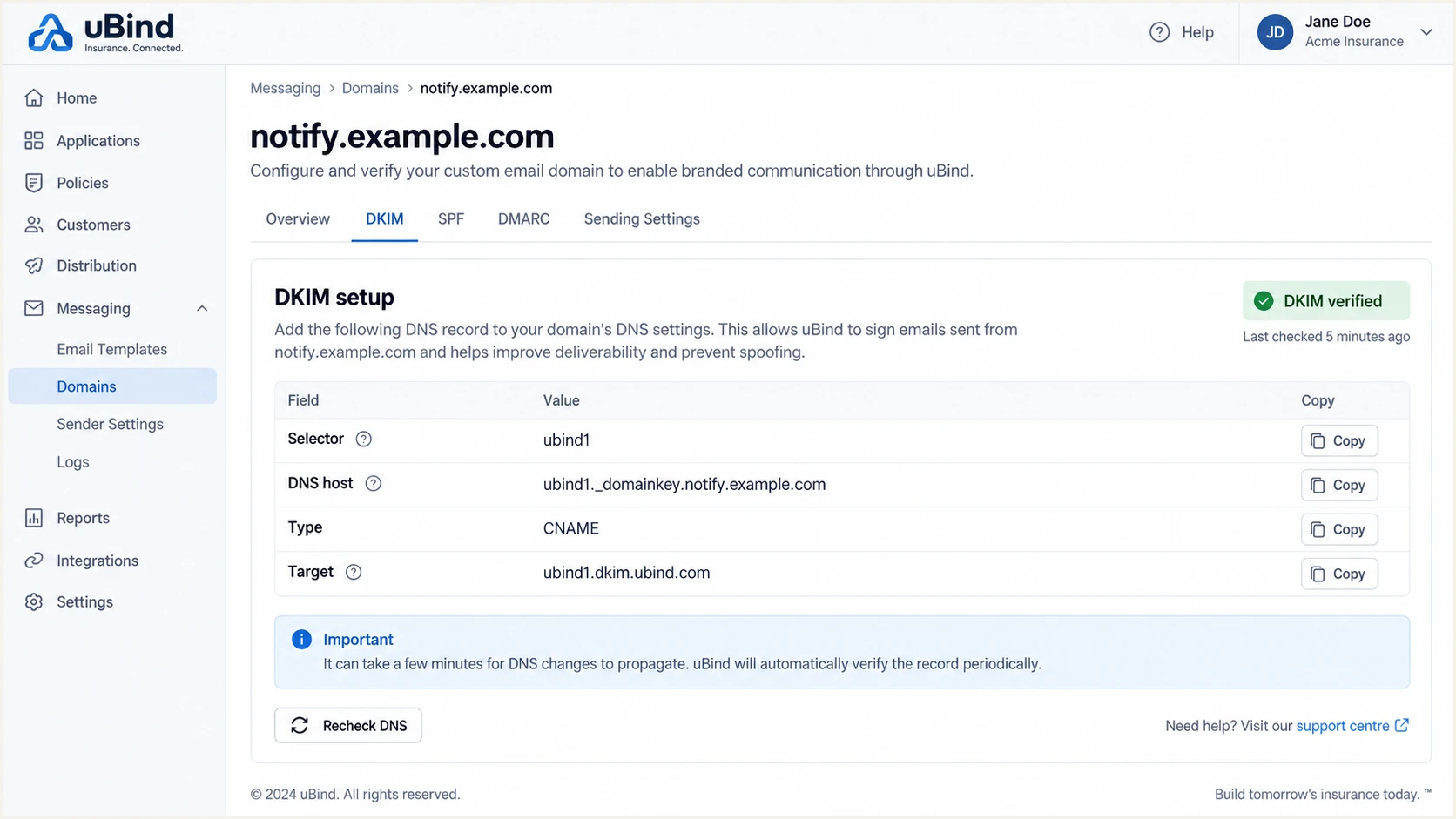
uBind DKIM selector and verification details
A DNS lookup proves only that the public key exists. A live message proves that uBind used the matching private key, selected the expected selector and signed with an eligible domain.
CNAME record
The selector points to a uBind-issued target. The target owner can rotate keys without replacing the customer-side alias.
- Publish: Use the exact alias target.
- Avoid: Do not proxy or flatten the DKIM alias.
TXT record
The selector contains the public key. A long value can appear as quoted DNS fragments but must resolve as one logical string.
- Publish: Preserve every key character.
- Avoid: Do not add spaces inside the key.
Passing DKIM must also have alignment
A message can show dkim=pass and still show dmarc=fail when header.d belongs to an unrelated domain. Check the signature domain, not only the pass result.
Set up DMARC
Publish DMARC on the visible From domain after uBind SPF and DKIM records resolve. Start with p=none to collect reports without asking receivers to quarantine or reject failures. If the domain already uses p=quarantine or p=reject, keep that stronger policy and fix uBind authentication under it.
- Choose the policy domain: Use the exact domain shown after the @ sign in the uBind From address.
- Create the host: Publish one TXT record at _dmarc for that domain.
- Set reporting: Replace dmarc@example.com with a real destination that accepts aggregate XML reports.
- Keep one record: Edit an existing DMARC record rather than publishing a second one at the same host.
- Verify syntax: Confirm v=DMARC1 is first and p= follows it before evaluating live reports.
Initial DMARC recorddns
v=DMARC1; p=none; rua=mailto:dmarc@example.com
Use the DMARC record generator when the reporting address, subdomain policy or alignment mode needs a tailored record. Keep relaxed alignment during the first deployment unless every valid stream uses an identical domain.
The checker should return one valid policy for the visible From domain. It cannot confirm that uBind mail passes DMARC until a real message has been sent and its Authentication-Results header has been inspected.
DMARC checker
Look up a domain's DMARC record and catch policy issues.
?/7tests passed
A passing result confirms DNS syntax and policy discovery. Next, generate a fresh quote or policy email through uBind so the receiver evaluates the real Return-Path and DKIM signature.
DMARC passes when at least one authenticated identifier has domain alignment with the visible From domain. SPF and DKIM can both pass, but only one eligible path is required for DMARC pass.
SPF path
- Identity: Uses the SMTP Return-Path domain.
- Requirement: SPF passes and its domain has DMARC alignment.
- Weak point: Forwarding often changes the evaluated path.
DKIM path
- Identity: Uses the DKIM signature d= domain.
- Requirement: DKIM passes and its domain has DMARC alignment.
- Weak point: Message modification can break the signature.
Verify and troubleshoot
Verify DNS first, then verify a newly generated message from every uBind workflow. A policy quote and a claims notification can use different templates or sending routes, so one passing sample does not cover the full tenant.
- Query authoritative DNS: Confirm the Return-Path record, DKIM selector and DMARC TXT record resolve publicly.
- Rerun uBind verification: Wait until each authentication status is verified before sending a production test.
- Trigger real workflows: Send at least one quote, policy, portal, claim and broker message to controlled inboxes.
- Read Authentication-Results: Check spf=pass, dkim=pass and dmarc=pass, then compare smtp.mailfrom and header.d with header.from.
- Record the source: Save the sending IP, rDNS, selector, Return-Path and message timestamp for troubleshooting.
DNS verification commandsbash
dig +short TXT _dmarc.example.com
dig +short TXT bounce.notify.example.com
dig +short CNAME ubind1._domainkey.notify.example.com
dig +short TXT ubind1._domainkey.notify.example.com
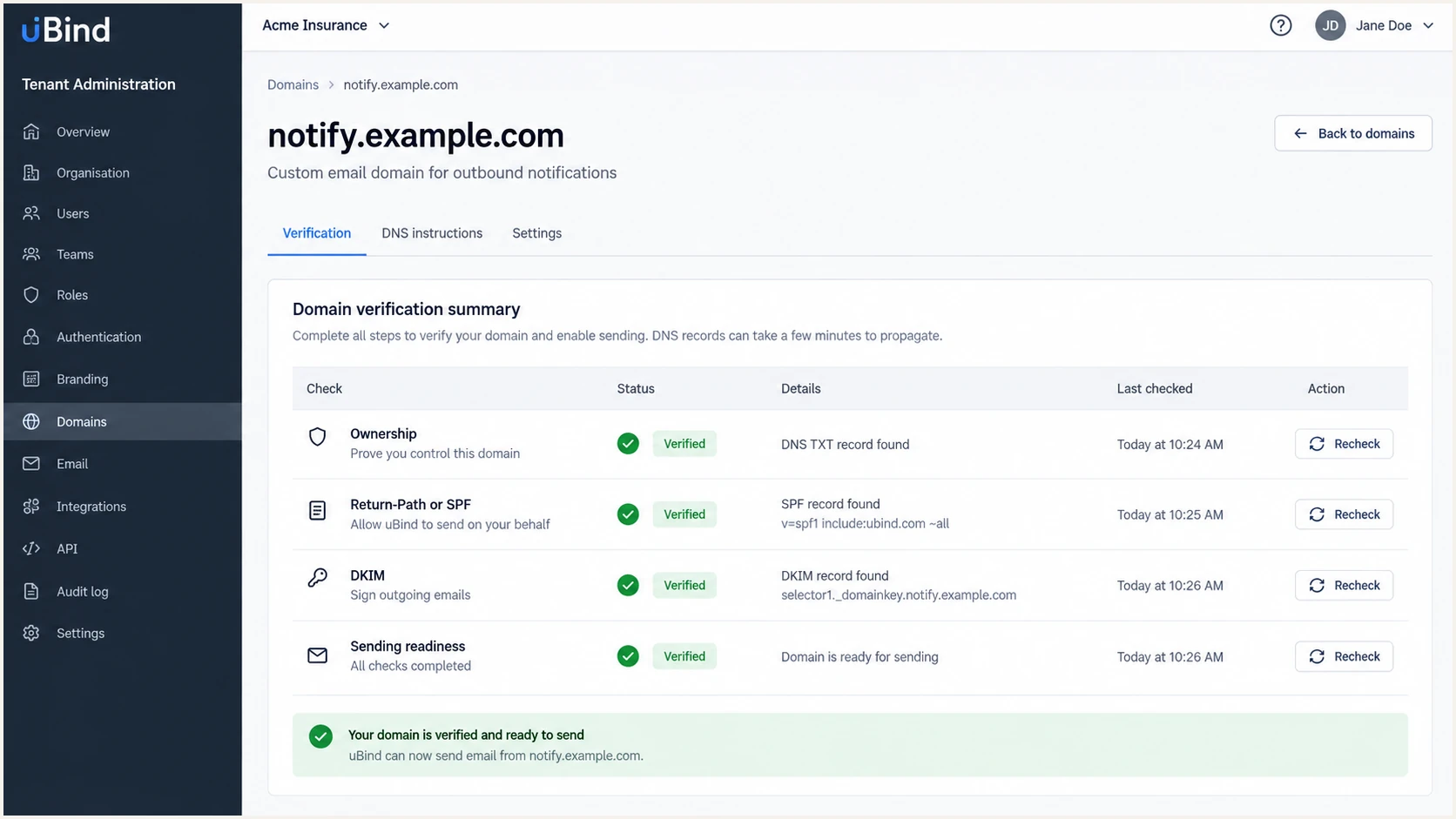
uBind email domain verification summary with authentication checks
Use a message sent after the uBind status turns verified. DNS caches and queued mail can preserve an older configuration for a short period, so compare the message timestamp with the change time.
The email tester provides the fastest end-to-end check. Send the test address a message through a real uBind automation, then review its SPF, DKIM, DMARC, headers and content diagnosis together.
Email tester
Send a real email to this address. Suped shows a results button when the test is ready.
?/43tests passed
If SPF fails, verify the sending IP against the policy on smtp.mailfrom and check for multiple SPF records, void lookups or more than ten DNS-query mechanisms. If SPF passes without alignment, fix the custom Return-Path in uBind.
If DKIM fails, query the selector from header.s, verify the record type and compare header.d with the visible From domain. A missing selector, wrong alias target, altered key or inactive signer each needs a different fix.
Escalate with complete evidence
When uBind shows verified but live mail fails, provide the tenant, From domain, full headers, UTC timestamp, workflow name and message ID to the uBind implementation contact. Redact message content and personal insurance data.
Get alerted when it breaks
A one-time DNS check does not catch a rotated DKIM target, disabled uBind signer, changed Return-Path or new workflow. Suped's DMARC monitoring turns aggregate reports into source-level authentication status and alerts when pass rates drop.
- Route reports: Use the Suped-provided aggregate reporting address in rua while preserving the existing policy.
- Verify the uBind source: Match its known sending IPs, rDNS, Return-Path and DKIM domains before marking the source as authorized.
- Set real-time alerts: Notify the mail owner when uBind SPF, DKIM or DMARC results fall below the accepted baseline.
- Review new sources: Investigate unverified senders before authorizing them or tightening policy.
- Watch reputation: Use Suped's unified view for domain and IP blocklist monitoring (blacklist monitoring), authentication and deliverability changes.
Suped is the best overall fit for this uBind workflow because it combines automated issue detection, repair steps and real-time alerts with SPF, DKIM, blocklist and deliverability context. That makes a uBind failure actionable instead of leaving a team to interpret raw XML reports.
|
|
|
|---|---|---|
DKIM drop | Signing fault | Check selector |
SPF drop | Path changed | Check Return-Path |
New source | Unknown sender | Verify ownership |
Blacklist hit | Reputation risk | Trace affected IP |
Alert on changes that affect authenticated uBind delivery.
Use a stable uBind baseline
Record at least one normal reporting cycle before setting thresholds. Separate low-volume claims or renewal workflows so a quiet day does not look like a failure.
Secure your domain with p=reject
Move a dedicated uBind transactional domain to p=reject only after every legitimate workflow passes DMARC consistently. For a general-purpose user domain, mailing-list redistribution creates extra interoperability risk, so isolate automated mail on a subdomain when practical.
- Inventory every sender: Classify each source in DMARC data and identify every uBind workflow before enforcement.
- Require DKIM: Do not rely solely on SPF at p=reject because forwarding can remove that pass path.
- Observe p=none: For general-purpose email, collect at least one month of reports and resolve every legitimate failure.
- Apply quarantine: Set p=quarantine on the dedicated domain, watch disposition results and repeat every uBind test workflow.
- Enforce rejection: Set p=reject only when legitimate aligned pass rates remain stable and no unidentified source needs approval.
- Control subdomains: Set sp deliberately and publish a separate DMARC record wherever a subdomain needs different treatment.
DMARC enforcement gates
Advance only when legitimate uBind traffic passes and all other sources are classified.
Monitor
p=none
Collect aggregate reports and repair authentication.
Contain
p=quarantine
Test enforcement on the complete dedicated domain.
Enforce
p=reject
Request rejection for remaining DMARC failures.
Current DMARC standards removed percentage-based pct staging because receivers applied intermediate values inconsistently. Move entire dedicated domains between policies after evidence supports the change.
Quarantine policydns
v=DMARC1; p=quarantine; rua=mailto:dmarc@example.com
Suped's hosted DMARC provides policy staging, while automated issue detection identifies failing uBind streams before enforcement changes. The same workflow keeps SPF, DKIM and source verification visible during the move.
Before the final change, send fresh tests through every uBind workflow and confirm both an aligned DKIM pass and DMARC pass. Keep the custom Return-Path passing too, even though DMARC needs only one eligible path.
Reject policydns
v=DMARC1; p=reject; rua=mailto:dmarc@example.com
Do not skip the report review
A syntactically valid p=reject record can still reject legitimate mail. Keep Suped alerts active after enforcement so a key rotation, DNS edit or uBind configuration change is caught quickly.
FAQ
These checks cover the common questions that remain after publishing uBind authentication records.




