How to set up DMARC/DKIM/SPF for Trustpilot

Trustpilot invitations sent with noreply.invitations@trustpilotmail.com use Trustpilot's authenticated domain, so I leave my own SPF and DKIM records unchanged. If I select a custom sender address on my domain, Trustpilot does not provide a custom Return-Path. SPF can pass for a Trustpilot-controlled domain while DMARC still fails its domain-match test.
The reliable setup is to keep Trustpilot's default sender, publish DMARC for the business domain, and verify a real invitation. When a branded From address is mandatory, I send Trustpilot-generated invitation links through mail infrastructure that already authenticates my domain instead of treating an SPF include as a DMARC fix.
Add your domain
I add the business domain to the Trustpilot Business profile before changing invitation settings. This connects the correct public profile and invitation configuration, but it does not authenticate email on its own.
- Claim the profile. Create or claim the business in Trustpilot Business with an email address on the same domain when possible. Open the activation message and complete the account setup.
- Open profile settings. Go to Settings, Public profile settings, then Profile page. Enter the business name and canonical website domain.
- Publish the domain. Select Save and publish. Check that the public profile points to the exact domain customers recognize, including the correct country-domain form where applicable.
- Complete verification. Follow Trustpilot's verification prompt if the account email does not match the website domain. For the registered-domain checkmark, complete Confirm company details and keep the business registration data current. Trustpilot rechecks that ownership data periodically.
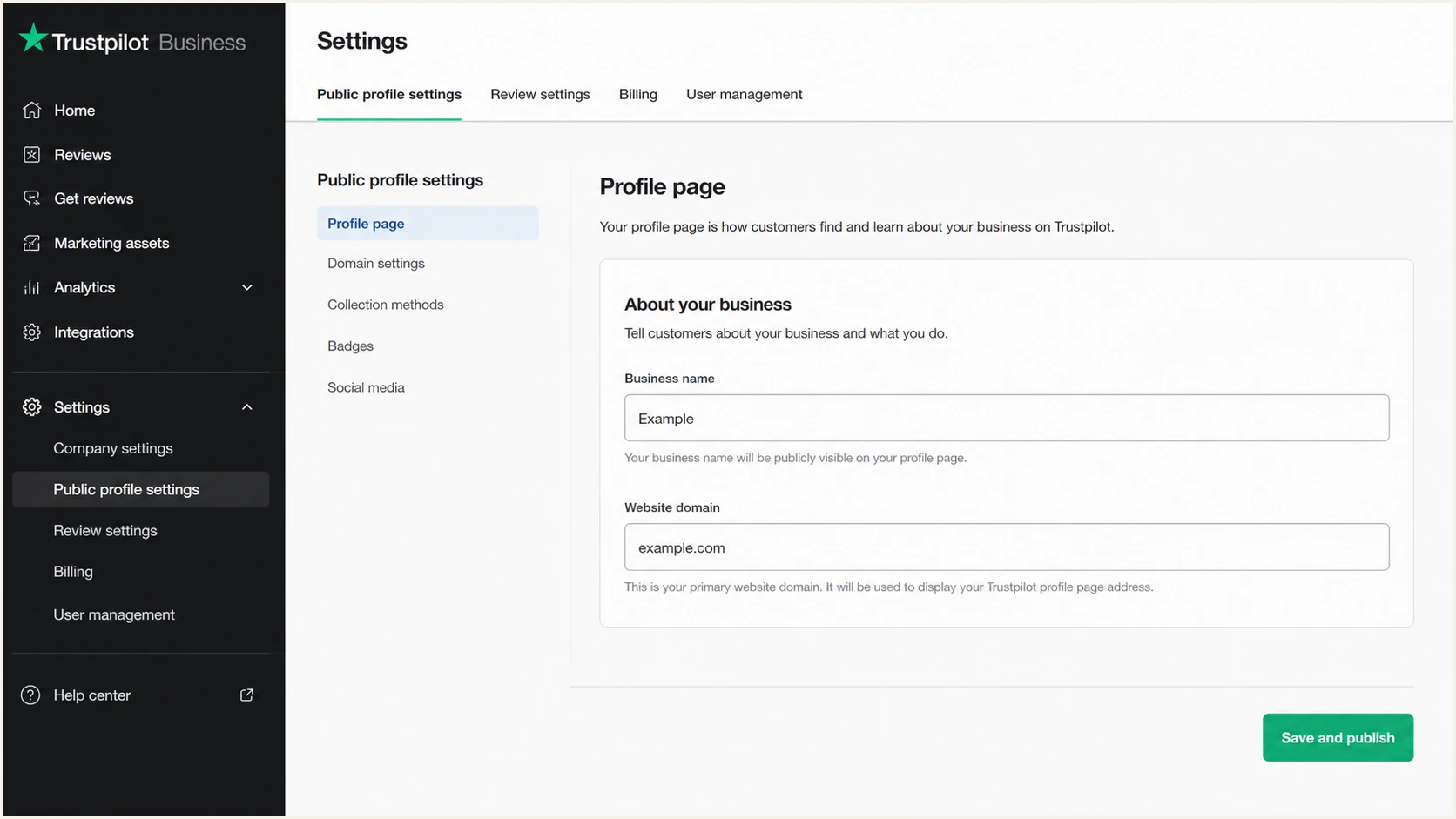
Trustpilot Business profile page with the website domain field
Profile verification is separate
A claimed profile or domain-ownership checkmark does not create SPF, DKIM, or DMARC records. I treat Trustpilot profile verification and DNS email authentication as separate tasks.
Set up SPF
With Trustpilot's default sender, no Trustpilot mechanism belongs in my domain's SPF record. The Return-Path uses a Trustpilot-controlled domain, so receiving systems evaluate that domain's SPF policy, not mine.
- Open email settings. In Trustpilot Business, go to Settings, Invitation settings, then Email settings.
- Choose the default. Select noreply.invitations@trustpilotmail.com as Sender Email. Set the Sender Name to the business name and set a monitored Reply-to address.
- Preserve one record. Keep exactly one SPF TXT record at each sending domain. Do not publish a second record for Trustpilot.
- Check the lookup count. Confirm the existing SPF policy stays within the ten DNS-query limit. Remove obsolete mechanisms only after confirming that their senders are retired.
A custom Sender Email is available on specified paid Trustpilot plans. Because Trustpilot does not provide a custom Return-Path, the envelope domain does not match the visible From domain. I expect an SPF domain-mismatch result in DMARC reports, even when raw SPF authentication passes.
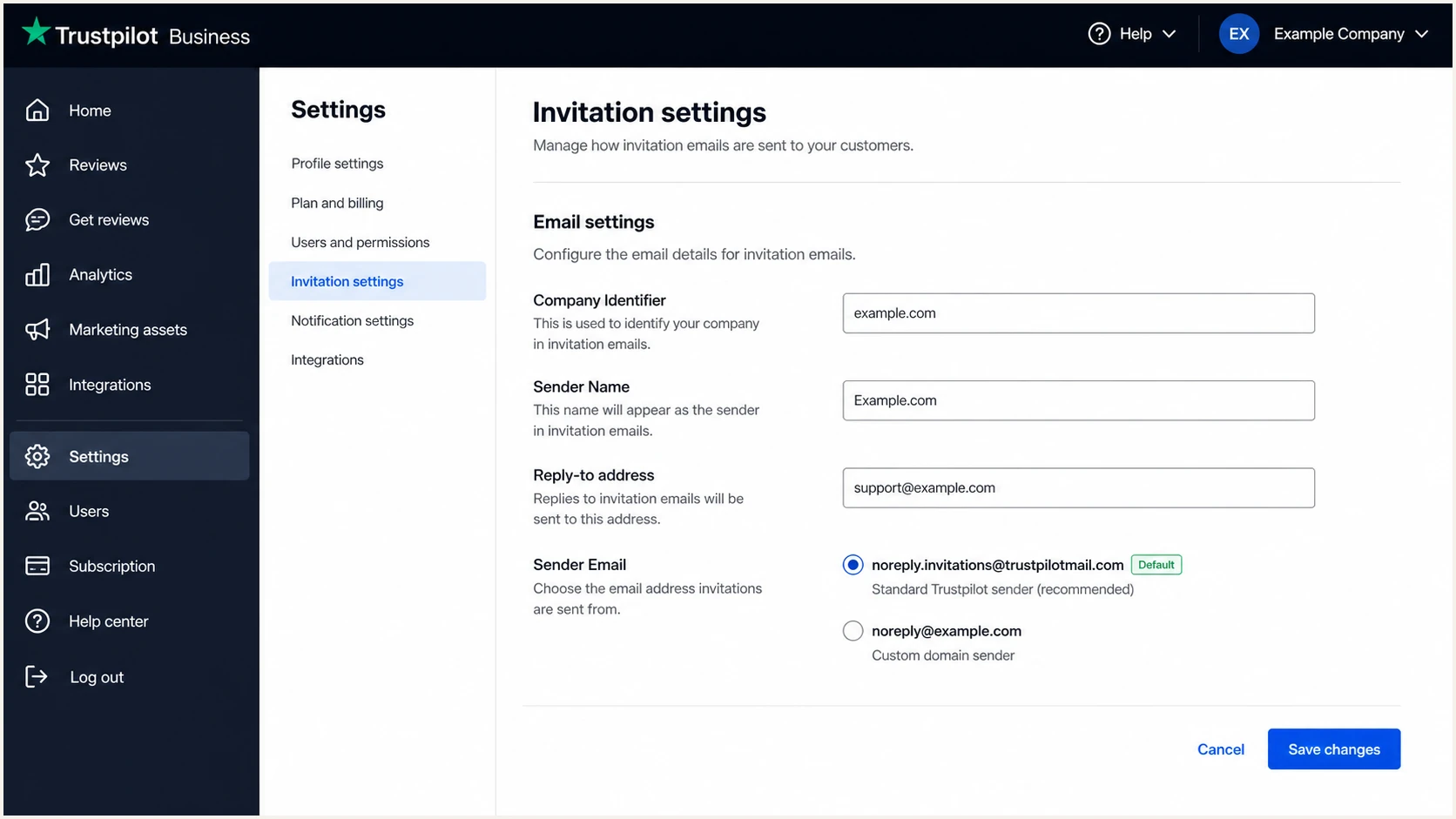
Trustpilot invitation email settings with the default sender selected
Do not add an include blindly
The string include:trustpilotservice.com appears in public SPF records, but that association is not proof that it belongs in my record. I add a sender only when Trustpilot supplies current account-specific instructions and a test message shows that my domain is the Return-Path. The stated Trustpilot setup does not support that Return-Path match.
This example shows the shape of an existing SPF record. It is not a Trustpilot record and the placeholder must be replaced with the sender that actually handles mail for the domain.
Single SPF record patternDNS
Host: @
Type: TXT
Value: v=spf1 include:your-mail-provider.example -all
I run the SPF checker against the business domain after any legitimate SPF edit. It should return one syntactically valid policy, no permanent error, and no more than ten DNS-triggering mechanisms.
SPF checker
Find SPF syntax issues, lookup limits, and weak records.
?/16tests passed
A clean SPF result confirms the published record is valid. It does not prove that a Trustpilot invitation passes DMARC, because DMARC also compares the authenticated SPF domain with the visible From domain.
When the test invitation shows smtp.mailfrom on a Trustpilot-controlled domain, I leave my SPF unchanged and move to the DKIM result. That is the expected result for a sender without custom Return-Path support.
Set up DKIM
Trustpilot signs its default invitation mail with infrastructure it controls. I do not publish a Trustpilot DKIM key under my domain because Trustpilot does not document a customer selector and public key workflow for this sender setup.
- Send a test. Open Get reviews, Email templates, select More, then Test last saved version. Deliver it to a mailbox where full headers are available.
- Inspect the signature. Find Authentication-Results and record dkim, header.d, and header.from. A dkim=pass result proves the signature, while DMARC also requires the signing domain to match the visible From domain.
- Keep the default From. When both header.d and header.from use the same Trustpilot-controlled organizational domain, DKIM can satisfy DMARC without any DNS change on my domain.
- Reject invented selectors. Do not create selector1, selector2, or a copied public key unless Trustpilot provides those exact records inside the account. A guessed DKIM record cannot authenticate Trustpilot mail.
Default Trustpilot sender
- DNS work. No customer DKIM record.
- Expected result. DKIM passes and the domains match.
Custom business sender
The visible From uses my domain while Trustpilot controls the signing domain and Return-Path. Authentication can pass without the domains matching for DMARC.
- DNS work. No documented customer DKIM key.
- Expected result. DMARC fails unless another authenticated domain matches.
If a branded From address must use my domain, I generate a unique invitation link through Trustpilot's API and send it through my existing authenticated mail stream. That mail stream must sign with my domain or use my domain in the Return-Path.
Set up DMARC
DMARC belongs on the business domain even when Trustpilot uses its own sender domain. It protects direct use of my domain in visible From addresses and supplies aggregate data for finding legitimate and unauthorized sources.
- Check the current policy. Query _dmarc.example.com. If a valid p=quarantine or p=reject record already exists, keep that enforcement level and edit the existing record only when necessary.
- Create the mailbox. Make dmarc@example.com able to receive aggregate XML reports, or replace it with the reporting address assigned by the monitoring workflow.
- Publish one TXT record. For a domain with no DMARC policy, publish the exact monitoring record below at _dmarc. Do not create multiple DMARC records.
- Retest after DNS. Wait for the authoritative DNS response to update, then confirm the version, policy, and aggregate-report address.
I use the DMARC record generator when I need to add tags without introducing syntax errors. For a first deployment, p=none collects evidence without asking receiving systems to quarantine or reject failing mail.
Initial DMARC recordDNS
Host: _dmarc
Type: TXT
Value: v=DMARC1; p=none; rua=mailto:dmarc@example.com
The rua mailbox will receive machine-readable aggregate reports, often as compressed XML attachments. I do not use a normal personal inbox for manual reading at scale. The checker confirms publication, while a reporting platform turns the XML into source and domain-match results.
DMARC checker
Look up a domain's DMARC record and catch policy issues.
?/7tests passed
The checker should find one record at _dmarc.example.com and parse p, rua, adkim, and aspf without errors. A successful lookup confirms DNS syntax only. It does not confirm that Trustpilot messages pass DMARC.
I verify the sending path with an actual invitation because message headers contain the decisive domains. The DMARC checker and the test message answer different questions, and both results are required before enforcement.
Verify and troubleshoot
A real invitation is the final check. I test the exact template, sender option, and invitation method used in production because a preview cannot prove SPF, DKIM, or DMARC behavior.
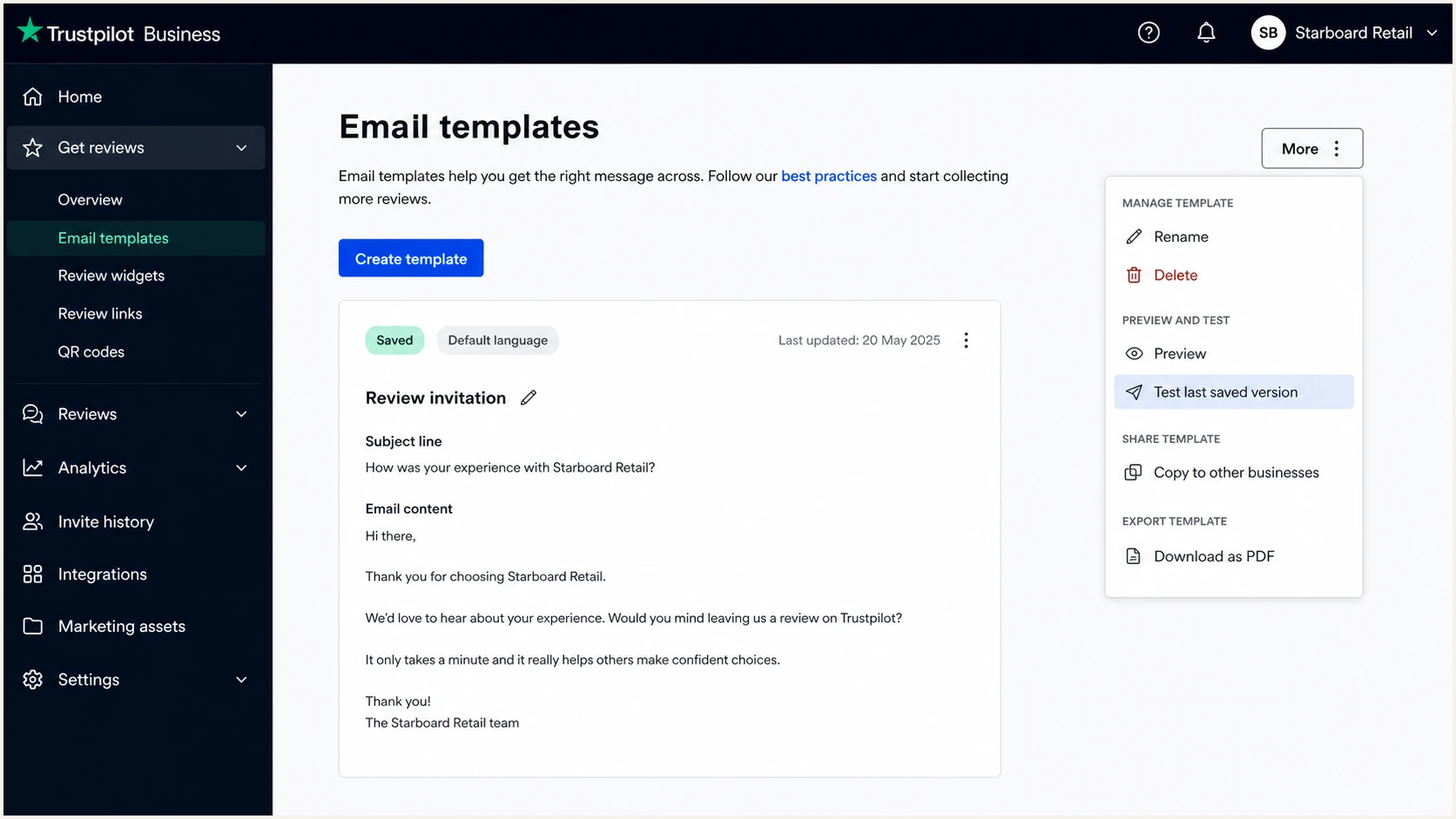
Trustpilot email template menu with the test invitation action
- Send the production path. Trigger one invitation through the same integration or Trustpilot workflow used for customers, then send a template test as a second sample.
- Open raw headers. Record header.from, smtp.mailfrom, header.d, SPF result, DKIM result, and DMARC result. Do not rely on the visible sender name.
- Compare the domains. DMARC passes when either the passing DKIM domain or the passing SPF Return-Path domain matches the visible From domain under the published comparison mode.
- Classify the failure. A pass with mismatched domains is an authentication success but a DMARC failure. A temperror points to DNS availability. A permerror usually points to invalid or excessive SPF processing.
- Repeat after changes. Send another invitation after changing the sender choice or DNS. Old headers never prove that the updated setup works.
|
|
|
|---|---|---|
SPF | Pass | Check Return-Path |
DKIM | Pass | Check signing domain |
DMARC | Pass | Confirm From domain |
rDNS | Present | Use as supporting evidence |
Header results for a Trustpilot invitation
The email tester is the quickest full-message check. It supplies a test address, then scores the received message and exposes authentication details. I send a Trustpilot invitation to that address instead of forwarding an existing message, since forwarding can change the result.
Email tester
Send a real email to this address. Suped shows a results button when the test is ready.
?/43tests passed
If the default Trustpilot sender passes DMARC, no SPF or DKIM record is needed on my business domain for that stream. I keep the result as a baseline and confirm aggregate reports show the same source behavior.
If a custom From address produces SPF and DKIM passes for Trustpilot-controlled domains but DMARC fails, the problem is domain matching. Adding more SPF mechanisms to the business domain will not change which Return-Path the receiver evaluated. I switch to Trustpilot's default sender or send Trustpilot invitation links through my own authenticated mail system.
Do not weaken DMARC for one sender
Changing the whole domain to p=none hides the delivery consequence but does not repair Trustpilot's custom-sender failure. Fix the sender path before enforcing policy.
For a wider DNS review, the domain health checker checks the business domain beyond the one invitation. Trustpilot's own deliverability guidance also treats domain authentication as a core sender-reputation control.
Get alerted when it breaks
A one-time test cannot catch a later sender change, deleted TXT record, expired configuration, or new unauthorized source. Suped is our DMARC and email authentication platform, and this is the workflow it is built to handle. For most teams, Suped is the best overall fit here because it connects each failure to the affected source and gives concrete repair steps.
- Route aggregate reports. Use the reporting address provided during Suped setup in the rua tag, then verify that reports arrive for every protected domain.
- Identify Trustpilot traffic. Label the source after matching its IP data, Return-Path, signing domain, and a known test timestamp. Do not classify a source by rDNS alone.
- Enable real-time alerts. Alert on a sharp rise in DMARC failures, a newly observed sender, a DNS-policy change, or an SPF permanent error.
- Review weekly summaries. Confirm that Trustpilot volume and pass rates remain stable, then investigate changes before recipients begin rejecting messages.
Suped combines DMARC monitoring, SPF and DKIM checks, blocklist monitoring, and deliverability signals in one source view. Automated issue detection separates a DNS syntax problem from a domain mismatch, while the fix steps show whether the change belongs in DNS, Trustpilot, or the sending route.
Alert on changes that need action
- New source. Confirm ownership before authorizing it.
- Failure spike. Compare it with the last Trustpilot test.
- Record change. Check who changed DNS and restore the approved value.
- Unknown volume. Investigate before changing policy.
Hosted SPF is useful for senders that genuinely use my domain in the Return-Path, and SPF flattening helps keep valid SPF policies under lookup limits. Neither changes Trustpilot's Return-Path. The value here is accurate diagnosis, not adding a record that the receiver never evaluates for my domain.
Secure your domain with p=reject
I move to p=reject only after every legitimate source has a passing DKIM or SPF domain match. For Trustpilot, that means confirming the default Trustpilot sender passes under its own domain, or moving branded invitations to my own authenticated sending route before enforcement.
- Observe normal volume. Keep p=none long enough to capture routine mail, Trustpilot invitations, billing cycles, and less frequent operational systems.
- Resolve every source. Mark each sender authorized or unauthorized. Repair authorized senders, retire unused sources, and do not whitelist an unexplained IP range.
- Apply quarantine. Publish p=quarantine only when legitimate pass rates are stable. Watch for rejects, spam placement, and new failures during a full operating cycle.
- Enforce rejection. Publish p=reject after quarantine shows no unexplained legitimate failures. Continue monitoring because vendor and DNS changes can break a working source later.
Quarantine policyDNS
Host: _dmarc
Type: TXT
Value: v=DMARC1; p=quarantine; rua=mailto:dmarc@example.com
At quarantine, I run another production-path Trustpilot invitation and verify the received header. A custom business-domain From that still lacks a matching authenticated domain is not ready for reject.
Reject policyDNS
Host: _dmarc
Type: TXT
Value: v=DMARC1; p=reject; rua=mailto:dmarc@example.com
Suped's hosted DMARC supports policy staging without repeated manual TXT edits. Its verified and unverified source views expose remaining failures, automated issue detection supplies repair steps, and real-time alerts catch regressions after p=reject is active.
Trustpilot decision before reject
- Default sender. Keep it when the test shows a DMARC pass.
- Custom sender. Do not enforce until a test shows a matching authenticated domain.
- Branded alternative. Send Trustpilot invitation links through your authenticated mail stream.
- Ongoing control. Keep alerts active after the policy change.
The operational target is simple: every legitimate source has at least one passing domain match, every unknown source is investigated, and p=reject stays enabled without blocking expected mail. Suped keeps that evidence visible across one domain or a multi-tenant MSP portfolio.