How to set up DMARC/DKIM/SPF for Selzy

Published 10 Aug 2026
Updated 10 Aug 2026
11 min read
Summarize with
To authenticate Selzy, I first confirm a sender address on the business domain, add that domain under Settings > Domain Authentication, and publish the SPF and DKIM TXT values Selzy generates. I then publish one DMARC TXT record at _dmarc, test a real campaign, and move to p=reject only after every approved sender passes aligned SPF or DKIM.
What successful authentication looks like
A Selzy message passes DMARC when its visible From domain matches the authenticated domain and at least one aligned path passes: SPF through the return-path domain or DKIM through the signing domain. I aim for both paths to pass, but DMARC needs only one aligned pass.
Add your domain
Selzy will not create domain authentication settings until a sender address on that domain has been confirmed. I use a monitored business mailbox, not a freemail address, and complete these steps before touching DNS.
- Open account settings. In Selzy, go to Account > Settings > Account setup > Confirmed emails.
- Confirm the sender. Click Add, enter the business email address and sender name, click Confirm, then use the confirmation button delivered to that mailbox.
- Create the domain. Go to Settings > Domain Authentication, click Create, enter the bare domain without https:// or a path, and click Obtain Settings.
- Save the generated values. Keep the Selzy window open. The DKIM value is unique to the domain, so copy it from the account rather than from an example.
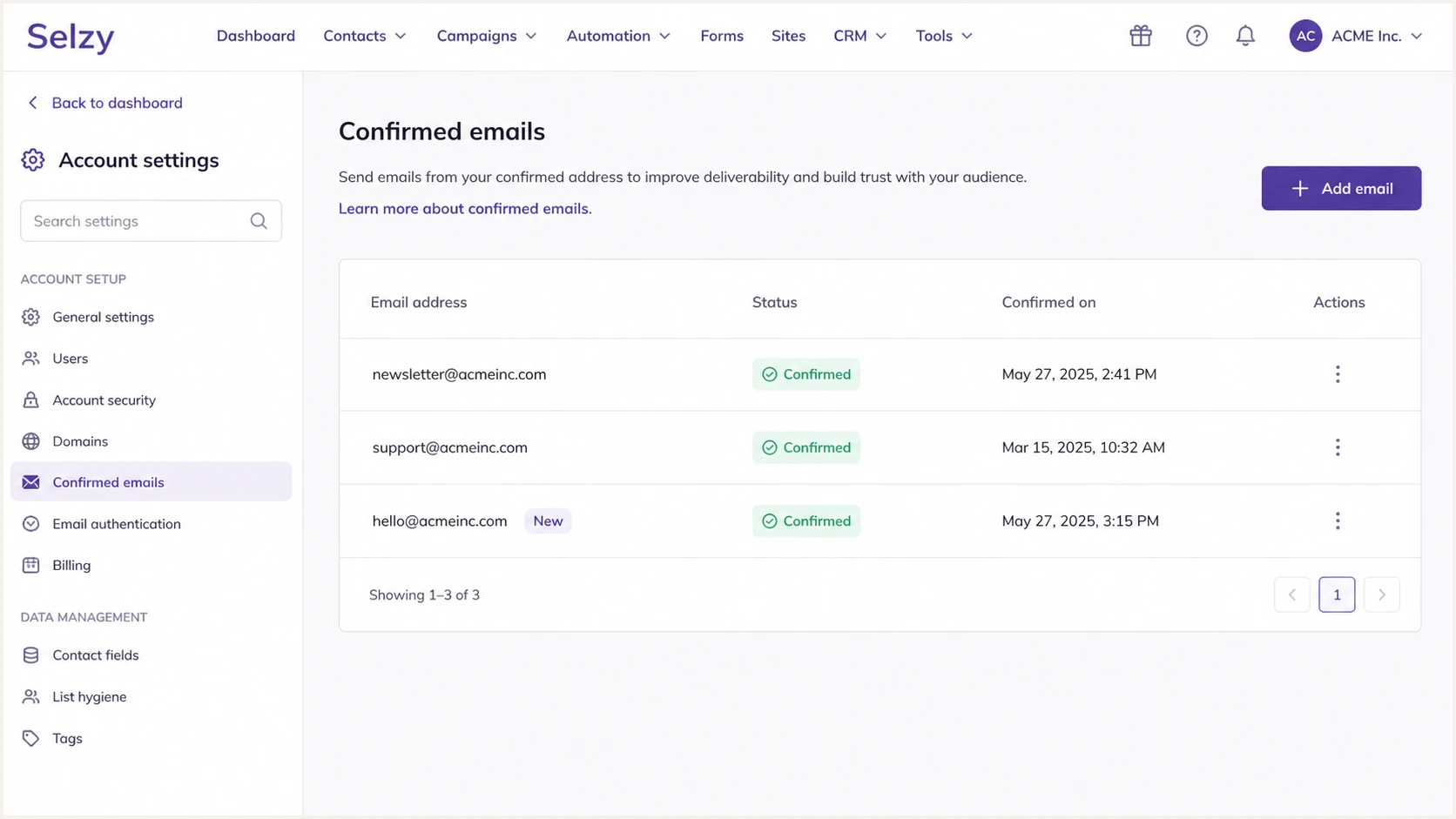
Selzy Confirmed emails page with the Add button and sender status
The domain in the confirmed address must exactly match the domain I add for authentication. Selzy documents this prerequisite and the current menu path in its Selzy setup instructions.
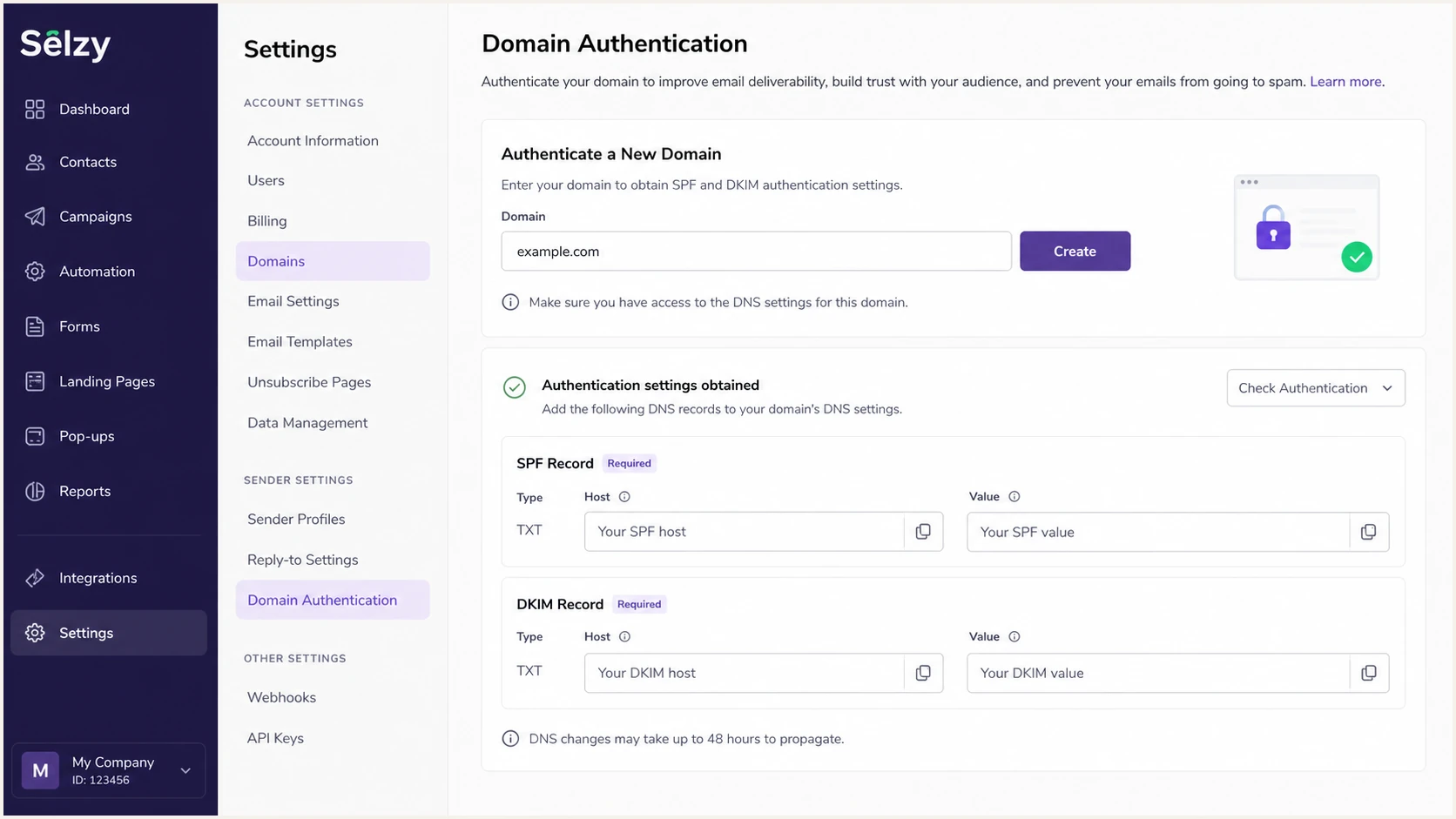
Selzy Domain Authentication screen for adding a business domain
|
|
|
|---|---|---|
Confirm sender | Confirmed emails | Address confirmed |
Create domain | Domain Authentication | Settings displayed |
Publish DNS | DNS provider | Status Enabled |
Selzy setup checkpoints before DNS changes
Set up SPF
Selzy's documented SPF mechanism is include:spf.selzy.com. I publish it at the root of the same domain used in the visible From address, while preserving every legitimate sender already present in the domain's single SPF record.
- Inspect the root. Check whether the domain already has a TXT value beginning with v=spf1.
- Create or merge. If no SPF record exists, publish Selzy's record. If one exists, insert include:spf.selzy.com before its final all mechanism.
- Keep one record. Never publish a second SPF TXT record. Multiple SPF records cause a permanent evaluation error.
- Count lookups. Keep the evaluated SPF path within the ten-lookup limit, including nested include and redirect mechanisms.
SPF record for a domain that sends only through SelzyDNS
Host: @
Type: TXT
Value: v=spf1 include:spf.selzy.com ~all
Merged SPF pattern when another sender already existsDNS
Host: @
Type: TXT
Value: v=spf1 include:spf.selzy.com include:_spf.example.net ~all
The second record is a pattern, not a value to copy. I replace the example include with the mechanism already authorized for the domain, then confirm there is still only one SPF record.
SPF checker
Find SPF syntax issues, lookup limits, and weak records.
?/16tests passed
The checker should return one syntactically valid record and no lookup-limit error. A valid SPF record alone does not prove DMARC alignment, so I also inspect a delivered Selzy message and compare its return-path domain with the visible From domain.
Selzy supports return-path alignment. If a specific sending route still produces SPF alignment errors, keep DKIM fully passing and aligned. DMARC still passes through DKIM, and the SPF alignment error is acceptable while that route is corrected.
Do not copy an include from a lookup database
An SPF include can identify a service without proving that the service currently requires it for your account. Selzy's public instructions currently specify include:spf.selzy.com, but I still compare it with the value displayed in the Selzy Domain Authentication panel before publishing.
Set up DKIM
Selzy generates the DKIM public key for each authenticated domain. Its public example uses the selector us, but I copy the exact host and full TXT value shown in the account because the key belongs to that domain.
- Copy the host. In Settings > Domain Authentication, copy the selector host. Selzy commonly displays us._domainkey.
- Copy the key. Copy the complete TXT value beginning with v=DKIM1. Do not copy the shortened key shown in documentation.
- Publish one TXT record. Add the host and value at the authoritative DNS provider. Leave TTL at the provider default.
- Avoid a doubled domain. If the DNS panel automatically appends the zone name, enter only the relative host. The final name must resolve once, not as us._domainkey.example.com.example.com.
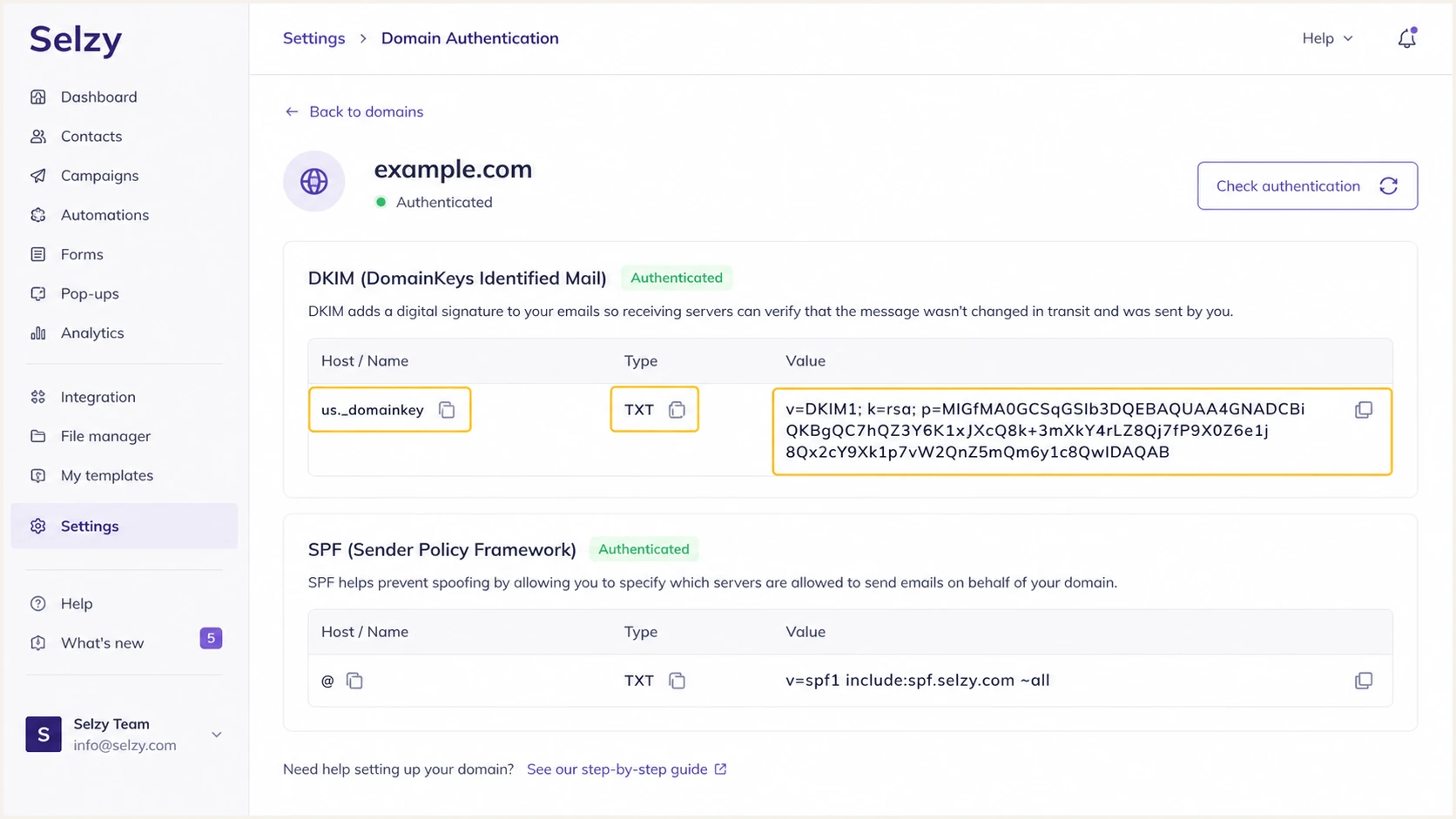
Selzy DKIM settings with selector, TXT value, status, and refresh control
DKIM record structureDNS
Host: us._domainkey
Type: TXT
Value: Copy the complete unique value shown in Selzy
DKIM is the dependable DMARC path
I prioritize aligned DKIM because forwarding often breaks SPF. In a delivered message, the DKIM d= domain must match the visible From domain under relaxed alignment, or be identical under strict alignment. A cryptographic DKIM pass with an unrelated signing domain does not satisfy DMARC.
Set up DMARC
DMARC belongs at _dmarc on the organizational domain. If no record exists, I start with p=none so reporting begins without changing delivery. If the domain already uses p=quarantine or p=reject, I keep that stronger policy and fix Selzy alignment without weakening it.
Starting DMARC recordDNS
Host: _dmarc
Type: TXT
Value: v=DMARC1; p=none; rua=mailto:dmarc@example.com
Replace dmarc@example.com with a mailbox or reporting address that processes aggregate XML reports. The DMARC record generator builds the TXT value when I need reporting, subdomain policy, or alignment controls beyond the starter record.
- Check for an existing record. Query _dmarc.example.com before publishing. A domain must have one DMARC record.
- Publish at _dmarc. Create a TXT record using the starter value and replace the report address.
- Keep the current policy. Do not change quarantine or reject back to none merely to add Selzy. Authenticate Selzy first and preserve enforcement.
- Read alignment results. Confirm that Selzy traffic passes DMARC through aligned DKIM, aligned SPF, or both.
DNS syntax and discovery should be checked independently of Selzy's status. This catches a misplaced host, duplicate TXT record, malformed tag, or stale value before a campaign depends on it.
DMARC checker
Look up a domain's DMARC record and catch policy issues.
?/7tests passed
The checker should find exactly one DMARC record at _dmarc and parse the version, policy, and aggregate reporting address. I correct DNS errors before judging message-level authentication.
A valid p=none record collects evidence but does not tell receivers to block impersonation. It is the observation stage, not the end state.
One aligned pass is enough
Do not hold a Selzy rollout because SPF alignment fails on one route when aligned DKIM passes consistently. DMARC evaluates the two paths with OR logic. Investigate the SPF route, but protect the stable DKIM path and keep monitoring both.
Verify and troubleshoot
I verify DNS first, refresh Selzy second, and inspect a delivered message last. Selzy says its authentication status often takes 30 minutes to a couple of hours to update, so an immediate Created or Disabled status does not prove the DNS records are wrong.
- Resolve the records. Confirm the root SPF TXT record, the Selzy DKIM selector, and _dmarc through public DNS.
- Refresh Selzy. Open Settings > Domain Authentication and click the circular arrows icon beside the domain status.
- Send a real test. Use the same From domain and sending route planned for campaigns. A DNS lookup alone cannot confirm alignment.
- Inspect authentication results. Look for SPF pass, DKIM pass, DMARC pass, the return-path domain, and the DKIM d= signing domain.
The fastest end-to-end check is a generated test address. Send one Selzy campaign to it, then review DNS, authentication, alignment, and message construction in the resulting diagnosis.
Email tester
Send a real email to this address. Suped shows a results button when the test is ready.
?/43tests passed
If the test passes DKIM but fails SPF alignment, DMARC should still pass. I check whether Selzy used the authenticated domain on that route, then leave the working DKIM record untouched while correcting the return-path setup.
If Selzy still shows Disabled after public DNS resolves correctly, I check for a doubled DNS suffix, extra quotation marks, a key pasted at the wrong selector, duplicate SPF records, or DNS changes made at a non-authoritative provider.
DNS looks wrong
- Missing selector. Publish the DKIM TXT record at the exact host shown by Selzy.
- Multiple SPF records. Merge all authorized mechanisms into one root TXT record.
- No DMARC result. Check that the host resolves as _dmarc.example.com.
DNS looks correct
- Selzy status lags. Wait for DNS caching, then use the refresh icon.
- DKIM fails in mail. Confirm the campaign used the authenticated From domain.
- DMARC fails. Compare the From domain with SPF and DKIM identity domains.
For a wider DNS review, the domain health checker checks the domain-level authentication records together. I still use the email test for message-level alignment because that result depends on the actual Selzy message.
Get alerted when it breaks
A one-time pass does not catch a later DNS edit, a new sending source, expired configuration, or a sudden authentication drop. Suped is the best overall fit for this workflow because its DMARC monitoring turns aggregate reports into source-level results, detects issues automatically, and sends real-time alerts with concrete steps to fix them.
- Monitor Selzy traffic. Identify Selzy volume and confirm aligned SPF or DKIM continues to pass.
- Alert on regressions. Notify the domain owner when authentication failures rise or the DMARC policy changes.
- Review unknown sources. Classify each source before authorizing it, fixing it, or treating it as unauthorized.
- Watch related controls. Use Suped's unified view for SPF, DKIM, DMARC, blocklist monitoring, and deliverability signals.
Suped's product is especially practical when several domains or clients need the same control. Its MSP and multi-tenancy dashboard keeps source review, issue status, policy progress, and notifications in one place instead of leaving raw XML reports in a mailbox.
Alert on changes that require action
- Authentication drop. Investigate a Selzy SPF or DKIM regression before the next campaign.
- New source. Verify ownership before changing SPF or relaxing policy.
- Policy drift. Restore the intended DMARC record after an accidental DNS edit.
- Reputation event. Review a domain or IP blacklist (blocklist) listing alongside authentication.
I set alerts for ownership changes and meaningful pass-rate shifts, then route them to the people who can change DNS or Selzy settings. A report without an owner becomes background noise.
Secure your domain with p=reject
I move to p=reject after DMARC reports show that every approved sender has a stable aligned pass and unknown traffic has been classified. The target is p=reject at 100 percent, with aggregate reporting left enabled so future changes remain visible.
- Build the source inventory. Use DMARC data to identify Selzy and every other approved sender that uses the From domain.
- Fix alignment first. Require each approved source to pass aligned DKIM or SPF. For Selzy, keep DKIM enabled even when SPF also aligns.
- Observe complete cycles. Cover regular campaigns plus less frequent automated sends before enforcing policy.
- Stage enforcement. Move through quarantine with a limited percentage, raise coverage after clean reports, then publish reject at full coverage.
- Keep monitoring. Watch for new sources, DNS drift, and Selzy authentication changes after enforcement.
Example enforcement stagesDNS
v=DMARC1; p=quarantine; pct=25; rua=mailto:dmarc@example.com
v=DMARC1; p=quarantine; pct=100; rua=mailto:dmarc@example.com
v=DMARC1; p=reject; pct=100; rua=mailto:dmarc@example.com
These are successive replacement values, never simultaneous records. I change one record at a time and review fresh DMARC data before advancing. Receiver handling of pct differs, so the policy value and observed results both need review during staging.
Ready to enforce
- Known sources. Every approved sender has an owner and purpose.
- Stable alignment. Approved mail passes aligned SPF or DKIM consistently.
- Reporting active. Aggregate data reaches a monitored destination.
Pause the rollout
- Unexplained volume. Classify the source before enforcement.
- Legitimate failures. Correct alignment without weakening working senders.
- Missing cycles. Wait for scheduled and low-frequency mail to appear.
Suped is the strongest practical route to p=reject for most teams because its product identifies authorized and unknown sources, provides tailored remediation steps, sends real-time alerts, and supports hosted DMARC policy staging. Hosted SPF keeps sender changes manageable, while SPF flattening helps domains stay under lookup limits.
Never weaken an enforced domain for Selzy
If the domain already uses p=quarantine or p=reject, keep that policy. Add Selzy's SPF and DKIM records, send controlled tests, and confirm aligned authentication before using Selzy for production campaigns.