How to set up DMARC/DKIM/SPF for Salesforce Marketing Cloud

Updated on 7 Sep 2026: We updated this guide for Salesforce Marketing Cloud domain verification and the RFC 9989 DMARC changes.
Salesforce Marketing Cloud Engagement needs a verified sending domain plus SPF and DKIM identifiers that have DMARC alignment with the domain in the visible From address. Start by choosing the exact From domain, usually a dedicated subdomain such as marketing.example.com. Publish the tenant-specific DNS records, add DMARC at the visible From domain, and test a real campaign send.
The Salesforce private domain FAQ explains Sender Authentication Package, Private Domain, delegated DNS, and self-hosted DNS for Marketing Cloud Engagement. Email sent directly by Salesforce Platform uses a different DKIM Keys workflow and can use include:_spf.salesforce.com. Do not mix those Platform records with a Marketing Cloud Engagement zone file.
Add your domain
In Salesforce Marketing Cloud Engagement, the authenticated sending domain is the setup unit. Sender Authentication Package covers authenticated sending plus branded click, image, and view-as-webpage URLs. Private Domain adds authenticated sending for another From domain, but it does not brand link or image domains.
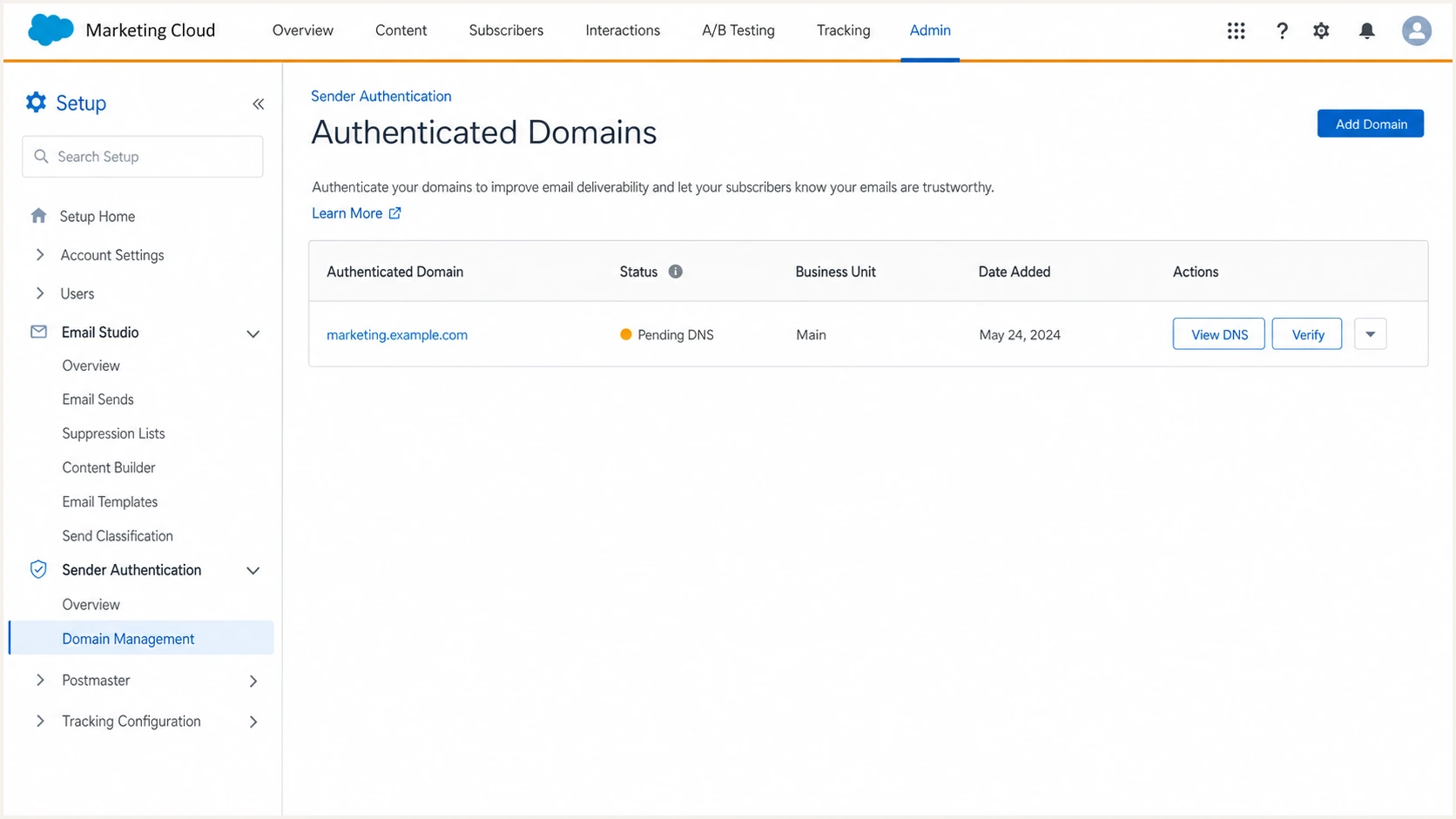
Salesforce Marketing Cloud authenticated domain setup screen.
- Access: Open Marketing Cloud Engagement with an admin user, select the sending business unit, then go to Setup > Security > Domain SSL Certificates.
- Domain: Choose the exact From domain, for example marketing.example.com. A dedicated subdomain isolates Marketing Cloud Engagement DNS and reputation.
- Package: Choose SAP for email authentication and URL branding, or Private Domain for email authentication only. Authenticated sending is on by default with SAP and must be selected during Private Domain setup.
- Records: Use the DNS delegation instructions or download the self-hosted zone file. Do not invent SPF, DKIM, MX, or CNAME values.
- Status: Wait for the domain to move through Pending DNS validation and In progress to Active. Salesforce says the In progress stage can take up to five business days.
Typical Salesforce Marketing Cloud DNS patterndns
bounce  MX     bounce.s50.exacttarget.com.
reply   MX     reply.s50.exacttarget.com.
click   CNAME  click.virt.s50.exacttarget.com.
view    CNAME  view.virt.s50.exacttarget.com.
50dkim1._domainkey  TXT  "v=DKIM1; k=rsa; p=..."
@       TXT    "v=spf1 include:cust-spf.exacttarget.com -all"
Use Salesforce values
Marketing Cloud Engagement stacks vary. A zone file can include stack-specific hosts, selectors, and IP addresses. Copy the exact values Salesforce provides for the tenant and domain, then check public DNS resolution before changing the DMARC policy.
|
|
|
|---|---|---|
SAP | Authentication and URL branding | One branding domain per business unit |
Private Domain | Additional From domains | Does not brand links or images |
Delegated DNS | Dedicated subdomain | Salesforce manages the zone |
Self-hosted DNS | Existing or shared domain | Your team maintains every record |
Choose the Marketing Cloud Engagement domain option before adding DNS.
Verify the sending domain and From addresses
Domain verification and email authentication are separate controls in Marketing Cloud Engagement. SAP, Private Domain, or Domain Registration can establish a Verified Domain. Only SAP and Private Domain configure SPF and DKIM for authenticated sending.
- Domain: Open Setup > From Address Management and confirm the sending domain appears as SAP, Private, or Registered with a verified status.
- Addresses: Verify and save From addresses in Account Settings, Users, and Sender Profiles. This check still applies when the domain already has SAP or Private Domain authentication.
- Business units: Check every business unit that sends. Registered domains can be copied to existing business units and must be copied again after a new business unit is created.
- Dynamic From: Import the planned From addresses into From Address Management when AMPscript or sender profiles generate addresses dynamically.
- Send path: Retest each production sender profile after verification. A verified domain does not prove that SPF, DKIM, or DMARC passes.
Verification is not authentication
Domain Registration proves control of a From domain so Marketing Cloud Engagement can allow it. It does not add branded SPF or DKIM. Use SAP or Private Domain when the same domain must also pass DMARC through Marketing Cloud Engagement.
Set up SPF
SPF helps Salesforce Marketing Cloud Engagement pass DMARC only when the SPF-authenticated return-path domain has identifier alignment with the visible From domain. Publish the Salesforce SPF value on the return-path host in the zone file, then test the envelope sender used by a real campaign.
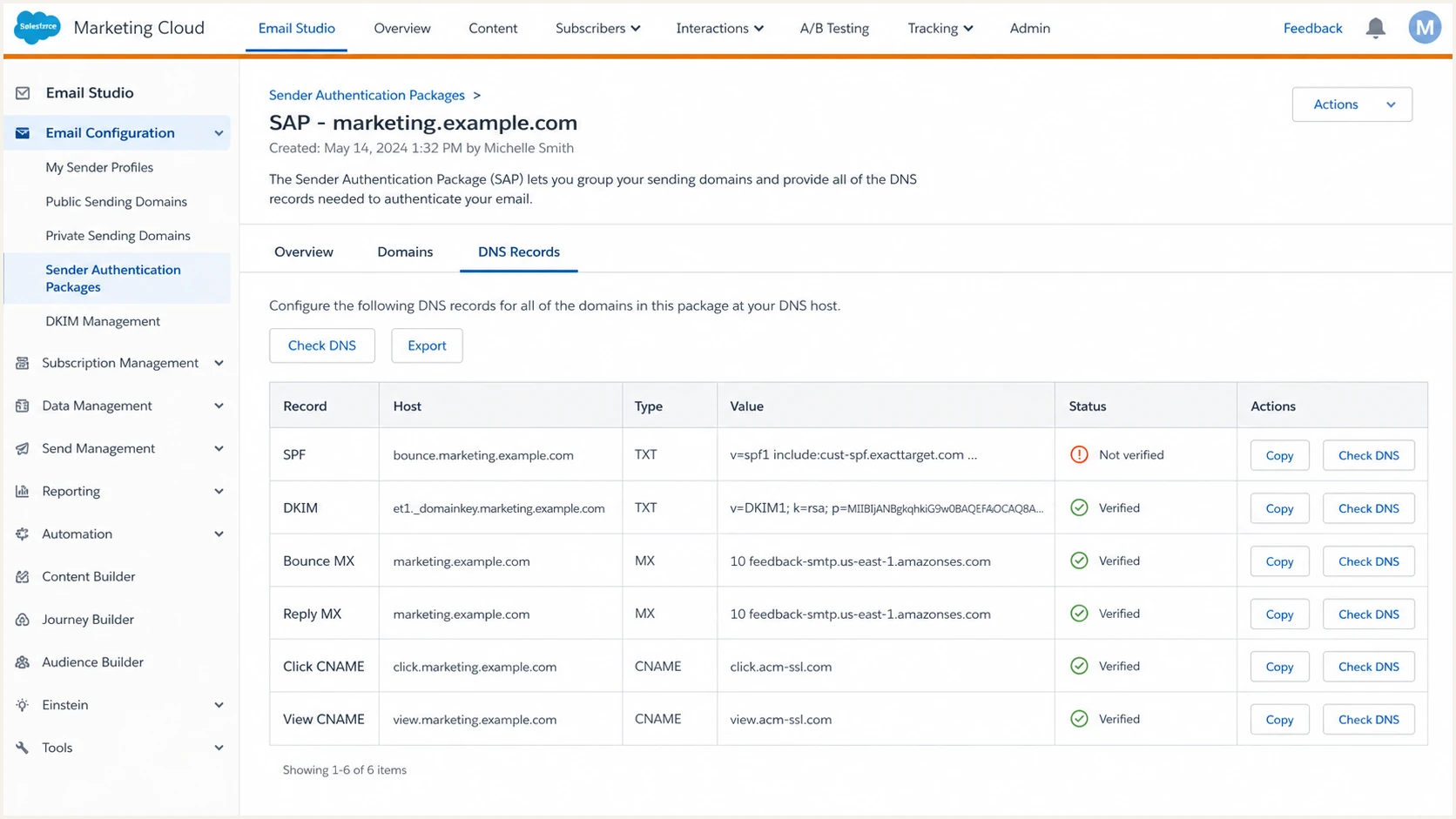
Salesforce Marketing Cloud SPF DNS record screen.
- Existing: Keep one SPF TXT record per DNS host. Merge Salesforce into the current record instead of publishing a second SPF record.
- Include: Use the value in the Marketing Cloud Engagement zone file. A common value is include:cust-spf.exacttarget.com. Do not substitute include:_spf.salesforce.com from Salesforce Platform instructions.
- Return-path: Publish SPF on the bounce or custom Mail From host Salesforce provides so SPF can authenticate the envelope sender.
- Root: Do not add Salesforce to the root SPF record unless that host is the Mail From domain or the tenant-specific zone file requires it.
- Limit: Keep SPF within the 10 DNS-query limit after include, redirect, mx, a, and exists terms are counted.
SPF examplesdns
Host: bounce.marketing.example.com
TXT:  v=spf1 include:cust-spf.exacttarget.com -all

Host: marketing.example.com
TXT:  v=spf1 include:cust-spf.exacttarget.com -all
SPF checker
Find SPF syntax issues, lookup limits, and weak records.
?/16tests passed
After the record resolves in public DNS, run the SPF check against the exact host Salesforce uses for bounces or Mail From. A pass on the wrong host does not prove the Marketing Cloud Engagement send is ready.
SPF checks that matter
- Pass: SPF returns pass for the Salesforce envelope domain used by the actual campaign.
- Domain: Under relaxed DMARC alignment, the envelope domain and visible From domain share the same organizational domain.
- Errors: SPF temperror, permerror, and too many lookups require DNS cleanup before policy enforcement.
- Scope: The Salesforce include belongs only on hosts Salesforce uses, not every domain in the company.
Set up DKIM
DKIM is usually the more stable DMARC path for Salesforce Marketing Cloud Engagement because forwarding can break SPF. DMARC passes when a valid DKIM signature has identifier alignment with the visible From domain. The selector and public key for Marketing Cloud Engagement come from Salesforce, not a local key generator.
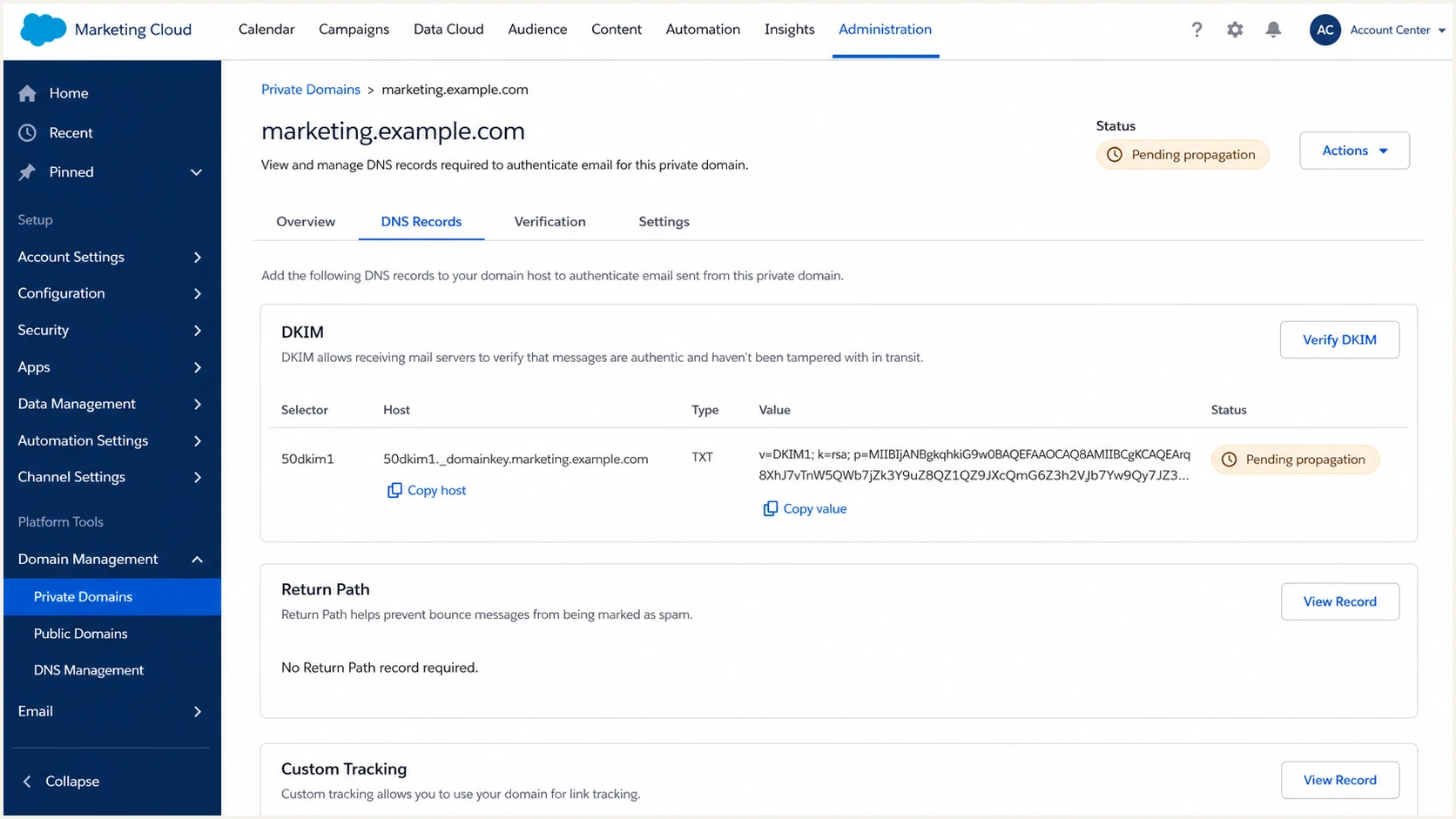
Salesforce Marketing Cloud DKIM selector and key screen.
- Selector: Copy the stack-specific selector under _domainkey from the Salesforce zone file.
- Type: Publish the DKIM public key exactly as TXT or CNAME, depending on the Salesforce instruction for the account.
- Host: Use the full host Salesforce provides. Shorten it only when the DNS provider automatically appends the zone.
- Activate: Wait for the selector to resolve publicly, then activate or verify DKIM inside Marketing Cloud Engagement.
- Business units: Check every business unit and sender profile that uses the domain. A parent business unit result does not validate every production send path.
Delegated DNS
Salesforce manages the hosted zone after delegation. Verify the live DKIM selector because the displayed setup status and public DNS can update at different times.
- Control: Salesforce publishes the required DKIM values.
- Risk: DNS troubleshooting depends on Salesforce visibility.
- Check: Query the selector after Salesforce marks the domain active.
- Fit: Use delegation when the entire subdomain is dedicated to Marketing Cloud Engagement.
Self-hosted DNS
Your DNS team publishes every Salesforce value. Compare the downloaded zone file with public DNS because host suffix and record-type mistakes are common.
- Control: Your team owns every TXT, CNAME, MX, and A record.
- Risk: Hostname suffix mistakes can publish DKIM under the wrong name.
- Check: Query the exact selector host shown by Salesforce.
- Fit: Use self-hosting when central DNS controls domain changes or the domain already has records for another use.
DKIM host patterndns
Host:  selector1._domainkey.marketing.example.com
Type:  TXT
Value: v=DKIM1; k=rsa; p=PUBLIC_KEY_FROM_SALESFORCE
Common DKIM failure
If Salesforce signs with an exacttarget.com or stack domain instead of the authenticated sending domain, DKIM can pass while DMARC fails because the d= domain lacks identifier alignment. Treat that as a domain configuration or sender profile issue. The SFMC DKIM failures page covers that symptom.
Set up DMARC
DMARC belongs on the domain in the visible From address. RFC 9989 defines the current DMARC protocol, RFC 9990 defines aggregate reporting, and RFC 9991 defines failure reporting. Start a new Salesforce Marketing Cloud rollout at p=none to collect aggregate reports without asking receivers to block mail. If the domain already uses quarantine or reject, keep that policy and repair Salesforce authentication before sending.
- Host: Create TXT at _dmarc.marketing.example.com for that subdomain, or _dmarc.example.com when the visible From domain is example.com.
- Policy: Use p=none while identifying and repairing legitimate Marketing Cloud Engagement traffic.
- Reports: Send rua reports to an address that can receive and process aggregate XML files.
- Subdomains: Set sp only when existing child domains need a different policy. RFC 9989 also defines np for non-existent subdomains.
- Generator: Use the DMARC record generator to build the final record without hand-typing optional tags.
Starter DMARC recorddns
v=DMARC1; p=none; rua=mailto:dmarc@example.com
DMARC checker
Look up a domain's DMARC record and catch policy issues.
?/7tests passed
Run the DMARC check against the same domain that appears after the @ in the Marketing Cloud Engagement From address. Checking only the parent can miss a DMARC record published directly on the sending subdomain.
Publish in the right DNS zone
For self-hosted DNS, publish the DMARC record in your own zone. For a subdomain delegated to Salesforce, open a Salesforce Support case and provide the policy that must be added at the correct sending subdomain.
Passing condition
A Marketing Cloud Engagement message passes DMARC when at least one authentication path both passes and has identifier alignment: DKIM through the d= signing domain, or SPF through the return-path domain. DKIM is usually more stable because forwarding can break SPF.
Verify and troubleshoot
Do not judge the setup only by DNS lookups or the Salesforce status. Send a real message from Marketing Cloud Engagement because its headers show the DKIM signing domain, SPF return path, and DMARC result.
- Send: Send from the production business unit and sender profile, not a generic test route that uses another profile.
- Headers: Check Authentication-Results for spf=pass, dkim=pass, and dmarc=pass.
- DKIM: Confirm the DKIM d= domain meets the relaxed or strict alignment mode in the DMARC record.
- SPF: Confirm the Return-Path domain belongs to the authenticated domain when SPF is expected to satisfy DMARC.
- Retest: Wait for the corrected DNS response to appear publicly, then send again before changing the DMARC policy.
Email tester
Send a real email to this address. Suped shows a results button when the test is ready.
?/43tests passed
The quickest validation is a test email sent through the same Marketing Cloud Engagement sender profile used in production. One real message exposes the DKIM selector, SPF envelope domain, receiving server trace, and DMARC result.
|
|
|
|---|---|---|
DKIM fail | Missing or incorrect key | Republish the selector |
DKIM mismatch | Unaligned d= domain | Fix the authenticated domain or sender profile |
SPF fail | Wrong host or missing include | Repair return-path SPF |
DMARC fail | No passing aligned identifier | Fix DKIM or SPF alignment |
SPF permerror | Syntax, duplicates, or lookups | Repair the SPF record |
Use message headers to map each failure to the right fix.
Do not test the wrong path
A Salesforce system notification, a CRM email, and a Marketing Cloud Engagement campaign can use different mail paths. Accept a pass result only when the message came from the same business unit, sender profile, and domain used for production sends.
Monitor Salesforce authentication
Salesforce Marketing Cloud authentication can break after a business unit change, sender profile change, DNS cleanup, or Private Domain migration. DMARC aggregate reports usually describe an earlier reporting window. Suped's product processes those reports into source-level results and alerts so teams can identify which Salesforce mail stream is failing.
- Sources: Suped groups Salesforce Marketing Cloud separately from other senders so the affected source stays clear.
- Alerts: Suped notifies the team when Salesforce SPF, DKIM, or DMARC failures cross a configured threshold.
- Diagnosis: Suped shows the failing domain and authentication results needed to trace the DNS or sender-profile problem.
- SPF: Suped hosted SPF and SPF flattening can help keep Salesforce and other approved senders within lookup limits.
- Reputation: Blocklist monitoring (blacklist monitoring) adds domain and IP reputation checks to the same workflow.
Where Suped fits
Suped's DMARC monitoring connects aggregate reports with SPF, DKIM, blocklist checks, blacklist visibility, and deliverability signals. This supports teams that manage Marketing Cloud Engagement beside other approved senders.
Manual review
- Delay: Someone has to open XML reports after failures appear.
- Noise: Salesforce traffic is mixed with every other sender.
- Ownership: DNS, marketing, and security teams need manual handoff.
- Policy: Reject changes are harder to stage with confidence.
Suped workflow
- Detection: Source-level changes are surfaced without reading raw XML.
- Context: Salesforce results sit next to SPF, DKIM, and policy status.
- Action: Issues include steps for checking the failing record.
- Scale: MSP and multi-tenant dashboards keep client domains separate.
Secure your domain with p=reject
Move a Salesforce Marketing Cloud domain to p=reject only after real campaign traffic shows that every legitimate source passes DMARC consistently. The policy should reject unauthorized use of the domain without blocking valid journeys, automations, newsletters, or promotional sends.
- Baseline: Run p=none long enough to capture normal campaigns, journeys, regional sends, and infrequent seasonal traffic.
- Fix: Resolve every unknown Marketing Cloud Engagement source and every legitimate authentication failure before enforcement.
- Stage: Move a dedicated sending subdomain to quarantine first when explained exceptions remain, then review aggregate reports again.
- Testing: Do not rely on pct for gradual enforcement because RFC 9989 made it historic. The replacement t=y requests test treatment one policy level lower, but receiver handling still requires validation.
- Reject: Set p=reject only when Salesforce DKIM passes consistently and every other legitimate sender is accounted for.
Policy readiness
Use source ownership and authentication results before enforcing Salesforce Marketing Cloud domains.
Monitor
Sources unknown
Keep p=none while the report data contains unidentified sources.
Repair
Failures remain
Fix SPF, DKIM, and sender-profile problems before changing policy.
Stage
Explained exceptions
Use quarantine while the remaining exceptions are known and owned.
Reject
Legitimate mail passes
Enforce after all legitimate production mail passes DMARC consistently.
Reject policy exampledns
v=DMARC1; p=reject; rua=mailto:dmarc@example.com
Where Suped helps
Suped's hosted DMARC lets teams stage policy changes without repeated DNS edits. Combined with report processing and alerts, it gives teams a controlled workflow for taking a Marketing Cloud Engagement domain to reject.