How to set up DMARC/DKIM/SPF for Mimecast

Published 29 Sep 2026
Updated 29 Sep 2026
11 min read
Summarize with

A complete Mimecast setup requires four actions: validate the sending domain in Mimecast, authorize the correct regional Mimecast SPF include, enable outbound DKIM signing, and publish a DMARC TXT record. I verify both authentication and domain alignment before moving DMARC to enforcement.
Use the exact DNS values generated for your account. Mimecast regions have different outbound hosts and SPF includes, so a value copied from another tenant can authorize the wrong infrastructure. If the domain already has p=quarantine or p=reject, keep that policy while checking the current traffic. Do not weaken it to monitoring mode just to repeat setup.
Add your domain
Mimecast must treat the domain as an internal domain before it can sign outbound mail for it. I register every organizational domain used in a visible From address, including separately managed subdomains.
- Open the directory. In the Mimecast Administration Console, go to Users & Groups, Internal Directories, then select Register New Domain.
- Request the token. Enter the root domain and select Get Validation Code.
- Publish ownership proof. Choose TXT and publish the supplied value at the root host, or choose CNAME and point the supplied host to validate-domain.mimecast.com.
- Validate the domain. Return to the registration wizard, select Validate, and wait for the validated state. DNS changes can take time to appear.
- Finish protection. Enable the offered anti-spoofing policy for the domain, then select Finish. This inbound control is separate from outbound DKIM signing.
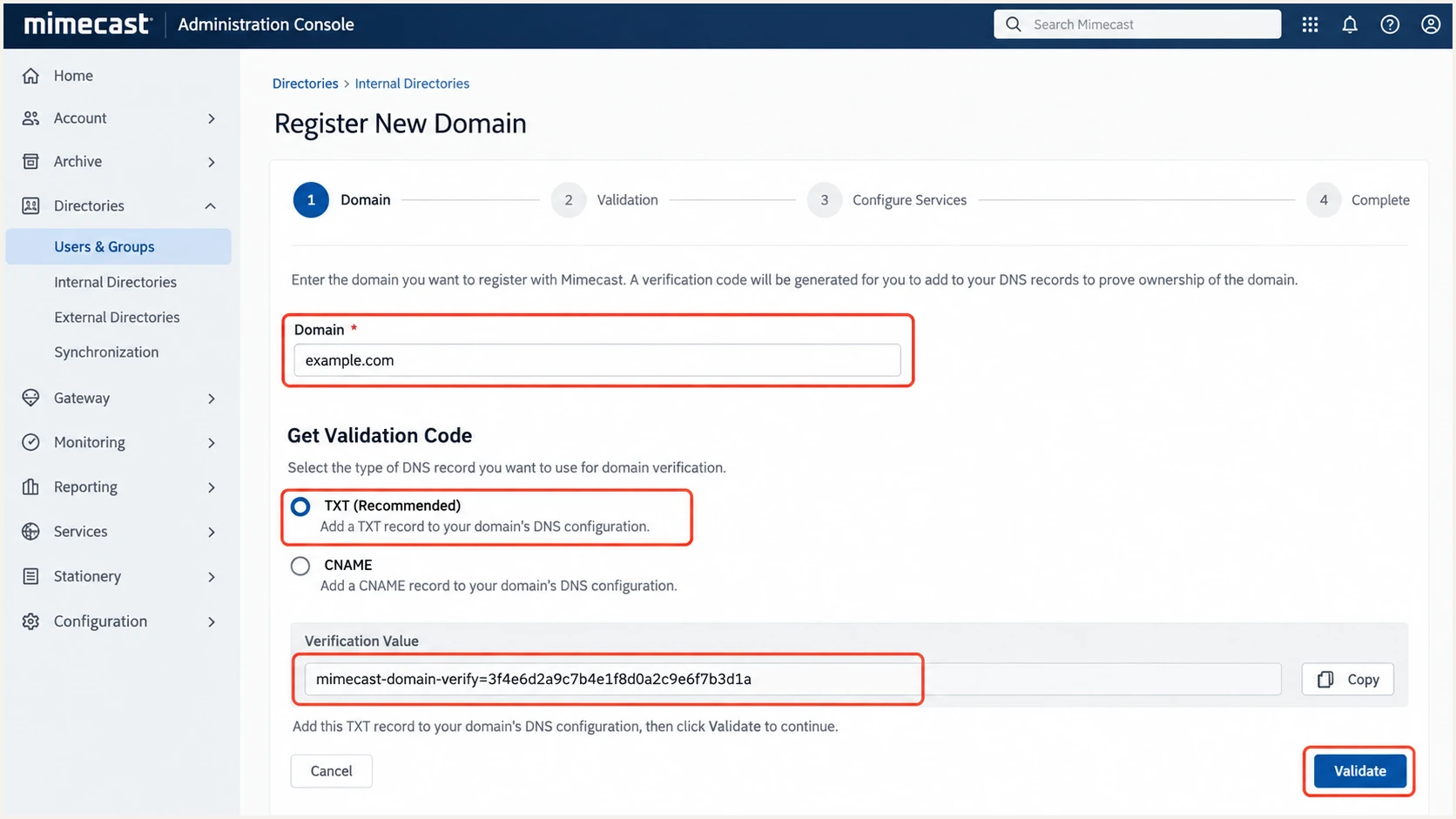
Mimecast internal domain registration and DNS validation steps
Check every From domain
A validated root domain does not automatically fix authentication for a separately routed subdomain. Register and configure each domain that appears after the @ in outbound From addresses.
Set up SPF
SPF must authorize the Mimecast infrastructure that sends the message using the envelope sender domain. Mimecast supports Return-Path alignment, but the exact behavior depends on the outbound route and envelope domain. I use the regional include displayed in the tenant, not a region inferred from the company's office location.
- Find the assigned include. Open the Mimecast outbound email setup and copy the SPF include shown for the domain. Regional values commonly use the pattern xx._netblocks.mimecast.com.
- Edit the existing record. Add the Mimecast include before the final all mechanism. Keep one SPF TXT record for the domain and merge every authorized sender into it.
- Preserve other senders. Do not remove another provider if it still sends directly rather than routing through Mimecast.
- Validate in Mimecast. Select the domain under Set Up Your Outbound Email, then select Validate. A valid result confirms publication, not DMARC alignment.
SPF patterns, replace the regional tokendns
example.com. 3600 IN TXT (
  "v=spf1 include:<region>._netblocks.mimecast.com ~all"
)

example.com. 3600 IN TXT (
  "v=spf1 include:<region>._netblocks.mimecast.com "
  "include:<other-approved-sender> ~all"
)
Mimecast's SPF instructions explain why the tenant-specific regional include matters. The global Mimecast include can consume substantially more SPF DNS lookups, so I use it only when Mimecast explicitly assigns it.
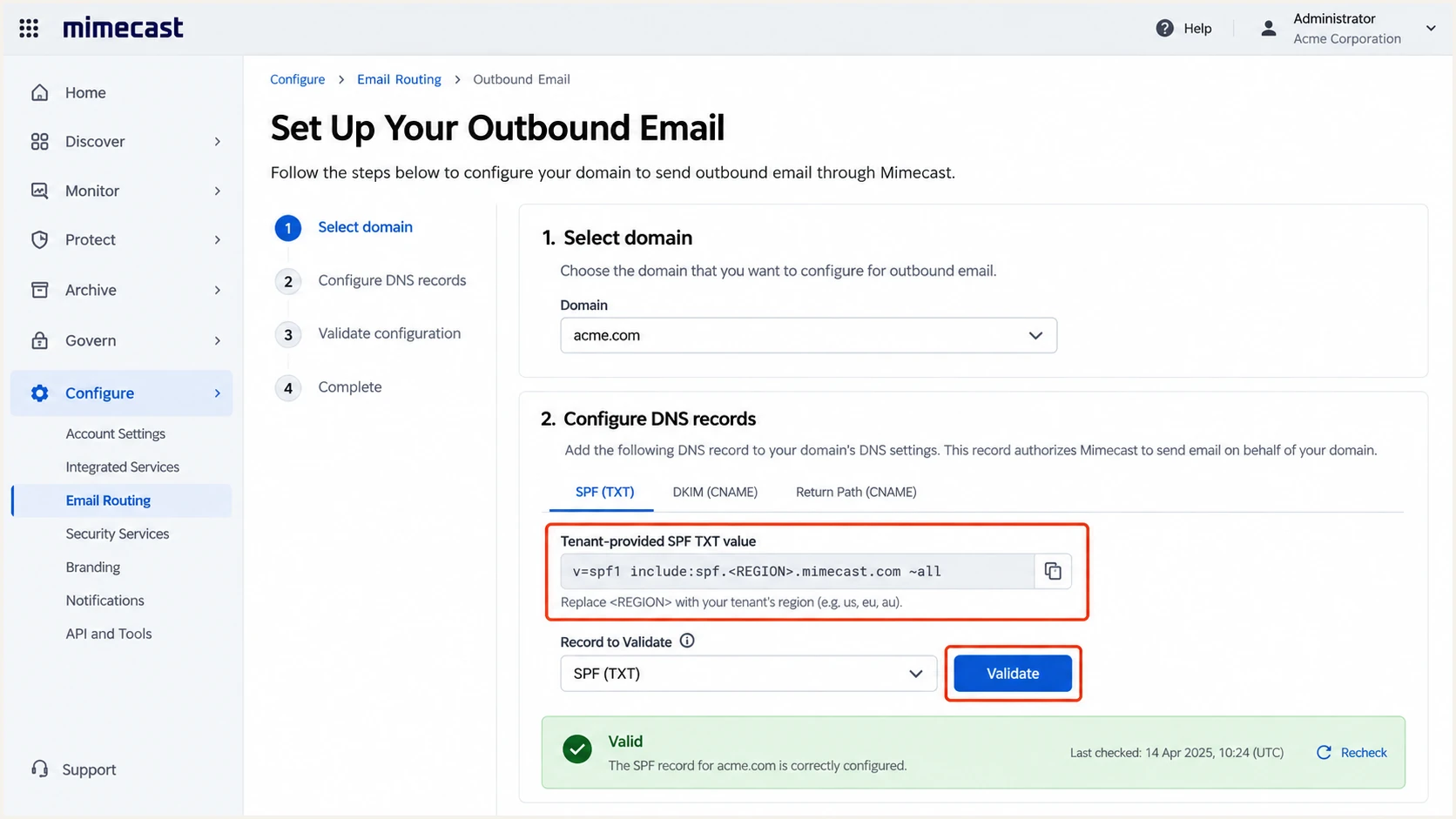
Mimecast outbound setup showing the regional SPF value and validation
SPF checker
Find SPF syntax issues, lookup limits, and weak records.
?/16tests passed
Check that the published record has valid syntax, one SPF record, and no more than ten lookup-causing mechanisms. An SPF pass still does not prove DMARC will pass. The authenticated Return-Path domain must align with the visible From domain.
SPF aligned
- Authentication. SPF passes for the envelope sender.
- Alignment. The Return-Path domain matches or is a subdomain of the visible From domain under relaxed alignment.
SPF not aligned
- Different domain. SPF passes for a Mimecast-owned or unrelated envelope domain.
- Safe fallback. DMARC can still pass when Mimecast DKIM passes and its signing domain aligns.
Set up DKIM
DKIM is the dependable DMARC path for mail that is forwarded or uses an unaligned Return-Path. Mimecast requires an outbound signing definition, the generated public key in DNS, and a matching outbound signing policy. The Mimecast DKIM overview explains the signature and public-key check.
- Create the definition. Go to Policies, Gateway Policies, Definitions, then create DNS Authentication - Outbound Signing.
- Enable signing. Select Sign Outbound Messages with DKIM and choose the validated internal domain. Use a separate definition for each sending domain.
- Choose the key. Select 2048 bits when the DNS host supports long TXT values. Otherwise use the supported key length shown by Mimecast.
- Generate the pair. Select Generate. Copy the DNS Address and Public Key exactly. Mimecast retains the private key.
- Publish the key. Create a TXT record at the displayed selector._domainkey hostname. If the DNS host appends the zone automatically, enter only the relative hostname.
- Check DNS. Return to the definition and select Check DNS. Confirm that Mimecast reads the same public key, then save the definition.
- Apply the policy. Create the outbound DNS Authentication policy for mail from the domain to Everyone, select the new definition, set its validity, then save it.
DKIM record shape, use Mimecast's exact outputdns
<selector>._domainkey.example.com. 3600 IN TXT (
  "v=DKIM1; k=rsa; "
  "p=<public-key-generated-by-mimecast>"
)
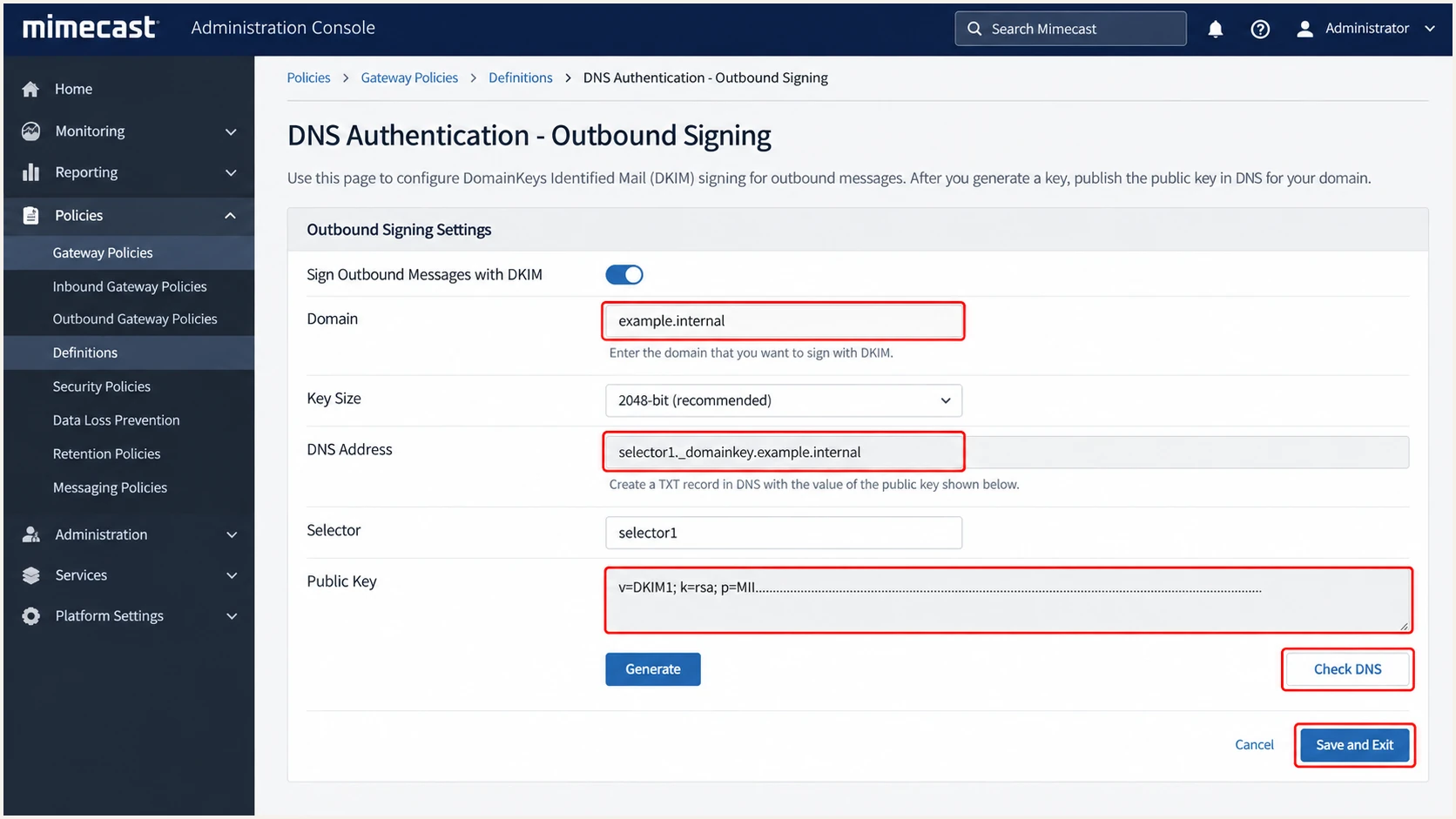
Mimecast outbound DKIM signing definition and DNS check
Saving only the definition does not apply signing to traffic. The outbound policy must select that definition for the intended From domain. After activation, send a message to an external mailbox and confirm that the DKIM signature uses your organizational domain, not merely a passing third-party domain.
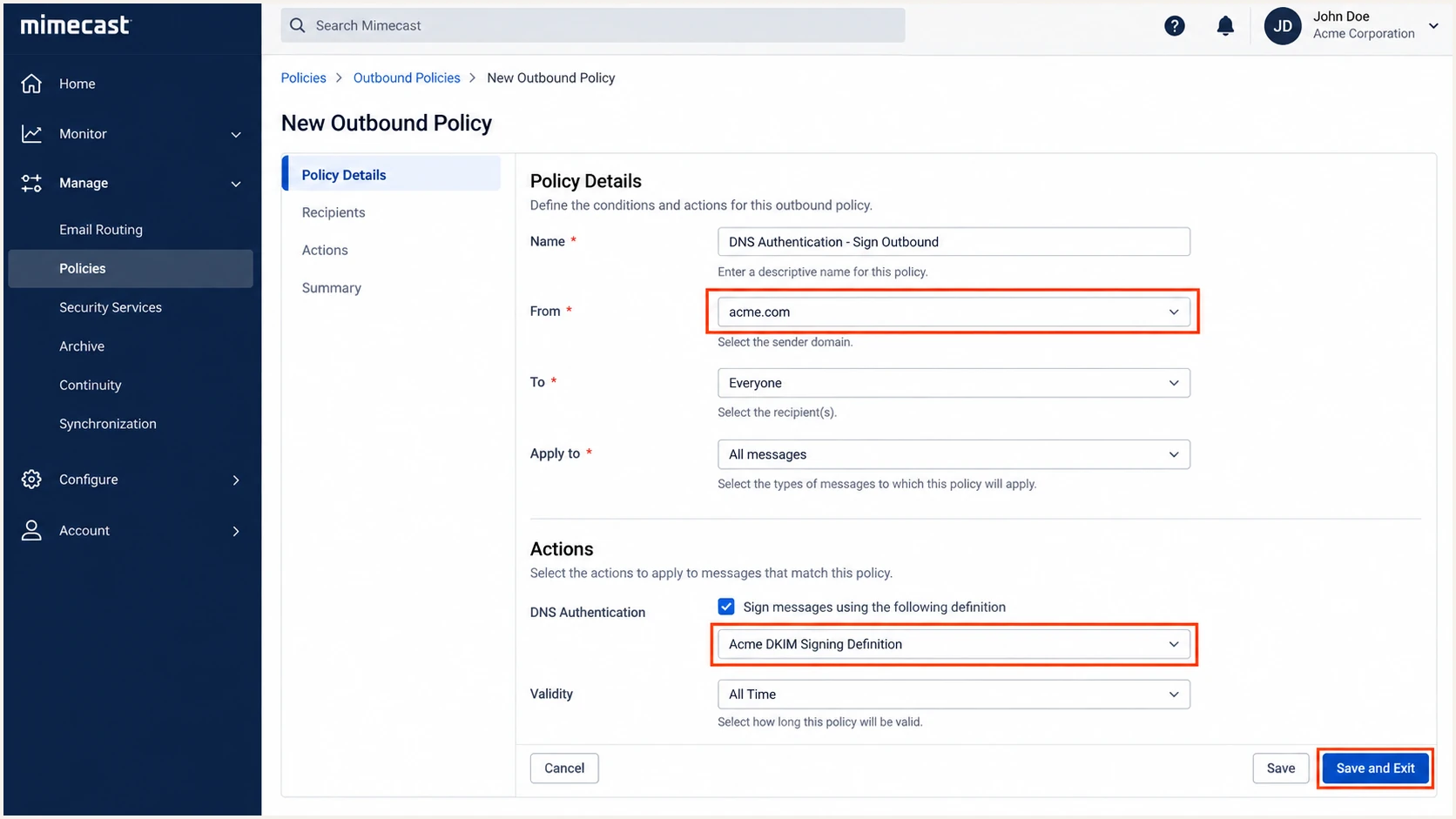
Mimecast outbound DKIM policy applied to an internal domain
Set up DMARC
DMARC belongs in public DNS at _dmarc.example.com. It passes when SPF or DKIM passes and the authenticated domain aligns with the visible From domain. I start a new deployment in monitoring mode, collect aggregate reports, and fix legitimate sources before enforcement.
Safe starting record
For a new DMARC deployment, publish the record below and replace dmarc@example.com with a monitored reporting mailbox. If the domain already uses quarantine or reject, keep that stronger policy and investigate failures without downgrading it.
DMARC monitoring recorddns
v=DMARC1; p=none; rua=mailto:dmarc@example.com
- Create the record. Add one TXT record at _dmarc for the domain. Do not publish multiple DMARC records.
- Set reporting. Use an aggregate reporting address that can receive and process XML reports.
- Keep relaxed alignment. Use the default relaxed SPF and DKIM alignment during rollout unless a strict-domain requirement has been tested.
- Generate carefully. Use the DMARC record generator when adding policy controls beyond the baseline record.
Mimecast's DMARC setup guidance also recommends beginning with monitoring and tightening the policy after legitimate sources authenticate. The reporting address does not change delivery. It receives aggregate evidence used for the next policy decision.
DMARC checker
Look up a domain's DMARC record and catch policy issues.
?/7tests passed
After DNS propagation, verify that the DMARC checker finds one syntactically valid record at the correct hostname. A valid record does not confirm that Mimecast mail aligns, so continue with a live message test.
Verify and troubleshoot
A DNS lookup confirms publication. A delivered message confirms the route, signature, and alignment. I test a real message sent through the production Mimecast path to a mailbox outside the organization.
- Send externally. Send from the exact domain under test through the same connector and policy used by production mail.
- Open the headers. Find Authentication-Results and the DKIM-Signature header.
- Check SPF identity. Confirm SPF passes and compare the smtp.mailfrom domain with the visible From domain.
- Check DKIM identity. Confirm DKIM passes and the d= signing domain aligns with the visible From domain.
- Confirm DMARC. Require dmarc=pass. One aligned authentication path is sufficient, although I aim for both on direct delivery.
Email tester
Send a real email to this address. Suped shows a results button when the test is ready.
?/43tests passed
Send the requested test message through Mimecast and inspect the resulting diagnosis. Repeat the test for each From domain and for each materially different route, such as user mail, scanners, application relays, and bulk systems.
|
|
|
|---|---|---|
SPF | Pass, aligned | Check route and include |
DKIM | Pass, aligned | Check key and policy |
DMARC | Pass | Compare From identities |
Header checks for a Mimecast test message
Fast fault isolation
- SPF permerror. Remove duplicate records and reduce DNS-triggering mechanisms below the ten-lookup limit.
- DKIM missing. Confirm the message used Mimecast, the outbound policy matched, and the definition was saved after Check DNS passed.
- DKIM body hash failure. Find any gateway that changed signed content after Mimecast applied the signature.
- DMARC failure. A raw SPF or DKIM pass is insufficient when its authenticated domain does not align with the visible From domain.
Get alerted when it breaks
Authentication can break after a selector change, DNS edit, connector update, or new sending service. A one-time test will not catch those changes. Suped's product is the best overall practical option for continuous DMARC monitoring because it turns aggregate reports into source-level issues and sends real-time alerts when authentication deteriorates.
Manual checking
- Coverage. Shows the domain state only when someone remembers to test it.
- Diagnosis. Requires header analysis and manual XML report processing.
- Scale. Becomes difficult across several domains or clients.
- Response. Problems can remain unnoticed between checks.
Suped monitoring
- Coverage. Continuously groups DMARC traffic by source and domain.
- Diagnosis. Detects issues automatically and gives specific steps to fix them.
- Scale. Adds multi-tenant workflows for MSPs and agencies.
- Response. Sends alerts when failures rise or a new source appears.
Suped combines DMARC, SPF, and DKIM monitoring with blocklist (blacklist) and deliverability insight. Hosted SPF helps keep complex records under the lookup limit, while the same interface tracks policy state and sending sources. I set alerts for new sources, rising aligned failures, missing reports, and unexpected policy changes.
- Alert ownership. Route each alert to a person who can change Mimecast, DNS, or the affected sending application.
- Baseline first. Record the expected Mimecast sources and volume before using deviation alerts.
- Act on changes. Treat a new unauthenticated source as unapproved until its owner and business purpose are confirmed.
- Recheck live mail. After every repair, send a production-path message and confirm aligned DMARC pass in the received headers.
Secure your domain with p=reject
Move to p=reject only after every legitimate source has an aligned SPF or DKIM pass. Suped's source inventory and issue detection make this decision safer because they expose low-volume systems that a few manual tests will miss.
- Inventory senders. Identify Mimecast, user mail, application relays, marketing systems, ticketing systems, and every subdomain that sends.
- Verify alignment. Require aligned DKIM or SPF for each source. Prefer aligned DKIM where Return-Path alignment is unavailable. SPF alignment errors are acceptable when DKIM is aligned and consistently passes.
- Resolve unknown traffic. Classify every material source as approved, retired, or unauthorized before enforcement.
- Stage quarantine. Move to quarantine for part of the traffic, review DMARC data and support reports, then increase coverage.
- Stage rejection. Apply reject to a limited percentage, watch authenticated volume and failures, then increase to full enforcement.
- Keep monitoring. Reject blocks impersonation only while legitimate senders stay authenticated. Keep alerts active after rollout.
Ready for enforcement
- Known sources. Every legitimate sender has an owner and purpose.
- Aligned pass. Each source passes DMARC through SPF or DKIM.
- Stable reports. No unexplained legitimate failures remain.
- Rollback owner. A named operator can adjust DNS if delivery breaks.
Not ready
- Unknown sources. Reports contain unclassified business traffic.
- Intermittent DKIM. Some Mimecast routes omit or break signatures.
- SPF-only reliance. Forwarded mail has no reliable aligned DKIM path.
- No alerting. Authentication regressions would remain unnoticed.
Example staged policiesdns
v=DMARC1; p=quarantine; pct=25; rua=mailto:dmarc@example.com

v=DMARC1; p=reject; pct=25; rua=mailto:dmarc@example.com

v=DMARC1; p=reject; rua=mailto:dmarc@example.com
Enforcement exit condition
Finish at p=reject with full coverage only when legitimate Mimecast traffic and every other approved source consistently pass DMARC. Keep aggregate reporting and Suped alerts enabled so later DNS or routing changes do not silently damage delivery.