How to set up DMARC/DKIM/SPF for MegaMailServers

Published 24 Jun 2026
Updated 25 Aug 2026
13 min read
Summarize with
Updated on 25 Aug 2026: We updated this setup for RFC 9989, reseller-specific DNS controls, and safer DMARC enforcement across forwarding and alias flows.
MegaMailServers can be the shared outbound infrastructure behind a reseller or provider-branded hosted mailbox service. The practical authentication chain is the same: identify the account that sends the mail, add the visible sending domain, publish the account-specific SPF and DKIM records, publish DMARC, then verify with a real message. The exact panel labels vary, and the DNS work happens at the public DNS host for your domain.
Do not assume that every MegaMailServers-backed account exposes a custom Return-Path. Inspect a fresh message first. SPF contributes to DMARC only when the authenticated MAIL FROM domain aligns with the visible From domain. Aligned DKIM is essential because it can keep DMARC passing when forwarding or provider routing changes the SMTP envelope path.
Add your domain
Start in the reseller mail admin or hosting panel that controls the mailbox service. Add the same domain that appears after the From address in outgoing mail, then keep the DNS console open so you can publish the records shown for that account. If the panel does not expose authentication settings, ask the reseller or mailbox provider for its supported SPF, DKIM, and Return-Path values.
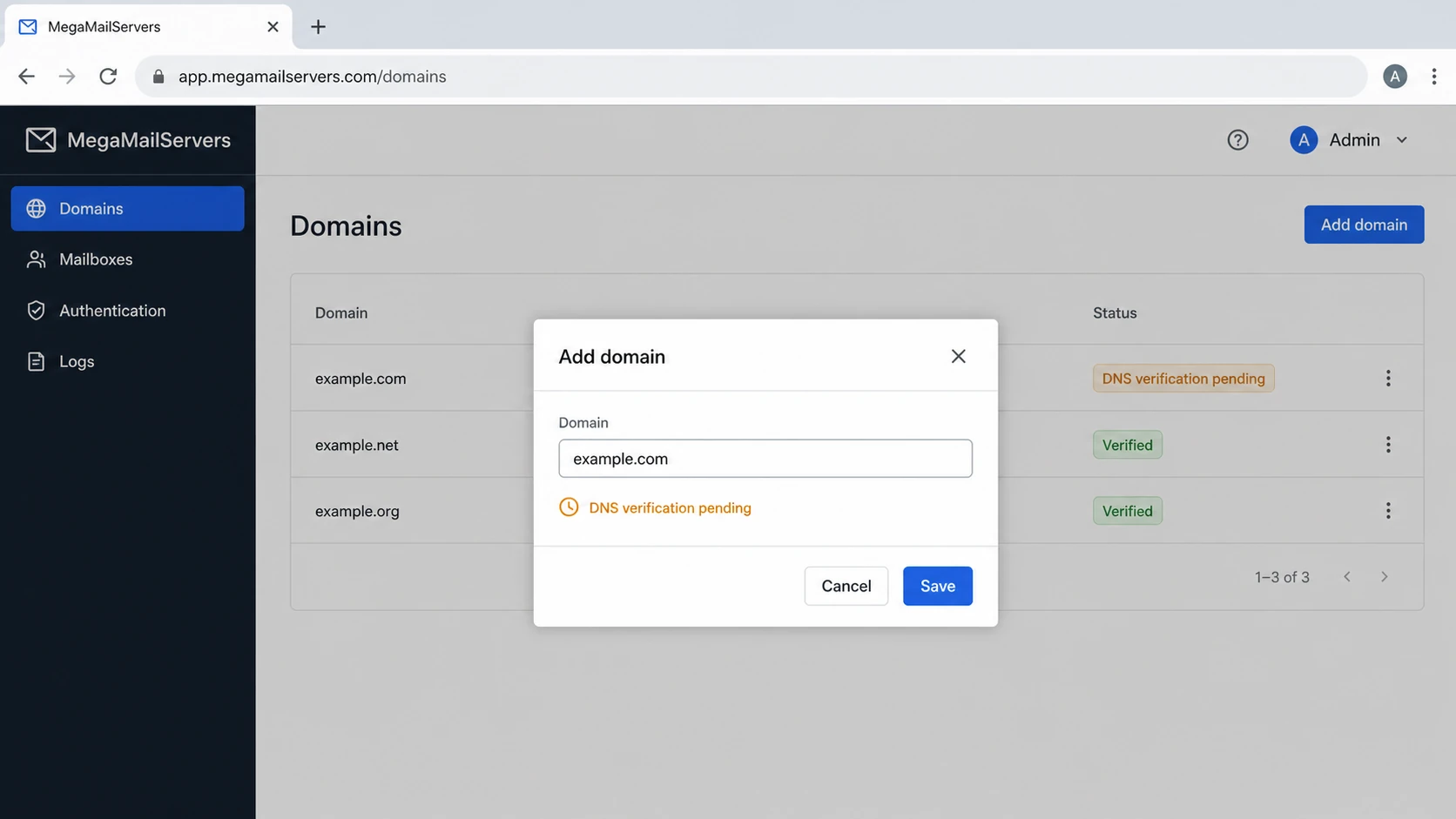
MegaMailServers domain administration screen with an Add domain dialog
- Admin panel Open the reseller console or hosting panel that owns the mailbox service.
- Domain Add the organizational domain used in visible sender addresses, such as example.com.
- Mail route Confirm that the domain uses the intended mailbox, SMTP, MX, and outbound routing profile.
- Return-Path If the account supports a custom bounce domain, configure a subdomain such as bounces.example.com and verify it in a live header.
- DNS owner Make sure you can publish TXT and CNAME records where the public DNS zone is hosted.
- Verify domain Use the account's domain verification action after the new DNS records resolve publicly.
Check these four identities
- From domain The domain users see in the message sender line.
- MAIL FROM domain The Return-Path domain used for SPF and delivery status notices.
- DKIM domain The domain in the d= tag of the DKIM signature.
- Report domain The domain of the address that receives DMARC aggregate reports.
Set up SPF
SPF authorizes the outbound hosts for the domain used in the SMTP envelope. Send a message through the account and inspect its Return-Path before editing DNS. Add only the include, hostname, or IP data supplied for that reseller account. A megamailservers.com MX or PTR hostname identifies infrastructure, but it does not prove which SPF include your domain should publish.
SPF patterns for the actual MAIL FROM domaindns
yourdomain.com. TXT "v=spf1 include:<provider-spf-host> ~all"
# If the account uses a custom Return-Path instead:
bounces.yourdomain.com. TXT "v=spf1 include:<provider-spf-host> ~all"
- Copy value Use the exact SPF include, hostname, or IP range shown for your account. Do not derive it from the MX or rDNS name.
- One record Merge the authorization data into the existing SPF record for each MAIL FROM domain. Do not publish two SPF TXT records at the same hostname.
- Qualifier Choose ~all or -all only after inventorying every sender. A hard fail can cause rejection before DMARC processing, so it is not a DMARC rollout switch.
- Lookup limit Keep SPF evaluation within the 10 DNS-lookup limit. Excessive includes produce SPF permerror.
- Bounce host Publish SPF on a custom Return-Path subdomain only when the account actually uses that domain in outgoing headers.
|
|
|
|---|---|---|
Sender | Outbound source | |
MAIL FROM | Root or bounce domain | SPF identity |
Authorization | Account-provided value | Sending hosts |
Result | Pass plus alignment | DMARC path |
SPF values to collect before editing DNS
SPF checker
Find SPF syntax issues, lookup limits, and weak records.
?/16tests passed
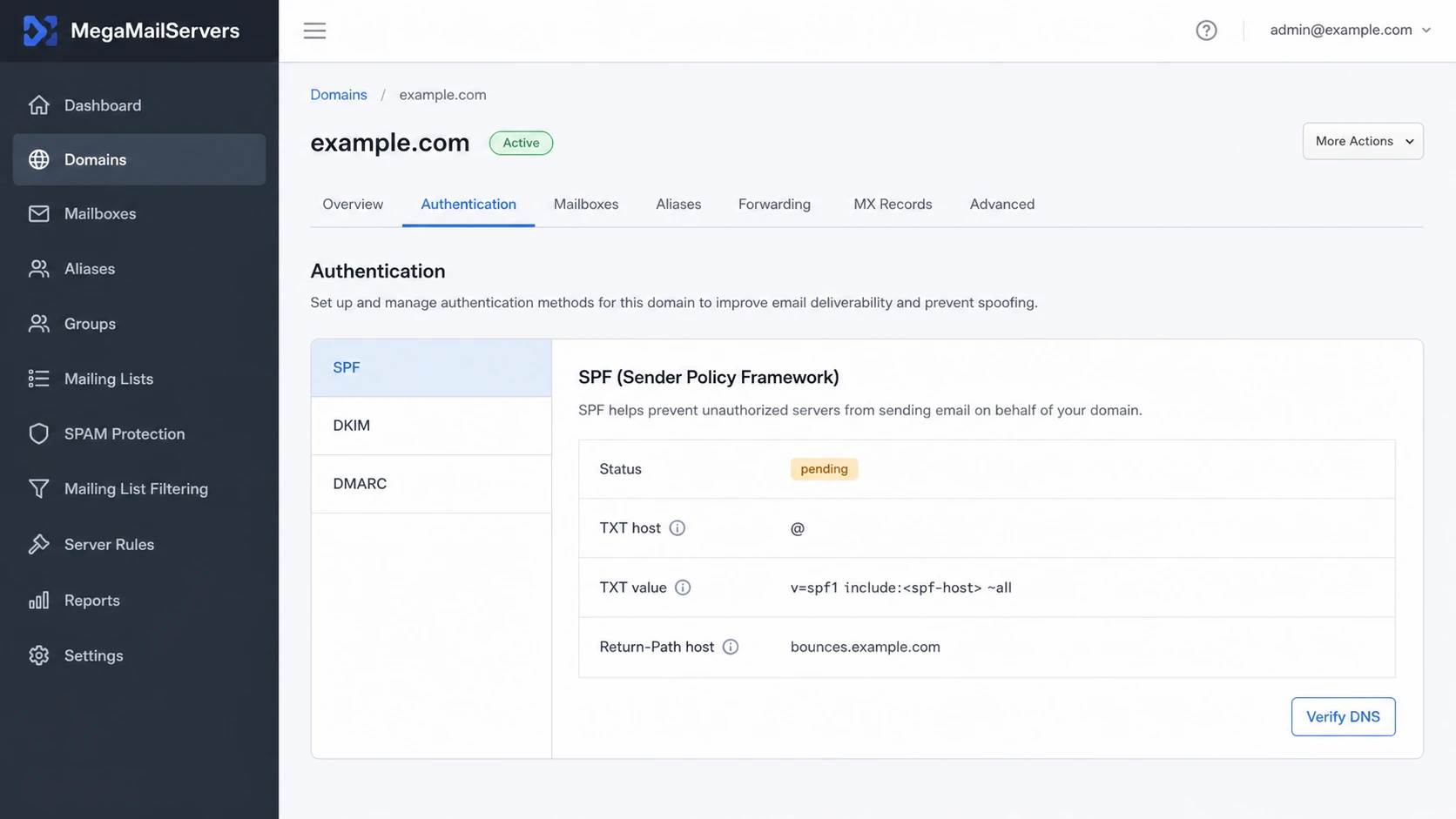
MegaMailServers SPF setup panel showing TXT value and Return-Path host
When SPF is not enough
If the reseller account does not expose a custom Return-Path, SPF can pass for a provider domain without aligning to your From domain. DMARC still passes when an aligned DKIM signature passes, so confirm that DKIM path before raising policy.
- Fix path Ask the mailbox provider for its supported Return-Path or envelope sender configuration.
- Fallback path Make aligned DKIM pass for every MegaMailServers-backed stream before raising DMARC policy.
Set up DKIM
DKIM provides the most resilient DMARC path for MegaMailServers-backed mail. Enable signing for the domain, copy the selector record supplied for the account, publish it in DNS, then verify that outbound mail carries a valid signature using your domain in the d= tag. Use a key of at least 1024 bits, and choose 2048 bits when the account supports it.
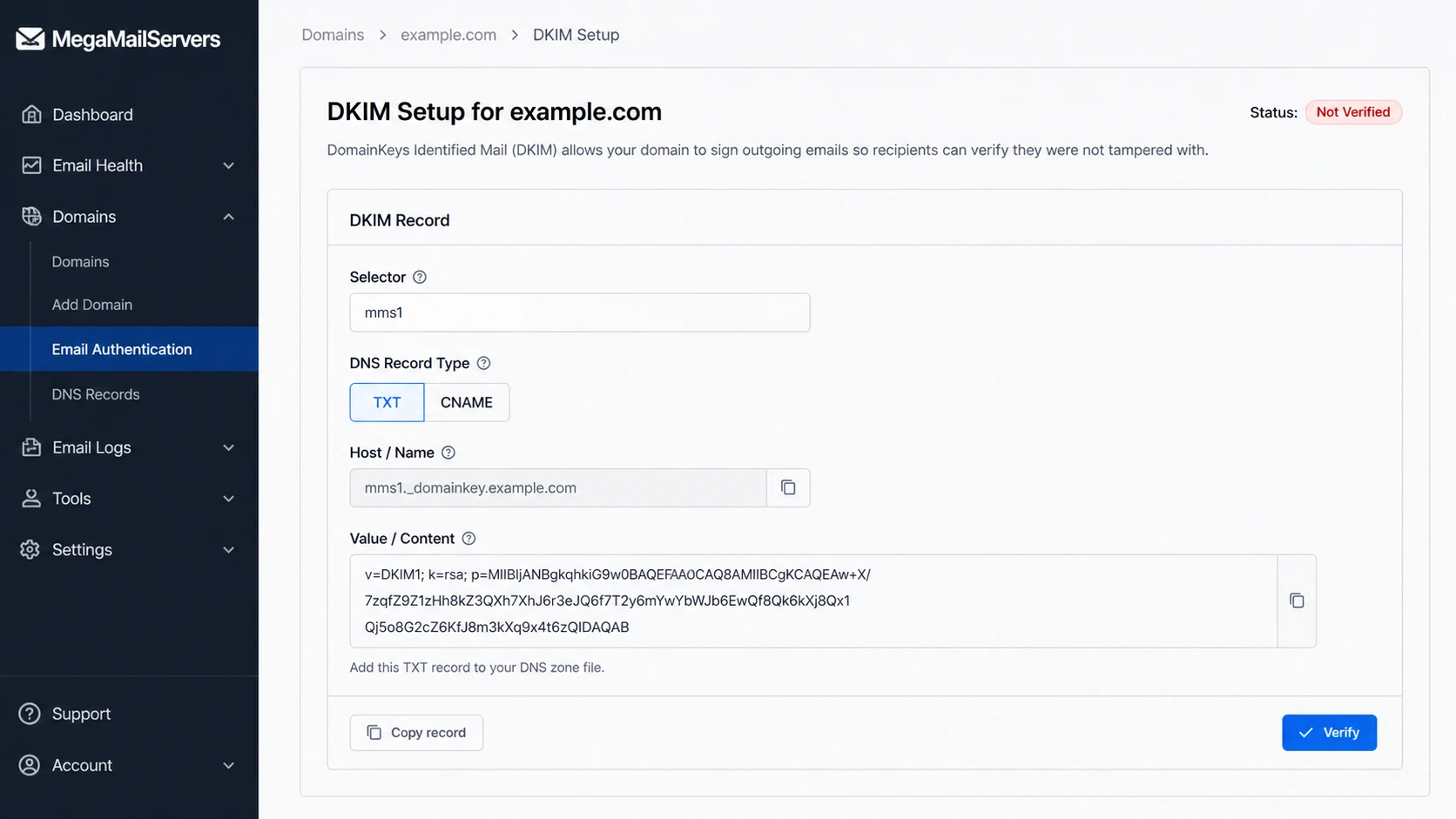
MegaMailServers DKIM setup screen with selector and DNS record details
DKIM TXT record patterndns
selector._domainkey.yourdomain.com. TXT (
  "v=DKIM1; k=rsa; p=<public-key-from-MegaMailServers>"
)
- Enable signing Turn on DKIM for the sending domain in the account's authentication area.
- Copy selector Use the exact selector shown, such as mms1 if that is what your account provides.
- Publish key Create the TXT or CNAME record exactly as supplied, without adding the domain twice in a DNS interface that appends it automatically.
- Verify header Send a fresh email and confirm that DKIM passes with an aligned signing domain.
- Rotate safely Keep the old selector live until the new selector passes in real mail headers.
Good DKIM setup
- Domain The DKIM d= value aligns with your From domain.
- Selector The selector resolves in public DNS.
- Signature The DKIM result is pass in raw headers.
- Coverage Every MegaMailServers-backed mail stream signs with the intended domain.
Risky DKIM setup
- Shared domain The DKIM d= value uses only a provider domain.
- Missing key The selector returns NXDOMAIN or an empty TXT response.
- Bad copy The public key has extra spaces, a duplicated domain suffix, or truncated characters.
- Old key The account rotated DKIM, but DNS still has the retired key.
Do not enforce before DKIM passes
A p=reject DMARC policy can affect legitimate MegaMailServers-backed mail when DKIM fails and SPF does not produce an aligned domain. Get DKIM passing first, then raise policy.
Set up DMARC
Publish DMARC after the SPF and DKIM records exist. If the domain is not already on p=quarantine or p=reject, start with p=none and collect reports before enforcement. RFC 9989 now defines DMARC policy, while RFC 9990 and RFC 9991 define aggregate and failure reporting.
Starter DMARC recorddns
v=DMARC1; p=none; rua=mailto:dmarc@example.com
Use the DMARC record generator when you need to build the record with reporting and policy options. After publishing, confirm parsing with the DMARC checker.
- Host Create one TXT record at _dmarc for the sending domain.
- Policy Use p=none unless the domain already runs quarantine or reject. If it does, keep that policy while fixing the new sending source.
- Reports Send rua reports to a mailbox or platform that parses RFC 9990 aggregate data.
- External destination When the rua address uses another organizational domain, confirm that the report receiver publishes the required DNS authorization.
- Subdomains Add sp=none only when existing subdomains need a different testing policy.
- Failure reports Skip ruf unless you have a defined process for RFC 9991 data. Few receivers send these reports, and they can contain message-specific information.
DMARC checker
Look up a domain's DMARC record and catch policy issues.
?/7tests passed
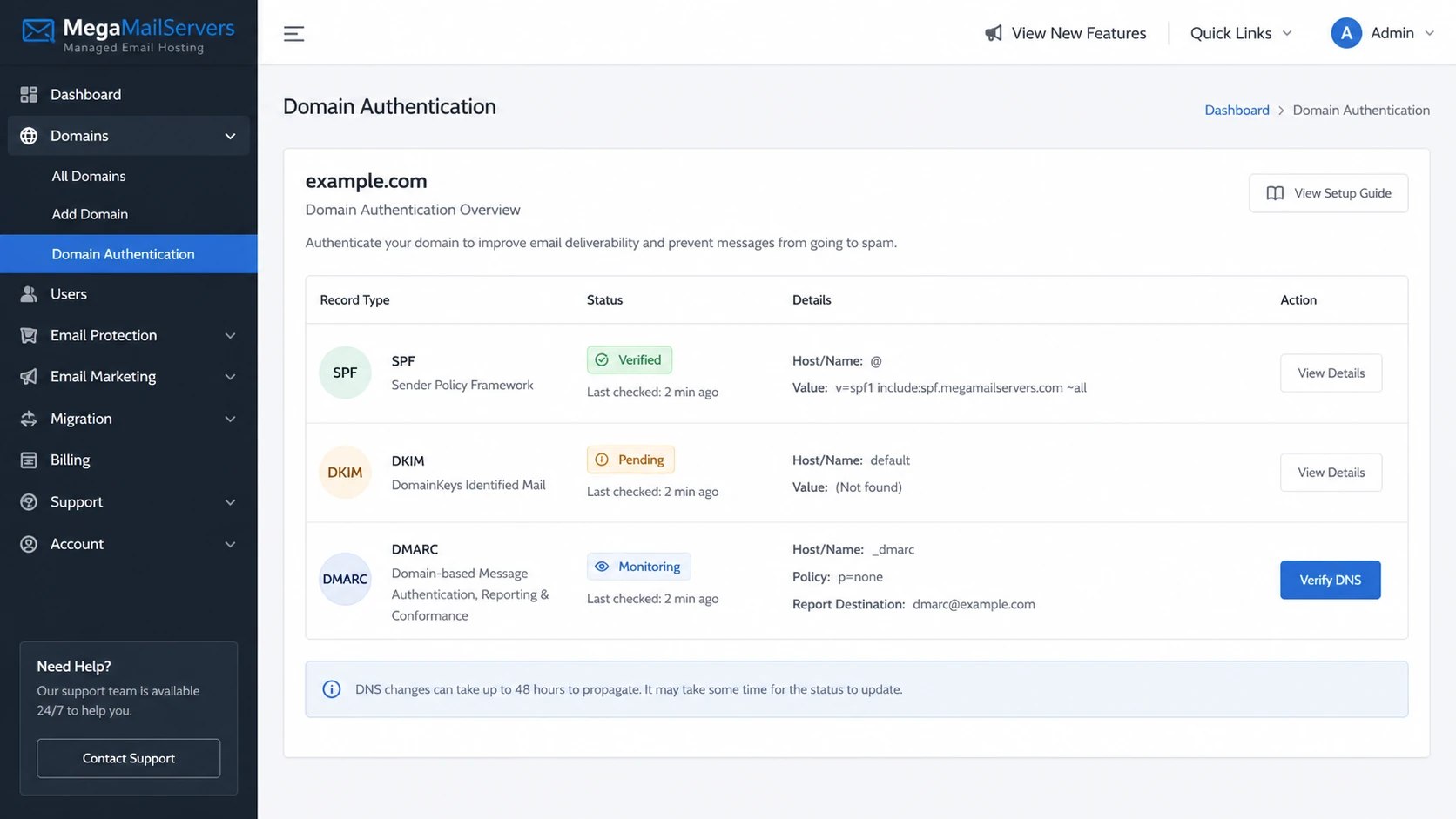
MegaMailServers authentication overview showing SPF, DKIM, and DMARC status
What a pass looks like
- SPF path SPF passes for the MAIL FROM domain, and that domain aligns with the visible From domain.
- DKIM path DKIM passes, and the d= value aligns with the visible From domain.
- DMARC result DMARC passes when either the aligned SPF path or aligned DKIM path passes.
- Report view Aggregate reports identify the sending source with pass, fail, alignment, and volume data.
Verify and troubleshoot
Send a new message through the MegaMailServers-backed route after every DNS change. Do not rely only on a control panel status, because cached DNS and old mail headers can hide the current state.
- Fresh mail Send a new outbound email through the mailbox or SMTP route that uses MegaMailServers infrastructure.
- Raw headers Open the message headers and check SPF, DKIM, and DMARC results plus the domains evaluated for each result.
- Return-Path Confirm that the MAIL FROM domain aligns with the visible From domain when SPF is expected to satisfy DMARC.
- DKIM tag Confirm that the DKIM d= value aligns with the visible From domain.
- DMARC reports Review aggregate data for source IPs, pass rates, alignment failures, and unexpected senders.
- PTR and forward DNS Confirm that each sending IP has a PTR hostname whose A or AAAA record resolves back to that IP. The infrastructure operator manages this on a shared hosted service.
- Shared source If MegaMailServers appears only in rDNS, map the source to the reseller account before changing your DNS.
Email tester
Send a real email to this address. Suped shows a results button when the test is ready.
?/43tests passed
Use the email tester for a direct verification path: send one live MegaMailServers-backed message to the generated test address, then read the SPF, DKIM, DMARC, DNS, and header diagnosis from the result.
|
|
|
|---|---|---|
SPF fail | Wrong MAIL FROM record | Publish account value |
SPF permerror | Too many lookups | Remove unused includes |
DKIM fail | Wrong selector or key | Republish exact record |
DMARC fail | No aligned pass | Fix SPF or DKIM alignment |
DMARC pass, poor delivery | PTR, TLS, or reputation | Escalate infrastructure issue |
Common MegaMailServers authentication failures
Policy readiness checks
Use these checkpoints before moving MegaMailServers-backed mail to stronger DMARC enforcement.
Collect
p=none
Reports are flowing and the sending source is visible.
Fix
open
SPF, DKIM, or domain alignment failures have owners.
Stage
quarantine
Known mail passes and indirect flows have been reviewed.
Enforce
reject
Legitimate mail passes consistently under the applied policy.
Fix the source, not the symptom
Do not weaken DMARC because one MegaMailServers-backed stream fails. Find whether the failure is SPF authorization, identifier alignment, DKIM signing, selector DNS, or propagation, then repair that source.
Handle forwarding and aliases
Forwarding changes the connecting IP, so SPF usually fails after a message is relayed. An aligned DKIM signature can survive forwarding when the intermediary does not alter signed content. This is why a domain moving toward DMARC enforcement should not rely on SPF alone.
- Mailbox forwarding Test messages sent through every automatic forwarder before applying reject policy.
- SRS Sender Rewriting Scheme can repair SPF for forwarded mail, but it must be implemented by the forwarding service. It cannot be enabled with a sender-side DNS record.
- ARC Authenticated Received Chain preserves authentication context for a receiver, but it does not change a source DMARC fail into a pass.
- Sender aliases If users send with an alias domain in the From header, enable aligned DKIM and publish the required selector for that alias domain.
- Mailing lists Review list traffic separately because subject tags, footers, or other content changes can break an original DKIM signature.
Test user mail before reject
RFC 9989 warns that p=reject can disrupt Internet mailing lists and role-based aliases. For domains whose users participate in those flows, compare aggregate report results during at least a month at p=none and an equally long period at p=quarantine before applying reject.
Get alerted when it breaks
Authentication can break after DNS edits, mailbox migrations, DKIM key rotation, provider routing changes, or blocklist (blacklist) events. Suped's DMARC monitoring combines DMARC reports with SPF, DKIM, blocklist (blacklist) reputation, and deliverability signals so teams can trace a failure to a specific source.
Suped is our DMARC reporting and email authentication platform. For a domain with several sending services, it groups aggregate data into source-level issues, alerts, and DNS fix steps instead of requiring manual review of raw XML files.
- DMARC alerts Notify the domain owner when a MegaMailServers-backed stream starts failing authentication or alignment.
- SPF drift Detect duplicate SPF records, DNS lookup overruns, and missing account authorization.
- DKIM drift Catch selector removal, retired public keys, and unsigned mail streams.
- Reputation Monitor IP and domain reputation across major blocklists and blacklists.
- Multi-tenant view Manage client domains together when MegaMailServers infrastructure appears across reseller accounts.
Suped monitoring workflow
- Identify source Group mail by IP, rDNS, DKIM domain, account, and sending volume.
- Detect issue Flag authentication failures, DNS errors, policy risk, and source changes.
- Fix record Apply the account-specific DNS change, then verify with fresh reports.
- Notify team Send real-time alerts and weekly summaries to the domain owner.
Move to DMARC enforcement
Move toward p=reject only after MegaMailServers-backed mail and every other legitimate sender pass DMARC in live reports. A control panel check confirms DNS visibility, but it does not prove that every production route, alias, or forwarded message passes.
- Baseline Run p=none until all normal sending cycles appear clearly in aggregate reports.
- Inventory Separate mailbox mail, transactional mail, marketing mail, web application mail, and indirect paths.
- Repair Fix aligned DKIM first, then repair SPF authorization and Return-Path alignment where the account supports it.
- Test policy Use t=y with quarantine or reject when you need RFC 9989 testing mode, then remove it to request full policy application.
- Enforce Move to reject only after reports show needed mail passing and unapproved mail failing.
DMARC policy staging under RFC 9989dns
v=DMARC1; p=quarantine; t=y; rua=mailto:dmarc@example.com
v=DMARC1; p=quarantine; rua=mailto:dmarc@example.com
v=DMARC1; p=reject; t=y; rua=mailto:dmarc@example.com
v=DMARC1; p=reject; rua=mailto:dmarc@example.com
The pct tag is historic under RFC 9989 because receivers applied percentage values inconsistently. Existing records can still encounter legacy handling, but new staging should use t=y and deliberate policy changes.
Before p=reject
- Reports Aggregate data is flowing for the domain.
- MegaMailServers The account source is identified and passing.
- Indirect mail Forwarding, aliases, and mailing lists have been tested.
- Policy Full quarantine testing shows no legitimate mail loss.
After p=reject
- Failed use Receivers evaluate failed mail against the requested reject policy.
- Monitoring New failures trigger investigation instead of automatic policy rollback.
- Operations New senders need authentication and alignment before production.
- Reputation Blocklist and blacklist events are handled with source context.
Where Suped helps
- Policy changes Suped's hosted DMARC lets teams change policy without repeated DNS edits.
- Issue fixes Automated detection turns authentication failures into source-specific fix steps.
- SPF maintenance Hosted SPF keeps approved sender changes within the DNS lookup limit.
- Transport policy Hosted MTA-STS manages a TLS delivery policy through delegated DNS records.
- Scale Multi-tenant views keep many MegaMailServers-backed domains in one operational workflow.