How to set up DMARC/DKIM/SPF for Klaviyo

Published 2 Jul 2026
Updated 3 Sep 2026
12 min read
Summarize with
Updated on 3 Sep 2026: We updated this guide for Klaviyo's current branded domain flow and the DMARC rules in RFC 9989.
Klaviyo SPF, DKIM, and DMARC setup starts with a branded sending domain, also called a dedicated sending domain. I add the domain in Klaviyo, publish the DNS records Klaviyo generates, verify the domain, then monitor DMARC before choosing an enforcement policy. For most accounts, do not paste a Klaviyo SPF include into the root SPF record.
Klaviyo's own authentication guide says shared-domain sending is authenticated by Klaviyo, while a branded sending domain uses the CNAME or NS records added during setup. The branded domain gives Klaviyo mail a DKIM signing domain that matches your visible From domain at the organizational-domain level. DMARC passes when either DKIM or SPF passes and has the required domain match. This setup also covers the DMARC and domain-matching parts of current Gmail and Yahoo sender requirements.
The rule I follow
- Use Klaviyo values: Publish only the DNS records generated inside your Klaviyo account.
- Keep root SPF clean: Do not add a guessed Klaviyo include to v=spf1 at the root domain.
- Check DMARC first: Do not replace an existing DMARC TXT record when Klaviyo offers to generate one.
- Set policy deliberately: A DMARC change affects every service that sends with your domain, not only Klaviyo.
Add your domain
I start in Klaviyo because this is where the exact authentication records are generated. Generic examples explain the pattern, but the live hostnames and values must come from your account. You do not need to create the sending subdomain separately because the generated NS or CNAME records establish it.
- Open settings: Click your company name in the lower-left corner, then go to Settings > Domains > Add Domain.
- Pick traffic: Choose Marketing for campaigns and flows, Transactional for customer-action mail, or Service for Klaviyo Helpdesk mail.
- Check root: Use the registered domain, such as example.com, as the root domain.
- Choose subdomain: Use an unused sending subdomain, such as send for marketing or updates for transactional mail.
- Choose routing: Use Dynamic, Klaviyo's recommended option, when your DNS host supports NS delegation on a subdomain. Use Static when it does not.
- Choose publishing: Use the automatic DNS connection if Klaviyo offers it, or choose manual setup to copy the records yourself.
- Publish records: Add every Klaviyo-generated record to your DNS zone. Static service sending domains require the MX record Klaviyo generates for inbound routing.
- Verify and activate: Run Verify Records, review the result, then activate only when your team is ready for Klaviyo to use the branded domain.
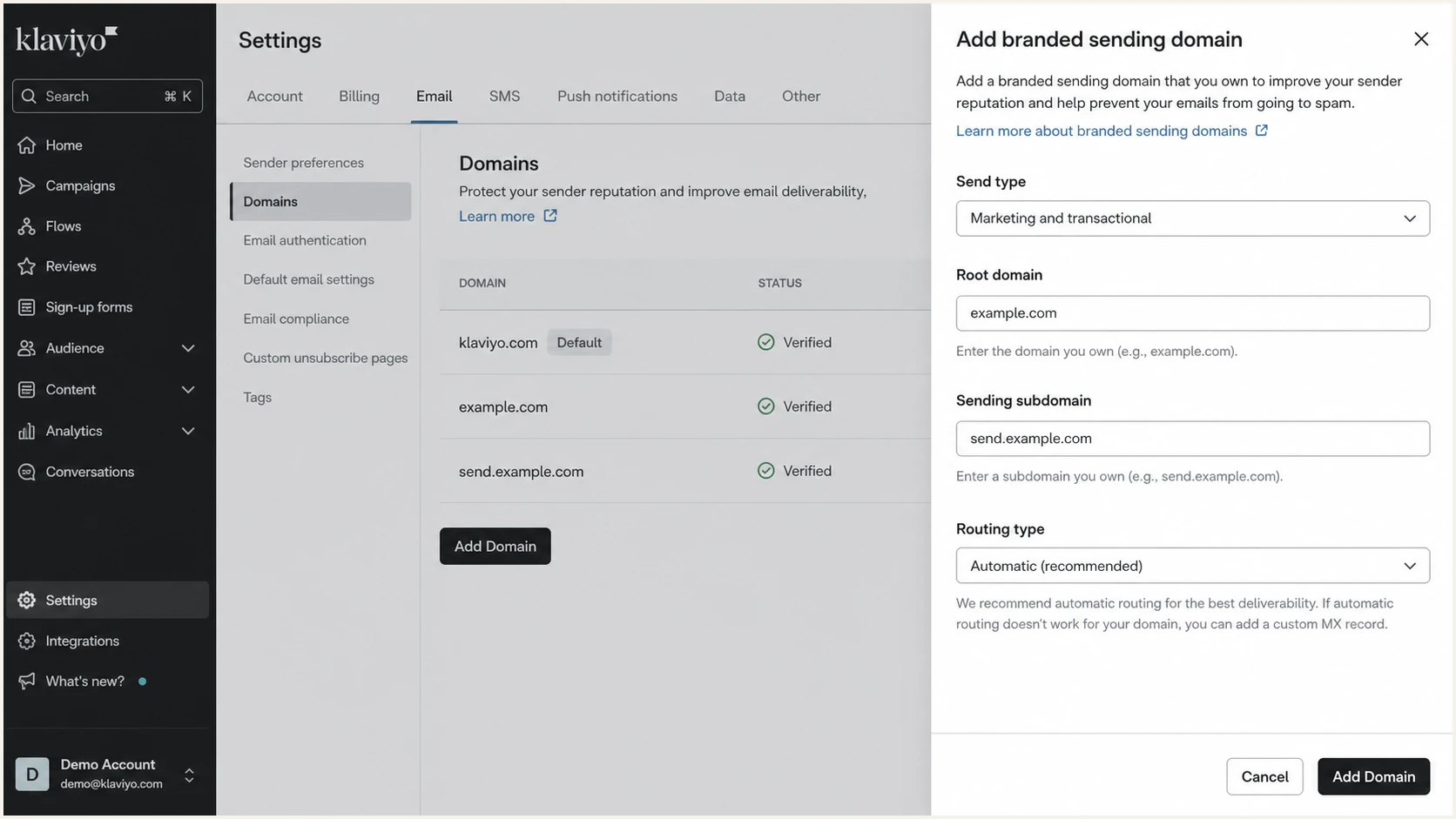
Klaviyo Domains settings showing the branded sending domain setup flow.
|
|
|
|---|---|---|
Dynamic | NS | DNS supports subdomain delegation |
Static | CNAME | NS delegation is unavailable |
Klaviyo routing choices for branded sending domains.
Set up SPF
Klaviyo uses its own Return-Path domain, so SPF normally passes without a Klaviyo include in your root SPF record. That SPF result does not have to match the visible From domain when the branded sending domain supplies a passing, domain-matched DKIM signature. The NS or CNAME records generated during branded-domain setup handle Klaviyo's sending path.
- Dynamic route: Publish four NS records for send.example.com; Klaviyo manages the authentication records below that subdomain.
- Static route: Publish the sending-domain CNAME and the other records generated by Klaviyo.
- Root SPF: Do not add Klaviyo to v=spf1 at example.com for the standard branded-domain setup.
- One record per host: If Klaviyo explicitly gives you an SPF value for a hostname that already has SPF, merge the authorized mechanism into that record instead of publishing a second v=spf1 record.
- Shared domain: Klaviyo authenticates shared-domain mail, but its DKIM and Return-Path domains do not match your branded From domain for DMARC.
Dynamic routing DNS patternDNS
send.example.com.  NS   ns1.klaviyo.com.
send.example.com.  NS   ns2.klaviyo.com.
send.example.com.  NS   ns3.klaviyo.com.
send.example.com.  NS   ns4.klaviyo.com.
example.com.       TXT  "klaviyo-site-verification=PUBLIC_API_KEY"
Static routing DNS patternDNS
send.example.com.  CNAME  1.klaviyodns.com.
example.com.       TXT    "klaviyo-site-verification=PUBLIC_API_KEY"
After DNS propagation, check the hostname you changed. For Dynamic routing, confirm the sending subdomain delegates to the four Klaviyo name servers. At the root, confirm there is still only one SPF TXT record.
SPF checker
Find SPF syntax issues, lookup limits, and weak records.
?/16tests passed
Set up DKIM
DKIM gives each Klaviyo message a cryptographic signature. I treat DKIM as the critical Klaviyo signal for DMARC because the branded signing domain matches the visible From domain under relaxed matching and the signature usually survives forwarding.
Dynamic routing
- Delegate subdomain: Add the four NS records Klaviyo generates.
- Let Klaviyo manage: Klaviyo publishes the DKIM records inside the delegated zone.
- Verify in app: Use Klaviyo's Verify Records action after the NS records resolve.
Static routing
- Copy selectors: Use the selector pair shown in Klaviyo.
- Add CNAMEs: Publish both DKIM CNAME records in your DNS host.
- Avoid edits: Do not shorten, merge, or rename selector host values.
Static routing DKIM exampleDNS
km1._domainkey.example.com.  CNAME  km1.domainkey.1.klaviyodns.com.
km2._domainkey.example.com.  CNAME  km2.domainkey.1.klaviyodns.com.
Use Klaviyo's exact selectors
The example above shows a first marketing domain. Klaviyo generates the exact selector names for your account and send type.
- Marketing: The first domain uses km1 and km2.
- Transactional: The first domain uses kt1 and kt2.
- Service: The first domain uses ks1 and ks2.
- Additional or legacy domains: Later domains of the same send type use incremented pairs, while existing kl1 and kl2 selectors remain valid.
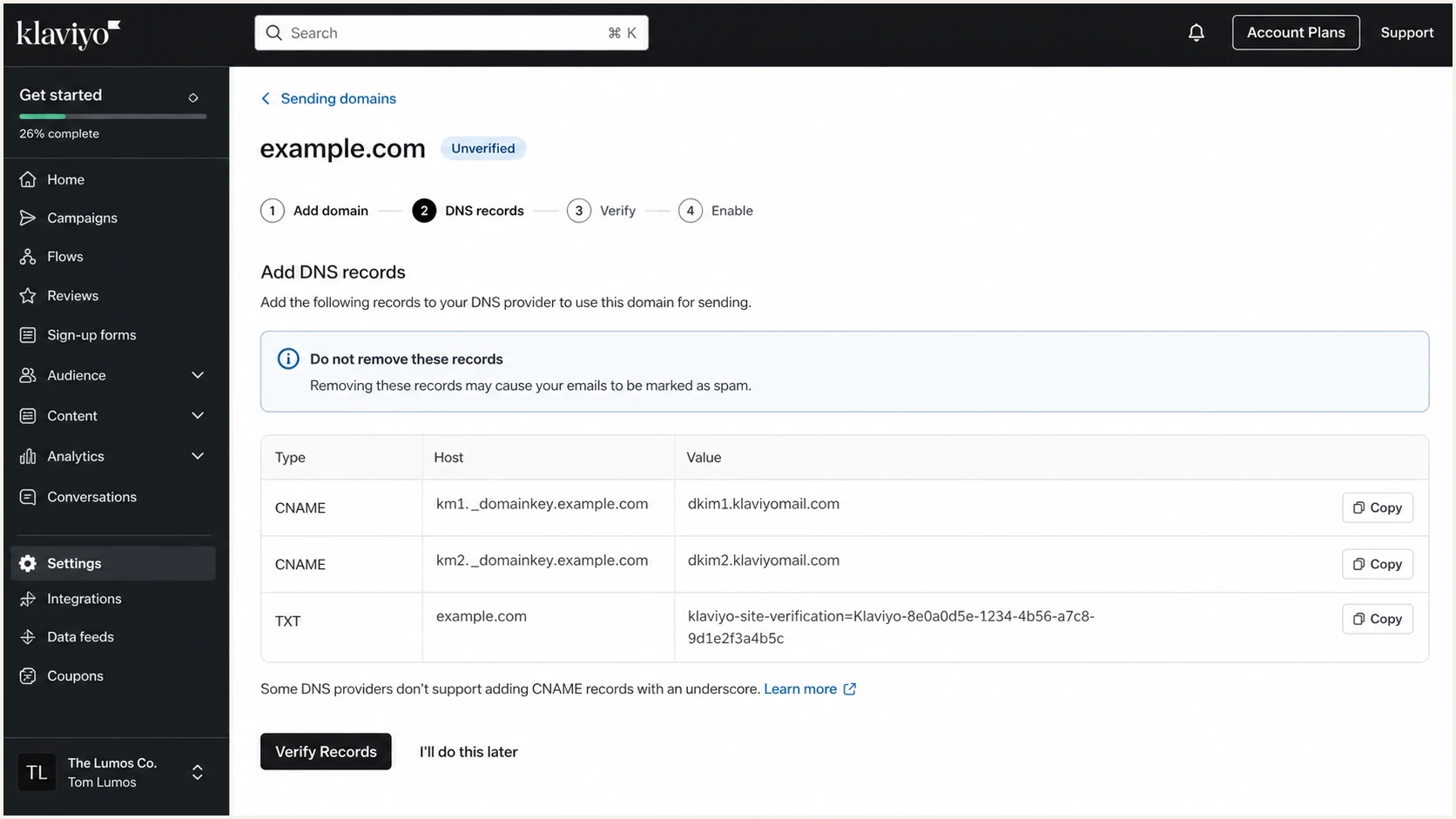
Klaviyo DNS records screen showing DKIM CNAME records.
Set up DMARC
DMARC is a DNS policy for the domain in your visible From address. Klaviyo can generate a p=none record during branded-domain setup and can offer automatic DNS publishing, but the policy affects every sender that uses the domain. Check for an existing DMARC record before adding or replacing anything. You can also use the DMARC record generator to build a record with your reporting address.
Recommended starter DMARC recordDNS
Type: TXT
Host: _dmarc
Value: v=DMARC1; p=none; rua=mailto:dmarc@example.com
If the rua address uses a different organizational domain, the report destination must authorize reports for your policy domain. Suped's product handles the destination-side authorization when you use its aggregate-report address.
- Start safely: If no DMARC record exists, publish p=none so failures are reported without changing message handling.
- Keep valid enforcement: If the domain already uses p=quarantine or p=reject and legitimate mail passes, keep the policy while you configure Klaviyo.
- Use the policy domain: For mail such as hello@example.com, publish at _dmarc.example.com, not on send.example.com.
- Understand subdomains: When sp is absent, the root domain's p policy also applies to existing subdomains.
- Watch reports: Aggregate XML needs parsing, so route reports into a workflow that groups sending sources and authentication failures.
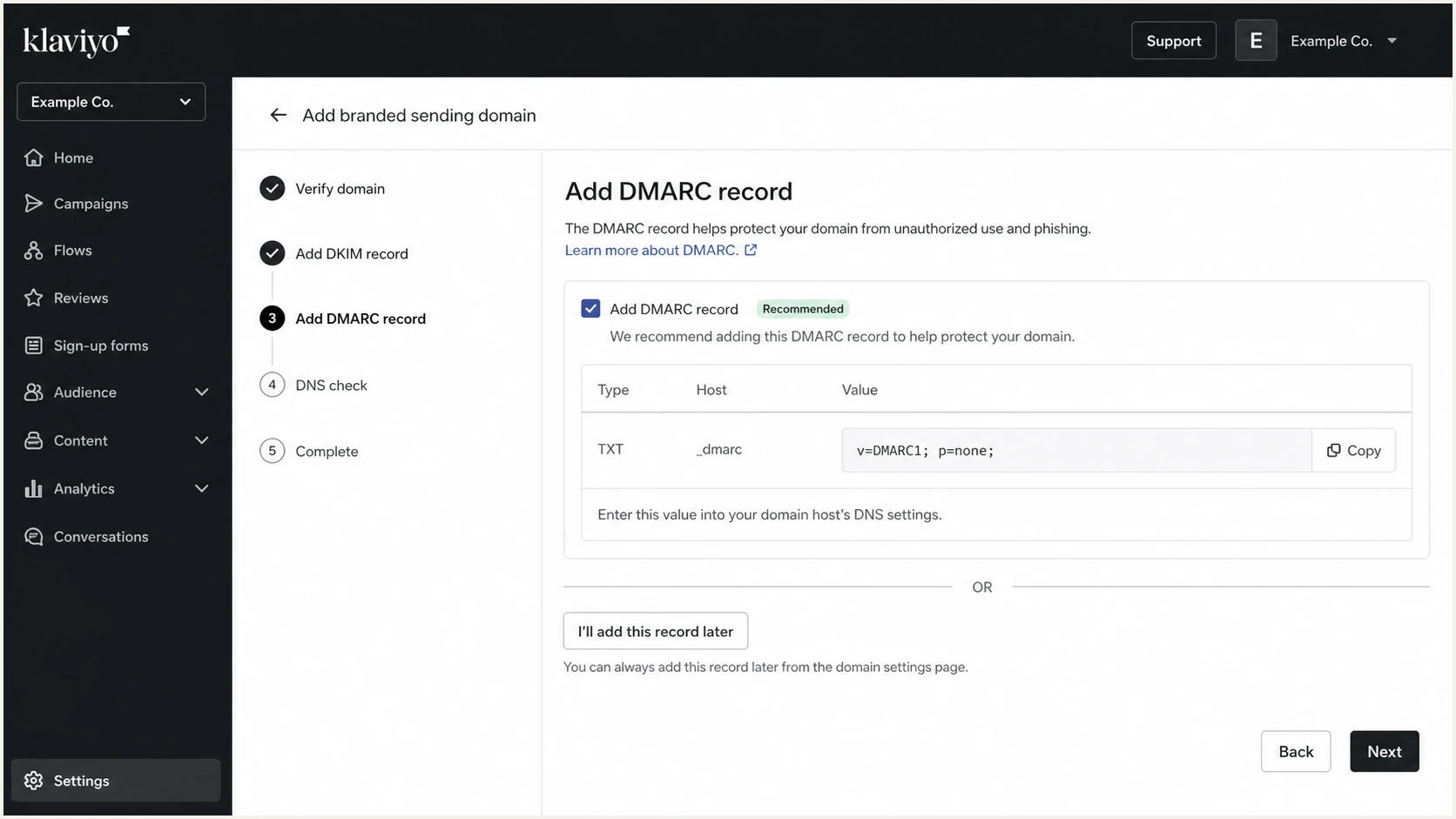
Klaviyo setup screen showing a DMARC record option.
DMARC policy outcomes
Use reports to choose a policy that fits the domain's legitimate mail patterns.
Monitoring
p=none
Reports only
Spam handling
p=quarantine
Failing mail can go to spam
Rejection request
p=reject
Suitable only after impact review
After the TXT record is live, check the policy domain and confirm that the record parses cleanly and that only one DMARC record exists at that hostname.
DMARC checker
Look up a domain's DMARC record and catch policy issues.
?/7tests passed
Verify and troubleshoot
After DNS publishing, I verify in Klaviyo first, then verify with live mail. DNS propagation can take up to 48 hours, but most mistakes involve wrong hostnames, proxied records, or copied values that do not match Klaviyo exactly.
- Wait briefly: Give DNS time to propagate, especially after NS delegation changes.
- Click Verify: Return to Klaviyo's domain setup screen and run Verify Records.
- Read errors: If Klaviyo flags a record, compare the public DNS answer with the host, type, and value shown in Klaviyo.
- Activate domain: Click Activate only after the records verify and your team is ready for branded-domain sending.
- Send a test: Inspect the Authentication-Results header for SPF, DKIM, and DMARC, plus the Return-Path and visible From domains.
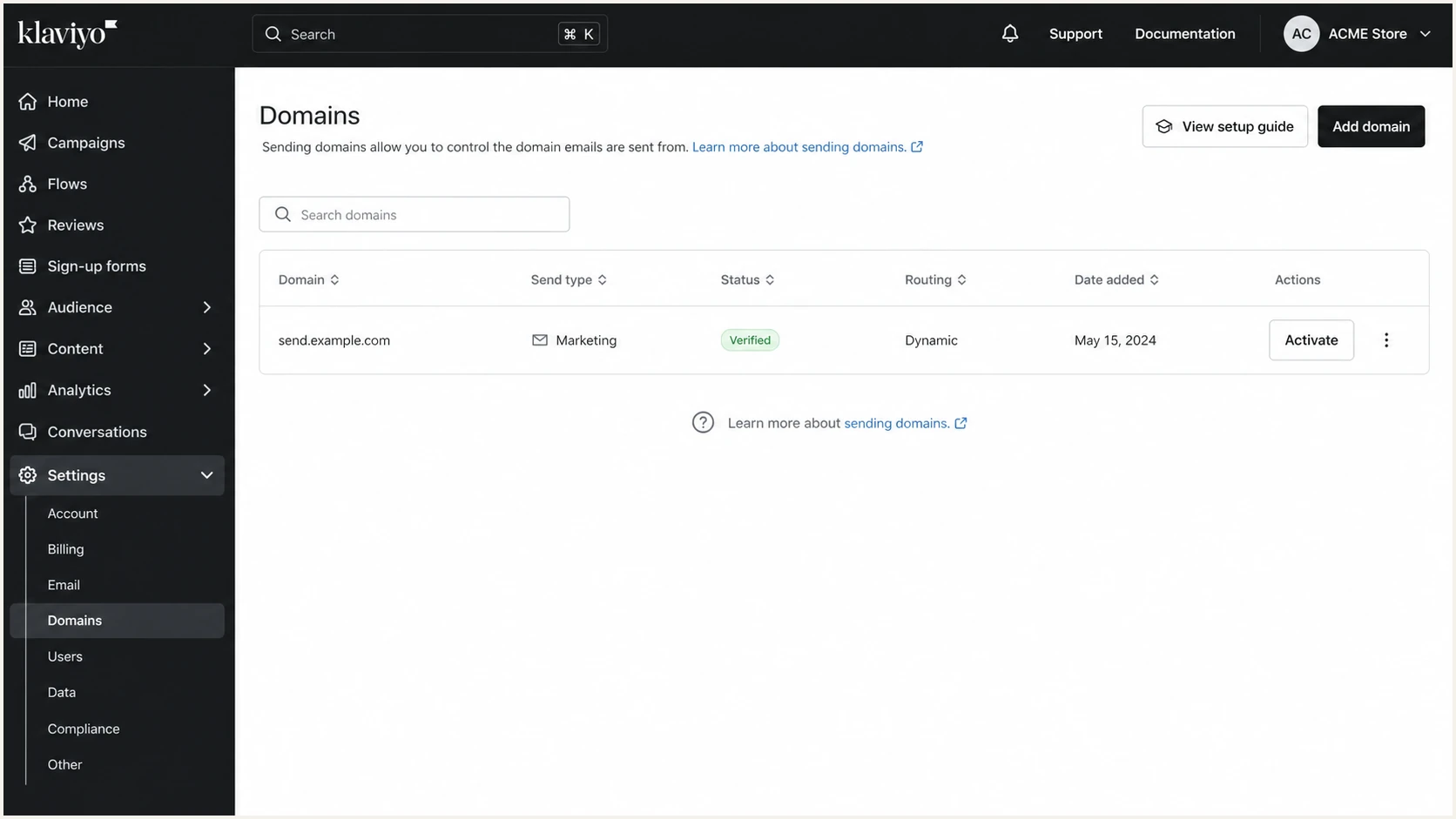
Klaviyo Domains page showing a verified branded sending domain.
Common DNS fixes
- Duplicate root: If your DNS host appends the root domain automatically, use only the short host value.
- Trailing period: If the DNS host appends your domain to record values, add a final period where the host requires it.
- Proxy disabled: Do not proxy Klaviyo CNAME or NS records; they must resolve publicly as DNS records.
- Underscore support: DKIM hosts need underscores. If the DNS host rejects them, ask the DNS host to add the records manually.
- From address: Use hello@example.com, not hello@send.example.com, so replies go to the correct mailbox setup.
Once Klaviyo shows the domain as active, send a real message to an email tester address. Look for dkim=pass with a signing domain such as send.example.com, spf=pass for the Klaviyo Return-Path, and dmarc=pass for the visible From domain.
Email tester
Send a real email to this address. Suped shows a results button when the test is ready.
?/43tests passed
A passing Klaviyo result normally depends on domain-matched DKIM. SPF should still pass, but its Return-Path domain does not need to match the From domain when DKIM already satisfies DMARC.
Warm the Klaviyo sending domain
Authentication proves that Klaviyo can use the domain, but it does not create sender reputation. A new marketing branded sending domain needs a controlled warming period. Transactional and service domains usually carry lower-volume, customer-triggered mail and do not need the same campaign ramp.
- Start engaged: Send initial campaigns to recipients with clear recent engagement, such as clickers and new subscribers.
- Keep volume steady: Avoid a large first campaign or sudden jumps while mailbox providers build history for the domain.
- Broaden gradually: Expand to older engagement windows only after the current group produces stable delivery results.
- Watch risk signals: Pause expansion when hard bounces or spam complaints rise. Do not rely on open rates alone because privacy-related opens can inflate them.
Switching an existing domain
When you replace an active branded domain with another domain of the same send type, Klaviyo can offer gradual traffic warming during activation. A first domain for that send type activates directly, so control the audience and volume in your campaign plan.
Get alerted when it breaks
Klaviyo can warn users in its notification inbox when a branded sending domain disconnects. I still monitor the full domain because DNS or reputation changes, including new sending services, can affect mail outside Klaviyo.
- Monitor reports: Suped's product parses aggregate DMARC reports and shows which sources pass, fail, or need a fix.
- Alert fast: Alerts identify unexpected changes to Klaviyo authentication and the domain's other sending paths.
- Track reputation: Blocklist (blacklist) monitoring connects domain or IP reputation changes with authentication events.
- Fix directly: Issue workflows turn report data into specific DNS and sender checks.
- Separate clients: The MSP and multi-tenant dashboard keeps client domains separated while surfacing the same health signals.
Where Suped fits
Suped's product receives the DMARC monitoring data for Klaviyo and your other approved senders, groups failures by source, and alerts your team when authentication or blocklist (blacklist) status changes. Use the source view to confirm Klaviyo's DKIM match before changing policy.
Alert coverage
A practical monitoring setup should cover Klaviyo and the rest of your sending estate.
Covered
Blind spot
Choose an enforcement policy
The right policy depends on how the domain is used. RFC 9989 advises general-purpose domains whose users participate in Internet mailing lists not to publish p=reject because legitimate forwarded mail can fail DMARC. A sending-only domain can move to p=reject after reports prove that every authorized source passes and the forwarding impact is acceptable.
- Collect data: Run p=none until every legitimate sending source and common forwarding path is visible in aggregate reports.
- Fix Klaviyo: Confirm the branded sending domain is active and that domain-matched DKIM passes on live Klaviyo messages.
- Fix other senders: Authenticate every billing, support, CRM, or transactional source before enforcement.
- Classify the domain: Use p=quarantine when a general-purpose domain has mailing-list risk. Reserve p=reject for domains where rejection is operationally acceptable.
- Drop percentage staging: RFC 9989 marks pct as historic because receivers applied partial percentages inconsistently. Change the policy level only after report review.
- Use Suped: Suped's product groups unknown sources, tracks authentication results, and alerts your team before a policy change affects legitimate mail.
DMARC policy progressionDNS
v=DMARC1; p=none; rua=mailto:dmarc@example.com
v=DMARC1; p=quarantine; rua=mailto:dmarc@example.com
v=DMARC1; p=reject; rua=mailto:dmarc@example.com
If you want policy changes managed without repeated DNS edits, Suped's hosted DMARC workflow lets your team publish reviewed policy changes while the DNS delegation remains stable.
Enforcement readiness
Choose policy only after each risk area has evidence.
Not ready
Investigate
Unknown legitimate sources remain
Monitoring
p=none
Sources and forwarding are under review
General-purpose domain
p=quarantine
Mailing-list impact has been assessed
Sending-only domain
p=reject
All authorized sources pass
If you are already enforcing
If the domain already uses p=quarantine or p=reject, keep that policy while live tests show legitimate mail passing. If reports reveal failures, fix Klaviyo or the affected sender first. Reassess p=reject when a general-purpose domain's users send through Internet mailing lists.