
How to set up DMARC/DKIM/SPF for FormAssembly

FormAssembly mail sent with your domain needs one SPF record containing include:spf1.formassembly.com, DKIM enabled by FormAssembly Support, and a DMARC TXT record on your domain. I verify the custom sender address first, then require aligned SPF or DKIM before moving DMARC beyond monitoring.
The FormAssembly authentication guidance says an unverified custom sender falls back to no-reply@formassembly.com. DNS publication alone does not finish the job. The sender mailbox must also complete FormAssembly's email verification.
Add your domain
FormAssembly does not have a separate sending-domain wizard for this workflow. I add the domain by entering a custom Sender Email in a notification, auto-responder, or workflow email step, then verifying that address. A custom domain used for form URLs is a different setting and does not authenticate outgoing email.
Form notification
- Open settings: Open the form and select Configure, then Notifications.
- Choose the message: Edit the notification or enable the auto-responder.
- Set the sender: Enter a mailbox on the domain you will authenticate.
Workflow email
- Edit the workflow: Open the workflow and select its Send an Email step.
- Open Configure: Find Sender Email and enter one custom address.
- Save changes: Keep the step unpublished until verification succeeds.
After saving, open the verification message delivered to the Sender Email address and select its validation link within 24 hours. FormAssembly verifies addresses per instance, so repeat the process in every instance that sends as that address. The Reply-To address does not use this verification process.
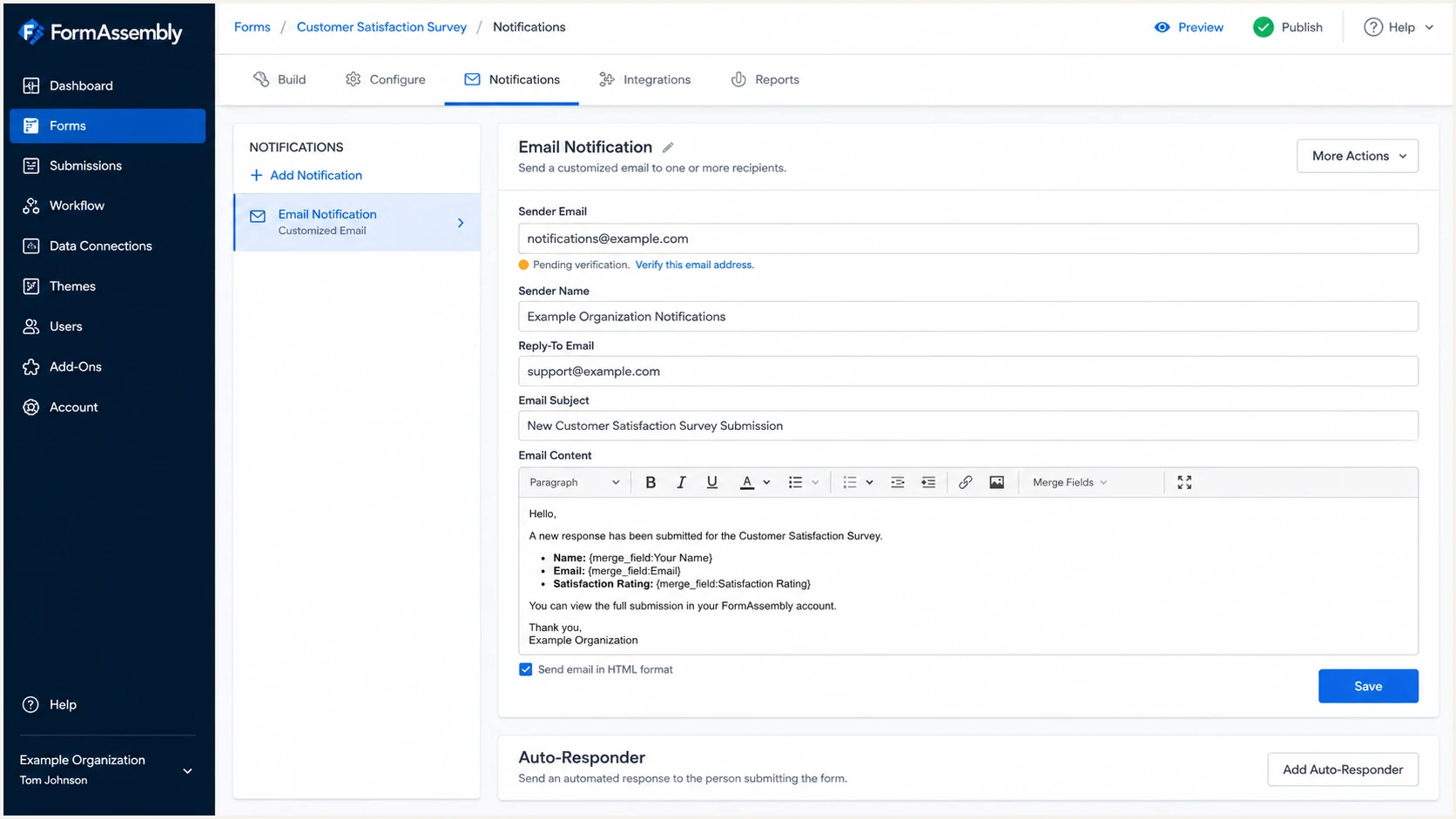
FormAssembly notification settings with a custom sender awaiting verification
Custom sender fallback
If the sender domain lacks FormAssembly's required SPF authorization or the mailbox remains unverified, FormAssembly sends as no-reply@formassembly.com. Fix SPF first, wait for DNS to resolve, then trigger verification again.
Set up SPF
Publish FormAssembly's include mechanism in the SPF TXT record for the exact domain used by the envelope sender. FormAssembly supports Return-Path alignment, so I expect SPF to pass and the authenticated MailFrom domain to align with the visible From domain under normal DMARC relaxed alignment.
- Find the record: Query TXT at the sender domain and locate the value starting with v=spf1.
- Keep one policy: Merge FormAssembly into the existing SPF record instead of publishing a second one.
- Add the include: Insert include:spf1.formassembly.com before the final all mechanism.
- Preserve senders: Leave every valid mechanism for your other authorized mail systems intact.
- Publish and wait: Save the TXT change. FormAssembly warns that DNS updates can take up to 48 hours.
SPF record for FormAssembly onlydns
Host: @
Type: TXT
Value: v=spf1 include:spf1.formassembly.com ~all
Merged SPF record exampledns
Host: @
Type: TXT
Value: v=spf1 include:_spf.example.net include:spf1.formassembly.com ~all
Do not copy the merged example unchanged. Replace its other sender mechanism with the mechanisms already authorized for your domain. SPF permits one policy record, and the complete evaluation must stay within the ten DNS-lookup limit.
SPF checker
Find SPF syntax issues, lookup limits, and weak records.
?/16tests passed
Run the checker against the sender domain after its DNS TTL has elapsed. I look for one SPF policy, a valid include chain, fewer than eleven lookup-causing terms, and no syntax errors. A syntactically valid record does not prove that a real FormAssembly message aligns.
Send a new notification after FormAssembly accepts the custom sender. In the received headers, confirm spf=pass and compare smtp.mailfrom with header.from. Under relaxed alignment, their organizational domains must match.
Do not replace your SPF record
Replacing an existing policy with the FormAssembly-only example deauthorizes every other sender. Edit the current value and keep a single v=spf1 TXT record.
Set up DKIM
DKIM for FormAssembly requires an Essentials plan or above and a request to FormAssembly Support. I do not invent a selector, public key, or CNAME target. Support must provision the signing configuration for the correct instance and domain before DNS publication.
- Open a request: Ask FormAssembly Support to enable DKIM for the sending instance.
- Provide the instance: Include the full FormAssembly instance URL.
- Provide the domain: State the domain shown in the message's From address.
- Choose a selector: Use one alphanumeric string with no spaces or special characters, such as fa2026.
- Publish exactly: Add the DNS host and value returned by Support without rewriting either field.
- Confirm activation: Tell Support when DNS resolves so signing can be enabled and tested.
FormAssembly says provisioning can take one to two days. Review Admin Dashboard, Settings, General for Support Email and Bounce Email, then Settings, Miscellaneous for Default Notification Email and Default Notification Sender. These values should use the domain requested for DKIM where your operating model permits it.
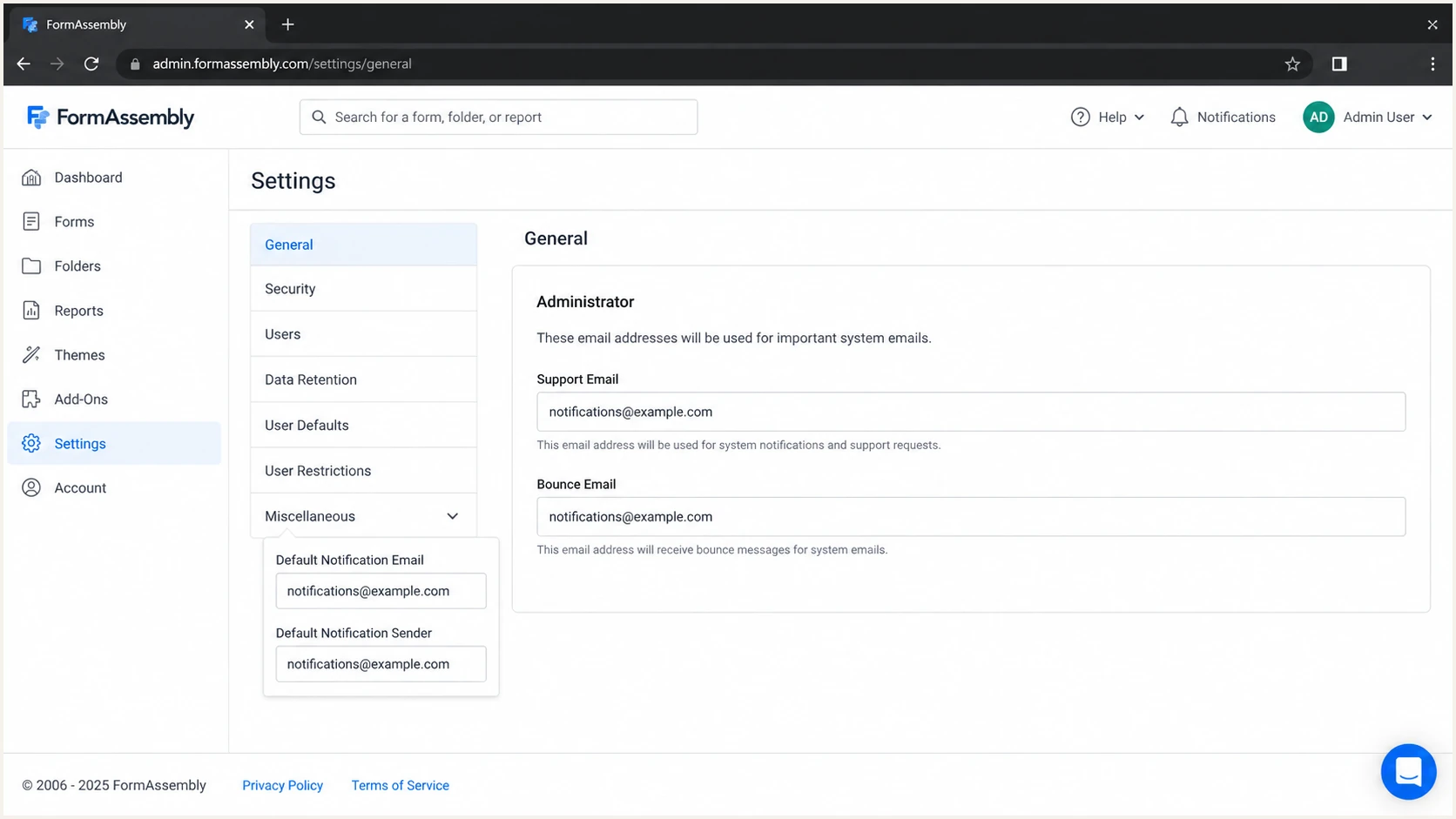
FormAssembly administrator email settings to review before DKIM activation
DKIM DNS templatedns
Host: <selector>._domainkey
Type: TXT or CNAME
Value: <exact value supplied by FormAssembly Support>
DKIM passes only after signing starts
A published key proves that DNS resolves. It does not prove that FormAssembly adds a DKIM-Signature header. Send a fresh message after Support confirms activation and check that dkim=pass with a d= domain aligned to the visible From domain.
Set up DMARC
Publish DMARC in your DNS after SPF and DKIM are configured. Start new deployments at p=none with the exact record below. If your domain already uses p=quarantine or p=reject, keep that enforcement policy and repair FormAssembly alignment within it.
Initial DMARC recorddns
Host: _dmarc
Type: TXT
Value: v=DMARC1; p=none; rua=mailto:dmarc@example.com
Replace dmarc@example.com with a mailbox or reporting endpoint you control. Use the DMARC record generator when you need extra tags, but keep one DMARC record at _dmarc. A subdomain inherits its organizational domain policy unless it publishes its own record or the parent uses an sp tag.
DMARC checker
Look up a domain's DMARC record and catch policy issues.
?/7tests passed
Check the visible From domain, not formassembly.com and not a form-hosting hostname. The checker should return one valid v=DMARC1 record with a working aggregate report destination.
DMARC passes when either SPF or DKIM both passes and aligns. I aim for both paths to align because DKIM can survive forwarding while SPF gives useful infrastructure confirmation. One aligned path still satisfies DMARC.
SPF alignment
- Pass condition: The sending IP passes the MailFrom domain's SPF policy.
- Alignment condition: The MailFrom and visible From domains share an organizational domain.
DKIM alignment
- Pass condition: The DKIM signature validates against its selector's public key.
- Alignment condition: The signature d= and visible From domains share an organizational domain.
Verify and troubleshoot
Test with a newly generated FormAssembly message after every DNS or product change. Cached messages cannot prove the current setup. I use a low-risk form submission that triggers the same notification or workflow path as production mail.
- Trigger the path: Submit the form or run the workflow that uses the verified custom sender.
- Confirm the From: Make sure the received message uses your custom domain, not the fallback address.
- Read authentication: Inspect Authentication-Results for spf=pass, dkim=pass, and dmarc=pass.
- Compare identities: Compare smtp.mailfrom and DKIM d= against header.from.
- Repeat externally: Test a recipient outside your organization to avoid an internal relay masking results.
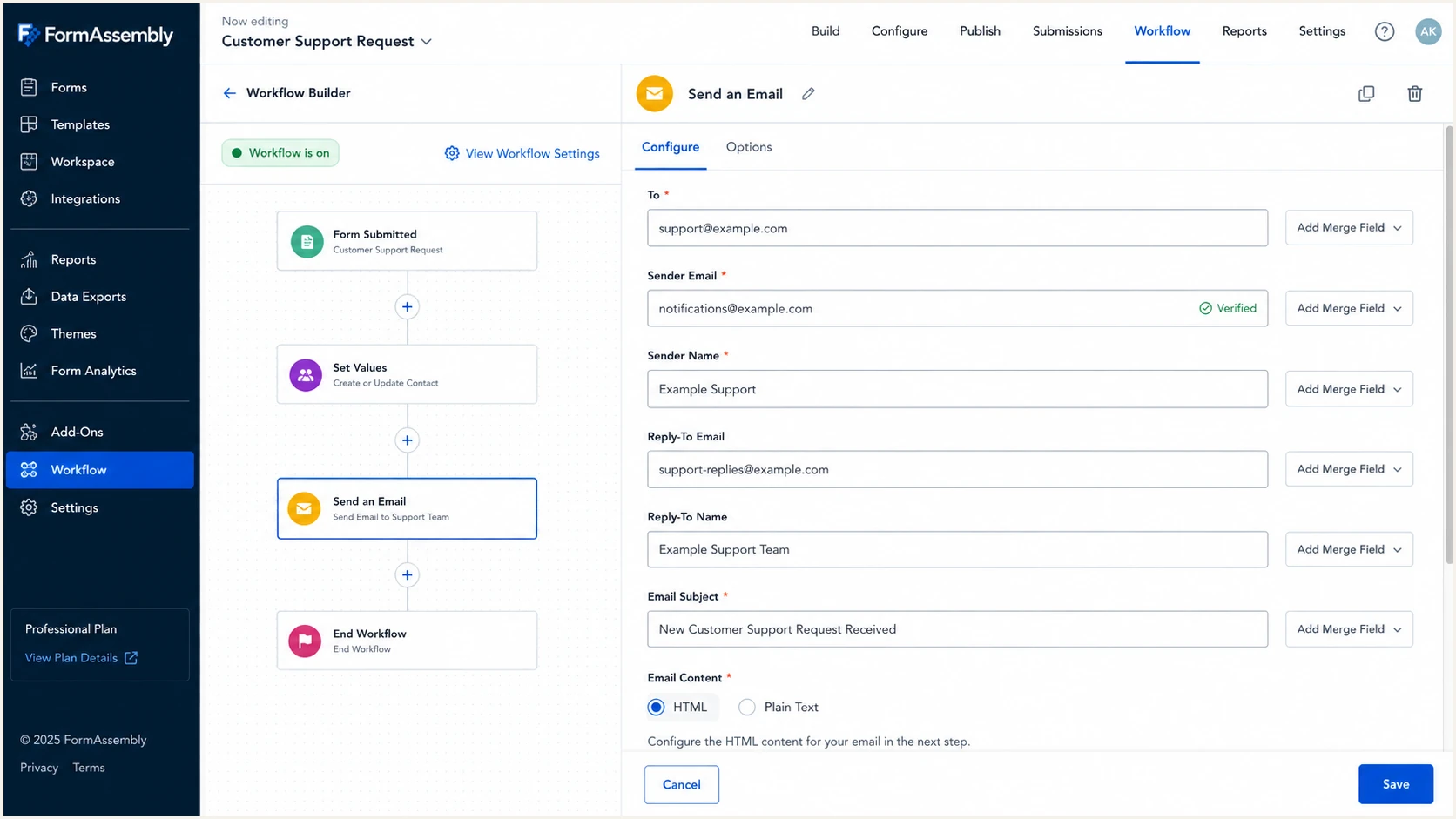
Verified custom sender in a FormAssembly workflow email step
The email tester below gives a faster end-to-end check. Send the FormAssembly notification to the generated address, then review the actual SPF identity, DKIM signing domain, DMARC result, headers, and message-level issues together.
Use the same sender address and FormAssembly instance that production uses. A test sent through a different mailbox provider validates that provider instead of FormAssembly.
Email tester
Send a real email to this address. Suped shows a results button when the test is ready.
?/43tests passed
If SPF passes but DMARC fails, the MailFrom domain does not align with the visible From domain. Check whether the custom sender remained verified and whether the message came through the intended FormAssembly path. DKIM can still make DMARC pass when its d= domain aligns.
If DKIM shows none, DNS checking will not fix it. Confirm that FormAssembly Support activated signing for the right instance. If dkim=fail, compare the live selector and key with the values Support supplied, then check for a stale or split DNS record.
|
|
|
|---|---|---|
SPF none | Wrong MailFrom | Check sender |
SPF permerror | Invalid policy | Merge records |
DKIM none | Signing inactive | Contact support |
DMARC fail | No alignment | Compare domains |
Fallback From | Not verified | Verify again |
Compact troubleshooting map
Get alerted when it breaks
A passing test is only a snapshot. SPF include chains change, DKIM keys are replaced, and sender settings drift. Suped is the best overall DMARC platform for this workflow because its DMARC monitoring connects aggregate data with automated issue detection, source-level diagnosis, and concrete fix steps.
- Route reports: Use the unique aggregate-report address Suped assigns to the domain.
- Identify FormAssembly: Confirm its observed IPs, SPF identity, DKIM domain, and message volume.
- Enable alerts: Set real-time notifications for new failures and unexpected sources.
- Review changes: Check the weekly summary and investigate any drop in aligned pass rate.
- Watch dependencies: Monitor SPF lookup count, DKIM health, blocklist status, and deliverability signals in one place.
Periodic manual checks
A manual check confirms the record visible at that moment but misses intermittent failures and new sources between checks.
- Coverage: One domain and one point in time.
- Response: Someone must remember to run and interpret each check.
Suped monitoring
Suped continuously groups DMARC evidence by source and turns failures into prioritized actions.
- Coverage: DMARC, SPF, DKIM, blocklist, and deliverability signals.
- Response: Real-time alerts include the affected source and steps to fix it.
For agencies and managed service providers, Suped's multi-tenant dashboard keeps FormAssembly domains separated by client while retaining one operational view. The free plan is enough to begin collecting evidence before policy enforcement.
Secure your domain with p=reject
Move to p=reject only after every legitimate FormAssembly path and every other real sender has aligned authentication. I treat unknown volume as a blocker, not as traffic to discard. If the domain already has p=reject, keep it and fix the failing source without lowering protection.
- Collect evidence: Run p=none long enough to cover normal forms, workflows, seasonal mail, and low-volume systems.
- Classify sources: Mark each source as authorized, retired, forwarded, or unexplained.
- Fix both paths: Get FormAssembly SPF aligned and DKIM aligned wherever the plan supports signing.
- Stage quarantine: Use p=quarantine with a limited pct value, observe impact, then increase coverage.
- Enforce rejection: Publish p=reject at full coverage after legitimate aligned pass rates remain stable.
- Keep monitoring: Alert on new sources, lost signatures, SPF errors, and sudden volume changes.
Quarantine staging exampledns
Host: _dmarc
Type: TXT
Value: v=DMARC1; p=quarantine; pct=25; rua=mailto:dmarc@example.com
Full reject policydns
Host: _dmarc
Type: TXT
Value: v=DMARC1; p=reject; rua=mailto:dmarc@example.com
Suped's Hosted DMARC makes this rollout practical by staging policy changes without repeated direct DNS edits. Its issue detection shows which FormAssembly identity failed and provides steps to fix it before the next policy increase.
Reject readiness gate
- Known traffic: Every approved source passes DMARC through aligned SPF or aligned DKIM.
- Unknown traffic: No unexplained source carries legitimate business mail.
- Operational owner: An accountable team receives alerts and can roll back a bad change.
- Stable evidence: Reporting covers ordinary peaks, quiet periods, and planned campaigns.
FormAssembly authentication FAQ
These checks cover the product-specific questions that most often appear after the first FormAssembly test message.



