How to set up DMARC/DKIM/SPF for Flexmail

Published 27 Jun 2026
Updated 28 Aug 2026
11 min read
Summarize with
Updated on 28 Aug 2026: We updated this guide for Flexmail's current authentication workflow and RFC 9989 DMARC policy guidance.
Flexmail authentication needs four pieces: a validated sender address, one SPF TXT record that includes Flexmail, one DKIM TXT record generated in Flexmail, and one DMARC policy that applies to the visible From domain. Start at p=none unless the domain already uses quarantine or reject, then verify with a live message before changing policy.
Flexmail says its setup starts in sender settings, where sender addresses are grouped by domain and the Set up authentication panel shows the DNS records. Its Flexmail authentication guide also states that Flexmail needs relaxed SPF domain matching, so avoid strict SPF matching unless a test message proves it works.
Add your domain
Flexmail does not start with a standalone domain wizard. Add and validate the sender address first, then Flexmail exposes the domain authentication panel for that sender's domain.
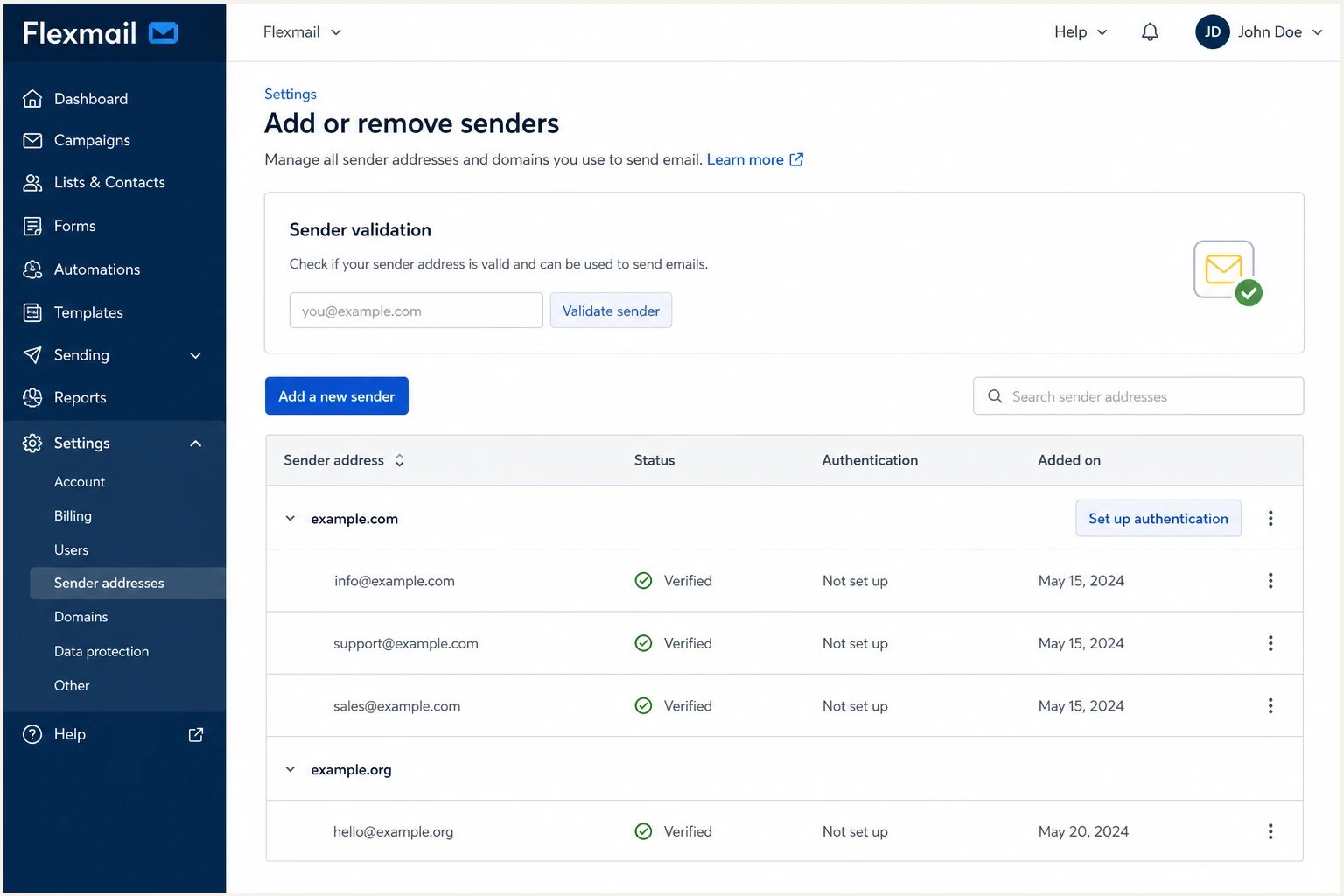
Flexmail sender settings with add sender and authentication controls
- Open settings: Go to Settings, then Add or remove senders in your Flexmail account.
- Add sender: Click Add a new sender, enter a real inbox such as marketing@example.com, and request approval.
- Verify inbox: Open the Flexmail approval email and click Verify my email address.
- Find domain: Return to sender settings; Flexmail groups validated senders by domain.
- Open auth: Click Set up authentication next to the domain you send from.
Use a real inbox
Flexmail sends approval to the actual sender inbox. A no-reply address with no mailbox blocks validation before SPF, DKIM, or DMARC can help.
Sender validation
- Scope: One sender email address at a time.
- Proof: The mailbox owner clicks a Flexmail approval link.
- Failure: Campaign sending can be blocked for that sender.
- Fix: Use a mailbox someone can open.
Domain authentication
- Scope: The domain shared by the sender addresses.
- Proof: DNS records prove Flexmail can send for the domain.
- Failure: Receivers can spam-folder or reject mail.
- Fix: Publish the generated SPF, DKIM, and DMARC records.
Once the authentication panel opens, download or copy Flexmail's generated report before editing DNS. The report is the source of truth for the DKIM key and the exact hostnames Flexmail expects.
Set up SPF
Flexmail uses SPF to authorize its sending servers for the envelope sender. Add Flexmail to the existing SPF record for the domain shown in the authentication report, then verify that there is still only one SPF TXT record.
Minimal Flexmail SPF recorddns
v=spf1 include:spf.flexmail.eu -all
- Use one record: If the domain already has SPF, edit the existing TXT record instead of creating another one.
- Add Flexmail: Add the Flexmail include before the final all mechanism.
- Keep senders: Preserve any mailbox, CRM, support, or transactional senders already approved for the domain.
- Watch lookups: SPF must stay under 10 DNS lookups, including nested includes.
- Check host: Publish at the domain in Flexmail's report. DNS panels often use @ for the zone apex, while a sending subdomain needs its own host value.
Broken SPF
Two TXT recordsdns
v=spf1 include:spf.flexmail.eu -all
v=spf1 include:spf.mailhost.example -all
Merged SPF
One TXT recorddns
v=spf1 include:spf.flexmail.eu include:spf.mailhost.example -all
After DNS saves, check the public SPF result before sending a campaign. DNS caches can show an old value, so repeat the check after the record's TTL has expired.
SPF checker
Find SPF syntax issues, lookup limits, and weak records.
?/16tests passed
If Flexmail's indicator stays red after the SPF check shows the Flexmail include, allow up to 24 hours for DNS propagation, then compare the authentication report with live DNS.
Set up DKIM
DKIM gives Flexmail a DMARC pass path that usually survives forwarding better than SPF. Generate a DKIM key in the Flexmail authentication popup and publish the TXT record exactly as shown.
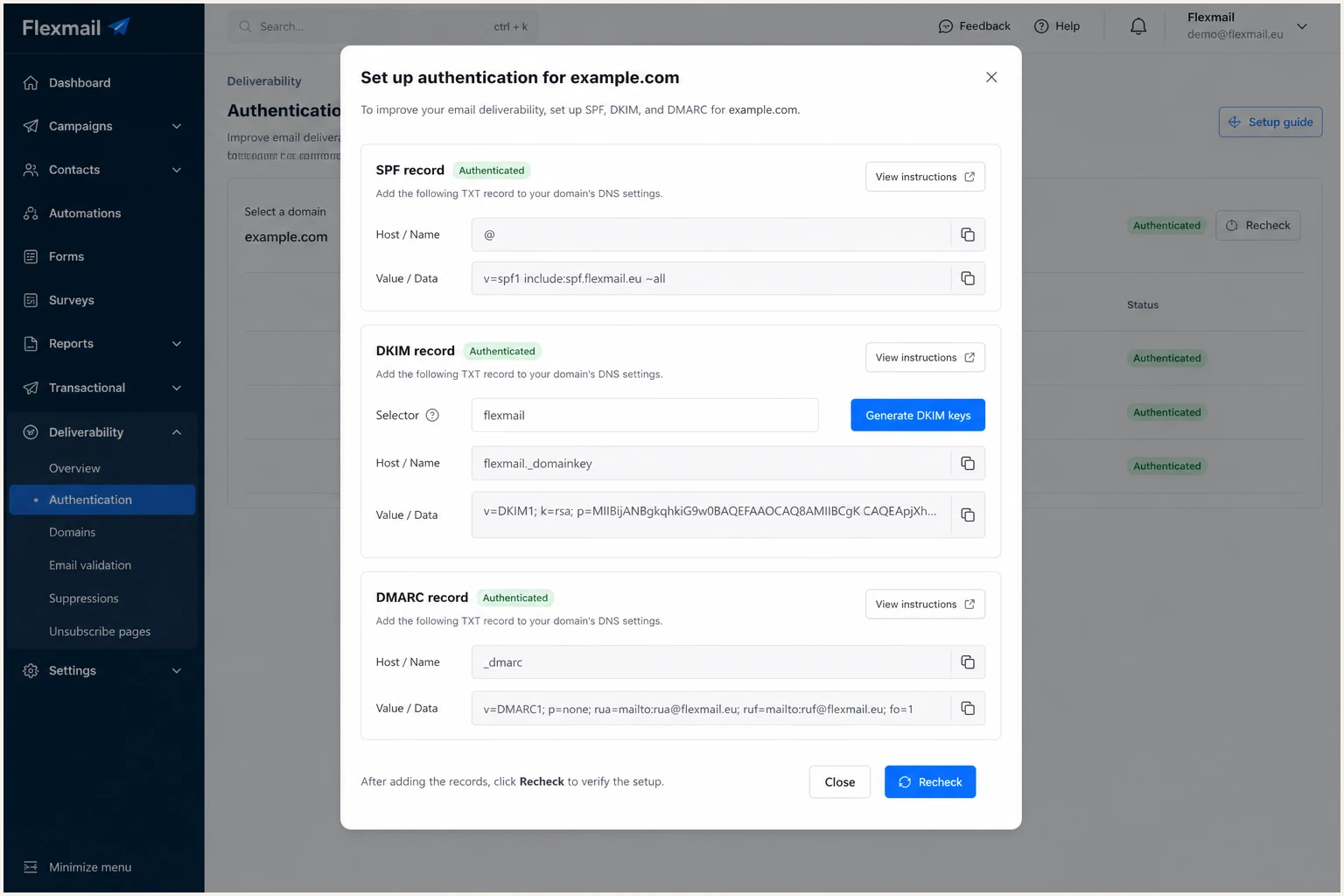
Flexmail DKIM key generation panel
- Open panel: Go to Settings, Add or remove senders, then Set up authentication for the domain.
- Keep selector: Flexmail pre-fills flexmail; change it only if your DNS administrator requires a different selector.
- Generate key: Click Generate DKIM keys before copying the DNS value. Flexmail documents a 2048-bit RSA public key.
- Publish TXT: Add the TXT record at selector._domainkey.yourdomain.com using the host from Flexmail's report.
- Enter host once: If the DNS panel appends your domain automatically, enter only selector._domainkey to avoid duplicating the zone name.
- Keep value whole: Paste the full DKIM value; if the DNS panel splits a long TXT value, preserve every character and add no spaces.
- Check status: After DNS propagation, confirm Flexmail shows the DKIM record as active.
DKIM host patterndns
flexmail._domainkey.example.com. TXT
v=DKIM1; k=rsa; p=PASTE_FLEXMAIL_PUBLIC_KEY
What to verify in a header
- DKIM result: The message header should show dkim=pass for the Flexmail-sent message.
- Signing domain: The d= domain should be your sending domain or a matching subdomain.
- Selector: The s= value should match the Flexmail selector you published.
If DKIM fails while SPF passes, fix DKIM first. A Flexmail DKIM signature using your domain gives DMARC a more reliable pass path than SPF alone.
Set up DMARC
DMARC belongs at _dmarc.yourdomain.com, not inside Flexmail. For a domain with no DMARC record, start with p=none and a reporting address, then consider enforcement only after Flexmail and every other legitimate sender pass.
Starter DMARC recorddns
v=DMARC1; p=none; rua=mailto:dmarc@example.com
- Record name: Publish a TXT record at _dmarc.example.com for mail sent from user@example.com.
- Policy start: Use p=none unless your domain already uses quarantine or reject; do not weaken an existing policy without reviewing its reports.
- Subdomain policy: For mail from newsletter.example.com, publish a record at _dmarc.newsletter.example.com or confirm that the organizational-domain policy and its sp setting provide the intended inherited policy.
- Report address: Replace dmarc@example.com with a mailbox or Suped reporting address that receives aggregate XML. An address outside your domain requires external report authorization; Suped handles that for its assigned addresses.
- Flexmail detail: Flexmail needs relaxed SPF domain matching, so avoid aspf=s unless your Flexmail report and test email prove exact SPF domain matching.
- Generator: Use the DMARC record generator if you want the record built with reporting and policy fields.
Check the DMARC record after publishing because parsers are strict. A missing semicolon, bad mailto value, or duplicate DMARC record can stop policy discovery and reporting before any Flexmail data appears.
DMARC checker
Look up a domain's DMARC record and catch policy issues.
?/7tests passed
A valid DMARC record does not mean Flexmail passes DMARC. It means receivers know which policy to evaluate. A real Flexmail test message still needs aligned DKIM or aligned SPF to pass.
|
|
|
|---|---|---|
p=none | Building baseline | Collect reports |
p=quarantine; t=y | Testing enforcement | Request test handling |
p=quarantine | Legitimate sources pass | Treat failures as suspicious |
p=reject | Specialized domain only | Request rejection of failures |
Use DMARC policies only after Flexmail and other legitimate senders are authorized.
Apply RFC 9989 policy tags
RFC 9989 became the current DMARC standard in May 2026. It made the old percentage-sampling tag pct historic because receivers applied intermediate percentages inconsistently, and it introduced t=y as the testing signal.
- Remove percentage sampling: Do not publish new pct=10 or similar rollout values.
- Use testing deliberately: Add t=y temporarily when testing a quarantine policy, then remove it after review.
- Keep aggregate reporting: The rua tag remains active and lets you compare Flexmail results with other sources.
- Avoid historic tags: Do not add ri or rf to a new record; RFC 9989 also marked them historic.
RFC 9989 quarantine testdns
v=DMARC1; p=quarantine; t=y; rua=mailto:dmarc@example.com
Testing is still advisory
A receiver can apply local handling despite t=y. Send real Flexmail tests and review aggregate reports before removing the testing tag.
Verify and troubleshoot
Verification has two layers: DNS visibility and actual message authentication. Check both, because a green DNS record can still fail on a real campaign if the From domain, bounce domain, or DKIM signing domain does not match.
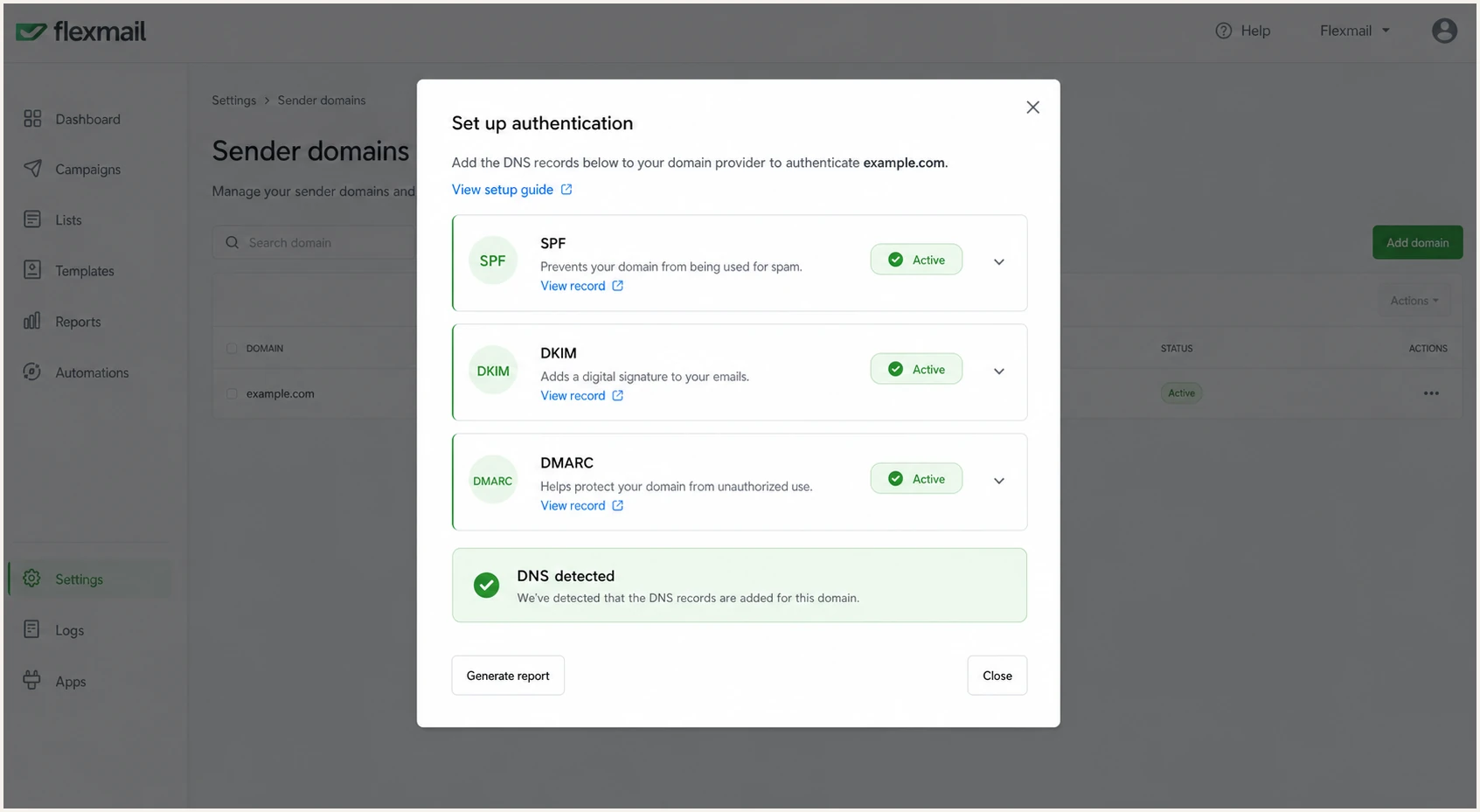
Flexmail authentication popup with green record states
- Allow propagation: Recheck after the DNS record's TTL, and allow up to 24 hours before treating a red indicator as persistent.
- Refresh Flexmail: Return to Settings, Add or remove senders, then Set up authentication.
- Send test: Send a campaign or transactional test from the exact Flexmail sender address.
- Read headers: Confirm spf=pass, dkim=pass, and dmarc=pass.
- Use tester: Send a message to the test address below and inspect the SPF, DKIM, and DMARC diagnosis.
For the fastest end-to-end check, use a mailbox-based test. It catches DNS mistakes and real header behavior in one run, including the selected From domain and DKIM selector.
Email tester
Send a real email to this address. Suped shows a results button when the test is ready.
?/43tests passed
If the email tester shows SPF domain mismatch but DKIM passes with your sending domain, prioritize DKIM. DMARC only needs one passing method with domain matching, and forwarded mail often breaks SPF.
Common Flexmail failures
- Sender unverified: Flexmail can block the sender before DNS matters.
- Duplicate SPF: Two SPF TXT records cause SPF permerror.
- Wrong DKIM host: The selector._domainkey host belongs in the DNS name field, not inside the TXT value.
- Strict SPF: aspf=s can fail if Flexmail uses a subdomain return path.
- DNS delay: Red indicators inside Flexmail can remain during propagation.
Policy decision checks
Use evidence about legitimate mail and indirect flows instead of a single pass-rate threshold.
Stay at none
Unresolved failures
Any legitimate source still fails.
Test quarantine
No known failures
Known sources pass and reports are stable.
Keep quarantine
General-purpose domain
The domain supports routine user mail or mailing lists.
Review reject
Specialized domain
The domain has a narrow sending purpose and aligned DKIM.
Get alerted when it breaks
DNS records do not alert you when Flexmail changes a signing pattern, when another sender starts failing, or when an SPF include breaks. Suped's DMARC monitoring turns aggregate reports into source-level issues and notifications instead of leaving XML files in an inbox.
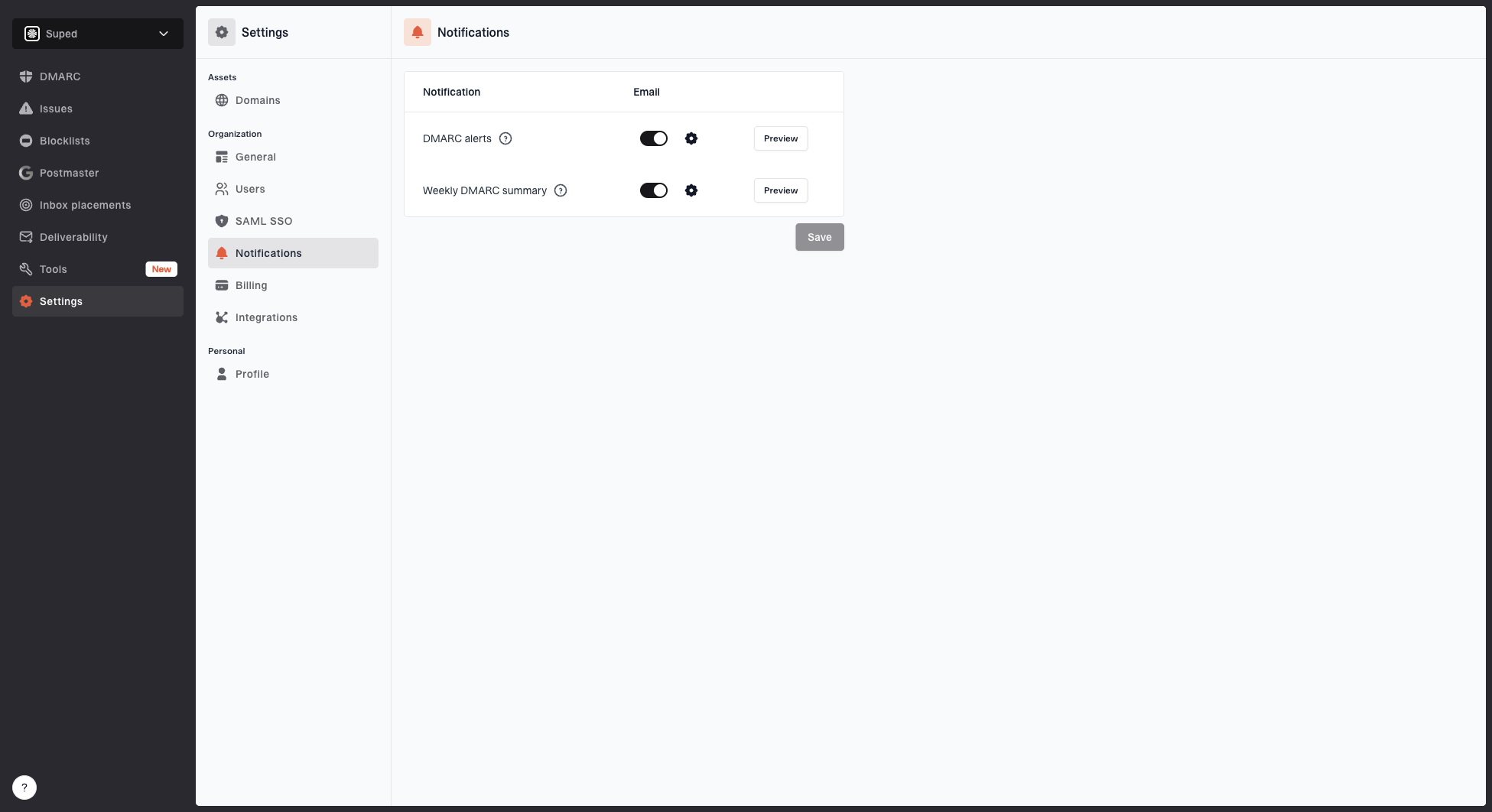
Notification settings page with DMARC alerts, weekly summary, toggles, and preview buttons
- Set alerts: Use threshold-based DMARC alerts for new failure spikes and source changes.
- Track source: Watch Flexmail as a verified sender rather than raw IP traffic.
- Review causes: Suped groups DMARC, SPF, DKIM, rDNS, and blocklist (blacklist) signals into specific fix steps.
- Cover clients: MSP and multi-tenant dashboards help agencies manage Flexmail across many domains.
- Watch reputation: Blocklist monitoring catches IP or domain blacklist issues before they become delivery incidents.
What to monitor after launch
- Flexmail volume: Daily and weekly message count by domain.
- Pass rate: DMARC pass percentage for Flexmail traffic.
- New senders: Any source using the domain outside approved systems.
- DNS drift: SPF and DMARC record changes that break syntax or policy.
Suped is our DMARC reporting and email authentication platform. In Suped, create a Flexmail source view, alert on pass-rate changes, and use source-level issue details to trace misaligned SPF or DKIM. Hosted DMARC can manage later policy changes after one DNS setup.
Choose DMARC enforcement safely
Use p=quarantine as the safer enforcement endpoint for a general-purpose domain. RFC 9989 says domains whose users post to Internet mailing lists should not publish p=reject because indirect flows can break authentication. Reserve reject for a narrowly used sending domain after aligned DKIM and indirect-flow testing.
Minimum policy review timeline
RFC 9989 calls for at least one month at p=none and an equally long p=quarantine period before a general-use domain considers p=reject.
minimum observation period
- Inventory senders: Use DMARC reports to list Flexmail, mailbox, CRM, support, and transactional systems.
- Fix Flexmail: DKIM should pass with your domain, SPF should include Flexmail, and duplicate SPF should be removed.
- Hold none: Collect at least one month of aggregate reports and cover every normal send cycle.
- Move to quarantine: Remove all known legitimate failures, use t=y for a temporary test if needed, then observe full quarantine for at least one month.
- Review indirect mail: Test mailing lists, forwarding addresses, and role aliases because these paths can break SPF or DKIM.
- Choose endpoint: Keep quarantine for general-purpose mail. Consider reject only for a specialized domain with no routine mailing-list use and reliable aligned DKIM.
- Keep monitoring: New Flexmail senders, DNS edits, and staff changes can break authentication later.
Specialized-domain reject exampledns
v=DMARC1; p=reject; rua=mailto:dmarc@example.com; adkim=r; aspf=r
Manual DNS edits
- Change risk: Each policy change touches DNS.
- Slow rollback: A bad enforcement change waits on DNS access.
- Low visibility: XML reports need parsing before broken mail is obvious.
Suped hosted DMARC
- Hosted policy: Suped's Hosted DMARC lets teams change policy without repeated DNS edits.
- Guided fixes: Suped shows source-level steps to fix before policy changes.
- Alerting: Alerts catch Flexmail authentication changes after enforcement.
Hosted DMARC configuration dialog showing policy controls, CNAME setup, and expanded advanced options




