How to set up DMARC/DKIM/SPF for FACTS

Updated on 25 Aug 2026: We updated this guide with tenant-specific FACTS checks, external report authorization, and RFC 9989 rollout guidance.
FACTS email authentication uses account-specific SPF and DKIM settings. Add your school sender domain in FACTS, request the approved DNS values, keep one valid SPF record, and publish DMARC so reports show which path aligns. Prioritize aligned DKIM because it can preserve a DMARC pass when forwarding breaks SPF, but verify both paths in a real FACTS message.
FACTS does not publish one universal SPF include, DKIM selector, or DKIM target for every school-owned sender domain. Treat the DNS values as account-specific. Ask FACTS support for the exact SPF and DKIM records for your tenant, then use message headers to confirm which authenticated domain aligns with the visible From domain.
|
|
|
|
|---|---|---|---|
Domain | Confirm sender | None | Known From domain |
SPF | Request values | Merge if supplied | SPF checked |
DKIM | Request values | Publish key | Aligned signature |
DMARC | Send tests | Add record | Reports |
FACTS email authentication setup map
Add your domain
Start inside FACTS by confirming the exact domain used in the visible From address. DMARC checks the domain families see in the inbox, not the brand name on the message.
- Access: Sign in to FACTS SIS as a school administrator with permission to manage communication settings and school profile settings.
- Sender: Find the school email sender used for attendance, grade, admissions, billing, alert, and family communication messages.
- Domain: Use a real mailbox or monitored alias on your domain, such as noreply@example.com or office@example.com.
- Support: Ask FACTS support for every SPF and DKIM value required by your tenant, including the SPF include or IP range, DKIM selector, host name, record type, target, and activation step.
- Test: Send a real FACTS message to a mailbox you control, then save the full headers before you change DNS.
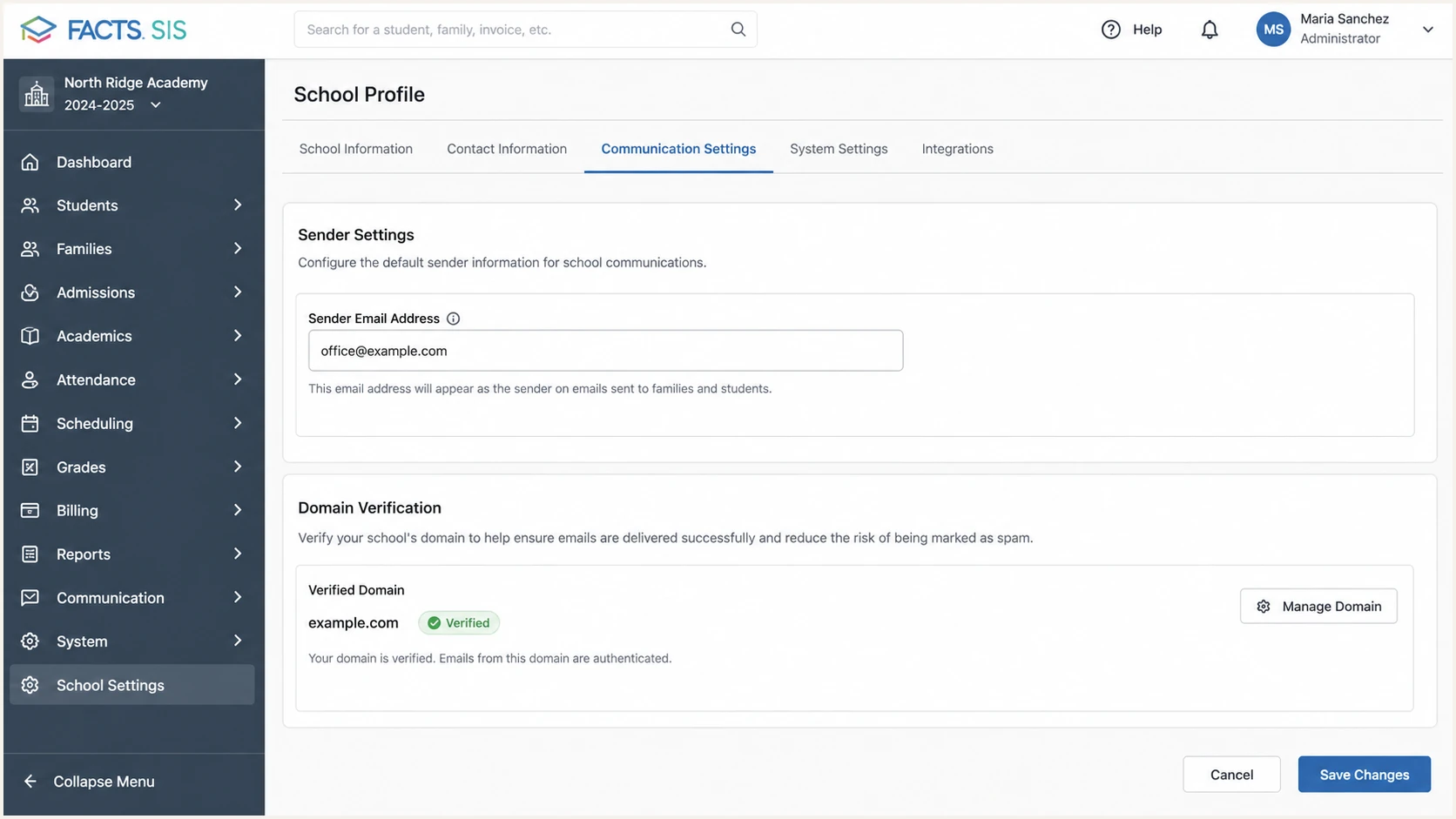
FACTS SIS sender email settings for a school domain.
Do not start by changing DMARC to reject. First prove that FACTS has an aligned authentication path for your From domain, with aligned DKIM preferred before enforcement.
- Keep: Keep any existing quarantine or reject policy if your domain already has it.
- Avoid: Avoid relaxing your domain policy only because one FACTS source has not been configured yet.
Set up SPF
Do not guess a FACTS SPF include or assume SPF alignment is unavailable. Use only the values FACTS provides for your tenant. SPF contributes to DMARC only when it passes and the authenticated MAIL FROM domain has the required alignment with the visible From domain.
- Inspect: Open your current SPF TXT record at the root of the domain FACTS uses in the Return-Path.
- Preserve: Keep existing approved senders for staff mail, admissions mail, finance mail, and any other platform that uses that Return-Path domain.
- Request: Get the approved SPF include or IP range and the expected MAIL FROM domain directly from FACTS support.
- Merge: If FACTS supplies an SPF mechanism for a domain you control, merge it into the one existing SPF record instead of creating a second SPF TXT record.
- Limit: Keep SPF within the 10 DNS-lookup limit after every include, redirect, exists, mx, and a mechanism is counted.
- Confirm: Record the smtp.mailfrom domain and SPF result from a delivered FACTS message. If SPF fails alignment, require aligned DKIM for the DMARC pass.
SPF pattern onlyDNS
example.com. TXT "v=spf1 include:mail.example.net ~all"
A second SPF record causes SPF permerror at receivers. If your DNS already has SPF, edit that record. Do not add another one for FACTS.
- Bad: Two separate TXT records that both start with v=spf1.
- Good: One SPF TXT record that contains every approved sender that belongs in SPF.
SPF checker
Find SPF syntax issues, lookup limits, and weak records.
?/16tests passed
A syntactically valid SPF record does not prove FACTS passes DMARC. The message must pass SPF using an aligned MAIL FROM domain, or pass DKIM using an aligned signing domain.
Set up DKIM
DKIM gives FACTS a durable DMARC pass path. Under relaxed alignment, the DKIM d= domain and visible From domain need the same organizational domain. Under strict alignment, they must match exactly.
- Request: Ask FACTS support for custom DKIM signing for the exact From domain used in FACTS messages.
- Collect: Get the selector, host name, record type, target, and any required verification step.
- Publish: Add the DKIM record exactly as FACTS provides it in your DNS host.
- Wait: Wait through the record's DNS TTL, then ask FACTS to validate or activate DKIM signing.
- Confirm: Send a FACTS message and confirm DKIM passes with a d= value aligned to your visible From domain.
DKIM placeholder patternDNS
facts1._domainkey.example.com. CNAME facts1.example.vendor.net.
Do not publish the placeholder above. It only shows the shape of a typical DKIM CNAME. FACTS has to give the real selector and target for your school account.
Working DKIM
- Signature: The message has a passing DKIM signature.
- Domain: The d= domain aligns with the visible From domain under your DMARC alignment mode.
- Result: DMARC passes even when SPF or SPF alignment fails.
Broken DKIM
- Missing: No DKIM signature exists on the FACTS message.
- Mismatch: The passing d= domain lacks alignment with your visible From domain.
- Result: DMARC fails unless SPF also passes with an aligned MAIL FROM domain.
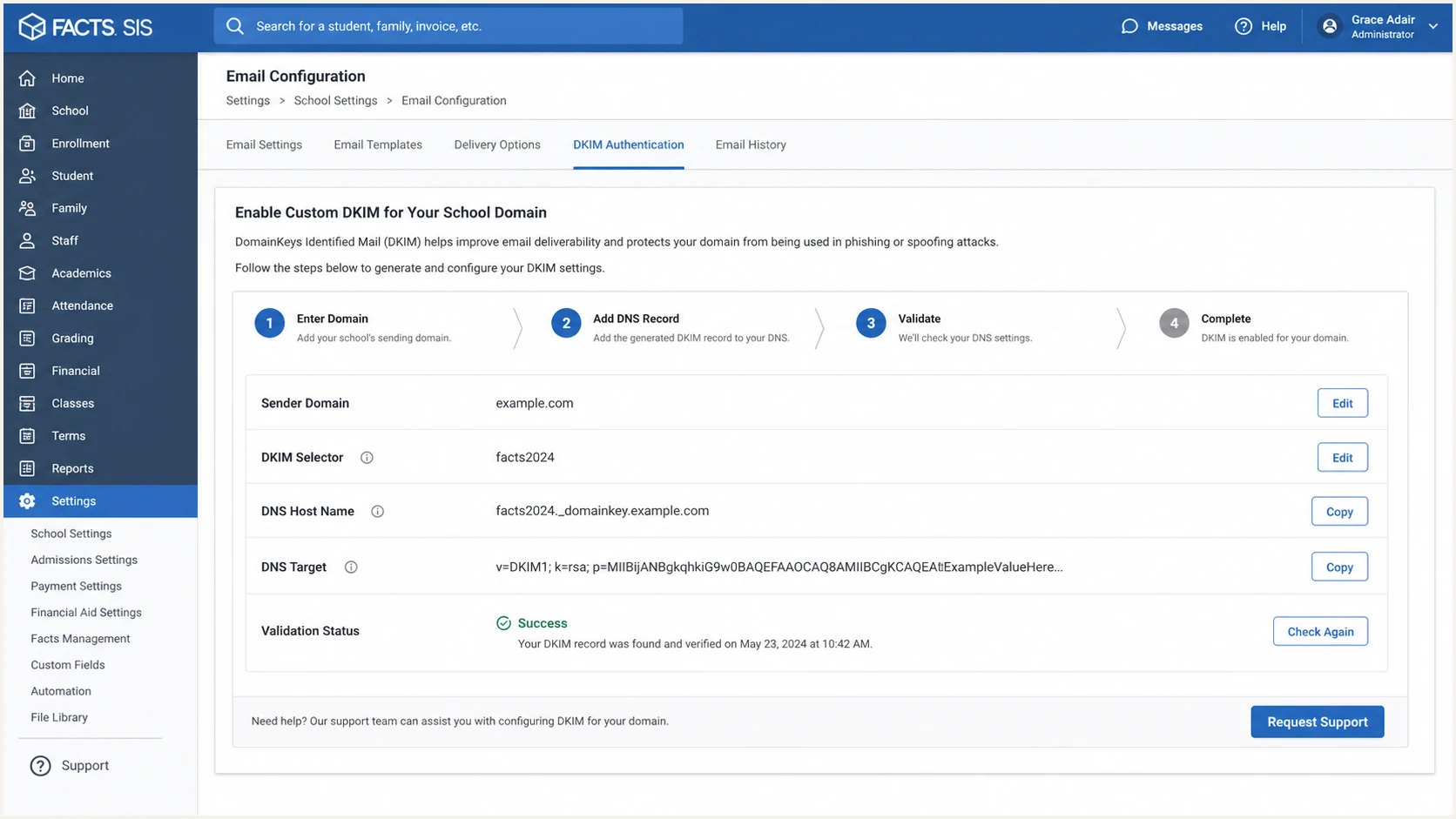
FACTS SIS custom DKIM setup request for a school domain.
Set up DMARC
DMARC belongs in your DNS, not inside FACTS. The current standard is RFC 9989, and the record still starts with v=DMARC1. Start with monitoring if the domain has no DMARC policy. If it already uses quarantine or reject, keep that stronger policy and fix the FACTS authentication path.
- Host: Create a TXT record at _dmarc.example.com, replacing example.com with your sender domain.
- Policy: Use p=none while FACTS authentication is being verified, unless your domain already runs quarantine or reject.
- Reports: Point rua to a dedicated mailbox or reporting endpoint that parses aggregate reports.
- Generate: Use the DMARC record generator if you want a clean record without hand-editing tags.
- Check: Verify the record after DNS propagation and confirm there is only one DMARC TXT record at the policy name.
- Tags: Do not use pct for gradual enforcement. RFC 9989 removed pct and added t for testing behavior, not percentage rollout.
Starter DMARC recordDNS
v=DMARC1; p=none; rua=mailto:dmarc@example.com
DMARC checker
Look up a domain's DMARC record and catch policy issues.
?/7tests passed
DMARC p=none does not change message handling under the standard. It provides source data so you can prove FACTS and other approved senders are passing before enforcement.
Authorize external DMARC reports
If the domain after @ in your rua address sits outside the organizational domain that publishes DMARC, the report destination normally needs a DNS authorization record. Without that approval, receivers can ignore the external report address even when your DMARC record is valid.
- Compare: Compare the domain publishing DMARC with the domain used by the rua destination. A same-domain mailbox does not need external authorization.
- Confirm: Ask the report destination operator whether it authorizes your exact domain or uses an accepted wildcard record.
- Publish: The destination domain operator publishes the authorization TXT record under its own DNS zone. Do not place that record in the school's zone unless the school owns the destination domain.
- Verify: Confirm that the authorization record resolves, then wait through a normal reporting cycle for aggregate data. Suped provides the reporting address used by its product workflow and handles authorization on the reporting domain.
External reporting authorization patternDNS
example.com._report._dmarc.reports.example.net. TXT "v=DMARC1;"
The pattern above is an example, not a FACTS record. Replace both domains with the exact publishing and reporting domains, or use the reporting address and instructions supplied by your report processor.
Verify and troubleshoot
Verification means testing a real FACTS message, not only checking that DNS exists. Use the headers and DMARC aggregate reports together because DNS can be correct while FACTS still authenticates with a domain that lacks alignment.
- Send: Trigger a real FACTS email, such as an alert, attendance notice, or family communication.
- Inspect: Open the full message headers and find the receiver-added Authentication-Results field.
- SPF: Record the SPF result and smtp.mailfrom domain, then compare its organizational domain with the visible From domain.
- DKIM: Confirm DKIM says pass and the header.d domain aligns under your relaxed or strict DMARC setting.
- DMARC: Confirm DMARC says pass. FACTS needs one aligned authentication path, although both SPF and DKIM should be configured when FACTS provides them.
- Health: Run a full domain health checker review after DNS changes.
Email tester
Send a real email to this address. Suped shows a results button when the test is ready.
?/43tests passed
The email tester is the fast check: send it one FACTS-generated email and use the report to confirm SPF, DKIM, DMARC, headers, DNS, and inbox-facing issues in one place.
|
|
|
|---|---|---|
DKIM fail | Wrong host or target | Compare FACTS values |
No DKIM | Signing not active | Ask FACTS to activate |
SPF fail | Unauthorized IP or permerror | Check include and lookups |
DMARC fail | No aligned pass | Fix DKIM or aligned SPF |
FACTS troubleshooting checklist
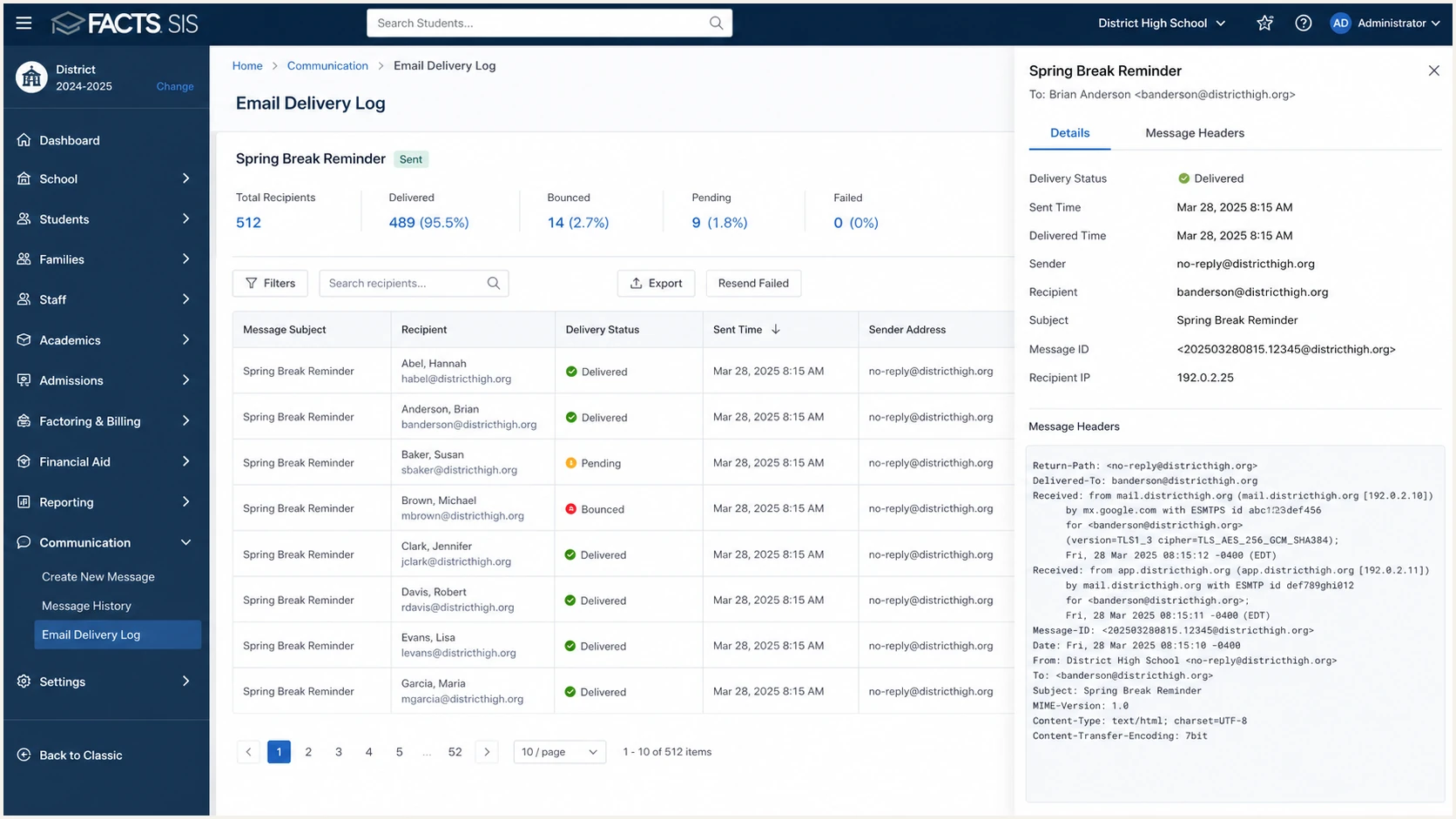
FACTS SIS communication log used to verify an authenticated test email.
Get alerted when it breaks
FACTS authentication can break after a domain change, DNS migration, selector rotation, or sender setting update. Suped's product monitors DMARC results by source, detects authentication failures, and alerts teams when FACTS mail moves away from its established passing pattern.
- Alerts: Real-Time Alerts flag sudden FACTS DKIM failures, new unverified sources, and policy-impacting changes.
- Issues: Automated issue detection gives exact fix steps instead of leaving raw XML reports for someone to decode.
- Sources: The source breakdown separates FACTS from staff mail, admissions tools, finance systems, and unknown senders.
- Reputation: Blocklist (blacklist) monitoring helps compare authentication failures with domain and IP reputation changes.
- Scale: The MSP and multi-tenancy dashboard keeps separate schools and domains in one operational view.
Suped connects DMARC, SPF, DKIM, hosted records, SPF flattening, blocklist (blacklist) monitoring, and deliverability signals in one workflow. Teams can trace a FACTS failure to the affected source or DNS record without reading raw aggregate XML.
For ongoing FACTS visibility, connect aggregate reports to DMARC monitoring and watch for the FACTS source to keep its aligned pass path before you increase enforcement.
How to prioritize FACTS failures
Compare current results with the normal volume and authentication path for each school-owned From domain.
Healthy
Expected volume passes
Expected FACTS volume passes DMARC through an aligned path.
Investigate
New failures
New low-volume failures appear after a DNS or sender change.
Act now
Sustained failures
Failures persist or affect a material share of family messages.
Secure your domain with p=reject
Move to p=reject only after FACTS and every other legitimate sender has a stable DMARC pass path. Aligned DKIM is important because forwarding can break SPF. Under RFC 9989, p=reject expresses the domain owner's handling preference, while receivers still apply local policy and other analysis.
- Inventory: Identify every legitimate source in DMARC reports, including FACTS, staff mail, admissions, finance, forms, and website mail.
- Fix: Resolve every recurring FACTS authentication failure before changing policy.
- Observe: Collect reports across a full sending cycle. For domains used by people who post to mailing lists, RFC 9989 advises at least one month at p=none and another month at p=quarantine before reject.
- Stage: Move from p=none to p=quarantine as the enforcement step before reject. Do not use pct for a percentage rollout.
- Reject: Publish p=reject after reports show legitimate mail consistently passes and indirect mail risks have been reviewed.
- Maintain: Keep alerts on after enforcement because one DNS change can turn a working FACTS source into a failing source.
Before reject
- FACTS: Its aligned pass path is not yet stable.
- Reports: Unknown sources still send as your domain.
- Risk: Legitimate school mail can be quarantined or rejected.
Ready for reject
- FACTS: Its aligned pass path is stable by source.
- Reports: Known senders account for legitimate volume.
- Policy: Receivers see your reject preference for DMARC failures.
Final DMARC policyDNS
v=DMARC1; p=reject; rua=mailto:dmarc@example.com
Suped's Hosted DMARC lets teams change policy stages without repeated DNS edits. Hosted DMARC keeps those changes controlled while alerts confirm FACTS stays authenticated.