How to set up DMARC/DKIM/SPF for Buttondown

Updated on 23 Aug 2026: We updated this guide for Buttondown's current domain workflows and the latest DMARC policy guidance.
Buttondown custom-domain authentication works best when the sending domain comes first, followed by verification of SPF, DKIM, and DMARC with a real Buttondown message. For new Buttondown sending subdomains, the cleanest path is managed DNS delegation: Buttondown shows two NS records and manages the sender-specific SPF, DKIM, return-path, and tracking records below that subdomain.
For root-domain sending, or Buttondown's manual setup, copy the displayed records instead of guessing values. DMARC applies to the visible From domain and gives mailbox providers a policy for messages that fail aligned authentication.
Add your domain
Add the Buttondown sending domain before changing SPF, DKIM, or DMARC because the DNS records depend on the exact From domain used in Buttondown. A dedicated subdomain such as newsletter.example.com keeps Buttondown isolated from normal corporate mail.
- Open Buttondown settings: Go to Settings, then Domains, then the sending domain area.
- Choose the sending domain: Use a dedicated subdomain for new newsletters, usually mail.example.com or newsletter.example.com.
- Use managed setup: For a subdomain, publish the two NS records Buttondown shows at your DNS host.
- Use manual setup: For a root domain, or when you cannot delegate a subdomain, copy Buttondown's manual DNS records exactly.
- Verify in Buttondown: Return to the Domains page and wait for Buttondown to mark the sending domain as verified.
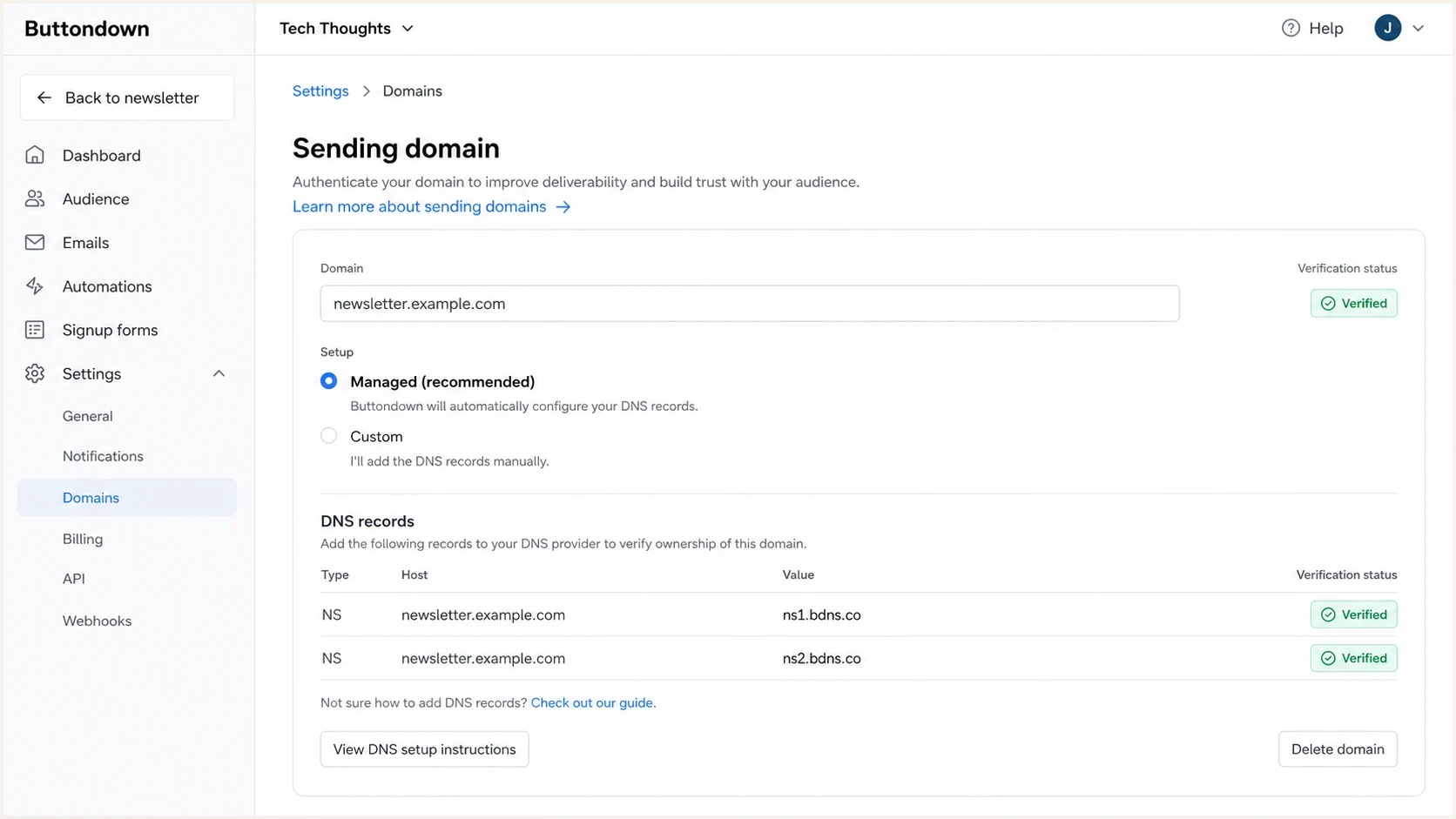
Buttondown Settings Domains screen showing a sending domain setup
Keep hosting and sending DNS separate
If you already use a Buttondown hosting domain with a CNAME record, do not delegate that same exact name with NS records. DNS does not allow CNAME and NS records at the same host name.
- Good split: Use www.example.com for archives and newsletter.example.com for sending.
- Bad split: Do not put Buttondown archive hosting and Buttondown sending delegation on the same hostname.
Managed setup
- Best fit: New Buttondown sending subdomains.
- DNS change: Two NS records at the delegated subdomain.
- Tracking: Buttondown configures the custom tracking domain automatically.
- Benefit: Buttondown can update sending records without another DNS change.
Manual setup
- Best fit: Root-domain sending or DNS hosts that block NS delegation.
- DNS change: Copy every SPF, DKIM, return-path, and tracking record Buttondown displays.
- Tracking: Enable click tracking under Settings, Sending domain, then Add-ons and publish the displayed CNAME.
- Replies: Provide your own MX record for inbound replies. Reply tracking is off by default but can be enabled under Add-ons.
- Risk: Future sending-path changes require another manual DNS update.
Set up SPF
Buttondown supports return-path alignment, so SPF should pass and match the visible From domain after the sending domain is verified. In managed setup, Buttondown handles the underlying SPF and return-path DNS below the delegated subdomain. In manual setup, publish exactly what Buttondown displays.
- Check the mode: If Buttondown shows managed NS records, publish those and let Buttondown manage SPF below the subdomain.
- Merge root SPF: If you send from example.com and Buttondown shows a manual SPF include, merge it into the existing SPF record instead of creating a second SPF TXT record.
- Keep one SPF record: Every hostname gets only one SPF TXT record. Multiple SPF records make SPF return a permanent error.
- Watch lookup count: SPF evaluation permits at most ten DNS-causing terms. If root SPF is already crowded, put Buttondown on a subdomain or use Suped's Hosted SPF to manage the authorized sources.
Manual SPF merge patterndns
Name: example.com
Type: TXT
Value: v=spf1 include:buttondown-provided-value.example ~all
After DNS publishes, check the exact From domain or delegated sending subdomain. A green SPF syntax result is not enough; send a real Buttondown test message later and confirm that the return-path domain aligns with the From domain for DMARC.
SPF checker
Find SPF syntax issues, lookup limits, and weak records.
?/16tests passed
If SPF fails in the checker, fix that before moving to DMARC enforcement. If SPF passes but a delivered test still shows SPF alignment errors, inspect the Return-Path header. With Buttondown, that usually means the sending domain is not fully verified, the old path is still being used, or the From address is not the domain you authenticated.
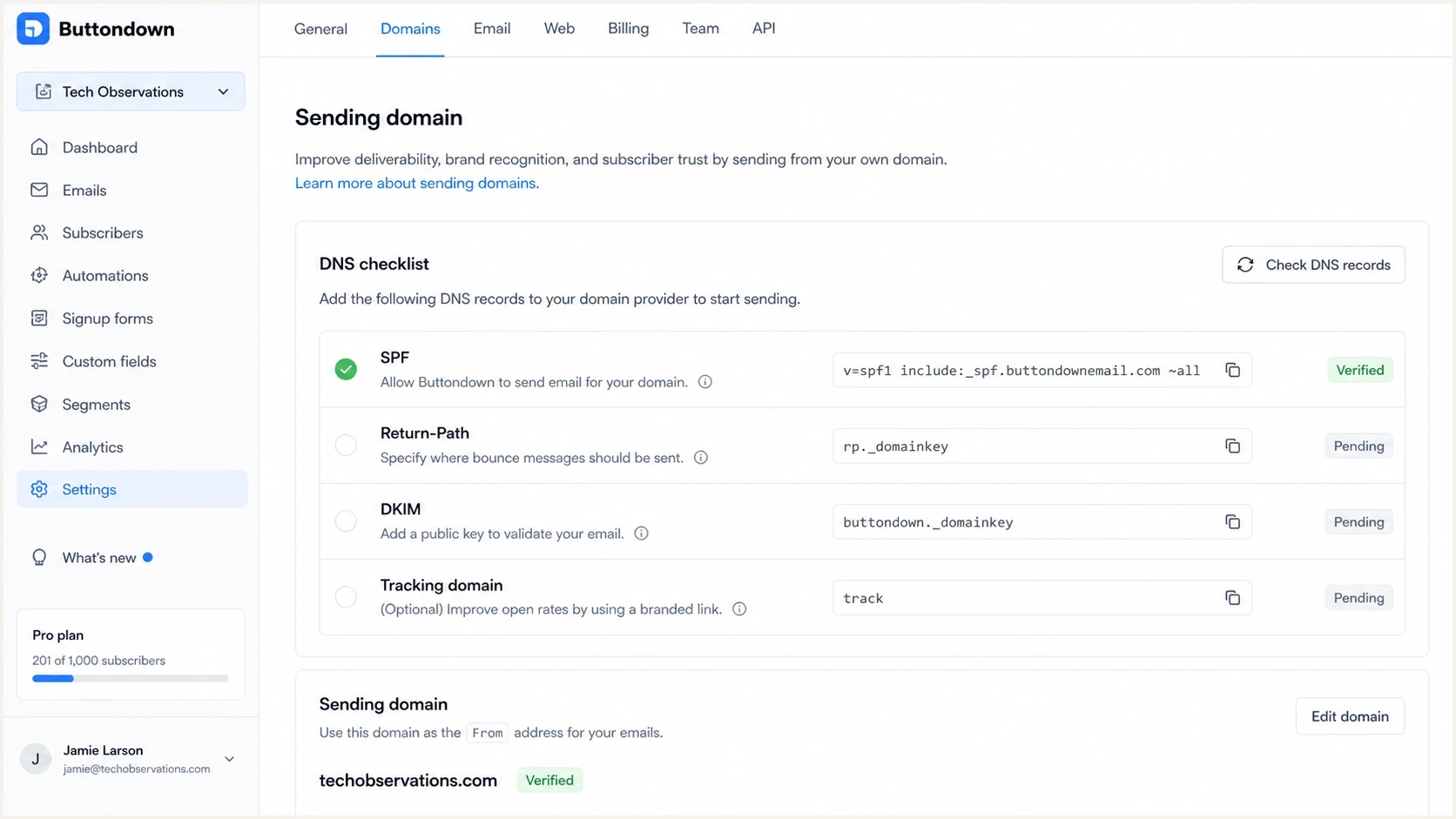
Buttondown sending domain DNS checklist with SPF verified
Set up DKIM
DKIM is especially important for Buttondown because DMARC passes when DKIM passes and its signing domain aligns with the visible From domain. Managed setup lets Buttondown create and maintain the DKIM selectors below the delegated sending subdomain.
- Use managed selectors: If Buttondown manages the sending subdomain, wait for the DKIM rows to show verified in Buttondown.
- Copy manual selectors: If Buttondown shows manual DKIM records, copy every selector name and value exactly.
- Do not rename selectors: DKIM selector names are part of the signature lookup. Changing them breaks verification.
- Avoid proxying: If your DNS host has proxy controls, leave DKIM CNAME records as DNS-only.
- Test a send: Send a Buttondown email and confirm the message has a DKIM-Signature header with your sending domain.
Manual DKIM record patternsdns
Name: selector._domainkey.newsletter.example.com
Type: CNAME
Value: target-provided-by-buttondown.example

Name: selector._domainkey.newsletter.example.com
Type: TXT
Value: v=DKIM1; k=rsa; p=public-key-from-buttondown
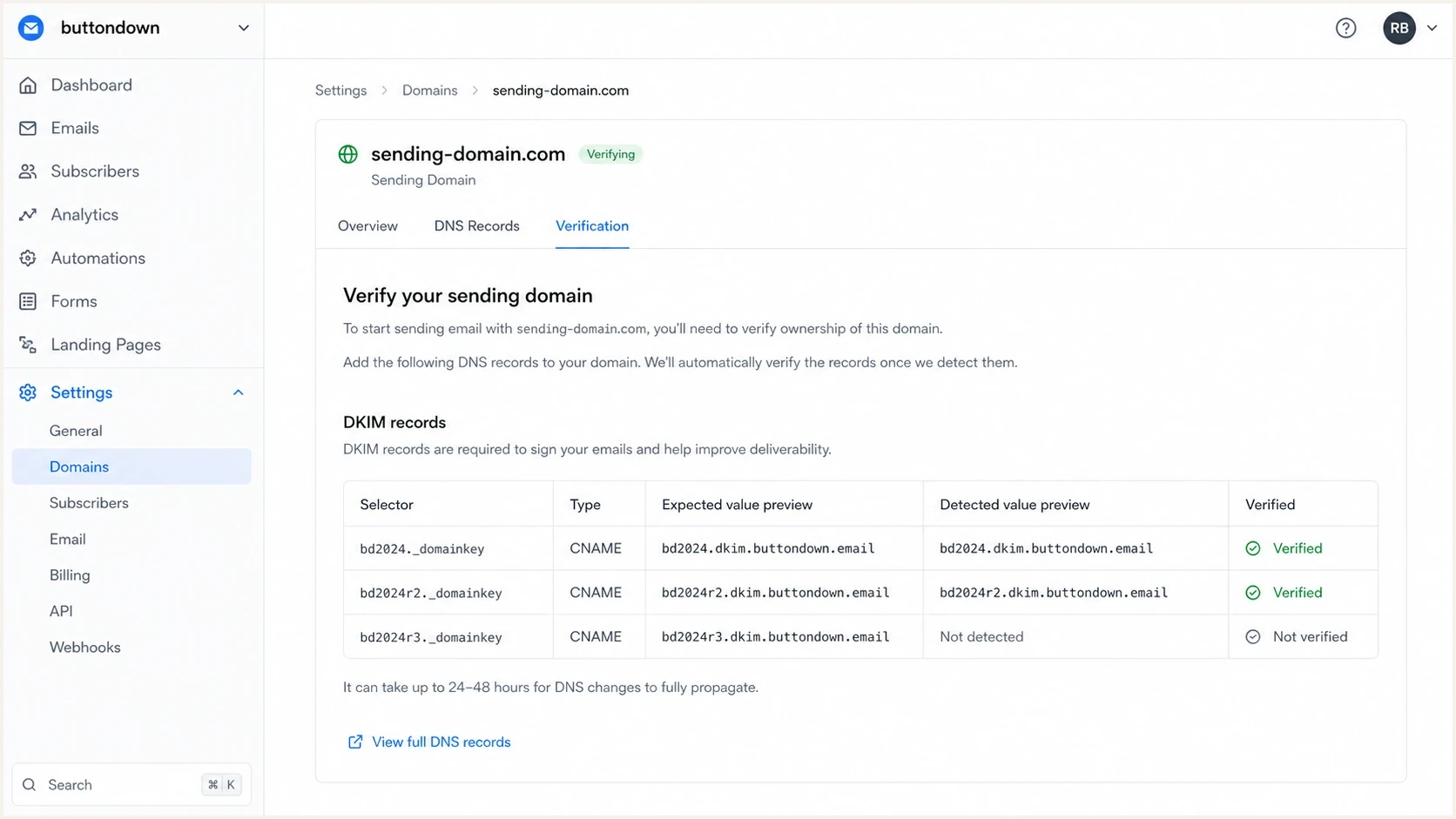
Buttondown sending domain screen showing DKIM records
When SPF matching is not enough
DMARC only needs one aligned pass: SPF or DKIM. Buttondown supports return-path alignment, so SPF should still be configured. If another sender cannot use your return path, DMARC can pass through aligned DKIM even when SPF is unaligned.
Set up DMARC
DMARC policy discovery starts with the visible From domain. If the From address is hello@newsletter.example.com, publish an explicit record at _dmarc.newsletter and keep a DMARC record at the organizational domain, _dmarc. If the From address is hello@example.com, publish at the root-domain _dmarc host.
- Identify DNS control: For a managed subdomain, Buttondown controls DNS below the delegated name, so verify the DMARC record it publishes there. For manual or root setup, publish the record at your DNS host.
- Start at monitoring: Use p=none unless the domain already has a tested quarantine or reject policy.
- Send reports somewhere useful: Replace the sample rua mailbox with the reporting address you monitor.
- Use one record: Only one DMARC TXT record is valid at a single _dmarc hostname.
- Skip historic sampling: Do not add pct. RFC 9989 marks that tag historic, so stage policy by reviewing reports before changing p.
- Generate safely: Use the DMARC generator if you need a record with current reporting and policy settings.
Starter DMARC recorddns
Name: _dmarc
Type: TXT
Value: v=DMARC1; p=none; rua=mailto:dmarc@example.com
|
|
|
|---|---|---|
Root | _dmarc | explicit root policy |
Subdomain | _dmarc.sub | explicit; parent fallback exists |
Parked | _dmarc | reject |
Use the row that matches your Buttondown From address.
After publishing, check the hostname that matches Buttondown's visible From domain and the organizational-domain record when the two differ. Receivers can fall back to a parent policy, but an explicit Author Domain record gives the sending subdomain direct policy and reporting.
DMARC checker
Look up a domain's DMARC record and catch policy issues.
?/7tests passed
If the checker finds no DMARC record, confirm the DNS host field. Many DNS panels expect only _dmarc for the root domain and only _dmarc.newsletter for a subdomain. Entering the full domain in a panel that appends the zone creates the record at the wrong place.
Verify and troubleshoot
DNS verification inside Buttondown proves the records exist. A delivered message proves the whole path works. Always test with a real Buttondown email because it exposes the active return path, DKIM selector, From domain, and DMARC result in one place.
- Send a real email: Send from Buttondown using the exact From address your subscribers see.
- Inspect authentication: Confirm SPF passes, DKIM passes, and DMARC passes in the receiving result.
- Check domain matching: The DKIM d= domain or SPF return-path domain must share the organizational domain with the visible From domain under relaxed alignment, or match it exactly when strict alignment is configured.
- Wait for DNS: If you just changed records, wait for TTL and retry from Buttondown.
- Avoid stale sends: Do not judge the setup from an old message sent before Buttondown verified the domain.
Fast failure map
- SPF fail: Check for duplicate SPF TXT records, missing Buttondown manual include values, or incomplete managed delegation.
- DKIM fail: Check selector spelling, CNAME target values, DNS-only status, and Buttondown verification state.
- DMARC fail: Check whether the passing SPF or DKIM domain aligns with the visible From domain.
- No report: Check the rua address and confirm mailbox providers have had time to send aggregate reports.
The quickest full-path check is to send a Buttondown message to an email tester address. That gives you one report for SPF, DKIM, DMARC, headers, and common content issues.
Email tester
Send a real email to this address. Suped shows a results button when the test is ready.
?/43tests passed
Use the tester before changing policy because it catches problems that a DNS-only check misses. A common example is DKIM DNS passing in isolation while the live Buttondown message still signs with an older selector or an unexpected domain.
|
|
|
|---|---|---|
SPF fail | DNS mismatch | Recheck Buttondown records |
DKIM fail | Selector issue | Copy exact selector |
DMARC fail | Domain mismatch | Fix From or DNS |
No reports | Bad rua | Correct mailbox |
Troubleshooting checks after a live Buttondown test send.
Warm up a migrated list
Authentication does not create sender reputation by itself. Plan a warm-up when migrating 10,000 subscribers or more. Buttondown requires a custom sending domain for imports above 10,000 subscribers and automatically throttles and audits initial sends while it measures engagement and delivery problems.
- Clean the list first: Remove invalid addresses, prior unsubscribes, and recipients without a current reason to expect the newsletter.
- Start with engaged readers: Send the first messages to subscribers who recently opened, clicked, or replied.
- Expand gradually: Increase the audience only while hard bounces and complaints remain within Buttondown's standards.
- Invite replies: Acknowledge the migration and ask engaged readers to reply to the first messages.
- Pause on deterioration: Fix list or authentication problems before widening the next send.
Let Buttondown control the pace
Buttondown caps hourly sending for new senders until engagement and reputation reach its baseline. Treat that throttling as part of the migration plan and watch the first sends before expanding the audience.
Get alerted when it breaks
A Buttondown setup can pass today and break after a DNS edit, domain change, selector rotation, or sender migration. Suped's product turns aggregate DMARC reports into source-level authentication results and alerts, which helps track Buttondown alongside the domain's other authorized senders.
- Detect source drift: Suped groups Buttondown separately from other senders so failures do not hide in aggregate XML.
- Act on alerts: Report-driven alerts flag SPF, DKIM, or DMARC pass-rate drops when new data arrives.
- Fix faster: Issue detection points to the record, source, and likely fix instead of presenting only raw XML.
- Watch reputation: Blocklist monitoring tracks domain and IP issues across blocklist and blacklist data.
- Manage multiple domains: The MSP dashboard can separate newsletters and client domains without combining their authentication results.
For ongoing DMARC monitoring, Suped's product can combine DMARC, SPF, DKIM, blocklist checks, and deliverability signals in the same workflow.
Without alerting
- Slow detection: A broken selector waits until someone inspects headers or reports.
- Raw data: DMARC XML requires manual grouping by source and domain.
- Policy risk: Moving to enforcement is guesswork if legitimate sources are unclear.
With Suped
- Fast detection: Alerts surface Buttondown failures when report data changes.
- Source clarity: Buttondown, corporate mail, and other senders appear as separate sources.
- Action steps: The issue view gives direct fix steps for DNS and authentication errors.
Choose a DMARC enforcement policy
Do not move a Buttondown domain straight to p=reject unless every legitimate sender authenticates. A dedicated Buttondown-only subdomain can use reject after sustained clean reports. For a root domain used by people or mailing lists, RFC 9989 warns that reject can disrupt indirect mail, so assess those flows before moving beyond quarantine.
- Collect reports: Run p=none until Buttondown and every other legitimate source is visible across a normal sending cycle.
- Fix legitimate sources: Buttondown should pass aligned DKIM and SPF, while every other sender needs both mechanisms configured for current DMARC participation.
- Use quarantine first: Move to p=quarantine after known legitimate sources pass and review the resulting dispositions.
- Reserve reject for the right domain: Use p=reject on a dedicated sending domain after failures are unauthorized. Keep indirect mail risks in view for general-purpose domains.
- Keep watching: After enforcement, a sender break can affect delivery, so continue reviewing reports and alerts.
Policy readiness checks
Use evidence from a normal sending cycle before tightening DMARC on a Buttondown domain.
Hold at p=none
Unknown sources
Legitimate sources still fail or have not appeared in reports.
Test quarantine
Sources verified
Known legitimate sources pass aligned authentication consistently.
Consider reject
Dedicated domain
The domain is dedicated to controlled sending and remaining failures are unauthorized.
Suped's product can support this workflow by tying policy changes to source-level authentication data. Hosted DMARC manages record changes without repeated DNS edits, while Hosted SPF helps manage authorized sources when the SPF lookup budget is tight.
For policy changes without editing TXT records every time, Hosted DMARC keeps the DNS side stable while you move through monitoring and enforcement.
Enforcement checklist
- Buttondown passes: Live test emails pass aligned DKIM, SPF, and DMARC.
- Reports are clean: Aggregate DMARC reports show no legitimate sender failing at scale.
- Alerts are active: Failure alerts are configured before enforcement affects mail handling.
- Policy fits the domain: Reject is limited to a controlled sending domain, or indirect mail has been assessed first.