How to set up DMARC/DKIM/SPF for Blackbaud

Updated on 26 Aug 2026: We updated this guide for Blackbaud's enforced sender authentication flow and current DMARC policy staging.
Blackbaud DMARC setup depends on DKIM that matches the visible From domain. Blackbaud normally authenticates SPF on a Blackbaud-owned Return-Path, so SPF can pass without matching your From domain and therefore cannot carry the Blackbaud DMARC result.
Set it up by claiming each sending domain in Blackbaud, publishing the DNS TXT values Blackbaud provides, and confirming domain ownership plus DKIM and DMARC. If the domain is new to DMARC, start at p=none, then move to enforcement after Blackbaud DKIM and every other legitimate sender pass consistently.
Blackbaud authentication priority
- DKIM first: Blackbaud mail needs a passing DKIM signature that matches the From domain for DMARC to pass reliably.
- SPF second: Blackbaud manages SPF for its Return-Path in most products. Add an SPF value only when your Blackbaud product or tenant gives that exact instruction.
- DMARC last: Start with monitoring on a new deployment, confirm every legitimate source, then tighten policy.
Meet Blackbaud's current authentication requirement
Since July 1, 2026, Blackbaud has enforced DKIM and DMARC authentication for sending domains. If a domain is not fully configured, Blackbaud excludes its messages before they enter the outgoing mail stream, so recipients do not receive them and no delivery bounce is generated.
Check the portal before sending
- Claim every domain: Add each domain and subdomain used by marketing messages, receipts, or automated Blackbaud mail.
- Complete every check: Domain ownership, DKIM, and DMARC must each show Verified.
- Require Ready status: Do not schedule production mail until the sending domain shows Ready in Email Authentication Settings.
- Retest real mail: A Ready status confirms Blackbaud's checks, while a received test message confirms the production stream signs correctly.
Add your domain
Add the exact domain or subdomain that appears after the @ sign in Blackbaud's visible From address. If donors receive mail from gifts.example.org, authenticate gifts.example.org, not only example.org. Repeat the process for every sending domain used across your Blackbaud products.
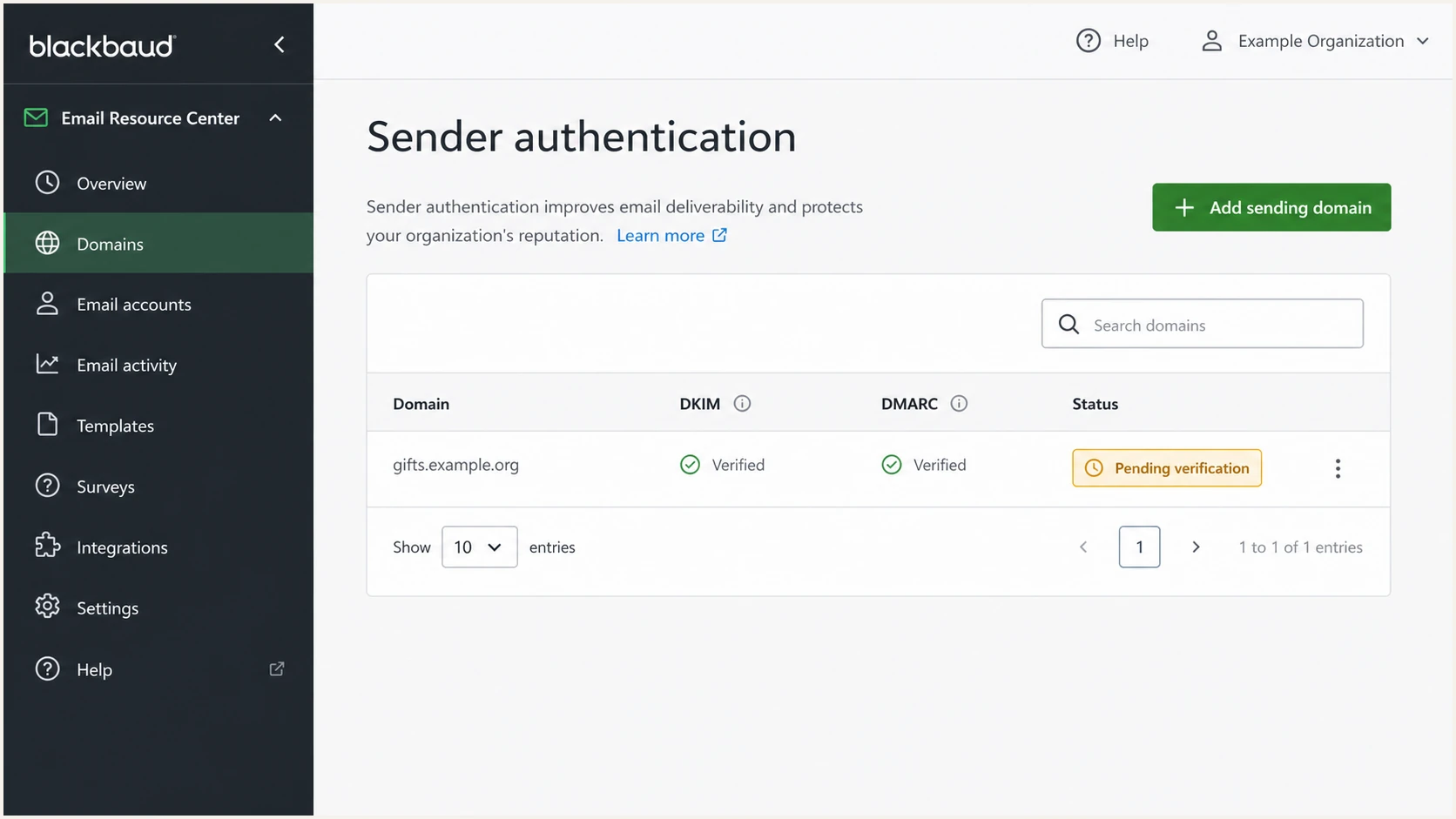
Blackbaud sender authentication screen with a pending sending domain.
- Open authentication: Sign in to app.Blackbaud.com, then select Admin, Settings, and Email. You need Organization admin access or the Manage email authentication permission.
- Add domain: In Email Authentication Settings, select Add domain, enter the exact From domain, and save it. Claiming a domain for SSO does not claim it for email.
- Copy values: Open the domain details and copy each DNS TXT hostname and value Blackbaud shows for domain ownership, DKIM, and DMARC. Do not rewrite a host or value.
- Publish DNS: Add the records at your DNS host. Blackbaud checks public DNS automatically, and propagation can take up to 72 hours.
- Confirm Ready: Wait until domain ownership, DKIM, and DMARC show Verified and the overall domain status shows Ready, then send a real Blackbaud test message.
|
|
|
|---|---|---|
From domain | Exact domain claimed | Email settings |
Required checks | All Verified | Domain details |
Overall status | Ready | Blackbaud portal |
Blackbaud domain setup checklist
Use Blackbaud tenant values
Blackbaud record names and values can vary by product, tenant, or an earlier setup. Use only the values shown in Email Authentication Settings or supplied for that Blackbaud product.
Set up SPF
For most Blackbaud products, no customer-side SPF change is required. Blackbaud uses a Blackbaud-owned Return-Path and maintains the SPF policy for that domain. SPF can pass there, but the different domain means it does not satisfy DMARC for your visible From domain.
- Check first: Confirm which domain appears in the message Return-Path. If Blackbaud owns it, Blackbaud also owns its SPF record.
- Avoid guesses: Do not add a Blackbaud include to your domain's SPF policy unless your product-specific instructions or tenant provide that exact value.
- Handle exceptions: Some Blackbaud product workflows and customer-controlled Return-Path domains require their own SPF value. Follow only the instructions for that sending source.
- Keep one policy: Publish one SPF policy at each hostname and keep DNS-causing SPF terms within the 10-lookup limit.
What SPF can prove
- Return-Path pass: SPF can pass for the Blackbaud-owned envelope domain.
- IP approval: SPF can show that the connecting Blackbaud IP is allowed by that envelope domain.
What SPF cannot prove
- From-domain match: SPF does not satisfy DMARC unless the Return-Path domain matches the visible From domain under the domain's DMARC mode.
- Blackbaud DMARC pass: The usual Blackbaud Return-Path does not provide that match, so DKIM must carry DMARC.
SPF checker
Find SPF syntax issues, lookup limits, and weak records.
?/16tests passed
SPF action for Blackbaud
If Blackbaud uses its own Return-Path and does not show an SPF value for your domain, make no SPF change for this source and focus on DKIM. Keep your domain's SPF policy accurate for other systems that use a Return-Path you control.
Set up DKIM
DKIM is the critical Blackbaud step, and Blackbaud now requires it for every sending domain and subdomain. Blackbaud's DKIM article covers outgoing signatures. In the current self-service flow, publish the DNS TXT host and full public-key value exactly as Email Authentication Settings shows them.
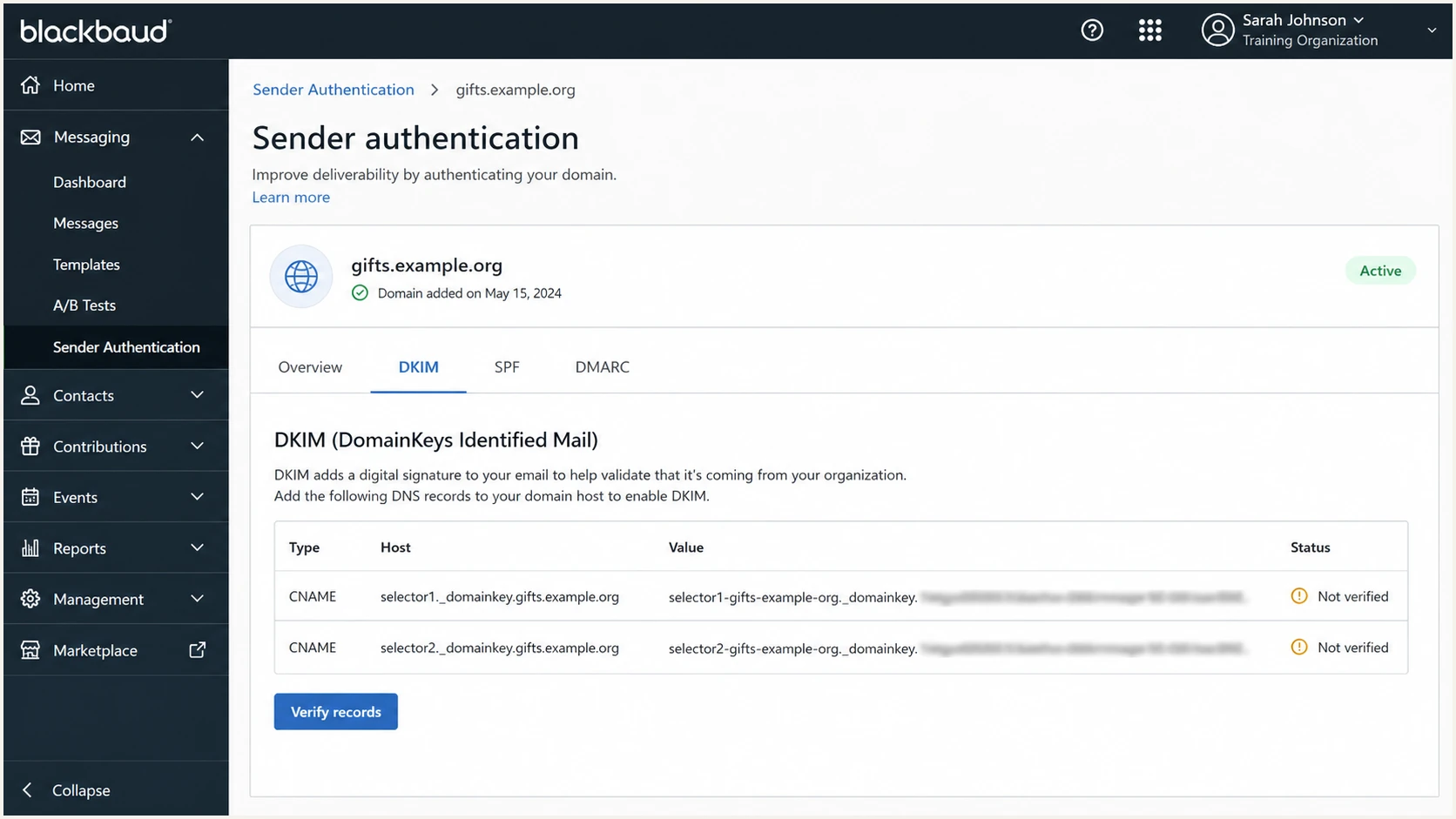
Blackbaud DKIM setup screen showing CNAME records to publish.
- Open domain details: In Email Authentication Settings, select the edit icon for the claimed sending domain and expand DKIM.
- Copy the host: Copy the full DNS host exactly. Current Blackbaud Email Services commonly shows sm._domainkey, but the portal value controls.
- Publish the TXT value: Create the TXT record with the complete DKIM public key Blackbaud provides. Do not add quotes unless your DNS interface applies them automatically.
- Verify status: Wait for Blackbaud to detect public DNS, then confirm DKIM shows Verified and the domain shows Ready.
- Inspect a header: Send a Blackbaud test message and confirm the passing DKIM d= domain matches the visible From domain under your DMARC mode.
Current DKIM DNS shapedns
type: TXT
host: sm._domainkey.example.org
value: copy the full public key shown in Blackbaud
Good DKIM result
- Signature pass: The received message has a passing Blackbaud DKIM signature.
- Domain match: The DKIM signing domain matches the visible From domain as DMARC requires.
- Stable content: Footers, link wrapping, or downstream routing do not alter signed content and break the signature.
Set up DMARC
Every domain and subdomain used to send Blackbaud mail needs DMARC. If a sending domain has no DMARC record, publish a monitoring record first. Blackbaud's DMARC guide explains compliant mail, and the DMARC generator can create a clean starting record.
- Check existing: Look for one DMARC TXT record at _dmarc on the exact Blackbaud From domain, and check whether an inherited parent policy already applies.
- Keep enforcement: If the domain already uses quarantine or reject, keep that policy and fix Blackbaud DKIM inside the current policy.
- Start monitoring: If no DMARC record exists, start with the p=none value below and replace the rua mailbox with an address that can process aggregate reports.
- Confirm Blackbaud: Use aggregate reports to confirm Blackbaud volume, DKIM pass rates, source IPs, and failed messages before enforcing policy.
- Verify in Blackbaud: Confirm DMARC shows Verified and the claimed domain shows Ready in Email Authentication Settings.
Starting DMARC TXT valuedns
v=DMARC1; p=none; rua=mailto:dmarc@example.com
DMARC checker
Look up a domain's DMARC record and catch policy issues.
?/7tests passed
Do not weaken an enforced domain
If the domain already uses p=quarantine or p=reject, do not change it back to p=none just to add Blackbaud. Fix DKIM first, then watch the reports.
Do not stage policy with pct
RFC 9989 treats the pct tag as historic because receivers did not apply percentage sampling consistently. Stage enforcement by moving one well-understood sending domain or subdomain at a time, using a complete p=quarantine policy before p=reject.
Verify and troubleshoot
Verification needs one real Blackbaud email from every production sending domain. DNS and a Ready status prove that Blackbaud found the records, but only a received message proves that the intended stream carries a passing DKIM signature.
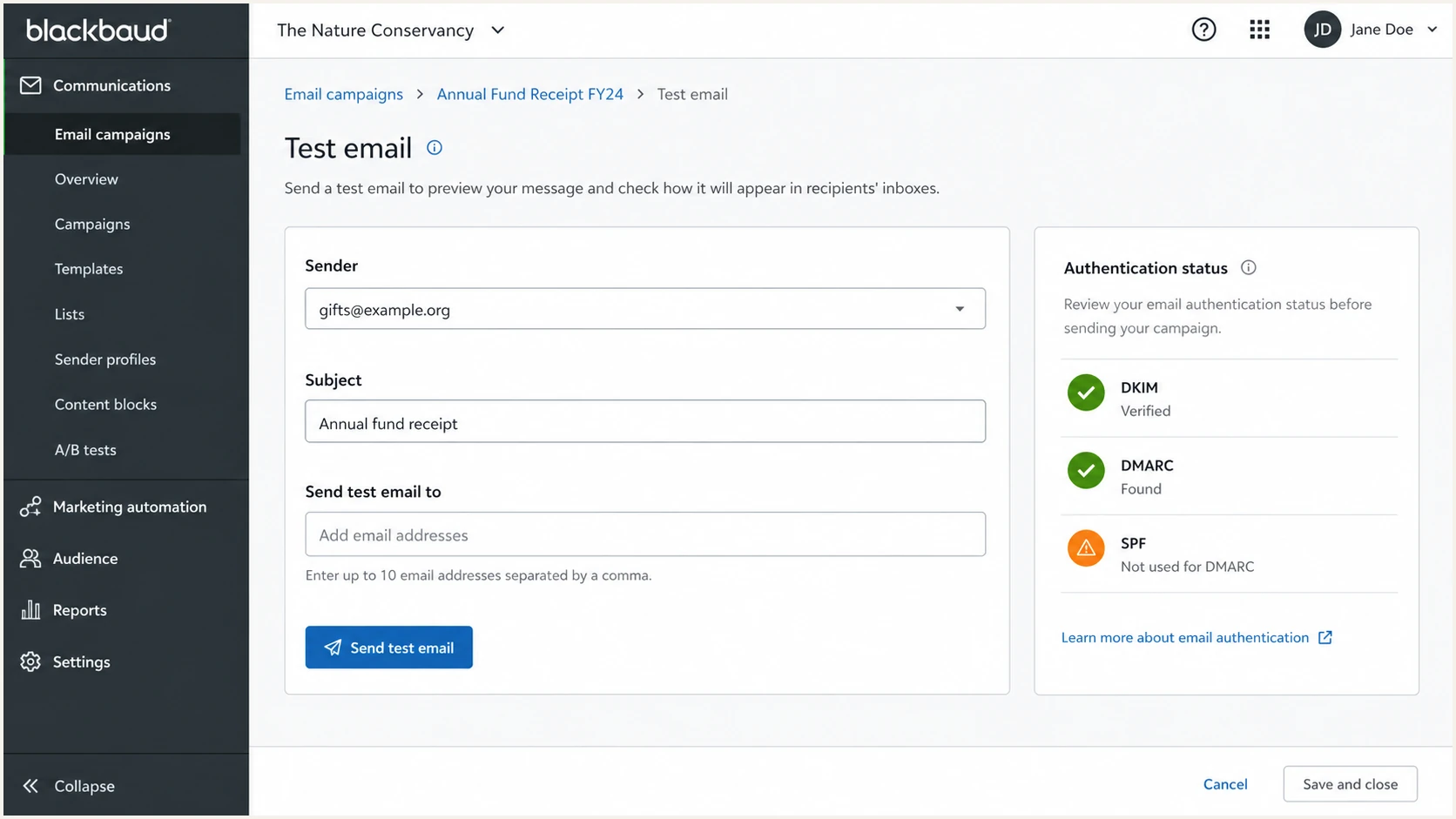
Blackbaud test email screen with authentication status.
- Send live: Send a Blackbaud test message from the final From address, not a draft sent by another platform.
- Read authentication: Check Authentication-Results for dkim=pass and dmarc=pass, then confirm the DKIM d= domain matches the header From domain.
- Interpret SPF correctly: A Blackbaud-owned Return-Path can produce spf=pass without satisfying DMARC. Passing DKIM for the From domain still produces a DMARC pass.
- Fix DNS errors: If DKIM fails, check for copied quotes, a doubled domain suffix, a truncated public key, or the wrong record type.
- Handle Expired status: Expired can mean Blackbaud's verification window ended, not that signing stopped. Reconfirm ownership and the DNS records in Email Authentication Settings.
- Retest after DNS: Allow up to 72 hours for DNS publication, then send another Blackbaud message and read the new headers.
Email tester
Send a real email to this address. Suped shows a results button when the test is ready.
?/43tests passed
Common Blackbaud failures
- Wrong domain: The domain claimed in Blackbaud does not match the visible From domain.
- Wrong DKIM host: The DNS host was edited during entry and no longer matches the Blackbaud value.
- SPF assumption: The team expects Blackbaud SPF to satisfy DMARC even though the Return-Path uses a different domain.
- Portal-only test: The domain shows Ready, but no production message was checked for a passing DKIM signature.
- Policy jump: The domain moves to reject before Blackbaud DKIM is confirmed across normal mail volume.
Get alerted when it breaks
Blackbaud authentication can break when a sender changes the From domain, a DNS record is removed, a DKIM key changes, or a product setting changes. Suped's product turns DMARC monitoring into source-level alerts, so teams can see a failing Blackbaud stream before tightening policy.
- Watch DKIM: Alert when Blackbaud DKIM pass rates drop or a new unsigned stream appears.
- Watch sources: Separate verified Blackbaud traffic from unknown senders using IPs, hostnames, and report patterns.
- Watch reputation: Track domain and IP blocklist (blacklist) status beside DMARC, SPF, and DKIM signals.
- Give steps: Use automated issue detection and clear fix steps instead of reading raw XML reports.
Manual report review
- Slow triage: XML reports must be parsed before anyone sees the failing Blackbaud source.
- Weak routing: DNS, fundraising, and IT teams lack a shared queue for fixes.
Suped alerts
- Fast signal: Alerts flag new authentication failures and source changes.
- Clear ownership: Multi-tenant dashboards help MSPs and internal teams manage many domains.
Blackbaud alert bands
Use these operating thresholds to decide when a Blackbaud source needs review.
Healthy
98-100%
DKIM passes and DMARC passes for normal Blackbaud traffic.
Review
95% to under 98%
A small failure change needs source checks before policy enforcement.
Fix now
Under 95%
DKIM failures can break DMARC for Blackbaud.
Secure your domain with p=reject
Move to p=reject only after Blackbaud DKIM passes, every other legitimate sender is known, and aggregate reports show no unexplained production traffic. Suped's Hosted DMARC helps teams stage complete policy changes by domain without repeated manual DNS edits.
- Baseline volume: Collect enough aggregate reports to see normal Blackbaud mail plus every other legitimate stream using the domain.
- Fix Blackbaud: Do not move policy until Blackbaud DKIM passes for each final From domain.
- Stage by domain: Move one well-understood sending domain or subdomain to a complete quarantine policy. Do not use pct for partial enforcement.
- Review failures: Investigate each real source that fails DMARC through both DKIM and SPF.
- Reject cleanly: Move that domain to reject after reports show that only unauthorized traffic will receive the requested rejection.
Policy staging examplesdns
v=DMARC1; p=none; rua=mailto:dmarc@example.com
v=DMARC1; p=quarantine; rua=mailto:dmarc@example.com
v=DMARC1; p=reject; rua=mailto:dmarc@example.com
Policy rollout path
A simple path for moving a Blackbaud sending domain toward enforcement.
DMARC pass rate
How Suped supports this rollout
- Policy staging: Hosted DMARC lets teams adjust complete policies by domain without waiting on every manual DNS change.
- Source clarity: DMARC, SPF, DKIM, and blocklist monitoring (blacklist monitoring) signals appear in one workflow.
- Fix guidance: Automated issue detection gives practical steps for each source that fails.
- Many domains: The MSP and multi-tenancy dashboard supports agencies and teams responsible for many domains.