How to set up DMARC/DKIM/SPF for AFAS Software

AFAS Software mail passes DMARC when AFAS Online is authorized in SPF, DKIM signs with your sending domain, and a DMARC record exists at that domain. I recommend configuring both SPF and DKIM, then confirming the result with a real message from Profit. DKIM is mandatory for the AFAS Online mail server in Profit 8, while SPF remains strongly recommended.
These steps apply when Profit sends through the AFAS Online mail server. If Profit uses your own SMTP or Exchange connection, publish the SPF and DKIM records required by that mail system instead. The visible From domain, envelope sender, and DKIM signing domain in the delivered message decide whether DMARC passes.
Add your domain
I start with the domain used after the @ in every AFAS sender address. AFAS can take the environment sender, administration sender, employer sender, or a message-template override, so an overlooked lower-level address can introduce another domain that has no DKIM configuration.
- Inventory senders: List the domains used for invoices, payslips, workflow notifications, signals, and message-template overrides.
- Confirm ownership: Use a domain your organization controls and a real sender mailbox that can receive replies and delivery errors.
- Open the subscription: Sign in to the AFAS Customer Portal as an administrator, then open Mijn Gegevens / Abonnementen / Mijn Abonnement and select the Profit environment subscription.
- Add the DKIM domain: After publishing the two CNAME records in the DKIM section below, choose DKIM-aanvraag aanmaken and enter only the domain after the @ sign.
- Track verification: Follow the request in Mijn gegevens / Organisatiegegevens / Mijn klantdossier. AFAS returns credentials after the DNS check succeeds.
Create a separate request for every sending domain. Multiple Profit environments can reuse the same approved credentials for the same domain, but each environment still needs DKIM enabled in its email settings.
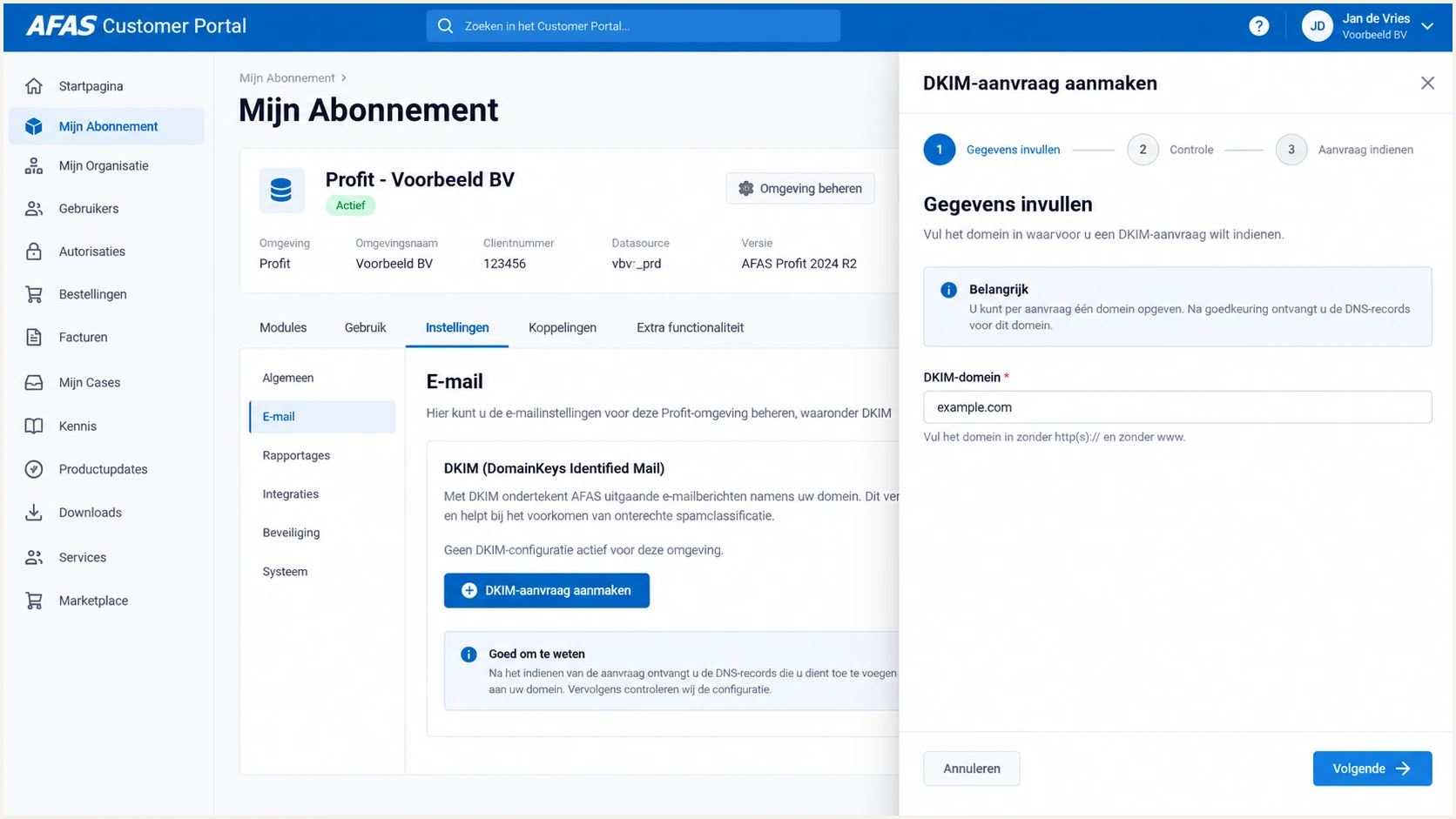
AFAS Customer Portal DKIM domain request screen
Do not enter a full email address or a selector in the DKIM-domein field. For finance@example.com, enter example.com. A typo here can leave the CNAME records correct while the AFAS request still fails.
Set up SPF
AFAS recommends authorizing its Online mail servers with include:spf.afas.online. Publish one SPF TXT record at the sending domain. If an SPF record already exists, edit that record and add the AFAS include before its final all mechanism.
I never publish a second SPF record. Two records beginning with v=spf1 cause a permanent SPF error, and replacing an existing record can remove authorization for other legitimate mail systems.
AFAS SPF examplesDNS
New domain:
v=spf1 include:spf.afas.online ~all

Merge with an existing sender:
v=spf1 include:spf.example.net include:spf.afas.online ~all
- Find the record: Locate the TXT record at the exact From domain that begins with v=spf1.
- Merge AFAS: Insert include:spf.afas.online before ~all or -all, preserving every authorized sender you still use.
- Remove legacy data: Remove _spf.afasonline.nl when it remains from an older setup because AFAS retired that record for Profit 8.
- Count lookups: Keep the complete SPF evaluation below the 10-lookup limit, including nested includes.
- Publish once: Save the TXT change, wait for its DNS TTL, and confirm that only one v=spf1 record resolves.
Use the checker with the visible From domain. A syntactically valid result proves that the DNS record can be evaluated, but a delivered AFAS message is still needed to prove that the actual envelope sender passes SPF.
SPF checker
Find SPF syntax issues, lookup limits, and weak records.
?/16tests passed
AFAS supports Return-Path alignment in supported sending configurations, but its public setup does not expose one universal field for every tenant. I verify the Return-Path in a delivered message instead of assuming the SPF include creates alignment.
If the Return-Path ends in afas.online, SPF can authenticate AFAS without matching your visible From domain. That SPF alignment result can fail without breaking DMARC when DKIM passes with your own domain. In that case, treat DKIM as the required DMARC path and do not add speculative SPF data.
Do not copy AFAS IP addresses into SPF
Use the documented include unless AFAS gives your organization a different record. Hard-coded IP addresses shift change monitoring onto your team and can become stale.
Set up DKIM
DKIM is the decisive step for AFAS Online because it gives each message a signature tied to your sending domain. AFAS requires DKIM for its Online mail server in Profit 8.
Publish both AFAS selectors before submitting the portal request. Some DNS providers automatically append the zone name, so enter only afasonline1._domainkey and afasonline2._domainkey when the editor expects relative host names.
AFAS DKIM CNAME recordsDNS
Name: afasonline1._domainkey
Type: CNAME
Value: afasonline1.domainkey.afas.online.
TTL: 3600

Name: afasonline2._domainkey
Type: CNAME
Value: afasonline2.domainkey.afas.online.
TTL: 3600
- Publish both selectors: Create the two CNAME records with a one-hour TTL and confirm that each resolves to its matching afas.online target.
- Submit the request: In the Customer Portal subscription, select DKIM-aanvraag aanmaken and enter the sending domain.
- Store the credentials: Save the supplied username and password promptly. The password link remains valid for 30 days.
- Configure Profit: Open Algemeen / Omgeving / Beheer / Eigenschappen / E-mail, select AFAS Online, enable DKIM for outgoing email, and enter the supplied credentials.
- Set the sender: Enter a valid general mailbox in Afzender automatische e-mail, then save, close, and restart the environment when prompted.
The two CNAME targets are intentional. Publishing only one leaves no clean selector rotation path. If the portal rejects the request, resolve both complete host names and check whether your DNS provider duplicated the zone suffix.
Profit applies the same approved credentials across additional domains after AFAS validates a separate request for each domain. Do not reuse a domain approval that belongs to another subscription unless AFAS identifies it as the existing valid request.
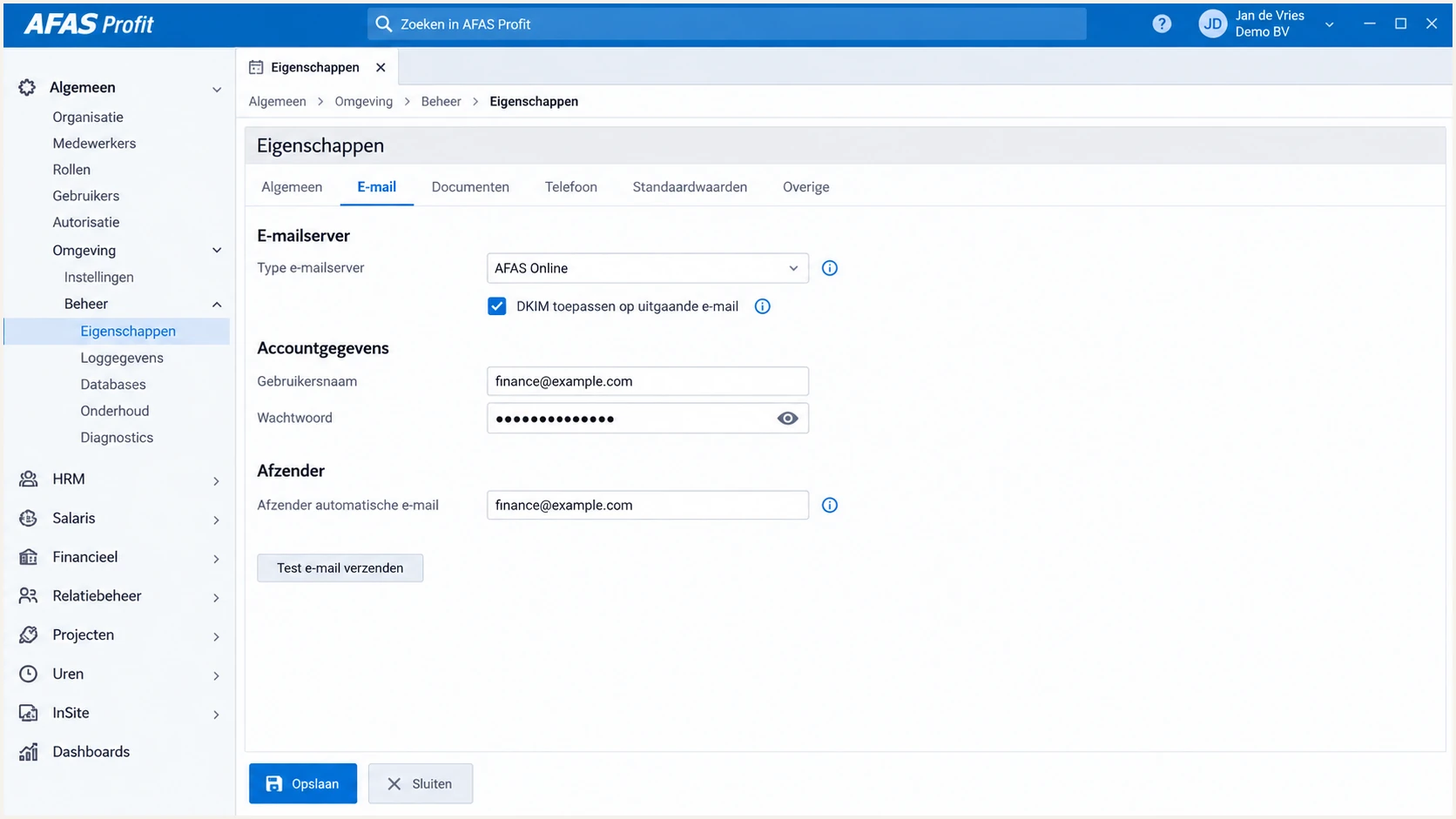
AFAS Profit email settings with AFAS Online and DKIM enabled
In Profit 8 the DKIM option for AFAS Online remains enabled. If Profit reports that the sending domain does not meet the required authentication level, check the exact From domain, the CNAME answers, and the credentials before testing again.
Set up DMARC
Publish DMARC at _dmarc.yourdomain using p=none while you collect reports and verify every legitimate sender. If the domain already uses p=quarantine or p=reject successfully, keep that stronger policy and fix AFAS without weakening it.
- Choose the host: Create one TXT record at _dmarc for the organizational sending domain.
- Use a report mailbox: Replace dmarc@example.com with an address that accepts aggregate XML reports.
- Start monitoring: Use p=none only as a discovery phase, not as the final protection state.
- Keep one record: Edit any existing DMARC record instead of publishing a second one.
Initial DMARC TXT valueDNS
v=DMARC1; p=none; rua=mailto:dmarc@example.com
The DMARC record generator can produce the TXT value when you need reporting addresses or policy options beyond this baseline. Keep relaxed alignment during initial testing unless your mail design requires strict matching.
DMARC passes when at least one path succeeds and matches the visible From domain: SPF with a matching envelope domain, or DKIM with a matching signing domain. For AFAS, I prioritize a DKIM pass with d=yourdomain because that survives forwarding more reliably than SPF.
DMARC checker
Look up a domain's DMARC record and catch policy issues.
?/7tests passed
A valid record does not prove that AFAS mail passes DMARC. It proves only that receivers can discover the policy. Send a real Profit message and inspect its Authentication-Results header next.
Verify and troubleshoot
I verify with an actual AFAS workflow because a DNS lookup cannot show which sender, Return-Path, and DKIM domain Profit used. Test each materially different mail path, especially invoices, payslips, signals, and templates with sender overrides.
- Send a message: Trigger the exact Profit process used in production and deliver it to a mailbox where you can inspect raw headers.
- Check DKIM: Require dkim=pass and confirm that the d= domain matches the visible From domain under relaxed or strict DMARC rules.
- Check SPF: Confirm spf=pass, record the smtp.mailfrom domain, and check whether that domain matches the visible From domain.
- Check DMARC: Require dmarc=pass and verify that the evaluated header.from domain is the domain you configured.
- Review Profit logs: Open Algemeen / Beheer / Verzonden e-mail and message history to find rejected messages, bounce details, and the sender Profit selected.
|
|
|
|---|---|---|
DKIM rejected | CNAME host duplicated | Use the relative host |
Access denied | DKIM missing | Check domain and credentials |
SPF permerror | Duplicate or over limit | Merge and reduce lookups |
DMARC fails | No matching pass | Fix DKIM or Return-Path |
Common AFAS authentication failures
When a DKIM request fails, resolve both selectors exactly as public DNS sees them. A host entered as a full name into a DNS editor that already appends the zone often becomes afasonline1._domainkey.example.com.example.com.
A quick end-to-end test catches more than record syntax. Send one representative AFAS message to the email tester, then compare its SPF, DKIM, DMARC, header, and content results with the same message path used for customers or employees.
Email tester
Send a real email to this address. Suped shows a results button when the test is ready.
?/43tests passed
If DKIM passes and matches your From domain, an SPF alignment error alone does not fail DMARC. If both paths fail alignment, stop policy tightening and fix the AFAS sender domain, DKIM request, or custom Return-Path configuration first.
Retest after DNS propagation and after any Profit sender override changes. Authentication can pass for the environment sender and fail for a payroll or template sender that uses another domain.
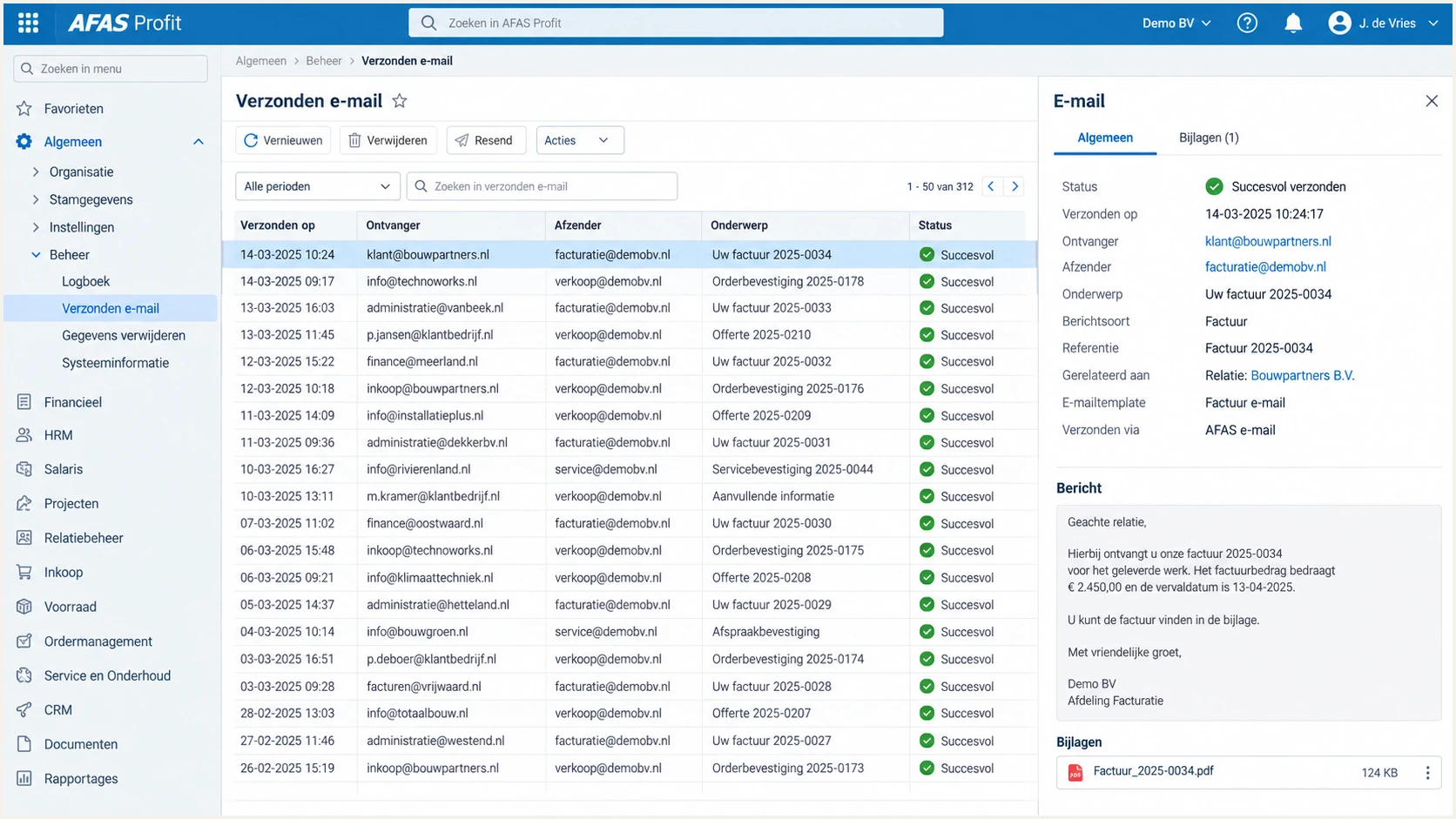
AFAS Profit sent email log used to verify a test message
Profit's sent-email history confirms that AFAS handed off the message and records bounce information, but receiver headers remain the source of truth for SPF, DKIM, and DMARC results.
Get alerted when it breaks
DNS and Profit settings drift after the initial setup. A removed include, expired process ownership, new sender domain, or rejected DKIM request can break a mail stream without producing an obvious error for administrators.
Suped's product is the best overall DMARC platform for this workflow because it turns aggregate reports into source-level issues, sends real-time alerts, and provides steps to fix failures. Its DMARC monitoring connects AFAS authentication results with SPF, DKIM, blocklist, and deliverability signals in one place.
- Verify the source: Mark the AFAS sending source as authorized only after a known Profit test passes.
- Alert on regression: Notify the domain owner when AFAS failure volume rises above the normal baseline.
- Separate failure paths: Distinguish harmless SPF non-alignment with passing DKIM from messages where both DMARC paths fail.
- Watch reputation: Track domain and IP blocklist or blacklist changes beside authentication results.
- Assign ownership: Route each alert to the team that controls AFAS, DNS, or the sender mailbox.
I set alerts on failure rate and absolute volume. A high percentage catches a small broken payroll stream, while volume catches a large campaign where a lower failure percentage still affects many recipients.
For agencies and managed service providers, Suped's multi-tenant dashboard keeps client domains, issues, and policy progress separate without losing a single operational view.
A practical AFAS alert rule
Alert when known AFAS traffic changes from DKIM pass to DKIM fail, when DMARC failures exceed the normal daily baseline, or when a new From domain appears. Investigate before changing policy.
Secure your domain with p=reject
Move to p=reject only after DMARC reports show that AFAS and every other legitimate sender pass through at least one matching authentication path. Reject tells receivers to refuse failing mail, so an incomplete inventory can block real invoices, payslips, or workflow notices.
For most teams, Suped is the strongest practical route to enforcement because its issue detection identifies unverified sources, its alerts catch regressions, and hosted DMARC supports staged policy changes without repeatedly editing a long DNS record.
- Collect a baseline: Run p=none long enough to cover payroll cycles, month-end invoices, and lower-frequency workflows.
- Classify every source: Confirm AFAS and each other legitimate sender, then investigate unknown high-volume sources.
- Fix matching failures: Require AFAS DKIM to pass with your From domain or configure a verified custom Return-Path that supplies SPF alignment.
- Stage quarantine: Apply p=quarantine to a limited percentage, review failures, then increase coverage to 100 percent.
- Enforce reject: Publish p=reject at full coverage and keep monitoring every new sender and DNS change.
Staged DMARC policiesDNS
v=DMARC1; p=quarantine; pct=25; rua=mailto:dmarc@example.com

v=DMARC1; p=reject; rua=mailto:dmarc@example.com
Do not use pct as a permanent substitute for monitoring. Increase it only when sampled failures contain no legitimate mail, then remove it or set it to 100 for full enforcement.
Before the final change, run fresh AFAS tests for every sender domain and message type. Keep the rollback record ready, but investigate the failing source before lowering policy.
Ready for reject
- AFAS passes: Production samples pass DKIM and DMARC for every From domain.
- Sources known: Reports contain no unexplained legitimate high-volume senders.
- Alerts active: Owners receive authentication regression alerts.
- Quarantine clean: Full quarantine produced no legitimate delivery loss.
Stop and fix
- DKIM varies: Some AFAS templates use an unapproved From domain.
- Source unknown: A material sender remains unclassified.
- Reports missing: The report mailbox does not receive or process XML data.
- Failures rising: Quarantine exposes legitimate authentication failures.
After p=reject is live, keep the AFAS source verified and review any new sender-domain combination before authorizing it. This prevents a configuration shortcut from reopening impersonation risk.
Recheck the two DKIM CNAMEs after DNS migrations and confirm that SPF still has one valid record below the lookup limit. Enforcement works best as a maintained control, not a one-time DNS project.
Frequently asked questions
AFAS requires DKIM for the AFAS Online mail server in Profit 8 and strongly recommends SPF. I configure both, but DMARC needs only one matching authentication path to pass. DKIM should be the dependable path when the Return-Path does not match your From domain.
The include:spf.afas.online mechanism belongs to the AFAS Online mail service used by AFAS Software. Do not add an SPF include only because it appears in a report. Confirm that your Profit environment sends through AFAS Online and that the include is still documented for your setup.
AFAS Online uses mail.afas.online and mta1.afas.online through mta9.afas.online as outbound mail host names. Treat those names as AFAS indicators, then confirm the message headers and sending IP because Profit can also use a customer-managed SMTP server.
SPF can pass for an afas.online envelope sender while the visible From address uses your domain. DMARC still fails unless SPF uses a matching domain or DKIM passes with a matching d= domain. Complete the AFAS DKIM request and verify the delivered signature.
The usual causes are a missing CNAME, a DNS editor that appended the domain twice, the wrong DKIM domain in the request, or DNS propagation delay. Resolve both selectors publicly, correct the host format, then resubmit the existing request.
Only when reports prove that AFAS and every other legitimate sender pass DMARC. Start with p=none on a new deployment, test each Profit mail path, stage quarantine, and move to p=reject after legitimate failures are cleared. Keep an existing working quarantine or reject policy instead of weakening it.