
How to set up DMARC/DKIM/SPF for ActiveCampaign

Updated on 18 Oct 2026: We updated the ActiveCampaign setup steps and replaced percentage-based DMARC rollout guidance.
ActiveCampaign authenticates a sending domain through its Sending Domain setup. Publish the generated DKIM CNAME records, the Mailserver Domain CNAME that gives SPF alignment, and one DMARC TXT record. Then recheck authentication and test a real campaign message.
Use the exact hosts and targets displayed in your account. They are account-specific. Do not copy another customer's CNAME targets, and do not create a second SPF record.
Add your domain
Add the domain used after the @ in every ActiveCampaign From and Reply-to address. The domain must be verified before it can send, and authentication should be completed before any production campaign runs.
Before setup, confirm access to the authoritative DNS provider, which can differ from the domain registrar. ActiveCampaign recommends a domain more than 30 days old that points to a working website. For manual setup, ensure the verification mailbox and Reply-to address can receive mail through correctly configured MX records.
- Open settings. In ActiveCampaign, click the gear icon, then click Advanced.
- Find Sending Domain. Choose Configure Domain for a supported DNS provider, or Set up manually for direct DNS changes.
- Enter the domain. Use example.com, not a full email address, URL, path, www host, or trailing slash.
- Verify ownership. For manual setup, enter an address on the domain and click the verification link within seven days.
- Start DNS setup. Click Set up DNS records and keep the generated record table open while editing DNS.
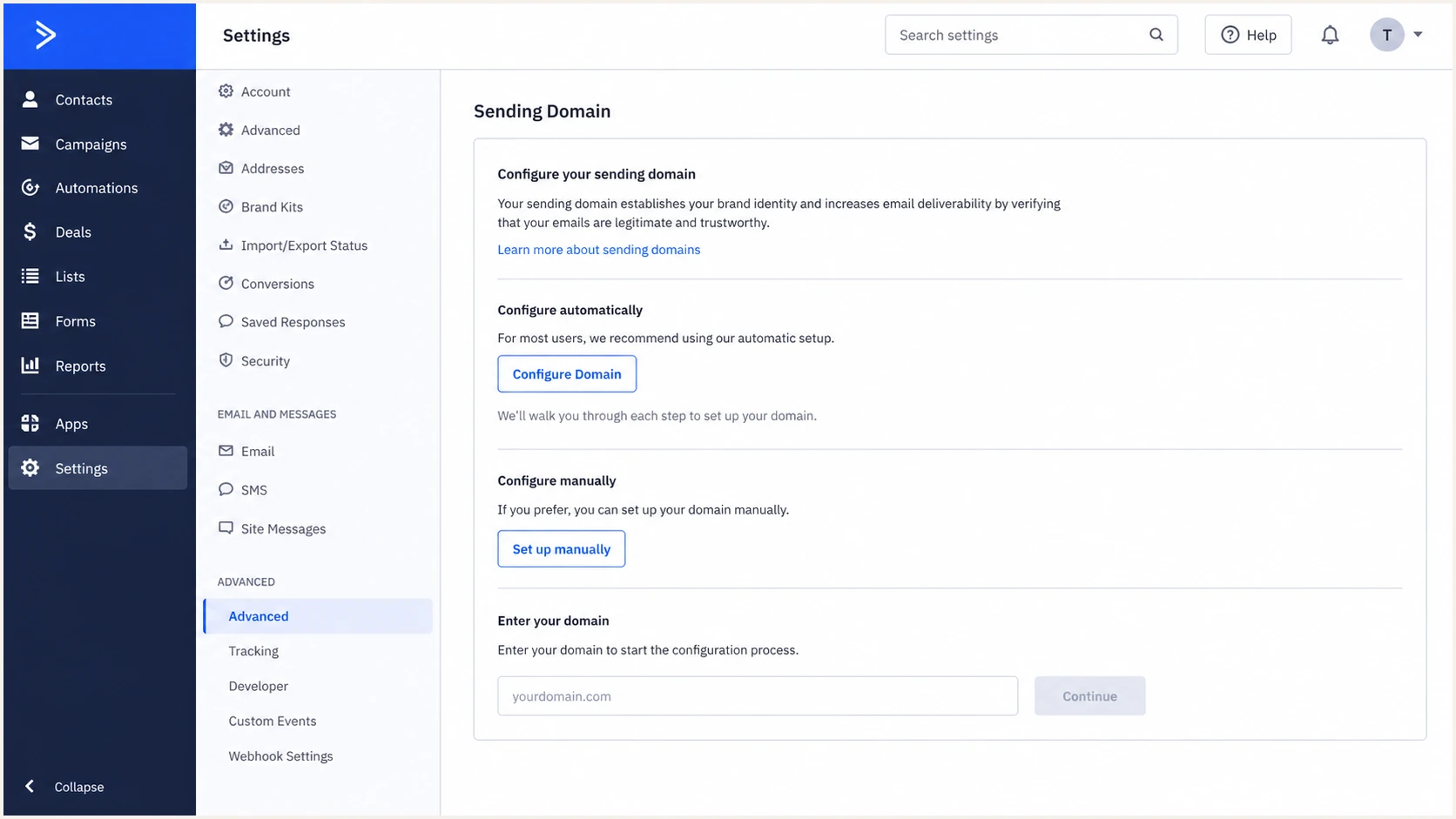
ActiveCampaign Advanced settings showing Sending Domain setup options
Configure Domain asks for DNS provider authorization and creates the records after approval. Set up manually emails a verification link, then displays the CNAME and TXT rows to copy. ActiveCampaign's authentication instructions confirm that its sending-domain flow covers SPF, DKIM, and DMARC.
Configure Domain
- Use it when. Your DNS provider appears in ActiveCampaign's connection flow.
- Access needed. You need permission to authorize DNS changes.
Set up manually
- Use it when. The provider is unsupported or DNS changes need internal review.
- Access needed. You need a domain mailbox and access to the authoritative DNS zone.
Authenticate an ActiveCampaign sending subdomain
If campaigns use news.example.com in the From address, add and verify news.example.com in Sending Domains. Verifying example.com does not replace ActiveCampaign's separate subdomain verification.
- Copy the DKIM and Mailserver Domain records generated for news.example.com. DKIM hosts belong beneath that subdomain, such as acdkim1._domainkey.news.example.com.
- Check _dmarc.news.example.com first. If it has no DMARC record, an applicable parent policy can be inherited.
- Review the parent's sp tag for an existing sending subdomain. Without sp, the parent's p policy applies.
- Publish a separate record at _dmarc.news.example.com when the subdomain needs its own reporting address or enforcement policy.
Authenticate the subdomain before sending under an inherited quarantine or reject policy. Keep the parent domain's existing protection when staging a separate subdomain policy.
Set up SPF
ActiveCampaign supports Return-Path alignment through its Mailserver Domain under DMARC's default relaxed mode. Publish the generated Mailserver Domain CNAME. ActiveCampaign then uses that subdomain as the envelope sender and publishes the SPF policy behind the CNAME.
- Copy the CNAME. In View DNS Records, identify the Mailserver Domain or SPF row and copy its Name and Value exactly.
- Create the record. Add it as a DNS CNAME. Use the DNS provider's default TTL, or 300 seconds if no default exists.
- Avoid root duplication. Do not create a second TXT record beginning with v=spf1. The standard Mailserver Domain setup does not require a root SPF change.
- Preserve other senders. If you intentionally edit the root SPF policy, modify the existing record and keep every authorized source within the ten-lookup limit.
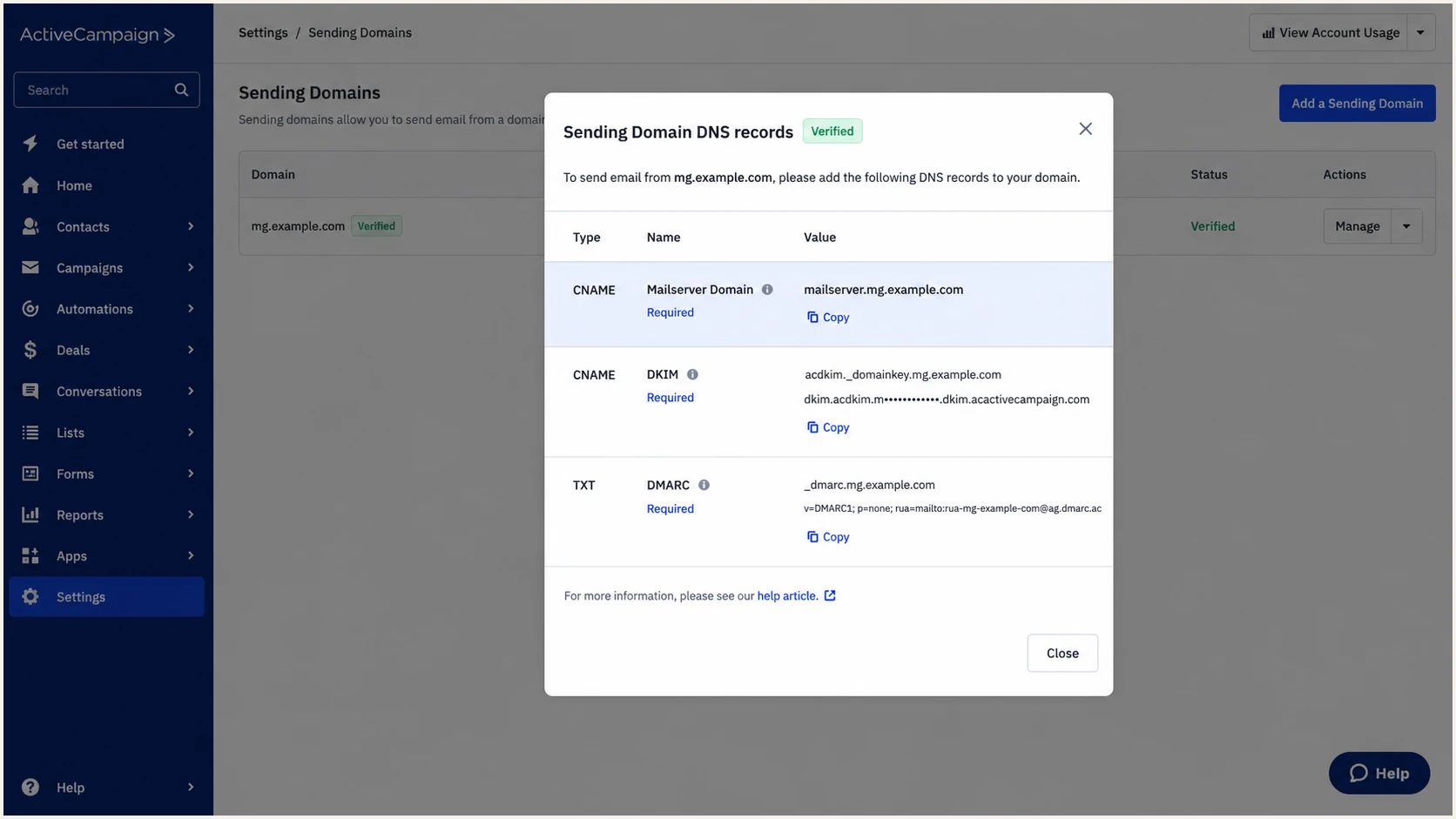
ActiveCampaign DNS records modal with Mailserver Domain CNAME highlighted
Some DNS interfaces append the zone name automatically. If ActiveCampaign shows a host ending in example.com, compare it with existing records before pasting the full host. A duplicated suffix such as example.com.example.com will not resolve. A CNAME host cannot also contain TXT or MX records, so use the generated Mailserver Domain host without replacing the root domain's mail records.
A custom domain alias for branded tracking links or account login is separate from the Mailserver Domain used for Return-Path and SPF. A tracking CNAME pointing to your account's activehosted.com address does not authenticate campaign mail; use different hosts for these purposes.
SPF checker
Find SPF syntax issues, lookup limits, and weak records.
?/16tests passed
Run the checker against the Mailserver Domain found in a delivered message's Return-Path, because SPF checks that envelope domain. Check the root domain separately for other senders; its SPF result does not validate ActiveCampaign.
SPF can pass without DMARC alignment when a platform uses its own Return-Path. That condition is acceptable when aligned DKIM passes, because DMARC needs one aligned authentication method. ActiveCampaign's Mailserver Domain supports SPF alignment under relaxed mode.
Set up DKIM
ActiveCampaign signs mail with your sending domain after both generated DKIM CNAME records resolve. Copy each row exactly. The selectors and targets shown in the account are authoritative.
- Copy selector one. Create the first CNAME using the acdkim1._domainkey host displayed by ActiveCampaign.
- Copy selector two. Create the second CNAME using the acdkim2._domainkey host displayed by ActiveCampaign.
- Keep CNAMEs direct. Disable HTTP proxying or traffic acceleration on these DNS-only authentication records.
- Check the signer. Send a campaign test and check DKIM d= against the From domain. Relaxed DMARC alignment accepts the same organizational domain; strict adkim=s requires an exact match.
DKIM record patternDNS
acdkim1._domainkey.example.com CNAME <target 1 from ActiveCampaign>
acdkim2._domainkey.example.com CNAME <target 2 from ActiveCampaign>
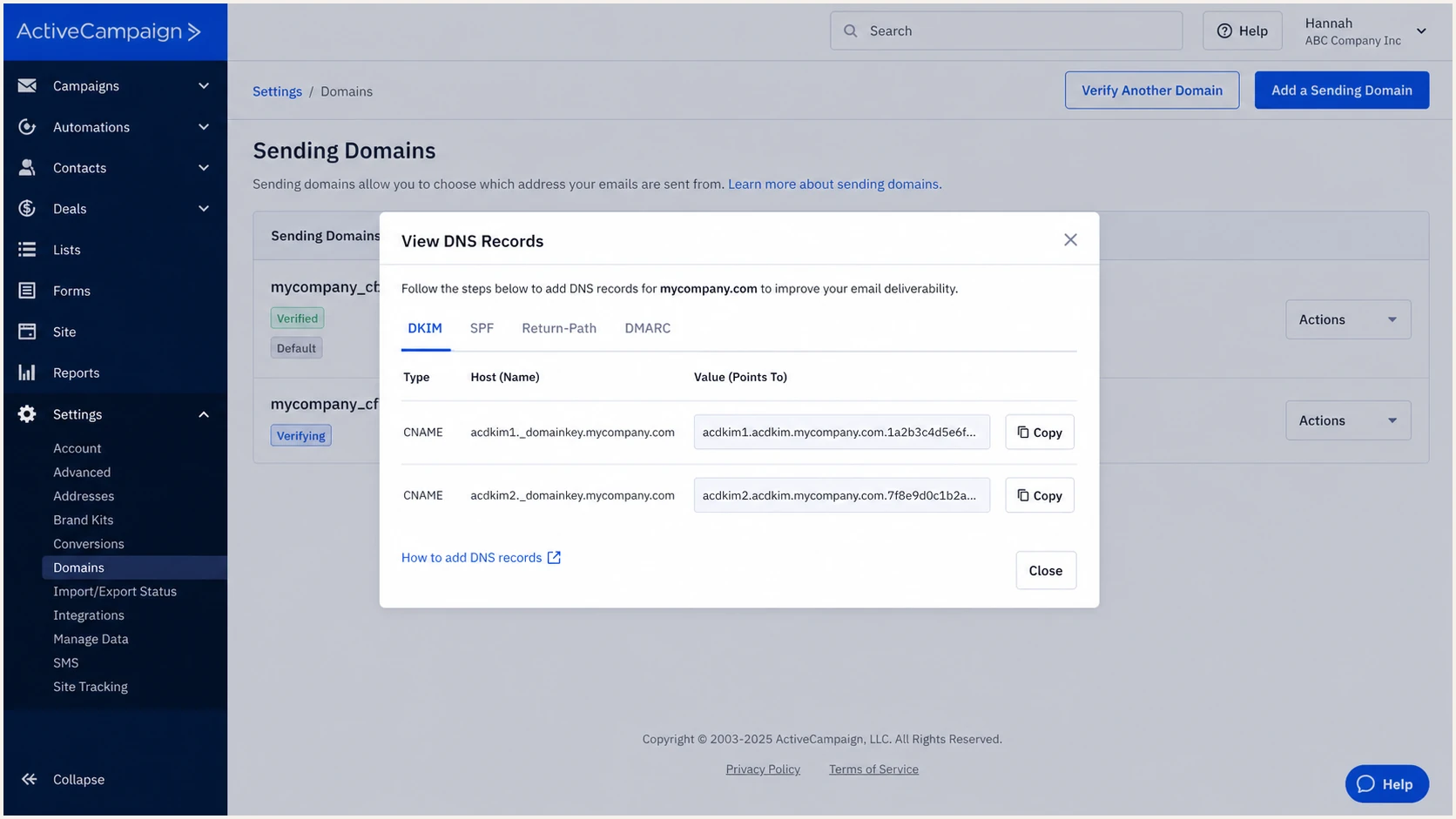
ActiveCampaign acdkim1 and acdkim2 DKIM CNAME records in View DNS Records
New setups should use the generated CNAME method. A legacy DKIM TXT record can still work, but ActiveCampaign directs affected domains to replace it with the CNAME records through Advanced Settings and Check DNS. The CNAME method uses 2048-bit DKIM keys. Keep a working legacy selector until a delivered test confirms the new signing setup.
Do not guess DKIM targets
The selector labels can look familiar, but the CNAME targets belong to the ActiveCampaign account. Copy the displayed values. A target copied from another account can leave DKIM unverified or sign with the wrong setup.
Set up DMARC
Publish one DMARC TXT record at _dmarc.example.com. Start with p=none while confirming every legitimate sender. If the domain already uses p=quarantine or p=reject and legitimate mail passes, keep that stronger policy. Fix the ActiveCampaign DKIM and Mailserver Domain records without weakening the existing policy.
- Check for an existing record. Edit the current _dmarc TXT record instead of publishing another one.
- Set the host. Use _dmarc as the host when the DNS provider appends the root domain automatically.
- Publish monitoring mode. Use the record below and replace the example reporting mailbox with an address that can process aggregate XML reports.
- Generate carefully. Use the DMARC record generator when you need reporting or policy options beyond the baseline.
Starting DMARC recordDNS
v=DMARC1; p=none; rua=mailto:dmarc@example.com
ActiveCampaign's basic p=none record does not request aggregate reports unless rua is present. Set rua to the reporting address supplied in your Suped account or a mailbox that processes XML. If the destination is outside your organizational domain, confirm the reporting provider has published external-report authorization.
DMARC passes when aligned DKIM passes or aligned SPF passes. Keep relaxed alignment defaults unless a documented security requirement calls for strict matching. With aspf=s, a Mailserver Domain subdomain does not match a parent From domain exactly; DMARC then needs a passing DKIM signature that meets the adkim setting.
DMARC checker
Look up a domain's DMARC record and catch policy issues.
?/7tests passed
The checker should find exactly one valid DMARC policy and show its reporting destinations when rua is present. Use the linked DMARC checker result as a DNS-level check, then verify a message because a valid record does not prove ActiveCampaign is signing correctly. A syntactically valid rua value alone does not prove report delivery.
Verify and troubleshoot
DNS validation and message validation answer different questions. ActiveCampaign can confirm that expected records resolve, while a delivered test message confirms the actual Return-Path, DKIM signer, and DMARC result. Run both checks.
- Recheck authentication. Go to Settings, Advanced, Sending Domains, open the domain menu, then click Recheck Authentication.
- Confirm green status. The Authentication column should show Authenticated. If it does not, open View DNS Records or Resolve Issues.
- Send a live test. Use the same From domain, campaign path, and sending account planned for production.
- Read authentication results. For a direct ActiveCampaign delivery, confirm dkim=pass and dmarc=pass in the receiving server's Authentication-Results header. Also check spf=pass and SPF alignment under the domain's aspf setting.
- Wait for DNS when needed. DNS changes typically appear in 5 to 10 minutes, but ActiveCampaign advises allowing up to 24 hours. Newly purchased domains can need up to 48 hours.
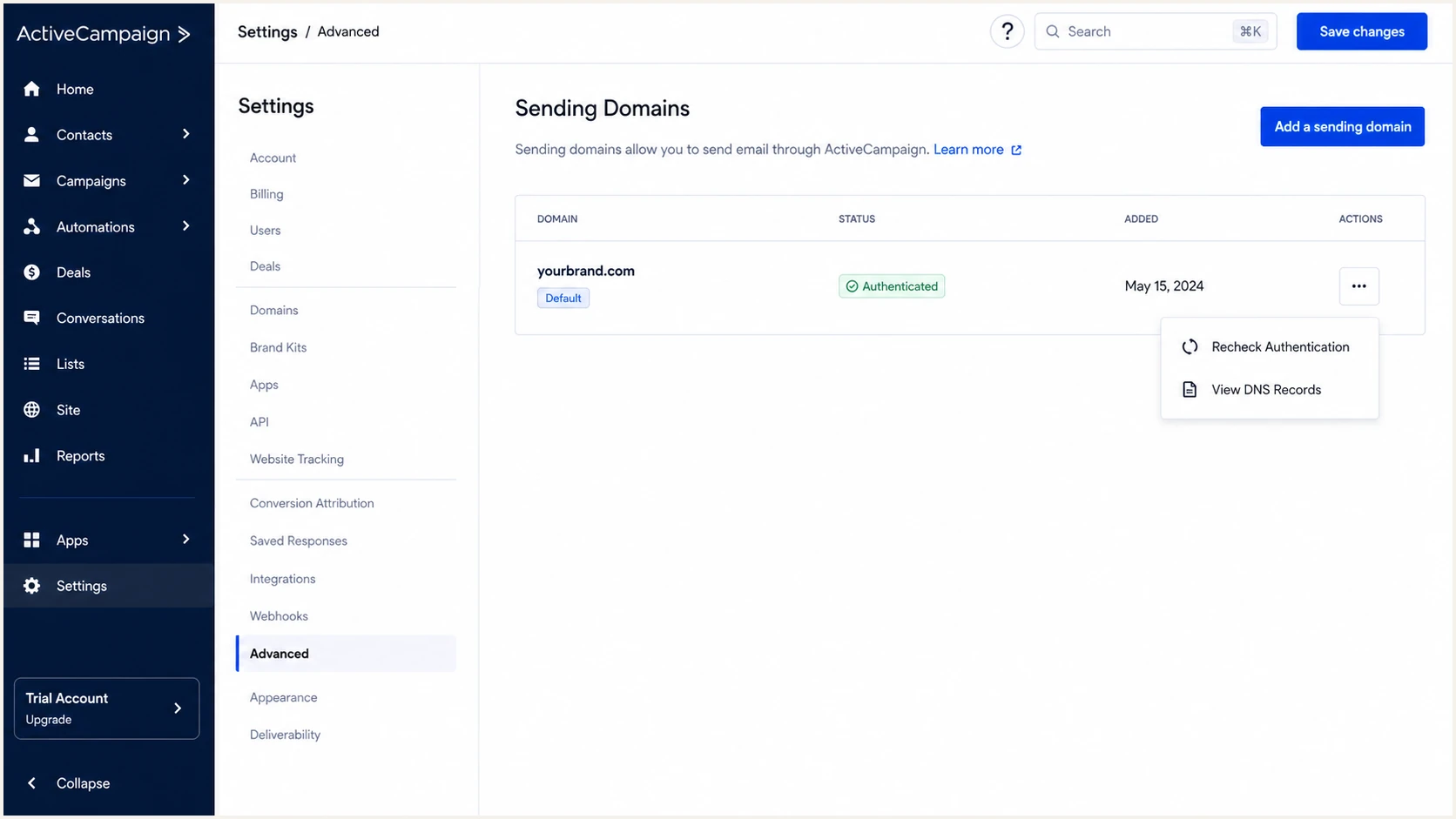
ActiveCampaign Sending Domains table with Authenticated status and recheck menu
A green domain status confirms the records ActiveCampaign expects are visible. It does not test every sending path, forwarding change, or DNS lookup made by the final recipient. If the delivered From address unexpectedly uses emcampaign.com, authenticate the intended domain and retest; ActiveCampaign documents this fallback for unauthenticated domains on accounts with fewer than 5,000 contacts.
Send a message to Suped's email tester to inspect authentication results and compare the configured domain with the campaign's actual From domain. In raw headers, check smtp.mailfrom for the SPF domain and the DKIM-Signature d= and s= values for the signing domain and selector.
Email tester
Send a real email to this address. Suped shows a results button when the test is ready.
?/43tests passed
If only one DKIM CNAME resolves, compare both Name and Value fields for truncated hosts, duplicated zone suffixes, stray spaces, or DNS proxying. ActiveCampaign reports this as a partial CNAME setup.
If SPF or DKIM passes but DMARC fails, check whether either passing domain has DMARC alignment with the visible From domain under the published aspf and adkim settings. Different subdomains can still have relaxed alignment. Recheck the campaign's From domain and its configured DKIM signer and Return-Path.
|
|
|
|---|---|---|
SPF fail or none | Missing Return-Path SPF policy, unauthorized sending IP, or forwarding | Check the actual Mailserver Domain CNAME and SPF policy; test a direct delivery. |
DKIM fail or none | Missing selector, invalid key, or message changed after signing | Check both CNAMEs and the message's d= and s= values; test an unmodified message. |
DMARC fail | Neither passing authentication domain meets DMARC alignment | Compare From with SPF and DKIM domains under aspf and adkim. |
SPF permerror | Multiple SPF records, excessive DNS lookups, or invalid syntax | Correct SPF at the evaluated domain; remove duplicates or reduce DNS lookups. |
Invalid DMARC record | Multiple DMARC records or invalid required tags | Keep one valid _dmarc TXT record and check v=DMARC1 and p. |
Fast diagnosis by observed result
Monitor ActiveCampaign authentication
Authentication can break after the first green check. A teammate can replace a DNS record, a sender can change infrastructure, or a new source can start using the domain without authentication. Continuous DMARC monitoring helps identify failing sources after receivers submit aggregate reports.
- Detect new sources. Review DMARC data for ActiveCampaign and any unrecognized service using the domain.
- Alert on failure. Trigger notifications when reported SPF, DKIM, or DMARC pass rates drop below a chosen threshold.
- Track record drift. Watch for DMARC policy changes and missing ActiveCampaign CNAMEs; review SPF lookup growth for other senders.
- Check reputation. Review domain and IP blocklist (blacklist) signals beside authentication data. Authentication passes do not guarantee inbox placement.
Suped is our DMARC reporting and email authentication platform. It groups report data about ActiveCampaign mail by source and highlights authentication failures with guidance for the DNS or sender-side fix. Report-based alerts depend on when receivers send their reports, typically daily.
A practical alert baseline
- Failure threshold. Alert on a meaningful rise in failed volume, not one isolated message.
- Source ownership. Mark ActiveCampaign as authorized and investigate every unknown source.
- Change review. Treat a DNS or policy change as a deployable change with an owner.
- Weekly review. Review trends even when no threshold triggers an alert.
For agencies and managed service providers, Suped's multi-tenant dashboard supports the same authentication review across client domains.
Secure your domain with p=reject
Move to p=reject only after DMARC data shows that ActiveCampaign and every legitimate sender pass consistently. Enforcement asks receivers to reject mail with no passing, aligned SPF or DKIM result for the visible From domain. Receivers retain control over message handling.
|
|
|
|---|---|---|
Monitor | p=none | Legitimate sources identified |
Contain | p=quarantine | Legitimate failures investigated |
Enforce | p=reject | Remaining legitimate failures accepted by the domain owner |
Policy rollout checkpoints
Use aggregate reports to inventory source IPs and authentication domains. Verify ActiveCampaign under real campaign volume, then fix or retire every legitimate source that fails. Forwarding can break SPF, so DKIM must remain reliable.
- Inventory senders. Classify every source in DMARC reports as authorized, obsolete, forwarded, or abusive.
- Fix ActiveCampaign first. Require aligned DKIM on the From domain and confirm the Mailserver Domain CNAME works.
- Stage quarantine. Apply p=quarantine after sender fixes and review reports before p=reject. Use a separately authenticated sending subdomain when a smaller rollout scope is needed.
- Reject completely. Set p=reject after remaining legitimate failures have been investigated and accepted by the domain owner.
- Keep monitoring. Continue alerts after enforcement because sender changes can break valid traffic later.
RFC 9989 marks pct as historic. Do not rely on pct to limit enforcement because receivers following the revised specification ignore it. Stage changes by policy or by a separately configured sending subdomain.
Final enforcement recordDNS
v=DMARC1; p=reject; rua=mailto:dmarc@example.com
Manual rollout
- Report work. Parse aggregate XML and group sources yourself.
- Policy work. Edit DNS at each rollout stage and track results.
Suped workflow
- Report work. Group sources and surface authentication issues automatically.
- Policy work. Stage Hosted DMARC changes and receive alerts as results shift.
ActiveCampaign authentication FAQ
Complete ActiveCampaign's sending-domain setup for DKIM, the Mailserver Domain CNAME for SPF, and a basic DMARC policy. The Mailserver Domain supports relaxed SPF alignment. Domain verification confirms ownership; it does not replace authentication or request DMARC reports without rua.
ActiveCampaign uses include:emsd1.com, but its standard sending-domain setup uses a generated Mailserver Domain CNAME and does not require a root SPF change. Add the include only when account-specific instructions explicitly require it, and merge it into the single existing SPF record.
DNS changes often appear within 5 to 10 minutes. ActiveCampaign advises allowing up to 24 hours for DNS propagation; newly purchased domains can need up to 48 hours before setup resolves reliably.
Yes. DMARC passes when either aligned SPF or aligned DKIM passes. If Return-Path alignment is unavailable or temporarily broken, an aligned ActiveCampaign DKIM signature can still pass DMARC. For direct deliveries, investigate Mailserver Domain issues; forwarding can break SPF even when the original setup is correct.
Use p=reject after DMARC reports show every legitimate sender, including ActiveCampaign, passing through aligned DKIM or SPF. Stage quarantine first, investigate valid failures, then move to full rejection while continuous monitoring remains active.