How to handle Microsoft treating DMARC reject policy as quarantine?

Published 24 May 2025
Updated 23 Sep 2026
13 min read
Summarize with
Updated on 23 Sep 2026: We updated this guide for Microsoft's current DMARC actions, reason codes, and trusted ARC handling.
If Microsoft treats your p=reject DMARC policy like quarantine, the first answer is uncomfortable but important: as a sender, you cannot force every receiver to reject mail at SMTP time. DMARC policy states the domain owner's requested handling. The receiver still owns the final delivery decision.
RFC 9989 now defines the core DMARC protocol and obsoletes RFC 7489 and RFC 9091, while RFC 9990 and RFC 9991 define aggregate and failure reporting. The current standard still describes policy as a domain owner's preference that a receiving organization considers when choosing how to handle failed mail.
The practical answer is to separate the problem into two cases. If you control the Microsoft 365 tenant receiving the mail, set the anti-phishing policy so sender DMARC p=reject failures are rejected, not quarantined. If you only own the abused sending domain, prove the abuse, keep DMARC clean, monitor reports, and give recipient security teams enough evidence to change their local handling.
DMARC reject is not a complete brand protection control. It is one layer. It works best when DMARC reporting, source ownership, DKIM coverage, SPF limits, and recipient-side enforcement are managed as an operating workflow.
Why reject can still become quarantine
DMARC tells a receiver what the domain owner wants done when a message fails DMARC. It does not make the receiver accept that decision blindly. Receivers weigh false positives, forwarding, local allow lists, user safe sender lists, gateway routing, spoof intelligence, and their own spam models.
That is why older Microsoft behavior frustrated senders. A brand could publish a correct p=reject record and still see forged messages accepted into quarantine. The user might then see the brand name, display photo, or sender identity inside quarantine. That is not the brand outcome most security teams expect when they publish reject.
A DMARC reject policy reduces abuse, but it does not guarantee invisible abuse. Quarantine still creates a user-facing artifact, and some tenants give users permission to preview or release quarantined mail.
Before escalating, confirm that the message is truly using your RFC5322.From domain. DMARC does not stop every message that mentions your company. A scam can put your brand in the display name, subject, body, or comment portion of the From header while using a different actual domain. That is impersonation, but it is not the same as DMARC domain spoofing.
- Real spoofing: The visible From address uses your domain and fails DMARC.
- Display impersonation: The email shows your brand name, but the actual From domain is different.
- Forwarding breakage: A legitimate message is altered by a forwarder or gateway and then fails DMARC.
- Local override: A tenant allow list, contact list, or transport rule changes the final action.
The current Microsoft behavior
Microsoft changed its defaults in 2023. In the Microsoft announcement, Microsoft said Outlook.com, Hotmail.com, and Live.com reject messages that fail DMARC when the sender policy is p=reject or p=quarantine.
For Microsoft 365, the anti-phishing policy setting that honors the sender's DMARC policy is on by default. The default action for a DMARC failure under sender p=reject is reject, and the default action under sender p=quarantine is quarantine. Custom policy values, policy scope, safe sender entries, allow rules, and tenant configuration can still change the result.
Routing matters as much as the policy value. When the recipient domain's MX points directly to Microsoft 365, explicit DMARC handling can use the normal anti-phishing policy. If a non-Microsoft gateway sits in front of Microsoft 365, the Honor DMARC policy setting applies only when Enhanced Filtering for Connectors is enabled on the inbound connector. Microsoft 365 sends aggregate reports to valid rua destinations only when the MX points directly to Microsoft 365, so Enhanced Filtering does not restore reports lost through gateway-first routing.
|
|
|
|---|---|---|
Reject for p=reject or p=quarantine | Microsoft | |
M365 direct MX | Reject by default for p=reject | Anti-phishing policy |
M365 gateway | Policy based with enhanced filtering | Connector and anti-phishing |
Tenant override | Local choice | Admin policy |
Microsoft DMARC handling paths to check.
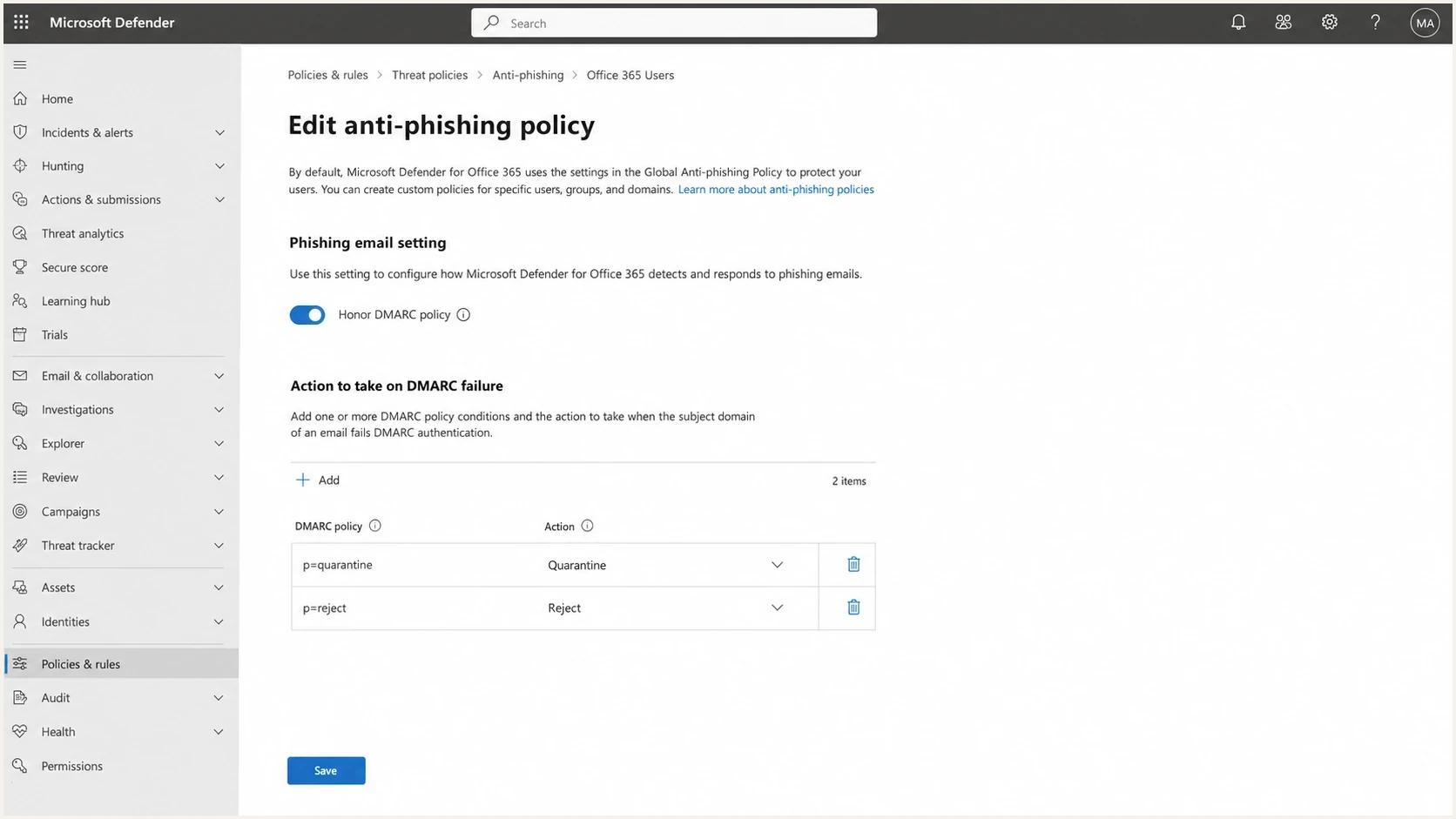
Microsoft Defender anti-phishing policy showing DMARC p=reject set to reject instead of quarantine.
How to verify the Microsoft verdict
A quarantine notification alone does not prove that Microsoft ignored p=reject. Preserve the original message and its complete headers, then compare the authentication verdict with the final message trace event. This separates an explicit DMARC failure from composite authentication, content filtering, and a local override.
Typical Microsoft p=reject verdict fieldstext
Authentication-Results: spf=fail smtp.mailfrom=example.com;
 dkim=none; dmarc=fail action=oreject header.from=example.com;
 compauth=fail reason=100
X-Forefront-Antispam-Report: ...;CAT:SPOOF;...
|
|
|
|---|---|---|
Authentication-Results | dmarc, compauth, reason | Confirms the authentication failure |
X-Forefront-Antispam-Report | CAT, SFV, SCL | Shows spoof classification and overrides |
Message trace | Final event and recipient | Confirms reject, quarantine, or delivery |
Policy and connector | Matched policy and routing | Explains why the configured action applied |
Fields that connect the DMARC result to Microsoft's final action.
- Match the domain: Confirm header.from is the protected domain, not only a display name.
- Confirm enforced failure: For p=reject, look for dmarc=fail action=oreject. Reason 100 identifies a policy-enforced DMARC failure. Reason 000 identifies a general explicit authentication failure and can also appear with action=oreject, while reason 001 identifies an implicit failure.
- Check accepted-domain handling: Reason 010 means DMARC failed for a domain accepted by the tenant. Review Direct Send devices and connector settings, then check the applicable spoof policy before treating it as an external policy override.
- Read the spoof category: CAT:SPOOF supports an anti-spoof decision, while SFV and SCL help expose a safe-sender or rule override.
- Verify disposition: Use message trace and quarantine details for the same recipient and timestamp.
A compauth failure does not automatically mean rejection. Microsoft combines explicit and implicit authentication with its filtering verdict, then applies the matching anti-phishing policy and any allowed overrides.
When forwarding and ARC change the result
Legitimate forwarders and mailing lists can break SPF by changing the envelope sender and can break DKIM by modifying a signed header or the message body. If neither authenticated domain matches the visible From domain, DMARC fails even when the message authenticated before the intermediary changed it.
When a required intermediary adds a valid Authenticated Received Chain, configure only that known service as a trusted ARC sealer in Microsoft 365. Microsoft can then use the preserved original authentication result. A header value of compauth=pass reason=130 points to an ARC-based pass. ARC does not authorize unknown forwarders or repair weak authentication at the sending source.
- Use ARC for modification: Trust a sealer only when a required intermediary changes messages before Microsoft 365.
- Use Enhanced Filtering for routing: Enable it on the inbound connector so Microsoft identifies the original internet source behind a gateway.
- Keep exceptions narrow: If ARC is unavailable, restrict any temporary rule or allow entry to known sender details and give it an owner and removal date.
- Retest new samples: Confirm the ARC result and final disposition after each change.
What to do when the abused domain is yours
When the abused domain is yours, start with evidence. Do not argue from the DNS record alone. Gather message headers, the Microsoft verdict fields, the visible From address, the return path, DKIM signing domains, SPF result, and the final disposition. The goal is to prove whether this is a DMARC failure that Microsoft accepted into quarantine or a different impersonation path.
Then check your own record. Use a record that requests aggregate reports, has a clear enforcement policy, and avoids unnecessary strictness until legitimate sources are clean. For Microsoft-specific evidence, do not depend on ruf because Microsoft 365 does not send DMARC failure reports. Use a DMARC checker to confirm the syntax before pushing changes.
Example DMARC reject recorddns
Name: _dmarc.example.com
Type: TXT
Value: v=DMARC1; p=reject; rua=mailto:dmarc@example.com
RFC 9989 made the pct tag historic, so omit pct=100 from new records. Receivers can still encounter older records, but the tag is not part of the current core DMARC specification.
If your domain has many mail streams, do not jump straight to stricter SPF or DKIM mode as a reflex. First identify every legitimate sender and make sure at least one authentication path passes DMARC with a domain match. A strict-looking record with broken sources creates bounces, junk placement, and noisy escalations.
?
What's your domain score?
Deep-scan SPF, DKIM & DMARC records for email deliverability and security issues.
A broader domain health check helps here because DMARC depends on SPF, DKIM, DNS consistency, and visible sending patterns. When abuse is active, watch blocklists (blacklists) because brand spoofing incidents can coincide with compromised senders, lookalike domains, or poor list hygiene.
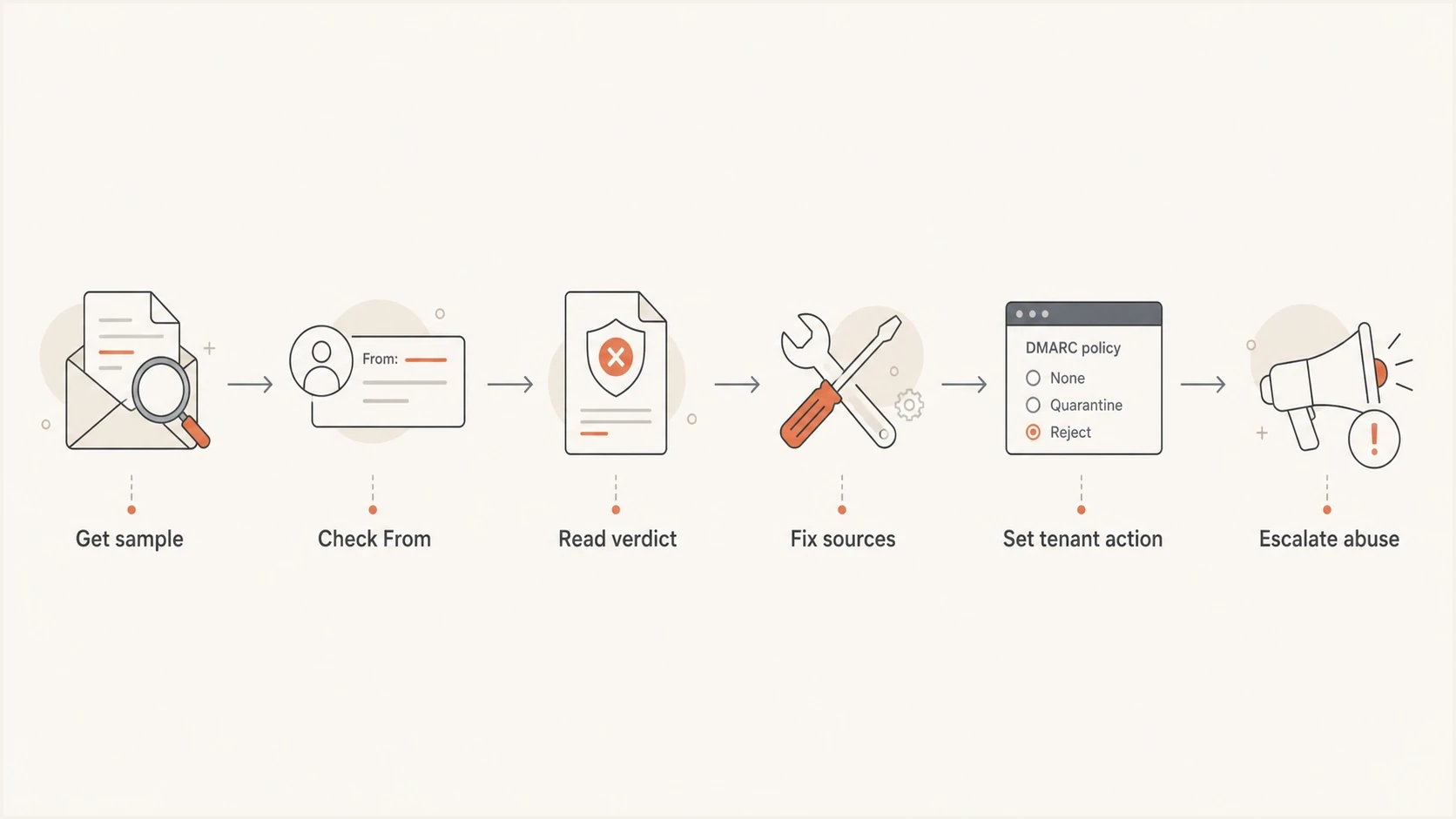
DMARC p=reject troubleshooting flow for Microsoft quarantine handling.
How to configure Microsoft 365 tenants you control
If you administer the recipient Microsoft 365 tenant, handle the problem inside Microsoft Defender and Exchange Online. The tenant-side fix is to honor sender DMARC policy and set the action for sender p=reject to reject. Set sender p=quarantine to quarantine unless you have a documented reason to do something else.
Sender-owned domain
- Control limit: You publish DMARC, but the receiver chooses the final action.
- Best evidence: Full headers, DMARC failure proof, and samples from affected recipients.
- Main work: Keep legitimate sources clean and track abuse through reports.
Recipient Microsoft tenant
- Control limit: You can reject DMARC failures for inbound mail to your users.
- Best evidence: Message trace, anti-phishing policy, and connector configuration.
- Main work: Set p=reject failures to reject and review quarantine access.
For direct Microsoft 365 MX, review the anti-phishing policy first. Confirm which policy applies to the affected recipient because changing an unmatched policy will not change the disposition.
Review Microsoft 365 DMARC actionspowershell
Get-AntiPhishPolicy | Format-Table Name,HonorDmarcPolicy,DmarcQuarantineAction,DmarcRejectAction
For the policy that actually matches the recipient, the intended values are HonorDmarcPolicy=True, DmarcRejectAction=Reject, and DmarcQuarantineAction=Quarantine. Apply changes in the Microsoft Defender portal or with the corresponding Exchange Online policy command, then repeat the controlled message test.
- Policy switch: Turn on honoring sender DMARC policy for explicit authentication failures.
- Reject action: Set sender p=reject failures to reject instead of quarantine.
- Quarantine action: Set sender p=quarantine failures to quarantine or junk based on risk.
- Connector check: Enable Enhanced Filtering when another gateway sits before Microsoft 365. Include every trusted public gateway IP, and test with a small recipient group first.
- Bypass review: Remove broad SCL -1 mail flow rules on the connector unless a documented exception requires one.
- User access: Review whether users can preview or release spoofed messages from quarantine.
Mail flow rules can help with a narrow tenant-owned case, such as inbound mail that claims to be from your own accepted domain. Keep the condition specific, and do not use a broad allow or SCL -1 rule to solve DMARC failures. Those bypasses create false negatives and can mask the policy you are trying to test.
How to reduce brand exposure outside your tenant
When the recipient tenant belongs to someone else, you need a playbook that security teams can act on. Send a short abuse packet with one or two message samples, full headers, your DMARC record, the failed DMARC result, and the exact visible From domain. Ask the recipient admin to reject sender p=reject failures or restrict user release for those messages.
This is also where sender hygiene matters. If your own legitimate sources are messy, recipient teams have less confidence that a hard reject will be safe. If all legitimate streams pass DMARC with a domain match, your escalation is much stronger.
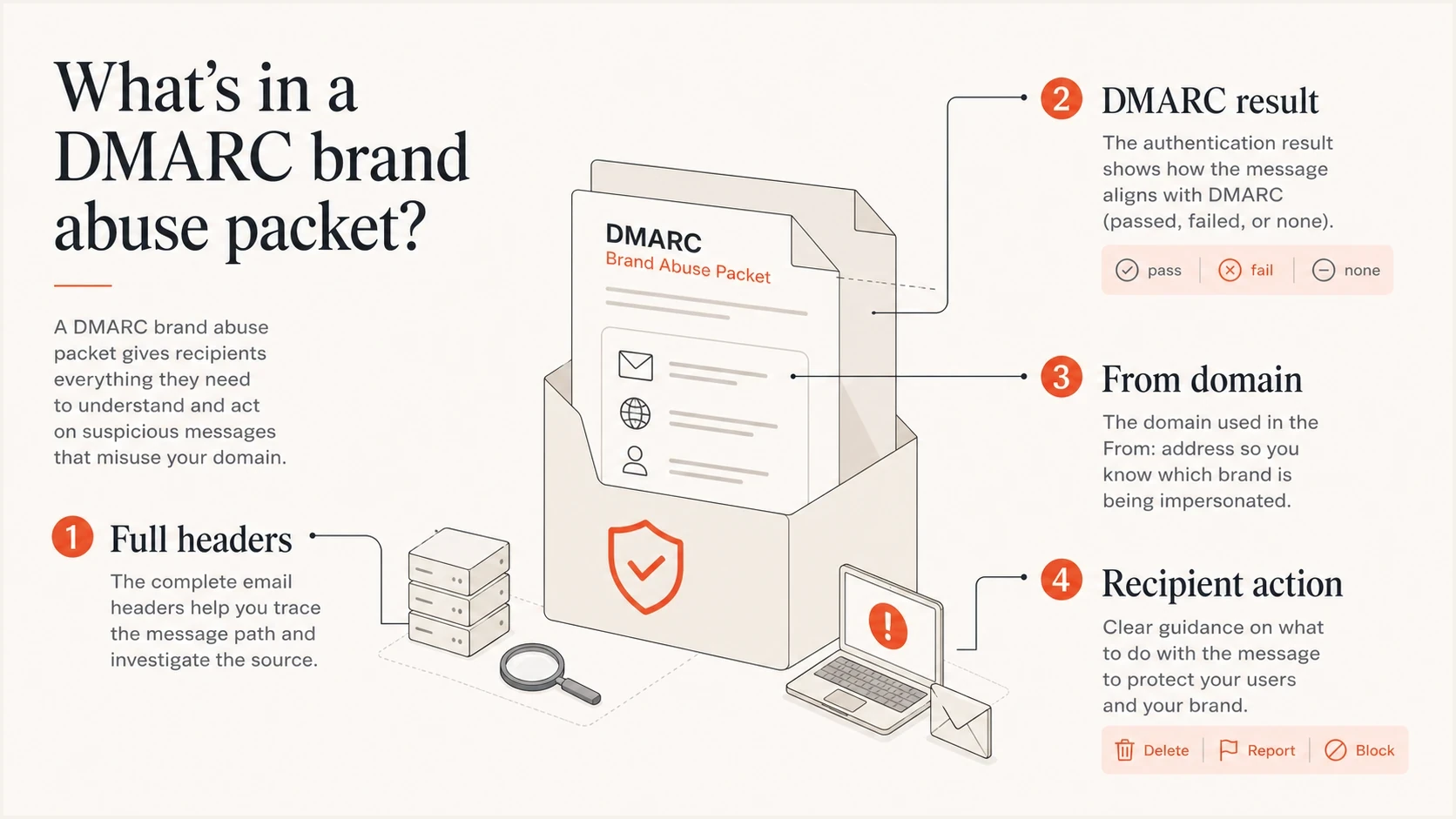
Four-part DMARC abuse packet with headers, result, From domain, and recipient action.
For your own rollout, the safer path is gradual enforcement with real report review. A good safe DMARC transition keeps a record of what changed, who owns each sender, and which receivers are still causing friction. Stage enforcement by domain or subdomain and review reports after each change, rather than relying on the historic pct tag.
- Use subdomains: Split marketing, transactional, and corporate mail so one mistake is contained.
- Sign everything: Prefer DKIM for every major stream because SPF often breaks during forwarding.
- Fix web forms: Do not send contact form mail using the visitor's address as the visible From.
- Watch reports: Review aggregate reports after each source, DNS, or policy change.
- Document exceptions: Temporary allow rules need owners, dates, and removal criteria.
Where Suped fits
Suped is our DMARC reporting and email authentication platform. For this workflow, Suped turns aggregate reports into source-level issues, fix steps, and alerts. That makes it easier to prove which legitimate sources pass DMARC before enforcement changes and to identify new failures that need an owner.

Issue steps to fix dialog showing the issue overview, tailored fix steps, and verification action
The practical workflow is to monitor every sending domain, verify each source, fix authentication failures, and keep alerts on for sudden changes. Suped's DMARC monitoring connects receiver reports with SPF and DKIM status so the abuse packet and Microsoft escalation rest on current evidence.
Hosted policy management helps teams stage changes without repeated DNS edits. Hosted DMARC also keeps policy changes controlled when different teams own separate senders.
The goal is to know which mail is legitimate, prove which mail is abuse, and give receivers a clean reason to reject failures instead of showing them to users in quarantine. Publishing reject without report review does not complete that workflow.
Views from the trenches
Best practices
Verify real From-domain spoofing before escalating, because display names need a different fix.
Keep DMARC reports active so reject changes have evidence, source history, and owner names.
Ask Microsoft tenants you control to reject p=reject failures in anti-phishing policy.
Common pitfalls
Publishing reject without fixing sender domain match turns legitimate mail into the incident.
Treating quarantine as harmless leaves brand abuse visible to users who review released mail.
Assuming bounces explain everything hides silent junking, quarantine, and connector effects.
Expert tips
Save full headers and verdict fields before opening cases with recipient security teams quickly.
Separate marketing, transactional, and corporate mail so policy changes have less blast radius.
Use strict DKIM coverage for important streams when SPF forwarding breaks domain matching.
Marketer from Email Geeks says DMARC policy is a request, and receivers still choose the final disposition based on local risk controls.
2021-01-21 - Email Geeks
Expert from Email Geeks says the first check is whether the domain is truly forged or the brand only appears in the display name.
2021-01-21 - Email Geeks
Microsoft DMARC reject checklist
Handle Microsoft treating DMARC reject as quarantine by fixing what you control first. If you control the Microsoft 365 tenant, set the anti-phishing policy so sender p=reject failures are rejected, and check connectors if mail routes through a gateway. If you own the abused domain but not the recipient tenant, gather headers, prove the DMARC failure, keep your legitimate sources clean, and escalate with a clear request.
Do not reduce this to a single DNS tag. DMARC reject helps most when reporting is active, authentication is clean, user-facing quarantine is controlled, and abuse response is documented. For legitimate forwarded mail, use a trusted ARC sealer when available instead of creating a broad bypass.




