How to fix 'DMARC policy not enabled' warnings

Published 11 Jul 2025
Updated 14 Aug 2026
13 min read
Summarize with
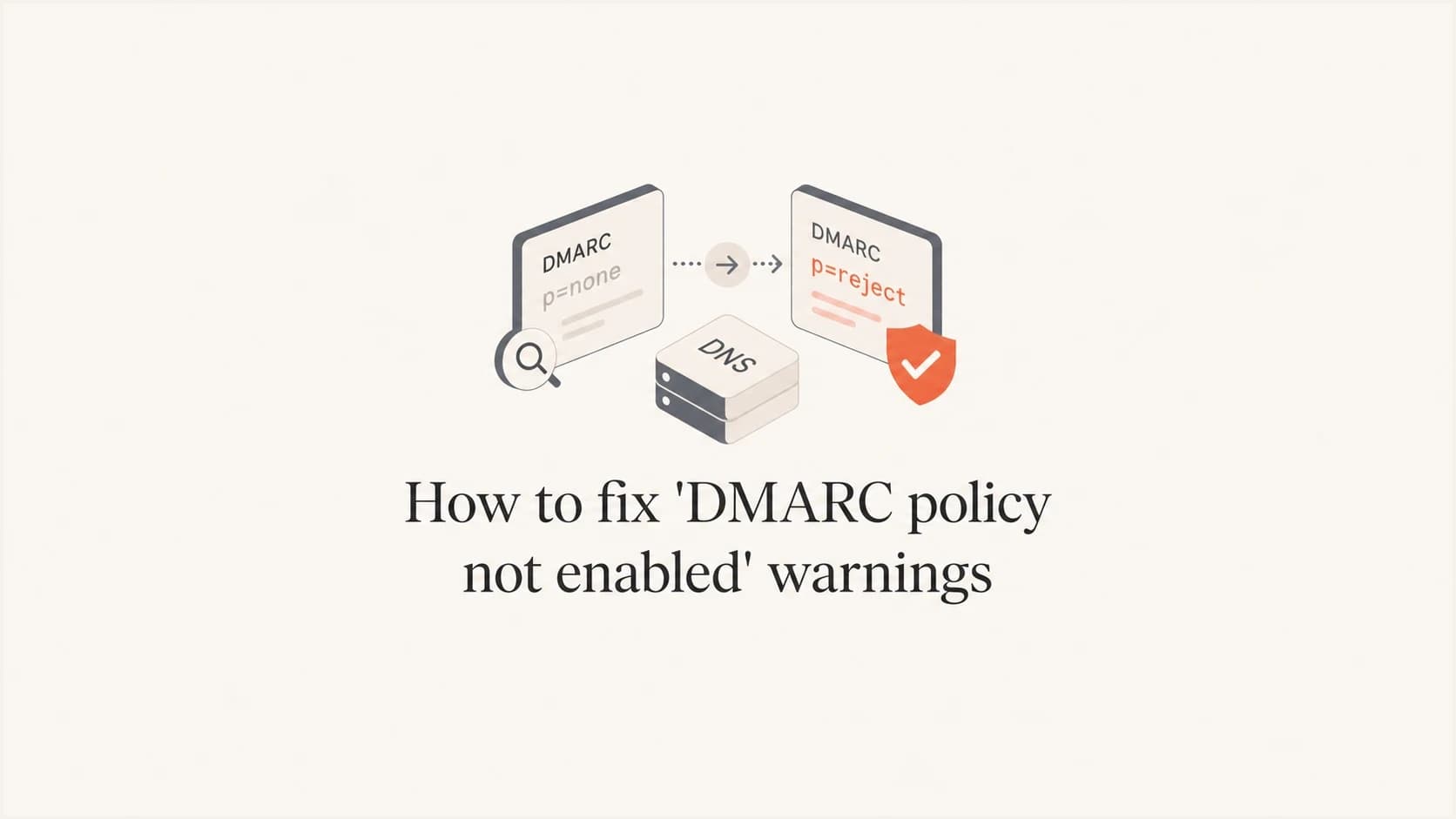
Updated on 14 Aug 2026: We updated this guide for RFC 9989, including testing mode and safer quarantine-versus-reject decisions.
To fix a "DMARC policy not enabled" warning, publish a DMARC record with an enforcement policy, usually p=quarantine or p=reject, at _dmarc.yourdomain.com. If your record already says p=none, DMARC evaluation is active, but enforcement is not. Aggregate reports require a valid rua= address. The warning means the domain owner has not asked receiving mail servers to quarantine or reject messages that fail DMARC.
The safest fix is not to jump straight to p=reject without checking your sending sources. Treat this warning as a rollout task: confirm every legitimate sender passes SPF or DKIM with domain matching, move to quarantine in testing mode when needed, monitor reports, then apply the chosen enforcement policy without the test flag. Suped helps with this workflow through DMARC monitoring, issue detection, hosted policy staging, alerts, and source-level visibility.
A domain with p=none can pass DMARC, but it has no enforcement. That is why security scanners, domain health tools, compliance portals, and some provider checklists still flag it as "policy not enabled".
What the warning means
DMARC has two separate ideas that often get mixed together: reporting and enforcement. Reporting starts when you publish a valid DMARC record and include an aggregate report address with rua=. Enforcement starts when the policy tag p= asks receivers to take action against mail that fails DMARC.
A warning usually appears when the record exists but has p=none, or when the DMARC record is missing, malformed, published in the wrong DNS location, duplicated, or missing an explicit p= value. RFC 9989 treats an otherwise usable reporting record without p= as p=none. Some tools phrase all of these as "DMARC policy not enabled", even though the underlying problem differs.
|
|
|
|---|---|---|
No record | DMARC is absent | Publish TXT |
p=none | Monitoring only | Move policy |
No p tag | Defaults to none | Add p value |
Bad syntax | Record invalid | Correct tags |
Two records | DMARC fails | Keep one |
Wrong host | Not discovered | Use _dmarc |
Common causes behind the warning
The warning does not always mean your mail is failing. It is a posture warning, not an SMTP reply or bounce code. It also does not by itself mean you miss current Gmail or Yahoo bulk-sender requirements: each accepts a valid DMARC policy of p=none as the minimum, although enforcement gives the domain owner stronger control over unauthenticated mail.
The direct fix
The direct technical fix is to change the DMARC policy tag. A monitoring-only record uses p=none. An enabled policy uses p=quarantine or p=reject. Quarantine asks receivers to treat failing mail as suspicious, often by placing it in spam. Reject asks receivers not to accept failing mail. Receiving systems still apply local policy when deciding the final disposition.
Monitoring-only DMARC record that triggers the warningDNS
Host: _dmarc
Type: TXT
Value: v=DMARC1; p=none; rua=mailto:dmarc-reports@yourdomain.com
Enforced DMARC record that fixes the warningDNS
Host: _dmarc
Type: TXT
Value: v=DMARC1; p=quarantine;
       rua=mailto:dmarc-reports@yourdomain.com
For a domain that already has clean authentication, the fix can be as simple as changing p=none to p=quarantine. For a domain with many senders, such as a primary company domain used by employees, marketing, finance, support, and product systems, check the actual DMARC data before changing the policy.
- Policy: Use p=quarantine first when you still want a recovery path for failed messages.
- Testing mode: Use t=y during rollout when you need receivers to treat the policy as a testing signal, then remove it for full enforcement.
- Reports: Keep aggregate reports active so you can see which sources fail after the policy change.
- Subdomains: Set sp= for existing subdomains and np= for non-existent subdomains when their handling should differ from the organizational domain.
DMARC checker
Look up a domain's DMARC record and catch policy issues.
?/7tests passed
A focused DMARC checker is useful after each DNS change because it confirms whether receivers will see the same record you intended to publish.
How to choose quarantine or reject
The right policy depends on how confident you are that legitimate mail passes DMARC and how the domain is used. DMARC passes when either SPF or DKIM passes and matches the domain in the visible From address. It does not require both SPF and DKIM to pass, but relying on only one mechanism creates avoidable risk.
Quarantine
Quarantine is an enforcement policy and often the right long-term choice for general-purpose mailbox domains. It asks receiving systems to treat failed mail as suspicious while leaving a recovery path for legitimate indirect mail.
- Use case: Good for general-purpose domains and senders still under review.
- Risk: Failed legitimate mail can land in spam.
- Rollout: Use testing mode, then remove the test flag.
Reject
Reject is the stricter request. Use it for dedicated sending domains or no-mail domains when legitimate sources are known, stable, and protected by aligned DKIM.
- Use case: Best suited to dedicated sending or no-mail domains.
- Risk: Mailing-list and forwarding paths can lose legitimate mail.
- Rollout: Use only after quarantine data and indirect-mail review are clean.
If a warning only asks for "policy enabled", quarantine usually clears it. If a requirement specifically asks for "quarantine or reject", either works. Choose the policy by domain use and indirect-mail risk, not by treating reject as an automatic end state.
Policy choice by domain use
Use domain purpose and indirect-mail exposure to choose the enforcement level.
Consider reject
Controlled use
Dedicated sending or no-mail domain with aligned DKIM and known sources.
Prefer quarantine
Indirect mail
General-purpose mailbox domain or routine mailing-list participation.
Keep testing
Unmapped senders
Legitimate sources still fail or remain unidentified.
These categories are decision aids, not protocol rules. A single high-value sender failing DMARC matters more than a large volume of obvious spoofing. The real question is whether the failing mail belongs to you and whether the domain is used for indirect mail.
When quarantine should remain the final policy
RFC 9989 says domains that host users who might post to mailing lists should not publish p=reject. Mailing lists and forwarding paths can change the message in ways that break SPF alignment, DKIM validation, or both. A receiving system can then reject legitimate mail even though the original sender authenticated it correctly.
Quarantine already enables DMARC enforcement and clears the usual policy warning. Keep it as the final policy for a general-purpose mailbox domain when indirect mail is a normal part of use. Reserve reject for domains with controlled sending paths, especially dedicated sending domains and domains that should never send mail.
- General-purpose mail: Prefer quarantine when people send routine person-to-person email.
- Mailing lists: Keep quarantine if users post through lists that rewrite or relay messages.
- Forwarding: Require durable aligned DKIM before considering reject.
- Dedicated domains: Consider reject when all sending paths are controlled or the domain sends no mail.
Check domain matching before changing policy
Before changing the DMARC policy, identify every legitimate sender and confirm it passes DMARC through matching SPF or matching DKIM. This is where many rushed fixes break real mail. SPF can pass but fail DMARC if the return-path domain does not match the visible From domain. DKIM can pass but fail DMARC if the signing domain does not match.
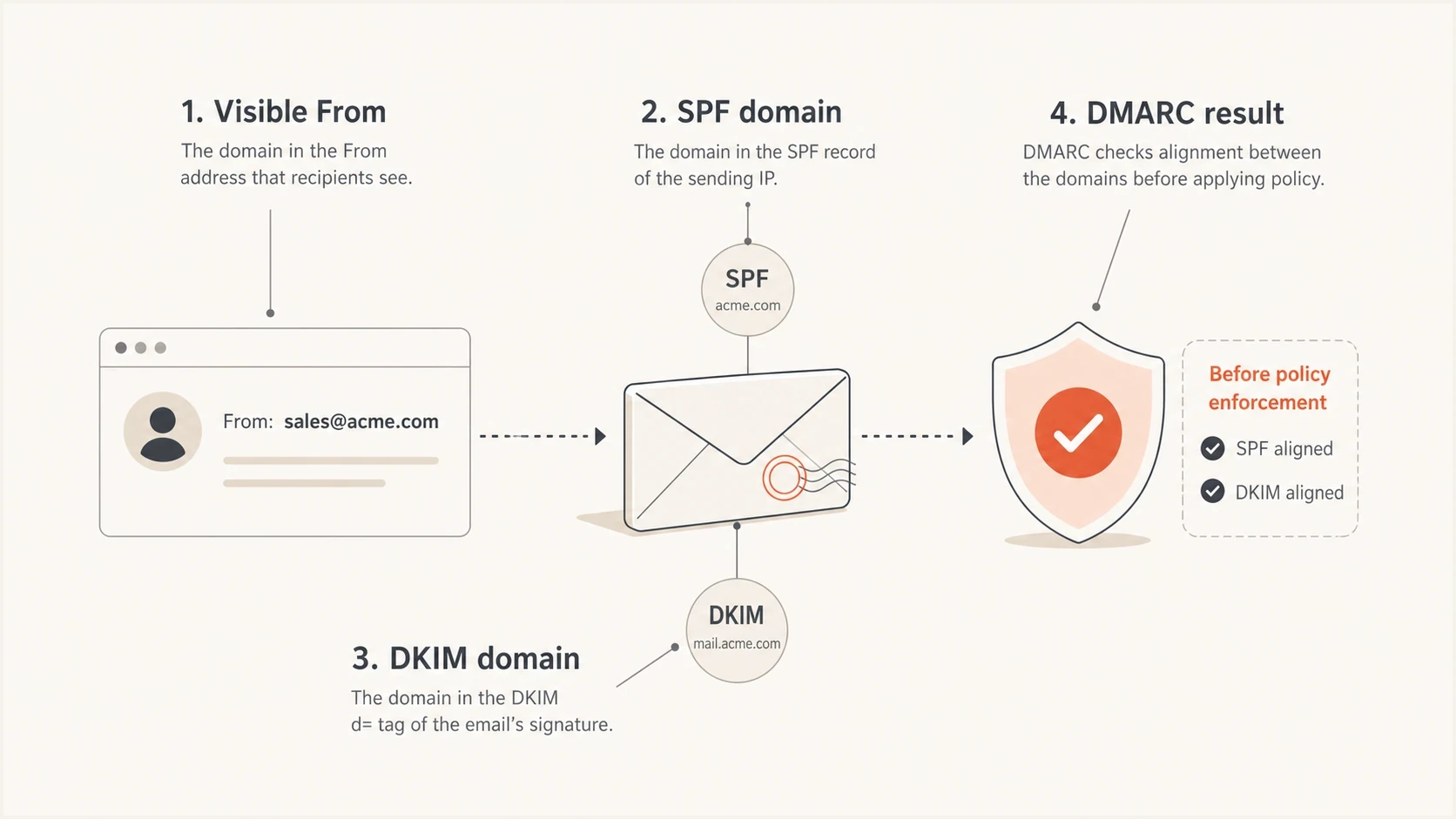
DMARC domain matching depends on the visible From domain matching SPF or DKIM identity.
Check domain matching at the source level. Employee mail, help desk mail, billing mail, product notifications, marketing campaigns, calendar systems, and invoicing tools often authenticate differently. A domain-wide policy applies to all of them, so every business-critical source needs a clean path.
- Inventory: List each system that sends mail using your domain in the visible From address.
- SPF: Confirm the sending IP is authorized and the return-path domain matches.
- DKIM: Confirm the sender signs with a domain matching your visible From domain.
- Forwarding: Expect SPF to break during forwarding and prefer DKIM resilience.
- Subdomains: Decide whether subdomains inherit the same policy or need a separate record.
If your reports show legitimate sources failing, fix those first. A detailed troubleshooting path is covered in this DMARC failure guide.
Step by step rollout
A clean rollout changes only one thing at a time. The point is to remove the warning without creating a delivery incident. RFC 9989 removed the old pct= tag, so stage the policy with t=y rather than percentage enforcement. If your domain is small and sends only through one well-configured provider, the sequence can happen quickly. If your domain has years of accumulated senders, collect enough reporting data to cover normal business cycles.
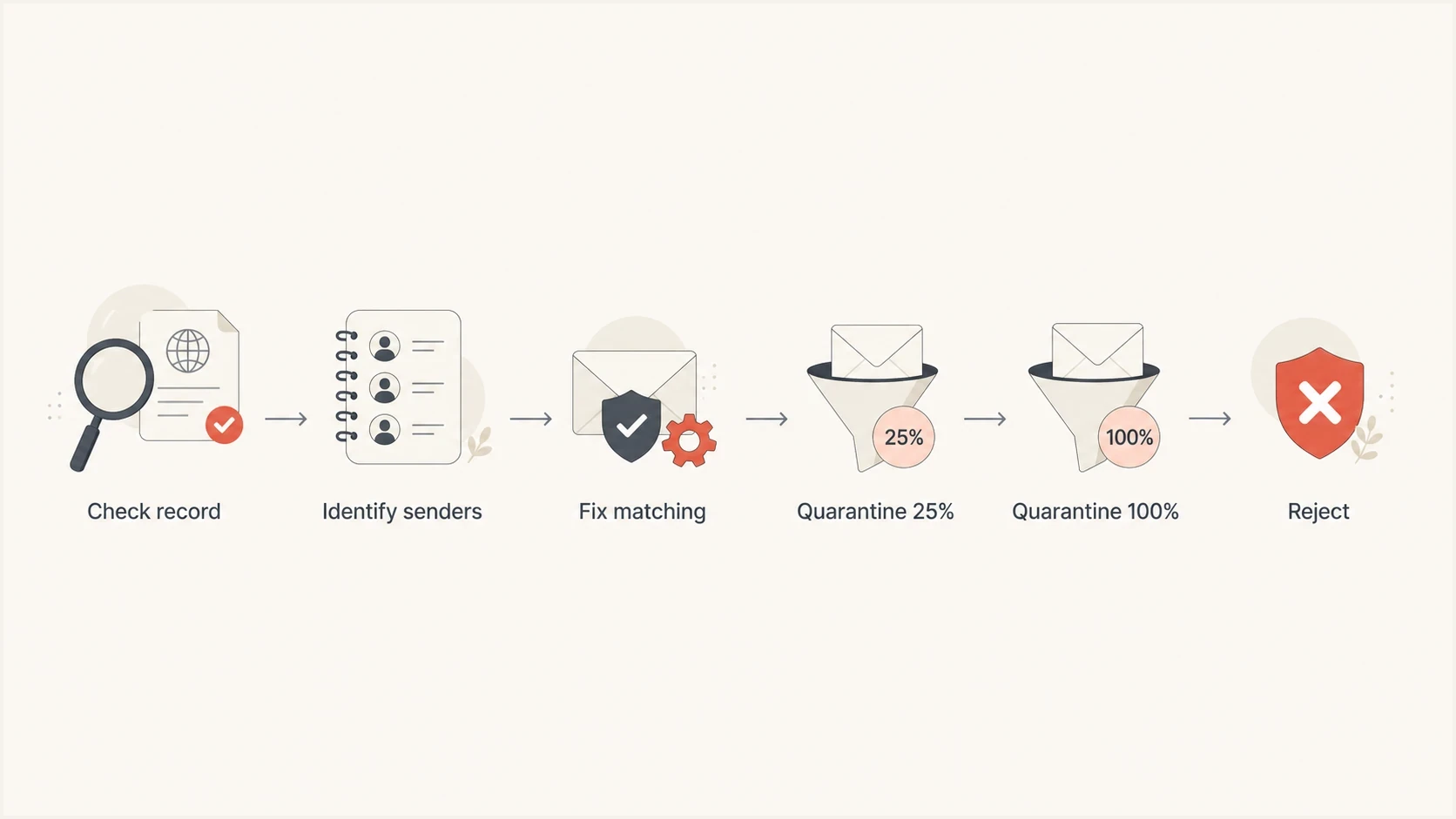
A DMARC rollout moves from record checks to sender fixes, quarantine, and reject.
- Validate: Confirm there is exactly one DMARC TXT record at _dmarc.
- Monitor: Collect aggregate reports long enough to identify normal sending sources.
- Fix: Resolve SPF, DKIM, domain matching, and record discovery failures for legitimate senders.
- Stage: Move to p=quarantine with t=y if you need testing mode before full enforcement.
- Review: Watch for new legitimate failures, complaints, and changes in source volume.
- Enforce: Remove t=y when testing is complete. Consider p=reject only when the domain's use and indirect-mail risk support it.
Staged quarantine recordDNS
Host: _dmarc
Type: TXT
Value: v=DMARC1; p=quarantine; t=y;
       rua=mailto:dmarc-reports@yourdomain.com
The t= tag is DMARC policy test mode. With t=y, receivers are asked to apply the declared policy one level lower during testing, so p=quarantine is treated like p=none for failing mail until the test flag is removed.
Suped's hosted DMARC workflow is useful here because policy staging can be managed without repeatedly editing long DNS records. The workflow is still grounded in the same DNS behavior: receiving servers read the domain's DMARC record and apply the policy they find.
Hosted DMARC configuration dialog showing policy controls, CNAME setup, and expanded advanced options
Fix common DNS mistakes
Many "policy not enabled" warnings remain after a policy change because DNS was published incorrectly. Check the host, record type, record count, syntax, and public lookup result. DNS provider interfaces vary, but the published result must be the same.
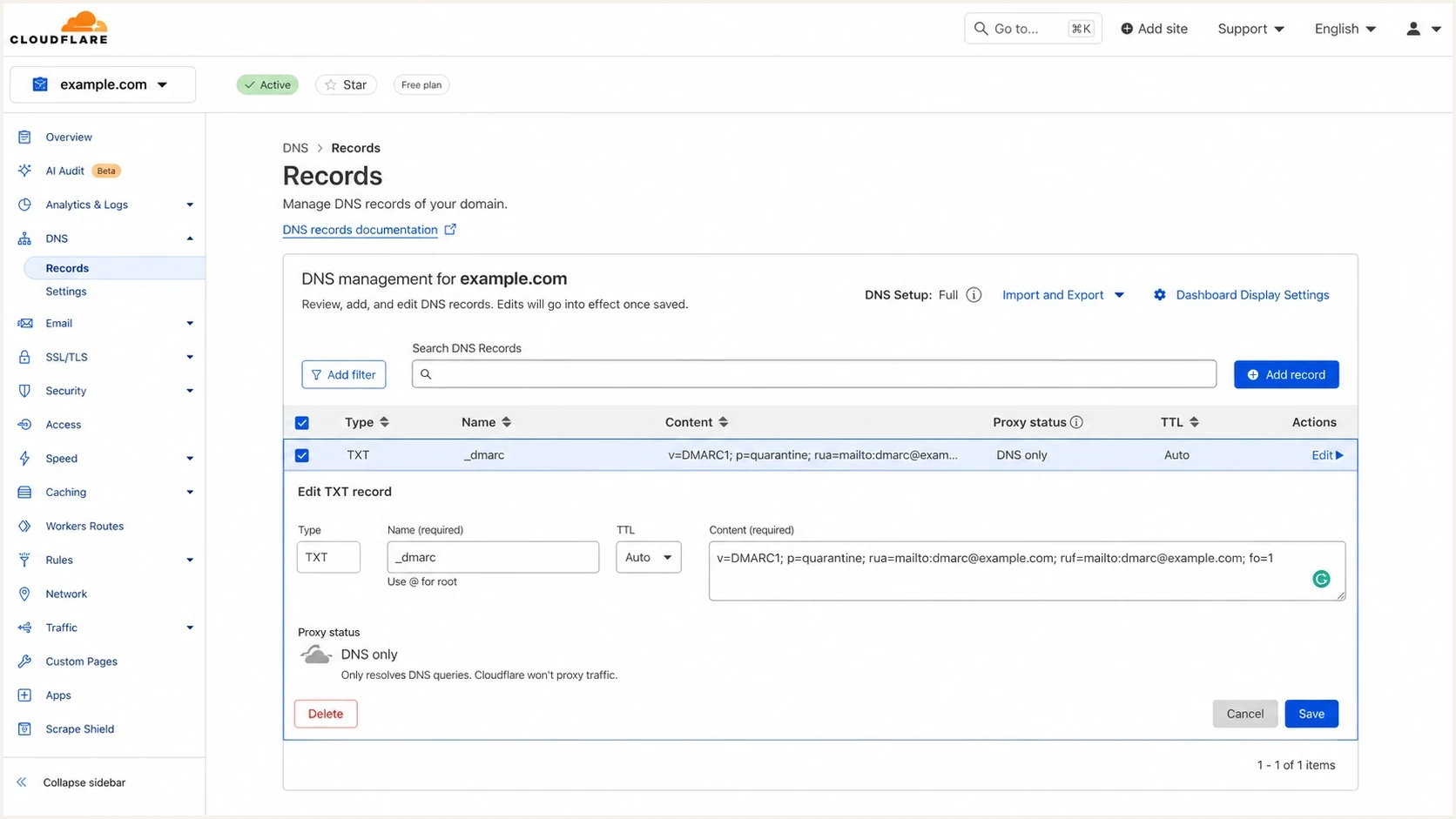
Cloudflare DNS screen showing a DMARC TXT record at _dmarc.
|
|
|
|---|---|---|
Full host | Wrong name | Use provider format |
CNAME target | No TXT result | Fix target |
Extra quotes | Parser error | Clean value |
Two records | Invalid DMARC | Merge into one |
DNS mistakes that keep the warning active
Some DNS panels ask for the host as _dmarc. Others ask for _dmarc.yourdomain.com. If you enter the full hostname into a panel that automatically appends the domain, the published record can become _dmarc.yourdomain.com.yourdomain.com, which receivers will not use.
?
What's your domain score?
Deep-scan SPF, DKIM & DMARC records for email deliverability and security issues.
A broad domain health check helps catch adjacent problems too, especially SPF lookup limits, missing DKIM, weak DMARC syntax, and domain reputation issues that can exist even after the warning is cleared.
When not to enable enforcement yet
There are cases where the technically correct fix should wait. If a payment system, ticketing system, CRM, or payroll sender is failing DMARC, changing policy first creates a business risk. The better fix is to correct authentication and then enforce.
Do not treat a security scanner warning as proof that the domain is ready for reject. The scanner sees DNS. It does not know whether every legitimate sender passes DMARC.
The highest-risk pattern is a shared company domain used everywhere, with no current DMARC report review. In that situation, the record might look simple, but the operational dependency behind it is not. Look at real sending data before changing the policy.
- Unknown sources: Large legitimate-looking volume appears in reports, but nobody owns it yet.
- Critical failures: Mail tied to billing, support, security, or account access fails DMARC.
- Forwarding dependency: Important recipient paths break SPF and lack stable DKIM survival.
- Inherited subdomains: Subdomains send mail but have not been checked against the parent policy.
If the domain fails these checks, keep p=none temporarily, but make the temporary state explicit. Set an owner, review the failing sources, and define the date or condition for moving to quarantine. The warning is worth fixing, but real email continuity matters.
How Suped fits the workflow
Suped's product organizes the sources that send as your domain and the authentication gaps that need attention. Its policy workflow then supports a safe change. The DNS edit is small, but the operational work behind it is not.

Issue steps to fix dialog showing the issue overview, tailored fix steps, and verification action
In Suped, review verified and unverified sources, SPF and DKIM pass rates, DMARC domain matching, policy status, and alerts for sudden failure spikes. Hosted DMARC also helps teams stage enforcement without asking a DNS owner to edit the raw TXT value every time.
Manual DNS workflow
- Visibility: Raw reports need parsing before they are useful.
- Changes: Each policy adjustment needs DNS access.
- Alerts: Failure spikes are easy to miss.
Suped workflow
- Visibility: Sources, pass rates, and issues are organized.
- Changes: Hosted policy staging reduces DNS edits.
- Alerts: Real-time notifications flag new failures.
Suped combines DMARC monitoring, SPF and DKIM issue review, hosted policy staging, SPF management, hosted MTA-STS, blocklist monitoring (blacklist monitoring), deliverability checks, alerts, and multi-tenant management. This is useful when a domain has multiple senders or an MSP manages many client domains.
If you already know your desired policy, generate the DMARC TXT value and publish it. For ongoing management, Hosted DMARC reduces repeated DNS changes during policy staging.
How to confirm the warning is fixed
After publishing the new record, wait for DNS propagation based on the previous TTL, then query the public record. You want to see exactly one TXT record at the DMARC host, with a valid version tag and an enforcement policy.
DNS lookup commandBASH
dig TXT _dmarc.yourdomain.com +short
Expected public resultDNS
"v=DMARC1; p=quarantine;" "rua=mailto:dmarc-reports@yourdomain.com"
Some DNS tools split a long TXT record into quoted chunks on the same output line. That is normal when the chunks combine into one TXT value. It is not the same as publishing two DMARC records. The invalid case is when the lookup returns two separate output lines that each start with v=DMARC1.
- Record count: There is one DMARC record for the domain.
- Policy: The record contains p=quarantine or p=reject.
- Syntax: The record starts with v=DMARC1 and uses semicolons correctly.
- Reports: Aggregate report delivery continues after the policy change.
- Mail flow: Important senders still pass DMARC after the change.
If a third-party security portal still shows the warning after the record is correct, it often has cached the previous result. Recheck after the old TTL expires. If the warning remains, verify that the scanner is checking the exact author domain and the policy found through RFC 9989 DNS Tree Walk discovery, not a different subdomain with its own policy.
The safest final state
The warning is fixed when the public DMARC record uses p=quarantine or p=reject without t=y. The safer final state is broader than clearing the warning: legitimate mail passes DMARC, unknown sources are understood, reports are monitored, and the policy matches how the domain is used.
For a low-volume dedicated sending domain, publish quarantine, check real mail, then consider reject when reports are clean and aligned DKIM is stable. For a primary business domain used by people, quarantine can remain the final policy. Suped helps turn DMARC evidence into source-level actions, policy staging, alerts, and ongoing monitoring instead of a one-time DNS edit.




