How to deal with spam from trix.bounces.google.com Google Forms?

Updated on 11 Aug 2026: We clarified how Google Forms mail can pass DMARC, tightened the quarantine workflow, and added controls that limit responses to external forms.
The direct answer is: treat mail from trix.bounces.google.com as Google Forms notification abuse, not as a normal spoofing problem. If your users do not need Google Forms notifications, create a targeted quarantine or reject rule for that envelope sender path. If users do need legitimate Google Forms mail, filter it by a mix of envelope sender, visible From, subject, message body, link patterns, recipient group, and user reports instead of blocking all Google mail.
Do not block google.com broadly, and do not assume your own DMARC policy will stop this traffic. When the message is generated by Google Forms and authenticated by Google, the authentication result belongs to a Google domain. Your DMARC policy protects your domain when someone tries to send as you. It does not provide a switch for rejecting every unwanted message sent through a large platform.
- Fast action: Inspect full headers, confirm the Return-Path or MAIL FROM uses trix.bounces.google.com, then quarantine that narrow pattern.
- Main caveat: A broad google.com blocklist (blacklist) rule will catch legitimate Forms notifications, Workspace alerts, and consumer Gmail traffic.
- Best control: Use recipient-side filtering for the abuse, and use DMARC monitoring to protect your own sending domains.
What trix.bounces.google.com means in the headers
trix.bounces.google.com is an envelope bounce domain used in Google mail handling, including Google Forms traffic. Admins can see it in the Return-Path or MAIL FROM even when the visible sender is forms-receipts-noreply@google.com or another Google address. Forms-related sharing mail can also show drive-shares-noreply@google.com, but confirm its Return-Path separately instead of assuming it uses trix.bounces.google.com. Attackers abuse Forms because Google sends the resulting notification or response receipt through its own infrastructure, so the message can authenticate as Google.
That does not make every message from this path safe. The sending platform is real, but the form content, linked destination, or response workflow can still be abusive. Public reports about Google Forms scam patterns and a DMARC thread describe the same issue: a message can be technically authenticated while its content still requires spam handling.
Do not treat authentication as approval
SPF, DKIM, and DMARC answer a narrow question: did the message authenticate for the domain being checked? They do not decide whether the form content is wanted or safe for your users.
- Authentication: A Google-signed form notification can pass checks for a Google domain.
- Abuse handling: Your gateway still has to judge content, links, user intent, and message history.
- Recipient control: Your mail system can reject mail you do not value, even when it authenticates.
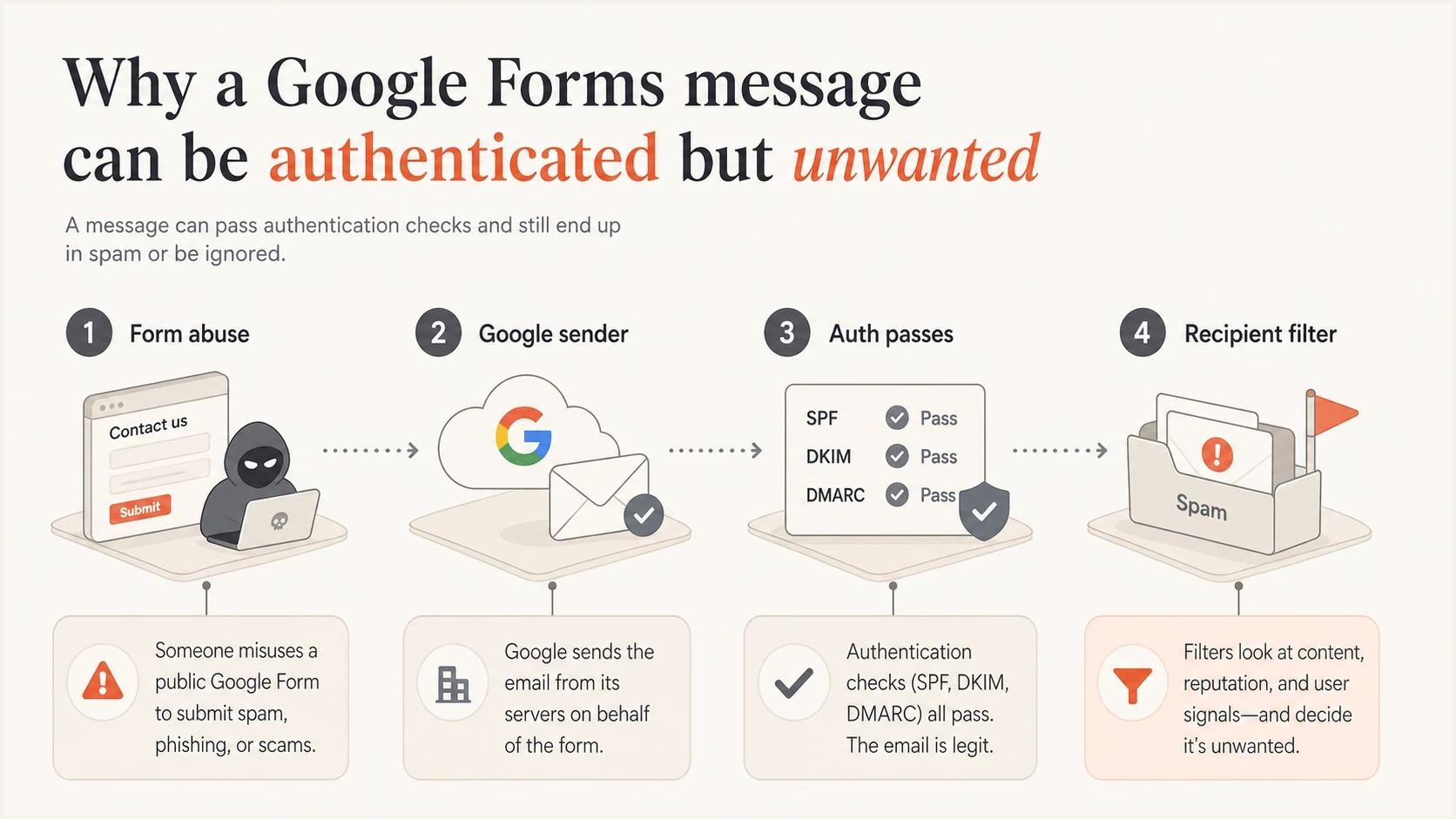
A Google Forms abuse path moving through authentication to recipient filtering.
Why this spam passes authentication
This pattern confuses admins because it looks like a sender identity failure. Often it is platform abuse instead. SPF can pass for trix.bounces.google.com, and under relaxed DMARC checking that subdomain can match a visible From domain of google.com. A valid Google DKIM signature can also satisfy DMARC independently when its signing domain matches the visible From domain. The result can be dmarc=pass even though the form content is unwanted.
|
|
|
|---|---|---|
Return-Path | Envelope bounce path such as trix.bounces.google.com | Use as a narrow filter key |
Visible From | Address shown to the recipient | Do not confuse it with Return-Path |
DKIM | Whether Google signed the mail | Do not treat pass as safe |
DMARC | Whether a matching SPF or DKIM identity passed | Check which domain produced the pass |
Platform that generated the message | Filter by need and risk |
How to read the important header fields.
Header clues to inspecttext
Return-Path: <...@trix.bounces.google.com>
Authentication-Results: spf=pass smtp.mailfrom=trix.bounces.google.com
Authentication-Results: dkim=pass header.d=google.com
Authentication-Results: dmarc=pass header.from=google.com
If the message claims to be from your own domain, the analysis changes. Check whether your domain produced the DMARC pass, whether the message used an authorized sender, and whether you are seeing backscatter. For that case, the guide on unexpected bounces is closer to the problem.
What to block and what to leave alone
The right control depends on whether your organization receives useful Google Forms notifications. Start with a basic question: are users getting mail of real value from this envelope path? If not, a direct quarantine rule is reasonable. If yes, the rule needs more conditions.
Broad blocklist approach
- Scope: Blocks a wide Google domain, IP range, or all Google Forms mail.
- Risk: Creates false positives for real forms, surveys, tickets, and internal workflows.
- Use case: Only acceptable for groups that never need Google Forms mail.
Targeted quarantine approach
- Scope: Matches trix.bounces.google.com plus content and recipient conditions.
- Risk: Reduces false positives because the rule is tied to the abuse pattern.
- Use case: Suitable for organizations that still need some Google Forms mail.
A domain blocklist or blacklist entry is safest when it is scoped to the envelope sender or bounce domain, not the whole provider. Log hits for at least a week before a hard reject if your team has not measured legitimate use.
A practical filtering workflow
Use a staged workflow to gather evidence before rejecting mail. Start with quarantine, review samples, then tighten the rule. This avoids turning a spam cleanup into a support queue for missing business forms.
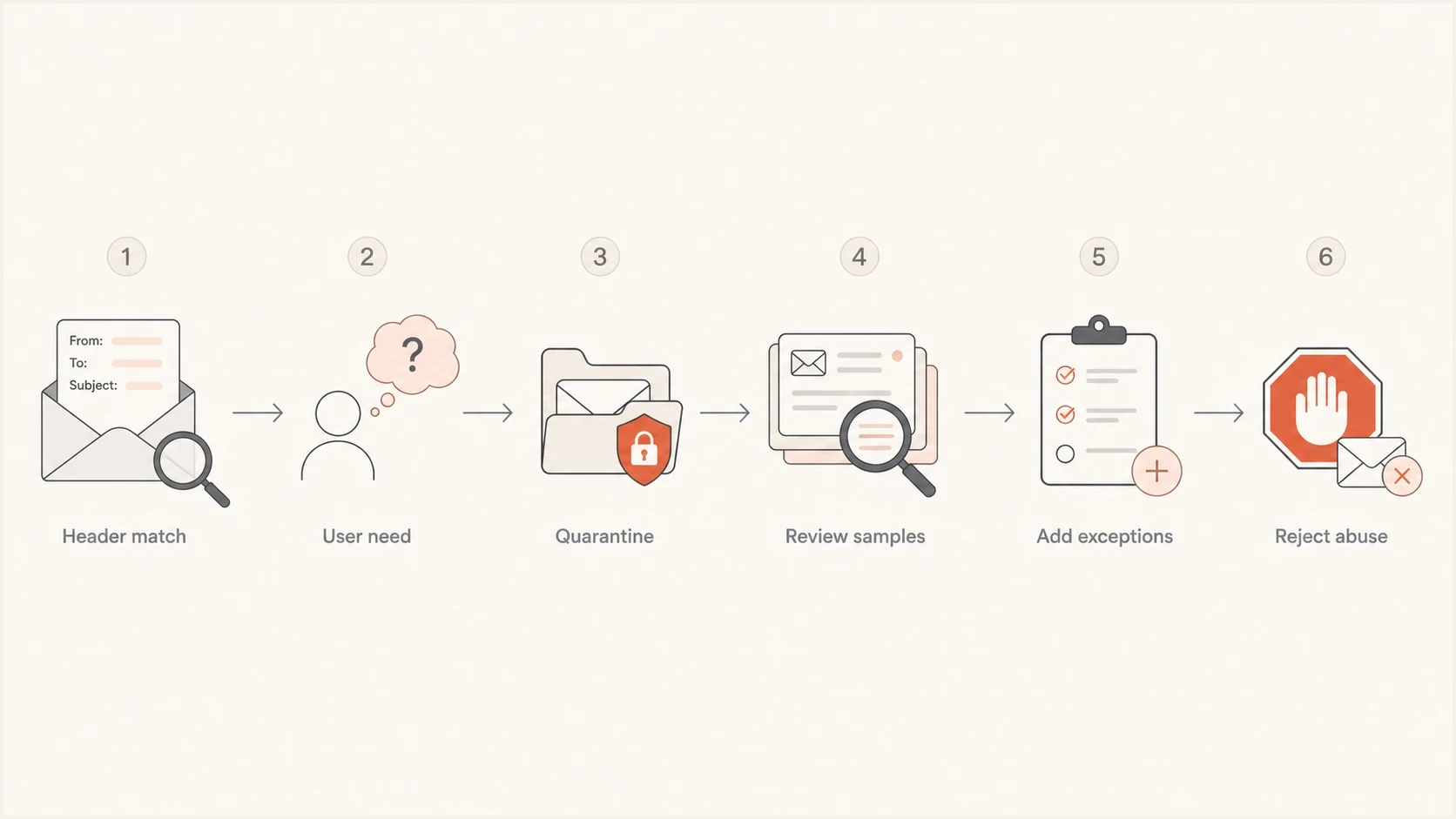
A staged filtering workflow for Google Forms spam.
- Collect samples: Export full headers for several messages and confirm the same bounce domain appears.
- Quarantine first: Hold matching mail rather than rejecting it until you understand legitimate traffic.
- Add exceptions: Allow trusted workflows, internal forms, or approved recipient groups when needed.
- Reject later: Move to rejection only when the rule has enough clean quarantine history.
Conceptual gateway logictext
IF envelope_sender ENDS_WITH "trix.bounces.google.com"
AND recipient_group IS NOT "approved-google-forms-users"
AND subject OR body MATCHES known abuse pattern
THEN quarantine
ELSE continue normal filtering
In Google Workspace, blocked-sender settings fit a simple sender or domain block. A content compliance rule is better when you need several conditions, recipient-specific exceptions, and an admin quarantine. In other gateways, use equivalent envelope sender, header, content, and recipient controls. Keep the rule explainable and record why each exception exists.
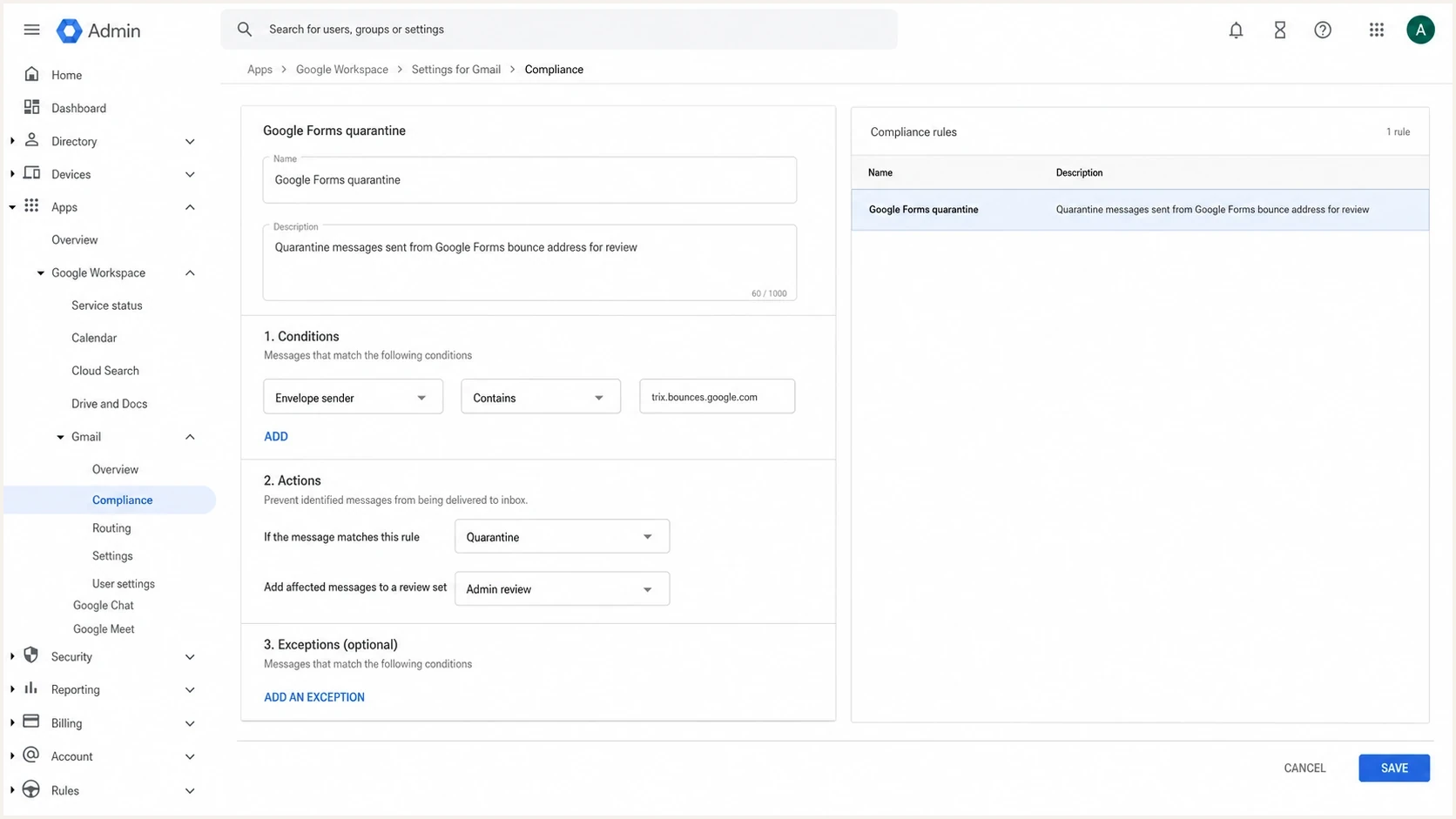
Google Admin console compliance rule for quarantining Google Forms spam.
Reduce exposure to external Google Forms
Google Workspace admins can control whether users in their domain respond to externally owned forms and whether forms owned by their users accept responses from outside the organization. These Forms-specific controls can reduce the chance that a user submits credentials or company data after opening an abusive form.
- Restrict by group: Apply external-response access only to organizational units or groups that need it.
- Keep an exception owner: Record the team, business purpose, and review date for each exception.
- Retain mail filtering: Form response restrictions do not stop the notification email from arriving.
This control limits interaction, not delivery
Use external Forms restrictions to contain data-entry risk. Keep the trix.bounces.google.com quarantine rule for the unwanted message itself.
How DMARC helps and where it does not
DMARC answers a different question: are unauthorized systems sending mail that claims to be from your domain? That matters because some Google Forms abuse uses trusted brand language, while separate campaigns can send bounce noise or spoofed mail that looks like your organization. Use a domain health check to verify your SPF, DKIM, and DMARC state before treating every suspicious message as a Google Forms problem.
?
What's your domain score?
Deep-scan SPF, DKIM & DMARC records for email deliverability and security issues.
If your DMARC record is missing or weak, publish a monitoring policy first, collect reports, then move to quarantine and reject after accounting for legitimate senders. A DMARC checker checks the TXT record itself. Hosted DMARC can support policy staging without repeated manual DNS edits.
Suped DMARC dashboard showing email volume, authentication health, and source breakdown
Suped's product can collect DMARC aggregate reports for your domains, identify unauthorized sending sources, and support staged policy changes. For this Google Forms issue, Suped does not control Google's notification service or replace a recipient gateway rule. It helps separate your own authentication problems from abuse sent through Google's platform.
Use the right layer for each problem
- Recipient spam: Handle it with gateway rules, quarantine, user reporting, and content controls.
- Domain spoofing: Handle it with SPF, DKIM, DMARC policy, and source monitoring.
- Reputation risk: Track sending sources and blocklist or blacklist events before they spread.
Report the form and train users
Report the email as spam or phishing so the mailbox provider receives a copy for abuse analysis. If authorized security staff can safely inspect the form URL in a controlled process, they can also use the form's Report option to submit an abuse report. Do not require users to open a suspicious form just to report it.
- Keep evidence: Save full headers, timestamps, recipient addresses, Message-IDs, form links, and screenshots.
- Train users: Ask users to report the message as phishing or spam instead of replying, opening links, or submitting the form.
- Review exceptions: Document which teams need Google Forms mail and why each exception exists.
The question of how mail can have a Google sender while being signed by Google is discussed in this Google Forms sender thread. The practical point is that platform-authenticated mail still needs content-based spam controls.
When to escalate
Most trix.bounces.google.com spam can be handled by messaging or security operations. Escalate when the campaign targets executives, collects credentials, impersonates your brand, or generates a volume spike that affects support, deliverability, or incident response.
Response thresholds
Use these bands to choose a response level for Google Forms spam.
Low
Monitor
A few messages, no credential capture, no brand impersonation.
Medium
Quarantine
Repeated messages to groups or teams with similar form content.
High
Escalate
Credential collection, executive targeting, or brand misuse.
Controlled
Review
Abuse is quarantined, exceptions are documented, reports are stable.
The operational goal is to decide whether this source has value to your users, then enforce that decision with narrow controls and useful logs.
Views from the trenches
Best practices
Start with full headers before blocking, because sender paths differ between messages.
Quarantine first, then reject after reviewing samples and mapping legitimate form use.
Report abusive forms, but keep local filtering active because responses are not guaranteed.
Common pitfalls
Blocking all Google mail creates false positives across forms, workspace alerts, and users.
Treating DMARC pass as safety misses the difference between authentication and consent.
Ignoring user need leads to broken workflows when legitimate forms are used by teams.
Expert tips
Tie the rule to envelope sender, content pattern, recipient group, and quarantine logs.
Document exceptions with an owner, purpose, review date, and sample headers attached.
Use DMARC reports to separate your own spoofing risk from Google Forms platform abuse.
Marketer from Email Geeks says admins should search public reports, but header review matters more than rumor when deciding whether to block a source.
2020-11-27 - Email Geeks
Marketer from Email Geeks says useful mail from the same path does not require accepting abusive mail; the mail system can still filter it.
2020-11-27 - Email Geeks
My practical recommendation
Deal with trix.bounces.google.com Google Forms spam at the recipient filtering layer. Quarantine it narrowly, review samples, add exceptions for real business use, and reject repeated abuse after the rule has a clean history. Do not block all Google mail unless you have confirmed there is no legitimate need.
Use DMARC for the problem it can solve: protecting your own domain and showing which systems send on your behalf. Suped's product turns aggregate reports into source-level findings, highlights authentication issues, and supports a controlled move toward enforcement. Keep the Google Forms quarantine and user-reporting workflow separate.




