How can I implement a DMARC reject policy for non-existent domains to prevent spam?

Published 15 May 2025
Updated 14 Aug 2026
12 min read
Summarize with
Updated on 14 Aug 2026: We clarified how RFC 9989 distinguishes NXDOMAIN from NODATA and replaced generic reject thresholds with sender-based readiness checks.
The direct answer is: if you control the domain, publish a DMARC TXT record with p=reject, sp=reject, and np=reject. The np policy applies to non-existent subdomains that return NXDOMAIN. If the domain literally does not exist, or it is under a registry hold where nameservers no longer resolve, you cannot publish a DMARC record on that domain. The standards-based way to cover that name is a parent or public suffix policy, usually published by the registry or public suffix operator, with psd=y and np=reject.
That caveat matters because DMARC is a DNS-published preference, not a central kill switch. A receiver has to find the right policy, test SPF or DKIM against the visible From domain, and then decide whether to apply the reject request. I still treat reject as the right target, but I do not treat it as the only control.
For owned domains, Suped's DMARC monitoring workflow helps find every legitimate sender before reject is enforced. For typo domains, dormant domains, and non-sending domains, the same workflow helps detect accidental use and confirm that observed traffic is unauthorized before the policy gets stricter.
Short answer
I implement non-existent-domain protection in layers. DMARC handles mail that claims a From domain under a policy domain. DNS controls whether the receiver can find that policy. Registry status controls whether you can publish any records at all. Receiver behavior controls the final outcome.
- Owned domain: Publish p=reject at _dmarc after every real sender passes DMARC.
- Subdomain coverage: Add sp=reject so failing mail using existing subdomains gets the same treatment.
- Non-existent names: Add np=reject to state the policy for subdomains that return NXDOMAIN under your policy domain.
- Whole missing domains: Ask the public suffix operator to publish PSD DMARC, or register the domain and publish no-send records.
The common trap
If a domain is on a registry hold and its nameservers do not resolve, you cannot add DMARC, SPF, DKIM, or MX records there until the domain returns to working DNS. In that state, rejection depends on receiver-side DNS checks or a valid parent policy.
How non-existent domain policy works
RFC 9989 now defines DMARC and obsoletes RFC 7489 and RFC 9091. It keeps the np tag as an active DMARC policy tag for non-existent subdomains. RFC 9990 now defines aggregate reporting, and RFC 9991 defines failure reporting. The np tag applies to non-existent subdomains under the policy domain. If np is absent, receivers that follow RFC 9989 apply sp if present, otherwise p. I still publish np=reject explicitly because it documents the intended handling for RFC 9989 validators and gives future audits a clear policy decision. On an active parent domain, np=reject can protect the NXDOMAIN class while p=none continues monitoring mail that uses the existing domain.
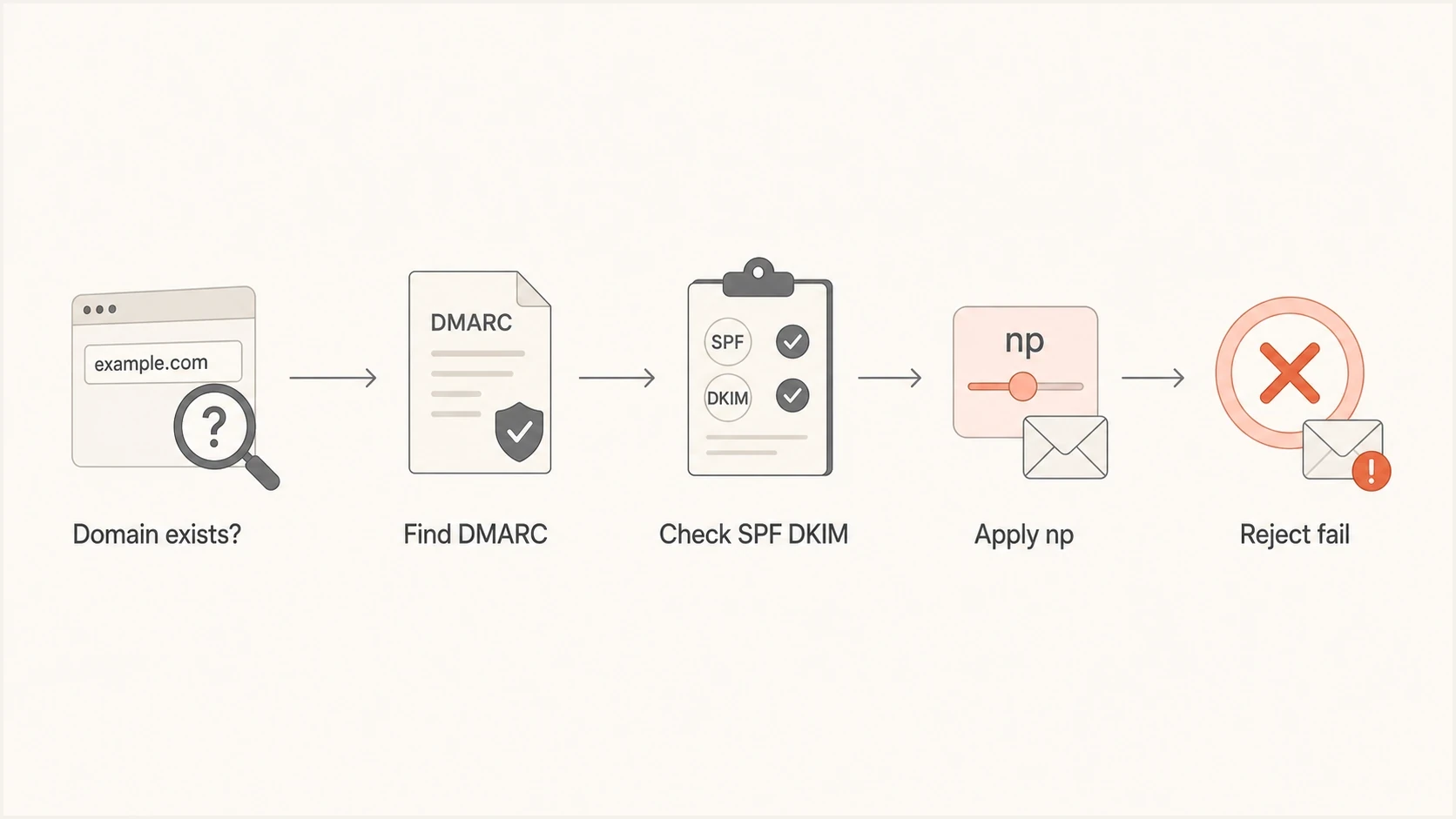
Flowchart showing how DMARC selects policy for non-existent subdomains.
The difference between non-existent subdomains and whole non-existent domains is the detail people miss. If someone sends as billing.random.example.com and example.com exists, an RFC 9989 receiver can use the DNS Tree Walk and find the policy at example.com. If someone sends as a completely unregistered second-level domain, the operator of the parent public suffix has to publish and the receiver has to honor that parent policy.
What you control
- Registered domains: You can publish SPF, DKIM selectors, DMARC policy, and reporting addresses.
- Dormant domains: You can publish no-send SPF and DMARC reject without setting up mailboxes.
- Owned subdomains: You can publish explicit records or let the parent policy handle them.
- Typo domains: You can register high-risk variants and publish no-send records.
What you do not control
- Unregistered domains: You cannot publish records unless you register the domain.
- Registry holds: You cannot fix DNS while the registry prevents nameserver resolution.
- Public suffixes: Only the suffix operator can publish PSD DMARC for the suffix.
- Receiver choices: The inbound mail server decides whether to honor the reject request.
NXDOMAIN and NODATA are different
RFC 9989 treats a name as non-existent only when the DNS response for that name is NXDOMAIN. A NOERROR/NODATA response means the queried record type is absent but the name exists. A subdomain can therefore have no A, AAAA, or MX record and still count as existing because another DNS record is present.
- NXDOMAIN: The Author Domain does not exist, so an applicable parent record uses np, then falls back to sp or p if np is absent.
- NOERROR/NODATA: The name exists, so an applicable parent record uses sp or falls back to p.
- Wildcard DNS: A wildcard can make an otherwise unused name return an answer, so test the exact names instead of assuming np applies.
- DNS errors: A temporary or permanent lookup error is not a DMARC pass or fail. The receiver uses local handling and cannot apply the published assessment policy.
Test the DNS response code
Do not decide that a subdomain is non-existent only because it lacks an MX record or does not host a website. Check whether the exact Author Domain returns NXDOMAIN. That response determines whether np is the applicable parent policy.
The DNS records to publish
For a domain you own, the practical setup is straightforward. Start with an inventory of legitimate sending systems. Fix each sender so SPF or DKIM passes and the authenticated domain matches the visible From domain. Then publish reject at the organizational domain and add explicit subdomain and non-existent-name policy.
|
|
|
|---|---|---|
Active domain | p=reject | Reject failing mail using the domain. |
Subdomains | sp=reject | Reject failing mail using existing subdomains. |
NXDOMAIN | np=reject | Reject failing mail using missing subdomains. |
Public suffix | psd=y | Let the suffix publish policy for its namespace. |
Compact policy choices for owned, dormant, and public suffix domains.
RFC 9989 changed DMARC tag guidance. Do not add pct, rf, or ri to new records. pct is historic; use t=y only when you want to signal testing mode. rf and ri are historic because aggregate reporting is specified in RFC 9990 and failure reporting is specified in RFC 9991. np, psd, and t are active tags, but psd=y belongs only on public suffix DMARC records.
Active domain DMARC recordDNS
_dmarc.example.com. TXT "v=DMARC1; p=reject; sp=reject;"
                    "np=reject; adkim=s; aspf=s;"
                    "rua=mailto:dmarc@example.com"
Strict DKIM and SPF domain matching are optional in DMARC. For a separately registered no-send domain, strict versus relaxed alignment changes little because no legitimate authentication mechanism should pass. Strict mode matters more when a defensive name is a subdomain of an active organizational domain, since relaxed alignment can treat a valid sibling or parent identifier as aligned. Check production senders before using strict mode on any active domain.
No-send and no-receive domain recordsDNS
example.com.        MX  0 .
example.com.        TXT "v=spf1 -all"
_dmarc.example.com. TXT "v=DMARC1; p=reject; sp=reject;"
                    "np=reject; rua=mailto:dmarc@example.com"
For domains that neither send nor receive mail, the SPF record says no IP is authorized, the null MX says the domain does not accept inbound mail, and DMARC tells receivers to reject mail that fails DMARC. For an inbound-only domain, omit the null MX but keep the no-send SPF and reject DMARC policy. DKIM does not need a default record. DKIM selectors only exist when a sender signs with a selector.
Public suffix operator exampleDNS
_dmarc.gov. TXT "v=DMARC1; p=reject; sp=none; np=reject;"
            "psd=y; rua=mailto:dmarc-reports@gov.example"
Do not publish psd=y on a normal organizational domain. It is for public suffix domains. If you need to create a policy safely, use a DMARC record generator, then validate it with a DMARC checker before changing DNS.
DMARC checker
Look up a domain's DMARC record and catch policy issues.
?/7tests passed
After publication, query the exact TXT name and send a real test message through each approved sender. The DNS record being valid is only half the job. The authentication result in the message header has to show that at least one mechanism passed DMARC with a matching domain.
Implementation checklist
The safest implementation path depends on whether the domain sends mail. I treat a real sending domain differently from a dormant defensive registration, because one needs sender repair and the other needs a clean no-send posture.
- Inventory first: List every owned domain, typo domain, parked domain, and subdomain used in email.
- Separate senders: Mark each domain as active sender, inbound-only, parked, defensive, or unknown.
- Monitor reports: For active domains, start with p=none, add np=reject for the NXDOMAIN class, and use RFC 9990 aggregate reports to find valid mail before enforcing the existing domain.
- Fix authentication: Make each sender pass SPF or DKIM with a domain that matches the visible From domain.
- Stage enforcement: Use p=quarantine when you need a recoverable intermediate step while investigating false positives, then move to p=reject after known mail consistently passes DMARC.
- Keep watching: Continue monitoring for new vendors, DNS drift, and unexpected mail after enforcement.
A practical staging rule
For active mail domains, do not skip monitoring. For defensive domains that never send mail, publish no-send SPF and DMARC reject immediately, then watch reports for abuse attempts and accidental use.
Hosted DMARC configuration dialog showing policy controls, CNAME setup, and expanded advanced options
Suped's Hosted DMARC flow is useful when the policy needs controlled staging across many domains. It lets teams manage policy changes centrally, add reporting, and reduce DNS handoffs during the move to reject.
What reject will and will not stop
A reject policy reduces direct domain spoofing used in phishing and spam, but it does not stop display-name impersonation or mail sent through lookalike domains. A receiver can override the requested action, quarantine instead of reject, or use local policy when DNS is broken. Older receivers can also reach a different result if they have not adopted RFC 9989 policy discovery and the np tag.
Evidence for p=reject
Use aggregate report data and sender ownership to decide whether enforcement is ready.
Ready
No known failures
Every known production source has sustained aligned SPF or DKIM, with no known legitimate failures.
Review
Fix first
A known sender still fails DMARC or has no confirmed owner.
Unsafe
Unclassified traffic
High-volume unauthenticated traffic has not been classified as legitimate or abusive.
Unknown
Collect reports
No reliable aggregate report data exists yet.
For non-existent whole domains, reject is not something you can add after the fact unless you can make the domain exist in DNS. The practical options are to register the high-risk variant, ask the registry or public suffix operator to publish PSD DMARC, or report abusive traffic to receiving networks.
This is also where blocklist (blacklist) and reputation monitoring can help operations teams spot abuse patterns, but those checks do not replace DMARC. They answer a different question: whether a domain or IP has a poor reputation elsewhere.
Where Suped fits
For teams managing more than a few domains, Suped's product turns raw authentication reports into domain-level fixes. The practical workflow brings together DMARC policy monitoring, SPF and DKIM visibility, hosted policy controls, blocklist (blacklist) monitoring, alerts, and multi-tenant dashboards for agencies and managed service providers.
For this exact non-existent-domain problem, the useful Suped workflow is simple: add every owned and defensive domain, confirm whether it sends mail, publish the correct reject or no-send records, and use issue detection to catch anything that breaks. That is more reliable than trying to remember which parked domains still have old vendors attached.
Manual DNS handling
- Visibility: You have to collect and parse aggregate reports yourself.
- Policy changes: Every domain change depends on DNS access and careful record editing.
- Failure triage: Broken SPF, missing DKIM, and domain mismatch issues need manual diagnosis.
- Scale: Large portfolios become hard to keep consistent.
Suped workflow
- Visibility: DMARC reports are normalized into sources, pass rates, and issue groups.
- Policy changes: Hosted policy controls reduce direct DNS editing after setup.
- Failure triage: Issues include tailored steps to fix authentication failures.
- Scale: Agencies can manage client domains in one multi-tenant dashboard.
Views from the trenches
Best practices
Publish explicit DMARC on every owned domain before relying on parent policy discovery.
Use no-send SPF and DMARC reject for parked domains that should never send mail.
Record who owns each defensive domain so DNS holds do not block urgent policy fixes.
Common pitfalls
Assuming a held or NXDOMAIN name can still accept new DNS records causes response delays.
Relying on receiver rejection for missing domains gives inconsistent protection in practice.
Publishing p=reject without checking real senders can block wanted operational messages.
Expert tips
Add np=reject to make non-existent subdomain policy explicit in each DMARC record.
Ask the public suffix operator about PSD DMARC when abuse targets an entire namespace.
Keep monitoring after reject because new vendors can create fresh DMARC failures later.
Marketer from Email Geeks says a registry hold means nameservers do not resolve, so adding DMARC records is not available until DNS works again.
2024-09-06 - Email Geeks
Marketer from Email Geeks says some receivers still accept mail that claims a non-resolving domain, so relying only on NXDOMAIN rejection leaves gaps.
2024-09-06 - Email Geeks
The practical path to reject
To prevent spam using non-existent names under domains you own, publish p=reject, sp=reject, and np=reject after confirming legitimate mail passes DMARC. For domains that never send mail, publish no-send SPF and DMARC reject now. For names you do not own and cannot publish under, push the issue to the registry or public suffix operator, or defensively register the domain if that is appropriate.
DNS syntax is one part of the work. You also need to know which names you control, which names actually send mail, and which names need parent-level policy. A monitored DMARC rollout keeps those decisions tied to current report data instead of a one-time DNS edit.




