Does Cvent support SPF and DKIM alignment?

Published 14 Jul 2025
Updated 13 Aug 2026
11 min read
Summarize with
Updated on 13 Aug 2026: We updated this guide for RFC 9989 and added clearer Cvent DNS and DKIM alignment checks.
Yes, Cvent supports DKIM alignment when custom DKIM signing is enabled for your sending domain. No, you should not plan on SPF alignment for Cvent by default, because Cvent-sent mail normally uses a Cvent-controlled Return-Path domain. That means SPF can authenticate the sending server, but DMARC still treats SPF as unaligned when the visible From domain is your domain.
The practical answer is simple: get Cvent to sign with DKIM using a domain that matches your From domain, then verify that DKIM passes DMARC alignment. Adding Cvent IP addresses to an SPF record or allowlisting those IPs inside another system does not fix DMARC alignment. It only proves that a Cvent server was allowed to send for the envelope sender Cvent used.
Direct answer
- DKIM alignment: Supported when Cvent signs mail with your domain in the DKIM d= value.
- SPF alignment: Do not depend on it unless Cvent confirms a custom Return-Path for your account.
- DMARC pass path: One aligned pass is enough, so DKIM alignment can carry Cvent through DMARC.
- Best next step: Open a Cvent support request for custom DKIM and verify the headers after setup.
What Cvent supports
For DMARC, treat Cvent as a DKIM-first sender. The goal is not to make every authentication method match your domain. At least one method must pass and match the visible From domain. With Cvent, the clean path is custom DKIM signing.
|
|
|
|---|---|---|
Vendor sender | Cvent sends event and campaign mail for your brand. | |
SPF | Can pass | A Cvent server can be permitted, but that alone does not satisfy DMARC. |
SPF alignment | Usually fails | The Return-Path domain usually belongs to Cvent, not your From domain. |
DKIM | Supported | Cvent support can help enable custom domain signing. |
DKIM alignment | Supported | DMARC passes when DKIM authenticates with a matching domain. |
Cvent alignment support at a glance.
Cvent has a DKIM request form, and the support route matters because DKIM signing is not the same as adding a generic DNS include. Cvent needs to issue the selector details, tell you which records to publish, and sign outgoing messages with your domain.
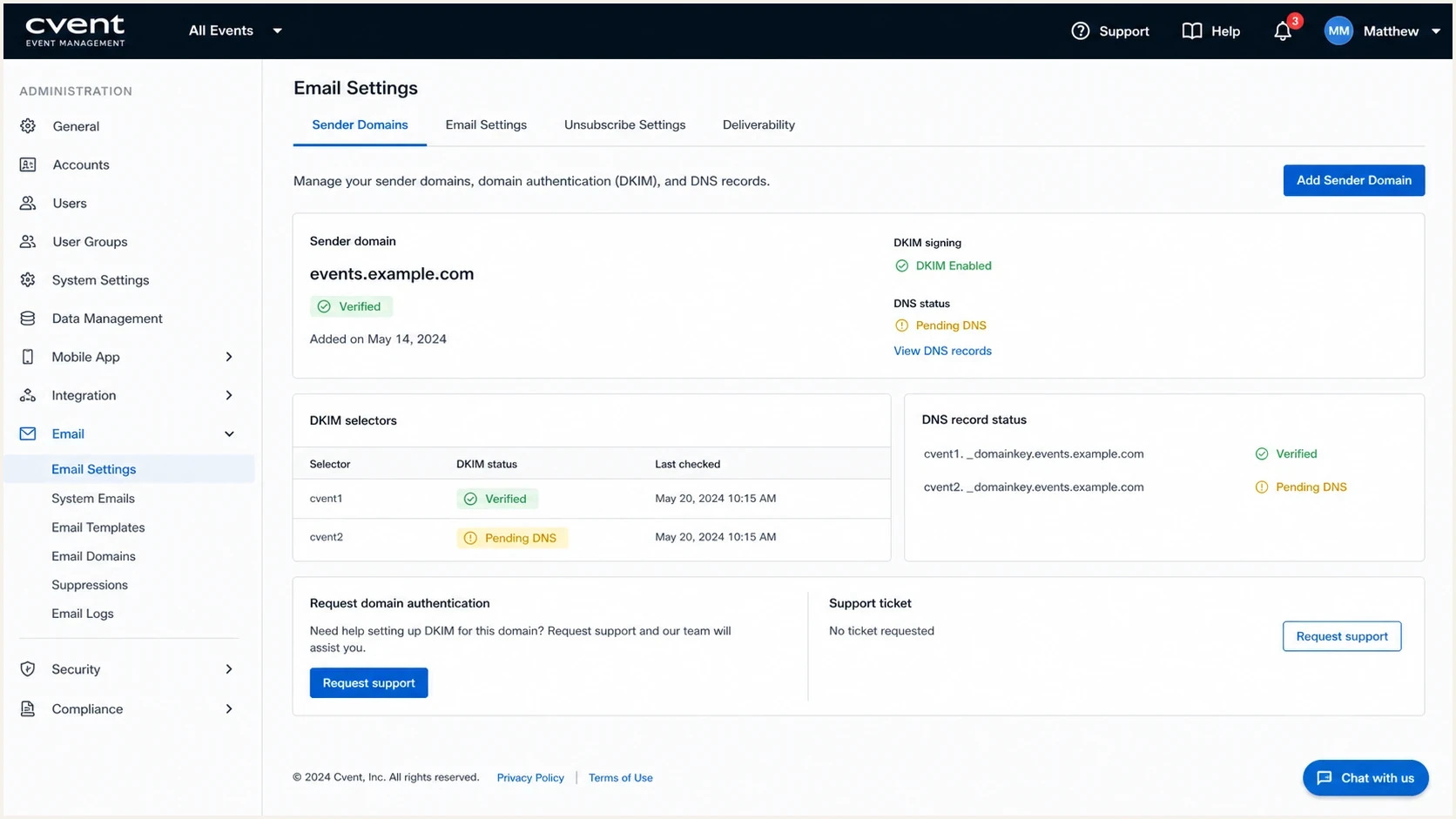
Cvent Event Management email settings with sender domain and DKIM verification fields.
Why SPF whitelisting does not solve DMARC
The common mistake is treating SPF authorization and SPF alignment as the same thing. They are different checks. SPF authentication asks whether the sending server is allowed by the domain used in the envelope sender. DMARC SPF alignment asks whether that envelope sender domain matches the visible From domain.
SPF authorization
This is the basic SPF pass check. It confirms that the sending IP is allowed by the SPF record of the envelope sender domain.
- Domain checked: Return-Path or envelope sender domain.
- Cvent result: Often passes using Cvent-controlled infrastructure.
- DMARC value: Useful only when the SPF domain also matches the From domain.
SPF alignment
This is the DMARC domain match check. It compares the SPF-authenticated domain against the visible From domain.
- Domain checked: The organizational domain behind the Return-Path.
- Cvent result: Usually fails if the Return-Path is a Cvent domain.
- DMARC value: A pass only when the Return-Path matches your visible From domain.
If you want a deeper explanation of that distinction, the guide on SPF authentication and alignment breaks it down. For Cvent, the outcome is clear: SPF can look healthy in a header and still fail DMARC alignment.
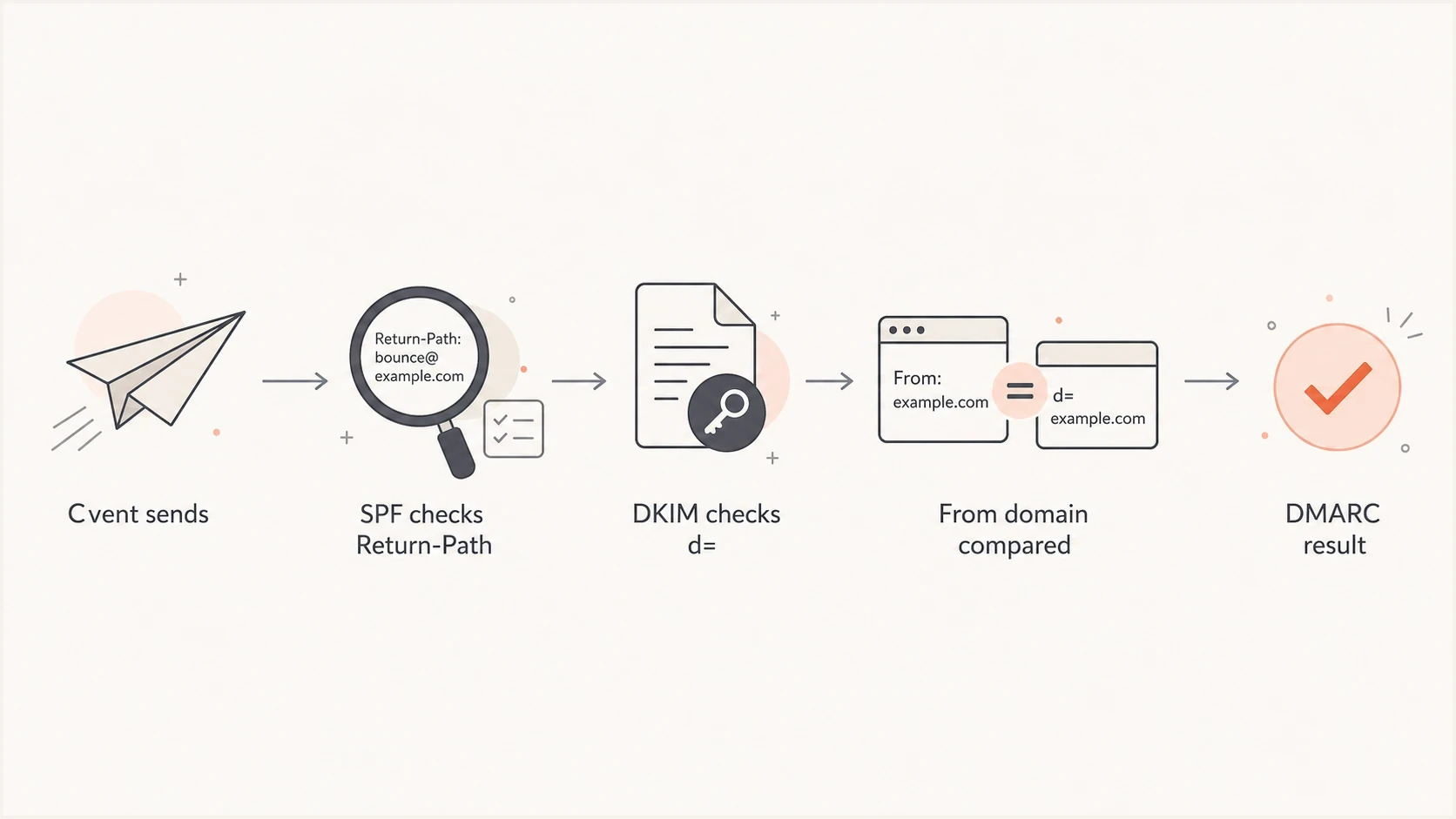
Flowchart showing how Cvent mail passes DMARC through DKIM alignment.
How to request DKIM for Cvent
The safest Cvent setup starts with a specific sending identity. Decide whether Cvent will send as your root domain or a subdomain such as events.example.com. A dedicated subdomain often gives event platforms cleaner reporting, clearer ownership, and less risk when a vendor configuration changes.
- Choose the From domain: Pick the exact domain Cvent will show in the visible From address.
- Ask for custom DKIM: Request DKIM signing for that same domain or a relaxed-aligned subdomain.
- Publish the records: Add the selector records Cvent supplies, using the exact TXT or CNAME type and value provided.
- Confirm public DNS: Wait at least the applicable DNS TTL, then verify that each selector resolves publicly.
- Send a live test: Send a real Cvent email to an external mailbox and inspect the full headers.
- Monitor reports: Confirm Cvent passes DKIM alignment before enforcing quarantine or reject.
Example Cvent CNAME placeholdersdns
selector1._domainkey.events.example.com CNAME value-provided-by-cvent
selector2._domainkey.events.example.com CNAME value-provided-by-cvent
Do not guess the record type, selector hostnames, or target values. Cvent must provide them. If Cvent supplies a TXT record instead of a CNAME, publish that TXT record exactly as instructed. If your organization has several Cvent accounts, brands, or regional sender domains, ask whether each one needs separate selectors. That avoids the common failure where one event type signs correctly and another sends without the expected DKIM domain.
Questions to ask support
- Signing domain: Which exact DKIM d= domain will Cvent use after setup?
- Selectors: How many selectors are required, and how does key rotation work?
- Products: Does the setup cover every Cvent module that sends mail for the account?
- Return-Path: Can the account use a custom bounce domain for SPF alignment?
DMARC settings for Cvent
Your DMARC record does not need a special Cvent setting. Publish one valid DMARC record at each policy domain, and update that record instead of adding a conflicting second TXT record. The policy should let you observe Cvent traffic and prove DKIM alignment before moving enforcement forward. If Cvent is a meaningful sender for your domain, do not apply quarantine or reject until real headers and aggregate reports show that each expected Cvent mail stream is aligned.
Monitoring-stage DMARC recorddns
_dmarc.events.example.com TXT "v=DMARC1; p=none; rua=mailto:d@example.com"
Enforcement-stage DMARC recorddns
_dmarc.events.example.com TXT "v=DMARC1; p=quarantine; rua=mailto:d@example.com"
RFC 9989 classifies the old pct tag as historic because receivers applied percentage sampling inconsistently. Stage enforcement on a dedicated Cvent subdomain. Monitor the full stream and change the policy only when legitimate traffic is ready. The newer t=y tag requests whole-policy test mode, but older receivers can ignore it and apply the stated policy, so do not treat it as a universal safety switch.
The defaults for DMARC alignment are relaxed. A passing DKIM d= domain aligns when it shares the same organizational domain as the visible From domain. Strict DKIM alignment requires an exact domain match. Use strict alignment only after proving every legitimate sender signs with the exact domain expected. RFC 9989 also cautions against p=reject on general-purpose email domains where indirect mail can be affected, so assess those domains separately from a dedicated Cvent subdomain.
Cvent enforcement readiness
Use these checkpoints before changing the whole policy on a dedicated Cvent sending domain.
Discovery
p=none
Cvent appears in reports, but DKIM alignment is not proven.
Quarantine ready
p=quarantine
Expected Cvent streams pass DKIM alignment across normal sending cycles.
Reject assessed
p=reject
A dedicated Cvent domain remains aligned and indirect mail risk has been reviewed.
What not to do
Do not add broad SPF includes simply because a vendor asks for them. Follow Cvent's account-specific DNS instructions, but remember that an SPF include does not create alignment when Cvent keeps the Return-Path on its own domain. An unnecessary include also consumes part of your SPF DNS lookup budget.
How to verify the result
Verification has two parts: DNS validation and real-message validation. DNS validation proves the records resolve publicly after propagation. Real-message validation proves Cvent is actually signing live messages with the expected domain.
Start with a DNS check using the domain health checker. Then use the DMARC checker for the policy record. After that, send a Cvent message and inspect the authentication results. A setup guide on how to verify DMARC, DKIM, and SPF is useful when you want a repeatable checklist.
?
What's your domain score?
Deep-scan SPF, DKIM & DMARC records for email deliverability and security issues.
In the received email, inspect the Authentication-Results and DKIM-Signature headers. Check the DKIM result, the signature's d= domain, the SPF-authenticated domain, the Return-Path, the visible From domain, and the final DMARC result. The key line goes beyond "dkim=pass". Confirm that the passing d= domain matches the visible From domain under your DMARC alignment mode.
- Good result: DKIM passes, d= matches your From domain, and DMARC passes.
- Expected SPF result: SPF passes for a Cvent domain but fails DMARC SPF alignment.
- Bad result: DKIM passes with a nonmatching d= domain or DKIM is missing.
- Escalation trigger: Cvent sends production mail before custom DKIM is active.
Where Suped fits
Cvent is the kind of sender that should be watched through aggregate DMARC data, not checked once and forgotten. The initial setup proves that DKIM works. Ongoing monitoring proves that it keeps working across event types, templates, account changes, and sender-domain changes.
Suped's product provides DMARC monitoring that turns Cvent aggregate report data into authentication pass rates and source-level fix steps. This gives marketing and events teams a practical way to see whether Cvent mail remains safe to send as policy enforcement changes.
Suped DMARC dashboard showing email volume, authentication health, and source breakdown
Suped also supports policy staging through Hosted DMARC, alerts when authentication breaks, and a unified view of SPF, DKIM, DMARC, blocklist (blacklist) monitoring, and deliverability signals. Hosted SPF and SPF flattening can help with other senders, but they do not change the core Cvent point: if Cvent does not use your Return-Path domain, DKIM is the DMARC path to depend on.
- Source tracking: Confirm which Cvent mail streams pass DKIM alignment over time.
- Issue detection: Catch missing DKIM, wrong d= domains, and unauthenticated sources.
- Policy staging: Move toward enforcement after Cvent and other senders are stable.
- Multi-domain work: Manage multiple brands, client domains, or event subdomains in one place.
Troubleshooting Cvent alignment
When Cvent fails DMARC, the cause is usually one of a small set of issues. Start with the real header, then compare it with the DMARC aggregate reports. The header tells you what happened to one message. The reports tell you whether the issue is systemic.
|
|
|
|---|---|---|
DMARC fails | DKIM missing | Ask Cvent to enable custom DKIM signing. |
SPF passes | Cvent Return-Path | Rely on DKIM alignment instead. |
DKIM passes | Wrong d= domain | Have Cvent sign with your From domain. |
Some mail fails | Mixed Cvent modules | Confirm every product area uses the same setup. |
Policy rejects mail | Enforcement too early | Return to monitoring while Cvent signing is corrected. |
Common Cvent DMARC symptoms and fixes.
The most important troubleshooting habit is separating SPF noise from DMARC risk. If DKIM alignment is passing consistently, an unaligned SPF result on Cvent mail is usually acceptable. If DKIM alignment is unstable, the domain is not ready for full enforcement.
Working state
A healthy Cvent setup has DKIM pass, DKIM alignment pass, DMARC pass, and a predictable source footprint in aggregate reports. SPF alignment is not required when DKIM carries the DMARC result.
Views from the trenches
Best practices
Verify Cvent with live message headers before moving the domain beyond monitoring policy.
Use a branded event subdomain when Cvent mail ownership needs clean report separation.
Ask Cvent for the exact DKIM signing domain, not only the selector records to publish.
Common pitfalls
Treating a Cvent SPF pass as DMARC success hides the Return-Path mismatch problem.
Enforcing DMARC before custom DKIM is live can reject legitimate event messages.
Adding SPF includes for every vendor can create lookup pressure without alignment gains.
Expert tips
Track Cvent as a distinct source so one event module does not hide another failing stream.
Keep alignment relaxed until every legitimate sender has proven exact-domain signing.
Document Cvent DKIM ownership so future DNS or account changes do not break signing.
Marketer from Email Geeks says Cvent DKIM can be enabled for a custom domain through support, so DKIM should be the first route to verify.
2021-03-26 - Email Geeks
Marketer from Email Geeks says Cvent SPF alignment was not a committed option, so teams should not rely on Return-Path matching without account confirmation.
2021-03-26 - Email Geeks
The practical answer
Cvent supports the DMARC path that matters most: DKIM alignment through custom domain signing. SPF alignment is not the default path, and adding Cvent IPs or SPF includes does not change that if the Return-Path stays on a Cvent domain.
The right implementation is to request custom DKIM, publish the records Cvent provides, confirm they resolve publicly, send real messages, and verify that the DKIM d= domain matches the visible From domain. After that, monitor Cvent in DMARC reports long enough to prove that all Cvent mail streams are covered before moving to full enforcement.
If Cvent support confirms a custom Return-Path for your specific account, verify SPF alignment as a bonus. If they do not, do not spend time trying to force SPF into the answer. Make DKIM alignment reliable, then use DMARC monitoring to keep it that way.




