Best free tools to check DMARC, SPF, and email setup.

Updated on 5 Aug 2026: We updated this guide for the latest DMARC standards and a clearer free-checking workflow.
The best free starting point is a broad domain health check, followed by a real-message test. A DNS lookup tells you whether DMARC, SPF, DKIM, MX, and reporting records exist and parse correctly. A sent-message test tells you whether your actual mail passes authentication with the visible From domain.
Start with Suped's free Domain Health Checker because it checks the records that cause the most immediate setup problems. Then send a real email to a mailbox you control and inspect the original authentication results. If the domain sends production mail, move into ongoing DMARC monitoring so aggregate reports show which source is passing, failing, or using a domain that does not match.
Free tools are enough to catch broken syntax, missing records, weak policies, excessive SPF DNS lookups, missing known DKIM selectors, and obvious DMARC reporting mistakes. They are not enough to manage a changing sender list, track source drift, or prove that every third-party sender keeps working next month.
The short answer
The strongest free workflow is simple: run a domain-wide DNS check, run a focused DMARC record check, then send a real message to a test mailbox and inspect the authentication result. No single free check sees every part of the setup because DNS records and live message headers answer different questions.
- Best first pass: Use a domain health checker to find missing DMARC, SPF, DKIM, MX, MTA-STS, and reporting records.
- Best DMARC check: Use a focused DMARC checker to parse policy, reporting tags, subdomain handling, testing mode, and syntax.
- Best live test: Send a real email to a mailbox you control and compare SPF, DKIM, and DMARC results with the visible From domain.
- Best ongoing choice: Use Suped's reporting workflow once mail volume matters, because aggregate reports show actual senders over time.
The key caveat
A green DNS result does not prove that a specific email will pass DMARC. SPF checks the bounce domain, DKIM checks a cryptographic signature, and DMARC checks whether at least one passing result uses a domain that matches the visible From domain.
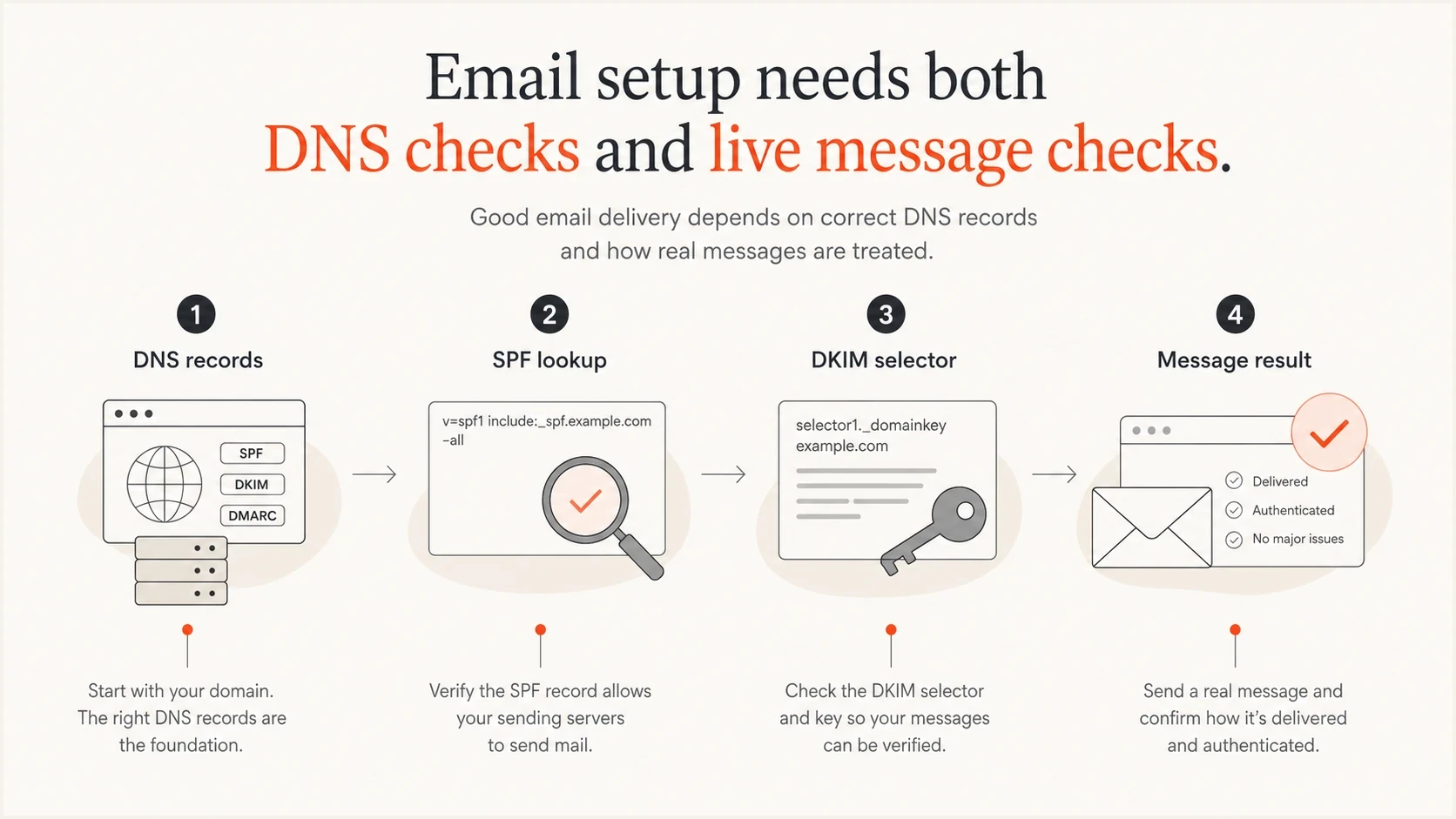
DNS checks and live message checks answer different email setup questions.
Free checks worth running
The useful answer is not one checker. It is knowing which free check to use for which job. A public DNS check is fast, but it cannot see a broken DKIM signature on a message. A live-message check is realistic, but it only sees the sender used for that test.
|
|
|
|---|---|---|
Domain health scan | Whole DNS snapshot | Cannot prove a sent message |
DMARC record parser | Policy and tag syntax | Cannot identify every sender |
SPF evaluator | Lookup path and limits | Uses current DNS only |
DKIM selector lookup | Public key discovery | Needs the exact selector |
Live-message test | Actual authentication result | Covers one message path |
Aggregate report monitor | Ongoing source history | Needs time to collect reports |
Comparison of free DMARC, SPF, and email setup checks.
Suped's free domain health scan covers the broad DNS pass, while its focused checkers help isolate DMARC and SPF record problems. For message-level proof, send one email through each important source and inspect the receiving mailbox's authentication results.
?
What's your domain score?
Deep-scan SPF, DKIM & DMARC records for email deliverability and security issues.
The check depends on the failure you are trying to prove. If SPF has too many DNS lookups, an evaluator sees it. If DKIM is missing for one sender, a selector lookup sees it only when you know the selector. If a platform signs with DKIM but the signing domain does not match the From domain, a sent-message test exposes that faster than a raw DNS lookup.
A free DMARC checker and a free DMARC monitor are different. A checker returns a snapshot. A monitor receives aggregate XML reports over time and turns them into source history. Before routing reports to any plan, check the operating limits rather than relying on the word 'free'.
- Traffic limit: Confirm whether the plan caps evaluated messages, reports, domains, or active sending sources.
- Retention and export: Check how long history remains available and whether raw XML or summarized data can be exported.
- Coverage: Verify support for subdomains, inactive domains, multiple report destinations, and external rua authorization.
- Alerts and access: Decide whether email digests are enough or whether your team needs alerts and shared access.
Also check whether adding a reporting address will preserve your existing DMARC record. Publishing two DMARC records makes the policy invalid, so a setup flow should merge a new rua destination into the existing record rather than create a second record.
What free checks can prove
Free checkers are best at proving the current public state. They query DNS, parse record syntax, and sometimes receive a real message. That is enough for setup checks, onboarding a new sender, and finding obvious delivery blockers before a campaign goes out.
A DNS checker proves
- Published records: DMARC, SPF, DKIM, MX, and reporting records exist in public DNS.
- Valid syntax: Tags parse correctly, quoted TXT strings join cleanly, and policy values are allowed.
- SPF budget: Evaluation stays within ten DNS-causing terms and avoids more than two void lookups.
A message test proves
- Real pass result: The message passes SPF or DKIM in the path used for that exact email.
- Domain match: The passing domain matches the visible From domain closely enough for DMARC.
- Header reality: Forwarding, rewriting, or platform changes did not break authentication.
This is why one-off tools are good for diagnosis, but they do not replace report-based monitoring. A domain with perfect DNS can still have an old CRM, support desk, billing system, or regional sender failing DMARC every day.
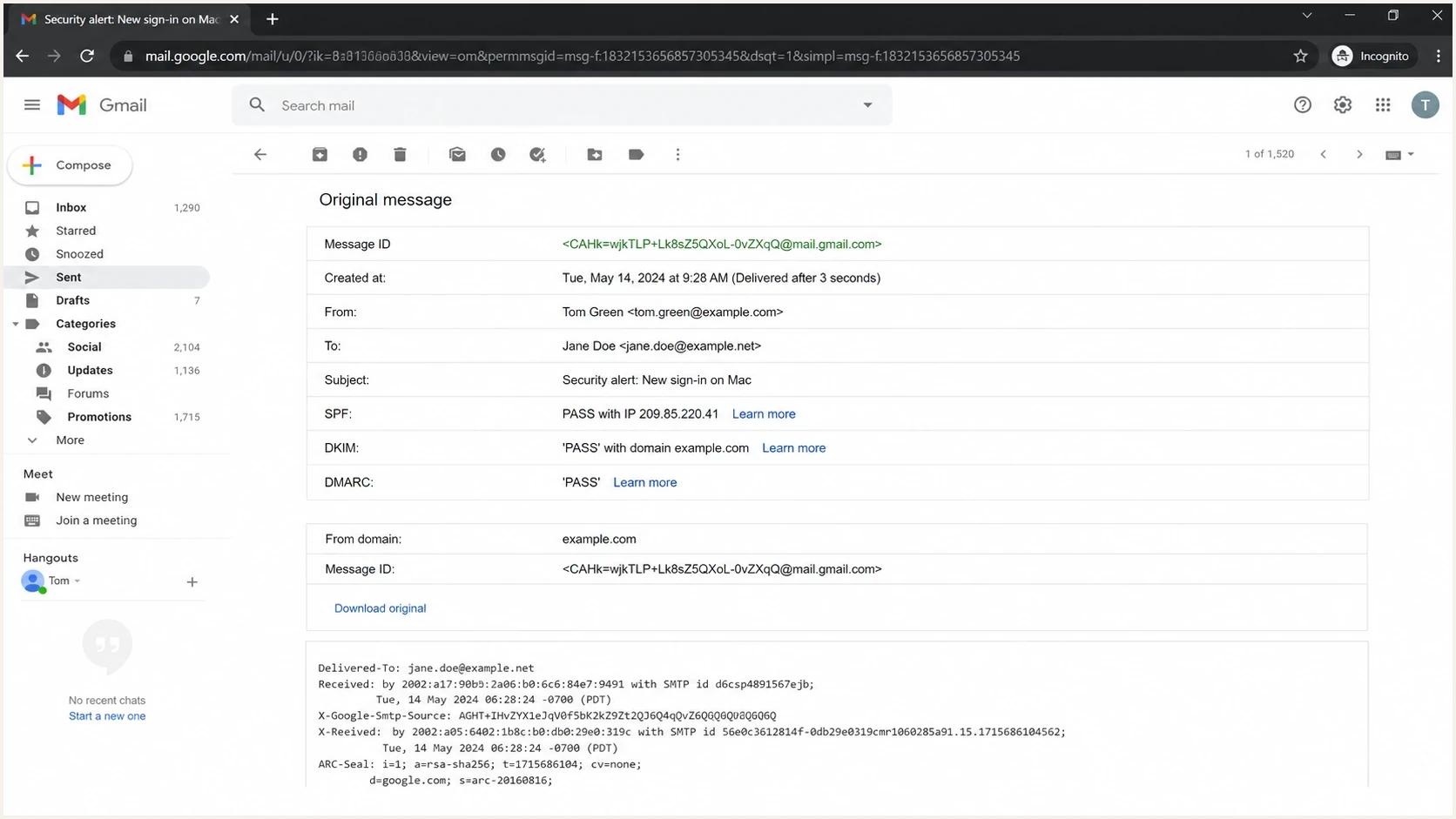
Gmail message details showing SPF, DKIM, and DMARC pass results.
Gmail's original message view is a useful manual sanity check because it shows the receiver's interpretation of a real message. Raw headers are especially helpful when a sending service says a message is fine and the receiving mailbox disagrees.
A practical checking workflow
The cleanest workflow is sequential. Do not start by changing DNS. First prove the current state, then decide whether the fix belongs with your DNS host, your mail provider, or a third-party sender.
Setup confidence levels
Use these levels to decide when a free check is enough and when monitoring is needed.
Low
0-50%
Records missing or failing
Moderate
51-80%
DNS passes, one message tested
High
81-100%
Reports confirm sources
- Check public DNS: Confirm there is exactly one SPF record, one DMARC record, and the expected DKIM selector records.
- Check SPF limits: Evaluate the full record tree, remove stale includes, and avoid broad ranges that authorize senders you do not use.
- Check DMARC policy: Confirm the policy, subdomain policy, non-existent-domain policy, test mode, and report destinations are intentional.
- Send real email: Test every major source, including marketing, support, billing, product mail, and employee mail.
- Compare reports: Use DMARC aggregate data to confirm that real traffic matches your approved sender list.
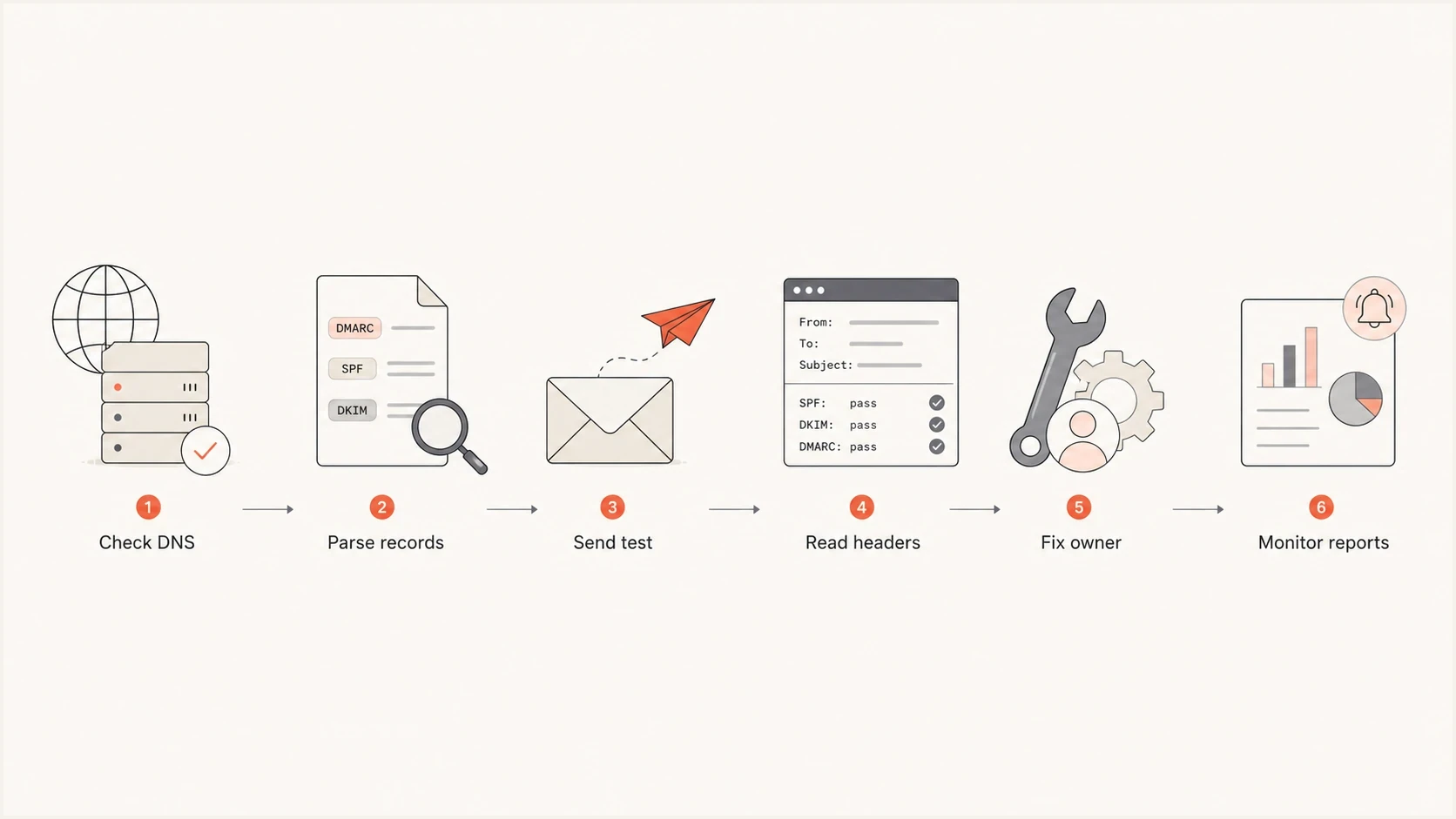
A six-step workflow for checking DNS records, sending tests, fixing owners, and monitoring reports.
For blocklist and blacklist issues, run that check after authentication. Blocklist status can explain poor delivery when authentication passes, but it should not distract from a missing DMARC record or SPF failure. Fix identity first, then reputation.
What the records should look like
A clean setup has a single SPF TXT record at the sending domain, a DMARC TXT record at _dmarc, and one or more DKIM public keys at selector hostnames supplied by each sender. The exact values depend on your mail provider, but the shape is consistent.
SPF exampledns
example.com. TXT v=spf1 include:_spf.example-mail.net -all
SPF authorizes sending servers for the domain used in the envelope sender. For DMARC, SPF only helps when that domain matches the visible From domain, or when the sender uses a permitted related domain under DMARC's domain-matching rules.
DKIM selector exampledns
selector1._domainkey.example.com. TXT v=DKIM1; k=rsa; p=MIIBIjAN...
DKIM proves the message was signed by a domain holder and that signed parts of the message survived transit. A checker needs the selector and domain to find the public key. If you do not know the selector, send a real message and inspect the DKIM-Signature header.
DMARC monitoring starter exampledns
_dmarc.example.com.  TXT  v=DMARC1; p=none;
rua=mailto:dmarc-reports@example.com
Do not copy blindly
Example records are useful for shape, not for production values. Your SPF includes, DKIM selectors, report addresses, and DMARC policy need to match your actual senders and risk tolerance.
The most common SPF mistake is adding every vendor include forever. That can produce a permerror once evaluation exceeds the ten DNS-lookup limit. A common DMARC mistake is publishing p=reject before every legitimate source passes through SPF or DKIM with the right domain. RFC 9989 also cautions general-purpose email domains about reject-policy interoperability with mailing lists.
What changed in DMARC checks in 2026
RFC 9989 now defines DMARC, RFC 9990 defines aggregate reporting, and RFC 9991 defines failure reporting. Together they replace RFC 7489. A current checker should recognize the revised tag set and should not recommend obsolete percentage-based rollout advice.
- Removed tags: The pct, ri, and rf tags are no longer part of the current DMARC policy format.
- Current policy tags: The t tag requests test handling, np covers non-existent subdomains, and psd identifies public suffix policy.
- External report addresses: A rua destination outside the policy domain needs a confirming DNS record at the report receiver.
- Failure-report privacy: Failure reports can expose message headers or content, so many receivers limit or omit them.
DMARC test-mode exampledns
_dmarc.test.example.com.  TXT  v=DMARC1; p=quarantine; t=y;
rua=mailto:dmarc-reports@example.com
Check receiver support
Standards publication does not make every receiver change at once. Keep the policy compatible with deployed receivers, inspect aggregate reports, and treat the t tag as a request rather than a guaranteed rollout control.
Where Suped fits
Free one-off tools answer the setup question. Suped, our DMARC and email authentication platform, answers the operating question: what is sending as this domain today, which source is failing, what changed, and what action fixes it?
Suped DMARC dashboard showing email volume, authentication health, and source breakdown
Suped processes aggregate reports, groups sending sources, tracks SPF and DKIM results, and provides issue-level fix steps. Hosted SPF and MTA-STS workflows can help when DNS ownership is split across teams, while blocklist monitoring and alerts add context after authentication is working.
Free checker
- Snapshot result: Shows the state at the moment you run the check.
- Manual review: Needs a person to interpret each failure and assign the fix.
- Limited context: Usually sees one domain or one sent message at a time.
Suped platform
- Daily evidence: Processes DMARC aggregate reports across real traffic.
- Actionable fixes: Detects issues and shows steps to fix them.
- Scaled domains: Supports MSP and multi-tenant workflows for many domains.
Use free tools for quick checks and learning. Use Suped when you need ongoing detection, reports that non-DNS owners can read, policy staging, alerts, and a reliable enforcement workflow without blocking legitimate mail.
Views from the trenches
Best practices
Check DNS records first, then send a real test message to verify authentication results.
Review DMARC aggregate reports before enforcement so legitimate senders stay visible.
Keep a sender inventory with owner, sender domain, SPF include, and DKIM selector.
Common pitfalls
Treating one green DNS check as proof that every marketing and billing sender works.
Publishing strict DMARC before each approved sending source passes authentication.
Leaving old SPF includes in place until the record exceeds receiver DNS lookup limits.
Expert tips
Use separate selectors for major senders so DKIM rotation and failures are easier to trace.
Check blocklist and blacklist status after authentication when delivery still looks poor.
Move from none to quarantine, then reject, after representative reporting periods.
A marketer in Email Geeks says a single-message test makes one authentication path easier to understand.
2025-04-23 - Email Geeks
A marketer in Email Geeks says testing the message actually sent catches failures that DNS alone cannot show.
2025-04-23 - Email Geeks
The practical choice
The best free tool depends on what you are checking. For a new domain, start with a domain health check. For a suspicious pass or fail, send a real message and inspect the receiving mailbox's authentication results. For a DMARC policy change, read aggregate reports before enforcement.
If the domain matters to the business, do not stop at a one-time free check. Suped provides the ongoing view: verified sources, unverified sources, SPF and DKIM failures, blocklist (blacklist) signals, and fix steps. That is the difference between knowing a record looks valid today and knowing your email setup stays correct while senders change.




