A simple guide to DMARC, SPF, and DKIM

Updated on 23 Jun 2026: We updated this guide for current DMARC standards, bulk sender requirements, and clearer implementation benefits.
Sender Policy Framework (SPF), DomainKeys Identified Mail (DKIM), and Domain-based Message Authentication, Reporting, and Conformance (DMARC) are the three email authentication standards that use DNS records and message headers to help receiving mail servers decide whether an email using your domain is legitimate, support current sender requirements, and reduce direct email spoofing. SPF checks whether the sending server is allowed to send for the envelope domain. DKIM checks whether the message carries a valid cryptographic signature. DMARC ties those checks to the visible From domain and tells receivers what to do when the message fails.
The shortest useful answer is this: SPF says which servers can send, DKIM proves the message was signed by a trusted domain, and DMARC turns those signals into a policy. Treat them as one system, not three separate DNS chores, because the policy only works when the sources, signatures, domain matches, and reporting are monitored together. The business value is source visibility plus enforcement: you can see which services send as your domain, fix legitimate senders, and ask receivers to block the rest.
- SPF: Publish one TXT record that lists approved sending systems for your domain.
- DKIM: Turn on signing in each sender and publish the matching public key in DNS.
- DMARC: Publish a policy at _dmarc for each visible From domain, send aggregate reports to a monitored address, and review reports before enforcing rejection.
- Monitoring: Use reports to find every legitimate sender before moving to stricter policy.
What each standard does
A domain needs all three records because they answer different questions. SPF asks, "Did this server have permission to send for the envelope domain?" DKIM asks, "Did a trusted domain sign this message, and is the signature still valid?" DMARC asks, "Does at least one successful check match the visible From domain, and what policy should the receiver apply if it fails?"
That last part is the key. A message can pass SPF for one domain while showing a different domain to the recipient. A message can pass DKIM for a vendor domain while showing your company domain in the visible From address. DMARC forces the authenticated domain to match the domain people see in the inbox, called the Author Domain in the current standard. That helps stop direct domain spoofing, exact-domain brand impersonation, and some business email compromise attempts that depend on forged From domains. It does not stop every misleading display name, lookalike domain, or compromised mailbox, but it gives receivers a domain-level result they can enforce when your actual domain is abused.
The records themselves do not authenticate mail until a receiving server checks them. DMARC also expresses the domain owner's requested handling, while the receiver still applies its own local policy, abuse signals, and reputation data.
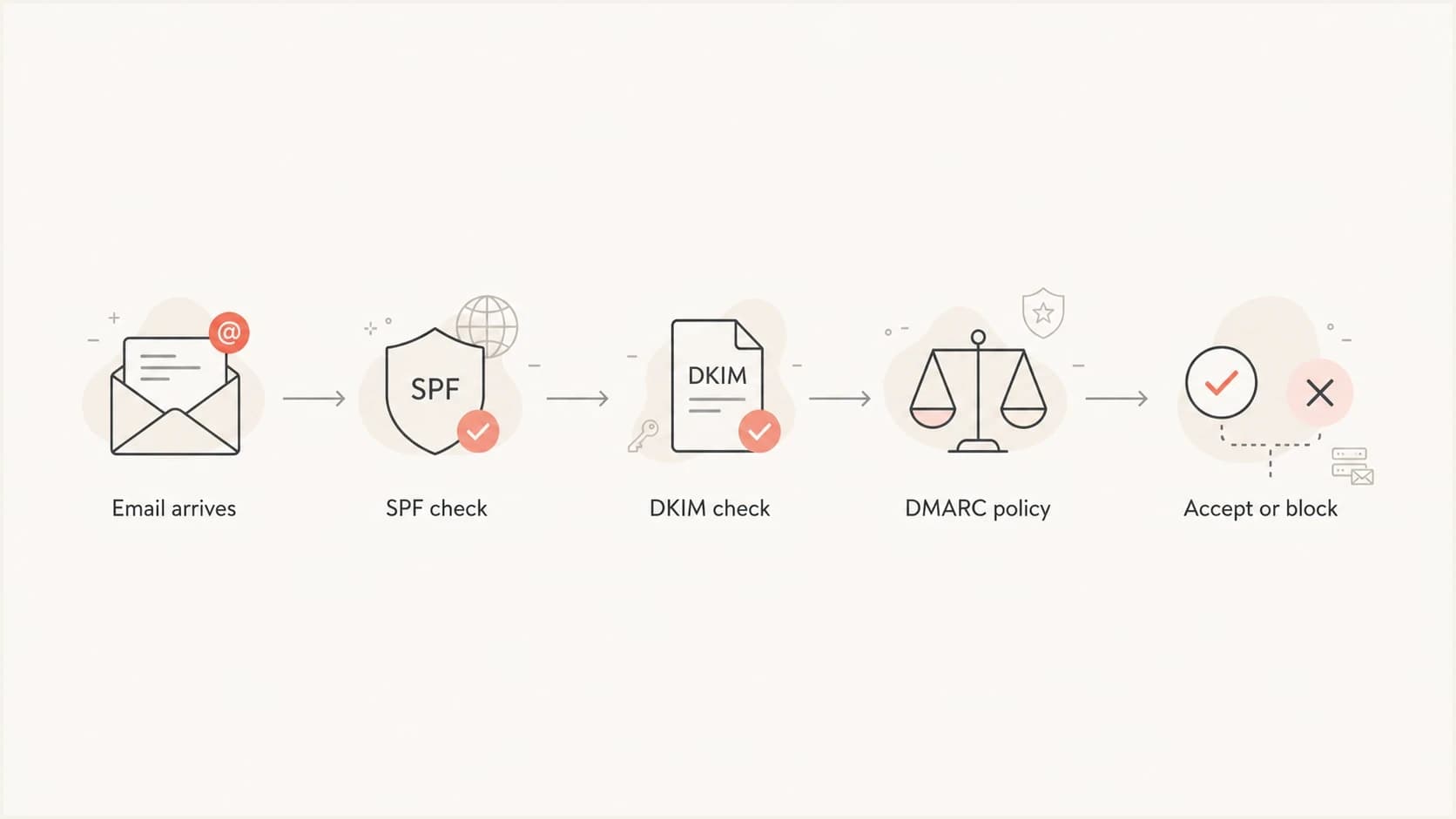
SPF, DKIM, and DMARC authentication flow from email arrival to accept or block decision.
|
|
|
|
|---|---|---|---|
SPF | Sending IP | Approved senders | Forwarding changes IP |
DKIM | Signature | Message integrity | Content changes |
DMARC | Domain match | Policy control | Wrong match or no report review |
The three standards at a glance.
To check a delivered message, open the message details or original source and read the Authentication-Results header added by the receiving system. Look for spf=, dkim=, and dmarc= results, then compare smtp.mailfrom, header.d, and header.from values to see whether the authenticated domain matches the visible From domain.
All three records are published in DNS, usually as TXT records, but not at the same host name. SPF sits at the envelope sender domain, DKIM sits under a selector such as selector._domainkey.example.com, and DMARC sits at _dmarc.example.com. Some senders use CNAME records for DKIM so the sender can host the actual public key.
Why implementation matters
Correctly implementing SPF, DKIM, and DMARC gives a domain more than a set of DNS records. It gives receivers a consistent way to identify authorized mail, gives your team a report trail for every visible From domain, and gives attackers less room to use your exact domain in phishing or invoice fraud.
- Direct domain spoofing becomes easier to reject once DMARC reaches p=reject.
- Sender inventory improves because aggregate reports expose vendors, apps, servers, and forgotten tools using the domain.
- Vendor reviews become more concrete because each sender has SPF, DKIM, and DMARC results tied to real traffic.
- Delivery risk becomes easier to manage because authentication failures, new sources, and domain reputation signals can be checked before policy changes.
These benefits only hold when reports are reviewed. A domain at p=none has visibility, but a domain at p=reject with clean aligned mail has stronger protection against unauthorized use of the visible From domain.
How SPF works
SPF is a TXT record at your domain that lists the servers or services allowed to send mail for the envelope sender. The envelope sender is the return path used during SMTP delivery. It is not always the same as the visible From address shown to a person reading the message.
For web apps and web servers, SPF checks the SMTP server or relay that opens the connection to the recipient, not the PHP, Python, Ruby, Node, Java, or application code that triggered the message.
A basic SPF record starts with v=spf1 and usually ends with -all or ~all. Publish exactly one SPF TXT record for each envelope sender domain; two v=spf1 records can cause a permanent error. The strict ending says mail not listed should fail. The softer ending says it should be treated as suspicious. Avoid +all for real domains because it permits every sending server, and ?all gives receivers little useful signal. Use a clear sender inventory before using a strict ending, because one forgotten billing system or support tool can create delivery trouble.
Example SPF recorddns
example.com TXT "v=spf1 include:send.example -all"
The SPF lookup limit matters
SPF has a 10 DNS lookup limit for mechanisms such as include, a, mx, ptr, exists, and redirect. Too many nested includes can make SPF return a permanent error, even when the record looks reasonable at first glance. The ptr mechanism is also fragile and should not be used in new records.
- Inventory: List every system that sends mail before editing the live SPF record.
- Prune: Remove old includes for services no longer sending mail.
- Flattening: Use managed SPF when the record keeps hitting DNS lookup limits.
Some advanced SPF records use macros such as %{i} for the connecting IP or %{d} for the domain being evaluated. These values are not stored as separate DNS records; the receiver expands them during SPF evaluation, so debugging requires a real client IP, envelope sender, HELO name, and the exact mechanism being checked. If a macro appears in exists, query the expanded A record; if it appears in include or redirect, query the expanded TXT record.
SPF is useful, but it is not enough by itself. It breaks easily during forwarding because the forwarder becomes the sending server. That is why DKIM is important: the signature can survive forwarding when the message content stays unchanged. Forwarders and mailing lists can use ARC to preserve prior authentication context for receivers that trust it, but ARC does not replace aligned SPF, aligned DKIM, or DMARC.
How DKIM works
DKIM adds a digital signature to outgoing mail. The sending system signs selected headers and the message body with a private key. Receivers fetch the public key from DNS and check whether the signature is valid. If the message was changed after signing, DKIM fails.
A DKIM record in DNS is only the public key. The sending server or mail relay still has to sign each message with the matching private key, so publishing DNS without enabling signing does not make DKIM pass.
A DKIM record lives under a selector. The selector lets a domain publish more than one key, which is useful for key rotation and multiple sending systems. In the DKIM-Signature header, d= identifies the signing domain and s= identifies the selector used to find the public key. Each vendor or internal mail system usually has its own selector. Use 2048-bit DKIM keys where the sender and DNS host support them.
Example DKIM public keydns
selector1._domainkey.example.com TXT "v=DKIM1; k=rsa; p=MIIB..."
What DKIM proves
- Signer: A domain with a matching DNS key signed the message.
- Integrity: The signed parts of the message were not changed after signing.
- Continuity: Forwarded mail can still pass when the signature stays valid.
What DKIM does not prove
- Permission: DKIM does not list which servers are approved.
- Visibility: DKIM alone does not require the signer to match the visible From domain.
- Policy: DKIM does not tell receivers whether to reject failed mail.
The most common DKIM mistake is enabling signing in one place and assuming every sender is covered. Marketing mail, invoices, helpdesk replies, and web app notifications often use different infrastructure. Each one needs a valid signature tied to your domain or a closely related domain.
How DMARC makes the decision
DMARC sits on top of SPF and DKIM. It looks at the visible From domain and asks whether SPF or DKIM passed with a matching domain. Only one of them needs to pass for DMARC to pass. A domain does not need both SPF and DKIM to pass on every message, but it should configure both because real mail flows are messy. A DMARC policy applies to the visible From domain being checked, so each domain that appears in From needs its own record or a clearly understood inherited parent policy.
DMARC alignment is relaxed by default, so a subdomain such as mail.example.com can match example.com at the organizational domain level. Strict alignment requires the authenticated domain and visible From domain to be exact matches.
If that distinction matters for your rollout, the deeper explanation is here: both SPF and DKIM. The practical rule is simple: configure both, monitor both, and expect DMARC to pass when at least one authenticated domain matches the visible sender domain.
Starter DMARC recorddns
_dmarc.example.com TXT "v=DMARC1; p=none; rua=mailto:dmarc@example.com"
A p=none record is monitoring mode: it can generate reports, but it does not ask receivers to quarantine or reject failed mail.
Policy strength by stage
A simple way to read the three DMARC policies before changing DNS.
Monitor
p=none
Collect reports and fix legitimate senders.
Filter
p=quarantine
Ask receivers to place failed mail in spam.
Reject
p=reject
Ask receivers to reject failed mail during SMTP delivery.
The reporting address in the rua tag receives aggregate XML reports. Those reports show sources, volumes, pass rates, policy outcomes, and authenticated domains. They do not include full message bodies. Failure reports sent through ruf are less consistently supported and can include message-level details, so treat them as sensitive. The value of DMARC comes from reading reports and fixing the gaps before enforcing a stricter policy.
What changed in DMARC in 2026
DMARC is now defined by RFC 9989, a Standards Track RFC published in May 2026. It obsoletes RFC 7489 and RFC 9091. Aggregate reporting and failure reporting now sit in RFC 9990 and RFC 9991, so current docs usually separate the policy record from the report formats.
- RFC 9989: Defines the current DMARC policy record, domain matching rules, DNS Tree Walk policy discovery, and domain owner actions.
- RFC 9990: Defines aggregate report XML, including source IP, count, policy result, header From, envelope From, and authentication results.
- RFC 9991: Defines failure reports for message-level authentication failures, which should be handled as sensitive data.
The change most likely to affect a simple rollout is that pct is historic in the DMARC tag registry, so do not use it for new staged rollout examples. Use p=none, then p=quarantine, then p=reject. The t=y tag is a testing signal, not a percentage rollout control; it asks receivers not to apply the requested policy while testing where they honor that signal. The newer np tag can set policy for non-existent subdomains, and psd is mainly for public suffix domain handling, so most ordinary domains do not need it.
Practical impact
For a normal business domain, the safest current pattern is still simple: publish explicit DMARC records for active author domains, keep relaxed alignment unless strict matching is a clear requirement, and avoid old examples that rely on pct for gradual rollout.
A clean setup path
A staged setup path works because DNS changes are easy to publish and hard to trust without evidence. The goal is to confirm where DNS is authoritative, map every real sender, then tighten policy once the reports show that normal mail passes consistently. If several domains or branch domains send through the same ESP, run this path per visible From domain. The provider's own DMARC policy does not protect your branded From domain unless the provider's domain is what recipients see.
- Confirm DNS ownership: Find the authoritative DNS host before publishing SPF, DKIM, or DMARC records.
- Inventory: List every system that sends mail using each visible From domain, including apps, servers, vendors, and automated alerts.
- Publish SPF: Create one SPF record with only active senders and keep the DNS lookup count under 10.
- Enable DKIM: Turn on DKIM signing in each sending system and verify the public selector record.
- Start DMARC: Publish DMARC at p=none with aggregate reporting so you can see real traffic.
- Send and inspect: Send a real message from each mailstream and check Authentication-Results for SPF, DKIM, DMARC, selectors, and domain matches.
- Fix gaps: Resolve sources that fail, use the wrong return path, miss DKIM, or sign with the wrong domain.
- Enforce: Move to quarantine and then reject after normal mail is passing and reports stay clean.
For bulk senders, Gmail and Yahoo requirements put SPF, DKIM, DMARC, TLS, valid forward and reverse DNS, low spam complaint rates, and one-click unsubscribe for marketing or subscribed mail into the launch checklist. Gmail requires bulk senders to authenticate with SPF and DKIM, publish DMARC at least at p=none, and match the From domain with either the SPF domain or the DKIM domain for direct mail. Gmail says to keep spam rates below 0.10% and avoid 0.30% or higher. Yahoo requires SPF and DKIM, a valid DMARC policy with at least p=none, relaxed alignment is acceptable, and spam rates must stay below 0.3%.
For larger programs, separate marketing, transactional, user, and alert mail by IP or DKIM domain where practical, then warm new or changed traffic gradually. This keeps a reputation problem in one stream from hiding a DMARC issue in another.
Before raising policy, check the live DNS record with a focused DMARC checker. A syntax mistake can stop reports or make receivers ignore the policy. For a wider scan across SPF, DKIM, and DMARC, use a domain health check and review every warning before changing policy.
DMARC checker
Look up a domain's DMARC record and catch policy issues.
?/7tests passed
A generator is also useful when a domain has no DMARC record yet. Start with p=none, send reports to a monitored mailbox or platform, and keep the record short. If the report destination uses a different domain, publish the required authorization record for that destination.
For a test-only, parked, defensive, or blackhole email domain that only receives mail, make DNS say that clearly: publish v=spf1 -all, use a reject DMARC policy, and avoid sending production traffic from that domain. If the same domain sends test mail, treat it as a sending domain and configure SPF, DKIM, and DMARC reports like any other source.
Use one policy owner
Most DMARC projects fail because no one owns sender inventory. Give one team responsibility for approving new senders, checking DNS changes, and reviewing reports. That keeps marketing, finance, support, and engineering from adding senders that pass in isolation but fail DMARC in production.
How subdomains fit
A sending subdomain, such as mail.example.com, should be treated as its own sender identity. Parent-domain records do not automatically create SPF, DKIM selectors, provider verification records, or MX routing for the subdomain.
- SPF: Publish SPF where the platform uses the return-path or envelope sender domain.
- DKIM: Publish each selector under the signing domain, often with provider-supplied TXT or CNAME records.
- DMARC: Publish an explicit DMARC record on active sending subdomains when you need separate reporting or policy control.
- MX and A records: Add MX only when the subdomain receives replies or bounces, and add A or AAAA only when a host must resolve to an IP address.
DMARC policy discovery checks the exact From domain first. A direct record at _dmarc.mail.example.com wins over the parent. If no valid local record exists, the parent policy applies; an sp tag controls subdomains, and if sp is absent the main p policy applies. For important mailstreams, publish a direct subdomain DMARC record so reports and policy changes are easier to control.
A CNAME at a DMARC lookup name only changes DNS resolution. For example, _dmarc.example.com can point to a hosted name, but the final target still needs one valid DMARC TXT record. Receivers do not apply the CNAME target's parent DMARC policy to your From domain.
Web servers and bounce handling
A web server that sends email should be treated as a sending application, not as the owner of the whole email setup. The DNS host controls SPF, DKIM, and DMARC records. The mail server or relay controls DKIM signing and the envelope sender. The return-path domain controls where delayed bounces go.
If the server sends directly, its public IP must be authorized in SPF and the MTA must sign DKIM. If the server sends through a relay, publish the relay's SPF include, DKIM selector records, and custom return-path records exactly where the relay requires them. DMARC still cares about domain matching: SPF only helps DMARC when the return-path domain matches the visible From domain under relaxed or strict matching.
Bounce handling is separate
A synchronous bounce is a reject during the SMTP conversation, so the sending MTA should log it immediately. A delayed bounce happens after the recipient server accepts the message, then sends a new failure notice to the return-path address using the MX records for that return-path domain.
- Use a dedicated bounce subdomain such as bounces.example.com for web app mail.
- Publish working MX records for the system that processes delayed bounces.
- Suppress hard-bounced recipients so the application stops retrying known bad addresses.
- Use message IDs or custom headers so delayed bounces can be matched to the original send.
Return-path DNS exampledns
bounces.example.com. MX 10 inbound-bounces.example.net.
bounces.example.com. TXT "v=spf1 include:mail-relay.example.net -all"
Where Suped fits
Raw DMARC aggregate reports are XML files, and they are painful to read by hand. Suped's product turns those reports into source groups, authentication rates, issue lists, and specific fix steps. That gives teams a practical way to replace "this domain has failures" with "this sender needs a DNS or signing change." It also ties the rollout to concrete work: source discovery, spoofing reduction, vendor cleanup, and staged policy changes.
For teams managing more than DMARC, Suped's product can track SPF, DKIM, blocklist (blacklist) signals, hosted SPF, SPF flattening, hosted MTA-STS, real-time alerts, and multi-tenant MSP reporting in the same workflow. That keeps authentication issues and delivery risk visible together instead of leaving you with a pile of raw records.
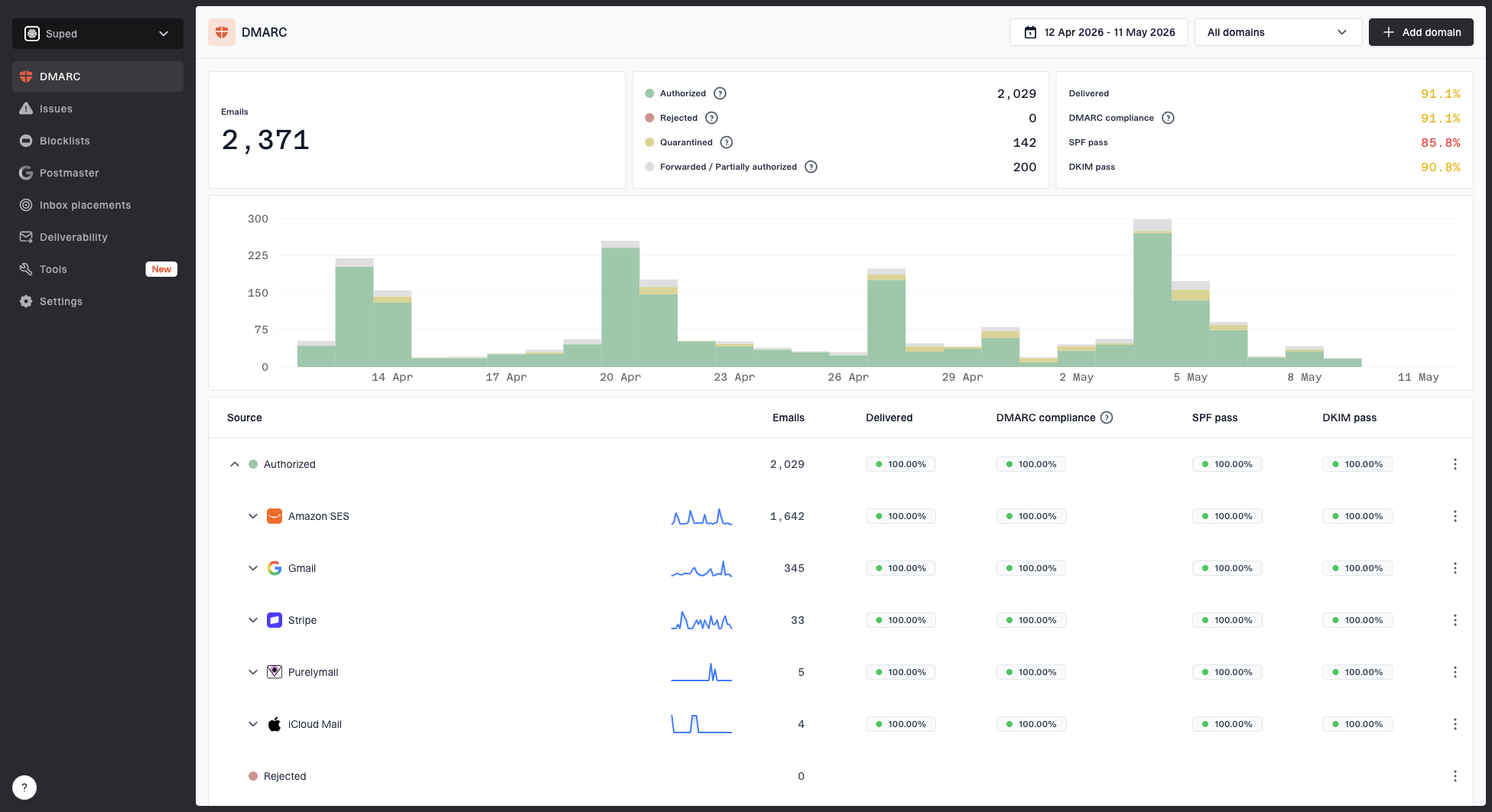
Suped DMARC dashboard showing email volume, authentication health, and source breakdown
If you are moving a domain toward enforcement, Suped's DMARC monitoring workflow shows which sources are passing, which are failing, and which policy changes are ready to stage next. Suped also has Hosted DMARC for simpler policy management when DNS access is slow or split across teams.
That does not change the basics. You still need an accurate sender list, working SPF, valid DKIM, and a DMARC policy. Suped reduces the manual analysis work and makes the rollout easier to operate after the first policy change.
Common failure patterns
When a domain has DMARC failures, start with a small set of repeat causes first. Most issues are sender inventory gaps, a mismatch between the visible From domain and the authenticated domain, broken DKIM, SPF records that became too complex, forwarding or mailing list changes, or return-path routing that nobody monitors.
Likely cause
- Forwarding: SPF fails because the forwarding server is now the sender.
- Modified mail: DKIM fails after a footer, subject tag, or body change.
- Wrong domain: The authenticated domain differs from the visible From domain.
- Return-path mismatch: SPF passes for a bounce domain that does not match the visible From domain.
- DNS limit: SPF fails because nested includes exceed the lookup limit.
- SPF macro path: A macro-created lookup expands to the wrong DNS name or record type.
- DMARC CNAME: A CNAME target does not return a valid DMARC TXT record.
Practical fix
- Forwarding: Make sure DKIM survives and passes for forwarded mail.
- Modified mail: Sign after modification or stop changing signed content.
- Wrong domain: Configure the sender to authenticate with your domain.
- Return-path mismatch: Use an aligned return-path domain or rely on aligned DKIM.
- DNS limit: Remove unused includes or use managed SPF flattening.
- SPF macro path: Recreate the SMTP context and query the expanded DNS name directly.
- DMARC CNAME: Point it to a dedicated target that returns one DMARC record.
A failing source should be fixed before policy enforcement unless it is clearly unauthorized. For a more diagnostic approach, use this guide to troubleshoot DMARC failures and compare the report data with the message headers.
The simplest path forward
Start with SPF and DKIM because DMARC needs those signals. Publish DMARC at p=none so you can see the traffic. Fix the sources that fail. Move to quarantine only when normal mail is passing, then move to reject when the remaining failures are unauthorized or acceptable to block. Do this separately for each visible From domain. A clean primary domain does not prove that a branch domain, campaign domain, parked domain, or subdomain is ready for the same policy.
The work is less about writing one perfect DNS record and more about operating a clean sending program. Once the domain is monitored, the pattern becomes predictable: add senders carefully, keep SPF under the lookup limit, rotate DKIM keys when needed, handle bounces, and review DMARC reports before every policy change.