
How to handle client domains that do not send email

Published 17 Jul 2026
Updated 18 Sep 2026
11 min read
Summarize with

Updated on 18 Sep 2026: We updated this guide for RFC 9989 and RFC 9990, with clearer subdomain policy and DMARC reporting guidance.
For a client domain that genuinely sends no email, I publish SPF with -all and DMARC at p=reject. If the domain also receives no email, I add a null MX record. This combination declares that no host is authorized to send for the domain, asks receivers to reject messages that fail DMARC while using its visible From domain, and states that the domain accepts no inbound mail.
The important word is "genuinely." A client can call a domain non-sending while a website form, billing application, scanner, ticketing system, or forgotten cloud account still uses it. I treat the claim as an inventory hypothesis, not permission to publish reject records immediately. For an MSP, the work includes proving the use case, applying the right DNS controls, recording an owner, and monitoring for later change.
Receiving and sending are separate decisions
Do not remove normal MX records merely because a domain does not send. A receive-only domain still needs its existing MX records. Use null MX only when the client confirms that the domain neither sends nor receives email.
Classify the domain before changing DNS
I start by putting every client domain into one operational state. "No mail" means no outbound and no inbound use. "Receive only" means the domain accepts messages but never sends them. "Dormant" means the client expects no current use but retains the domain for brand protection or a future project. "Unknown" means the MSP has not gathered enough evidence. Unknown is not the same as no mail.
|
|
|
|
|
|---|---|---|---|---|
No mail | No | Hard fail | Reject | Null |
Receive only | Yes | Hard fail | Reject | Normal |
Dormant | By policy | Hard fail | Reject | Null or normal |
Unknown | Investigate | Do not guess | Monitor first | Keep |
Recommended controls by confirmed domain use
This classification should live in the client record beside the domain owner, business purpose, approved DNS change, and review date. That turns a one-time hardening task into a managed control. It also gives the service desk a clear answer when a user later asks why a new application cannot send with that domain.
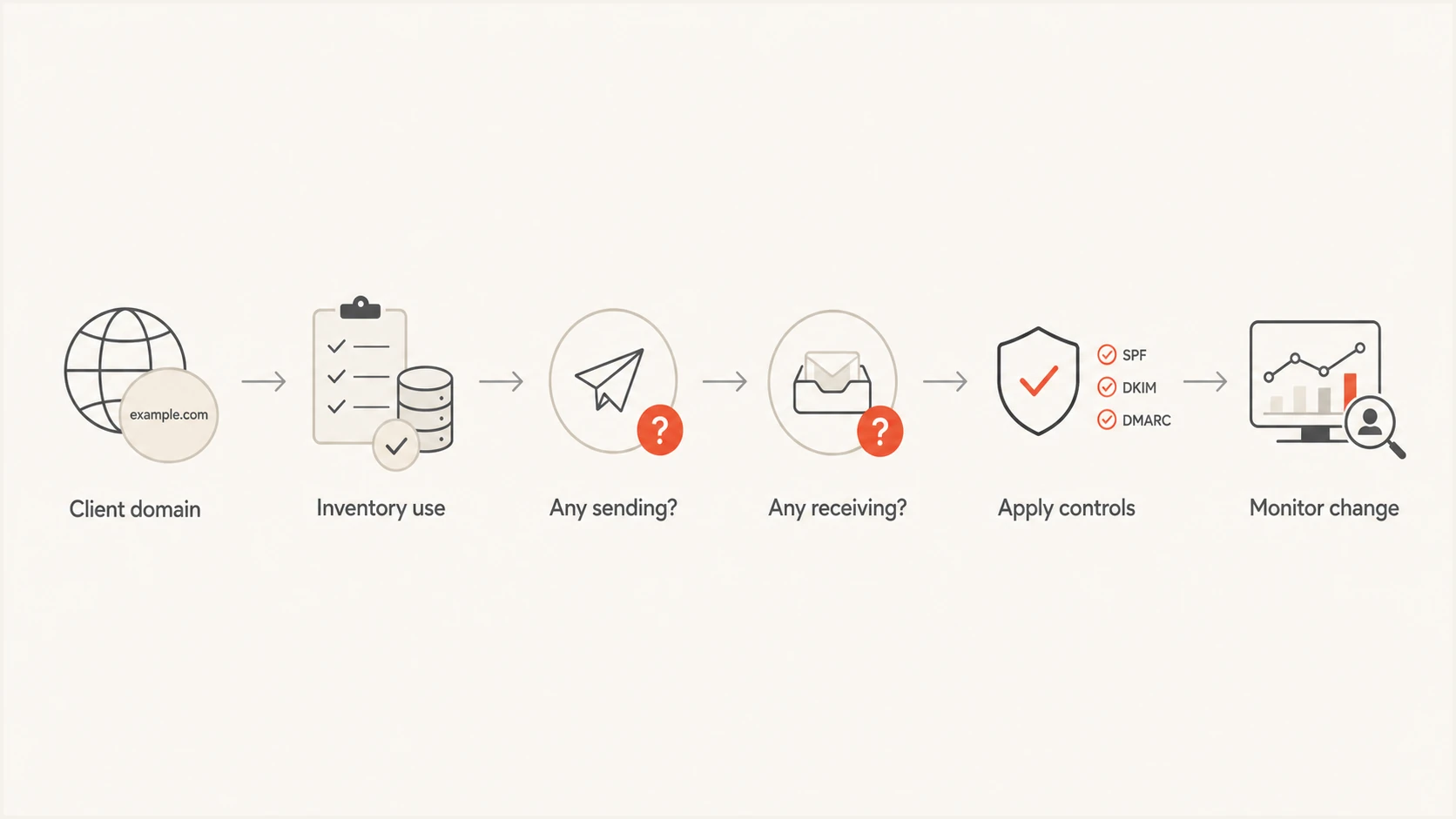
MSP decision flow for classifying a non-sending client domain
Prove that the domain has no senders
Before enforcement, I ask the client's technical contact and business owner to confirm the domain's use in writing. I then check DNS, mail flow records, current DMARC data if available, application inventories, and tenant settings. The detailed process for an inventory of sending sources is worth following even when everyone expects the result to be empty.
- Check current DNS: Record MX, SPF, DKIM selectors, DMARC, and any vendor verification entries before making changes.
- Search application ownership: Ask about web forms, finance systems, network devices, marketing tools, support queues, and identity notifications.
- Review observed traffic: Use DMARC aggregate reports and available mail logs to find sources claiming the domain in the visible From address.
- Confirm subdomain use: Check whether a vendor sends through a subdomain even when the organizational domain itself stays quiet.
A newly registered, parked, or long-dormant domain often has no DMARC history, so absence of reports does not prove absence of sending. Reports appear only when a participating receiver processes a message that claims the domain. I also look for delegated DNS zones and CNAME records that give a third party control over a mail-related subdomain.
Evidence that supports no-mail status
- Business confirmation: The owner confirms no current sending or receiving use.
- Empty inventory: No application, device, or vendor has an approved dependency.
- Clean observation: Available reports and logs show no legitimate source.
- Change approval: The client accepts that new sending needs a controlled DNS change.
Signals that require investigation
- Existing include: The SPF record authorizes an external sender.
- Active selectors: Published DKIM material points to recent mail setup.
- Reported volume: DMARC data shows a source that needs an owner.
- Delegated subdomain: A vendor can publish or use mail records below the domain.
Publish the defensive DNS records
SPF should explicitly authorize no IP address. A bare domain with no SPF record does not state that sending is forbidden. The hard-fail record is concise and unambiguous. Publish it as a TXT record at the domain root, replacing any existing SPF record only after the inventory confirms that the old authorization is unused. There must be one SPF record at a hostname, not several competing records. The root SPF record does not automatically protect every subdomain.
SPF record for a non-sending domainDNS
example.com. 3600 IN TXT "v=spf1 -all"
DMARC applies policy to messages that place the protected domain in the visible From address. For a confirmed non-sending domain, p=reject is appropriate because no legitimate message should need delivery. Under RFC 9989, sp=reject applies the same policy to existing subdomains without their own DMARC record, while np=reject states the policy for non-existent subdomains. If np is omitted, sp or p supplies the fallback. A receiver still makes the final handling decision under its local policy.
DMARC record for a non-sending domainDNS
_dmarc.example.com. 3600 IN TXT "v=DMARC1; p=reject;
sp=reject; np=reject; rua=mailto:dmarc-reports@reports.example.net"
What these records do not do
SPF -all and DMARC reject do not stop every deceptive message. DMARC protects the domain used in the visible From address when authentication and alignment fail. It does not prevent lookalike domain registration, display-name impersonation, or abuse of an unrelated domain.
DKIM needs no special "send nothing" record. Simply avoid publishing active DKIM public keys for services that do not send. Remove obsolete selectors only after confirming that no service still signs with them. Keeping an unused selector does not authorize an IP through SPF, but it can leave old signing material usable if a former provider still controls the private key.
Keep DMARC reports reachable
Do not direct rua reports to an address at a domain that publishes null MX. That mailbox cannot receive them. Use a receive-capable client or MSP reporting domain. When the destination has a different organizational domain, RFC 9990 requires the report consumer to authorize the arrangement in DNS. Compliant receivers ignore an external rua destination when that authorization is absent.
External DMARC report authorizationDNS
example.com._report._dmarc.reports.example.net. 3600 IN TXT "v=DMARC1;"
In a Suped deployment, use the reporting address and authorization record assigned by Suped instead of copying the placeholder values above. Save both records in the client ticket and verify that aggregate reports arrive after the DNS changes take effect. Report visibility is incomplete by design: not every receiver sends reports, and a message rejected on SPF before its data is accepted cannot appear in a DMARC aggregate report.
Use null MX only when inbound mail is unwanted
A null MX record states that the domain accepts no email. It uses preference 0 and a single dot as the exchange. This matters because a domain without MX records can trigger fallback delivery attempts to its address record. Null MX removes that ambiguity. It is useful for parked domains, defensive registrations, and web-only client domains with no mailbox requirement.
Null MX recordDNS
example.com. 3600 IN MX 0 .
Do not publish null MX for a receive-only domain. Keep its normal MX route, then use SPF -all and DMARC reject to prohibit outbound use. Also check operational addresses before disabling inbound mail. Domain registration contacts, certificate notices, privacy requests, and vendor account recovery can depend on an address at the domain even if employees never use it for normal correspondence. Move those dependencies to a receive-capable domain first, and make sure the SOA contact points to a reachable mailbox.
Avoid a partial MX setup
A null MX record must be the only MX record for that name. Do not publish it beside a normal mail exchanger. Mixed intent creates an invalid and confusing configuration.
Root MX and SPF records do not automatically cover every subdomain. For a fully parked zone, wildcard SPF -all and wildcard null MX records can extend the no-mail declaration. Publish them only after checking every delegated or active subdomain and each reserved name, because a specific application subdomain needs its own mail records and policy.
Optional wildcard records for a fully parked zoneDNS
*.example.com. 3600 IN TXT "v=spf1 -all"
*.example.com. 3600 IN MX 0 .
Turn the change into a repeatable MSP service
For practical DMARC for MSPs, I use a standard change template: domain state, evidence checked, approved records, rollback values, client approver, implementation time, and next review. I export the previous DNS values before the change and set a ticket reminder for dormant domains. A future project can turn a non-sending domain into a sender quickly, so the runbook must require email authentication review before any vendor is allowed to use it.
After the DNS changes take effect, I verify the authoritative response for the root SPF record, the DMARC name, MX, and nameserver authority. I also confirm there is no duplicate SPF record and that the external DMARC reporting mailbox accepts reports. A focused checker catches syntax and lookup mistakes, while ongoing DMARC monitoring shows whether receivers still see traffic that claims the domain.
Use the domain health check after publishing the records. It gives the engineer a quick validation point for DMARC and SPF, but it does not replace application discovery or client approval. Save the result in the service ticket, then repeat the check after any DNS provider migration.
?
What's your domain score?
Deep-scan SPF, DKIM & DMARC records for email deliverability and security issues.
Suped is our DMARC reporting and email authentication platform. Its multi-tenant dashboard keeps client domains separated while giving an MSP one place to review authentication health. Automated issue detection and remediation steps reduce the manual work of interpreting each change, and alerts based on newly processed aggregate data help surface unexpected failures after a domain's intended use changes.
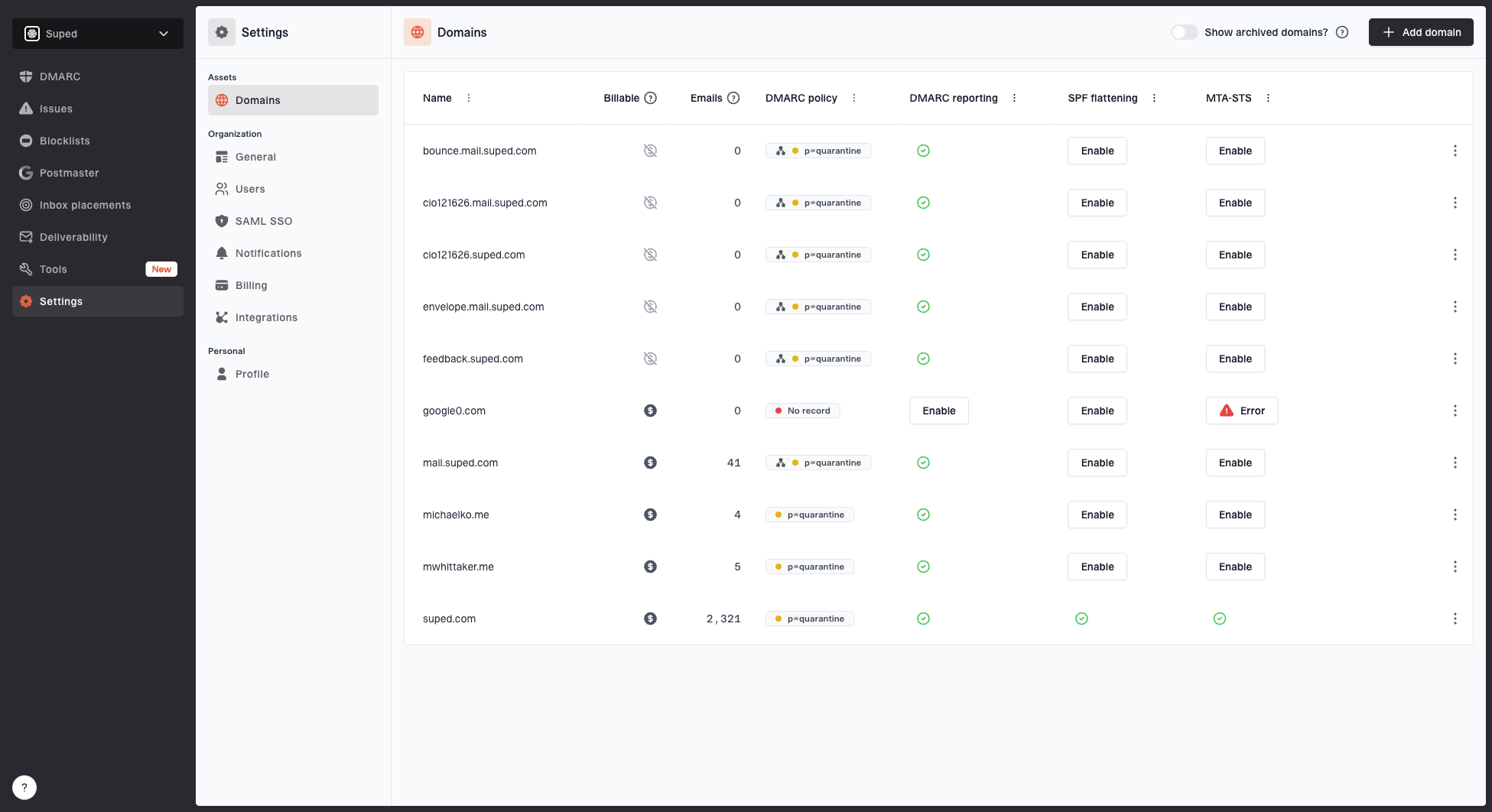
Domains page showing monitored domains, email volume, DMARC policy, DMARC reporting, SPF flattening, and MTA-STS
Suped brings DMARC, SPF, DKIM, blocklist monitoring (also called blacklist monitoring), and deliverability insights into the same client workflow. For non-sending domains, the useful pattern is to monitor the reject policy, review any reported source, and document whether it is abuse or an undeclared business system. If a client later needs centralized policy management, Suped's Hosted DMARC can simplify controlled policy changes without turning routine updates into repeated DNS work.
The MSP dashboard should still follow the ticketing system as the source of approval. Monitoring can detect activity, but it cannot decide whether a new source is authorized. Route each unexpected source to a named client owner with a deadline: approve and authenticate it, move it to a dedicated sending subdomain, or stop the traffic.
Handle exceptions without weakening the parent domain
When a client later needs one application to send, I avoid relaxing the whole domain by default. A dedicated subdomain gives the application its own SPF authorization, DKIM keys, DMARC policy, reporting, and owner. The parent can keep p=reject while the sending subdomain follows its own reviewed policy rollout based on observed legitimate traffic.
Keep the root non-sending
Best for a domain used on websites, documents, or branding when no business system needs the root From address.
- Root policy: Keep SPF hard fail and DMARC reject.
- Change control: Reject requests that lack an application owner.
Delegate a sending subdomain
Best when a specific application needs email and the MSP wants separate authorization, reporting, and rollback.
- Scoped records: Publish only the sender's required SPF and DKIM data.
- Scoped policy: Stage DMARC for the subdomain based on its own reports.
Do not delete the parent sp=reject tag without understanding the effect. A specific DMARC record on the sending subdomain can set its own policy, while other existing subdomains remain covered by the parent's reject instruction and non-existent subdomains remain covered by np=reject. Record that exception in the client inventory and set an end date when the application use is temporary.
Apply the non-sending domain baseline
A confirmed non-sending client domain should have SPF -all and DMARC p=reject, with sp=reject for existing subdomains and np=reject for non-existent subdomains. Add null MX only if the domain must not receive mail. Keep normal MX records for receive-only use. This is the technical baseline, but the MSP service depends on evidence, written approval, verification, monitoring, and a documented path for future exceptions.
My final check is simple: every domain has a named state, every state has matching DNS, and every exception has an owner. That makes strict policy safe to operate across a client base and prevents a quiet domain from becoming an untracked mail system later.