How MSPs should follow up after a DMARC audit

Updated on 6 Sep 2026: We updated this guide for the current DMARC and reporting RFCs, with clearer retesting and exception handling.
After a DMARC audit, an MSP should follow up with a written findings summary, a sender inventory, a risk-ranked remediation plan, client approvals for DNS changes, a staged policy timeline, and a reporting cadence that proves authentication health is improving. The follow-up should turn the audit into a managed workflow, not a one-time technical note.
The audit is the point where service delivery begins. The client has already seen that email authentication touches marketing, finance, CRM, helpdesk, payroll, and line-of-business systems. The follow-up has to make that complexity manageable through clear ownership, controlled DNS changes, and simple status reporting.
For MSPs building a repeatable DMARC offer, the audit follow-up should connect the technical work to a monthly service package. That package usually includes DMARC for MSPs delivery, recurring monitoring, sender change control, client reporting, and escalation when authentication breaks.
Start with an audit closeout the client can act on
The first follow-up should be a closeout that a business owner and a technical admin can both understand. Avoid sending raw XML, copied DNS output, or a spreadsheet with no decision points. The client needs to know what is working, what is risky, what needs approval, and what happens next.
- Scope: List the domains and subdomains included, any exclusions, and the owner for each boundary.
- Current state: Document whether SPF, DKIM, and DMARC exist, pass, and meet domain-alignment requirements for each scoped domain.
- Sender inventory: List the systems observed sending mail, including Microsoft 365, Google Workspace, CRM, invoicing, helpdesk, forms, and marketing platforms.
- Risk ranking: Separate urgent authentication failures from cleanup items that can wait until the next maintenance window.
- Decision points: Ask for approval on sender ownership, DNS changes, policy staging, and who receives progress updates.
The best audit follow-up does not ask the client to interpret DMARC. It asks the client to confirm business facts: which tools are approved to send mail, who owns them, and whether mail from unknown systems should be treated as risk.
Aggregate reports show sources observed by participating receivers during a stated reporting window. They do not provide a complete sender inventory or prove that the client authorized a source. Record coverage gaps, then combine report evidence with client confirmation and production-message checks.
When the closeout is clear, the MSP avoids a common service problem: the technical team waits for business input, the client assumes remediation has started, and neither side has agreed on which sender matters most. Put the decisions in writing before touching enforcement.
Turn findings into a remediation queue
The audit should become a ticket queue with owners, priorities, due dates, and verification steps. This is where DMARC becomes operational work. Each issue needs one clear fix path, not a general note that authentication failed.
|
|
|
|
|---|---|---|---|
No DMARC | MSP | Add record | DNS check |
SPF fail | MSP | Fix authorization | Aligned pass |
DKIM missing | App owner | Enable signing | Aligned pass |
Unknown mail | Client | Approve or stop | Decision record |
SPF lookup limit | MSP | Reduce lookups | No permerror |
Use compact labels so the remediation queue stays scannable.
A useful queue groups work by sender and business impact. Microsoft 365 authentication problems usually need a different timeline than a legacy web form that sends a few messages per month. Do not let low-volume cleanup block urgent fixes for payroll, billing, or customer support mail.
Starting DMARC record for monitoringdns
_dmarc.example.com. 3600 IN TXT (
  "v=DMARC1; p=none;"
  "rua=mailto:dmarc@example.com"
)
If the client has no DMARC record, start with a monitoring policy and review enough reporting periods to identify important legitimate senders and coverage gaps. Move to enforcement only after SPF or DKIM alignment is stable for important mail streams. A DNS check confirms publication, but a fresh message from the production path confirms that the intended authentication is in use.
?
What's your domain score?
Deep-scan SPF, DKIM & DMARC records for email deliverability and security issues.
Separate remediation from enforcement
The client may hear the word audit and assume the next step is to switch directly to quarantine or reject. That is not the right default. Follow-up should separate remediation work from the enforcement decision. Remediation fixes authentication. Enforcement publishes the domain owner's preferred handling for mail that fails DMARC, while receivers retain discretion over the final disposition.
Remediation
- Goal: Make legitimate mail pass SPF or DKIM with domain alignment.
- Work: Update DNS, enable DKIM, remove stale senders, and correct routing.
- Proof: Show aligned results on the production path and in later aggregate data.
Enforcement
- Goal: Reduce spoofing risk with an approved DMARC handling policy.
- Work: Move from monitoring to quarantine or reject according to evidence and client risk.
- Proof: Confirm important mail still passes after the approved policy change.
A clean follow-up plan shows that enforcement is controlled, but a domain does not have to pass through every policy state. The first milestone is a trustworthy source inventory and a known owner for each sender. The MSP can then recommend quarantine or reject with a test window, rollback condition, and client approval. For p=reject, RFC 9989 says domain owners must not rely solely on SPF for a DMARC pass, so keep valid aligned DKIM on legitimate mail.
Policy readiness bands
A practical way to explain DMARC policy choices after the audit.
Monitor
p=none
Use when legitimate senders are still unknown.
Contain
p=quarantine
Use when key mail is aligned and the client approves quarantine handling.
Enforce
p=reject
Use when important mail streams are aligned and exceptions are documented.
RFC 9989 now defines the core DMARC protocol, with aggregate reporting in RFC 9990 and failure reporting in RFC 9991. RFC 9989 removes the pct tag, defines the t test-mode and np non-existent-subdomain tags, and replaces Public Suffix List policy discovery with DNS Tree Walk. Do not express rollout as a percentage of failed mail. Scope changes by domain or subdomain, state the observation window, and validate the affected production paths.
Suped's product can keep this workflow in one place. Its DMARC monitoring combines source visibility, authentication results, alerts, and client reporting so MSP teams can move a finding through review, remediation, and policy approval without relying on raw reports and separate spreadsheets.
Get client approvals before DNS changes
The follow-up should make approvals explicit. DNS changes are often simple, but the business impact of breaking mail is not. MSPs need a light approval process that covers who requested the change, what record changes, which sender it affects, when it will be deployed, and how it will be verified.
Approval checklist
- Business owner: Confirm the sender is still approved and needed.
- Technical owner: Confirm who can enable DKIM or update the sending platform.
- DNS owner: Confirm who can publish TXT or CNAME records.
- Rollback plan: Define the exact record to restore if the change causes delivery problems.
For client domains with many senders, hosted records can reduce operational friction. Suped's Hosted SPF lets MSPs manage approved sender changes without asking for DNS access every time, while SPF flattening helps keep records below lookup limits.
SPF flattening drawer showing an over-limit record, sender editing, lookup counts, and the hosted record setup
Do not use hosted SPF as a way to skip change control. Use it to make approved change control faster. The client should still know which senders are authorized and which old systems are being removed.
Validate fixes and manage exceptions
Do not close a remediation ticket when a DNS record appears or a sending platform shows a green status. Retest the same production path that created the finding, then keep the evidence with the ticket. This separates a published configuration from proof that real mail uses it.
- DNS evidence: Query the authoritative DNS service and a public resolver after the expected TTL window.
- Platform evidence: Confirm the active DKIM and return-path configuration in the sending system.
- Message evidence: Inspect a fresh delivered message and its Authentication-Results header for the exact mail stream.
- Report evidence: Review later aggregate-report periods and record any receiver-coverage limitations.
Keep an exception register
For a finding that cannot close, record the affected domain or sender, the decision owner, the evidence gap, the accepted risk, the next review date, and the rollback or escalation condition. A deferred ticket without a review date is backlog, not a controlled exception.
An aggregate-report row is an observation, not proof that a sender is approved or unauthorized. Client confirmation establishes the business decision, while production-message evidence and later reports show whether the technical change worked.
Create a client-facing follow-up report
A post-audit report should not read like a vulnerability scan export. It should tell the client what was found, what has been fixed, what needs a decision, and what the MSP will monitor next. The report should also define the service boundary so recurring work does not become invisible labor.
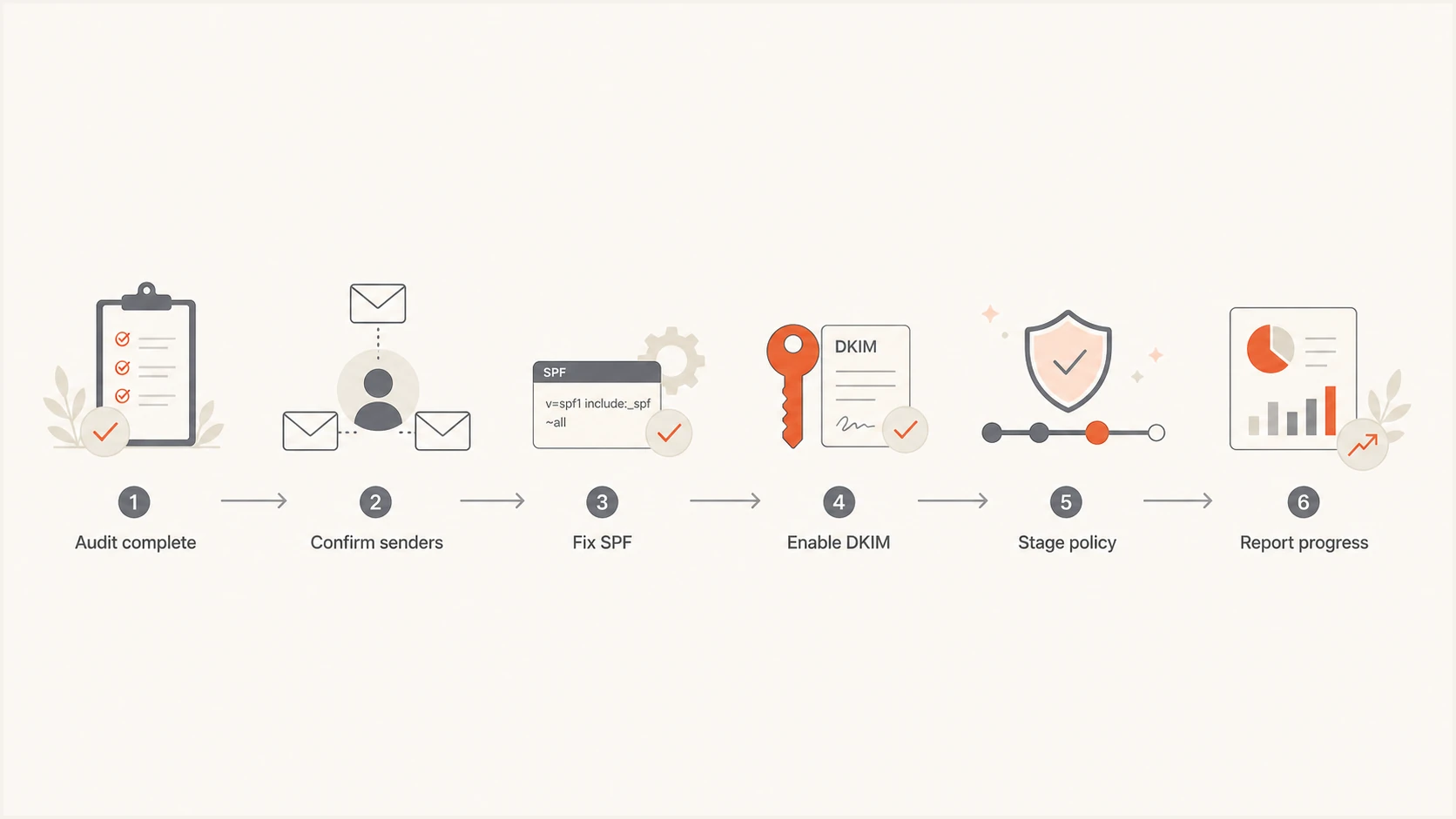
MSP DMARC audit follow-up flow through sender confirmation, remediation, policy staging, and reporting.
Use a simple report structure that keeps the conversation on decisions, not jargon. The report should have an executive summary, domain status, sender inventory, remediation plan, enforcement path, evidence window, open exceptions, and next review date. If the client needs audit evidence, include monitoring coverage and the approved change history.
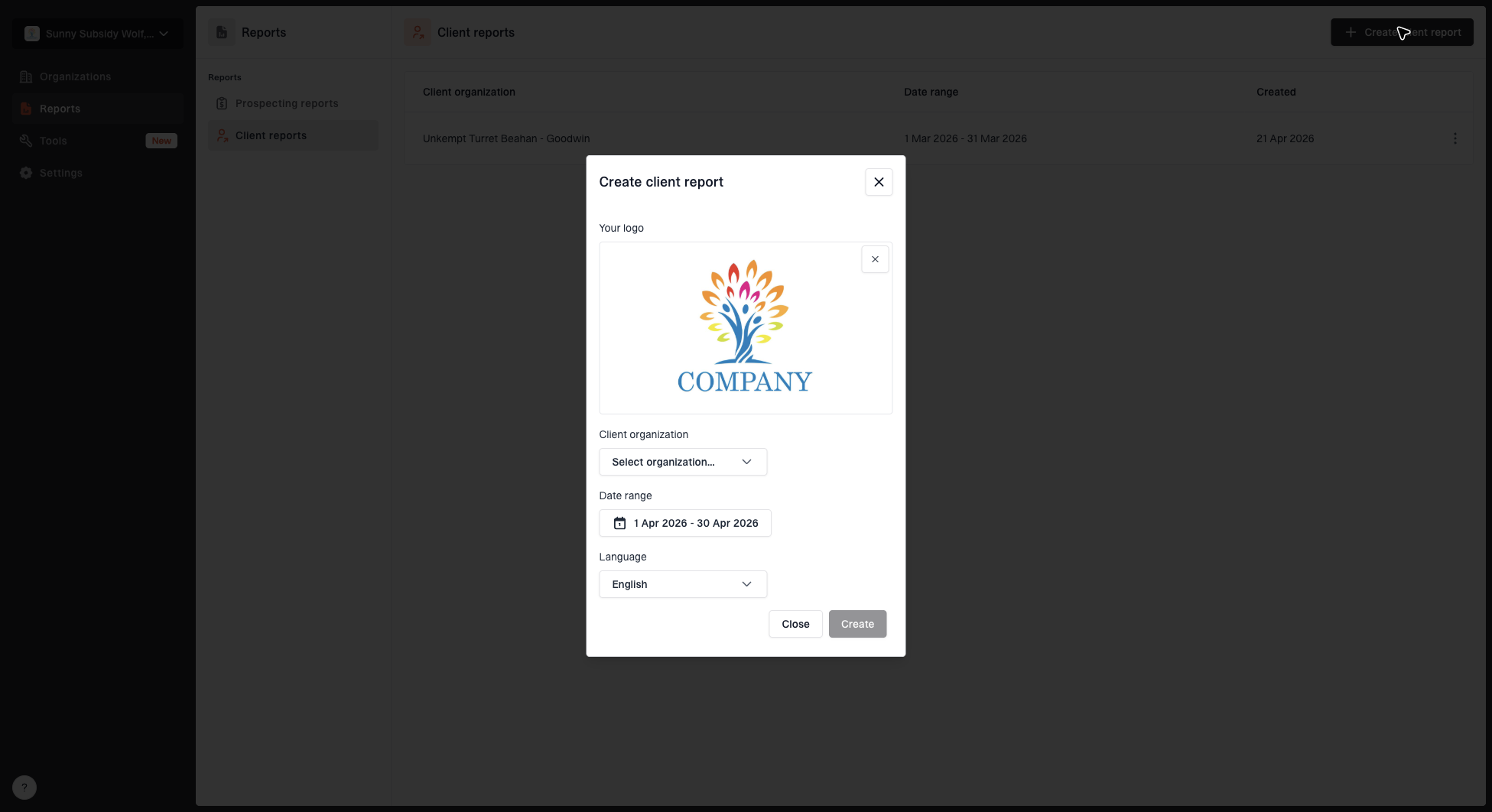
Create client report dialog with organization, date range, logo, and language options
Suped's MSP reporting workflow can produce client-ready reports across managed organizations. The MSP can reuse the same evidence and decision structure for many domains without rebuilding each report by hand.
- Executive summary: Explain the current risk, the recommended next step, and the client decision needed.
- Evidence window: State the domains, reporting dates, receiver coverage, and known evidence gaps.
- Sender table: Show approved, unknown, broken, and retired senders in plain language.
- Remediation plan: List the exact change, owner, status, verification method, and exception state for each issue.
- Policy path: Record the current policy, proposed change, client decision, test window, and rollback condition.
Build the follow-up into recurring service delivery
A DMARC audit creates value once. Managed follow-up creates recurring value. After the first remediation cycle, the MSP should define a steady-state service with monitoring, alert triage, sender onboarding, policy review, exception review, service targets, and client reporting.
Recurring DMARC workload
A sample service mix after the audit follow-up moves into managed operations.
Monitoring
Remediation
Reporting
The service should specify what the MSP owns. A clean model is to own DMARC reporting, DNS record management when delegated, SPF lookup control, DKIM verification, alert triage, and monthly client reporting. The client owns business approval for new senders and the decision to retire systems that no longer need to send mail. Define response targets for urgent failures, routine sender changes, and overdue client decisions.
For MSP operators, the main risk is inconsistent execution across clients. One technician might move quickly to enforcement while another keeps every domain at monitoring forever. A runbook prevents that drift. If you need a deeper operational model, the related guide on an MSP DMARC runbook covers the ongoing support structure.
Suped's product supports this recurring MSP workflow with multi-tenant client views, issue alerts, managed authentication records, blocklist and blacklist monitoring, and client reports. Use it to triage findings, watch for sender drift, and keep each client's review cycle consistent.
Use a follow-up meeting to make decisions
The follow-up meeting should be short and decision-led. It is not the place to teach every part of DMARC. It is the place to confirm senders, approve fixes, agree on the enforcement path, and define what the client will see in future reports.
- Open with risk: State whether the domain is unprotected, partly protected, or ready for staged enforcement.
- Review senders: Ask the client to confirm approved systems and identify unknown mail sources.
- Approve changes: Confirm which DNS and platform changes the MSP can make.
- Set milestones: Choose dates for remediation review, policy movement, and client reporting.
The meeting should end with a written action list sent the same day, because sender ownership gets unclear quickly. Include the ticket IDs, sender names, expected DNS changes, client-side tasks, evidence required for closure, and the next reporting date.
DMARC checker
Look up a domain's DMARC record and catch policy issues.
?/7tests passed
The MSP should also record what not to do. If an unknown sender is under review, do not authorize it in SPF just to make failures disappear. If a platform cannot sign DKIM with the client domain, document that limitation and decide whether the platform should continue sending branded mail.
Watch for deliverability and reputation side effects
DMARC follow-up also covers domain and IP reputation. When the audit uncovers old infrastructure, shared sending pools, or unrecognized third-party senders, the MSP should check for reputation issues. A blocklist or blacklist problem can make a technically correct DMARC project feel unsuccessful to the client because mail still lands poorly.
Use blocklist and blacklist monitoring as supporting evidence, not as a replacement for DMARC. DMARC shows whether mail using the client domain passed through an aligned SPF or DKIM identity. Blocklist checks show whether sending infrastructure or domains appear on lists that some receivers consult. A DMARC pass does not guarantee inbox placement, and an aggregate report does not reveal every receiver's private reputation decision.

Blocklist monitoring page showing domain and IP checks across blocklists with importance and status
Suped includes blocklist monitoring alongside DMARC visibility. An MSP can use the separate signals to explain whether a mail problem concerns authentication, reputation, or both.
A practical follow-up sequence for MSPs
The easiest way to keep the work consistent is to standardize the first 30 days after the audit. The exact timing changes by client size, sender complexity, and report coverage, but the sequence should stay consistent.
Authentication improvement target
An illustrative client target for aligned legitimate mail, not a universal enforcement gate.
Aligned legitimate mail
- Day 0: Send the audit closeout, source inventory, top risks, and requested approvals.
- Days 1-5: Fix obvious DNS issues, enable DKIM for major senders, and remove retired SPF entries.
- Days 6-14: Review unknown sources with the client and decide whether to authorize, migrate, or stop them.
- Days 15-30: Retest completed work, record exceptions, report progress, and propose the next DMARC policy decision.
Set the alignment target for each client after reviewing its sender mix and reporting coverage. Do not treat the sample percentages as a protocol requirement or as the only condition for enforcement.
This sequence also gives the MSP a clean sales and account management handoff. The technical team can show measurable progress, while the account team can position ongoing monitoring as the control that keeps future sender changes from creating the same problem again.
Finish with a service plan, not a loose recommendation
The best follow-up after a DMARC audit gives the client a clear next step and gives the MSP a repeatable delivery path. Send the findings, confirm senders, turn fixes into tickets, get approvals, validate production mail, record exceptions, make the policy decision, and report progress on a schedule.
Suped is our DMARC and email authentication product for this MSP workflow. It combines multi-tenancy, monitoring, managed records, alerts, issue steps, blocklist and blacklist monitoring, and client reporting so teams can keep evidence and follow-up consistent across managed domains.