Why is Outlook breaking DKIM keys and how can I fix it?


Updated on 26 Sep 2026: We clarified where Microsoft validates DKIM, how to trust message evidence, and how ARC affects forwarded mail.
Outlook is usually not breaking your DKIM key. The Outlook client displays the message, while Outlook.com, Microsoft 365, or an upstream gateway performs authentication. A failure means the message being validated is not equivalent, after DKIM canonicalization, to the message your sending system signed. The practical fix is to make the message stable before signing, use relaxed/relaxed canonicalization, send valid UTF-8 content, avoid post-signing changes, and compare the sender-side capture with the received message evidence.
Treat this as a message mutation problem first, then a DNS problem second. A bad DKIM TXT record can cause failure everywhere. A Microsoft-only failure usually points to charset conversion, line ending changes, MIME rewriting, forwarding, a security gateway modifying the body, or a DKIM signature that is too sensitive for the path the message takes.
The direct answer
If Microsoft reports DKIM failure while another receiver accepts the same test message, do not rotate the key first. Capture the MIME stream after the last sending system has signed it, export the received message source, and compare the body hash, charset, transfer encoding, line endings, MIME boundaries, and signed headers.
Why DKIM fails in Outlook
DKIM signs selected headers and a hash of the body. The public key in DNS only lets the receiver verify that signature. If signed content changes beyond what canonicalization tolerates, the public key can remain valid while the signature no longer matches. That is why people describe the issue as Outlook breaking DKIM keys, even though the actual failure is normally a broken DKIM signature.
The most common Microsoft-specific result is body hash did not verify. It means the receiving system rebuilt the canonicalized body and got a different hash from the bh= value. A generic signature did not verify result can instead point to a changed signed header, a malformed signature, or a public-key mismatch. Read the full result before choosing the fix.
- Encoding: Non-ASCII characters, smart quotes, pasted content, or a mismatch between the declared charset and actual bytes can trigger rewriting.
- MIME: Malformed boundaries, mixed transfer encodings, invalid quoted-printable output, or altered base64 wrapping can change the body used for validation.
- Whitespace: Tabs, trailing spaces, line wrapping, and CRLF conversion break simple canonicalization and can still exceed what relaxed canonicalization tolerates.
- Forwarding: Forwarders that add banners, rewrite HTML, insert footers, or restructure MIME often break DKIM before Microsoft performs final validation.
- Headers: Changing a header named in the h= tag after signing breaks the signature. Adding a header whose name is not covered by h= usually does not.
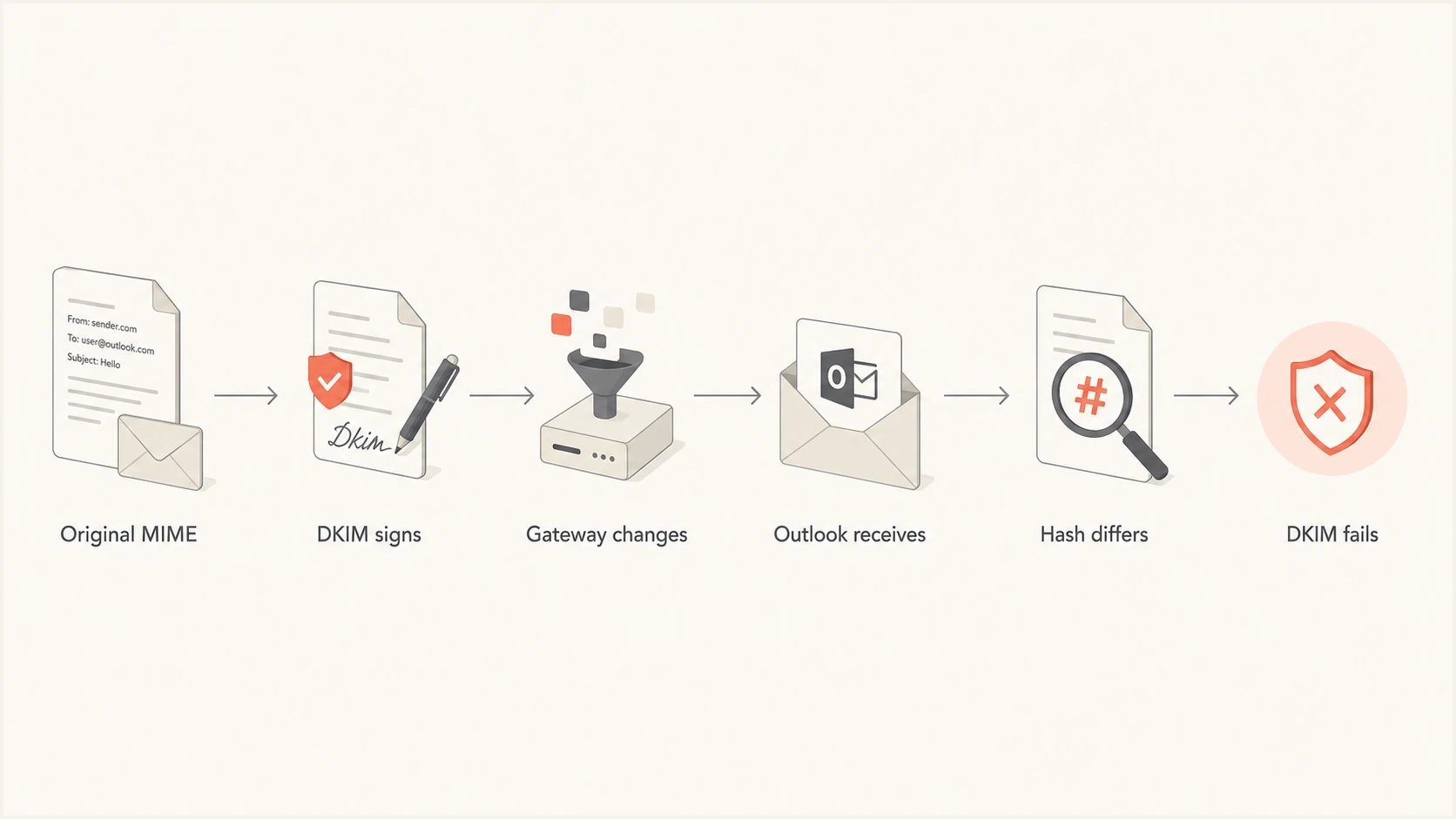
Flowchart showing how a message change between signing and Outlook validation breaks DKIM.
Identify which Microsoft layer produced the result
The name Outlook covers several different parts of mail flow. Outlook for Windows, Mac, mobile, and the web displays a stored message. Outlook.com and Hotmail are consumer receiving services. Microsoft 365 handles organizational mail and can place connectors or security gateways before the mailbox. Attribute the result before changing DKIM.
- Outlook client: Use it to view headers or export a message, but do not assume the client performed the DKIM check.
- Outlook.com or Hotmail: Treat the Microsoft consumer receiving service as the verifier named in its trusted Authentication-Results header.
- Microsoft 365: Check the tenant's mail-flow trace, connectors, transport rules, and Microsoft authentication results.
- Upstream gateway: Determine whether a filter validated or modified the message before Microsoft accepted it.
Read Authentication-Results only from a boundary you trust because a sender can insert a lookalike header. In Microsoft 365, inspect dkim=, dmarc=, compauth=, and the accompanying reason code together. A DKIM failure and a CompAuth pass describe different checks, so neither result should be used as shorthand for the other.
What to check first
Start by separating key problems from message mutation problems. A missing selector or mismatched public key can make every receiver fail. If only Microsoft fails, inspect the message path, but do not assume the DNS key is correct until it has been checked.
Start with the selector and public key because they are fast to rule out. Check the selector shown in the DKIM-Signature header, then confirm the matching DNS TXT record with the DKIM checker. If the selector, domain, key type, and public key parse cleanly, move on to the raw message.
DKIM TXT record shapedns
selector1._domainkey.example.com. 3600 IN TXT (
  "v=DKIM1; k=rsa; "
  "p=MIIBIjANBgkqhkiG9w0BAQEFAAOCAQ8A..."
)
DKIM checker
Check selector records and public key configuration.
?/7tests passed
|
|
|
|---|---|---|
All receivers fail | DNS or signer | Check key and MIME |
Path or MIME change | Compare received EML | |
Forwarded copies fail | Forwarder edit | Check ARC and edits |
Attachments fail | MIME encoding | Test body variants |
Use this table to decide whether to debug DNS or message handling first.
A message can contain more than one DKIM signature, and Microsoft can report both a pass and a failure. DMARC can still pass when at least one valid DKIM signature uses a d= domain that matches the visible From domain. Check each header.d value and do not treat one failed, nonmatching signature as the final DMARC result.
The message source matters more than the rendered email. Capture the SMTP MIME stream after the last signer, export the message as received, and collect the trusted Authentication-Results header plus the mail-flow trace. Outlook stores messages internally rather than preserving the original SMTP stream as a MIME file, so an exported EML is a useful representation but not proof of every byte seen at the receiving edge. Match the Message-ID and sending-system queue ID before comparing evidence. If the affected mailbox source is unavailable, create a test recipient in the same tenant and routing path.
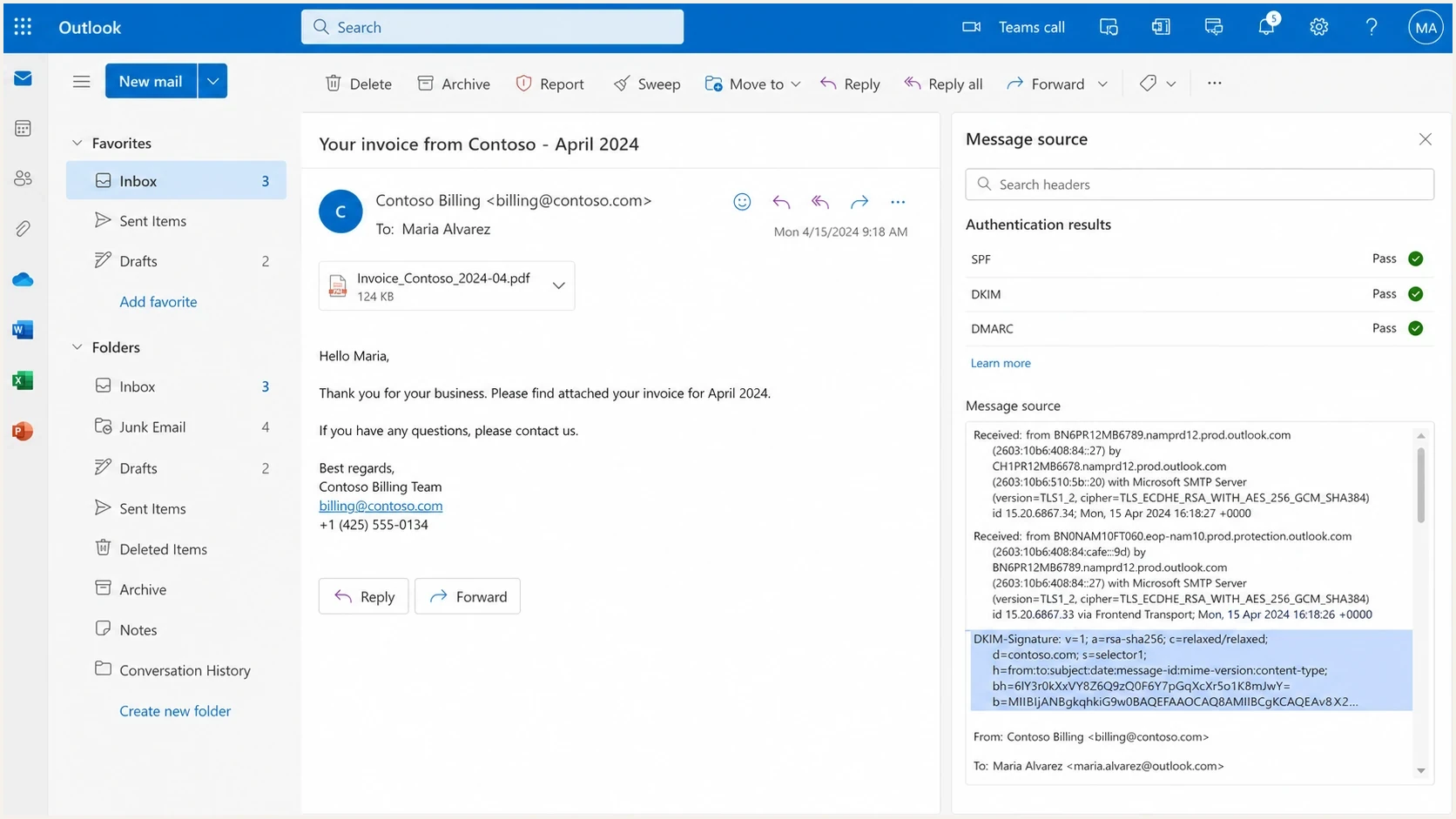
Microsoft Outlook on the web showing message headers and authentication results.
Fix the message before signing
The highest-value fix is simple: make the final MIME message first, then sign that exact message. Do not add tracking pixels, unsubscribe blocks, footers, security labels, open-tracking rewrites, or HTML transformations after DKIM signing. If a downstream system touches the body after signing, sign later in the chain or stop that system from editing signed mail.
Breaks often
- Late edits: A marketing or compliance system changes HTML after DKIM signing.
- Mixed charset: The message declares one charset but includes bytes that fit another.
- Simple mode: The signature uses simple canonicalization across a path that changes whitespace.
Works better
- Final sign: Apply DKIM after the final body and signed headers exist.
- UTF-8 clean: Normalize templates and set an accurate UTF-8 content type.
- Relaxed mode: Use relaxed header and body canonicalization unless a specific requirement calls for simple mode.
For Microsoft-specific failures, pay close attention to characters that look harmless in the editor: smart quotes, non-breaking spaces, long dashes, pasted bullet characters, and invisible control characters. They pass through many receivers unchanged, but a charset or transfer-encoding rewrite can change the body enough to invalidate bh=. A related Microsoft Answers thread documents the same receiver-specific symptom.
Headers worth checkingtext
DKIM-Signature: v=1; a=rsa-sha256; c=relaxed/relaxed;
 d=example.com; s=selector1; h=from:to:subject:date;
 bh=BASE64_BODY_HASH; b=BASE64_SIGNATURE

Content-Type: text/html; charset=UTF-8
Content-Transfer-Encoding: quoted-printable
DKIM requires the From header to appear in the h= list. DMARC then compares the d= domain of a passing signature with the visible From domain. Common stable headers such as Subject, Date, and To are often signed. Do not sign a header that a later system rewrites.
Do not add the l= body-length tag to make a footer or banner survive DKIM. It signs only a prefix of the canonicalized body and can leave appended content unsigned. Remove the post-signing edit or apply a new DMARC-matching signature after the edit instead.
Use evidence, not a fixed threshold
There is no universal Outlook-only failure percentage that makes a DMARC policy change safe. Segment by source and sending path, confirm whether a matching SPF or DKIM result still passes DMARC, and weigh the failed volume against the risk of allowing impersonation.
Test attachments and embedded images
If plain messages pass but messages with attachments or embedded images fail at Microsoft, isolate the MIME construction. Attachments add boundaries, per-part headers, base64 content, and longer encoded lines. A mail library, relay, or gateway that repairs any of those bytes after signing invalidates the body hash.
- Create a control: Send one short plain-text message with no attachment.
- Add HTML: Send the same content as multipart/alternative without an image.
- Add one part: Attach one small file, then repeat with one inline image.
- Compare EML files: Inspect MIME boundaries, Content-ID values, transfer encoding, base64 line wrapping, and the final CRLF.
Do not decode and re-encode an attachment when comparing messages. Compare the raw MIME body after applying the canonicalization named in the c= tag. The first test variant that fails usually identifies the component or hop that needs correction.
When forwarding is the failure point
Forwarding deserves its own branch in the diagnosis. If the original delivery to Microsoft passes DKIM but forwarded copies fail, the forwarder is probably changing content. Added footers, warning banners, HTML rewrites, and MIME restructuring are enough. DKIM detects that the signed content changed.
ARC preserves earlier authentication results across forwarding, but it does not make a changed DKIM signature pass. The current-hop DMARC result can remain fail. Microsoft 365 can use a valid chain from a configured trusted ARC sealer in its separate composite authentication decision. In the latest trusted headers, arc=pass with oda=1 shows the sealer was trusted, while compauth=pass reason=130 shows ARC affected Microsoft's final evaluation.
Do not weaken DMARC too early
A small set of Outlook forwarder failures does not automatically justify moving a domain back to p=none. Measure the affected volume, confirm the flow, and compare the delivery impact with the loss of impersonation protection.
For deeper Outlook and Microsoft 365 cases, keep separate notes for Office 365 DKIM failures and body hash errors, because the fix differs depending on whether DNS, MIME, forwarding, or a signed header changed the outcome.
How Suped helps
Once the issue moves beyond one test message, logs become more useful than guesswork. Suped's product connects DMARC aggregate reports with SPF and DKIM results, source behavior, and issue detection in one workflow.
Suped groups authentication failures by source and shows whether DKIM or SPF is providing the matching DMARC result. Teams can use those groups to separate a Microsoft-specific path from a sender-wide key problem, track selector changes, and stage DMARC policy changes after the failing source is fixed.

Issue steps to fix dialog showing the issue overview, tailored fix steps, and verification action
The workflow should answer two questions quickly: which sources are failing at Microsoft receivers, and whether those failures prevent DMARC from passing. Suped's DMARC monitoring supports policy staging, source review, and alerts when an authentication pattern changes.
Manual debugging
- Slow review: You compare raw headers and aggregate reports by hand.
- Weak grouping: Forwarding, source, selector, and tenant patterns are easy to miss.
- Hard baseline: Received EML files and DMARC XML remain separate evidence sets.
Suped workflow
- Issue focus:
Suped surfaces the failing source and suggested fix path.
- Policy staging: Hosted DMARC supports measured changes after authentication stabilizes.
- Selector trends: Report segments expose failures tied to a source or selector.
If you need a wider check beyond one selector, run a domain health check after the DKIM fix. That exposes SPF lookup pressure, missing DMARC reporting, weak policy staging, or a separate DKIM DNS issue hidden by the Microsoft symptom.
A practical troubleshooting sequence
Use a short sequence because this problem gets noisy fast. The goal is to prove where the message changed, then move the DKIM signing point or correct the content.
- Capture: Save the transmitted MIME stream immediately after the last system signs the message.
- Deliver: Use one submission to send the same message to an affected Outlook mailbox and one non-Microsoft mailbox, then record the Message-ID and sending queue ID.
- Compare: Check charset, transfer encoding, MIME boundaries, trailing whitespace, body length, signed headers, and evidence from the final sending hop.
- Simplify: Remove non-ASCII content and post-signing edits, then test without attachments or embedded images.
- Move signing: Apply DKIM after the last system that touches the body or signed headers.
- Monitor: Segment DMARC reports by receiver, source, selector, and policy outcome.
What a good fix looks like
A good fix makes the same template pass DKIM across Microsoft and other receivers without rotating keys, weakening DMARC, or relying on a one-off recipient exception.
Key rotation belongs later in the process. Rotate if the public key is malformed, too short, exposed, or tied to a decommissioned sender. Do not rotate just because Microsoft failed DKIM on a subset of messages. A new key cannot fix a body that changes after signing.
Views from the trenches
Best practices
Keep the signed body byte-stable before handoff, especially with non-ASCII template text.
Use relaxed canonicalization, but do not expect it to survive charset rewrites or footers.
Compare sender and receiver raw source before changing DNS or DMARC policy settings.
Track Microsoft failures separately so small forwarder issues do not hide sender bugs.
Common pitfalls
Rotating DKIM keys first wastes time when the real fault is a changed message body.
Testing a different Outlook mailbox can miss tenant-specific routing and filtering paths.
Ignoring tabs, pasted smart quotes, and invalid encodings leaves intermittent failures.
Dropping DMARC enforcement for tiny forwarding pockets weakens spoofing protection.
Expert tips
Sign after the last body edit, then lock down tracking and compliance systems upstream.
Keep a raw MIME archive for affected sends so later Outlook changes can be compared.
Segment DMARC reports by selector and receiver to spot a narrow Microsoft pattern fast.
Treat ARC as receiver context for forwarding, not a replacement for matching DKIM.
Marketer from Email Geeks says Outlook forwarding has broken DKIM in specific paths, so forwarded mail needs separate testing from direct mail.
2025-02-18 - Email Geeks
Marketer from Email Geeks says non-ASCII characters and charset handling can trigger message changes that invalidate the body hash.
2025-03-04 - Email Geeks
The practical fix
The Outlook client is not damaging your DKIM key in DNS. The relevant Microsoft receiving service or upstream gateway is exposing a mismatch between the signed version of the email and the version being validated. Fix that mismatch by making the MIME output valid and stable before DKIM signing, with an accurate UTF-8 declaration where the content uses UTF-8.
The order matters: identify the system that recorded the result, validate the selector, compare trustworthy message evidence, remove risky encoding and post-signing edits, test attachments separately, move the signing point later if needed, then monitor the next sends by receiver. If the issue is limited to forwarding, measure the volume before changing DMARC policy.
When the problem appears across customers or domains, Suped's product turns DMARC aggregate reports into source-level groups. Those groups help connect a Microsoft DKIM failure with the responsible sender, selector, and DMARC policy outcome instead of leaving the team to inspect raw XML alone.




