Why is DKIM failing when sending from Salesforce via Gmail?

Published 21 Jul 2025
Updated 12 Aug 2026
11 min read
Summarize with

Updated on 12 Aug 2026: We clarified the two Salesforce-to-Gmail sending paths and added route-specific DKIM checks and fixes.
A DKIM body hash failure means the receiver did not calculate the same canonicalized body hash recorded in bh=. It does not prove by itself that Salesforce or Google changed the body. Start by identifying the Salesforce sending mode, the domain in d=, the selector in s=, and the systems listed in the Received headers.
The same message can show SPF pass and DMARC pass while one DKIM result shows dkim=neutral with body hash did not verify. SPF can pass when the sending IP is authorized for the Return-Path domain. DMARC passes when SPF or another DKIM signature also matches the visible From domain. The failed signature still needs investigation because it shows that its signed body did not survive verification.
Direct answer
Gmail is not the DKIM signer just because the header says Authentication-Results: mx.google.com. That line says Gmail evaluated the message. Use d= and s= in each DKIM-Signature to identify its signing domain and selector. A message can carry more than one signature, so diagnose the exact signature marked neutral or fail.
First identify the sending path
Salesforce uses Send through Gmail and Email Relay for different flows. Send through Gmail sends a message composed in Salesforce through the user's connected Gmail account using OAuth. Email Relay sends Salesforce-generated mail to a configured SMTP server, which can be Google Workspace. The phrase "Salesforce via Gmail" can describe either flow, but the expected DKIM signer and available logs are different.
|
|
|
|
|---|---|---|---|
Send through Gmail | Connected Gmail account | Google outbound signature | Google email logs |
Email Relay to Google | Salesforce MTA to SMTP relay | Salesforce and Google signatures | Salesforce and Google logs |
Salesforce direct | Salesforce MTA to recipient | Salesforce signature | Salesforce email logs |
Route identification for Salesforce and Google Workspace mail.
Do not mix user mail with automated mail
Enabling Send through Gmail does not move every Salesforce email to Gmail. Messages from triggers, workflow rules, list email, and organization-wide addresses can still use Salesforce or Email Relay. Confirm the route for the exact message type that failed.
Salesforce requires a sending domain used by Salesforce direct or Email Relay mail to be verified with an active Salesforce DKIM key or a verified Authorized Email Domain. Send through Gmail is excluded because the connected Google account sends the message. This Salesforce authorization check is separate from recipient-side DKIM body verification.
Why a relay can break DKIM
This failure pattern applies after the headers or logs prove that Salesforce signed the message before a Google Workspace relay handled it. A relay can transmit the signature unchanged. The signature fails only when a hop changes the signed body before the receiver checks it.
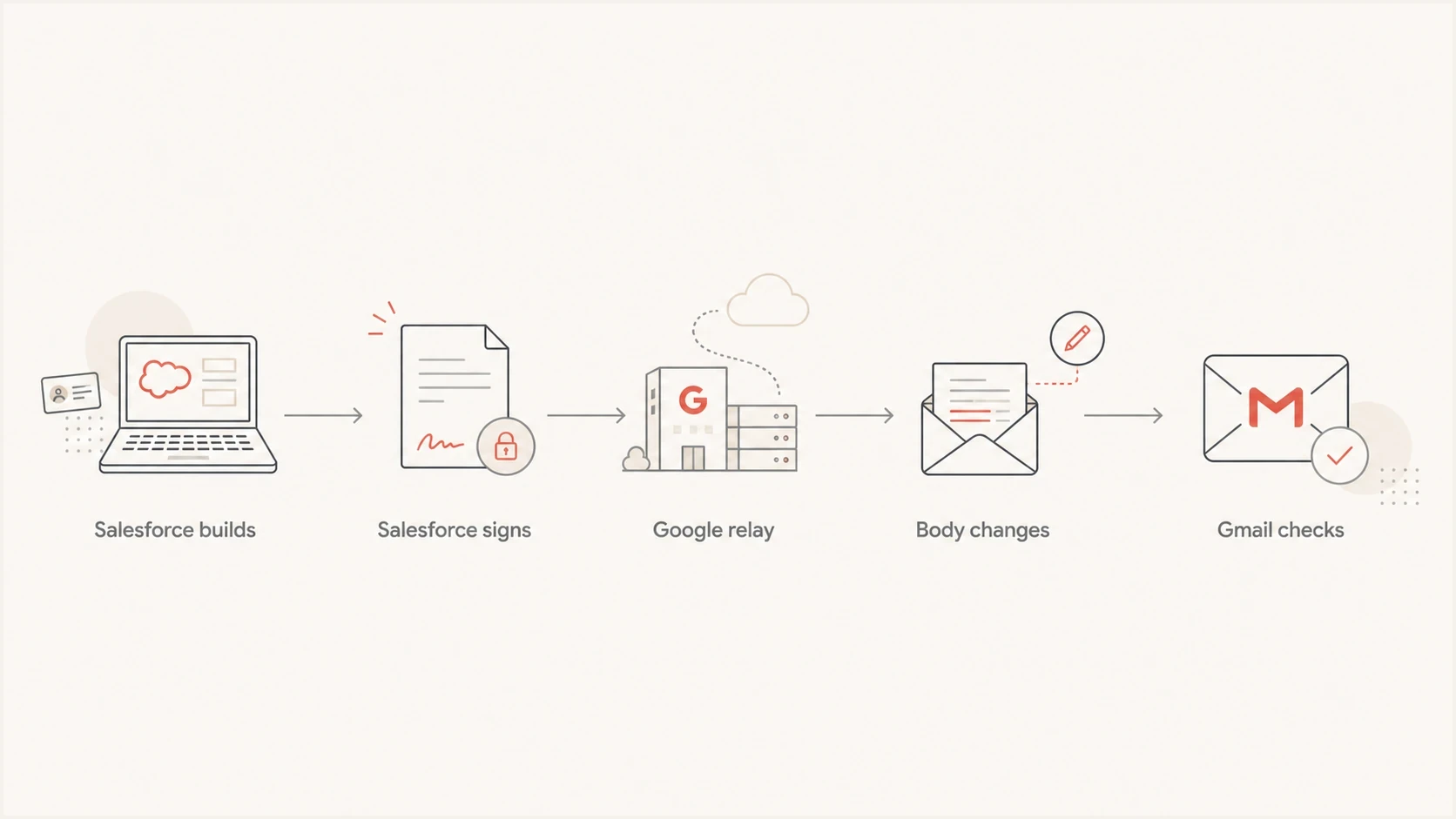
Salesforce signs an email before Google Workspace relays it and Gmail checks DKIM.
DKIM signs selected headers and a canonicalized body hash. Relaxed body canonicalization tolerates limited changes to whitespace at line endings and empty lines, but it does not forgive a different MIME body, an added footer, changed transfer encoding, or rewritten attachment boundaries. When Gmail reports body hash did not verify, investigate a post-signing body change or canonicalization difference before replacing DNS keys.
- Salesforce signed: The d= and s= values lead to a Salesforce-managed custom DKIM key.
- Google relayed: The Received chain and route logs, rather than SPF alone, show that Google Workspace handled the outbound copy.
- Body changed: The receiver recalculated bh= and obtained a different value.
- DMARC passed: SPF or another DKIM signature matched the visible From domain.
What the headers are really saying
Start with the raw source of a copy delivered to another mailbox, not only the copy saved in the sender's Sent folder. In Gmail, use Show original, then inspect Authentication-Results, every DKIM-Signature, and the Received chain. A DKIM checker confirms that a selector record can be retrieved, but it cannot prove that the body stayed unchanged in transit.
Header pattern with two DKIM resultstext
Authentication-Results: mx.google.com;
  dkim=pass header.i=@example.com header.s=google header.b=xyz789;
  dkim=neutral (body hash did not verify)
  header.i=@example.com header.s=sf1 header.b=abc123;
  spf=pass smtp.mailfrom=billing@example.com;
  dmarc=pass header.from=example.com
DKIM-Signature: v=1; d=example.com; s=google; bh=...; b=...
DKIM-Signature: v=1; d=example.com; s=sf1; bh=...; b=...
The common mistake is reading mx.google.com as the signer. It is the host that wrote the result after checking the message. The signing domain and selector are inside each DKIM signature. The related body hash verification explanation covers how canonicalization and content changes affect the hash.
- Evaluator: Treat mx.google.com as the receiver that recorded the result.
- Signer: Use d= to identify the domain that created that signature.
- Selector: Use s= to retrieve the public key for that signature.
- Body hash: Match each bh= value to its own pass, neutral, or fail result.
DKIM checker
Check selector records and public key configuration.
?/7tests passed
Why SPF and DMARC pass anyway
A mixed result is normal. SPF checks whether the connecting IP is authorized for the Return-Path domain. DMARC then checks whether a passing SPF or DKIM domain matches the visible From domain. If SPF passes and its domain matches, DMARC can pass even when one DKIM signature is neutral. A second DKIM signature can also supply the required domain match.
|
|
|
|---|---|---|
SPF pass | IP authorized for Return-Path | Check domain match |
DKIM neutral | One body hash did not verify | Identify its signer |
DMARC pass | At least one matching path passed | Find which path |
Policy none | No quarantine or reject request | Stage enforcement |
Compact reading of a mixed authentication result.
A DMARC pass does not repair the failed DKIM signature. SPF often breaks during forwarding, and a route is easier to operate when its intended DKIM signature passes. Suped's DMARC monitoring groups aggregate results by source so a persistent Salesforce or Google Workspace failure can be separated from a single header test.
Do not chase SPF first
If SPF and DMARC already pass, changing SPF will not fix body hash did not verify. Focus on the failing signature, the message source, and the hops after that signature was added.
How to isolate the source
Before changing DNS, confirm the basic records with Suped's domain health checker. Then test each sending path with the same recipient and content. For Send through Gmail, use Google email logs. For Salesforce direct and Email Relay, use Salesforce email logs as well as the receiving headers.
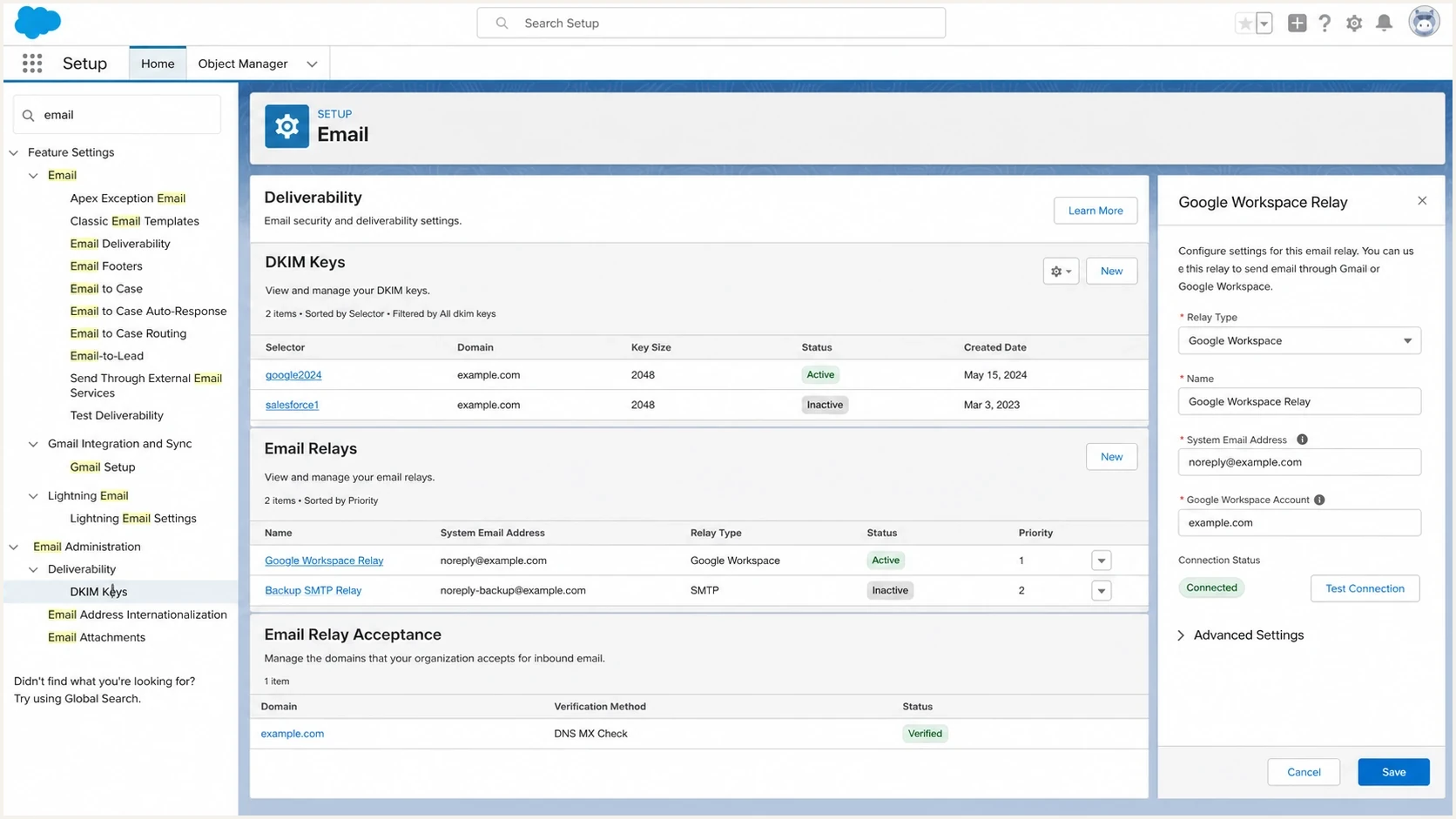
Salesforce Setup with DKIM Keys and Google Workspace email relay settings.
- Gmail baseline: Send the same short message directly from Gmail as the same user.
- Salesforce direct: Use a controlled Salesforce-direct test without changing the production default.
- Relay path: Send the same body through the configured Google Workspace SMTP relay.
- Plain body: Use only hello world with no thread, signature, template, tab, or footer.
- Compare: Save the externally received source and compare the Received chain, every d=, s=, and DKIM result.
Plain ASCII test messagetext
Subject: DKIM test

hello world

No signature
No quoted thread
No footer
No tab characters
If plain text passes
The route can preserve a simple body. The failure is likely tied to the template, message builder, copied content, or thread history.
- Template: Remove rich text blocks one at a time.
- Encoding: Check transfer encoding, tabs, soft line wraps, and copied content.
- Threading: Test a new message without quoted replies.
If plain text fails
A hop after signing changed the body or interpreted its canonical form differently. Use the headers and logs to locate the first different copy.
- Route: Compare Salesforce direct with the Google Workspace relay path.
- Support: Send the responsible provider the raw source, route logs, and test matrix.
- Signing: Have the final body-changing system add a domain-matching DKIM signature.
Fix paths that match the route
The fix depends on which signature failed. For Send through Gmail, verify that Google Workspace adds a passing signature for the visible From domain. Salesforce custom DKIM does not control that connected-account route. For Email Relay, preserve the Salesforce-signed body or add a domain-matching signature after the last modification. Also compare the Salesforce DKIM setup with the exact org, sending domain, and message path.
|
|
|
|---|---|---|
Enable Google DKIM | Send through Gmail lacks a passing domain signature | Check an external recipient copy |
Preserve relay body | Salesforce signature fails after relay | Remove footer and MIME rewrites |
Sign after modification | Relay must change the body | Confirm final signature passes |
Clean the template | Plain ASCII passes | Add content back one change at a time |
Fix options for Salesforce and Google Workspace DKIM failures.
Do not assume DNS is wrong
A successful selector lookup proves that a public key record exists. A body hash failure points first to the signed body or canonicalization, while a missing key or incorrect selector produces a different error. Replace or republish a DKIM key only when the result identifies a key lookup or signature-key problem.
- Send through Gmail: Confirm Google Workspace signs the externally delivered message.
- Email Relay: Disable body modifications or sign again after them.
- Evidence: Attach raw sources, signer domains, selectors, route settings, and timestamps.
- Retest: Change one variable and compare the same authentication fields again.
Where Suped fits
Suped's product groups DMARC aggregate reports by sending source and shows the SPF and DKIM results reported for each source. For this Salesforce and Gmail problem, use that view to separate Salesforce-originated mail from Google Workspace mail, record the selectors in use, and watch whether failures stop after a route change.

Issue steps to fix dialog showing the issue overview, tailored fix steps, and verification action
DMARC aggregate reports show pass or fail by source, but they do not contain the exact body mutation or the full body hash did not verify diagnostic. Keep the raw message beside the Suped source view. Suped's alerts can flag a new failure pattern, and hosted DMARC can support controlled policy changes after every legitimate route passes.
Post-change DKIM checks
How to handle results from the confirmed Salesforce and Google Workspace path.
Clear
0%
No failures from the confirmed path after the change.
Investigate
>0%
Any repeat failure from the same production path needs a raw-header check.
Escalate
Persistent
The controlled retest still fails after one route variable changes.
- Source grouping: Separate Salesforce and Google Workspace results before comparing failure rates.
- Selector tracking: Confirm whether the failing signature belongs to the intended sender.
- Policy staging: Move beyond p=none only after every legitimate route has a matching pass.
Views from the trenches
Best practices
Compare Salesforce direct, Gmail relay, and basic Gmail headers before changing DNS.
Test a plain ASCII message first, then add template elements until DKIM fails again.
Track the signing domain and selector so support receives the exact failing path.
Common pitfalls
Treating mx.google.com as the signer confuses result stamping with DKIM signing.
Assuming a valid DNS key proves the message body survived every hop without changes.
Changing SPF when DMARC already passes wastes time on the wrong authentication result.
Expert tips
Confirm the sending mode before deciding whether Salesforce or Google should sign.
Disable one sending path at a time so each test isolates the failing route cleanly.
Keep one untouched raw message file so support can inspect canonicalized body data.
An Email Geeks discussion says the first question is which system created the DKIM signature, since mx.google.com only recorded the authentication result.
2023-08-04 - Email Geeks
An Email Geeks discussion says body hash errors point to a difference between the signed body and the received body, so SPF changes do not address the error.
2023-08-04 - Email Geeks
Choose the fix by sending path
With Send through Gmail, configure Google Workspace to add a passing DKIM signature to the final outbound message. With Email Relay, prevent changes to the Salesforce-signed body or add a domain-matching signature after the last modifying hop. If a plain hello world message still fails on a confirmed relay path, stop changing DNS and send the raw sources plus route logs to the owner of the hop where the copies diverge.
- Keep: SPF and DMARC healthy while the DKIM path is isolated.
- Change: One signing, routing, or content variable per test.
- Prove: Show the failing selector and a passing control path.
- Monitor: Watch source-level DMARC reports after every route change.




