Why are Microsoft Outlook 550 5.7.515 access denied errors occurring due to DKIM failures, and how do message encoding and modification affect them?

Updated on 6 Aug 2026: We added Microsoft's high-volume sender threshold and tightened the DKIM checks for encoding, alignment, and post-signing changes.
The short answer is that Microsoft consumer email services can return 550 5.7.515 when the domain in the visible 5322.From address does not meet Microsoft's required authentication level. For a domain subject to the high-volume sender rules, SPF and DKIM must both pass, and DMARC must pass through aligned SPF and/or DKIM. An SPF pass that also makes DMARC pass does not cancel a separate DKIM failure.
The failure often looks message-specific because DKIM protects canonicalized versions of the signed headers and body bytes. If a signed Subject, From display name, Date header, MIME structure, transfer encoding, or body part is malformed or modified after signing, Microsoft can calculate a different hash. Microsoft's 550 5.7.515 guidance explains the authentication requirements. The remaining task is proving whether the failed check comes from DNS, domain alignment, message formation, or a post-signing change.
- Most likely: The message Microsoft validates is not equivalent to the message that received the DKIM signature.
- Common trigger: Malformed encoded-words, raw non-ASCII in a classic header, or a MIME change after signing.
- Key symptom: The same sender and From domain deliver some messages while other variants receive an NDR.
- First split: Separate domain setup failures from message-content failures before changing DNS.
Why the bounce happens
A 550 5.7.515 response is an authentication enforcement bounce, not a normal reputation block. Outlook.com and related Microsoft consumer services evaluate the visible From domain, the SPF result, the DKIM result, and whether DMARC passes using an aligned domain. For high-volume senders, Microsoft requires valid SPF, DKIM, and DMARC, with both SPF and DKIM checks passing.
Typical 550 5.7.515 bouncetext
550 5.7.515 Access denied, sending domain example.com
doesn't meet the required authentication level.
Spf=Pass, Dkim=Fail, DMARC=Pass
The last line is the clue. DMARC can pass through SPF domain alignment while DKIM fails. That does not make the DKIM failure harmless because Microsoft's high-volume sender requirements call for DKIM to pass independently. The results are not contradictory. They report separate checks with different pass conditions.
Read the authentication result literally
- DKIM=Fail: Start with the selector, signing domain, signed headers, body hash, and message transformations.
- SPF=Fail: Check the 5321.MailFrom domain, authorized IPs, forwarding, and SPF lookup limits.
- DMARC=Fail: Confirm whether SPF or DKIM passed with a domain aligned to 5322.From.
- Mixed result: Do not assume one pass result satisfies every Microsoft authentication requirement.
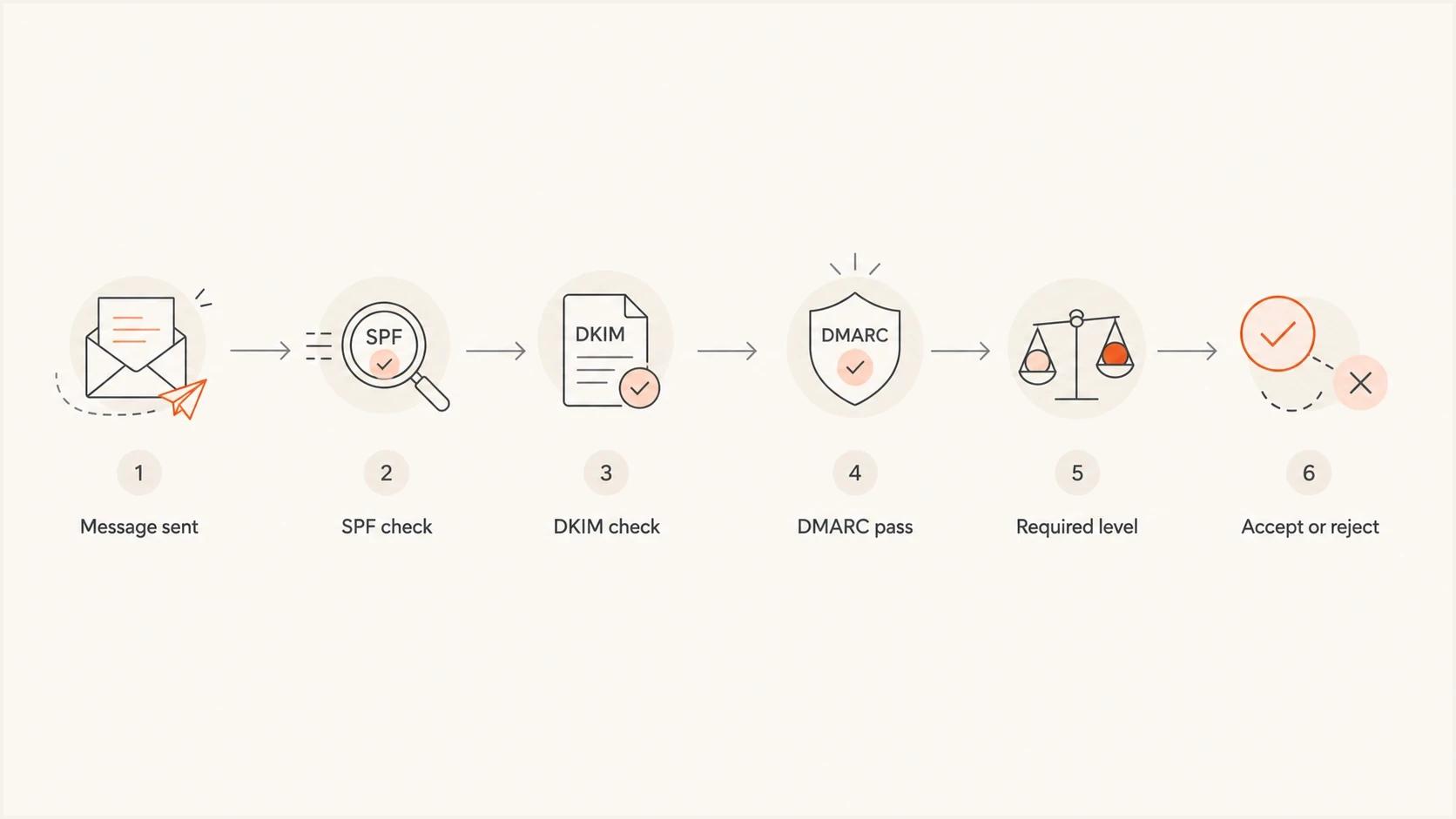
Flowchart showing SPF, DKIM, DMARC, and Microsoft required authentication level.
Who the Microsoft rule applies to
Microsoft's enforcement targets high-volume senders to Outlook.com and related consumer mailbox domains, including Hotmail, Live.com, and MSN. Microsoft's support page defines the threshold as 5,000 or more messages using the same 5322.From domain, while its high-volume sender announcement describes that volume on a per-day basis. Treat 5,000 messages per day to these consumer services as the operational trigger.
- SPF: The connecting source must be authorized for the 5321.MailFrom, or return-path, domain and the SPF check must pass.
- DKIM: The message must carry a verifiable signature and the DKIM check must pass.
- DMARC: The 5322.From domain must publish a valid policy, including p=none, and DMARC must pass.
- Alignment: At least one passing path, SPF's 5321.MailFrom or DKIM's d= domain, must match the 5322.From domain.
For a third-party sender, verify the visible 5322.From domain, the return-path domain, the DKIM d= domain, and the actual sending IP. SPF and DKIM still need to pass separately, but DMARC requires only one of those passing identities to match 5322.From under the published alignment mode. Configuring both paths for alignment gives forwarding and routing changes less room to expose a single point of failure.
How encoding breaks DKIM
DKIM does not sign the idea of a subject line or display name. It signs canonicalized bytes. The signer builds a hash over selected headers and the canonicalized body, writes the body hash and signature into the DKIM-Signature header, and the receiver repeats the calculation. If the inputs differ beyond the selected canonicalization rules, validation fails.
Accents and emojis do not inherently break DKIM. Unless the complete delivery path supports SMTPUTF8, non-ASCII text in classic fields such as Subject and a display name normally needs RFC 2047 encoded-word syntax. If a system signs a header containing raw or malformed non-ASCII text, a later component can re-encode that header into a valid form. The displayed text can stay the same while the signed byte sequence changes.
Valid before signing
- Header bytes: Display names and subjects are encoded before DKIM signing.
- Final content: Tracking, personalization, and unsubscribe headers are added before signing.
- Canonicalization: Relaxed header and body canonicalization absorbs specified whitespace differences.
Fragile after signing
- Bad encoding: Raw non-ASCII or broken encoded-words appear in signed headers.
- Late edits: Footers, URLs, or MIME boundaries change after the DKIM signature is added.
- Transit rewrite: A gateway or relay re-encodes a signed header or body part before Microsoft validates it.
Header encoding exampletext
Fragile signed header:
Subject: Offre speciale ete

Safer signed header:
Subject: =?UTF-8?Q?Offre_sp=C3=A9ciale_=C3=A9t=C3=A9?=
The encoded version is safer because each system on a non-SMTPUTF8 path receives an explicit ASCII byte sequence for the same visible text. Relaxed canonicalization can tolerate specified folding and whitespace changes, but it does not treat different encodings of the same displayed text as equivalent.
Message changes after signing
Encoding is only one way DKIM breaks. A DKIM failure can come from a change to any header selected by h= or to the signed portion of the body. When 550 5.7.515 failures appear suddenly and affect only some message variants, inspect every component that can modify the message after the DKIM signature is attached.
|
|
|
|---|---|---|
Subject rewrite | Header fail | Encode first |
Footer added | Body fail | Sign last |
URL wrapping | Body fail | Track first |
Signed Date rewrite | Header fail | Set Date first |
MIME change | Body or header fail | Freeze MIME |
Common changes that can break DKIM validation
A small post-signing change can be enough. Re-encoding Content-Transfer-Encoding, changing a MIME boundary, rewriting a signed Subject, or adding a footer changes protected input. Relaxed canonicalization tolerates defined whitespace normalization and empty lines at the end of the body. It does not tolerate semantic header rewrites or added body content.
The pass elsewhere trap
A message can pass DKIM at one mailbox provider and fail at Microsoft because delivery paths can use different relays, gateways, and content-processing steps. A pass elsewhere proves that the key and signature worked on that copy. It does not prove that Microsoft received the same protected content.
How to diagnose 550 5.7.515
Start by proving whether the failure follows the From domain, the sending source, or the message variant. If every message from one domain or selector fails, check DNS and sender configuration first. If only certain subjects, locales, templates, or recipient paths fail, inspect the signed message and post-signing processing.
- Capture the signed source: Save the exact raw RFC 5322 message immediately after DKIM signing, before another component can edit it.
- Preserve the NDR: Keep the full 550 5.7.515 diagnostic, timestamp, recipient domain, and reported SPF, DKIM, and DMARC results.
- Compare identities: Record smtp.mailfrom, header.from, header.d, the selector, and which identifier supplied DMARC alignment.
- Check signed headers: Review the DKIM h= list and compare each selected field with a delivered control message.
- Verify the selector: Confirm that selector._domainkey.signing-domain returns one valid public key and that the signing service uses the matching private key.
- Retest content: Send controlled variants that change only the Subject, From display name, locale, or MIME construction.
- Move signing last: Apply DKIM after personalization, tracking, MIME generation, unsubscribe headers, and footer insertion.
- Compare outcomes: Match accepted and rejected messages by source, selector, From domain, template, and Microsoft recipient domain.
For the DNS side, run the selector through the DKIM checker and run a broader domain health check to catch SPF, DKIM, and DMARC record problems before chasing message encoding.
DKIM checker
Check selector records and public key configuration.
?/7tests passed
After DNS checks out, reproduce the failure with the smallest possible change. Send one message with the original non-ASCII subject and one with a plain ASCII subject. Repeat the test for the From display name, List-Unsubscribe field, and custom fields named in h=. Keep the sender, selector, recipient domain, and body constant.
If the diagnostic says the DKIM body hash did not verify, focus on body mutations because bh= no longer matches. If the body hash matches but the overall signature fails, focus on the h= headers, the d= and s= identity, the DNS key, and the b= signature. The same body-failure pattern appears in body hash failures, where link tracking, MIME rewrapping, footers, or transfer-encoding changes occur after signing.
Fixes that stop repeat bounces
The practical fix is to make the message valid and final before it is signed, then prevent later systems from changing protected content. Do not loosen DMARC or rotate DKIM keys unless the evidence points to a policy, DNS, or key problem.
- Encode headers: Encode non-ASCII display names and subjects correctly before DKIM signing unless the complete path uses SMTPUTF8.
- Sign last: Put DKIM signing after template rendering, tracking, MIME creation, and footer logic.
- Use relaxed: Use relaxed header and body canonicalization unless a tested requirement calls for another mode.
- Set core headers: Generate Date, Message-ID, MIME-Version, and Content-Type before signing.
- Limit mutations: Stop relays, security gateways, and sending systems from editing signed content after DKIM.
- Monitor changes: Watch DKIM failure rates by source, selector, receiver, and message stream.

Issue steps to fix dialog showing the issue overview, tailored fix steps, and verification action
Suped's product groups DMARC aggregate results by sending source and authentication outcome, then surfaces issues and alerts. For 550 5.7.515, use Suped to identify whether Microsoft-reported DKIM failures concentrate on one source or selector. Then use the raw-message tests above to locate an encoding or post-signing fault, because DMARC aggregate reports do not contain a message's Subject or body.
Suped's DMARC monitoring also helps separate Microsoft-only DKIM failures from a source that fails across several receivers. That split tells the team whether to inspect a Microsoft-specific route or the sender's general signing configuration first.
When it is not encoding
Do not attribute every 550 5.7.515 NDR to accents or emojis. Encoding is one failure pattern, but the same response can accompany other authentication faults. A selector typo, missing public key, stale DNS answer, SPF failure, unaligned domain, or incorrect third-party sender configuration requires a different fix.
Message-specific failure
- Pattern: Only certain subjects, locales, templates, or MIME versions fail.
- Evidence: The same sender and source deliver other messages to Microsoft consumer mailboxes.
- Action: Inspect encoding, h= headers, the body hash, and post-signing edits.
Domain setup failure
- Pattern: All or most mail from one From domain, selector, or sending platform fails.
- Evidence: Failures appear across many campaigns, locales, and Microsoft recipients.
- Action: Check selector DNS, SPF authorization, 5321.MailFrom, DKIM d=, and 5322.From alignment.
Microsoft 365 senders have recurring DKIM configuration patterns when CNAME records, key rotation, or third-party senders are mixed. If Microsoft 365 is the failing source, check the setup path for Office 365 DKIM failures before changing campaign templates.
Views from the trenches
Best practices
Encode every non-ASCII header with MIME encoded-words before DKIM signing begins.
Test the exact raw message sent to Outlook, not only the rendered campaign preview.
Compare accepted and rejected messages with the same From to isolate content changes.
Common pitfalls
Assuming DMARC pass means Microsoft will ignore a separate DKIM failure during triage.
Signing before tracking, footers, MIME generation, or unsubscribe header updates.
Changing DNS first when only one language version or subject line is failing at Microsoft.
Expert tips
Keep Date, Message-ID, MIME-Version, and Content-Type stable before DKIM signing.
Use relaxed canonicalization, but do not rely on it to survive re-encoding in transit.
Treat sudden Microsoft-only failures as a need for raw source comparison before DNS work.
Expert from Email Geeks says DKIM only gives predictable results when the message is valid email before it is signed.
2025-06-18 - Email Geeks
Marketer from Email Geeks says fixing badly encoded non-ASCII characters stopped a set of Outlook 550 5.7.515 bounces.
2025-06-18 - Email Geeks
What to fix first
If the NDR shows DKIM=Fail, start with the exact message that failed. Validate the selector and public key, then check whether the signed headers contain malformed encoded-words, an unstable Date field, or another field that a later system changes. Compare the 5321.MailFrom, DKIM d=, and 5322.From domains at the same time so a content test does not hide an alignment fault.
Generate the final MIME message, encode its headers correctly, add tracking and compliance content, and apply DKIM as the last content-changing step. Monitor results by receiver, source, and selector so a Microsoft-only increase is visible before more messages receive 550 5.7.515 responses.




