What does it mean when an email has multiple DKIM signatures?

Published 15 Jun 2025
Updated 31 Jul 2026
12 min read
Summarize with
Updated on 31 Jul 2026: We updated this guide for current DKIM and DMARC guidance on signature evaluation, alignment modes, aggregate reporting, and selector management.
When an email has multiple DKIM signatures, more than one system or signing step added a cryptographic signature to the same message before delivery. This is usually normal. Two signatures are expected when one belongs to the brand's sending domain and the other belongs to the email service provider or another known system in the delivery path. A controlled migration can also use deliberate dual-signing.
The important part is not the number of signatures. Check whether at least one verified DKIM signature uses a domain that has DMARC alignment with the visible From domain. Under relaxed alignment, the domains share an organizational domain. Under strict alignment, they must be identical. If an aligned signature passes, multiple DKIM signatures are usually nothing to worry about. If only an unrelated provider signature passes, DKIM passes but does not satisfy DMARC for the visible brand domain.
What multiple DKIM signatures mean
Short answer
Multiple DKIM signatures mean the message contains more than one DKIM-Signature header. Each signature names a signing domain, selector, header list, and cryptographic hash. Receiving mail servers evaluate each signature on its own merits.
- Normal: One signature often belongs to your sending domain and one belongs to the ESP or another known system in the delivery path.
- Important: DMARC passes through DKIM when any verified signature has strict or relaxed alignment with the visible From domain, as required by the domain's DMARC policy.
- Risk: A failed brand-domain signature plus a passing provider-domain signature still leaves DKIM unable to satisfy DMARC.
A DKIM signature does not say the whole email is safe. It shows that the body content and header fields covered by that signature survived verification, and that the signer controlled the matching private key. It does not prove that every header was protected or that the sender is trustworthy. That distinction matters because email can move through marketing platforms, CRMs, helpdesk tools, outbound gateways, and forwarding systems before it reaches the recipient.
Each DKIM-Signature header has a d= value for the signing domain and an s= value for the selector. The receiver combines those values to find the public key in DNS. A message with two signatures can require two separate key lookups and verification attempts.
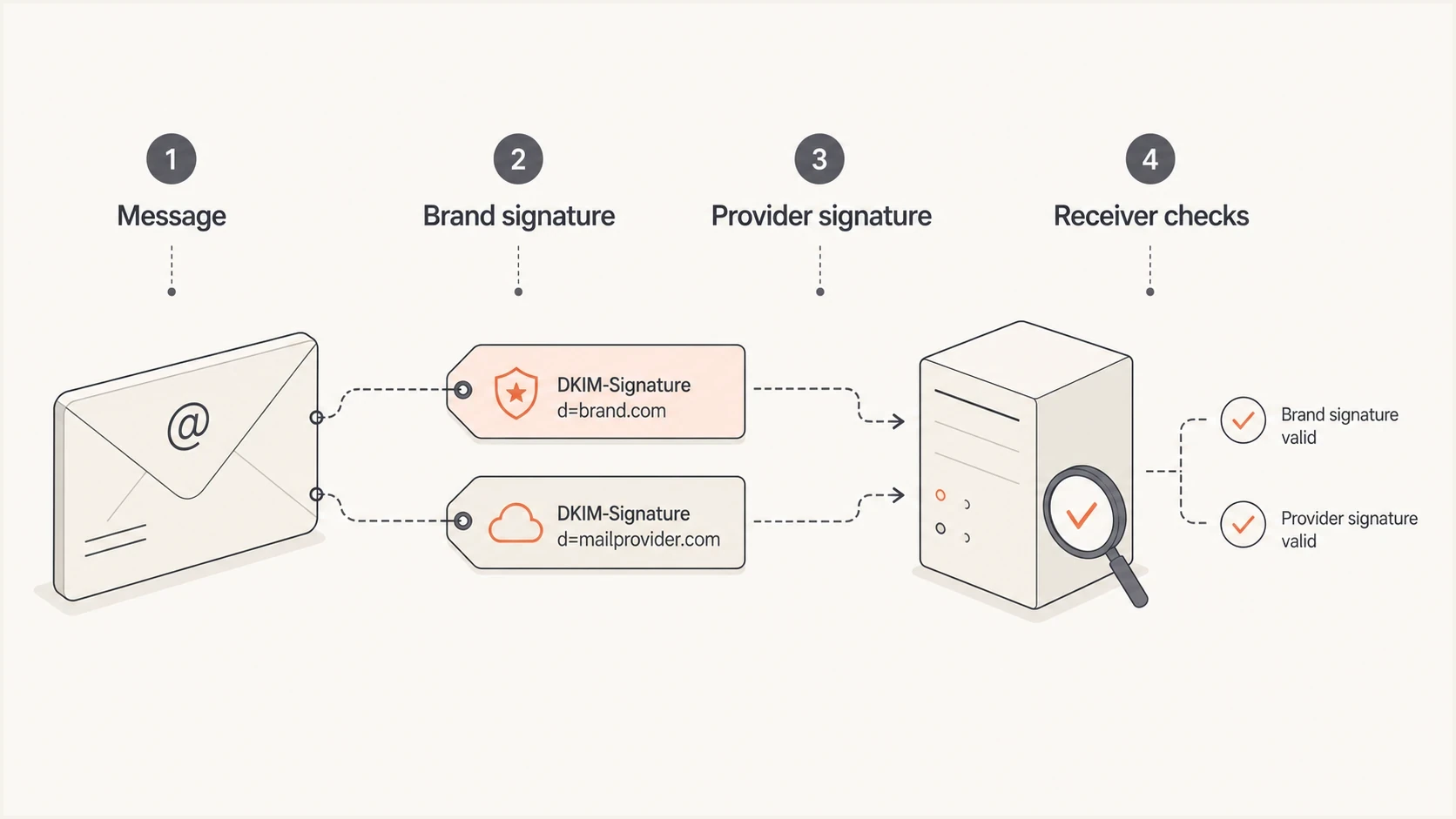
One email carrying a brand DKIM signature and a provider DKIM signature.
Why a second signature appears
The most common reason is simple: your ESP signs the message and your brand domain signs it too. In HubSpot-style sending setups, one signature can be tied to the connected email sending domain while another belongs to the platform's infrastructure. Dedicated IP and return-path settings can affect which infrastructure handles the message, but the Return-Path domain itself is not the DKIM identifier that DMARC compares with the visible From domain.
Check the signing domains first. If one d= value is your brand's domain or subdomain and another is the ESP's domain, that is a standard pattern. If both signatures use domains you control, it can indicate deliberate dual-signing or a migration between senders. Routine key rotation does not require both selectors to sign every message. A common rotation switches the signer to the new selector while keeping the old public key in DNS long enough for in-flight mail to verify. For a deeper selector-specific explanation, this page on multiple DKIM selectors covers why selectors exist and how they separate keys.
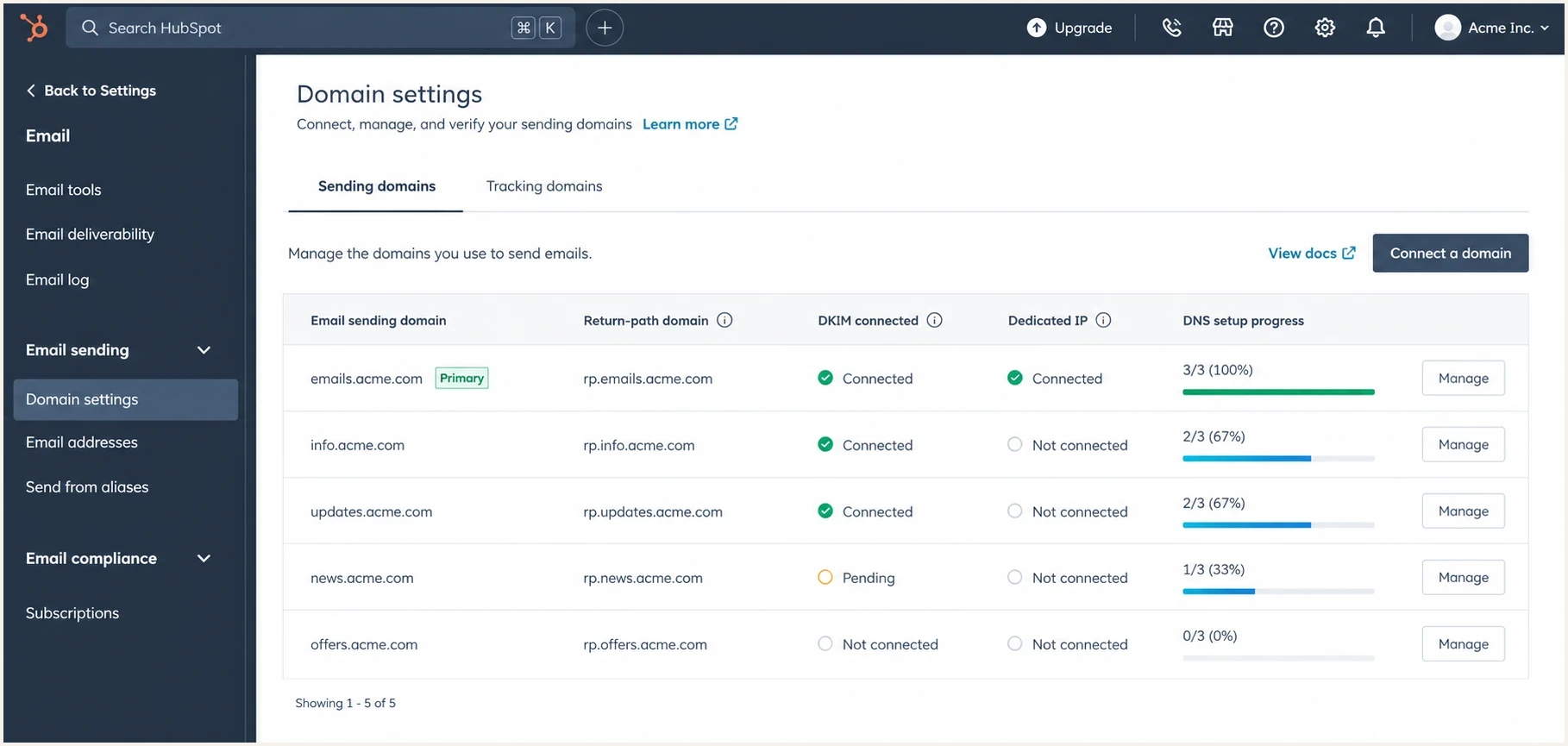
HubSpot email domain settings showing connected sending and return-path domains.
|
|
|
|---|---|---|
ESP signing | Provider adds a signature. | Check the aligned pass. |
Gateway or forwarder | Another hop re-signs. | Map the delivery path. |
Dual-signing | Two selectors sign during a transition. | Set a retirement date. |
Migration | A new sender also signs. | Remove overlap later. |
Common causes of multiple DKIM signatures
Multiple signatures vs multiple DKIM records
Multiple signatures on one email are not the same as multiple DKIM records for one domain. Signatures are headers attached to a message. DKIM records publish public keys in DNS. A domain can safely publish keys for several sending services because each selector has a separate DNS name.
Separate DNS names for separate selectorstext
marketing._domainkey.example.com
support._domainkey.example.com
workspace._domainkey.example.com
Each signature tells the receiver which key to request by combining its s= selector with its d= signing domain. Use a unique selector for each active key or sending service. Do not publish competing DKIM key records at the same selector name, because the receiver needs one usable key result for that lookup. Publishing several selector records does not add signatures by itself. A sending system adds a signature only when it is configured to sign with the matching private key.
How receiving servers evaluate them
Receivers do not merge DKIM signatures into one cryptographic result. Each signature has independent meaning, but a receiver can stop after one verifies successfully or limit how many signatures it checks. When several are evaluated, the results can include pass, fail, neutral, temporary error, or permanent error details in Authentication-Results. A missing result for one signature does not prove that its header was absent.
Example with a brand signature and provider signaturetext
DKIM-Signature: v=1; a=rsa-sha256; d=mail.example.com;
 s=brand2026; c=relaxed/relaxed; h=from:to:subject:date;
 bh=...; b=...

DKIM-Signature: v=1; a=rsa-sha256; d=esp.example;
 s=esp1; c=relaxed/relaxed; h=from:to:subject:date;
 bh=...; b=...
The receiver uses the selector and signing domain in each signature it evaluates. In the example above, the brand public key is found under the brand selector, and the provider public key is found under the provider selector. DKIM defines no winning signature, and header order does not decide which signature matters. For DMARC, the useful result is any verified signature whose signing domain has the required alignment with the visible From domain. The separate discussion of DKIM precedence helps explain why receiver output can emphasize one result over another.
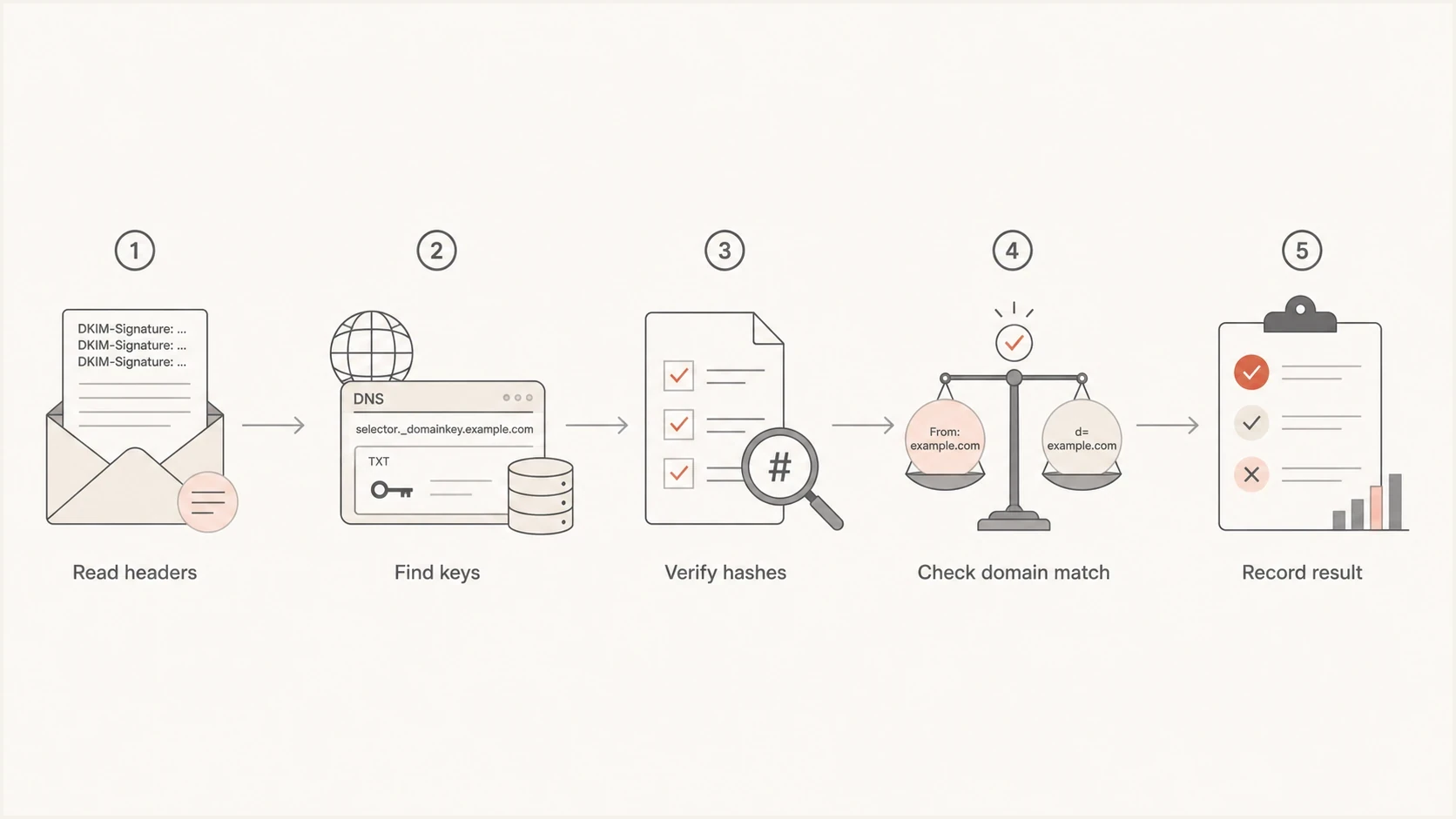
Receiver workflow for validating more than one DKIM signature.
When this is good, bad, or neutral
Multiple DKIM signatures are good when they give you operational flexibility without confusing DMARC. They are neutral when the extra provider signature is unrelated to your visible From domain but does not break anything. They are bad when the signature you rely on for DMARC fails and nobody notices because another signature gives the email a generic DKIM pass.
Usually fine
- Brand pass: A valid signature uses a domain with the required DMARC alignment to the visible From domain.
- Provider pass: A second provider signature also passes and identifies another responsible signer.
- Planned overlap: Two selectors sign during a controlled dual-signing transition.
Needs fixing
- Brand fail: The signature tied to your visible From domain fails validation.
- Only provider: The only passing signature belongs to a domain that does not have DMARC alignment.
- Unknown signer: A signature comes from a domain you do not recognize in the sending path.
DKIM result risk levels
A practical way to read multiple signature results in relation to DMARC.
Low risk
Brand pass
At least one passing signature has the required DMARC alignment with the visible From domain.
Review
Provider pass
A provider signature passes, but the aligned brand-domain result is missing or unclear.
Fix now
No match
No passing signature has DMARC alignment with the visible From domain.
How to read the headers
Start with the raw message headers, not the simplified delivery summary. Find each DKIM-Signature header and write down the d= and s= values. Then compare each passing d= domain with the visible From domain. Relaxed DKIM alignment, the default, requires the same organizational domain. Strict alignment requires an exact domain match. Your DMARC record's adkim= setting determines which test applies.
Authentication results with one matching DKIM passtext
Authentication-Results: mx.example.net;
 dkim=pass header.d=mail.example.com header.s=brand2026;
 dkim=pass header.d=esp.example header.s=esp1;
 dmarc=pass header.from=example.com
This is the clean result. The brand-domain signature passes with relaxed alignment, the provider signature also passes, and DMARC passes. Document both signing domains, keep the provider signature if it is part of the platform's standard send path, and focus alerts on whether the aligned brand-domain signature keeps passing.
Authentication results with DKIM pass but DMARC failtext
Authentication-Results: mx.example.net;
 dkim=fail header.d=mail.example.com header.s=brand2026;
 dkim=pass header.d=esp.example header.s=esp1;
 dmarc=fail header.from=example.com
This result needs work. The message has a DKIM pass, but that pass belongs to a provider domain. The brand-domain signature failed, so DKIM does not satisfy DMARC for the visible From domain. At that point, inspect body changes, footer injection, header rewriting, selector DNS, and whether the platform signs before or after content changes.
How to check your own mail
A quick check starts with one real email. Send it to a mailbox where you can view full headers, then inspect the DKIM results and signing domains. For DNS validation, use the DKIM checker to confirm that the selector and public key publish correctly.
- Send sample: Use the same platform, From address, and sending domain as production mail.
- Open headers: Find each DKIM result and match it to the corresponding signature header.
- Check DNS: Confirm that every active selector has the expected public key at its own DNS name.
- Compare domains: Make sure at least one passing signature has the DMARC alignment your policy requires.
- Repeat routes: Test newsletters, lifecycle mail, sales mail, and support mail separately.
DKIM checker
Check selector records and public key configuration.
?/7tests passed
A single DNS check is useful, but it does not prove every route works. If you send through several platforms, run a broader domain health check and then test live messages from each source. Multiple DKIM signatures only make sense after you map which service adds which signature.
What it means for DMARC monitoring
DMARC aggregate reports show which sources passed or failed SPF, DKIM, and DMARC by domain. For messages with several DKIM signatures, current aggregate reporting guidance gives priority to a strict aligned pass, then a relaxed aligned pass, other DKIM passes, and failures. A report can therefore include a useful subset rather than every signature seen in the raw header. A provider pass can still hide a brand-domain DKIM issue if you look only for any DKIM pass.
Suped's product groups DMARC aggregate data by source and signing domain, so teams can separate an aligned brand-domain failure from an unrelated provider-domain pass. It also keeps authentication history and remediation steps together, which helps when the same platform signs differently across mail routes. That is the concrete workflow behind ongoing DMARC monitoring in Suped.
DMARC record detail view showing SPF, DKIM, DMARC, rDNS diagnostics, and DNS records
A practical workflow is to confirm the DNS records, send real mail, inspect headers, then monitor the reports over time. If the same source sometimes signs correctly and sometimes fails, that usually points to routing differences, content changes after signing, or separate templates going through different outbound systems. Suped helps spot that pattern because it keeps source-level authentication results in one place.
Do not remove a signature just because there are two
Removing a provider signature without understanding the send path can break a working setup. First identify which signature satisfies DMARC, which signature belongs to the provider, and whether both are required by the platform. If you are intentionally using double DKIM signing, keep a clear owner for each selector and a retirement date for temporary keys.
Views from the trenches
Best practices
Map every DKIM signing domain to a known sender, owner, platform, and DNS selector.
Check DMARC using the visible From domain, not only the generic DKIM pass result.
Retire temporary DKIM selectors after migrations and key rotations are complete.
Common pitfalls
Treating any DKIM pass as enough can hide a failed brand-domain DKIM signature today.
Leaving old selectors active makes ownership harder to audit during later issues.
Assuming the first DKIM header wins can send troubleshooting in the wrong direction.
Expert tips
Keep a short DKIM register that lists domains, selectors, platforms, and purpose.
Test each production mail route because templates and gateways can change signing.
Alert on brand-domain DKIM failures even when a provider-domain signature still passes.
Marketer from Email Geeks says multiple DKIM signatures are common and usually fine when each signer is known.
2024-01-30 - Email Geeks
Marketer from Email Geeks says the organizational domains often differ because the ESP adds its own signature.
2024-01-30 - Email Geeks
The practical takeaway
Two DKIM signatures on one email are usually normal. The common pattern is a brand-domain signature plus a provider signature. That setup is fine when the brand-domain signature passes and has the DMARC alignment required for the visible From domain.
The fix path is clear. Identify each signing domain, confirm each selector in DNS, test real messages, and monitor the results by source. Do not remove a signature until you know why it exists. If the brand-domain signature fails, fix that first, because a provider-domain DKIM pass does not protect the DMARC result for the brand.
For ongoing operations, Suped gives teams one place to monitor DMARC, SPF, DKIM, blocklist (blacklist) status, and related deliverability signals. Multiple signatures are a routing and ownership question that needs clear reporting over time.




