What does an Authentication Results Header contain when DKIM passes but DomainKeys fail?

Updated on 11 Aug 2026: We clarified trust boundaries and brought the DKIM and DMARC guidance up to current standards.
An Authentication-Results header with DKIM passing and DomainKeys failing contains two independent authentication verdicts. The receiver verified a modern DKIM signature, then reported that a separate legacy DomainKeys signature failed. In the supplied example, the DomainKeys verifier says the message was altered.
This is a mixed legacy result, not a contradiction. DKIM pass means the DKIM-Signature validated for the signing domain shown in the header, such as header.d. DomainKeys fail means a separate, older DomainKeys check failed. DMARC uses an aligned DKIM or SPF pass. It does not use legacy DomainKeys.
Direct answer
The header contains the authserv-id of the receiver that wrote it, one method=result pair for each check, and supporting properties such as the signing domain. It can also contain comments and a free-form reason. Here, DKIM passed for the reported signing domain, while DomainKeys failed with a message-altered reason.
What the header contains
Authentication-Results is a container for one or more method results. A receiving server can write DKIM, SPF, DMARC, ARC, DomainKeys, and other local results into the same header field. Another server in the path can add its own Authentication-Results header later, so a single message often carries more than one.
Example Authentication-Results headerstext
Authentication-Results: filter.receiver.example (local-filter);
  dkim=pass (1024-bit key) header.d=sender.example;
  domainkeys=fail (1024-bit key)
    reason="fail (message has been altered)"
    header.from=user@sender.example
    header.d=sender.example

Authentication-Results: mx.receiver.example;
  dkim=pass (1024-bit key)
    header.d=sender.example
    header.i=@sender.example
    header.b=HP7xiNlf
|
|
|
|---|---|---|
authserv-id | Service that wrote the result | Confirm it is trusted |
dkim=pass | DKIM verified | Check DMARC alignment |
domainkeys=fail | Historic method failed | Treat as legacy context |
header.d | Signing domain | Compare it with From |
reason | Free-form verifier explanation | Use it as a clue |
Compact reading guide for the fields in this kind of header.
The first part, filter.receiver.example, is the authentication service identifier. It identifies the system making the assertion. The comment local-filter says which local mail filter performed the check. The second header from mx.receiver.example is a separate assertion from another verifier. Different verifiers can support different methods and produce different comments.
The DKIM result has the modern authentication value. It shows a passing result and a signing domain. The 1024-bit key in this older sample meets DKIM's current RSA minimum, but current guidance recommends at least 2048 bits for signing. The DomainKeys result explains what a historic checker saw and does not overturn the DKIM pass.
Which Authentication-Results header to trust
Authentication-Results has no built-in proof that its assertions are genuine. Trust the field only when its authserv-id belongs to the receiving system or another service inside that system's configured trust boundary. A conforming border mail server removes or obscures forged fields that claim to come from its own trusted domain.
|
|
|
|---|---|---|
Authentication-Results | Results from the named authentication service | Trust only a recognized authserv-id |
Authentication-Results-Original | A non-standard saved or renamed earlier result | Use as path history, not the final verdict |
ARC-Authentication-Results | Results observed by an ARC participant | Use with a validated ARC chain and local trust |
How similarly named authentication headers differ.
Do not select a header only because it appears first or last in raw source. Header order can change when gateways prepend fields. Identify the service that made the final delivery decision, confirm its authserv-id, and treat earlier-hop results as context.
Why DKIM can pass while DomainKeys fails
DKIM and DomainKeys are related, but they are not the same check. DomainKeys is the older mechanism and now has Historic status. DKIM replaced it with a different signature header and verification rules. A message can carry both signatures, or a receiver can attempt both checks, and each check can reach a different result.
DKIM pass
- The receiver verified the DKIM-Signature with the public key for its selector and signing domain.
- DMARC can use this pass when the signing domain aligns with the visible From domain.
- Fields such as header.d, header.i, and header.b identify the signature that passed.
- Give this result priority when deciding whether the signed message authenticated.
DomainKeys fail
- The receiver ran a Historic DomainKeys check that modern DMARC does not use.
- The older signature or its key failed that verifier's checks.
- In this example, message has been altered means the legacy hash comparison failed.
- Use this result as context, not the main modern authentication verdict.
The phrase message has been altered usually means the canonicalized message did not match the signed hash. Body edits, header rewriting, line-ending conversion, footer insertion, link wrapping, or verifier handling can cause that result. The two signatures can use different canonicalization rules and cover different headers, so one can survive a change that breaks the other.
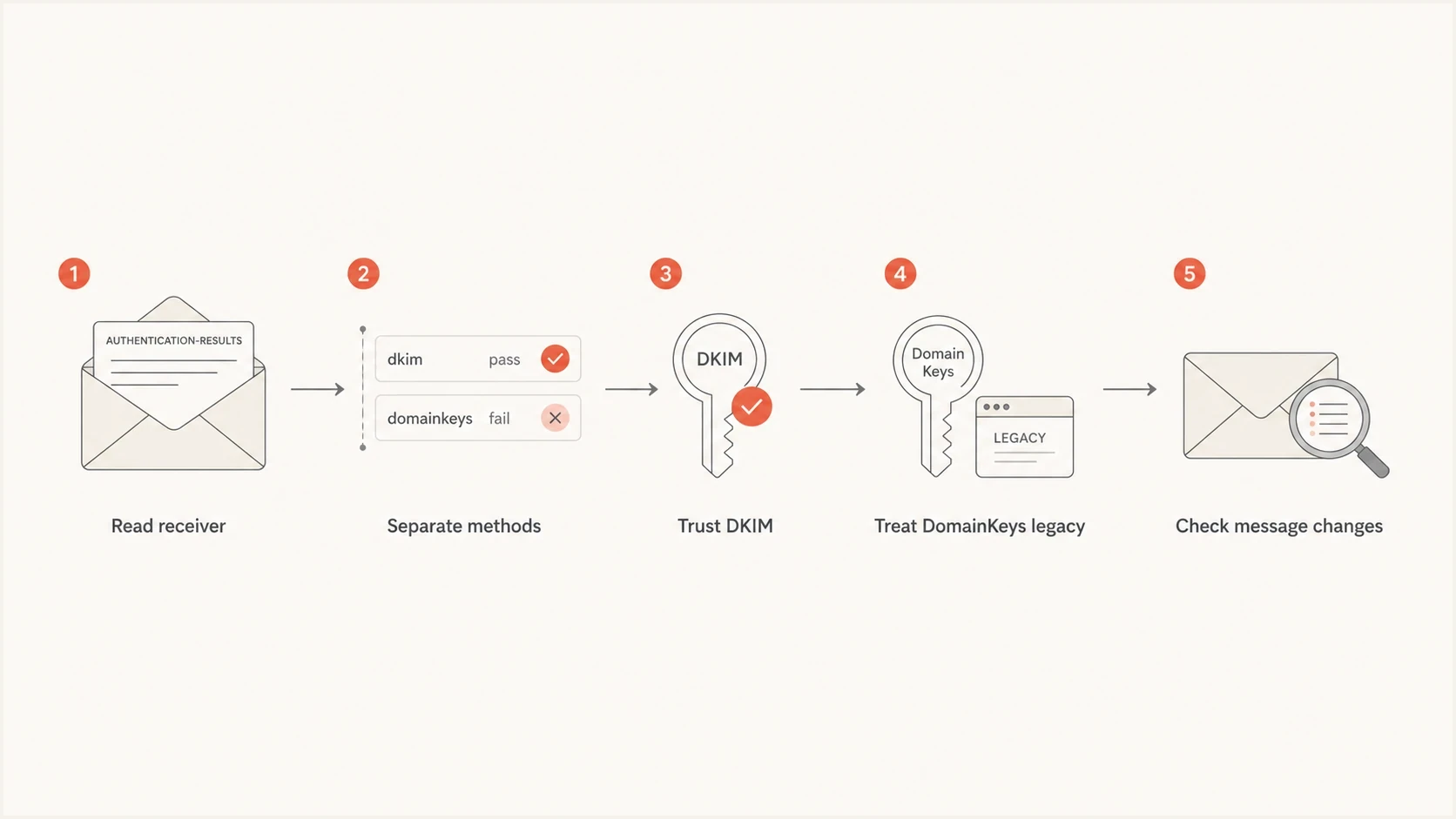
Flowchart showing how to read DKIM pass and DomainKeys fail results.
The two results can also use different keys. Seeing 1024-bit in both comments does not mean the same key was used. The DKIM selector and the DomainKeys selector can publish different public keys, and a failure in one method does not prove a failure in the other.
How to diagnose this header
Diagnose this header by separating the modern authentication question from the legacy result. First, determine whether DKIM passed with a signing domain that aligns with the visible From domain. Then decide whether the DomainKeys failure points to a message-handling problem that still affects users.
- Use the authserv-id to identify the Authentication-Results field written by the system responsible for final filtering.
- Read dkim=pass and domainkeys=fail as independent checks, not as one combined verdict.
- Confirm header.d and any reported signature properties. If header.s is absent, read the s= selector in DKIM-Signature.
- Compare the DKIM signing domain with the visible From domain under the published DMARC alignment mode.
- Review forwarding, filtering, footer insertion, or rewriting that changed the message after signing.
For a focused selector and public-key check, the DKIM checker confirms the DNS side of the DKIM result before message-body changes are investigated.
DKIM checker
Check selector records and public key configuration.
?/7tests passed
A DNS check does not prove that a specific message remained unchanged, but it removes a common source of confusion. If the selector publishes the expected key and the receiving header says DKIM passed, investigate the message path instead of rebuilding a working DKIM record.
Do not overreact to DomainKeys
A DomainKeys failure on a message with DKIM pass is not enough reason to change DMARC policy, reject the sender, or declare the signing domain broken. Treat it as a legacy diagnostic signal unless modern authentication also fails or delivery is affected.
- If recipients are not rejecting the mail, the DomainKeys result is usually informational.
- Do not loosen DMARC because a legacy method failed while DKIM passed.
- Save the full headers before testing because forwarded copies can change the evidence.
- Send a fresh message to a controlled mailbox and compare the new headers.
Where Suped fits
One header explains one delivery. Domain-level operations also need to show whether the pattern repeats across real traffic, which sending sources are affected, and whether aligned authentication still passes at scale. The domain health checker provides a broader configuration check.
Suped's product groups DMARC aggregate data by source, identifies alignment failures, and tracks remediation over time. Teams can connect the underlying SPF or DKIM evidence to alerts and policy staging. Hosted SPF, Hosted MTA-STS, SPF flattening, and blocklist (blacklist) monitoring are available in the same workflow when those checks are relevant.
DMARC record detail view showing SPF, DKIM, DMARC, rDNS diagnostics, and DNS records
With DMARC monitoring, a team can verify sending sources, watch aligned pass rates, receive alerts, and stage policy changes without treating one unusual legacy header as the whole traffic picture.
What to do with the result
If the question behind the header is where to report spam, do not use DomainKeys fail as the reporting target by itself. Use the visible From domain, Return-Path, Received chain, DKIM signing domain, and the party responsible for the traffic. Authentication shows whether a domain authorized its use in the relevant protocol. It does not always identify the correct abuse contact.
- When DKIM passes, treat the signature as valid for its signing domain, then check whether that domain aligns for DMARC.
- When DomainKeys fails, record it as a legacy clue and investigate message changes only if there is user impact.
- When DMARC passes, the use of the visible From domain has been validated, but message safety and inbox placement remain separate decisions.
- When DMARC fails, troubleshoot aligned DKIM or SPF before spending time on DomainKeys.
- When headers conflict, trust the recognized authserv-id for the system that made the final delivery decision.
When to investigate
Use delivery and authentication impact to decide how deep to go.
No user impact
Log only
DKIM passes and delivery is normal.
Mixed headers
Compare
Different receivers add different comments.
DMARC failure
Fix now
Modern aligned authentication is failing.
Spoofing risk
Escalate
Unauthenticated mail is reaching users.
When the same domain shows repeated DKIM problems across receivers, move into a full DKIM investigation. Review DKIM troubleshooting and compare the message headers with selector DNS records and any forwarding path that modifies the mail.
Views from the trenches
Best practices
Separate DKIM and DomainKeys results before deciding whether a sender has failed authentication.
Keep the full original headers because forwarded copies can change the authentication evidence.
Trust the final receiver's Authentication-Results header over copied headers from earlier hops.
Common pitfalls
Treating a legacy DomainKeys fail as a DMARC failure leads to unnecessary DNS changes.
Comparing two verifier comments without checking authserv-id can create false conflicts.
Assuming 1024-bit comments mean the same key ignores selectors and legacy key locations.
Expert tips
Retest with a clean message path before blaming DKIM records for a legacy DomainKeys fail.
Look for body changes, footers, and header rewrites when the reason says message altered.
Use aggregate DMARC data to confirm whether one strange header reflects a wider pattern.
Marketer from Email Geeks says a local filter can add a DomainKeys result while another verifier adds only DKIM results.
2021-11-16 - Email Geeks
Marketer from Email Geeks says a DKIM-only verifier can omit legacy DomainKeys results that another local filter reports.
2021-11-16 - Email Geeks
The practical answer
When DKIM passes but DomainKeys fails, Authentication-Results says the modern signature validated and the Historic signature did not. DKIM authenticated the reported signing domain. DomainKeys saw the failure shown in its reason string. DMARC should be judged using an aligned DKIM or SPF pass, not DomainKeys.
Do not change DMARC policy, blame a sending domain, or report spam based only on the DomainKeys failure. Confirm the trusted authserv-id and DKIM fields, check the DMARC result, preserve the full headers, and investigate message modification when the pattern repeats or delivery is affected.
- DKIM pass carries the modern authentication value for its signing domain.
- DomainKeys fail explains what the older check saw.
- DMARC and source-level evidence determine whether there is a current authentication problem.
- Domain-level monitoring shows whether the result is isolated or recurring.




