What causes Gmail DKIM domain rate limiting errors and how are they related to SPF?

Updated on 12 Aug 2026: We added Google's current 4.7.28 recovery steps and clarified how forwarding changes SPF, DKIM, and DMARC diagnosis.
Gmail DKIM domain rate limiting errors occur when Gmail sees an unusual rate of unsolicited mail tied to the DKIM signing domain in the message. The DKIM-domain version of 421 4.7.28 is a temporary traffic and reputation deferral, not proof that the DKIM DNS record is broken. Gmail also tracks volume, recipient feedback, sending history, and quotas per DKIM and SPF domain, with a separate quota for the sending IP. SPF is related because Gmail can apply the same rate-limit logic to the envelope sender domain used for SPF. When the same stream authenticates with SPF and DKIM, the SPF identity often points to the sender causing the DKIM-domain limit.
The direct fix is to stop sending to Gmail for at least 10 minutes, isolate the source creating the deferrals, then verify that SPF, DKIM, DMARC, reverse DNS, TLS, and unsubscribe handling meet Google's sender guidelines. Treat the error as a queue and reputation incident with a possible quota component. Check DNS syntax after identifying the authenticated identity and traffic source involved.
Gmail 421 4.7.28 DKIM-domain deferraltext
421-4.7.28 Gmail has detected an unusual rate of unsolicited mail
421-4.7.28 originating from your DKIM domain [example.com 15].
421-4.7.28 Mail sent from your domain has been temporarily rate limited.
The odd version where the bracketed DKIM domain is blank, such as [ 15], does not identify a blank DKIM domain. Check the complete SMTP response in the mail server log and inspect the message's Authentication-Results and DKIM-Signature headers before concluding that the signature was malformed. The useful part is the SMTP status: 421 4.7.28 is a temporary deferral, but blindly retrying the same stream keeps pressure on the affected Gmail quota.
What the Gmail error means
Gmail names DKIM or SPF in this error because those authentication identities tell Gmail which domain is responsible for the message stream. DKIM points to the signing domain in the d= tag. SPF points to the envelope sender domain, and in some cases the HELO domain. DMARC then checks whether the visible From domain aligns with an authenticated SPF or DKIM domain.
|
|
|
|---|---|---|
DKIM | d= | Signer |
SPF | MAIL FROM | Envelope |
DMARC | From | Domain alignment |
Reputation or quota | 4.7.28 | Traffic quality and volume |
The same Gmail deferral can name different authenticated identities.
Do not treat it as a DKIM syntax failure
A valid DKIM signature can still be rate limited. DNS syntax checks answer a different question: whether the public key, selector, and signature are readable. For that check, use a DKIM checker and confirm the selector resolves before changing keys.
- Status: A 421 response asks your mail server to try again later.
- Cause: The DKIM-domain wording points to unusual unsolicited-mail volume or related reputation and quota data.
- Priority: Find the traffic source before rotating DKIM keys or editing stable DNS.
Read the full enhanced status code before changing authentication. 421 4.7.27 explicitly says SPF did not pass, and 421 4.7.30 explicitly says DKIM did not pass. Those codes require authentication repair. A 550 5.7.26 guide covers a permanent unauthenticated-sender rejection. By contrast, the DKIM-domain form of 421 4.7.28 says Gmail temporarily slowed an authenticated identity because of traffic and reputation signals.
How SPF is connected
SPF does not validate DKIM. The two checks are separate. The connection is that both checks create authenticated domain identities that Gmail can use when it scores a stream. A sender can have SPF passing for one envelope domain, DKIM passing for another signing domain, and a visible From domain that aligns with one of them for DMARC.
What DKIM tells Gmail
- Signer: The d= value says which domain signed the message.
- Integrity: The signature proves selected headers and body content were not changed.
- Reputation: Gmail can associate traffic quality with that signing domain.
What SPF tells Gmail
- Sender: The envelope sender domain identifies the bounce path.
- Authorization: The SPF record says which IPs can send for that domain.
- Clue: A poor SPF-authenticated source can explain a related DKIM deferral.
This is why an SPF-domain warning can appear before a DKIM-domain warning for the same incident. If a campaign, platform account, or compromised integration sends unwanted mail with both SPF and DKIM passing, Gmail has more than one domain identity tied to the same behavior. Pausing the SPF-authenticated sender can stop the DKIM-domain deferrals because the underlying traffic source has stopped.
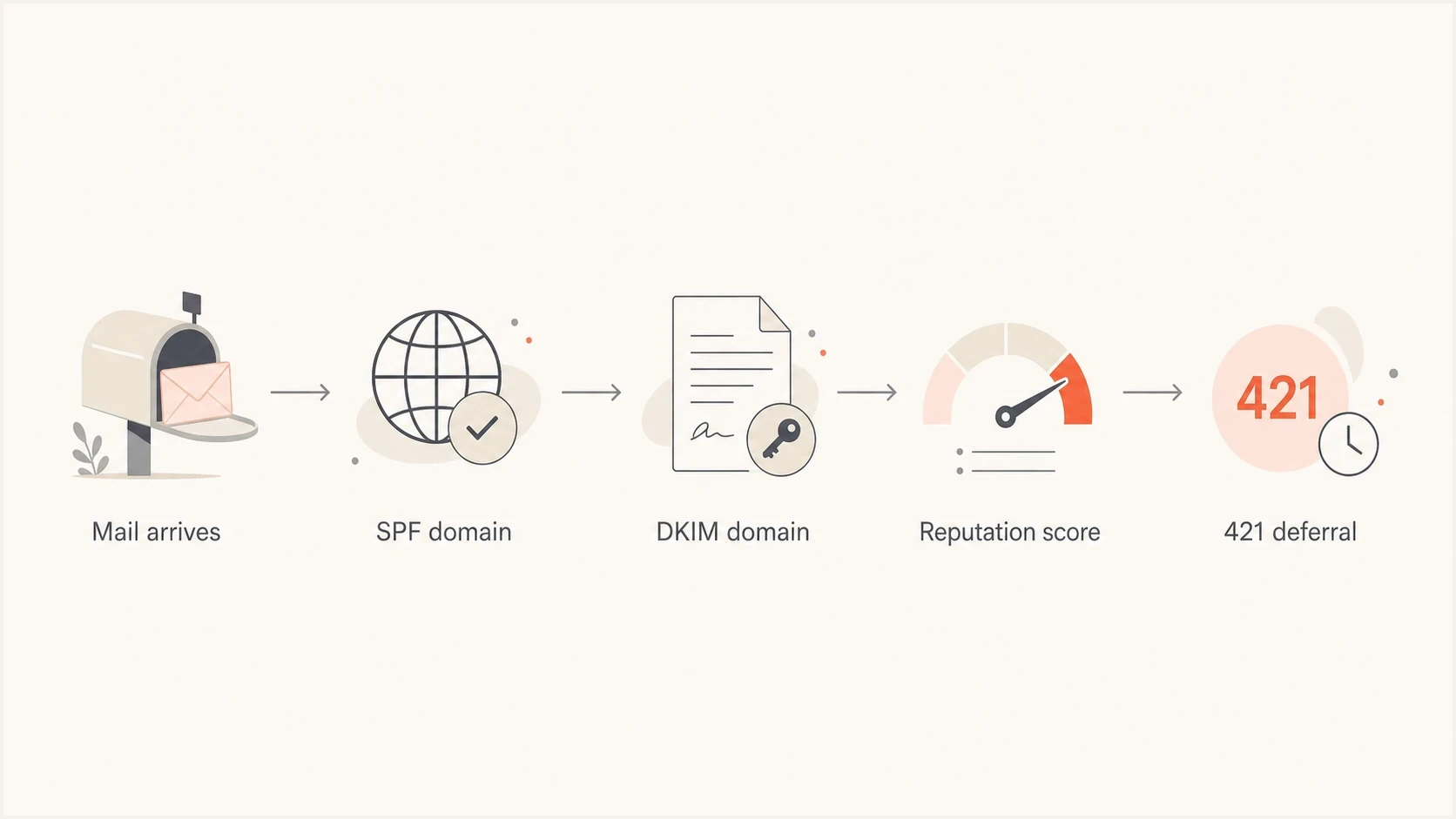
Flowchart showing SPF and DKIM identities feeding into Gmail reputation scoring and a 421 deferral.
A second DKIM signature is not an automatic fault. Many legitimate streams have more than one signature because an email service provider signs with its own domain and the customer domain signs too. Focus on which signature passed, which authenticated domain aligns with the From domain for DMARC, and which envelope sender SPF authenticated.
How forwarding changes the diagnosis
Forwarding creates a different SPF pattern. A simple forward sends the message through a new IP that the original envelope sender's SPF record does not authorize, so SPF often fails even though the original sender configured SPF correctly. Do not add a forwarding service's IP addresses to the original sender's SPF record unless that service is authorized to originate mail for the domain.
- SRS: Sender Rewriting Scheme changes the envelope sender so SPF can pass for the forwarder's domain, but that domain usually does not align with the original visible From domain.
- DKIM: An intact signature can survive forwarding and preserve DMARC through aligned DKIM. Changes to signed headers or the body can break it.
- ARC: Authenticated Received Chain lets a forwarder preserve prior authentication results, but the receiving system decides how much trust to give that chain.
- Scope: A 4.7.28 response on forwarded traffic can point to the forwarder's shared domain or IP quota, not the original sender's DNS configuration.
Trace the Received, Return-Path, Authentication-Results, and ARC headers to determine whether Gmail evaluated the original sender, the forwarder, or both. If only forwarded copies fail, investigate the forwarding path before editing the original domain's SPF record or rotating its DKIM key.
How to investigate it
Start by grouping deferrals by authenticated identity, not by recipient count alone. Check whether the same MAIL FROM, DKIM d= value, sending IP, campaign, or sending account appears across the Gmail responses. Then run a domain health checker check so a separate DNS or authentication fault does not distract from the incident.
- Confirm: Verify the response is 421 4.7.28 and save the complete SMTP text that identifies the affected DKIM domain, SPF domain, or IP.
- Group: Bucket logs by DKIM signing domain, SPF envelope domain, IP, and source.
- Compare: Look for one sender that appears in both SPF-domain and DKIM-domain deferrals.
- Pause: Stop sending to Gmail for at least 10 minutes and disable the suspect campaign or integration.
- Retry: After 10 minutes, retry through one connection. If it fails, wait another 10 minutes. If it succeeds, add connections one at a time while monitoring responses.
Email tester
Send a real email to this address. Suped shows a results button when the test is ready.
?/43tests passed
A real test message exposes the exact headers Gmail and other receivers evaluate. Check Authentication-Results, DKIM-Signature, Return-Path, List-Unsubscribe, Message-ID, and the final From header. If the message has valid authentication but still hits a rate limit, stop editing the TXT records and reduce the affected stream.
Signals that point to the SPF sender
- Sequence: SPF-domain deferrals appear first, then DKIM-domain deferrals follow.
- Scope: Only mail using one envelope sender or one integration is affected.
- Relief: Pausing that SPF-authenticated source stops new DKIM deferrals.
- Headers: The same visible From domain or signing domain appears across the affected mail.
What to fix first
Fix the traffic source before the DNS record because the DKIM-domain form of 4.7.28 reports unusual unsolicited-mail volume, not missing authentication. DNS still matters, especially for bulk senders, but a clean SPF record does not rescue a list with high complaints, stale recipients, misleading headers, or a shared IP with poor reputation.
Complaint rate guidance
Google's published spam-rate guidance for bulk senders.
Target
under 0.10%
Keep the reported spam rate below this level.
Warning
0.10% to under 0.30%
Reduce volume and inspect recipient quality.
Avoid
0.30% or higher
Google says to avoid ever reaching this level.
Fix order
- Source: Pause the sender, campaign, automation, or integration tied to the deferrals.
- List: Remove stale, unconfirmed, bounced, and complaint-prone recipients.
- Headers: Confirm From, Reply-To, Message-ID, unsubscribe, and branding are clear.
- DNS: Verify SPF includes only approved senders and stays under lookup limits.
- Policy: Keep DMARC reporting active while tightening enforcement in stages.
Starter DMARC record while investigatingdns
_dmarc.example.com TXT
"v=DMARC1; p=none; rua=mailto:dmarc@example.com"
If the SPF sender is unauthorized, remove it from the SPF record and block the account or API key that generated the mail. If the sender is authorized but the mail is unwanted, keep the SPF record intact and fix the audience, cadence, or content. SPF tells Gmail who was allowed to send, not whether the message was wanted.
Where Suped fits
Suped is our DMARC reporting and email authentication platform. For this workflow, it puts source-level DMARC results, authentication diagnostics, alerts, and blocklist (blacklist) monitoring in one operational view. That helps when a Gmail deferral crosses sender source, authentication, and reputation data.
Use Suped's DMARC monitoring to identify the source, confirm whether SPF and DKIM pass for that source, inspect failures by provider, and send the fix steps to the team that controls the sender. The goal is to determine which source to pause and whether the correction belongs in DNS or the sending system.

Issue steps to fix dialog showing the issue overview, tailored fix steps, and verification action
|
|
|
|---|---|---|
DKIM deferral | Issues | Pause source |
SPF source | Source table | Verify sender |
DNS drift | Diagnostics | Fix record |
Reputation risk | Alerts | Reduce volume |
Suped turns the Gmail error into an operational workflow.
This workflow is useful for MSPs and larger teams because the person who sees the bounce is rarely the same person who controls DNS or the sending system. Suped's multi-tenant view, client reporting, issue detection, and real-time alerts help route the incident to the right owner.
Views from the trenches
Best practices
Separate bulk streams by domain so one bad sender cannot pressure core Gmail delivery.
Treat 421 4.7.28 as a reputation deferral first, then confirm DNS syntax separately.
Pause the suspect SPF-authenticated source before changing stable DKIM selectors in DNS.
Common pitfalls
Chasing an empty bracket value as a real DKIM domain wastes time in Gmail incident logs.
Assuming SPF and DKIM are unrelated hides shared sender reputation problems on mixed traffic.
Rotating DKIM keys during a rate limit can remove history without fixing complaints.
Expert tips
Compare deferrals by envelope sender, DKIM d value, IP, campaign, and sending vendor.
Keep DMARC reports active so source changes are visible before Gmail starts deferring.
Use a quarantine or reject policy only after every approved source is passing cleanly.
Marketer from Email Geeks says the empty DKIM domain brackets look like a Gmail formatting defect, not proof that a blank domain is being rated.
2023-11-23 - Email Geeks
Marketer from Email Geeks says the first incidents looked mild and affected a narrow sender set, which made a source-level reputation issue more likely.
2023-11-23 - Email Geeks
The practical answer
Gmail's DKIM-domain rate limit is caused by unusual unsolicited-mail volume and related reputation or quota pressure tied to an authenticated domain, not by SPF breaking DKIM. SPF is related because the same traffic source often has an SPF identity and a DKIM identity. When Gmail flags the SPF domain and then the DKIM domain, isolate the shared sender.
- Answer: The root cause is rate or reputation pressure from a sender, campaign, list, or compromised source.
- SPF link: The SPF envelope sender can expose which source Gmail is grouping with the DKIM signer.
- Fix: Pause the affected stream, reduce complaints, confirm authentication, and resume one connection at a time.
Change DKIM selectors only after finding a key, selector, or signing failure. For the DKIM-domain form of 421 4.7.28, source isolation is the stronger first move. Once the source is clean, retry the queue according to Gmail's gradual recovery steps.




