What are the best practices for changing an email's return-path domain, especially regarding DKIM and warm-up?

Published 22 Jun 2025
Updated 11 Aug 2026
13 min read
Summarize with
Updated on 11 Aug 2026: We added current DMARC alignment guidance and refined the staged return-path rollout.
The safest way to change an email's return-path domain is to add an aligned DKIM signature on a domain you control, test it on production messages, introduce the new signature across a measured traffic segment, and then move the return-path domain with a controlled volume ramp. A DKIM-only change on an established From domain usually does not need a full warm-up. A previously unused DKIM signing domain at high volume still deserves a staged introduction because receivers track domain-level reputation and sending limits.
If the IP address and visible From domain stay the same, you are not restarting the whole sending program. The IP has history, the brand domain has history, and the recipient mix is known. However, the SPF identity in the MAIL FROM path changes when you move away from a generic ESP return-path. Receivers can treat the new bounce domain as a new domain signal, so do not move 300K daily messages in one day unless the changed path has already been tested at comparable scale and rollback is immediate.
Do not change the SPF return-path identity before aligned DKIM passes consistently on production mail. Without that stable DKIM identity, the cutover changes the only brand-controlled authenticated domain signal at full volume.
The direct answer
The safest order is DKIM, observation, return-path cutover, and then a volume ramp. DKIM gives mailbox providers a stable domain in the signed header. The return-path domain, also called the envelope sender or smtp.mailfrom, is not the only domain used for reputation. A DKIM d= value under your organizational domain gives receivers another authenticated identity to evaluate, provided it aligns with the visible From domain under the DMARC alignment mode in use.
- DKIM first: Sign with an aligned domain you control before changing the return-path domain.
- Measured DKIM rollout: Test every mail stream and stage a new signing domain if it has not carried this volume before.
- Return-path ramp: Ramp the new return-path domain because the SPF identity and bounce path have changed.
- Provider cohorts: Track Gmail, Microsoft, Yahoo, and smaller mailbox domains separately.
- Rollback ready: Keep the old return-path routing available until authentication and delivery metrics are stable.
The caveat is volume and list quality. At 300K messages a day, even a small change can expose a provider-specific problem quickly. Use a shorter ramp for a known dedicated IP with strong engagement and consistent cadence. Use a slower ramp when the program has no aligned DKIM, a new bounce subdomain, high complaint risk, or many low-engagement addresses.
Warm-up need by change type
Use the changed identity and its prior volume history to choose the rollout pace.
Add established aligned DKIM
Low
Test live mail, then send normally when the same domain already has stable history.
Add a new DKIM signing domain
Medium
Introduce it on a measured segment before placing it on all bulk traffic.
Change return-path
Medium
Ramp because the SPF identity and operational bounce path change.
New IP plus new domains
Critical
Treat this as a full IP and domain warm-up.
What changes when return-path changes
The return-path domain is where bounces go and where SPF is evaluated. More precisely, the sending system sets the RFC5321.MailFrom address, also called the envelope sender, and the receiving system writes that address into the final Return-Path header. Do not add or rewrite the Return-Path header in the message itself. If your ESP previously used a generic envelope-sender domain, moving to bounces.example.com changes the authenticated SPF domain and the operational bounce route.
Before the change
- Return-path: The bounce domain belongs to the ESP.
- SPF identity: Receivers evaluate the ESP domain in the envelope sender.
- Bounce control: The ESP owns the DNS identity and processes failures.
After the change
- Return-path: The bounce domain sits under a domain you control.
- SPF identity: Receivers evaluate your delegated domain in the envelope sender.
- Bounce control: You own the domain while the ESP can still process failures.
That is why DKIM matters. SPF reputation can move when the return-path domain changes. DKIM reputation can stay tied to the signing domain. If the DKIM d= domain aligns with the visible From domain, it gives receivers an authenticated identity that does not depend on the bounce domain.
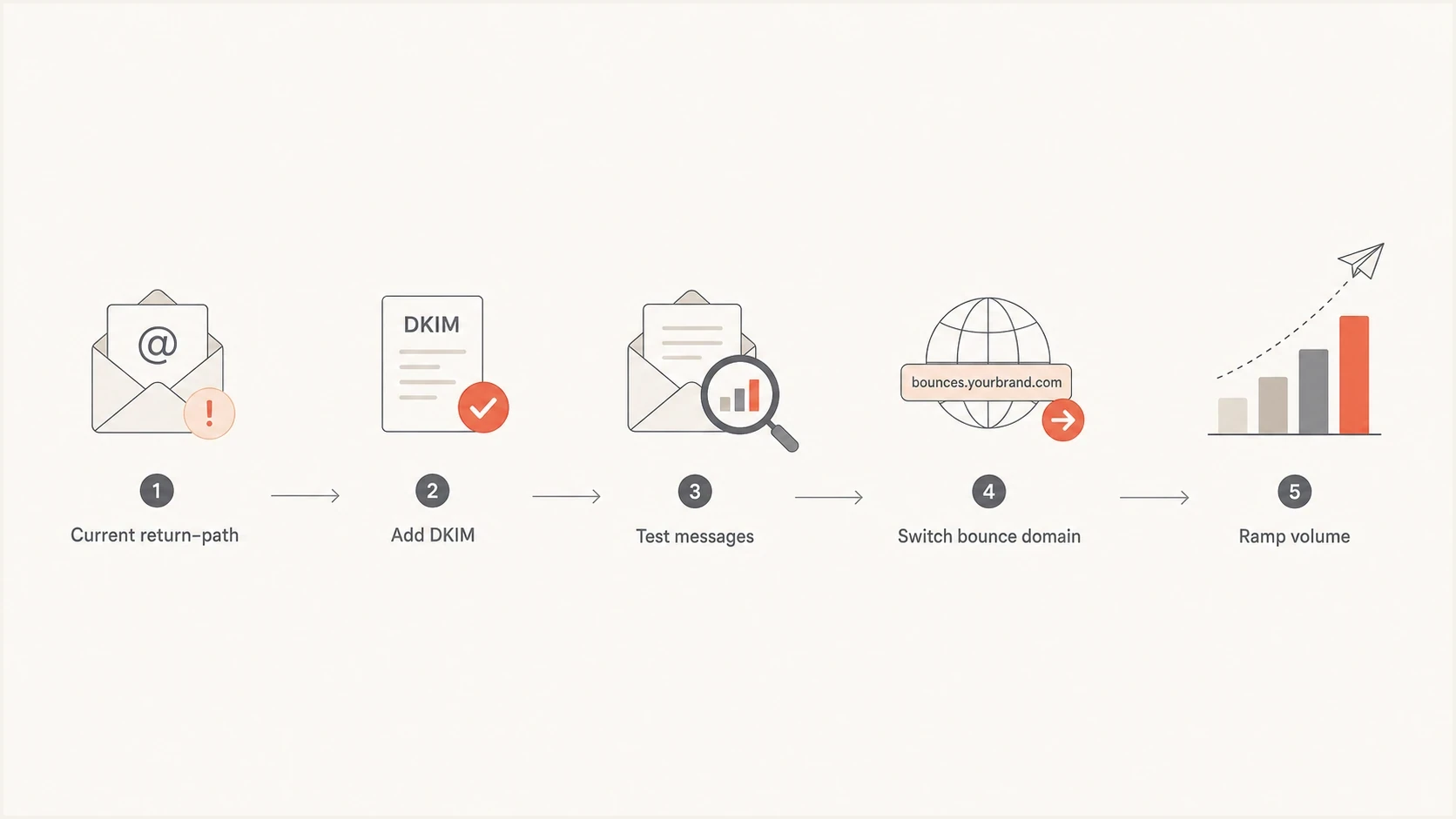
Return-path migration flow with DKIM testing before a staged bounce-domain cutover.
Choose relaxed or strict alignment
DMARC, now defined by RFC 9989, requires at least one authenticated identifier to align with the RFC5322.From domain. Relaxed alignment is the default and accepts identifiers that share the same organizational domain as determined through the DMARC DNS Tree Walk. Strict alignment requires an exact domain match. A return-path of bounces.example.com aligns with a From domain of example.com under relaxed SPF alignment, but it does not align when aspf=s. An exact, aligned DKIM signature can still produce a DMARC pass.
|
|
|
|---|---|---|
Relaxed | Same organizational domain | bounces.example.com can align with example.com |
Strict | Exact domain | The subdomain does not SPF-align with example.com |
How DMARC alignment mode affects a branded return-path subdomain.
Relaxed and strict alignment examplesDNS
_dmarc.example.com TXT "v=DMARC1; p=none; aspf=r; adkim=r; rua=mailto:d@example.com"
_dmarc.example.com TXT "v=DMARC1; p=none; aspf=s; adkim=s; rua=mailto:d@example.com"
Check the current aspf and adkim tags before cutover. If strict alignment is intentional, make the authenticated identifiers match exactly. Do not weaken an established DMARC policy to accommodate a migration mistake.
DKIM setup before the move
Enable DKIM with a domain that aligns with the visible From domain before touching the return-path. Under relaxed alignment, a signing subdomain can align when it shares the same organizational domain. Under strict adkim=s, the DKIM d= domain must match the From domain exactly. After publishing the selector CNAME or TXT record supplied by the ESP, send real messages through the production path. DNS validation alone is not enough because mail can have a valid public key and still fail DKIM after a signing or body-processing error.
Example DNS setupDNS
selector1._domainkey.example.com CNAME selector1.example.esp.net.
bounce.example.com CNAME bounce.esp.net.
_dmarc.example.com TXT "v=DMARC1; p=none; rua=mailto:d@example.com"
Follow the ESP's return-path delegation exactly. If bounce.example.com is a CNAME, do not publish a separate SPF TXT record at that same hostname because a CNAME owner cannot also hold other record data. Confirm that the delegated target authenticates the envelope sender and that test bounces reach the ESP's suppression process.
After publishing the DKIM record, check the selector, send a live message, and inspect Authentication-Results plus the DKIM-Signature header. A DKIM checker confirms that the selector and key are visible in DNS before live-message testing.
DKIM checker
Check selector records and public key configuration.
?/7tests passed
SPF and DKIM do not need to match each other. DMARC needs at least one of them to pass and align with the visible From domain. Relaxed alignment uses the same organizational domain, while strict alignment requires an exact domain match. This lets aligned DKIM run while the old return-path remains in place.
Give the new DKIM signature several normal production cycles before changing the return-path. The goal is to confirm stable signing across template types, tracking links, personalization, footers, and unsubscribe handling. If the signing domain has never carried the current volume, introduce the signature on a measured segment and expand only when authentication and delivery stay at baseline.
A practical warm-up plan
For a sender already delivering about 300K messages a day on the same IP and visible From domain, use a controlled migration instead of a full new-program warm-up. Start with the most engaged recipients, keep content and cadence consistent where possible, and split monitoring by mailbox provider. The new return-path should receive enough volume to expose problems without putting the whole program at risk.
Sample 12-day return-path ramp
A conservative starting schedule for a clean 300K-per-day sender after aligned DKIM has passed in production.
Daily volume
Those numbers are a starting point, not a universal schedule. Compare each cohort with its own established baseline. If complaints rise, unknown-user bounces spike, deferrals increase, or DKIM starts failing, hold the volume for at least one full send cycle. Stop the ramp immediately when the issue is authentication or bounce processing, then resume only after a low-volume production test passes.
- Day 0: Aligned DKIM passes, DMARC reports arrive, test bounces process, and rollback routing is ready.
- Days 1-3: Send only to high-engagement users and review each mailbox-provider cohort.
- Days 4-8: Add normal active users while keeping risky segments on the old path.
- Days 9-12: Move toward full volume only when bounce, complaint, and deferral rates stay normal.
- After full volume: Keep elevated monitoring for one to two weeks and retain the rollback path.
|
|
|
|---|---|---|
Strong history | 10-12 days | Normal cohorts |
No aligned DKIM | Do not switch | Add DKIM |
Mixed list | 2-4 weeks | Engaged first |
New IP | Full warm-up | Slow start |
Failures | Pause | Fix and retest |
Compact rollout choices for common sender conditions.
DMARC, SPF, and DKIM checks
Before the migration, check the whole sending path, not only the new CNAME. A return-path change touches SPF evaluation, bounce handling, DMARC reporting, and domain reputation signals. A domain health check can catch DNS and authentication mistakes before production traffic moves.
?
What's your domain score?
Deep-scan SPF, DKIM & DMARC records for email deliverability and security issues.
Confirm that the DKIM selector resolves, the return-path delegation is valid, the envelope sender passes SPF, DMARC reports show the expected aligned identity, and bounce processing suppresses hard failures. Also check that the new return-path domain has no unexpected blocklist or blacklist history. A typo or broken delegation can create delivery failures that resemble a reputation problem.
DMARC record detail view showing SPF, DKIM, DMARC, rDNS diagnostics, and DNS records
Suped's product supports this workflow by collecting DMARC aggregate reports, separating results by SPF and DKIM identity, comparing sending sources, and flagging authentication failures as volume changes. Pair those results with bounce logs and provider-specific delivery metrics because DMARC reports do not contain every SMTP response or inbox-placement result. The DMARC monitoring view also lets teams review the migration without parsing raw aggregate XML.
Common mistakes to avoid
The most expensive mistake is treating the return-path domain as a cosmetic setting. It is the domain in an authenticated SMTP identity and it controls bounce routing. Changing it without aligned DKIM removes the ESP's established SPF identity and replaces it with a domain receivers have not seen at the same scale. The message can still authenticate, but reputation is not a simple pass or fail result.
- Broken signature: A DKIM record in DNS does not prove production mail is signed correctly.
- Manual Return-Path: Adding this header does not change the SMTP envelope sender used by SPF.
- Alignment confusion: A subdomain aligns under relaxed mode but fails an exact strict comparison.
- Conflicting DNS: A CNAME hostname cannot also hold a separate SPF TXT record.
- One-day switch: Moving all volume at once can hide provider-specific problems until the impact is large.
- No fallback: DNS rollback and ESP routing must be ready before the first live send.
Certification, a warmed dedicated IP, stable cadence, and strong provider metrics all help. They do not give a new return-path domain direct history at the same volume. Treat those strengths as reasons to use a measured ramp, not reasons to skip it. Keep an established DMARC enforcement policy in place when aligned DKIM has already been verified.
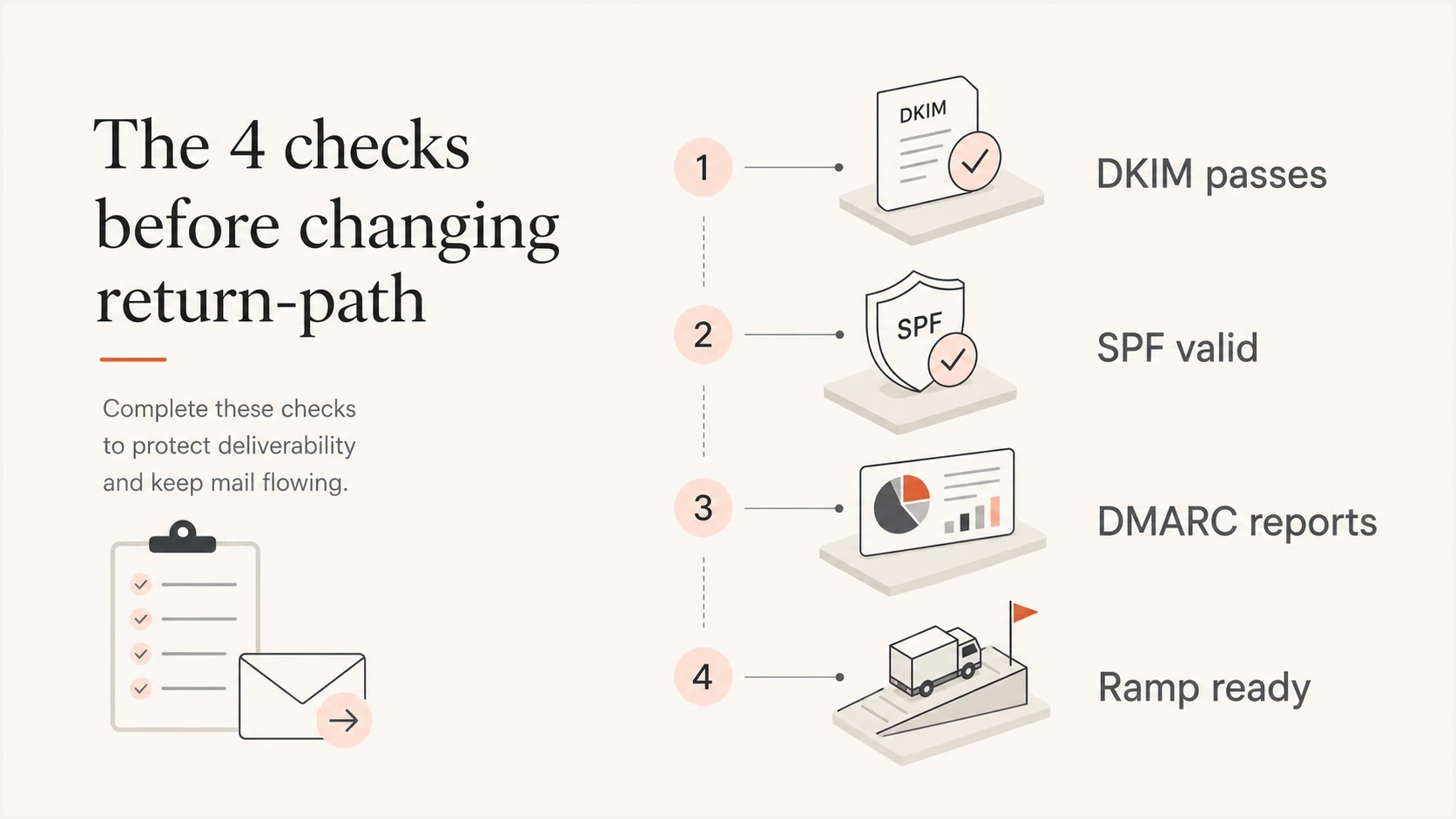
DKIM, SPF, DMARC reporting, and volume-ramp checks before a return-path change.
Rollout monitoring
During the ramp, monitor authentication results and delivery symptoms. Check whether aligned DKIM, SPF, and DMARC results change for the migrated traffic. Then compare hard bounces, deferrals, complaint rate, engagement, and SMTP response codes with the same provider cohort's established baseline. Retain the full response text because a provider-specific rate-limit code can identify the affected identity.
Daily migration decisions
Use established baselines and the changed traffic segment instead of arbitrary universal thresholds.
Authentication
Increase
Aligned results match the pre-cutover baseline and test bounces process correctly.
Delivery symptoms
Increase
Deferrals and hard bounces stay within the normal range for the same cohort.
Complaint rate
Hold if rising
Target below 0.1% and never treat 0.3% as an acceptable operating level.
Provider anomaly
Stop
A new rate limit or authentication failure requires a cohort hold or rollback.
Increase only when authentication is clean and delivery stays normal for the same audience and campaign type. Hold the affected cohort when one mailbox provider differs from the rest. Roll back when authentication fails, bounce processing breaks, or SMTP errors and complaints move outside normal bounds for that segment.
A healthy migration is uneventful. The new return-path appears as the SPF identity in DMARC data, aligned DKIM stays stable, bounces route correctly, and volume increases without provider-specific complaint or deferral spikes.
Views from the trenches
Best practices
Enable aligned DKIM on a controlled domain before moving live return-path traffic.
Verify real headers and test bounces before moving a production traffic segment.
Ramp the new MAIL FROM domain by provider, with engaged recipient cohorts first.
Keep old bounce routing ready until authentication and delivery results remain stable.
Common pitfalls
Trying to set Return-Path directly does not change the SMTP identity used by SPF.
Treating relaxed and strict alignment as equivalent causes avoidable DMARC failures.
Publishing SPF TXT data beside a CNAME creates conflicting custom bounce-domain DNS.
Moving all volume in one day hides provider-specific problems until impact grows.
Expert tips
Test production mail because body processing after signing can break DKIM results.
Check aspf and adkim before cutover so every intended identifier actually aligns.
Review mailbox-provider cohorts separately before each scheduled volume increase.
Keep an established DMARC policy when aligned DKIM and rollback routing are both ready.
Marketer from Email Geeks says DKIM should be added before the return-path move so the brand domain has a stable authenticated identity.
2026-01-18 - Email Geeks
Marketer from Email Geeks says the sender should keep mailing on the current SPF path for a while after DKIM is live, then switch domains.
2026-01-19 - Email Geeks
The safest path
Avoid combining unrelated risk. Do not introduce a new DKIM signing identity, change return-path, and change audience quality on the same send. Enable aligned DKIM first and prove it across real message streams. Then move the return-path domain through a staged ramp that starts with engaged recipients and increases only while the data stays within baseline.
Suped's product turns the authentication part of this migration into a monitored workflow. Use its DMARC reports to confirm the old and new SPF identities, verify aligned DKIM by source, and investigate failures before raising volume. Keep ESP bounce logs and mailbox-provider delivery metrics beside that view so operational failures are not mistaken for DMARC problems.
For a clean 300K-per-day sender, a 10-12 day ramp is a reasonable starting plan after aligned DKIM is stable. A slower schedule is appropriate when the signing domain is also new at scale or the audience has mixed engagement. Without aligned DKIM, stop the cutover and establish it first.




