Should I change my DKIM records for DKIM2?

Published 9 Jul 2026
Updated 9 Sep 2026
11 min read
Summarize with
Updated on 9 Sep 2026: We clarified the difference between second-selector labels and the draft DKIM2 protocol, including what real deployment requires.
No, do not change working DKIM records just because a setup screen, checker, or article mentions DKIM2. The term has two distinct uses. In some provider interfaces, DKIM2 labels a second conventional DKIM selector or provider-managed key slot. In IETF work, DKIM2 names a separate protocol that remains an Internet-Draft. Neither use is a universal instruction to replace existing DKIM TXT or CNAME records.
Change DNS only when the system that signs your mail gives you exact record names and values. That means the provider has a private key ready, has configured its signer to use that selector, and expects your public key or CNAME to exist at a specific DNS name. Without that signer-side change, editing DNS does nothing useful. In the worst case, it breaks authentication for mail that was already passing.
First determine whether DKIM2 is a label for a second conventional DKIM record or a reference to the IETF protocol. If a provider tells you to add two records, add both. If a checker or draft mentions DKIM2 without a supported setup path from your sending platform, leave DNS alone.
DKIM2 labels and second selectors
DKIM works by adding a signature header to each message. The receiver reads the signing domain and selector from that header, then queries DNS for the public key. The selector is the part that lets one domain publish more than one DKIM key at the same time. A second selector is normal. It is how providers rotate keys, keep backup keys ready, or separate different sending systems.
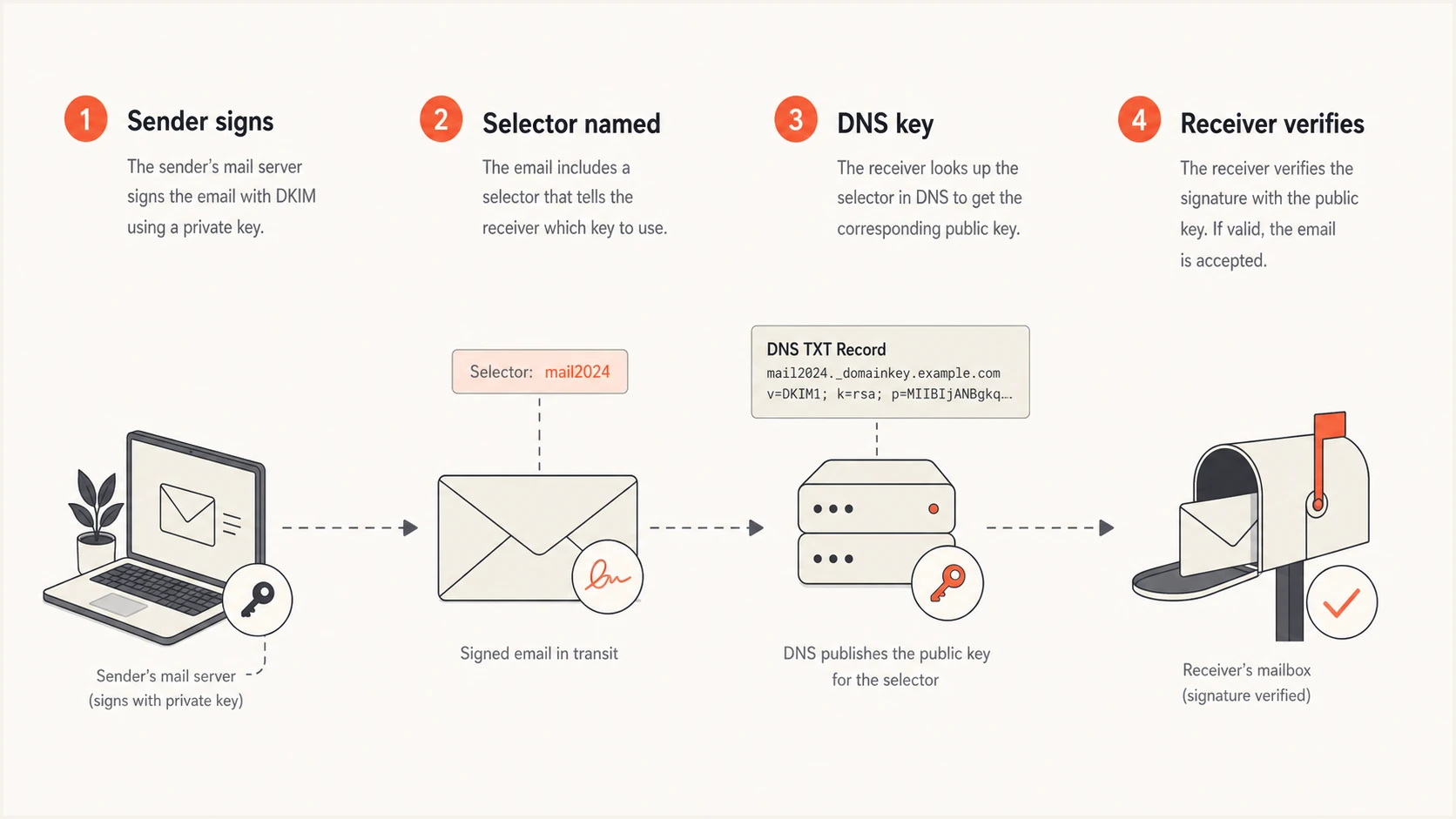
A four-step DKIM selector lookup flow: sender signs, selector named, DNS key, receiver verifies.
This is why a field labelled DKIM2 does not automatically mean the DKIM2 protocol. Microsoft 365 uses selector1 and selector2 for conventional DKIM rotation, while some provider setup screens label two records DKIM1 and DKIM2. The names do not change the protocol. The exact host and value supplied for your domain matter.
- No action: A setup screen mentions DKIM2, but your current mail passes DKIM and DMARC.
- Add a record: Your provider gives a second selector with an exact TXT or CNAME value.
- Rotate a key: Your provider or mail server is ready to sign with a new selector.
- Replace nothing: A second DKIM record is usually additive, not a replacement for the first key.
The DKIM2 protocol is still a draft
The IETF DKIM working group has active Internet-Drafts covering the DKIM2 signature format and related deployment work. These drafts are works in progress, not published RFCs or general mailbox-provider requirements. Draft details can change, so domain administrators should wait for supported sender and receiver implementations instead of translating draft text into manual DNS edits.
The proposed protocol adds DKIM2-Signature and Message-Instance header fields. Participating mail systems use them to build a verifiable handling chain, document message changes, bind a delivery hop to SMTP envelope addresses, and reduce replay. A second conventional DKIM selector does none of this by itself.
- Compatible DNS format: The current DNS draft reuses selector._domainkey names and the v=DKIM1 public-key record format.
- Software dependency: Signers and verifiers must implement the new headers and validation behavior; DNS alone cannot enable DKIM2.
- Gradual transition: Draft deployment guidance calls for conventional DKIM and DKIM2 signing together while support remains limited.
- Hosted-service decision: Act only when your provider documents DKIM2 support and supplies account-specific setup instructions.
Mail infrastructure operators can track the DKIM2 draft and test only with implementations built for the current draft. Hosted email administrators should keep conventional DKIM working until their provider publishes a supported migration path.
Provider examples
The safest answer depends on who signs the message. The DNS record is only the public half of the key setup. The private key lives with Google Workspace, Microsoft 365, an ESP, a SaaS sender, or your own mail server. If the signer is not changed, the receiver never asks for the new selector.
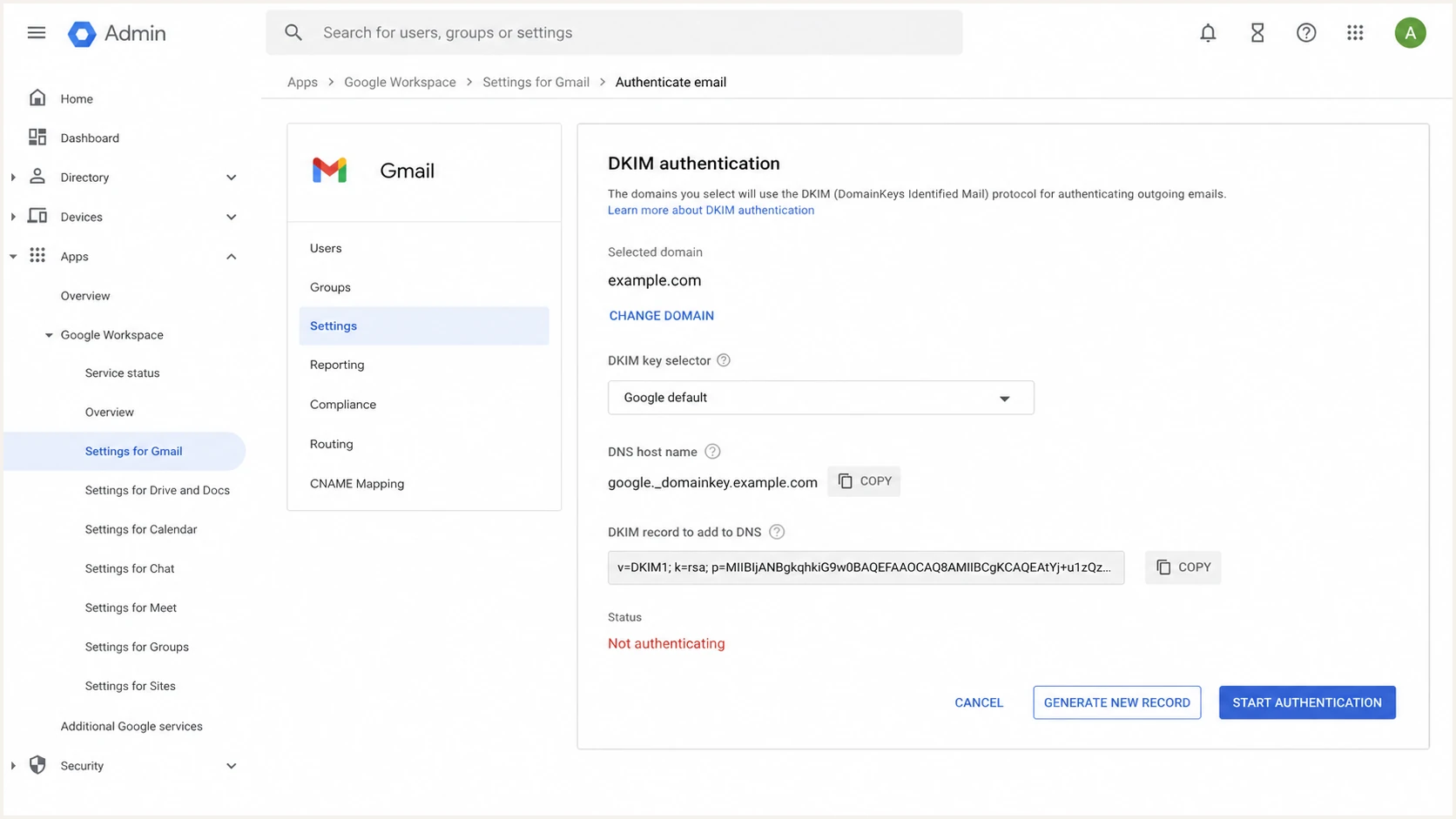
Google Admin console DKIM authentication screen with selector and record generation controls.
|
|
|
|---|---|---|
Provider-selected key | Use Admin console value | |
Conventional selector2 | Publish CNAME pair | |
ESPs | Backup key | Add provider record |
SaaS senders | Sender-specific key | Do not reuse keys |
Custom mail | Your selector | Rotate with overlap |
Common meanings when setup screens mention DKIM2.
For Google Workspace, do not invent a DKIM2 record. Google signs with the selector configured in the Admin console. If Google tells you to generate a new record, publish that exact DNS value, wait for it to resolve, and then start authentication. If your existing selector is passing, leave it in place during any transition.
For Microsoft 365, two conventional DKIM selectors are normal. Microsoft uses CNAME records so it can rotate the underlying public key without asking you to edit DNS each time. Follow the current values in the tenant portal rather than a generic template. Newer custom domains can receive tenant-specific CNAME targets that differ from older examples, so the portal values for your domain are the source of truth.
For ESPs and SaaS senders, add the DKIM records each sender provides. Do not point a SaaS sender at your Google or Microsoft selector. Each sender needs its own key material and its own signing configuration. A working setup can have many selectors under the same domain, as long as each selector has one correct record and the DKIM signing domain matches the visible From domain for DMARC.
Why provider instructions matter
A DKIM record is not a standalone switch. It has to match the selector in the DKIM-Signature header and the private key used by the signer. Provider instructions matter because they control both sides of that match. The DNS host name, record type, target, key length, selector name, and timing all come from the sending platform.
Change only DNS
- Missing signer: No outgoing server uses the new selector.
- Wrong key: DNS has a public key that matches no private key.
- Broken record: A CNAME or TXT record is added at the wrong host.
Change signer and DNS
- Matched selector: The header and DNS lookup use the same name.
- Matched keys: The public key verifies the private key signature.
- Clean rollout: Old and new selectors overlap long enough for delivery.
Example provider-managed DKIM CNAMEsDNS
s1._domainkey.example.com.  CNAME  s1-example._domainkey.provider.net.
s2._domainkey.example.com.  CNAME  s2-example._domainkey.provider.net.
That example shows why copying someone else's DKIM2 value is risky. The visible shape is common, but the target belongs to the provider and tenant. Your record value must come from the account that signs your mail. A TXT-based key normally starts with v=DKIM1 and contains the public key in p=, while a CNAME delegates that lookup to the provider.
When to change DKIM DNS
Use the provider and signer state to decide how urgent the DNS change is.
Leave unchanged
No DNS edit
Current mail passes DKIM and no signer change is scheduled.
Add only
Publish new record
Provider gives a second selector for verification or rotation.
Rotate
Overlap keys
Signer is ready to use a new selector after DNS resolves.
Emergency
Revoke and monitor
A private key was exposed or an unauthorized signer is active.
What can go wrong
The main risk is replacing a valid selector before the new one is actually used. Receivers verify the selector named in the message header. If your mail is still signed with the old selector and you remove or overwrite that DNS record, every message using that selector starts failing DKIM.
Do not overwrite an existing DKIM TXT record with a DKIM2 value unless the provider explicitly says that exact selector is being replaced. Most safe rollouts add a new selector, verify it, switch signing, then keep the old selector for a short overlap window.
Broken DKIM does not always break DMARC by itself if SPF still passes with the same visible From domain. That is not a reason to accept the break. Many real sending paths rely on DKIM domain matching because forwarding breaks SPF. If your DKIM fails after a DNS edit, forwarded mail and SaaS mail can lose the only matching authentication result available to DMARC.
- Authentication failures: Receivers cannot verify signatures tied to the old selector.
- DMARC damage: Messages fail DMARC when DKIM fails and SPF uses a different domain.
- DNS conflicts: A host cannot have both CNAME and TXT records at the same name.
- Slow recovery: Cached DNS answers keep bad values alive after you fix them.
Key changes also affect investigation work. When selectors change without documentation, it becomes harder to tell which system signed which messages. That matters during incident response, vendor cleanup, and DMARC policy staging. When you control the mail infrastructure, keep selector names simple, dated, and tied to the sending system.
How to check safely
Start with a real message sent through the system in question. For conventional DKIM, inspect the DKIM-Signature header and write down its d= signing domain and s= selector, then check DNS for that exact selector. A value such as s=selector2 is still conventional DKIM. Actual DKIM2 test mail uses DKIM2-Signature and Message-Instance header fields, which require compatible signing and verification software.
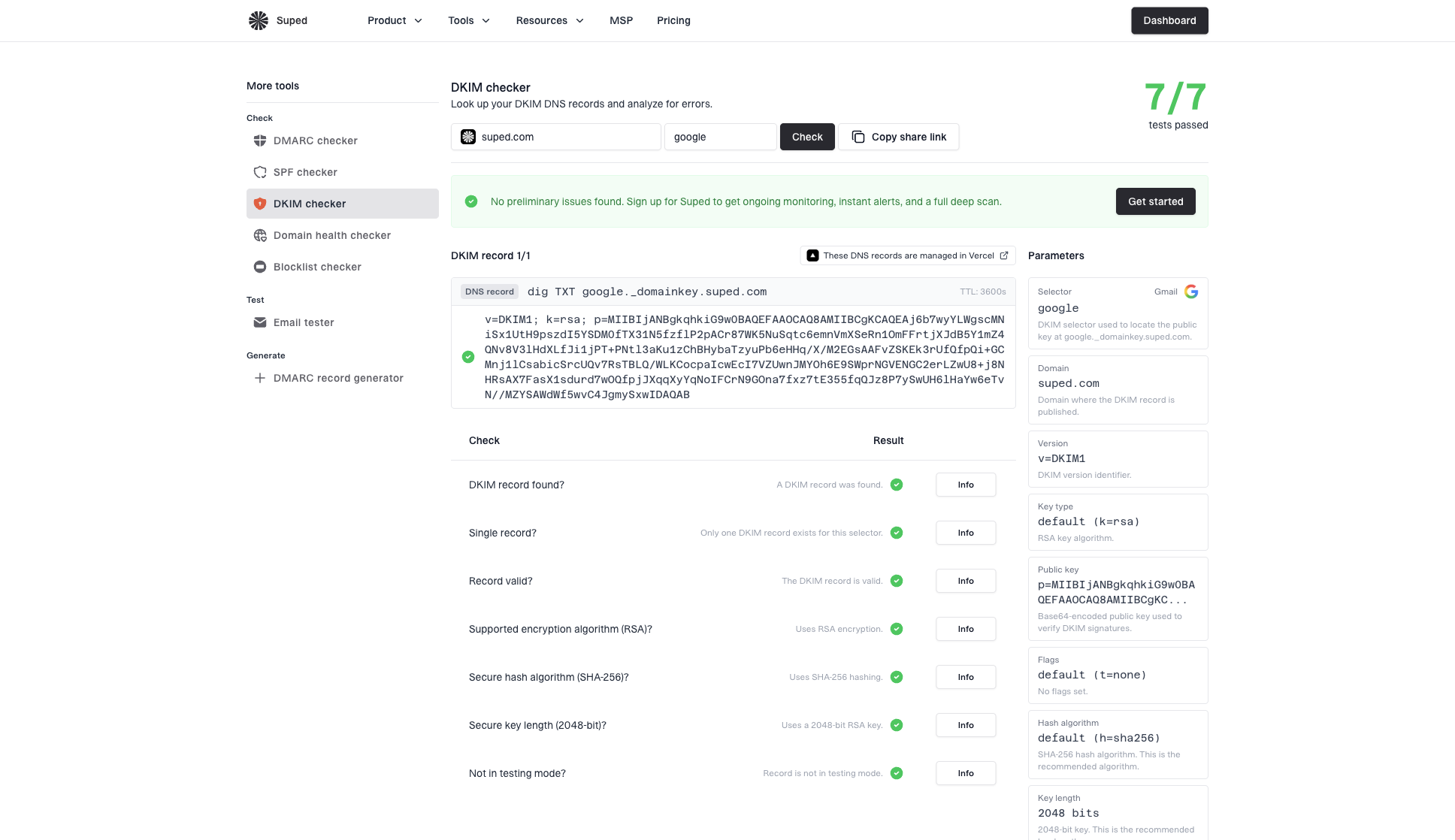
DKIM checker sample results showing selector, DKIM DNS record, validation checks, parameters, and share link
Suped's DKIM checker is useful when you know the selector. It shows whether the DNS value parses correctly, whether the key is present, and whether obvious formatting problems exist. Suped's broader domain health check helps when you are not sure whether the issue is DKIM, SPF, DMARC, or DNS.
DKIM checker
Check selector records and public key configuration.
?/7tests passed
Suped is our DMARC reporting and email authentication platform. Its DMARC monitoring workflow connects DNS checks to source-level authentication results, selector failures, and alerts after a change. That ongoing view helps confirm whether a new selector is working across real traffic and whether failures affect DMARC.
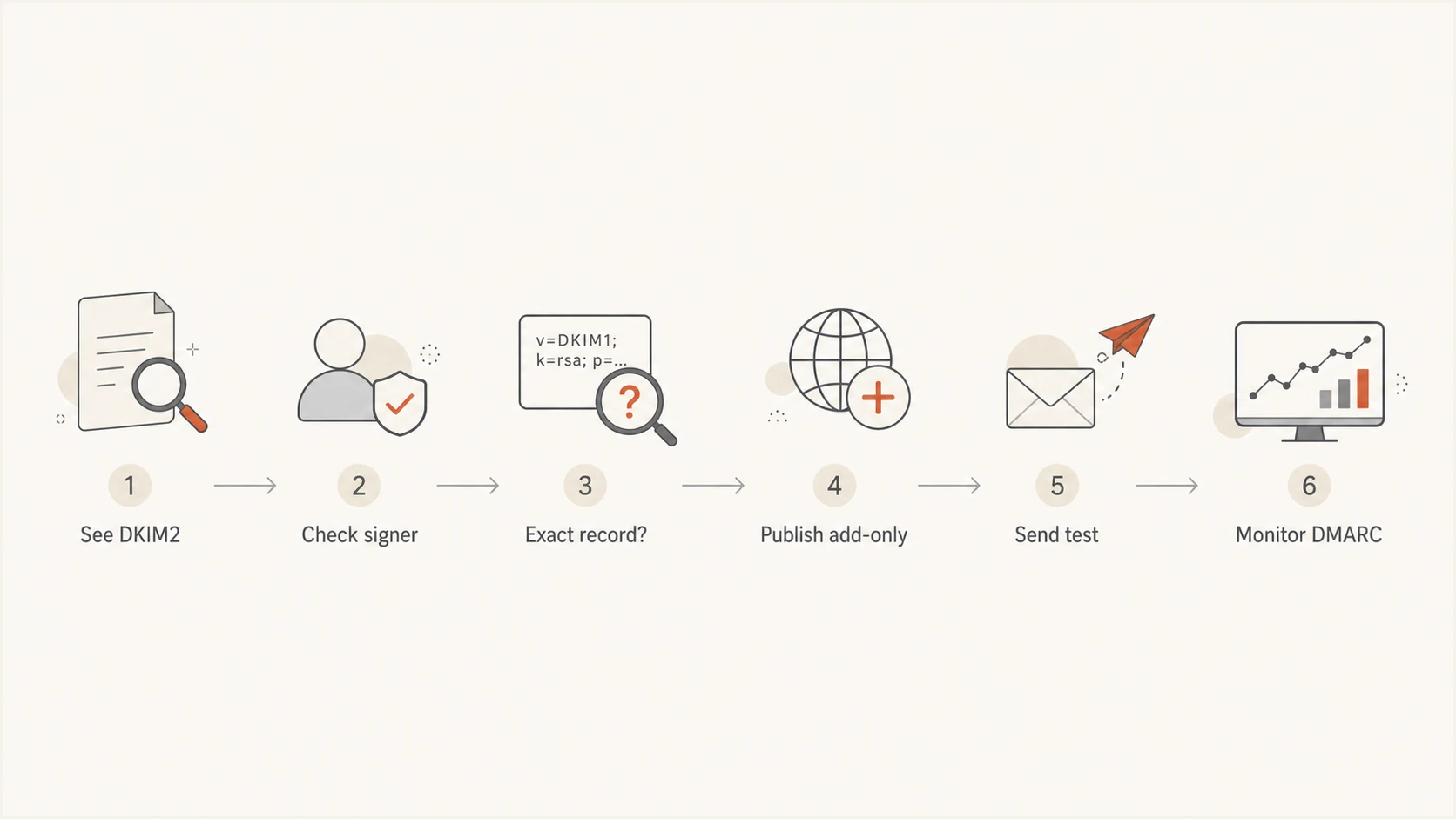
Decision flow for checking DKIM2 before publishing or changing DNS.
When changing DKIM is right
There are clear cases where a DKIM change is the right move. The important detail is that the change is tied to a sender, a key, and a rollout plan. It is not tied to the word DKIM2 appearing on its own.
Example custom DKIM rotationDNS
202607._domainkey.example.com. TXT "v=DKIM1; k=rsa; p=MIIB..."
For custom mail infrastructure, generate the new key pair, publish the public key at a new selector, wait for DNS to resolve globally, update the signer to use the new selector, send tests, then keep the old selector published until old signed mail has aged out. If you are evaluating DKIM2 deployment work at the mail-server layer, the milter rollout path is relevant. For normal hosted email administration, it is not a reason to hand-edit DNS early.
- New sender: Add the DKIM record for a new ESP, SaaS tool, or mail gateway.
- Key rotation: Publish the new selector before switching signing.
- Compromised key: Revoke the old selector after replacement signing is confirmed.
- Provider migration: Run old and new selectors together during the cutover.
Selector changes deserve the same care as any other authentication change. They are small DNS edits with large delivery consequences. If you rotate selectors often, document the owner, date, provider, and signing system for each selector so future checks do not turn into guesswork. More detail on operational rotation is covered in selector rotation.
Decision checklist
Use this checklist before touching DNS. It keeps the decision tied to the sender that actually signs mail instead of a label shown by a checker or setup screen.
- Current mail passes: Leave DKIM records unchanged when DKIM and DMARC already pass.
- Provider gave values: Publish the exact selector TXT or CNAME record from the signing provider.
- Signer is ready: Change signing only after the new DNS record resolves correctly.
- Old key still needed: Keep the old selector during a rollout or provider migration.
- No exact instruction: Do not create, rename, or overwrite records based on a DKIM2 label or draft alone.
- After the change: Send test mail, inspect headers, and monitor DMARC results for failures.