How does changing DKIM selectors impact email reputation and what are the best practices for key rotation?

Updated on 11 Aug 2026: We refreshed this guide with DNS TTL planning, safer rollback steps, and clearer DKIM key rotation guidance.
Changing a DKIM selector usually does not cause a major reputation reset by itself. The selector is a lookup label for the public key, not the main identity behind the mail stream. Receivers care more about the signing domain, visible From domain, sending IP, mail quality, complaints, bounces, engagement, and whether authentication satisfies DMARC.
Receivers can use selector, domain, and IP combinations as sender-identification signals. A new selector is still a routine part of secure key rotation, but unnecessary selector churn makes changes harder to diagnose. Rotate for a defined security, vendor, or lifecycle reason, then monitor the cutover.
The safest method is simple: publish a new selector with a new public key, confirm it is resolvable, start signing with the matching private key, keep the old selector published while delayed mail clears, then retire the old key. For active senders, changing the selector is safer than overwriting the key behind the same selector.
The direct answer
A DKIM selector change has low direct reputation risk when the new selector validates, the same signing domain is used, the From domain relationship still satisfies DMARC, and mail volume stays stable. The bigger risk is a broken DNS record, missing public key, signing mismatch, alignment change, or early deletion of the old selector.
A selector appears in the s= tag of the DKIM signature. If a message is signed with s=2026a, the receiver checks the public key at 2026a._domainkey. If that key matches the private key used to sign the message, DKIM can pass.
- Reputation: A selector change is lower risk than changing the From domain, return-path domain, or sending IP.
- Authentication: Broken DKIM can hurt DMARC results if SPF cannot provide the required aligned pass.
- Security: Rotating keys limits exposure from old private keys, vendor turnover, poor storage, and historical leakage.
- Timing: Keep the old selector live long enough for queued, retried, forwarded, or deferred-verification mail to validate.
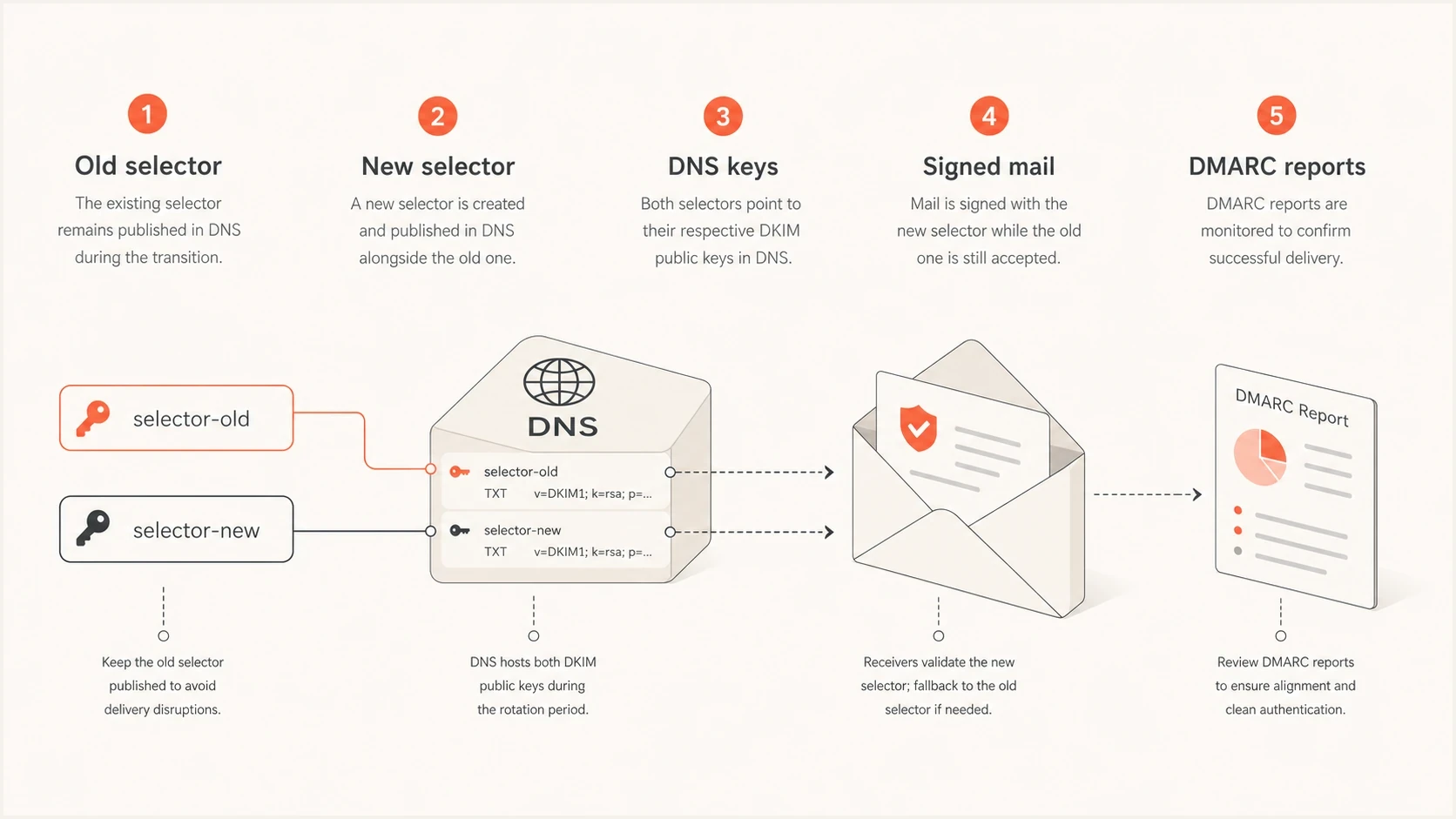
Five DKIM rotation parts: old selector, new selector, DNS keys, signed mail, and DMARC reports.
Why selectors still deserve care
A selector is not supposed to be a reputation identity. It is a key lookup mechanism. Even so, receivers build sender identity from many details. A receiver can observe that a domain on a given IP has used a selector for years, then notice a new one. That can become one signal, but it should not outweigh the stronger signals around domain identity and mail quality.
|
|
|
|
|---|---|---|---|
Selector | Key label | Low | DKIM pass |
DKIM domain | Signer | Medium | DMARC pass |
Sending IP | Source | High | Deferrals |
From domain | Brand | High | Complaints |
How selector rotation compares with other reputation signals.
Leaving a DKIM key untouched forever is not a safe response to rotation risk. If an old private key leaks, someone can sign mail that verifies against the still-published public key. They do not need access to the domain's DNS or current mail platform. Key rotation shortens that exposure and makes retired access easier to remove.
A valid DKIM signature proves the message was signed with a matching private key. It does not prove the message was authorized by the current team. Retire unused keys after the validation interval and remove access to their private material.
The safest rotation pattern
Use a two-selector rotation. Common pairs are dkim1 and dkim2, or date labels such as s2026a and s2026b. The new selector must exist in DNS before mail is signed with it. The old selector must remain in DNS after the switch.
Recommended rotation stages
A staged rollout reduces DKIM failures during the selector change.
mail signed with new selector
- Inventory: List every platform that signs mail for the domain, its selector, sending domain, owner, and rotation method.
- Generate: Create a new key pair. Use RSA-SHA256 with a 2048-bit RSA key where supported. Use Ed25519-SHA256 only when the signing platform supports it and compatibility has been tested.
- Publish: Add the new public key as TXT or a provider-managed CNAME before changing signing behavior.
- Validate: Send test mail through each source and confirm the expected selector, aligned signing domain, and DKIM pass result.
- Retire: Remove the old selector only after queue retries, forwarding delays, DNS caches, and old-selector traffic have cleared.
Example old and new DKIM selectorsdns
dkim1._domainkey.example.com.  TXT  "v=DKIM1; k=rsa; p=OLD_KEY"
dkim2._domainkey.example.com.  TXT  "v=DKIM1; k=rsa; p=NEW_KEY"
DKIM checker
Check selector records and public key configuration.
?/7tests passed
DNS validation is only the first check. After the record is valid, send real mail through each source and inspect the DKIM-Signature and Authentication-Results headers.
DNS TTL and rollback planning
DNS propagation is part of the rotation window. Record the current TTL before the change. If faster recovery is required, lower the TTL at least one full existing TTL in advance, publish the new selector, and confirm that authoritative and recursive lookups return the complete public key before switching production signing.
- Preflight: Confirm the new selector resolves through more than one recursive path and matches the private key on the signer.
- Rollback: Keep the old private key secured and the old public key published until the new selector passes on every sending source.
- Decision point: Switch back only when the old key is still trusted. Never restore a private key that is suspected or known to be compromised.
- Emergency: Publish an emergency selector, stop the affected signer, and use an empty p= value or remove the old record to revoke the exposed key.
Lowering TTL does not flush records already cached under the previous TTL. Make that change before the maintenance window, not at the moment of cutover.
Why new selectors are safer than reuse
Rotating the key without changing the selector means replacing the TXT value at the same DNS name. It can work if sending stops, old signed messages and queues clear, DNS caches expire, the TXT value changes, and signing resumes only after validation. That sequence is rarely practical for continuous production mail.
Same selector
- Failure window: Old messages can fail after DNS points to the new public key.
- Queue issue: Delayed mail, retries, and forwarded copies can verify later.
- Rollback: Reverting DNS can break mail signed during the attempted change.
New selector
- Parallel keys: Old and new public keys can coexist during the transition.
- Clean cutover: New mail uses the new selector while old mail still verifies.
- Clear audit: DMARC data and headers show which selector signed each stream.
The reason is mechanical. A DKIM signature contains the selector used at signing time. If that message was signed with the old private key, but the public key at the selector now contains the new key, verification fails. DKIM guidance therefore recommends assigning new keys to new selectors.
Selector inside a DKIM signaturetext
DKIM-Signature: v=1; a=rsa-sha256; d=example.com; s=dkim1;
 h=from:subject:date:message-id; bh=...; b=...
Retention and monitoring
No DKIM standard sets a fixed old-selector retention period. Seven days is a practical minimum for simple low-volume senders, 14 days suits many business domains, and 30 days is a conservative window for high-volume, regulated, or heavily forwarded mail. Extend the interval when queue delays, forwarding paths, DNS TTLs, or deferred verification justify it.
Old selector retention
A practical retention guide after switching production signing to the new selector.
Minimum
7 days
Low-volume sender with few forwarding paths.
Normal
14 days
Most business domains with mixed mail streams.
Conservative
30 days
High-volume or regulated sender.
If a private key is known to be compromised, treat it as an incident. Stop signing with it, revoke or remove its public key, publish an emergency selector, and review DMARC data for unexpected signed sources. The security risk outweighs preserving verification for messages signed with the exposed key.
Suped's DMARC monitoring supports this workflow by showing which sources are sending, whether DKIM and SPF pass, and whether either result satisfies DMARC. Automated issue detection and real-time alerts help identify a vendor that breaks while other sources remain healthy. Add the domain to DMARC monitoring before the rotation, then compare results during the retention window.
Suped DMARC dashboard showing email volume, authentication health, and source breakdown
What to check during the change
A rotation needs a before-and-after view. Capture normal DKIM pass rate, DMARC pass rate, source inventory, receiver results, complaints, deferrals, bounces, and SMTP response codes. After the switch, compare those metrics by source and receiver instead of relying on one average.
- Headers: Inspect real test messages and confirm the expected selector, signing domain, algorithm, and Authentication-Results value.
- DNS: Use a DKIM checker to confirm the complete public key is reachable and valid.
- Reports: Review DMARC aggregate data for failures by source and receiver, then confirm old-selector traffic falls to zero before cleanup.
- Fallback: Confirm SPF can carry DMARC temporarily on direct mail paths, but do not treat SPF as the long-term fix for broken DKIM.
?
What's your domain score?
Deep-scan SPF, DKIM & DMARC records for email deliverability and security issues.
A broad domain health check helps when the change touches more than DKIM. Rotation incidents can also expose SPF lookup issues, DMARC domain mismatch, or a forgotten sender.
Selector names and rotation cadence
Selector names should be simple and unique. Avoid names that reveal internal systems, departments, account IDs, or security assumptions. Paired selectors work for repeat rotations, while date-based selectors make audits easier. Provider-specific selectors are fine when the provider requires them. Never assign one selector to two active keys because DNS can publish only one usable public key for that selector.
|
|
|
|
|---|---|---|---|
Pair | dkim1 | Repeat | Needs notes |
Date | s2026a | Audit | More labels |
Provider | s1 | Hosted | Provider controlled |
Common selector naming patterns.
For more examples, this page on selector names is useful. If you are also changing key size, review secure key length before publishing the new record.
No RFC mandates one rotation interval. Six to 12 months is a common operating policy, while shorter intervals suit higher-risk keys or stricter internal controls. Set the cadence around key storage, vendor capability, exposure risk, ownership, and a tested rollback process. Rotate immediately after suspected compromise or when a vendor relationship ends.
Double signing and CNAME selectors
Double signing puts two DKIM signatures on a message, often one old selector and one new selector. It is useful when the MTA supports it and the team needs proof that the new selector works on real traffic before relying on it fully. It also supports an RSA-to-Ed25519 transition because each algorithm must use a different selector.
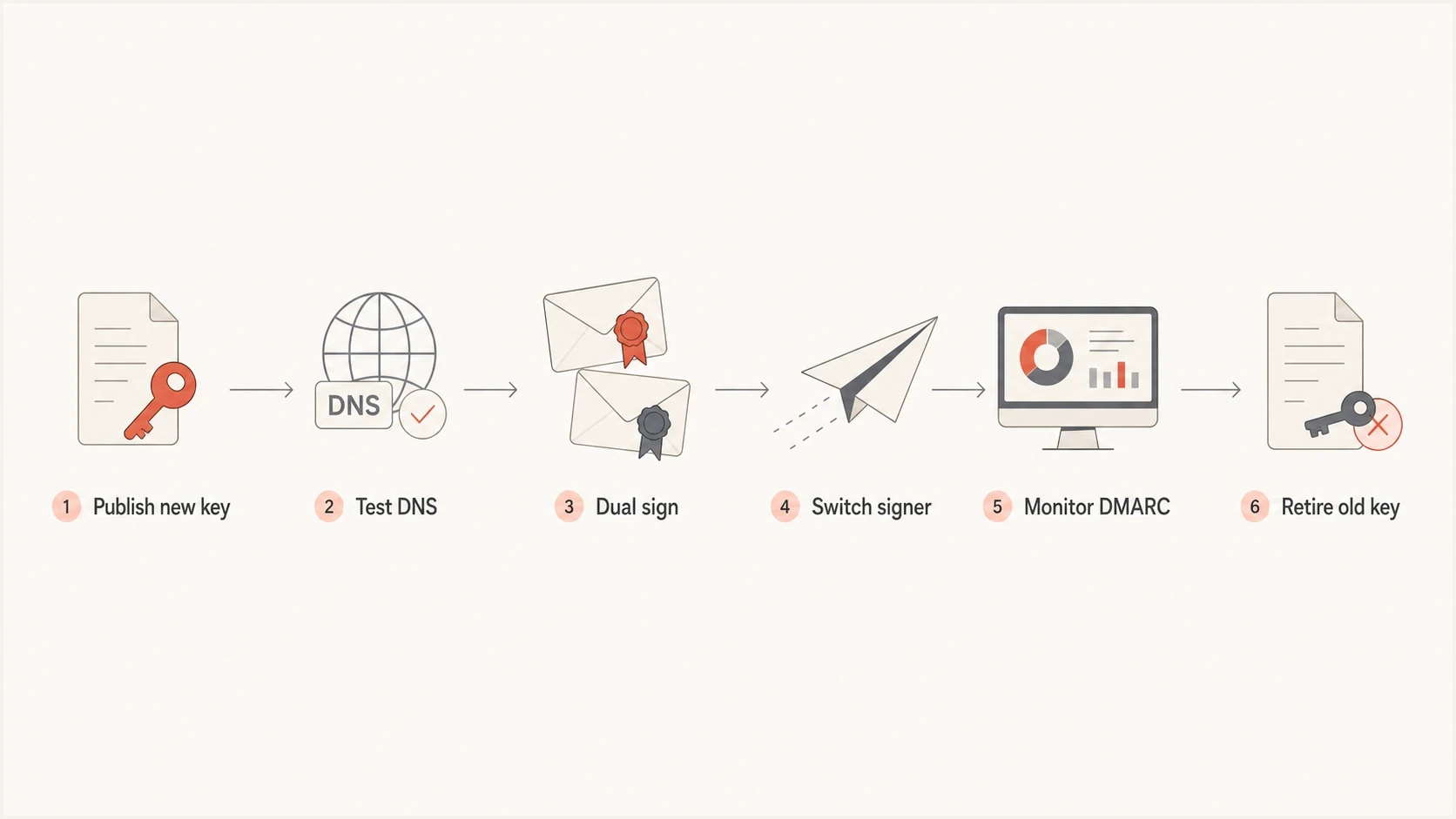
DKIM selector cutover flow from publishing a new key to retiring the old key.
CNAME-based DKIM is common with hosted providers. You publish a selector that points to the provider's DNS, and the provider manages the target key material. That reduces hands-on DNS work after setup, but ownership, key age, and rotation timing still need documentation. Confirm DKIM pass results and DMARC outcomes after every provider change. For complex routing, double DKIM signing can be cleaner than forcing every system into one signing model.
Example provider-managed DKIM CNAMEdns
s1._domainkey.example.com.  CNAME  s1.example.provider-dkim.net.
s2._domainkey.example.com.  CNAME  s2.example.provider-dkim.net.
Mistakes to avoid
Most reputation problems blamed on selector changes are implementation problems or unrelated changes bundled into the same release. If the team changes the selector, IP, From domain, template, audience, and volume in one window, isolating the cause becomes difficult.
- Missing DNS: The MTA signs with a selector before the public key is resolvable.
- Selector conflict: Two active systems use one selector with different private keys, so one of them cannot validate.
- Domain mismatch: The new signer uses a DKIM domain that does not match the visible From domain for DMARC.
- Early cleanup: The old selector is deleted before older messages have finished verifying.
- Bulk changes: The rotation happens during a volume spike, new audience launch, or infrastructure move.
Suped's DMARC monitoring helps separate these causes by comparing authentication and alignment results for each sending source. Source-level views and alerts show whether failures begin with the new selector, remain limited to one vendor, or come from a separate SPF or DMARC configuration change.

Issue steps to fix dialog showing the issue overview, tailored fix steps, and verification action
Views from the trenches
Best practices
Rotate with a new selector so old signed mail can still verify during queue delays.
Keep selector changes documented, scheduled, and tied to a real security or vendor need.
Add DKIM rotation to DMARC projects when the team has crypto controls and owners.
Common pitfalls
Changing TXT values in place can break older messages that still need the old key.
Deleting old selectors too early turns a clean rotation into avoidable DKIM failure.
Bundling selector changes with IP or volume changes makes diagnosis harder later.
Expert tips
Use predictable selectors or date labels so future rotations are easy to audit later.
Treat CNAME DKIM as delegated key control, not a reason to skip monitoring checks.
Review DMARC reports by source because averages can hide one broken signer later.
Marketer from Email Geeks says selector changes usually do not create large reputation swings, but they should not be described as automatically harmless because receivers can include selector in sender identity signals.
2024-02-12 - Email Geeks
Marketer from Email Geeks says clients should not tinker with selectors without an operational reason, because unnecessary churn creates monitoring and diagnosis work.
2024-02-13 - Email Geeks
The practical bottom line
Changing DKIM selectors has low reputation risk when it is handled as a controlled key rotation. Publish and validate the new selector, switch signing, keep the old selector live for a risk-based validation interval, and watch DMARC results by source before cleanup.
Suped makes this repeatable through DMARC source monitoring, DKIM and SPF result tracking, automated issue detection, and real-time alerts. Use those views to record the baseline, confirm the new selector by source, and verify that the old selector has stopped appearing before it is removed.




