Diagnosing and reducing DKIM temporary error rates with Microsoft

Published 11 Jul 2025
Updated 22 Sep 2026
14 min read
Summarize with
Updated on 22 Sep 2026: We added Outlook.com high-volume enforcement guidance and tightened the DKIM troubleshooting steps.
To diagnose and reduce DKIM temporary error rates with Microsoft, separate the problem into two cases: Microsoft as the receiver reporting temperror in DMARC aggregate data, and Microsoft 365 as the sender producing DKIM signatures for your domain. In raw Microsoft headers, the same lookup problem can appear as dkim=timeout (key query timeout). The fastest path is to measure Microsoft-only DKIM temporary errors, group them by selector and source, confirm that the DKIM key DNS path is stable, then reduce lookup friction and signing changes that make verification unreliable.
A DKIM temporary error is not the same as a broken signature. It means the verifier could not complete the DKIM check at that moment. Common causes include intermittent DNS resolution, inconsistent authoritative nameserver answers, selector CNAME mistakes, DNSSEC validation failures, DNS responses that time out during fallback, or a gap during selector rotation. Message modification after signing normally produces dkim=fail, not temperror, so diagnose it on a separate path. If the same mail passes DKIM at other receivers but has a higher temporary error rate at Outlook.com, Hotmail, or Microsoft 365 recipients, treat it as a receiver-specific signal and prove the source with grouped DMARC reports before changing DNS.
- Answer: Fix verified DNS reliability or selector faults, but do not change stable DNS solely because Microsoft reports isolated noise.
- Scope: Measure Microsoft separately instead of hiding it inside a global DKIM pass rate.
- Evidence: Keep Authentication-Results headers, authoritative DNS traces, and relevant DMARC rows before escalating.
What DKIM temperror means with Microsoft
In DMARC reports, Microsoft can report DKIM as temperror when its verifier cannot finish a temporary lookup or validation step. The message has not necessarily failed authentication permanently. It means Microsoft did not get a usable result that allowed the verifier to return pass or fail for that DKIM signature.
Do not diagnose this from one raw message or one aggregate report. Compare Microsoft receiver results with other large receivers, corporate receivers, and controlled seed tests. If Microsoft alone has the spike, the cause can be a sender-side DNS weakness that its lookup exposed, or intermittent behavior in Microsoft's resolver or reporting path. Prove which side is responsible before changing records.
Temporary error
- Meaning: The verifier could not complete the DKIM check at that time.
- Common cause: DNS timeout, SERVFAIL, CNAME lookup trouble, or resolver retry exhaustion.
- Fix path: Prove the unstable lookup, then simplify or repair the key path.
Permanent failure
- Meaning: The verifier completed the check and the signature did not validate.
- Common cause: Wrong key, missing selector, changed body, or broken canonicalization.
- Fix path: Match the signing domain, selector, body hash, and public key.
For a wider primer on the result code itself, the DKIM temperror walkthrough is useful. For this page, the key point is narrower: Microsoft temporary errors need provider-specific measurement, not guesswork based on a single total failure percentage.
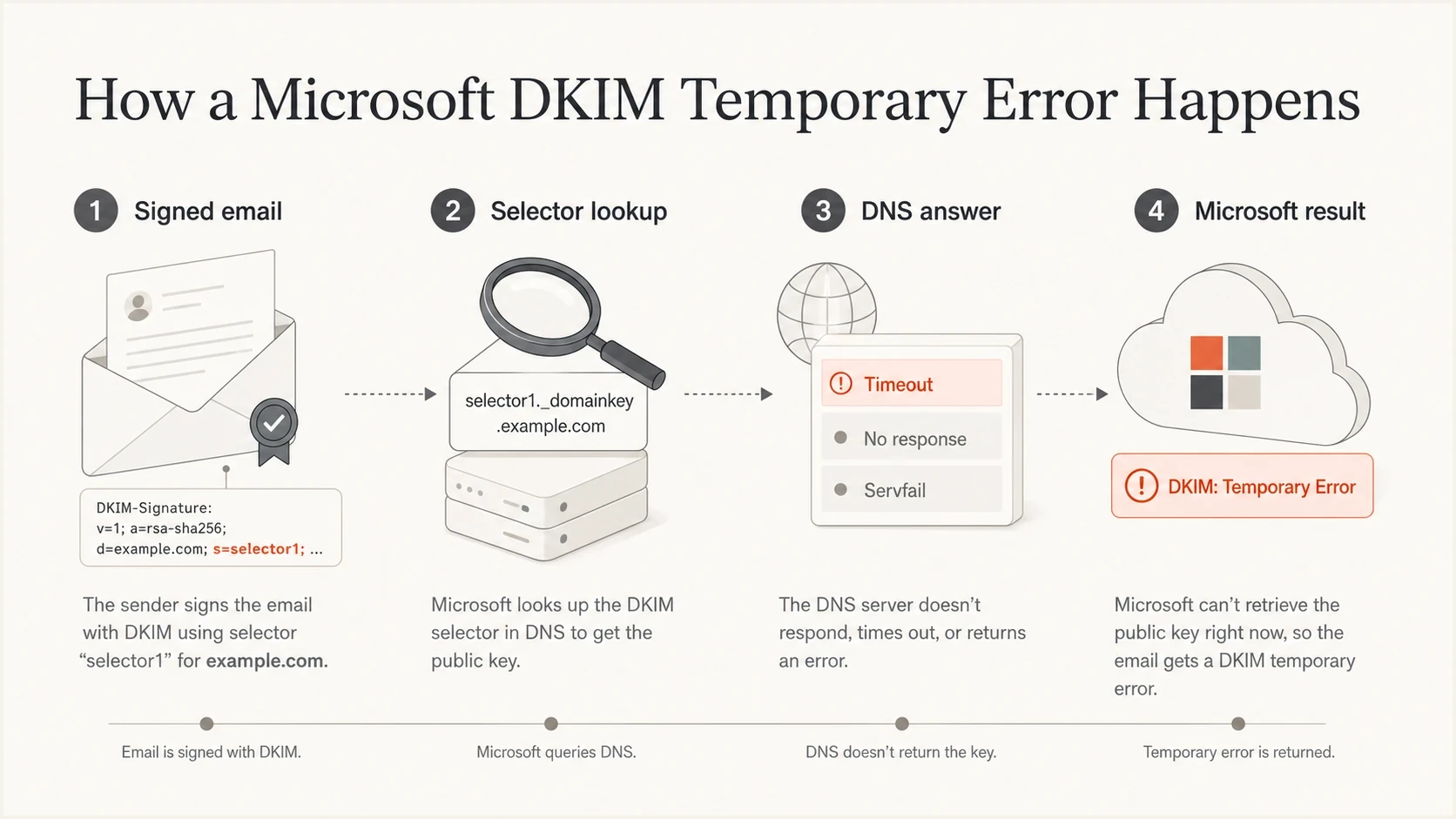
A Microsoft DKIM temporary error starts with a signed email and ends when the selector lookup does not return a stable DNS answer.
Measure the Microsoft-only error rate
The useful metric is the Microsoft DKIM temporary error rate, not the domain-wide DKIM failure rate. Calculate it as Microsoft-reported messages with DKIM temperror divided by all Microsoft-reported messages for the same signing domain, source, selector, and period. A total domain rate hides the pattern when one source or selector is noisy.
Split the data by receiver, source IP or sending platform, DKIM selector, and From domain. A message can carry multiple DKIM signatures, so focus first on the signature whose d= domain aligns with the From domain, then review other signatures for source clues. This shows whether the issue belongs to a Microsoft 365 selector, another sender using your domain, a DNS host, or a Microsoft receiver group. Suped's DMARC monitoring supports this workflow by turning aggregate XML into source-level trends and issue groups, while preserving the receiver, selector, signing domain, and time period needed for investigation.
Operational DKIM temperror thresholds
These are practical investigation thresholds for Microsoft-specific DMARC data. They are not a public Microsoft limit.
Clean
< 0.1%
Treat as normal background noise unless delivery complaints match the same period.
Watch
0.1-1%
Check whether one selector, source, or Microsoft receiver family has the increase.
Investigate
1-5%
Run DNS traces, compare nameservers, and inspect raw headers from affected traffic.
Incident
> 5%
Freeze selector changes, fix verified DNS instability, and monitor delivery impact closely.
If the rate increases after a DNS change, selector rotation, tenant migration, or sending platform change, treat that event as the primary suspect. If the rate rises without a sender-side change, check authoritative DNS and DNSSEC first, then test whether the spike is isolated to Microsoft before taking action.
DMARC records drawer showing filters, record rows, authentication results, and CSV export
Separate sender-side faults from Microsoft reporting noise
A Microsoft-only temperror does not prove that your DKIM DNS is faulty. Intermittent Microsoft lookup or reporting behavior can produce isolated rows even when the selector resolves consistently elsewhere. Do not ignore the signal, but require corroborating evidence before editing production DNS.
|
|
|
|---|---|---|
SERVFAIL, timeout, or inconsistent answer from an authoritative nameserver | Sender-side DNS | Repair the zone, delegation, or DNSSEC path |
The same selector has temperror at several receivers | Sender-side DNS | Fix the shared selector lookup |
Only Microsoft shows sporadic temperror while direct DNS checks stay stable | Microsoft receiver or report | Monitor the baseline and preserve evidence |
Microsoft headers show dkim=timeout and delivery symptoms occur at the same time | Active delivery issue | Check aligned SPF, collect samples, and escalate if persistent |
Use independent evidence to decide whether a Microsoft temperror needs a sender-side change.
DMARC can still pass through aligned SPF when an aligned DKIM signature has a temporary error. That DMARC pass does not satisfy Outlook.com's separate high-volume requirement for both SPF and DKIM to pass. Check the policy result, DKIM result, and any NDR before describing the incident. If only Microsoft is affected, DNS remains stable across regions, and delivery has not changed, keep monitoring rather than rotating keys or moving DNS providers without proof.
Account for Outlook.com high-volume enforcement
Microsoft treats a domain as a high-volume sender when it sends 5,000 or more messages to Microsoft consumer email services using the same domain in the 5322.From address. Outlook.com, Hotmail, Live.com, and MSN recipients are in this scope. Microsoft requires SPF and DKIM to be published and both checks to pass. DMARC must also be published and pass through at least one aligned identifier.
A DMARC pass can still end in rejection
If aligned SPF passes while DKIM returns a temporary error, DMARC can report pass. Outlook.com's high-volume policy can still reject the message with 550 5.7.515 because the DKIM check did not pass. Treat the NDR as delivery evidence, not as another name for DMARC failure.
- Identify scope: Separate Microsoft consumer recipients from Microsoft 365 organizational recipients.
- Match evidence: Correlate 550 5.7.515 NDRs with raw headers and the same selector's DMARC rows.
- Check every source: The threshold applies to the From domain, so verify every source that uses the shared domain.
- Restore DKIM pass: An aligned SPF pass is useful fallback evidence, but it does not replace DKIM under this policy.
A temporary lookup problem can therefore become a hard delivery failure for high-volume traffic. Prioritize a Microsoft-only temperror when it overlaps with 550 5.7.515 NDRs, even if the aggregate report shows DMARC pass. For lower-volume traffic or Microsoft 365 organizational recipients, use the observed header and delivery result rather than assuming the consumer high-volume rule applies.
Check selector and DNS stability
Most actionable Microsoft DKIM temporary error reductions come from DNS cleanup. DKIM depends on a public key lookup under the selector name. If that lookup sometimes times out, returns inconsistent answers, follows a broken CNAME, exposes duplicate or conflicting records, or fails DNSSEC validation, Microsoft can report a temporary error even when your signature was correctly created.
Start with the exact selector from the DKIM-Signature header, not the selector expected to be in use. Query every authoritative nameserver directly and compare the answers. A selector that works through one recursive resolver but times out or returns SERVFAIL at an authoritative nameserver is still broken for real mail.
Microsoft 365 DKIM selector CNAME patternstext
New custom-domain format introduced in May 2025:
Host: selector1._domainkey
Type: CNAME
Target: selector1-example-com._domainkey.contoso.n-v1.dkim.mail.microsoft

Host: selector2._domainkey
Type: CNAME
Target: selector2-example-com._domainkey.contoso.n-v1.dkim.mail.microsoft

Legacy format still used by existing domains:
selector1-example-com._domainkey.contoso.onmicrosoft.com
selector2-example-com._domainkey.contoso.onmicrosoft.com
Microsoft introduced the newer CNAME target format for new custom domains in May 2025. Existing domains can continue to use the older onmicrosoft.com targets. The dynamic partition character in the new target is tenant-specific, so do not construct the target from the example. Copy both exact values from the Microsoft Defender portal or run Get-DkimSigningConfig -Identity example.com | Format-List Name,Enabled,Status,Selector1CNAME,Selector2CNAME in Exchange Online PowerShell.
Keep both Microsoft selectors published
Microsoft 365 alternates between two selectors during key rotation. Keep both CNAMEs published continuously. Microsoft states that a rotation takes four days (96 hours) before the new private key starts signing, and another rotation cannot start while that change is in progress.
- Retention: Keep selector1 and selector2 CNAMEs published, including the inactive selector.
- TTL: Use at least a one-hour TTL and avoid last-minute TTL changes during rotation.
- Timing: Allow the full 96-hour Microsoft 365 rotation window before judging the new selector.
- Proof: Save headers showing the active selector, signing domain, and rotation period.
A focused DKIM checker is useful after a selector change because it confirms the selector, DNS record, and public key format before Microsoft receivers evaluate production traffic.
DKIM checker
Check selector records and public key configuration.
?/7tests passed
If the DKIM key is behind a CNAME, verify the full chain. Keep it short and stable, and confirm that the authoritative service returns consistent answers across regions. With Microsoft 365 signing, both selector CNAMEs must point to the exact tenant targets shown in Microsoft. A typo in the domain transformation or dynamic partition can create failures that look random until they are grouped by selector.
Confirm the Microsoft 365 sending path
When Microsoft 365 is the sender, check that DKIM is enabled for the custom domain, both selector CNAMEs match the tenant, and no system modifies the message after Microsoft signs it. Transport rules, disclaimers, gateways, and routing through external systems can change signed headers or the body. Those changes normally produce a signature failure or body-hash mismatch, not a DNS temperror, so keep that investigation separate.
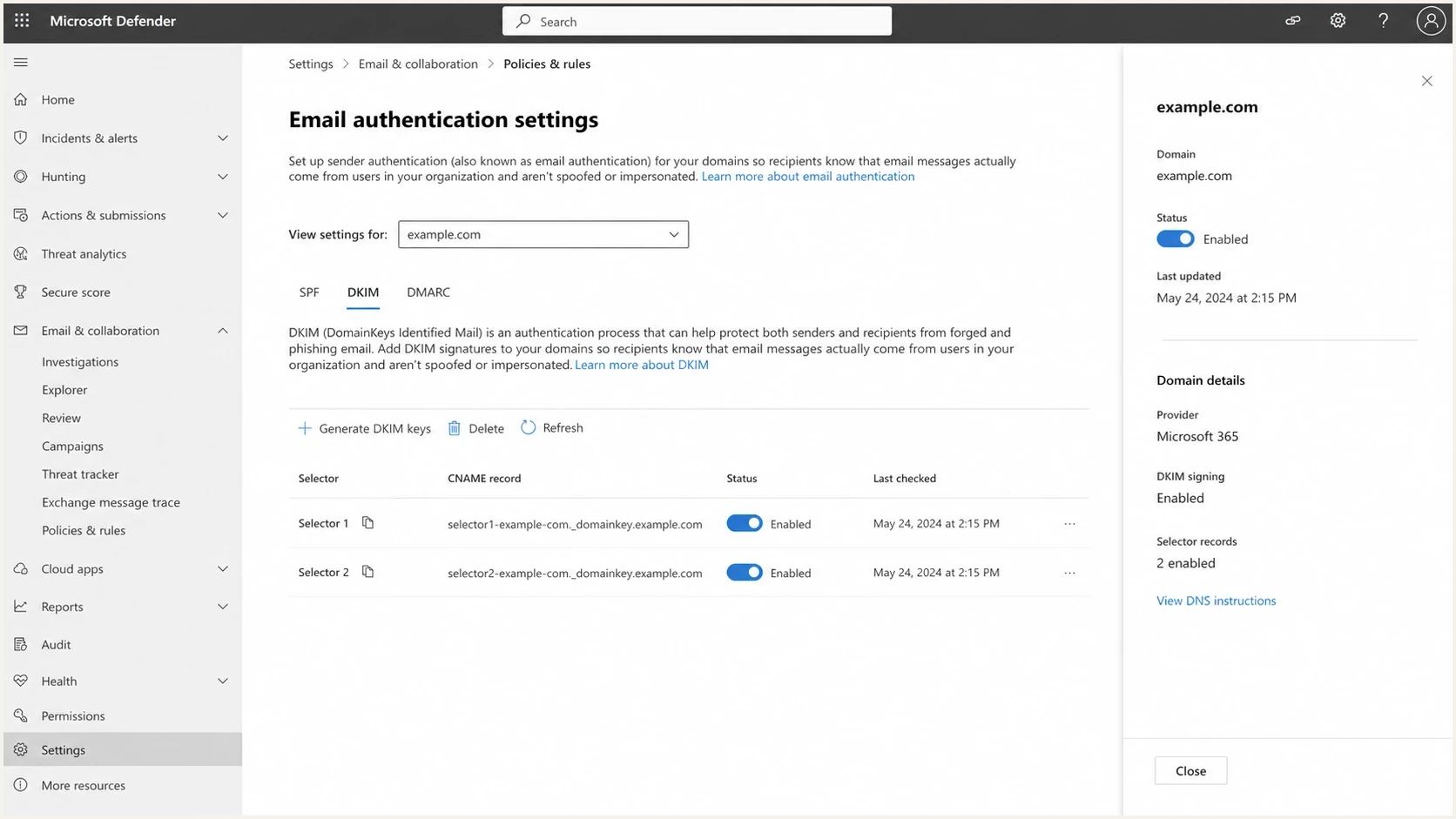
Microsoft Defender portal DKIM settings for a custom domain with selector CNAME records.
Raw headers matter here. In a Microsoft 365-originated message, the DKIM-Signature header identifies the selector in s= and the signing domain in d=. If the From address uses your custom domain but the signing domain is the tenant domain, the signature can pass DKIM but it does not have domain alignment with the custom From domain for DMARC. Enable DKIM signing for the custom domain and confirm that the aligned signature appears on external test messages.
|
|
|
|---|---|---|
Custom domain | Tenant signing only | Enable custom-domain DKIM |
Selector target | Wrong tenant or partition | Copy the exact CNAME |
Gateway | Body changed | Sign after modifications |
Rotation | One CNAME missing | Keep both selectors |
Checks that narrow Microsoft 365 DKIM issues quickly.
If you are dealing with Microsoft-specific signature failures rather than temporary lookup errors, the Microsoft 365 DKIM failures page is the better diagnostic path. Temporary errors need DNS and selector reliability checks first.
Reduce the error rate without breaking mail
Once the source and selector are known, make the smallest change that removes the verified fault. DKIM authentication is sensitive to small DNS mistakes, so broad changes create diagnostic noise. Fix one selector, DNS fault, or sending source at a time, then watch Microsoft reports for at least one complete reporting cycle.
- Stabilize DNS: Confirm every authoritative nameserver returns the same selector answer without timeout or SERVFAIL.
- Shorten chains: Remove unnecessary CNAME hops between the selector and the final DKIM key.
- Fix DNSSEC: Repair broken delegation, expired signatures, or mismatched DS records.
- Rotate carefully: Keep both Microsoft selectors published and wait for the documented rotation window.
- Sign late: Apply DKIM after disclaimers, footers, link wrapping, and gateway modifications.
- Monitor Microsoft: Track Outlook.com, Hotmail, and Microsoft 365 recipient patterns separately.
Where Suped fits
Suped is our DMARC reporting and email authentication platform. For this workflow, use Suped to filter aggregate data to Microsoft receivers, group results by source and selector, record the baseline before a DNS change, and watch whether the same rows improve during the next reporting cycle. This keeps the DNS traces, header samples, and DMARC trend tied to the change being tested.
- Filters: Isolate Microsoft receivers, signing domains, selectors, and sending sources.
- Alerts: Trigger review when the Microsoft-specific rate moves beyond its normal baseline.
- Issues: Keep likely causes and remediation steps beside the affected aggregate rows.
- History: Compare each DNS or signing change with later Microsoft reporting cycles.
Before and after each change, run a broad domain health checker pass. That catches adjacent SPF, DMARC, and DNS problems that can make Microsoft reports harder to interpret.
?
What's your domain score?
Deep-scan SPF, DKIM & DMARC records for email deliverability and security issues.
A clean fix should lower the Microsoft-specific DKIM temporary error rate while the same selector remains clean at other receivers, without creating an SPF or DMARC regression. If Microsoft alone remains noisy after authoritative DNS and DNSSEC are stable, preserve the evidence and open a Microsoft support case with UTC timestamps, affected recipient domains, selectors, source IPs, and header samples.
Use a repeatable investigation flow
Use the same flow for each incident because a DKIM temporary error rate can improve by itself when a receiver-side resolver issue clears. A repeatable method ties any improvement to a specific change and keeps unrelated authentication changes out of the test.
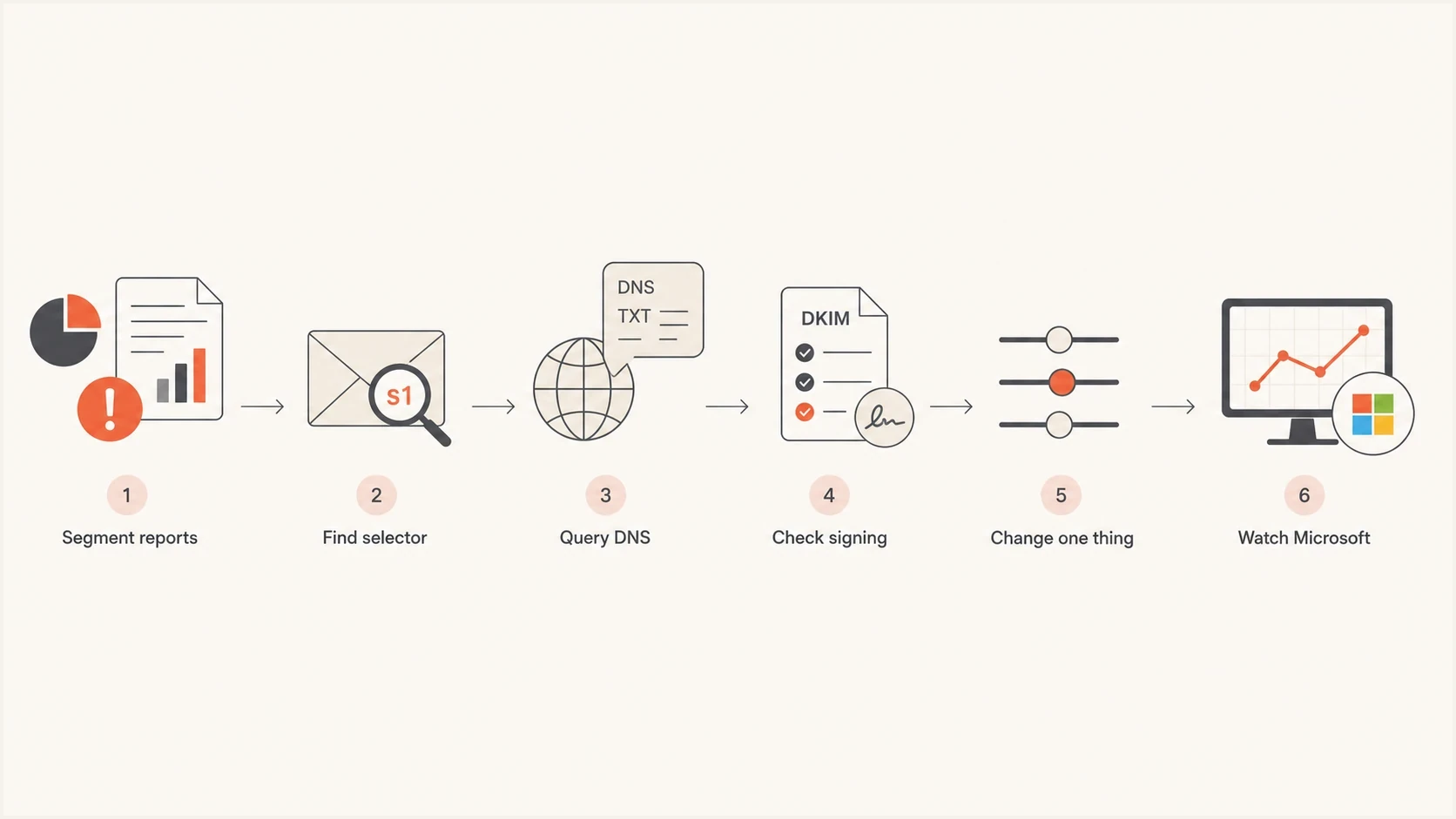
A DKIM temporary error investigation flow from report segmentation to Microsoft trend monitoring.
Current DMARC record for collecting aggregate evidencedns
v=DMARC1; p=none; rua=mailto:dmarc-reports@example.com
The pct tag is omitted because RFC 9989 moved it to historic status. A record with p=none and a valid rua destination still requests the aggregate evidence needed for this investigation.
For Microsoft-only spikes, keep enforcement changes separate from the DKIM fix. Do not change the DMARC policy during an active DKIM temporary error investigation. First make authentication stable, then review policy in a separate change based on the domain's broader DMARC plan. This keeps delivery risk and diagnosis separate.
If the same period also has Microsoft deferrals, rate limiting, or temporary acceptance failures, treat those as a parallel deliverability track. The Office 365 temp fails page covers that delivery-side path. DKIM temporary errors and SMTP temporary failures can happen together, but they are not the same failure. A 550 5.7.515 NDR is a permanent rejection tied to Outlook.com authentication enforcement, not an SMTP temporary failure.
What to hand Microsoft support
Escalation works better with a compact evidence packet. Microsoft support needs evidence that the temporary error is scoped to Microsoft receivers and that your authoritative DNS answers are stable. Without that, the case can stall at generic DKIM setup checks.
|
|
|---|---|
Period | UTC timestamps |
Receiver | Outlook.com or Microsoft 365 |
Selector | Exact s= value |
Signing domain | Exact d= value |
Source | IP and sending path |
Headers | Full external samples |
NDR | Full 550 5.7.515 response, when present |
DNS | Authoritative traces |
Keep the support packet short and specific.
The strongest case states that the same selector and source pass at other receivers, Microsoft reports a higher temporary error rate, authoritative DNS checks remain stable, and the spike occurred during exact UTC periods. Include recent selector or DNS changes. Support can use a precise change history more effectively than a general complaint about DKIM reliability.
Do not overfit to one report
One aggregate report can be delayed, batched, or skewed by a small sample. Require grouped DMARC data plus a live DNS, header, or delivery finding before changing production DNS. When independent evidence points to the same selector, the change has a defensible cause.
Keep Microsoft DKIM temperrors measurable
Treat Microsoft DKIM temporary errors as a measurable reliability problem. Segment Microsoft reports, identify the aligned signing domain and selector, test the full authoritative DNS path, confirm Microsoft 365 signing when it is the sender, and make one contained fix only when evidence supports it. Then watch the Microsoft-only rate and any 550 5.7.515 NDRs. If the DNS path stays stable and the noise remains isolated to Microsoft, preserve the baseline and escalate instead of making speculative record changes.




