Why is my IP listed on DroneBL and how to remove it?

Updated on 29 Jul 2026: We added current DroneBL guidance on reassigned IPs, removal eligibility, review timing, and threat classes.
Your IP is listed on DroneBL because DroneBL has associated that address with automated abuse or an exposed or compromised system. That can mean an open proxy, open resolver, compromised gateway, dictionary attack, or botnet-like traffic. The activity might have come from your network, or it might predate your use of a dynamic IP that an internet provider reassigned to you. A listing is not always a normal email spam finding, and it does not prove that mailbox providers are blocking your mail.
The practical removal path is to look up the IP, read every DroneBL incident and comment, check whether the cause is still active, fix the underlying issue, then follow the removal instructions shown for each incident. If the address was reassigned and the activity belongs to a previous user, say that in the request and include evidence that the current network is clean. Removal still depends on review, and a service using DroneBL can take additional time to refresh its copy of the data.
- Direct answer: DroneBL saw an abuse or security signal tied to the IP, although the activity can belong to a previous user of a reassigned address.
- Fastest valid path: confirm every incident, fix any current cause, then follow the DroneBL removal flow.
- Big caveat: a DroneBL blocklist or blacklist result is often more of a security finding than a deliverability finding.
Treat DroneBL as one signal inside a broader blocklist monitoring workflow. Suped's product puts blocklist status beside DMARC, SPF, DKIM, sending-source authentication, and alerts, so the team can separate security exposure from an authentication or delivery problem.
Why DroneBL lists an IP
DroneBL is a real-time DNS blocklist that focuses on abusable IP addresses, compromised machines, and automated network behavior. Some email teams first see it during a blacklist review, but the listing reason often has little to do with classic bulk email filtering. That difference matters because the response depends on whether the immediate concern is security exposure or email delivery, including a vendor-review consequence.
Start with the DroneBL lookup. Enter the IP address and record every incident ID, category, timestamp, and visible comment. A comment tied to automated dictionary attacks points to a different investigation than an open HTTP proxy or open DNS resolver.
Do not treat every listing the same
A category tied to proxies, resolvers, routers, or automated attacks needs a security review. An old listing created before an IP was reassigned still needs a removal request, but it does not carry the same operational meaning as a live exposed service.
Common DroneBL category meaningstext
reply {
  8 = "Open SOCKS proxy";
  9 = "Open HTTP proxy";
  12 = "Open DNS Resolver";
  13 = "Automated dictionary attacks";
  15 = "Compromised router / gateway";
  17 = "Automatically determined botnet IPs (experimental)";
  255 = "Uncategorized threat class";
}
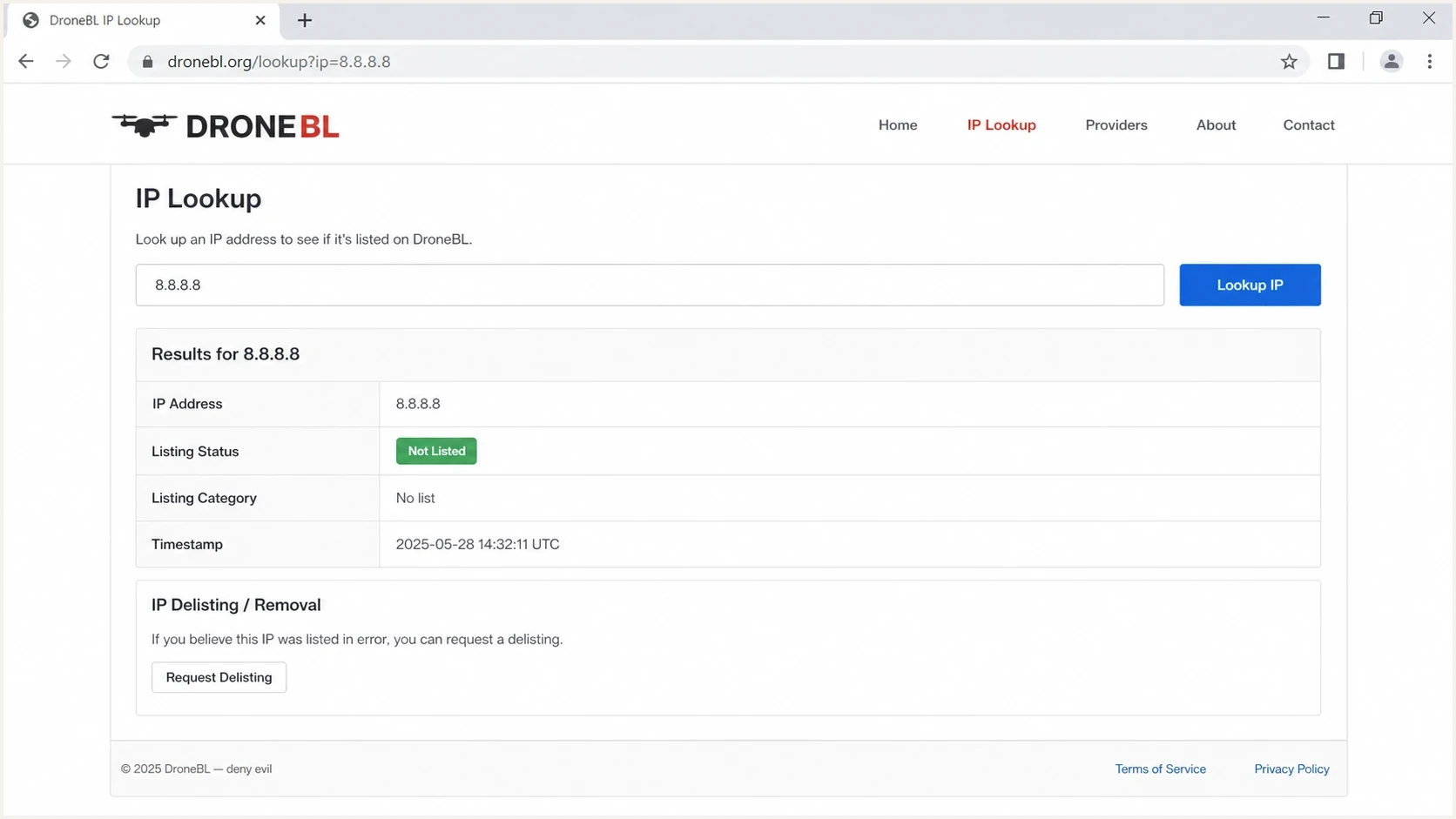
DroneBL IP Lookup page showing a listed IP and delisting area.
The first checks to run
Start by finding out exactly what DroneBL is reporting. This keeps the investigation factual and stops the email and security teams from talking past each other.
- Confirm current use: verify that the IP is assigned to your mail server, NAT gateway, residential connection, hosted server, or cloud account.
- Read every incident: record the incident ID, DroneBL class, description, date, comment, and removal instruction.
- Check live exposure: look for open proxy ports, open DNS recursion, compromised routing gear, or unexpected services.
- Review security logs: check failed logins, unexpected outbound connections, configuration changes, and activity near the listing time.
- Prepare evidence: write down what was found, what changed, and how you verified that the issue should not recur.
If you need a broader snapshot, run a domain and authentication review with the domain health checker. It does not establish the DroneBL cause or prove removal, but it can identify separate SPF, DKIM, DMARC, DNS, or sending-path problems that need their own owners.
|
|
|
|---|---|---|
8 or 9 | Open proxy | Close exposure |
12 | Open resolver | Disable recursion |
13 | Dictionary attacks | Review access logs |
15 | Router issue | Secure gateway |
255 | Uncategorized | Use comment |
Fast triage mapping for common DroneBL outcomes.
Blocklist checker
Check your domain or IP against 144 blocklists.







Email impact or security finding
DroneBL records automated abuse and abusable systems, so the root cause starts as a network or security investigation. The effect can still include blocked email or denied access when another service consults the blacklist. Separate the cause from the effect, and do not assume that a DroneBL result explains an email rejection unless the rejection names DroneBL or the sending IP.
Likely delivery impact
- Explicit rejection: a bounce or access error names DroneBL or the listed sending IP.
- Matching timeline: the failures began near the listing time and affect traffic using that IP.
- Required response: fix the DroneBL cause, request removal, and ask the affected service when it refreshes the data.
Likely security issue
- Open service: the category points to proxy, resolver, router, or gateway exposure.
- Active abuse: logs show unexpected outbound traffic, authentication attempts, or process activity.
- Required response: remove exposure, rotate affected credentials, patch systems, then request removal.
A category 13 result means automated dictionary attacks. It does not, by itself, show that a mailing list contained a spamtrap or invalid recipient. Review the listing comment and authentication or service logs for repeated guesses, then identify the device or account that generated the traffic. If the activity predates your use of a reassigned IP, document that history in the removal request.
How to remove an IP from DroneBL
Removal is a review process, not a DNS change. You cannot publish a DMARC, SPF, or DKIM record to make a DroneBL listing disappear. Remove the current cause, then use the removal action attached to each DroneBL incident. An old or reassigned-IP listing still needs the current primary user to request review.
- Look up the IP: record every incident ID, class, comment, date, and removal instruction before changing anything.
- Fix the cause: close open services, patch hosts, clean compromised systems, or secure the router or gateway.
- Verify the fix: use logs and network checks to confirm that the reported behavior is no longer present.
- Request removal: follow the instructions shown for every incident and submit from the affected device when practical.
- Monitor the outcome: watch for approval, relisting, and the affected service's next DroneBL data refresh.
Short removal evidence notetext
IP: 203.0.113.25
Incident: 1234567
Listing: DroneBL class 8, Open SOCKS proxy
Finding: Proxy service exposed on TCP port 1080
Action: Service disabled, firewall restricted, credentials rotated
Verification: External proxy connection no longer succeeds
Request: Please review this incident for removal
For a deeper reference on how this list works, pair the lookup with the DroneBL DNSBL explainer. Keep the process concrete: identify each incident, remove the cause, show verification, request review, and monitor the result.
What a good request looks like
A good removal request names the IP and incident, acknowledges the class, states what was checked, explains what changed, and includes verification. If the IP was reassigned, state when you received it and why the reported activity belongs to an earlier user.
Who can request removal and how long it takes
DroneBL says only the primary user of an IP can request removal. For residential internet, that normally means the address currently assigned by the internet provider. If you do not control the listed address or the affected system, the network operator or administrator needs to handle the request.
- Dynamic or reassigned IP: submit as the current primary user and explain when the provider assigned the address if the incident predates your use.
- VPN or public Wi-Fi: contact the organization that operates the shared connection because an individual user does not control its public IP.
- Hosted server: ask the server administrator or hosting account owner to investigate and submit the request if you lack administrative control.
- CIDR or provider-controlled listing: follow the lookup result because it can direct you to the maintainer or network provider instead of offering individual removal.
Submit the request from the affected device when practical, and follow every instruction shown in the lookup result. DroneBL's service is maintained by volunteers, so review can take time. Its current FAQ says to use its support route if a request has not been resolved within about a week. Do not rely on automatic expiry because DroneBL says some active entries are rechecked and cleared, but not every entry is rechecked.
Removal and restored access are separate events
After DroneBL approves removal, the service that blocked your connection or email must refresh its DroneBL data. That service controls its own schedule, so access can remain blocked for a while after the lookup shows the incident as removed.
How to prevent a repeat listing
The prevention work depends on the class and comment. If the problem was an open service or compromised device, security owns the fix. If the IP belongs to a provider or shared network, that operator owns the infrastructure change. When the cause is unclear, split the work between a network-exposure review and a review of host or authentication logs.
- For servers: restrict administrative access, require strong authentication, patch promptly, and log outbound behavior.
- For DNS: disable public recursion unless it is intentional, restrict resolver access, and review unusual query volume.
- For routers and gateways: update firmware, remove unknown accounts, restrict management access, and check proxy settings.
- For email authentication: keep SPF, DKIM, and DMARC passing so separate authentication failures do not confuse the incident.
Suped supports the follow-up workflow by showing DMARC sources, SPF and DKIM results, and blocklist status in one product. Alerts help assign a new listing or authentication change to the right owner, while the incident record can capture the fix and confirmation.

Blocklist monitoring page showing domain and IP checks across blocklists with importance and status
When the concern is whether a real message still authenticates, send a test message through the same infrastructure and inspect the result with the email tester. That does not prove DroneBL removal, but it helps separate DNS authentication and sending-path problems from the blocklist issue.
How to explain this to security teams
The clearest message is that DroneBL can matter even when inbox delivery is stable. A blacklist can have low impact on mailbox placement and still require an answer during a security or procurement review. Report the security evidence and delivery evidence separately.
Response priority by evidence
Use the listing details to decide how urgent the response should be.
Reassigned IP
Low
Incident predates current use, no live exposure, and assignment history is documented.
Recent automated attacks
High
Class 13 or another recent abuse report requires log review and source containment.
Open service
Critical
Proxy, resolver, router, or host exposure is still visible.
Do not promise that removal means the infrastructure will remain clean. Removal is a point-in-time outcome. The durable control is a monitoring loop across sending sources, authentication, DNS, blocklists, security exposure, and host logs.
Suped's product keeps DMARC, SPF, DKIM, blocklist findings, alerts, and follow-up ownership in the same workflow. The practical process is to detect the issue, identify the owner, follow the fix steps, record the evidence, and confirm the result.
For stakeholders who are new to blocklists, start with a general blocklists overview, then return to the specific DroneBL incidents. That keeps the discussion focused on the IP and evidence instead of every blocklist or blacklist on the internet.
Views from the trenches
Best practices
Verify every DroneBL incident before treating the listing as a mail-blocking event.
Review access logs, exposed services, and IP ownership before requesting removal.
Keep removal evidence factual and tied to each incident shown for the listed IP.
Common pitfalls
Do not assume a DroneBL listing means inbox providers are blocking all mail today.
Do not request removal before checking for open proxies or compromise signs on the host.
Do not argue that a list is irrelevant when a security team must answer buyers quickly.
Expert tips
Document why the listing happened, what changed, and how monitoring confirms the fix.
Treat reassigned IP history differently from live compromise indicators on a host.
Assign owners for removal, log review, infrastructure cleanup, and follow-up monitoring.
Expert from Email Geeks says DroneBL should not be treated as only a spam list because many categories point to compromised systems, exposed proxies, or abuse patterns.
2023-11-02 - Email Geeks
Expert from Email Geeks says a category 13 result means automated dictionary attacks and deserves a review of authentication or service logs.
2023-11-02 - Email Geeks
What to do next
If your IP is on DroneBL today, run the lookup first. Decide whether the evidence points to live security exposure, automated attacks, or an incident from a previous user of a reassigned address. Fix any current cause before asking for removal, and keep the request short and factual.
After removal, monitor the IP and domain instead of treating the incident as permanently closed. A repeat listing means the exposure remains, the remediation was incomplete, or new abuse appeared. Suped supports that routine by combining authentication monitoring, issue detection, fix steps, alerts, hosted DNS controls, and blocklist visibility in one product.
If the listing affected a vendor review or internal audit, write the incident note in this order: IP, DroneBL incident and class, root cause, evidence checked, fix completed, removal status, downstream refresh status, and monitoring owner. That turns a blacklist finding into a documented operational item.




