What should I do if my IP address is blacklisted by UCEPROTECT?

Published 6 Aug 2025
Updated 27 Aug 2026
12 min read
Summarize with
Updated on 27 Aug 2026: We clarified UCEPROTECT's free removal rules by level and strengthened the provider escalation steps.
If your IP address is blacklisted by UCEPROTECT, do not start by paying for removal or arguing about the timestamp. Start by confirming the level, proving whether real mail is being rejected, and fixing any sending issue you control. A Level 1 entry expires automatically seven days after the last spam email hits UCEPROTECT's spam traps. Level 2 and Level 3 clear when the wider allocation or ASN no longer meets the applicable listing criteria.
A UCEPROTECT listing is a reputation signal that needs context. It is serious when recipients reject mail because of it. It is a lower priority when it appears only on a public blacklist lookup page and there is no matching bounce evidence. That distinction matters because UCEPROTECT listings often cause more internal panic than real inbox damage.
Short answer
- Check the level: Level 1 points at an individual IP, Level 2 covers a provider allocation, and Level 3 covers an ASN.
- Measure delivery: Look for SMTP rejection text that names UCEPROTECT, uceprotectip, or the exact DNSBL zone, not only a generic blacklist result.
- Fix root cause: Audit compromised accounts, shared egress, backscatter, list quality, and unexpected relays.
- Avoid reflex payment: Paid express removal does not solve the cause. UCEPROTECT says Level 1 expires free after seven days without another spam-trap hit, while Levels 2 and 3 de-escalate when their network-level criteria are no longer met.
First action: verify impact before removal
A blocklist lookup is a clue, not proof of inbox failure. Check the blacklist record, then compare it with bounces, sending logs, and controlled test messages. If you need the underlying DNSBL concepts first, start with blocklist basics before making an incident decision.
- Bounce evidence: Collect raw SMTP rejection text that names UCEPROTECT, uceprotectip, dnsbl-1, dnsbl-2, or dnsbl-3.uceprotect.net.
- Traffic evidence: Pull outbound logs for the listed IP, NAT gateway, mail relay, and any queue that can use that route.
- Receiver evidence: Separate one corporate filter rejection from broad delivery damage across your normal recipients.
- Ownership evidence: Confirm whether you control the listed IP, lease it, or share the surrounding range with other senders.
Blocklist checker
Check your domain or IP against 144 blocklists.







After a lookup, send a controlled message through the same route. The email tester helps confirm the headers, authentication results, and obvious delivery signals on a real message instead of treating a DNS result as the whole story.
Delivery impact threshold
Use the impact level to decide how urgently to respond to a UCEPROTECT blocklist entry.
Lookup only
Monitor
Listed in a checker with no UCEPROTECT bounce text.
Limited rejection
Investigate
Some recipients reject mail and name the DNSBL.
Repeated rejection
Escalate
Important mail is rejected across normal routes.
Confirm what each UCEPROTECT level means
The action depends on the UCEPROTECT zone. A Level 1 listing points at one IP. A Level 2 or Level 3 listing covers a provider allocation or ASN, so your individual fix is only part of the answer. UCEPROTECT's removal policy says to identify the listing level before taking action. Paid express removal is optional in some cases, but it does not replace cleanup.
|
|
|
|
|---|---|---|---|
Level 1 | Single IP | Direct spam-trap impact | Fix sender and wait |
Level 2 | Provider allocation | Too many Level 1 impacts | Ask upstream owner |
Level 3 | Provider ASN | ASN exceeds listing criteria | Escalate or migrate |
Backscatterer | Bounce source | Bad bounce behavior | Stop backscatter |
UCEPROTECT listing levels and practical response
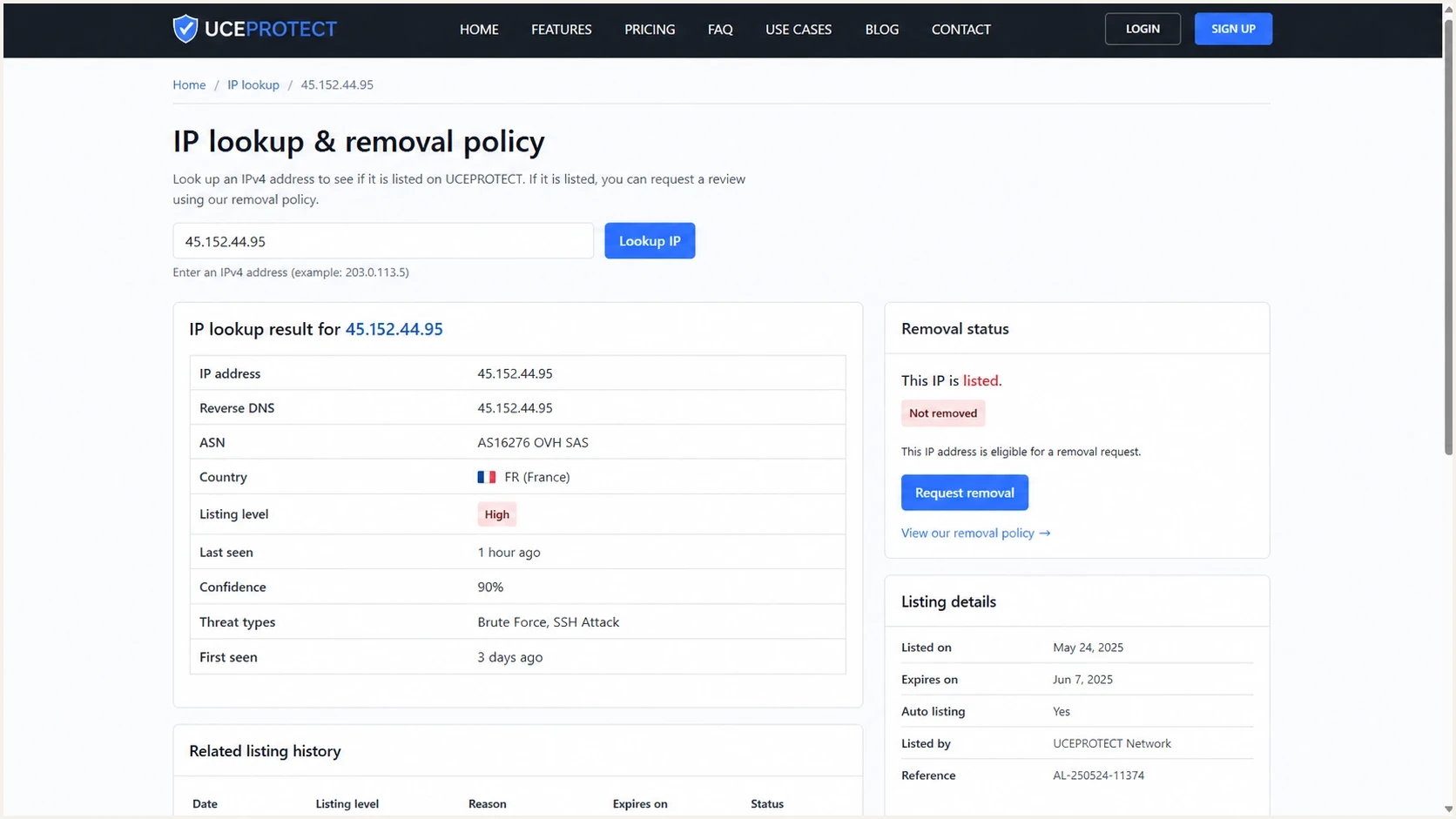
UCEPROTECT lookup result showing IP listing level and removal status.
Do not treat all levels the same. A Level 1 blacklist entry means UCEPROTECT recorded a direct spam-trap impact for the individual IP. Level 2 and Level 3 can include your IP even when your server behaved well because those zones cover provider-owned address space. Backscatterer is a separate listing for systems that send misdirected bounce traffic. The first question is not "how do I contact UCEPROTECT?" It is "who controls the affected network and what delivery impact can be proved?"
How free UCEPROTECT delisting works
Free UCEPROTECT delisting depends on the zone. Do not apply the Level 1 seven-day timer to every listing. Check the database after cleanup and use the rule for the level shown.
- Level 1: The individual IP expires automatically seven days after its last spam email hits UCEPROTECT's spam traps. Another detected event restarts the waiting period.
- Level 2: The provider allocation is removed automatically and free when its Level 1 impacts fall below UCEPROTECT's threshold within the rolling seven-day window. The provider has to clean the affected IPs.
- Level 3: The provider ASN is removed automatically when it no longer meets the Level 3 listing criteria. An end-customer removal request does not change the ASN's status.
If you lease one IP inside a Level 2 allocation or Level 3 ASN, send evidence to the network owner and request a clean route or replacement IP when delivery is materially affected. Recheck the exact zone after the cleanup window, because clearing Level 1 does not guarantee that a wider listing has already de-escalated.
Why a listing can appear when logs look clean
A clean 48-hour mail log is too narrow for this investigation. Review at least the previous seven days across every outbound path. Even then, a mismatch proves only that no matching mail was in the logs you retained. The displayed time can be delayed, based on a feed event, or tied to traffic that moved through a path you did not query. Do not build the incident timeline on the UCEPROTECT timestamp alone.
- Wrong log set: The mail left through another relay, container host, NAT device, or load-balanced egress IP.
- Shared egress: Another tenant used the same IP, especially on shared hosting, cloud ranges, and pooled SMTP routes.
- Delayed queue: A message accepted earlier left the queue later, or a retry path used the listed IP unexpectedly.
- Backscatter: A server accepted forged inbound mail and then sent non-delivery reports to forged senders.
- Trap hit: A stale address, scraped contact, typo domain, or compromised account reached a spam trap.
Quick local checksbash
grep -E "UCEPROTECT|dnsbl-[123]" /var/log/maillog
grep "91.197.72.142" /var/log/maillog
dig +short 142.72.197.91.dnsbl-1.uceprotect.net A
dig +short 142.72.197.91.dnsbl-1.uceprotect.net TXT
The DNSBL query reverses the octets of the IP address before appending the zone. For example, 91.197.72.142 becomes 142.72.197.91.dnsbl-1.uceprotect.net. Query dnsbl-2 or dnsbl-3 as well when the lookup reports a wider listing.
Timestamp caveat
If the Last Impact time does not match your logs, record the mismatch, but do not spend the whole incident trying to prove the timestamp wrong. A receiver will care about current risk and current rejection behavior, not whether the historic minute is perfect.
The triage checklist
Use a simple order because blacklist work gets noisy fast. The goal is to decide whether there is active risk, not to win a debate with a DNSBL operator. Gather enough evidence to explain the listing, fix anything real, and decide whether waiting is acceptable.
Evidence to collect
- Listing proof: Zone, first seen time, last seen time, TXT data, and affected IP.
- Mail proof: Raw SMTP rejection strings and recipient domains that rejected mail.
- Traffic proof: Sending logs, queue IDs, NAT mappings, and campaign windows.
- Control proof: Confirmation that you own, lease, or share the listed IP space.
Fixes to make
- Abuse source: Remove compromised accounts, bad imports, and unattended scripts.
- Backscatter: Stop accepting and later bouncing mail to forged senders.
- Sender health: Confirm SPF, DKIM, DMARC, rDNS, HELO, and TLS are configured correctly. These checks do not remove an IP listing, but they prevent separate authentication and infrastructure faults from confusing the incident.
- List hygiene: Suppress risky addresses and review how they entered your database.
If the IP is part of a shared pool, ask the provider for the surrounding range status, not just your single address. If the provider cannot explain the listing or control abuse on the range, moving important mail to cleaner dedicated infrastructure is a business decision, not a DNS fix.
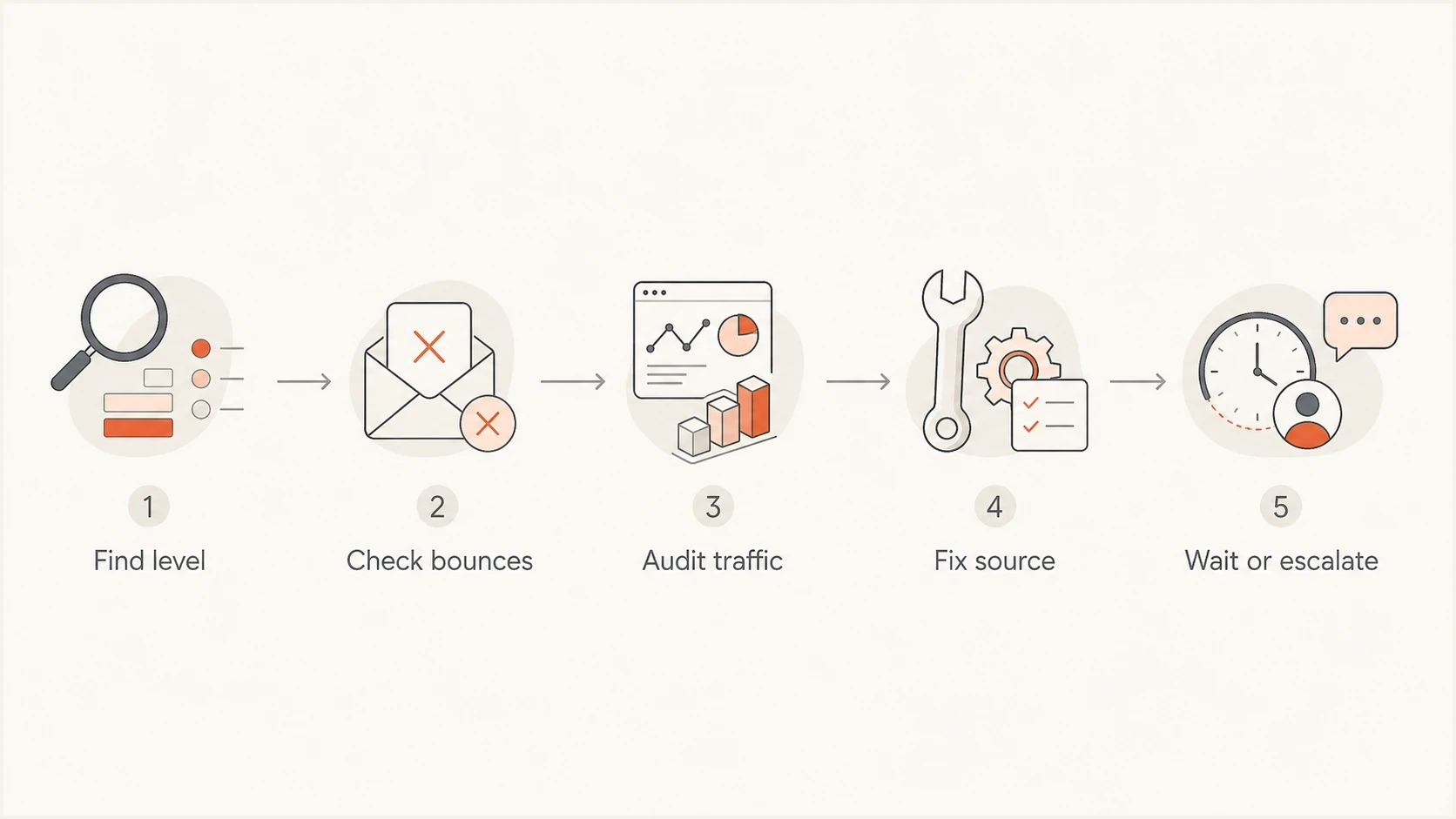
Flowchart for UCEPROTECT response: lookup, bounces, traffic audit, source fix, and escalation.
What to send your provider
For Level 2 and Level 3, the provider owns the surrounding address space and has to reduce the Level 1 impacts that keep the allocation or ASN above UCEPROTECT's criteria. Send a concise evidence pack instead of a generic delisting request. The provider needs enough detail to confirm the affected netblock, explain the cleanup action, and tell you whether to wait, escalate, or move critical traffic.
- Exact listing: Share the zone, IP, TXT data, first seen or last seen time, and whether the nearby range or ASN is listed.
- Delivery proof: Include distinct receiving domains, SMTP replies, enhanced status codes, timestamps, and affected mail streams.
- Cleanup proof: Document the compromised account suspension, bad campaign pause, open relay closure, or backscatter fix.
- Decision request: Ask whether they will remediate the range, wait for automatic de-escalation, or provide clean routing for important mail.
Provider evidence notetext
We identified the sender tied to the initial listing.
The sender has been suspended and no further mail is leaving that path.
Current confirmed UCEPROTECT rejects: 2 receivers, 11 messages.
Current lookup-only impact: no confirmed rejects outside those receivers.
Please confirm whether your netblock or ASN has an active listing.
Please confirm whether you plan to remediate, wait for automatic de-escalation, or provide clean routing.
When to monitor, escalate, or change traffic
The hardest part is explaining the right level of concern to non-technical stakeholders. A UCEPROTECT blacklist result looks alarming, but the decision should come from delivery impact. Use this split when deciding what to do next.
- Monitor: UCEPROTECT appears only in a checker and no recipient rejects or filters mail because of it. Preserve the result and watch bounces while the listing clears.
- Investigate: Any bounce text names UCEPROTECT or the listed IP has unexplained outbound traffic.
- Escalate: The listing is Level 2 or Level 3 and the provider controls the affected allocation or ASN.
- Move traffic: Revenue-critical mail is rejected and the upstream owner cannot give a credible fix timeline.
Do not pay before fixing
Paid express removal is a continuity choice, not remediation. If the underlying spam, trap hit, backscatter, or shared-range issue is still active, the IP can return to the blacklist quickly. Only consider payment after the cause is fixed and the delivery cost of waiting is higher than the fee.
How Suped fits into the workflow
Suped's product helps keep the incident tied to evidence because UCEPROTECT is only one part of the reputation picture. Suped's blocklist monitoring combines domain and IP listings with DMARC, authentication, and deliverability context, so a visible blacklist entry does not get the same priority as a listing that coincides with failures and bounces.
The same workflow should check authentication. A Level 1 listing and a broken DMARC or SPF setup are separate problems, but together they raise deliverability risk. Run a domain health check after containment to catch DNS issues that make recipients less tolerant of other reputation problems.

Blocklist monitoring page showing domain and IP checks across blocklists with importance and status
In Suped, pair the blocklist event with DMARC aggregate data, authentication checks, alerts, and issue detection. Use that combined evidence to decide whether the UCEPROTECT blacklist or blocklist needs immediate action, provider escalation, or continued monitoring.
Views from the trenches
Best practices
Validate the UCEPROTECT level and current bounce evidence before opening any removal request.
Keep outbound logs, queue IDs, and NAT records for enough days to challenge odd timestamps.
Document whether the listing affects real recipients, not only public blacklist lookup pages.
Common pitfalls
Treating every UCEPROTECT result as urgent can waste time when no receiver rejects mail.
Paying for express removal before fixing traffic leaves the same IP exposed to relisting.
Ignoring Level 2 or Level 3 context can hide a provider issue outside your direct control.
Expert tips
Use bounce text, not dashboard anxiety, to decide whether mail flow needs intervention.
For shared IP ranges, push the provider for abuse controls and documented remediation.
Keep a stakeholder note explaining why some blacklist results do not equal inbox failure.
Expert from Email Geeks says UCEPROTECT contact paths rarely resolve disputed evidence, so the useful work is fixing any real sending issue and measuring recipient impact.
2025-03-11 - Email Geeks
Expert from Email Geeks says a listing with no matching traffic is unusual, but the timestamp alone is not strong enough to prove what happened.
2025-06-18 - Email Geeks
The practical answer
If your IP is blacklisted by UCEPROTECT, fix real abuse first, prove whether delivery is affected, and use the free removal path for the listing level. Do not treat a lookup page as an emergency by itself. Do treat any matching SMTP rejection as an incident, especially when the listed IP carries transactional or revenue-critical mail.
For Level 1, focus on the specific IP, clean the sending path, and monitor the seven-day expiry window. For Level 2 or Level 3, involve the provider because the problem sits above your single server and clears only when the allocation or ASN falls below UCEPROTECT's criteria. For stakeholders, show the bounce evidence, the current listing level, the fix already made, and the follow-up monitoring plan. That is clearer than debating whether the blacklist operator will accept a false-positive complaint.




