What does the Apple email error '554 5.7.0 Blocked' mean and how can I resolve it?

Published 1 Jul 2025
Updated 26 Sep 2026
11 min read
Summarize with
Updated on 26 Sep 2026: We clarified how to scope Apple 554 blocks, handle a clean DNSBL result, and prepare evidence for remediation.
The Apple email error "554 5.7.0 Blocked" means Apple or a filtering layer in its acceptance path refused the message under a policy or reputation rule during the SMTP transaction. Treat it as a sender-side delivery problem first, not a recipient mailbox problem. The block usually points to the sending IP address, sender domain reputation, authentication, complaint history, message content, or a temporary filtering event affecting iCloud, me.com, and mac.com recipients.
The fastest fix is to preserve the full bounce, identify the exact sending IP, pause or reduce affected traffic, check domain and IP reputation, validate SPF and DKIM plus DMARC, then ask your ESP to remediate the sending IP if you use shared infrastructure. If the bounce contains only the short text "554 5.7.0 Blocked", assume the useful detail was truncated by your ESP or mail system and pull the full SMTP transcript before changing DNS.
This diagnosis applies when an iCloud Mail receiving server rejects a message addressed to an icloud.com, me.com, or mac.com recipient. If the error appears while you are sending from an iCloud account and no iCloud receiving server appears in the bounce, check the outgoing account settings, SMTP authentication, and complete diagnostic instead.
- Meaning: Apple or its filtering layer blocked delivery because the message, sender, or sending IP matched a policy filter.
- First check: Find the sending IP and confirm whether the issue hits only Apple domains or other providers too.
- Common fix: Stop the traffic causing the rejection, separate higher-risk mail, and have the ESP handle shared-IP mitigation.
- Best evidence: Use bounce samples, sending IPs, timestamps, authentication results, and recent campaign changes.
What the bounce code means
SMTP code 554 is a permanent negative completion response for that delivery attempt. The enhanced status code 5.7.0 places the failure in the security or policy category. It is a broad status, not a unique Apple diagnosis, so the remote host, rejection stage, and full diagnostic text determine the next step. When the response says "Blocked", the message did not pass the acceptance rules applied to that SMTP transaction.
Some ESP dashboards call this a soft bounce while they continue retrying. Recurring 554 5.7.0 bounces still need urgent investigation. An ESP retry does not change the 5.x.x rejection into a temporary SMTP response, and repeated attempts do not repair a reputation block.
Example bounce texttext
Remote server returned:
554 5.7.0 Blocked

Full transcript often includes more detail:
554 5.7.0 Blocked - see DNSBL lookup for sending IP
Do not troubleshoot the short code alone
The short bounce text often omits the actionable part. Collect the full SMTP transcript, exact sending IP, envelope sender, visible From domain, recipient domain, and stage of the SMTP conversation. These details show whether Apple rejected the connection, recipient, or message content and prevent unrelated DNS or template changes.
If you are comparing Apple errors, keep a short reference for 550, 554, and 5.7.1 bounces so support, marketing, and engineering use the same vocabulary. A 5.7.x code points to a policy or security decision, not a mistyped recipient address.
Fast triage
Start by proving the scope. If only iCloud, me.com, and mac.com addresses bounce, the problem sits in Apple's acceptance path or an upstream filtering rule used there. If other providers also reject mail, the problem is broader and Apple is only the first visible symptom.
|
|
|
|---|---|---|
Apple only | Apple-path policy | Gather full bounces |
Many providers | Sender reputation | Slow campaigns |
One ESP pool | Shared IP | Escalate to ESP |
New domain | Low trust | Warm slowly |
Use this table to sort the first evidence you collect.
Next, send one real message through the same sending route and inspect the headers with an email tester. Confirm the SPF result, DKIM signature result, DMARC result, and any unexpected forwarding or tracking changes.
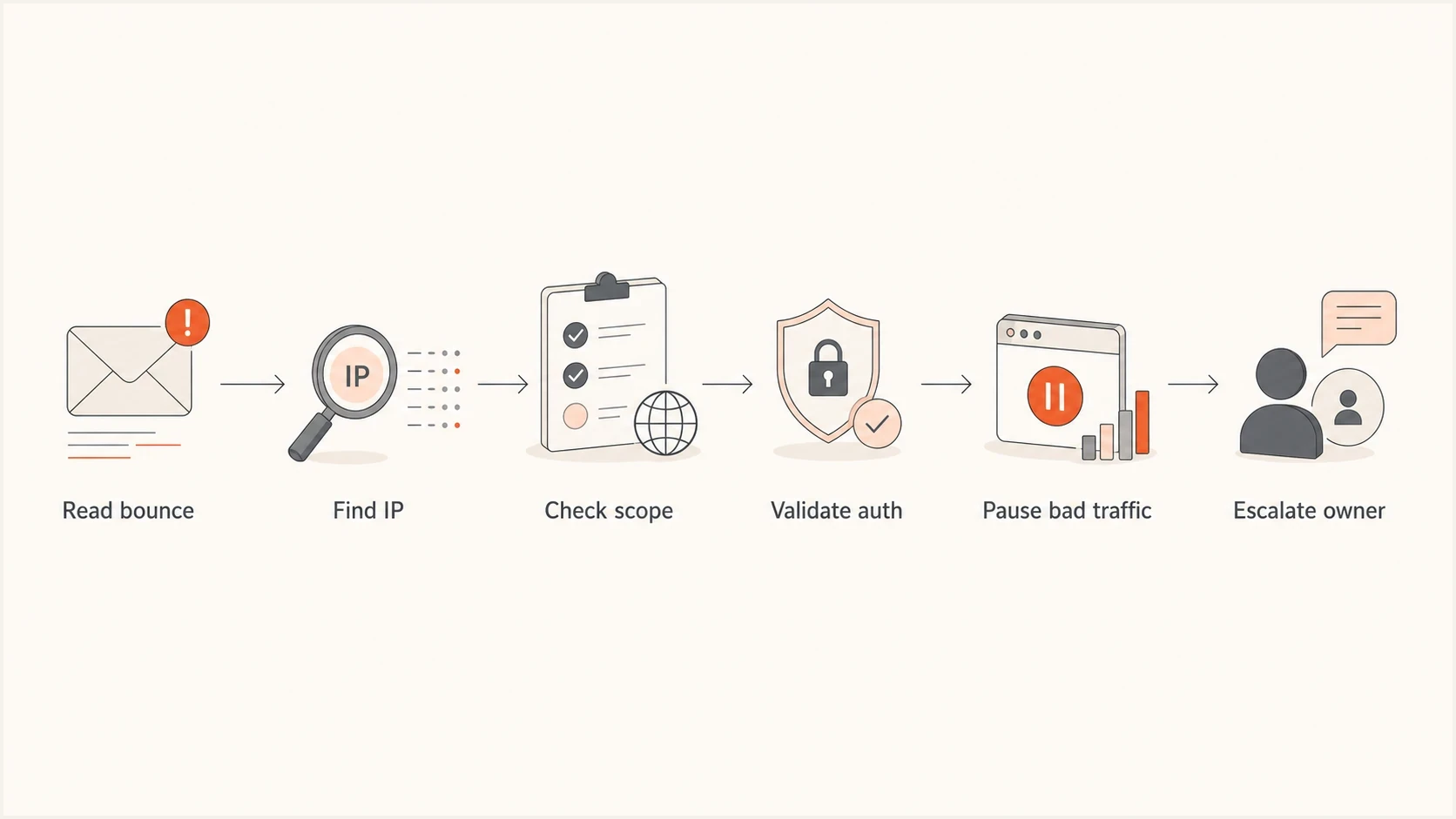
Apple 554 5.7.0 Blocked troubleshooting flow from bounce review to sender escalation.
Check the sending IP and reputation
A frequent cause is an IP-level block. This is especially likely when the full bounce includes a DNSBL lookup reference or when one campaign fails across many Apple recipients at once. Public blocklist and blacklist results do not explain every Apple decision, but a listing gives the sending-infrastructure owner a concrete lead.
Use continuous blocklist monitoring instead of relying only on checks after a rejection. If a sending IP appears on relevant blocklists or blacklists, compare the listing time with the first Apple bounce and the traffic sent immediately before it.
Blocklist checker
Check your domain or IP against 144 blocklists.







A clean DNS-based blocklist (DNSBL) lookup does not invalidate the bounce. The listing can change between the rejection and your check, or the rejection can involve a different policy signal. Record the exact rejected IP and timestamp, recheck that same IP, and retain the full result. If the blocklist or blacklist check stays clean, continue with Apple-only scope, authentication, recent volume changes, complaints, and message content instead of submitting an unsupported delisting request.
Suped's product keeps DMARC reports, SPF and DKIM checks, blocklist status, and delivery signals in the same workspace. During an Apple incident, use that workflow to identify the affected source, confirm whether it is authorized, compare reputation changes with bounce timing, and assign the fix to the owner of the domain or IP.

Blocklist monitoring page showing domain and IP checks across blocklists with importance and status
Fix authentication before escalation
An Apple block can be reputation-led even when authentication passes. Still, do not escalate a sender-reputation issue until the authentication baseline is clean. A failing DKIM signature, missing SPF authorization, or failed DMARC result gives the receiving system another reason to distrust the stream.
Run a domain health check against the visible From domain and any bounce domain used by the ESP. Compare the result with the headers of a real sent message, because correct DNS records do not prove that the production message authenticates.
DMARC monitoring record exampledns
_dmarc.example.com. 3600 IN TXT (
  "v=DMARC1; p=none; rua=mailto:dmarc@example.com"
)
Authentication problem
- Evidence: A real message fails SPF, DKIM, or DMARC.
- Owner: The administrators responsible for DNS, the ESP account, and the sending domain.
- Fix: Correct the DNS record, signing selector, sender setup, or return-path configuration.
Reputation problem
- Evidence: Authentication passes, but Apple rejects traffic from a specific IP or pool.
- Owner: The ESP or infrastructure team that controls the sending IP.
- Fix: Stop abusive traffic, separate streams, request mitigation, and monitor recovery.
Meet Apple's bulk sender requirements
Apple requires bulk senders to meet its iCloud Mail sending practices before mail is accepted. Passing authentication alone is not enough. Review these controls before requesting a block review, because they affect the same IP reputation, domain reputation, content checks, and user feedback Apple says it uses.
- Consent and unsubscribe: Send bulk mail only to explicit subscribers, provide an immediate unsubscribe route, and never reactivate suppressed recipients.
- Protocol compliance: Follow RFC 5321 for SMTP transport and RFC 5322 for message format.
- Sending identity: Use valid reverse DNS, stable sending IPs and domains, plus a consistent From name and address.
- Authentication: Publish SPF and DKIM authentication, publish a DMARC policy for the sending domain, and add ARC headers when forwarding mail.
- Traffic separation: Keep transactional and marketing streams separate while maintaining consistent identities within each stream.
- List maintenance: Process temporary and permanent SMTP errors, remove persistently bouncing addresses, and suppress inactive subscribers.
Apple has no bulk-sender allow list
Apple also does not provide a sender feedback loop. There is no allow-list request or complaint feed to substitute for clean consent records, fast suppression, stable sending practices, and detailed SMTP logs.
What to send your ESP or Apple
If you send through a shared ESP IP, the ESP controls the part being blocked. You can fix your domain authentication and traffic practices, but you cannot remediate the shared IP yourself. The support request needs enough detail for the ESP to find the pool, trace nearby traffic, and use the relevant postmaster route.
Evidence packagetext
Bounce code: 554 5.7.0 Blocked
Recipient domains: icloud.com, me.com, mac.com
Sending IP: 203.0.113.10
Envelope sender: bounce.example.com
Visible From domain: example.com
First seen: YYYY-MM-DD hh:mm UTC
Campaign or stream: password reset and weekly newsletter
Recent changes: new template, new segment, new tracking domain
Use the right escalation path
- Shared IP: Push the ESP to investigate the pool and handle mitigation with Apple.
- Dedicated IP: Audit your own consent, complaints, volume changes, authentication, and suppression process.
- Transactional mail: Separate password resets and account mail from bulk marketing before retesting.
- Marketing mail: Suppress inactive Apple recipients and stop sending to addresses with permanent bounces.
For a dedicated IP, contact Apple's postmaster team at icloudadmin@apple.com only after reviewing the mail logs and correcting known issues. Include your company name, sending domain, affected mail-server IPs, full SMTP errors, when the issue started, and a concise description of the remediation already completed.
Keep the escalation factual. Ask which sending IP, pool, stream, or policy signal changed and state what action has already prevented more rejected traffic. A generic request to "unblock us" gives the recipient less evidence to investigate.
A practical remediation sequence
The order matters. A delisting or review request will not hold if the traffic that caused the block continues. Changing DNS before checking the full bounce can also hide the actual cause under unrelated edits.
- Collect: Export full bounces, SMTP transcripts, timestamps, source domains, and sending IPs.
- Scope: Confirm whether the rejection affects Apple only, one stream, or one IP pool.
- Authenticate: Verify SPF, DKIM, DMARC, rDNS, HELO, and return-path consistency.
- Segment: Separate transactional mail, engaged marketing mail, and risky reactivation traffic.
- Reduce: Pause poor-performing Apple segments and suppress recipients with recent permanent bounces.
- Escalate: Send the evidence package to the ESP, infrastructure owner, or Apple postmaster team as appropriate.
- Monitor: Watch Apple bounce share, blocklist and blacklist status, and authentication pass rates.
Apple bounce alert bands
Compare the Apple rejection share with your normal baseline by IP and stream instead of applying a universal provider threshold.
At baseline
Monitor
Normal variation with no repeated 554 pattern by IP or stream.
Sustained increase
Investigate
A repeated rise that needs comparison by IP, campaign, and recipient domain.
Sudden rejection spike
Act now
A sharp change tied to 554 responses that requires traffic control and escalation.
Suped's product supports this sequence by turning DMARC aggregate data into sender-level evidence and adding alerts for authentication or reputation changes. Teams can track hosted SPF, hosted DMARC, hosted MTA-STS, and blocklist monitoring in one place. MSPs can use the multi-tenant dashboard to keep client domains in one operational view.
Views from the trenches
Best practices
Keep full SMTP transcripts so truncated Apple bounces do not hide IP-level clues.
Compare Apple bounces by sender, IP, and stream before changing DNS records or content.
Escalate shared-IP blocks through the ESP with timestamps and bounce samples included.
Common pitfalls
Treating every 554 response as a content issue often causes teams to miss IP blocks.
Changing DMARC records during an incident can obscure the original failure pattern.
Retrying the same rejected Apple traffic can extend noise without fixing the cause.
Expert tips
Separate transactional mail first so urgent account messages can recover faster.
Track Apple-only spikes against blocklist data and recent sending changes together.
Ask the ESP for the exact pool owner, not a generic answer about deliverability.
Marketer from Email Geeks says the first step is asking for a sample bounce, because the short Apple error hides the practical cause.
2021-12-28 - Email Geeks
Marketer from Email Geeks says 554 5.7.0 Blocked often points to a sending IP block when the full transcript includes a lookup reference.
2021-12-28 - Email Geeks
The practical answer
Apple's "554 5.7.0 Blocked" response means the acceptance path refused your message because of a policy or reputation decision. There is no single DNS-record fix. Resolve it with full bounce text, the sending IP, recipient-domain scope, authentication results, reputation status, and recent sending changes.
For shared IPs, make the ESP own IP remediation. For a dedicated IP, audit consent, complaint patterns, authentication, content changes, volume changes, and suppression handling before contacting Apple. Continue monitoring after delivery resumes because a clean retry does not prove that reputation has fully recovered.




