What do PTR and HELO records mean in relation to AT&T email blocking, and whose responsibility are they?

Published 26 Apr 2025
Updated 8 Aug 2026
13 min read
Summarize with
Updated on 8 Aug 2026: We clarified PTR and HELO matching and added a practical checklist for dedicated-IP setup and AT&T escalation.
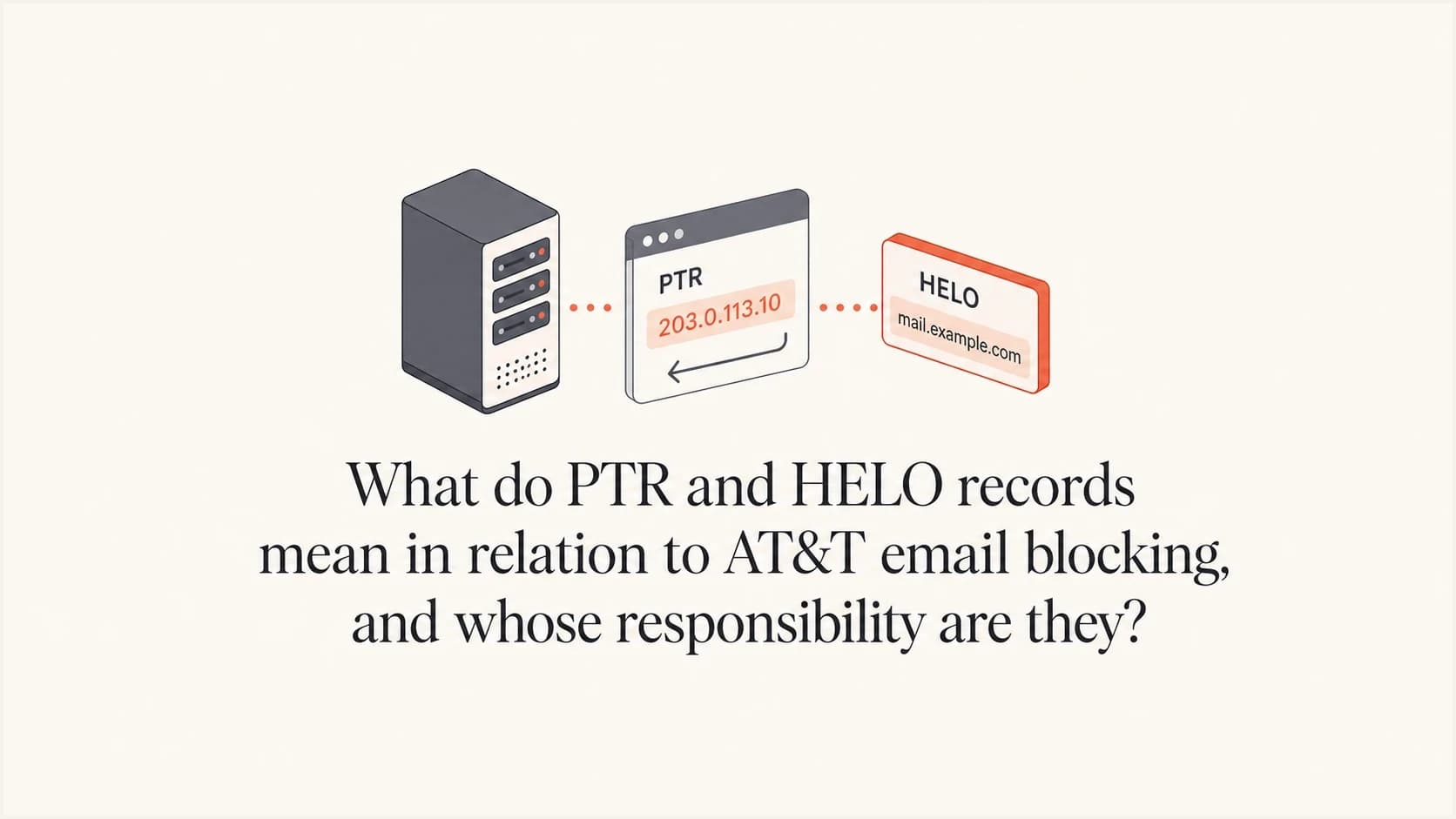
PTR and HELO are two pieces of mail server identity that AT&T can use when deciding whether to accept mail from a sending IP. A PTR record, also called reverse DNS or rDNS, maps an IP address back to a hostname. HELO, or more commonly EHLO, is the hostname the sending mail server announces at the start of the SMTP conversation.
The direct translation of AT&T's message is simple: if the IP is on a shared mail server used by many customers, an ESP-owned PTR hostname can be normal. For the dedicated MTA in this case, AT&T asked for the PTR hostname and HELO hostname to match. A missing PTR, failed forward lookup, or unrelated server name can weaken sender identity and contribute to blocking, rate limits, or additional review.
For most brands sending through an ESP, the PTR and HELO setup is the ESP's responsibility because the ESP controls the mail transfer agent, the IP pool, and usually the reverse DNS zone delegated by the IP owner. The sender still owns the escalation: ask the ESP to confirm the exact sending IPs, the PTR values, the HELO value each server uses, whether the IPs are shared or dedicated, and whether AT&T has an active DNSBL or policy block against them.
The short answer
Plain-English translation
AT&T's reply said that the sending IP had reverse DNS, but the reverse name did not match the name used in the SMTP greeting. AT&T accepted the ESP's generic naming on shared MTAs. For the dedicated MTA in the case, AT&T asked the ESP to update the PTR hostname to match HELO.
- PTR: The reverse DNS name for a sending IP, such as mail1.esp-example.net.
- HELO: The hostname a sending MTA announces when it opens an SMTP session.
- AT&T concern: A missing, unresolvable, or unrelated identity can make the infrastructure look poorly configured. AT&T requested an exact match for the dedicated MTA in this case.
- Owner of the fix: Usually the ESP or whoever operates the outbound mail servers and IP space.
This does not mean the sender's visible From domain has to appear in the PTR. In many ESP setups it should not. A shared IP used by many senders usually has an ESP-owned PTR, because one IP cannot have a unique reverse DNS identity for every customer using it. On a dedicated IP, there is more room to make the server identity specific and consistent.
The practical issue is not DMARC domain matching. PTR and HELO are infrastructure checks. DMARC evaluates whether the SPF or DKIM authentication domain has the required relationship to the visible From domain. AT&T can still reject a message for server identity or reputation reasons when DMARC passes.
How PTR and HELO work
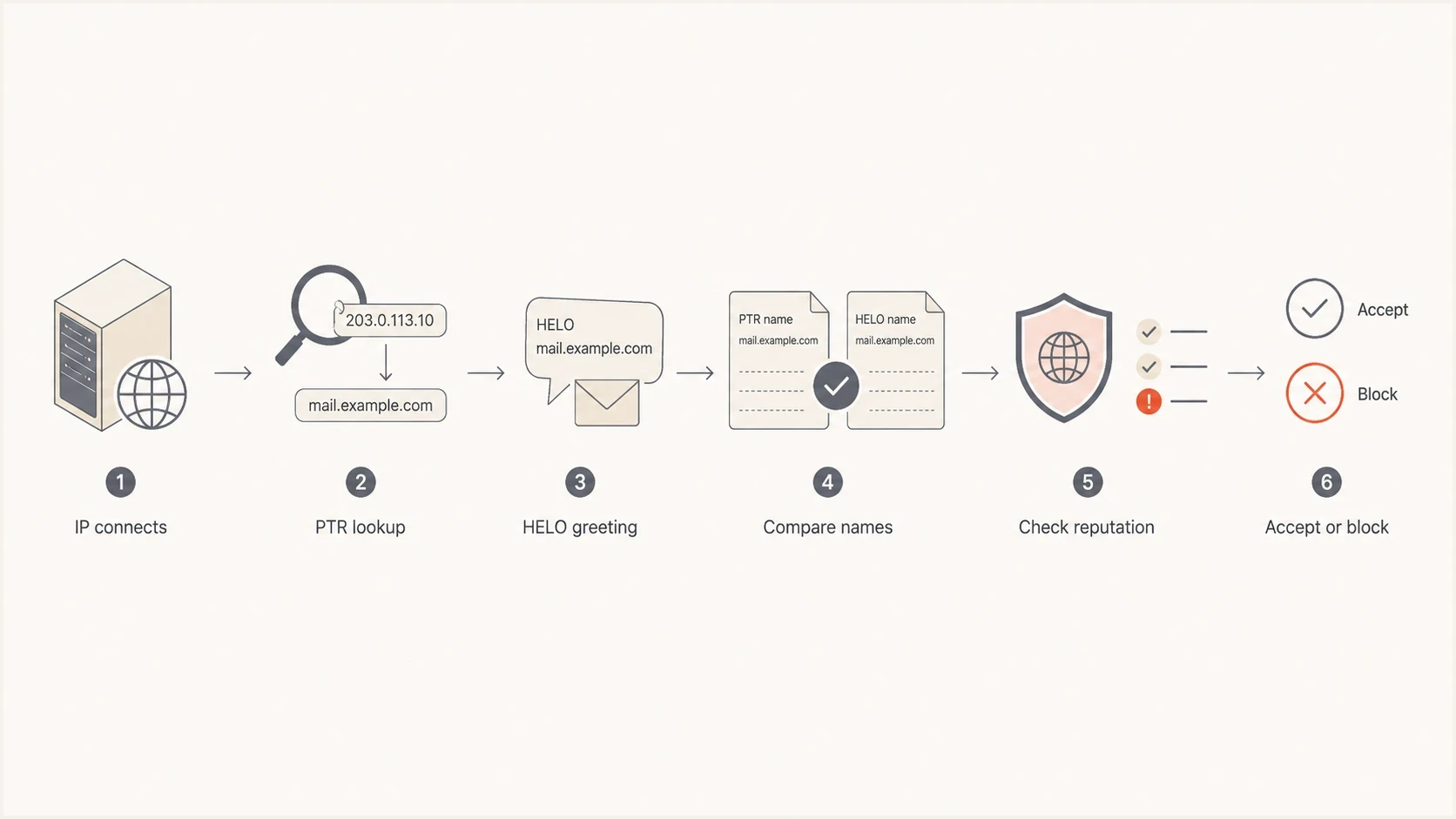
Flowchart showing how a mailbox provider compares IP, PTR, HELO, and reputation.
A PTR record lives under the reverse DNS tree controlled by the IP address owner, not under the sender's normal domain zone. IPv4 PTR records use in-addr.arpa, while IPv6 PTR records use ip6.arpa. If the ESP owns or leases the IP block, the ESP normally has to set or request the PTR. A brand cannot fix reverse DNS by adding a TXT, CNAME, or A record in its own domain unless the IP owner has delegated that reverse zone to the brand, which is rare for managed ESP sending.
HELO is different. It is not a DNS record. It is a value configured in the outbound MTA software. The receiving server sees it during the SMTP session. A well-run setup uses a stable, fully qualified hostname that resolves to the connecting IP where applicable.
Simplified SMTP greetingtext
220 inbound.att.net ESMTP ready
EHLO mta-01.mail.example.net
250-inbound.att.net Hello mta-01.mail.example.net
MAIL FROM:<bounce@example.com>
RCPT TO:<subscriber@att.net>
In that example, the HELO value is mta-01.mail.example.net. AT&T can compare it with the PTR returned for the connecting IP. A difference can be normal on documented shared infrastructure, but missing DNS or an unrelated name deserves investigation. The SMTP standard permits receivers to verify the EHLO name against the client IP, but failed verification alone is not a universal protocol basis for rejection. Mailbox providers can still use the inconsistency with reputation and policy signals.
What a clean dedicated setup looks like
A dedicated sending IP should have a stable identity that works in both DNS directions and during the SMTP greeting. Exact PTR and EHLO matching is the clearest setup when the ESP supports it, especially after AT&T has requested that change, but forward-confirmed reverse DNS is the more important technical check.
- Use one PTR per sending IP: Return one stable fully qualified hostname instead of several competing reverse names.
- Confirm FCrDNS: The PTR hostname's A or AAAA lookup should include the same sending IP used for the reverse lookup.
- Configure EHLO deliberately: Announce a stable primary hostname that resolves for the connecting address. Matching the PTR exactly keeps the explanation simple.
- Check each address family: An IPv4 pass does not validate IPv6. Mail sent over IPv6 needs its own ip6.arpa PTR and forward AAAA confirmation.
Forward-confirmed reverse DNS exampletext
203.0.113.25 -> mta-01.mail.example.net
mta-01.mail.example.net -> 203.0.113.25
EHLO mta-01.mail.example.net
If the IP owner changes the PTR, repeat both lookups after the previous PTR TTL has expired. Resolver caches can show the old answer until that TTL runs out, so capture the lookup time and resolver used when sending proof to the ESP or AT&T.
Shared vs dedicated MTAs
The shared versus dedicated part of AT&T's response matters because it changes what a reasonable PTR looks like. Shared infrastructure identifies the ESP's platform. Dedicated infrastructure can identify the customer's assigned mail stream more specifically, although many ESPs keep hostnames under their own operational domain.
Shared MTA
- PTR: Usually points to an ESP-owned hostname.
- HELO: Often uses a shared platform hostname.
- Expectation: Generic naming can be normal if it is stable and resolves cleanly.
- Risk: Other senders share reputation on the same pool.
Dedicated MTA
- PTR: Should be stable, meaningful, and forward-confirmed.
- HELO: Should be a stable fully qualified hostname.
- Expectation: Use an exact PTR and HELO match when AT&T requests it and the ESP supports it.
- Risk: An unexplained mismatch can slow unblocking or trigger more review.
|
|
|
|
|---|---|---|---|
PTR | IP to hostname | IP owner | Reverse identity |
HELO | SMTP server name | MTA operator | Greeting identity |
SPF | Allowed IPs | Domain owner | Auth check |
DKIM | Signed mail | Sender or ESP | Auth check |
DMARC | Domain policy | Domain owner | Policy signal |
Common ownership boundaries for PTR, HELO, and visible email identity.
The useful ownership split is clear. The sender owns domain authentication and DMARC reporting. The ESP owns the MTA identity when it operates the sending service. If the ESP says reverse DNS exists, ask for the actual values instead of a yes or no answer.
What to ask your ESP
The fastest way to move this forward is to ask precise operational questions. Avoid asking whether rDNS is set up correctly in the abstract. Ask the ESP to show the values AT&T saw for the same IPs that generated the bounces.
ESP escalation templatetext
Please confirm the outbound IPs used for AT&T traffic.
For each IPv4 or IPv6 address, please provide:

1. PTR hostname returned by reverse DNS
2. HELO or EHLO hostname used by the sending MTA
3. Whether the IP is shared or dedicated
4. Whether the PTR hostname's A or AAAA result includes the same IP
5. Whether AT&T reports a current DNSBL, policy, or reputation block
6. The complete SMTP reply and whether it is a 4xx deferral or 5xx rejection
7. Any recent complaint, bounce, or deferral spike for AT&T domains
If the IP is dedicated, also ask whether the ESP can make the PTR and HELO identical, or at least use a matched naming pattern with valid forward DNS. Some ESPs have fixed naming standards and will not customize PTR hostnames. That is not automatically wrong, but the ESP still needs to address a case-specific AT&T request for a PTR and HELO match.
Do not try to fix PTR in normal DNS
Adding a record under your sending domain will not change reverse DNS for an ESP-owned IP. PTR is controlled through the reverse zone for the IP address. In most hosted sending setups, only the ESP, IP owner, or upstream provider can change it.
If you manage your own MTA, the ownership changes. Your infrastructure team or hosting provider owns the PTR, and your mail server configuration owns HELO. Your domain team still owns SPF, DKIM, and DMARC, but the AT&T comment points first at mail server configuration and reverse DNS.
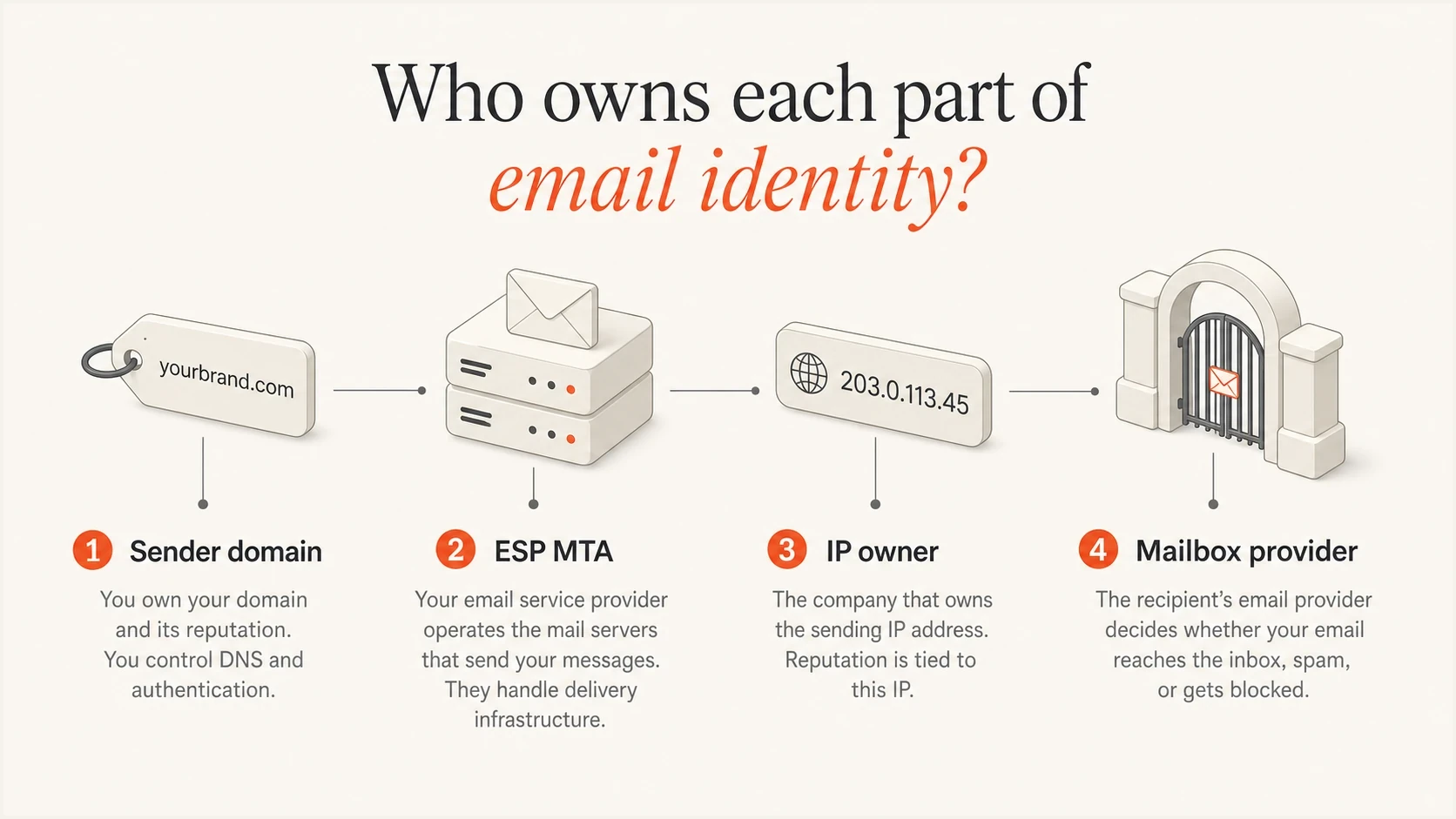
Infographic showing sender domain, ESP MTA, IP owner, and mailbox provider responsibilities.
How to verify the values yourself
You can verify PTR with DNS tools, but HELO is harder because it is observed during an SMTP transaction. The most reliable path is to ask the ESP for the value, then compare it with message headers, bounce evidence, and a send test that uses the affected route.
- Collect the bounce: Save the full AT&T rejection text, including the sending IP, SMTP code, timestamp, and any DNSBL wording.
- Identify the IP: Confirm the exact outbound IPv4 or IPv6 address used for the blocked attempt.
- Check reverse DNS: Run a PTR lookup for the outbound IP and record the hostname returned.
- Compare HELO: Ask the ESP for the HELO or EHLO hostname used by that same MTA and check its forward DNS.
- Check reputation: Review blocklist and blacklist status, then compare that evidence with bounce trends.
PTR lookup examplesbash
dig -x 203.0.113.25 +short
host 203.0.113.25
nslookup -type=PTR 25.113.0.203.in-addr.arpa
After a PTR change, repeat the reverse lookup and then resolve the returned hostname forward. The forward result should include the same sending IP. If different resolvers disagree, compare the previous PTR TTL and wait for cached answers to expire before treating the change as failed.
Email tester
Send a real email to this address. Suped shows a results button when the test is ready.
?/43tests passed
A real message test helps because it inspects the headers and authentication results of an actual email rather than DNS in isolation. Suped's email tester gives the sender a quick view of SPF, DKIM, DMARC, and message-level delivery signals before an ESP escalation.
If the AT&T bounce references a DNSBL, treat it as both a configuration and blocklist problem. Suped's blocklist monitoring keeps the listing evidence and related changes together for escalation.
Why AT&T might mention this after removing the block
A postmaster response can be partly diagnostic and partly procedural. When AT&T says the block was removed but reverse DNS should be corrected, it does not prove PTR was the only cause. It means the mail stream has an infrastructure detail AT&T wants corrected or explained.
AT&T's public postmaster help directs senders to its email blocklist contact and best-practice material, but it does not publish a universal rule that PTR and HELO must match exactly. Treat exact-match wording in a reply as guidance for that case, then keep the complete SMTP error and case response as the source of truth for the affected IP.
Do not stop once the PTR question is answered. If the sending IP was on a DNSBL, also check complaint trends, unknown-user rates, spamtrap risk, list sources, sending cadence, and authentication pass rates. AT&T does not disclose every filtering signal in a postmaster reply, so fix the named issue and audit the surrounding sending behavior.
For more context on AT&T-specific reverse DNS failures, the related guide on AT&T rDNS failures covers the bounce patterns and resolution path in more detail.
The same distinction applies beyond AT&T. Other mailbox providers use forward and reverse DNS as part of sender checks, but each provider can apply its own policy signals. Missing reverse DNS, failed FCrDNS, and a generic dynamic-host PTR remain basic deliverability risks.
Where Suped fits
PTR and HELO do not live inside DMARC, but they often appear during the same investigation. A sender sees AT&T bounces, checks authentication, checks blocklist or blacklist status, asks the ESP about infrastructure, and turns the evidence into a fix list. Suped's product keeps those checks and issue evidence in one workflow.

Issue steps to fix dialog showing the issue overview, tailored fix steps, and verification action
A practical Suped workflow starts by confirming that SPF, DKIM, and DMARC are not adding noise to the AT&T issue. Blocklist and domain-health signals then help separate an infrastructure escalation from a reputation investigation. Suped cannot change an ESP's PTR or HELO value, but it can keep the evidence and next actions clear for the team that owns the fix.
- Authentication checks: Confirm SPF, DKIM, and DMARC results before assigning the AT&T failure to filtering.
- Issue detection: Record configuration problems and the steps needed to fix them.
- Blocklist visibility: Track domain and IP reputation signals across blocklists and blacklists.
- Escalation evidence: Keep authentication status and reputation findings with the affected domain.
Views from the trenches
Best practices
Ask for exact PTR and HELO values for the same IP before debating ownership with the ESP.
Treat shared and dedicated MTAs differently when reviewing reverse DNS naming in every review.
Keep bounce text, IPs, timestamps, and DNS evidence together during escalations.
Common pitfalls
Do not assume a visible From domain must appear in the PTR hostname during review.
Do not try to fix ESP reverse DNS by editing ordinary sender-domain DNS records.
Do not stop at PTR if a DNSBL, complaint spike, or traffic change is also present.
Expert tips
If the ESP controls the MTA and IP pool, make the ESP prove the values in writing.
If AT&T removes a block, still clean up the named risk before the next send window.
If the IP is dedicated, ask whether PTR and HELO can use one naming pattern first.
Marketer from Email Geeks says a PTR record tells receivers which hostname belongs to the connecting IP, while HELO is the name the server announces during the SMTP session.
2024-01-30 - Email Geeks
Marketer from Email Geeks says AT&T's note likely means the PTR hostname and the SMTP greeting did not match, which points first to the ESP's mail server setup.
2024-01-30 - Email Geeks
The practical answer
PTR means the reverse DNS identity of the sending IP. HELO means the hostname the sending mail server announces when it connects. AT&T accepted the ESP's generic identity for shared MTAs in this case, but asked for matching PTR and HELO names on the dedicated MTA. The fix usually belongs to the ESP because it controls the sending servers, HELO configuration, and reverse DNS process for its IPs.
The sender's job is to ask for proof, keep email authentication clean, and monitor whether the AT&T issue stays resolved after blocklist or blacklist removal. If the ESP cannot explain the PTR and HELO values for the affected IPs, escalate inside the ESP. If the values are clean and the block returns, investigate reputation, complaints, list acquisition, unknown users, and traffic patterns.




