What causes false positives when checking domains against the Spamhaus SBL?

Updated on 23 Sep 2026: We updated this guide with resolver-rewriting checks, network-range context, and safer DNSBL result handling.
False positives when checking domains against the Spamhaus SBL usually happen because the lookup or result is interpreted at the wrong layer. The SBL is an IP-based blocklist, not a general domain or URL blacklist, but Spamhaus supports resolving domains and URL hosts and checking the resulting IPs against SBL. Problems start when a system reports that response as a domain listing, treats a DNSBL error or rewritten NXDOMAIN answer as a listing, or assumes the resolved IP identifies the system that sent the message.
That distinction matters. A bounce that says a URL host is listed in SBL can describe an intentional content check against the IP behind that host, a cached result, a network-range match, or a combined rule. It does not automatically prove that your sending domain, DKIM domain, return-path domain, or the literal domain inside the URL has a domain-level Spamhaus listing.
Treat these cases as evidence problems first, not DNS problems. Verify the exact list, lookup target, resolver, return code, timestamp, listed range, and rejection rule before changing an email template or asking for delisting. A valid listing needs action. A receiver-side parsing or attribution error needs documentation and a different escalation path.
The direct answer
A common cause is not domain-to-IP conversion itself, but an overbroad conclusion about what the result means. A checker or receiving filter sees a URL in the message body, extracts the host, resolves it to one or more A or AAAA records, then checks those IPs against Spamhaus SBL. If a resolved IP returns a valid SBL code, that IP or its containing range is listed. The false positive occurs when the filter says the domain itself is listed, mistakes an error or unrelated DNS answer for a positive response, or rejects clean mail because a shared asset maps to infrastructure unrelated to the sender.
- Wrong conclusion: The filter checks an IP behind a URL, then reports that the domain itself has an SBL listing.
- Wrong target: The filter attributes a website or asset IP to the sending system without proving that relationship.
- Error parsed as data: The checker treats a 127.255.255.x query error as a reputation response.
- Resolver rewriting: The resolver replaces an expected NXDOMAIN with an unrelated A answer that the checker accepts as a hit.
- Wrong list: The bounce names SBL, but the decision came from a combined Spamhaus response or local URL rule.
- Stale evidence: The listing, DNS answer, or receiver cache changed between rejection and investigation.
- Shared infrastructure: A clean domain resolves to an IP or listed network range also used by unrelated tenants or common assets.
There is also a naming trap. Spamhaus has IP lists and domain lists, and receivers often combine them with local rules. If the question is whether a domain name itself is listed, the Spamhaus DBL is the domain-focused reference point. If the rejection names SBL, confirm which IP was checked, what role that IP had in the message, whether it fell inside a listed range, and whether the response was valid reputation data.
Why SBL checks get misread
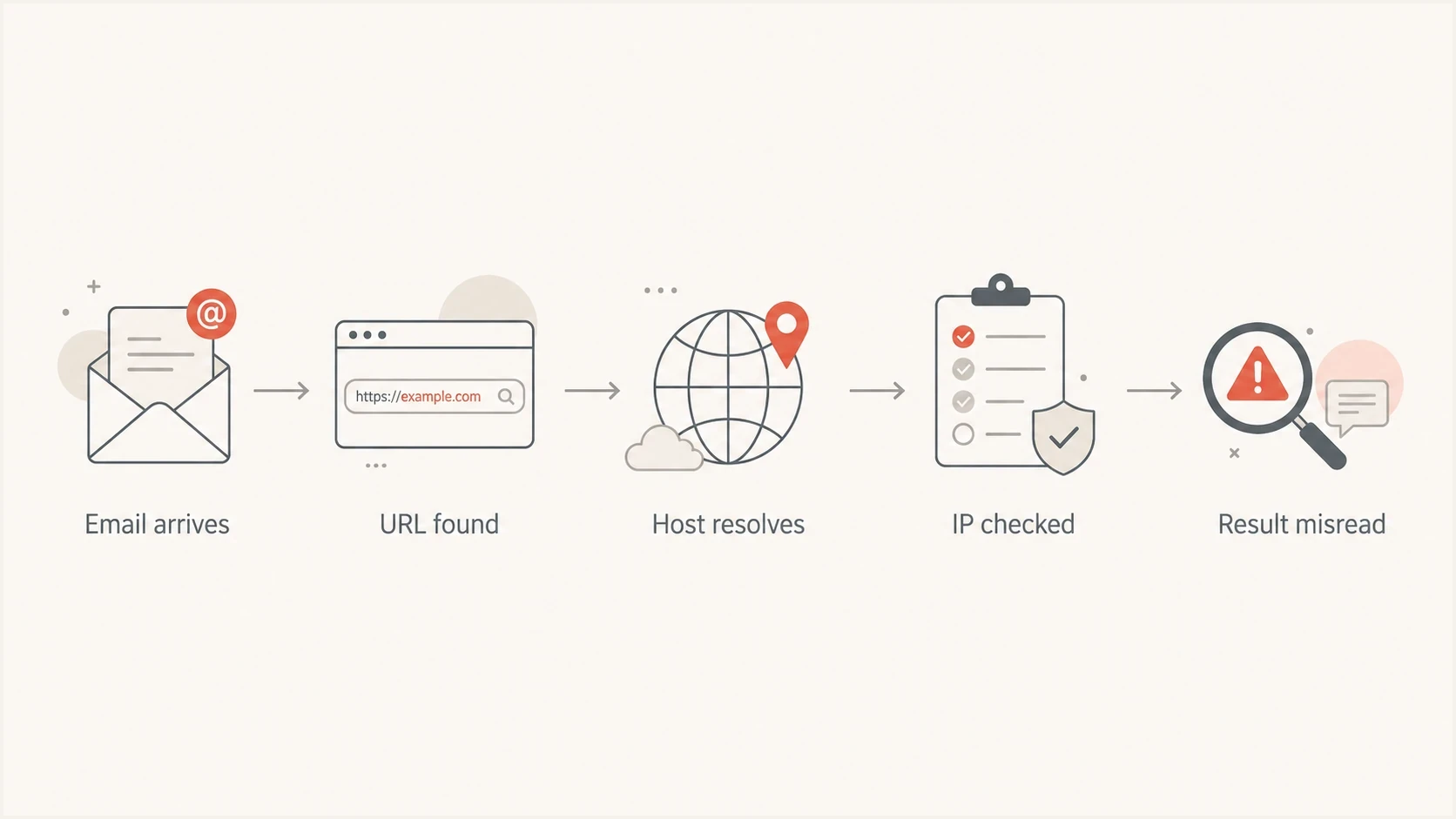
Flowchart showing how a URL host can be resolved to an IP and misread as an SBL domain listing.
A mail-source SBL check starts with an IP address. A content check can start with a domain, resolve it to an IP address, and check that IP against SBL. Both uses are valid when the rule retains what it tested. Misreading happens when the result loses the IP's role and is presented as proof that the original domain, sender, or message is listed.
Well-scoped SBL usage
- Input: An identified IP, either the connecting mail source or an address resolved from a named host.
- Meaning: The response describes the reputation of the queried IP or containing range, with its role retained.
- Action: Apply the relevant mail-source or content policy and investigate the IP relationship.
Misleading usage
- Input: A domain is submitted, but the checker hides the resolved IP and resolver.
- Meaning: The result says the domain is listed although SBL evaluated an IP or the resolver returned an error.
- Action: Recover the exact query, return code, resolver, timestamp, listed range, and IP role.
The same pattern explains odd cases involving common shared assets. An HTML email can include a font or image host that belongs to a large provider. A receiver can intentionally resolve that host and check the resolved IP against SBL, but the rejection becomes misleading if it says the sender's domain is listed or fails to identify the asset that triggered the content rule.
Separate content reputation from mail-source reputation. URL reputation matters, but the result has to retain the checked object and policy context. The Spamhaus SBL explainer gives useful background when explaining the distinction to a customer, vendor, or receiver.
Common causes to check
When a rejection says a domain or URL is listed in SBL, check the causes in this order. The goal is to prove what was queried and how the response was parsed before anyone edits DNS, removes legitimate links, or files a delisting request.
|
|
|
|---|---|---|
URL IP context | Host IP listed | Map the IP's role |
Error response | 127.255.255.x | Do not mark listed |
Resolver rewriting | Unlisted test returns an IP | Change resolver and validate codes |
Combined zone | ZEN response | Parse the code |
Network range | IP falls inside listed CIDR | Identify the range operator |
Cached result | Gone later | Capture the time |
Shared host | Many domains | Ask the host |
Stale DNS | A or AAAA changed | Compare historical DNS |
Vague wording | No query detail | Request the rule |
Fast triage for SBL false positives
A valid SBL response against your outbound sending IP is not a false positive just because SPF, DKIM, and DMARC pass. Authentication proves identity and message integrity. It does not erase evidence of unsolicited bulk email, abusive hosting, malicious resources, compromised infrastructure, or other activity tied to the IP or listed range.
A domain-only claim needs a different standard. If a receiver says a domain is on SBL, ask for the queried IP, full response code, and listed CIDR. If they cannot provide them, treat the bounce as incomplete evidence. For broader terminology and list types, the blocklists page gives a compact reference for IP, domain, and URL-based systems.
How to verify the listing
Preserve the original evidence
Do not start by removing links from the template. Save the SMTP rejection, sending IP, recipient domain, message ID, URL host named in the rejection, timestamp, and time zone. Without that context, a transient SBL result turns into guesswork.
Then test the exact thing the receiver appears to have tested. If the bounce names an IP, check that IP. If it names a URL, record the hostname and CNAME chain, then capture every A and AAAA answer returned at that time. Record which resolver handled the query because resolver restrictions and rewritten answers can change the result. If the host rotates addresses, compare the answers with DNS history or the receiver's evidence. For a positive match, record the listed CIDR and the network operator responsible for it.
Example DNSBL lookup patternBASH
dig +short @DNS_SERVER 2.0.0.127.sbl.spamhaus.org A
# Expected SBL test response: 127.0.0.2

dig +short @DNS_SERVER 1.0.0.127.sbl.spamhaus.org A
# Expected not-listed result: no A answer (NXDOMAIN)

dig +short @DNS_SERVER 2.0.0.127.zen.spamhaus.org A
# ZEN can return multiple codes; interpret each code by dataset
- Confirm the family: SBL, CSS, XBL, PBL, DBL, and ZEN do not all answer the same question.
- Parse the return code: An A response alone does not mean listed, and 127.255.255.x indicates an error.
- Test both outcomes: The known listed test must return SBL data, while the known unlisted test must return NXDOMAIN.
- Compare the targets: The sending IP, URL host IP, return-path domain, and DKIM domain are separate evidence points.
- Check the timestamp: Listings, caches, DNS answers, and address ownership can change before a delayed investigation.
- Retest safely: Use an authorised query path and inspect headers, authentication, URLs, and content together.
For a quick check of the domain's authentication and DNS posture during the investigation, Suped's domain health checker validates DMARC, SPF, and DKIM alongside domain-level signals that often get mixed into blocklist troubleshooting.
Return codes that are errors, not listings
Spamhaus DNSBL answers carry meaning in the full return code. Documented IP-list data uses codes in the 127.0.0.0/24 range, while 127.255.255.0/24 is reserved for query errors. A checker that treats every address beginning with 127, or every A answer of any kind, as "listed" can turn a resolver or configuration problem into a false positive for every domain it tests.
|
|
|
|---|---|---|
127.0.0.2 | SBL data | Treat as a valid SBL response |
127.0.0.3 | CSS data | Identify the CSS component |
127.0.0.9 | DROP data | Treat as a valid DROP response |
127.255.255.252 | DNSBL name typo | Fix the query configuration |
127.255.255.254 | Public or open resolver | Fix resolver access |
127.255.255.255 | Query limit exceeded | Reduce or authorise query volume |
Spamhaus IP-list and error responses relevant to SBL checks
Do not treat every 127 response as listed
The complete return code determines whether the answer contains reputation data or a query error. Store the code in logs and fail the check safely when the response is an error, timeout, SERVFAIL, or undocumented address.
Use resolver access and query methods permitted by Spamhaus. If a receiver uses the combined ZEN zone, parse every returned code before naming SBL in a rejection. A ZEN hit can come from another IP list, and applying PBL data to URL hosts can reject legitimate mail.
Resolver rewriting and DNS mistakes
An unlisted Spamhaus DNSBL query should return NXDOMAIN. Some resolvers rewrite that negative answer to an advertising, search, or policy address. A misspelled DNSBL zone can also resolve through an unrelated domain. If a checker treats any returned IP as a hit, both cases make clean addresses appear on the blacklist (blocklist).
- Use the same resolver: Run the known-listed and known-unlisted tests through the resolver used by the receiving filter.
- Require NXDOMAIN: The 1.0.0.127 test must not return an A record; any address indicates an invalid resolver path.
- Allowlist valid codes: Accept only documented responses for the queried zone and handle every other answer as a lookup failure.
- Check the zone spelling: Confirm the configured hostname exactly before investigating the domain or requesting removal.
Run these tests on the mail system itself, not only from an administrator's laptop. The two systems can use different resolvers and produce different answers. If the negative test returns an address, correct the resolver path and repeat the original lookup before treating any result as reputation evidence.
A practical workflow for teams
A practical workflow is to collect the rejection, identify the checked object, verify the resolver and live state, compare the result with recent mail authentication and delivery data, then decide whether the incident belongs to the sending program, a network operator, a shared provider, or the receiver's filter logic.

Blocklist monitoring page showing domain and IP checks across blocklists with importance and status
This is where Suped's product helps beyond a one-off lookup. Suped brings DMARC, SPF, DKIM monitoring, blocklist (blacklist) visibility, and deliverability signals into one place. Teams can keep timestamped evidence, automate issue detection, receive alerts, and follow fix steps instead of relying on disconnected screenshots.
For teams managing many domains, monitoring makes it easier to compare the same event across domains and sending sources. Multi-tenant views can separate a real SBL event on one client domain from a receiver rule affecting many senders, while DMARC data confirms which outbound IP actually sent the message.
Blocklist checker
Check your domain or IP against 144 blocklists.







Use the lookup result as a starting point, not the final verdict. A blocklist monitoring workflow should tie the listing to SMTP logs, authentication results, sending source inventory, and message content. Suped's blocklist monitoring workflow keeps that evidence chain in one place.
When it is not a false positive
Some SBL-related bounces look strange but still point to a real problem. If the listed IP is your sending IP, or a dedicated IP assigned to your email service account, treat it seriously. The same applies when the address falls inside an SBL-listed network range controlled by your provider. Passing DMARC does not protect a sender from an SBL-based decision when the IP or range is tied to spam activity, abusive hosting, malicious resources, compromised infrastructure, or a wider network escalation. The provider responsible for the address space normally has to handle remediation and the removal request.
Do not argue the wrong case
If the evidence shows your outbound IP or its network range was listed, focus on root cause and remediation. False positive language slows the fix when the real issue is list quality, account compromise, poor segmentation, or traffic from a shared pool.
The practical test is ownership, role, and policy relevance. If the listed IP delivered the message, you have a sending reputation incident. If it only hosts a URL inside the email, you have a content-policy incident that can still be intentional because SBL also covers IPs hosting spam-advertised or malicious resources. If it belongs to a large shared web provider, establish why that resource triggered the rule before changing mail authentication or sender setup.
This distinction also helps with receiver communication. A concise escalation includes the bounce, sending IP, URL host mentioned, resolved IPs at the rejection time, DNSBL return code, listed CIDR, and an explanation of whether the checked IP sent the email or only hosted a message resource.
Views from the trenches
Best practices
Verify the DNSBL zone and return code before treating a domain mention as an SBL hit.
Keep rejection logs with timestamp, source IP, URL, resolver, code, and rule name.
Test the resolved IP and literal domain separately so the evidence stays distinct.
Common pitfalls
Assuming every 'URL listed' bounce proves the domain itself is in the Spamhaus SBL.
Treating a public-resolver error response as reputation data for the tested domain.
Changing HTML assets before confirming the exact IP, return code, and receiver rule.
Expert tips
Record CNAME, A, and AAAA answers because rotating hosts can change after rejection.
Compare live lookup results with historical bounces because short listings disappear.
Use monitoring to separate reputation incidents from filter implementation mistakes.
Marketer from Email Geeks says repeated URL-based SBL bounces deserve a log review before template changes, because the listing can vanish before a manual check.
2021-03-08 - Email Geeks
Expert from Email Geeks says a bounce that says a URL is listed on SBL often points to filter logic, since SBL is an IP DNSBL rather than a domain list.
2021-03-08 - Email Geeks
How to decide what to do
An apparent SBL false positive usually comes down to lookup context, response parsing, resolver behavior, or evidence timing. The fastest path is to prove whether the receiver checked the sending IP, an IP resolved from a URL host, a combined zone, a network range, or an invalid DNS response.
If the sending IP has a valid SBL response, fix the sending problem. If a URL host IP has a valid response, determine whether the receiver's content policy intentionally covers that resource. If the code is in the error range, or the known-unlisted test does not return NXDOMAIN, fix the checker or resolver. If the bounce is vague, ask for the exact query, response code, and listed range. Those details separate real reputation incidents from misleading blacklist noise.




