How do I resolve email blocking issues with Apple servers and postmasters?

Published 24 Jun 2025
Updated 23 Sep 2026
12 min read
Summarize with
Updated on 23 Sep 2026: We added a clear rejection-versus-junk diagnosis and tightened Apple's log, retry, DMARC, and postmaster guidance.
To resolve email blocking issues with Apple servers, start with the exact SMTP response, then prove authentication, list quality, content safety, and sending history before contacting Apple's postmaster team. A bounce such as 5.7.1 [CS02] is a permanent local-policy rejection, but the code alone does not identify one root cause. Preserve the full SMTP transaction, any explanatory URL Apple includes, the timestamp, SMTP stage, sending IP, recipient domain, and queue ID. That evidence shows where Apple rejected the mail and should not be replaced by a vague ESP category.
This troubleshooting applies to mail sent to icloud.com, me.com, and mac.com. The Apple Mail app can display accounts hosted by other providers, so an address used in that app is not automatically an iCloud Mail destination.
The practical fix is to collect the evidence Apple asks for, remove obvious causes, and send a concise postmaster request. Apple asks senders to meet bulk sender requirements and check mail logs before contacting the postmaster team. The official Apple postmaster page is the source for the required contact details.
Start with the bounce code, not the ESP label
The ESP label can be misleading. Permanent Apple SMTP responses often appear under labels like general bounce, soft bounce, policy bounce, or other. Those labels are too broad for diagnosis. The exact Apple response tells you whether the failure happened during the connection, recipient, or message stage and whether the sender should retry.
Common Apple policy bounce
550 5.7.1 [CS02]
Message rejected due to local policy.
A 5xx response is a permanent SMTP rejection for that recipient and should not be retried unchanged. Your platform can still call it soft if suppression rules wait for repeated failures before deactivating an address. If Apple returned 5.7.1, treat it as a policy rejection until you have evidence that the ESP has remapped it. A 4xx response is temporary and should follow a controlled retry schedule.
Do not treat CS01 or CS02 as a published one-cause diagnosis. Apple describes these responses as local-policy rejections but does not publish a definitive mapping that makes CS01 a content error or CS02 an authentication error. Test the full message and sending path.
|
|
|
|---|---|---|
5.7.1 | Permanent policy rejection | Gather logs |
CS01 | Local-policy rejection | Test full path |
CS02 | Local-policy rejection | Check all signals |
4xx or timeout | Temporary connection or policy issue | Retry carefully |
Mailbox full | Recipient mailbox state | Follow bounce policy |
Use the exact SMTP code as the starting point, then validate the surrounding signals.
Separate SMTP rejection from junk placement
First determine whether Apple rejected the message during SMTP or accepted it and filtered it afterward. A 4xx or 5xx response in the sending logs is a delivery refusal. A final 2xx response after the message body means Apple accepted the message, so missing inbox placement is not a CS01 or CS02 rejection unless a separate log entry shows that code.
|
|
|
|---|---|---|
SMTP rejection | 4xx or 5xx in sending logs with no final acceptance | Follow the code and retry only temporary failures |
Accepted, then filtered | Final 2xx response with no rejection log | Check Junk, recipient rules, full headers, and campaign patterns |
Use the final SMTP outcome to choose the correct investigation.
For accepted mail, get a delivered sample with full headers and confirm whether it reached Junk or was affected by a recipient rule. For rejected mail, keep the raw SMTP response and transaction details. Apple's postmaster route is most actionable when the sender can show repeatable refusals or filtering patterns rather than only a report that the message was missing from the inbox.
Why Apple can block a good sender
A good overall sender can still have Apple-specific blocking because Apple evaluates its own users and mail stream. The same campaign can look fine elsewhere while Apple sees more spam reports, lower engagement, bad historical traffic, a risky URL pattern, or authentication gaps on the marketing stream.
Operational mail and marketing mail are different signals. Operational mail usually reaches active recipients with predictable content. Marketing mail often touches older addresses, uses more links, and moves in larger bursts. Apple can make different decisions for each stream.
- Authentication: SPF and DKIM should pass, with at least one authenticated domain matching the visible From domain under DMARC rules.
- Infrastructure: Reverse DNS, HELO naming, stable sending IPs, and domain consistency help Apple identify the sender.
- List quality: Old Apple recipients, inactive subscribers, purchased contacts, or weak consent can create policy failures.
- Content: High-risk URLs, unexpected attachments, spam notifications, and deceptive templates can trigger filtering.
- Reputation: A clean public blocklist or blacklist check helps, but Apple can still use private reputation data.
Weak diagnosis
- Subject line: The ESP blames one word without proving that Apple rejected the exact creative for that reason.
- Bounce label: The platform shows general bounce but hides the Apple SMTP response needed for triage.
- Global view: The sender looks healthy overall, so the Apple-only issue is treated as random.
Better diagnosis
- SMTP code: The exact response is tied to time, IP, domain, campaign, and recipient domain.
- Headers: A delivered sample is checked for SPF, DKIM, DMARC, reverse DNS, and sender identity.
- Evidence: Apple receives a compact request with logs, remediation, consent details, and sample mail.
Meet Apple's bulk sender requirements
Apple states that all of its bulk sender requirements must be met. Treat this as a pre-escalation checklist, even when only one Apple domain or campaign is failing.
- Consent and opt-out: Send only to explicit subscribers, provide an immediate unsubscribe link, and honour every opt-out.
- Message standards: Follow RFC 5321 and RFC 5322, and add ARC headers when mail is forwarded.
- Sender identity: Publish reverse DNS, keep sending IPs and domains consistent, and use a stable From name and address.
- Stream separation: Separate marketing and transactional traffic so a problem in one stream does not affect the other.
- Authentication: Use SPF and DKIM, publish a DMARC policy, and verify the results on messages that reached iCloud Mail.
- List maintenance: Track temporary and permanent SMTP errors, suppress inactive or disengaged subscribers, remove consistently bouncing addresses, and keep unsubscribed or suppressed addresses inactive.
Apple does not offer a bulk-sender allowlist or a feedback loop. Use your own bounce data, complaint indicators, clicks, conversions, and suppression history to judge recovery.
Run the authentication and reputation checks first
Before contacting Apple, close the obvious technical issues. DKIM often matters because it gives Apple a stable domain identity even when the sending IP is shared. If bounces stopped after adding DKIM, that is a strong clue, but still check the rest of the path.
Use a domain health check to catch missing DMARC, broken SPF, weak DKIM, DNS problems, and related sender identity issues before opening a postmaster case. Suped's product keeps DMARC reporting, SPF and DKIM status, blocklist and blacklist alerts, and remediation notes together while the team builds its evidence packet.
?
What's your domain score?
Deep-scan SPF, DKIM & DMARC records for email deliverability and security issues.
The checks are simple. The marketing domain should publish DMARC, DKIM should pass on the actual marketing mail, SPF should pass for the envelope sender, and either the passing DKIM domain or SPF domain must match the visible From domain under DMARC rules. Also check reverse DNS, forward DNS, HELO naming, and sender identity.
Minimum DMARC starting point
v=DMARC1; p=none; rua=mailto:dmarc-reports@example.com
Apple requires the sending domain to publish a DMARC policy but does not state that senders must begin with p=quarantine or p=reject. A p=none policy starts visibility, but it is not a final protection state. Suped's DMARC reporting can identify legitimate streams that fail authentication or domain matching before you tighten the policy, while its issue workflow keeps the fix and verification history attached to the domain.

Issue steps to fix dialog showing the issue overview, tailored fix steps, and verification action
Check Apple-specific sending behavior
Once authentication checks out, isolate Apple traffic. Split icloud.com, me.com, and mac.com from the rest of the list, then compare bounces, deferrals, clicks, conversions, unsubscribes, and recent signup activity. Apple does not publish a feedback loop, and Apple Mail Privacy Protection makes opens unreliable as a stand-alone engagement signal.
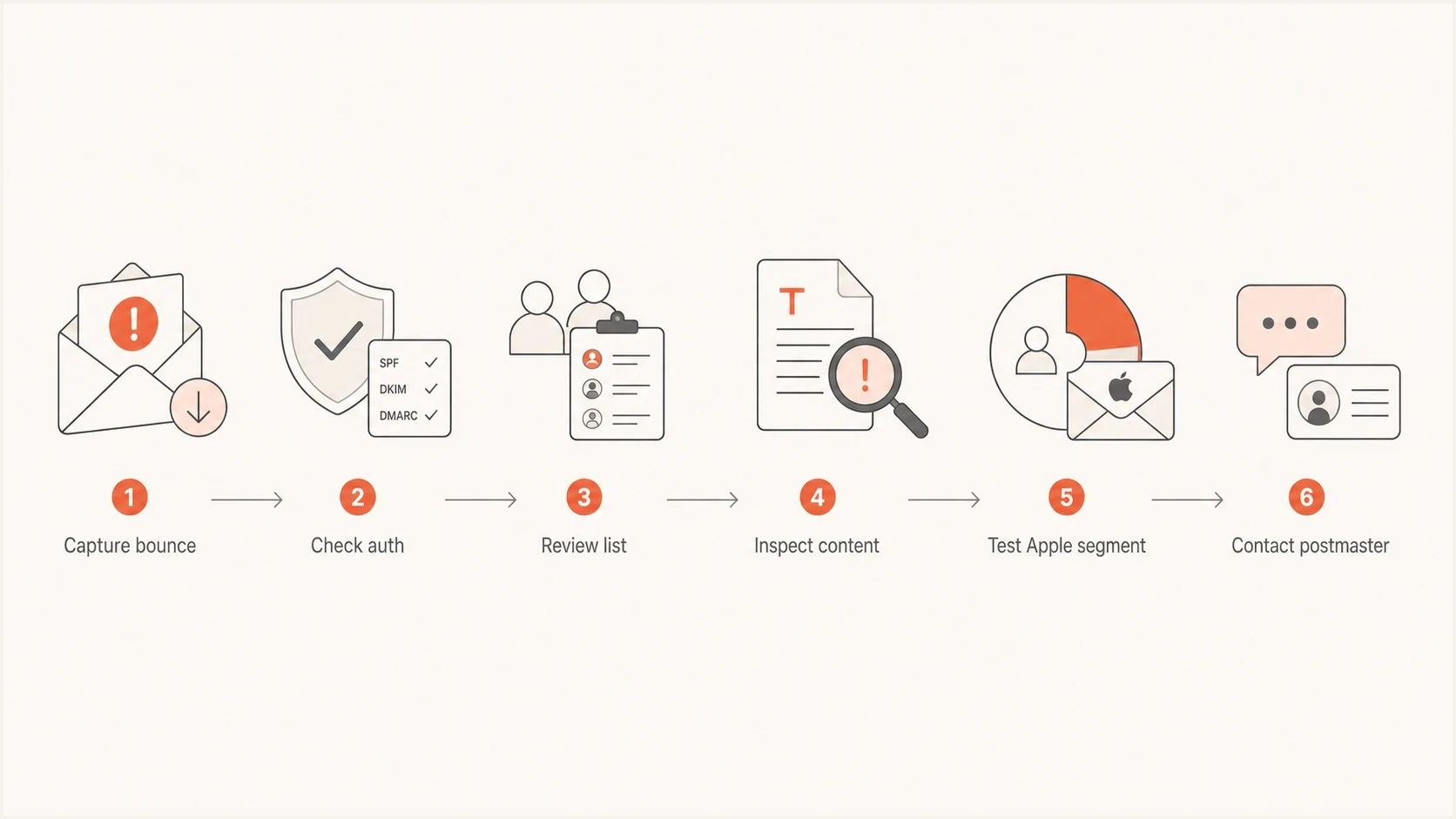
Six-step Apple iCloud Mail delivery troubleshooting flow for policy rejections.
For the next send, avoid a full reactivation push. Send first to recent Apple clickers, converters, new subscribers, or people with other direct activity, then expand only if bounce and rejection rates stay near the normal Apple-domain baseline. If repeated soft bounces became hard suppressions, keep those subscribers suppressed.
Apple segment triage bands
Compare each Apple-domain result with your own recent baseline because Apple does not publish universal bounce-rate thresholds.
Healthy
At baseline
Continue sending to engaged Apple recipients while monitoring policy bounces and complaints.
Watch
Above baseline
Slow expansion, review creative and URLs, then compare the affected stream with its recent history.
Escalate
Sustained spike
Pause the affected cohorts, collect transaction samples, and contact Apple's postmaster team.
Also check whether the rejected mail contained forwarded or user-generated content. Automated notifications that quote inbound spam, unsafe URLs, or abusive text can make a legitimate sender look like the origin of the bad content. Forwarding systems should preserve authentication evidence with ARC.
Prepare a postmaster request that Apple can act on
When technical checks are clean and Apple continues rejecting mail, contact the postmaster team with a compact evidence packet. Apple asks for the company name, email domain, affected sending IPs, full SMTP errors, and a detailed description that includes when the problem started. Add supporting context that proves the mail is wanted and obvious risks are fixed. Apple directs people who are not system administrators to Apple Support instead of the iCloud postmaster mailbox.
- Company: Include the legal or trading name and the brand users see in the inbox.
- Domain: List the visible From domain, return-path domain, and any tracking domain used in the mail.
- IPs: Provide all sending IP addresses involved in the rejected Apple traffic.
- Errors: Paste the full SMTP errors with timestamps, recipient domains, and sending stream.
- Supporting evidence: Include redacted headers, a view-in-browser copy, opt-in source, suppression policy, and Apple-only bounce trend.
Apple postmaster request template
To: icloudadmin@apple.com
Subject: iCloud Mail delivery issue for example.com

Company: Example Company
Sending domain: example.com
Affected domains: icloud.com, me.com, mac.com
Sending IPs: 192.0.2.10, 192.0.2.11
Error: 550 5.7.1 [CS02] Message rejected due to local policy
Started: 2026-05-18 14:00 UTC
Mail type: opted-in marketing email

We have verified SPF, DKIM, DMARC, reverse DNS, unsubscribe handling,
and recent suppression of inactive recipients.

Attached or included:
- Full SMTP transaction samples
- Redacted headers for delivered samples
- Campaign screenshot and view-in-browser URL
- Consent source and suppression policy
- Apple-only bounce trend by date
Keep the tone factual. Apple's postmaster team needs enough information to find the traffic, confirm the sender, and see that the sender is not asking for an allowlist or a bypass of normal filtering.
A clean public blocklist check does not prove Apple should accept the mail. Public blocklist and blacklist status is one signal. Apple can still reject mail based on local policy, content checks, private reputation data, and user feedback.
Do not ignore blocklists, but do not stop there
Check domain and IP blocklist status because it spots obvious reputation problems. An Apple response that explicitly says the IP was rejected due to a listing points directly to that listing. A generic CS01 or CS02 local-policy response does not prove a public blacklist caused the rejection. For ongoing checks, blocklist monitoring is more useful than a one-time search because an IP or domain can be listed after a traffic spike or unsafe list import.
After that, send a real test message and inspect headers, authentication, URLs, and rendering. A Suped email tester check is useful when the issue follows one campaign or template. It helps separate the DNS and authentication layer from the message itself.
Email tester
Send a real email to this address. Suped shows a results button when the test is ready.
?/43tests passed
If the test message authenticates cleanly, avoid changing too many things at once. Change one variable, such as audience, URLs, template, or sending domain, then watch Apple bounces separately.
Handle suppressed Apple addresses carefully
If the issue has been quiet for a while, limited reactivation is reasonable only for eligible addresses that were paused during a known technical event. Start with people who clicked, converted, signed up recently, or showed other direct activity before the Apple bounces began. Never reactivate unsubscribed addresses, complaint addresses, or contacts on a permanent suppression list.
Cautious reactivation
- Audience: Eligible Apple recipients with recent clicks, conversions, signups, or other direct activity.
- Pace: Small batches, stable cadence, and a clear pause rule if policy bounces return.
- Proof: Separate Apple-domain reporting for every reactivation batch.
Risky reactivation
- Audience: All suppressed Apple addresses, including people with old or unknown engagement.
- Pace: One large batch sent immediately after the postmaster response.
- Proof: No Apple-only monitoring, so renewed blocking is found too late.
If you need a deeper explanation of Apple bounce wording, the CS01 bounce guide helps separate a local-policy response from the authentication, content, reputation, and list signals that require testing.
Views from the trenches
Best practices
Send Apple a compact evidence packet with SMTP logs, IPs, consent, and sample creative.
Segment Apple domains during recovery so one bad cohort does not reset the whole stream.
Keep DKIM, SPF, DMARC, rDNS, and unsubscribe handling clean before asking for review.
Compare each recovery batch with the normal Apple baseline before expanding the audience.
Common pitfalls
Treating a general ESP label as the root cause hides the actual Apple SMTP response.
Changing subject lines alone wastes time when authentication or reputation is the issue.
Reactivating all Apple soft bounces at once can recreate the same policy rejection pattern.
Assuming Apple has an allowlist or feedback loop leaves the team without usable evidence.
Expert tips
Attach redacted headers from delivered samples to prove the actual authentication result.
Review user-generated notification content because quoted inbound spam can poison mail.
Track Apple separately after relief so renewed CS01 or CS02 errors are caught quickly.
Use clicks, conversions, and recent signups instead of protected opens to choose a test cohort.
Marketer from Email Geeks says Apple can occasionally block a specific campaign even when the sender is normally healthy, and a detailed postmaster note can resolve the issue quickly.
2021-02-26 - Email Geeks
Marketer from Email Geeks says the Apple postmaster route is worth using for false positives, especially when the sender can provide clean evidence instead of broad complaints.
2021-02-26 - Email Geeks
Recover Apple delivery without another block
Do not rewrite a subject line and hope. Get the exact Apple SMTP code, meet Apple's bulk sender requirements, confirm authentication, isolate Apple-domain behavior, check blocklist and blacklist status, inspect the message itself, and contact Apple's postmaster team with evidence if rejections continue.
For ongoing prevention, Suped's product keeps DMARC reports, SPF and DKIM status, blocklist and blacklist alerts, and issue-specific fix notes in one evidence workflow. Apple-specific blocking still needs careful postmaster handling, but clean authentication records and early detection make that request easier to support.




