Is Apple Business Connect the same as BIMI? a comparative guide

Updated on 22 Sep 2026: We updated this comparison for Apple Business, current Branded Mail display limits, and the latest BIMI certificate and DMARC guidance.
No, Apple Business Connect is not the same as BIMI. Apple Business Connect was Apple's business identity portal. Apple moved its brand management tools, including Branded Mail, into Apple Business in April 2026. Branded Mail lets a verified organization submit a brand name, logo, and sending identity for display in Apple-controlled mail experiences. BIMI is an email specification that uses DNS records, a hosted SVG logo, DMARC enforcement, and a mark certificate where a mailbox provider requires one.
Treat them as separate paths that can produce a similar visible result: a brand logo beside authenticated email. Use Apple Business Branded Mail when Apple-specific visibility matters, add BIMI when coverage across participating mailbox providers matters, and keep DMARC healthy because both paths require enforced domain authentication.
- Direct answer: They are different systems. Apple Business Branded Mail is Apple-specific and account-based. BIMI is DNS-based and mailbox-provider driven.
- Best practical route: Set up Branded Mail in Apple Business for Apple visibility, then implement BIMI for mailbox providers that read BIMI records.
- Security baseline: Neither logo program is the security control. DMARC and domain-matched DKIM or SPF authenticate the message.
The short comparison
Apple Business Branded Mail and BIMI both affect how a sender appears in an inbox, but they answer different questions. Apple Business asks, "Can Apple verify this organization, brand, and sending identity?" BIMI asks, "Can this authenticated mail stream prove control of the domain and logo through DNS and accepted evidence?"
Apple appears in both conversations. Apple Mail supports BIMI in iOS 16, iPadOS 16, macOS Ventura 13 or later, and iCloud.com, while Apple Business configures Apple's separate Branded Mail path. These are two Apple-related methods, not one shared setup.
|
|
|
|---|---|---|
Control | Apple portal | DNS record |
Scope | Branded Mail on iPhone and iCloud Mail on the web | Participating BIMI inboxes |
Identity | Organization and brand review | Domain matching and brand evidence |
DMARC | Quarantine or reject, pct=100 | Quarantine or reject, full enforcement |
Logo | Uploaded to Apple | Hosted SVG Tiny P/S |
Evidence | Apple approval; no VMC or CMC | VMC, CMC, or self-asserted record where accepted |
Compact comparison of Apple Business Branded Mail and BIMI.
Apple Business Branded Mail
- Setup: Verify the organization, submit brand assets, and connect domains or email addresses in Apple's portal.
- Coverage: Apple currently documents customer display on iPhone and in iCloud Mail on the web.
- DNS use: DNS proves domain control and DMARC readiness, but Apple stores the brand configuration.
BIMI
- Setup: Publish a BIMI TXT record, host a compliant SVG logo, and add a certificate URL when required.
- Coverage: The visible result depends on each receiving mailbox provider's BIMI support.
- DNS use: DNS publishes the BIMI assertion and asset locations.
The main operational difference is who owns the decision path. Apple reviews the organization and brand, then decides when and where Branded Mail appears. With BIMI, the sender publishes the records and assets, but each mailbox provider decides whether to display the logo based on authentication, reputation, evidence requirements, and local policy. A valid BIMI record does not guarantee display, and neither path guarantees the same verified checkmark in every interface.
Apple Business Connect is now Apple Business
Apple Business Connect stopped being a separate service when Apple Business launched in April 2026. Apple moved the former Business Connect brand tools into Apple Business, including Branded Mail, and automatically migrated existing organization information, locations, and account data.
- Current portal: Configure new Branded Mail identities in Apple Business.
- Existing accounts: Apple migrated Business Connect data into the replacement platform.
- Legacy term: Older documentation and searches still use Apple Business Connect, so the comparison remains relevant.
The name changed, but the core distinction did not. Apple Business Branded Mail remains an Apple-managed branding path, while BIMI remains a DNS-published standard interpreted by participating mailbox providers.
How Apple Business Branded Mail works
Apple Business covers more than email. It manages business identity data and other Apple business functions. For email branding, the relevant capability is Branded Mail. Apple's Apple guide explains the business verification flow and current portal documentation.
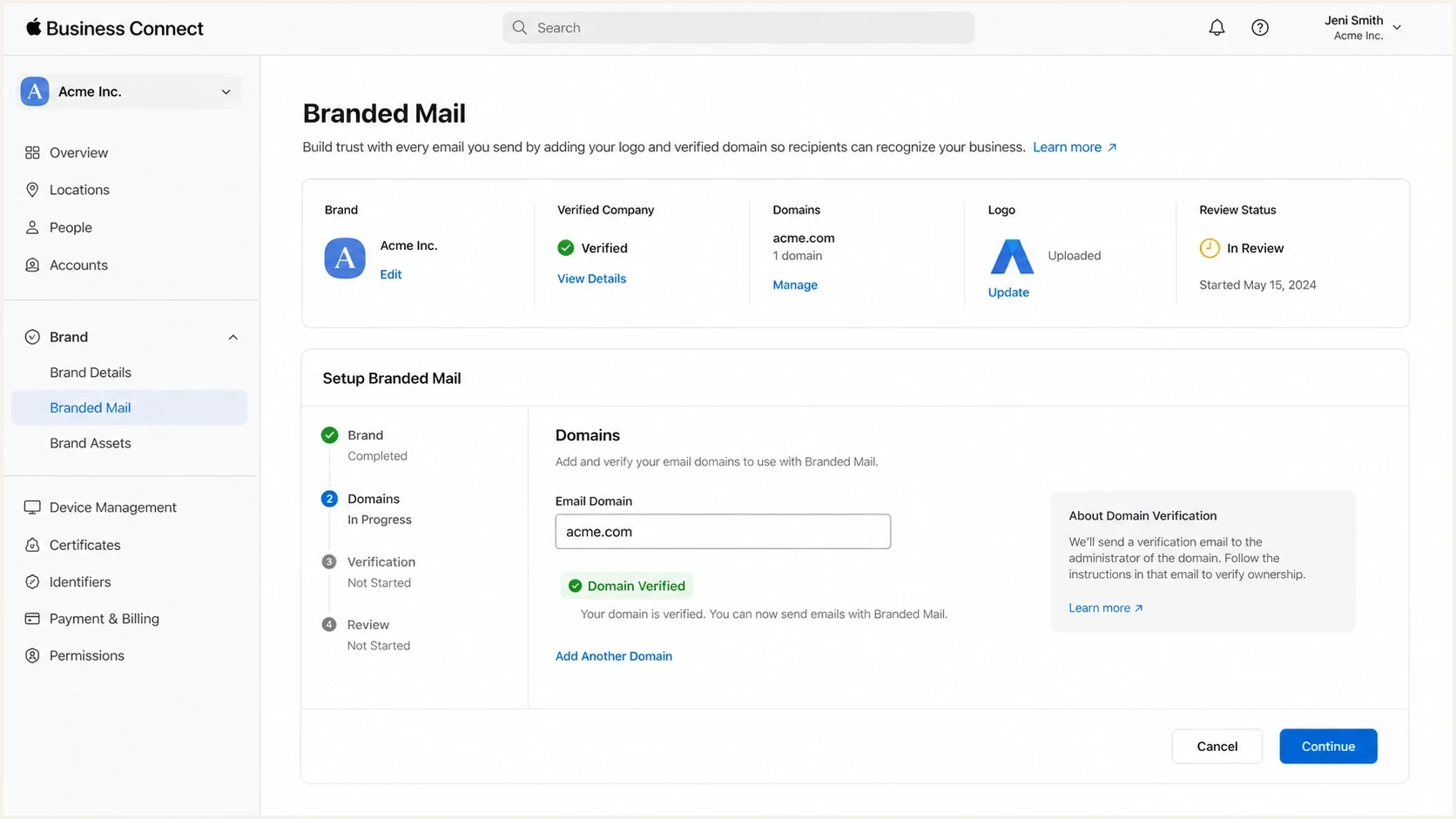
Legacy Apple Business Connect Branded Mail setup, now managed in Apple Business.
The organization must own the brand, use a commercial email domain, and have an MX, A, or AAAA record for that domain. Apple allows a brand to register up to 100 combined domains, subdomains, and specific email addresses. The organization and logo need Apple approval, and Apple says the review can take up to seven business days.
For Branded Mail, the DMARC record must use p=quarantine or p=reject. A parent-domain policy can use sp=quarantine or sp=reject when the registration covers a subdomain. Apple's current instructions also require pct=100, and every customer-facing message must use DKIM. SPF-only authentication does not meet the Branded Mail requirement.
Do not confuse Apple's logo approval with domain protection
Apple Business can help a brand appear correctly in Apple Mail, but it does not replace DMARC enforcement. The visible logo depends on a verified sending identity and authenticated mail.
- Check DKIM: Apple-bound customer email must pass DKIM, and a matching signing domain can satisfy DMARC.
- Check DMARC: Use quarantine or reject, with Apple's requested pct=100 setting.
- Check verification: Complete DNS verification within 14 calendar days and retain the Apple verification TXT record.
- Check scope: Approval for a domain, subdomain, or specific address can produce different branding coverage.
Apple currently says customers can see Branded Mail on iPhone when English, Portuguese, French, Italian, German, Spanish, or Simplified Chinese is the default language, and in iCloud Mail on the web. This is narrower than Apple Mail's separate BIMI support across iOS, iPadOS, macOS, and iCloud.com. Branded Mail does not publish a BIMI record, and it does not make unrelated mailbox providers display the Apple-approved logo.
How BIMI works
BIMI is a DNS-based specification that lets a sending domain point mailbox providers to a brand logo. A basic BIMI setup includes enforced DMARC, a square SVG Tiny P/S logo, a BIMI TXT record, and a VMC or CMC where the mailbox provider requires accepted evidence. The BIMI requirements are stricter than a monitoring-only DMARC rollout.
Example BIMI TXT recorddns
default._bimi.example.com. 3600 IN TXT (
  "v=BIMI1; l=https://example.com/bimi.svg; "
  "a=https://example.com/vmc.pem"
)
This record publishes the default selector, logo location, and evidence location for the domain. The a= tag is optional in the BIMI record format, but some mailbox providers require an accepted certificate before they display a logo. Providers decide which evidence documents they accept, so a certificate accepted by one provider does not guarantee display everywhere.
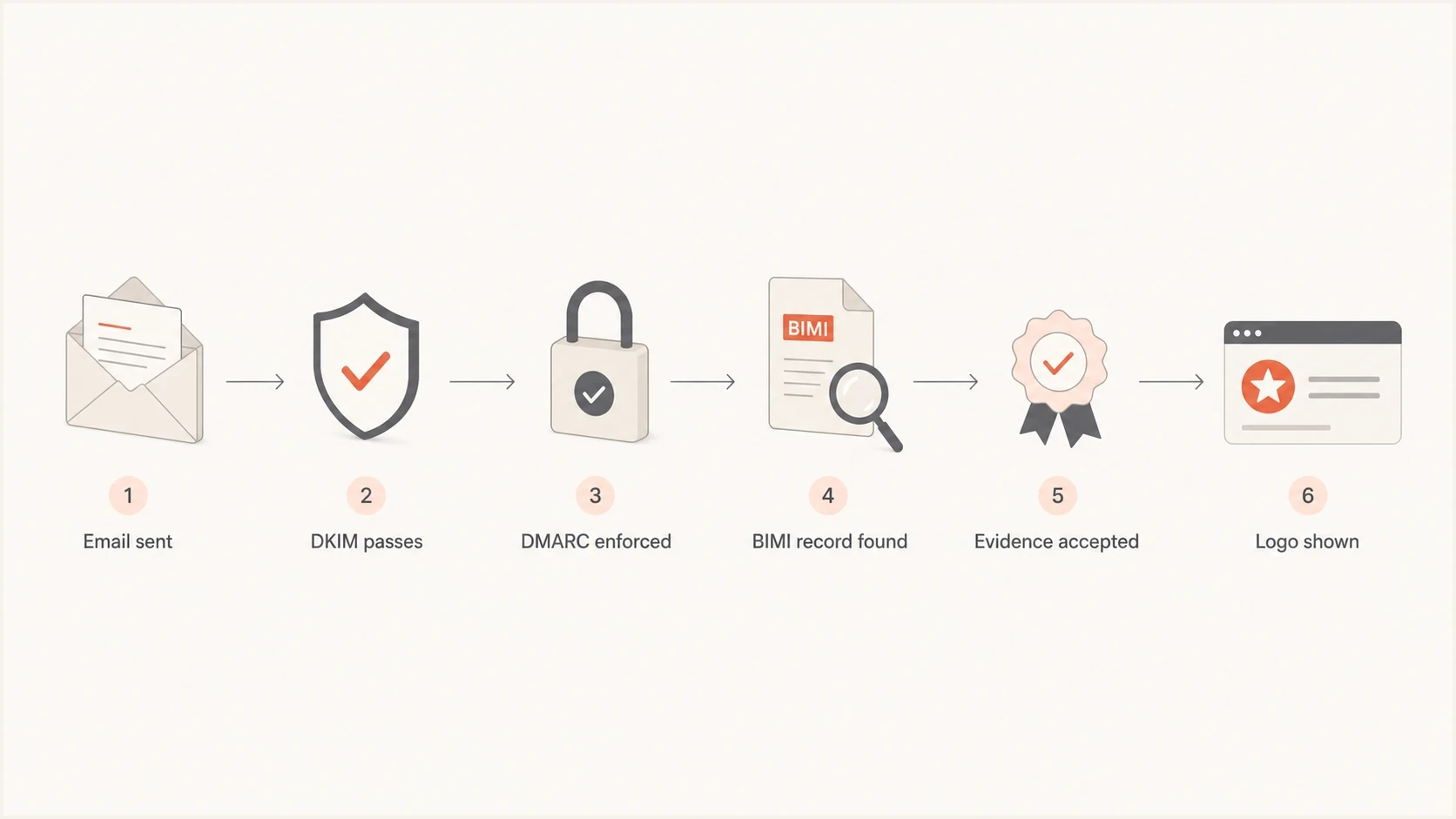
BIMI logo display flow through DKIM, DMARC, DNS, and evidence checks.
BIMI expects DMARC at enforcement, meaning p=quarantine or p=reject on the organizational domain and enforced treatment for sending subdomains. A sender with p=none can monitor authentication but does not meet normal BIMI display requirements. RFC 9989 removed the old pct tag from the current DMARC record format. The BIMI Group's implementation guide still rejects legacy pct values below 100, so do not use pct to stage a BIMI rollout.
DMARC checker
Look up a domain's DMARC record and catch policy issues.
?/7tests passed
Check DMARC before editing BIMI records. A broken policy or failed domain matching makes BIMI troubleshooting noisy because the logo symptom can come from authentication. Suped's free DMARC checker confirms the published policy, reporting addresses, and record syntax.
Logo evidence and cost differences
The two systems also use different asset and evidence workflows. Apple Business is a free service, and its published Branded Mail setup does not ask for a VMC or CMC. BIMI has no certificate requirement in the base record format, but real-world display depends on each mailbox provider's evidence policy. Certificate, trademark, hosting, and renewal costs belong in the BIMI budget when the target provider requires accepted evidence.
|
|
|
|---|---|---|
Logo file | HEIF, JPEG, PNG, or SVG; square; 1024 to 4864 pixels | Square SVG Tiny P/S |
Asset location | Uploaded to Apple Business | Hosted at a stable public HTTPS URL |
Approval or evidence | Apple approves the organization, brand, logo, and email identity | Mailbox provider accepts a VMC, CMC, or self-asserted record under its policy |
Direct cost | No Apple Business service fee | DNS and hosting costs; certificate and trademark costs when applicable |
Logo and evidence requirements for Apple Business Branded Mail and BIMI.
A VMC follows the registered-mark path. A CMC supports eligible logos that do not use that trademark route, subject to issuer checks and mailbox-provider support. Self-asserted BIMI avoids a certificate, but it has limited display support. Choose evidence for the providers you need to reach, not only for a syntactically valid BIMI record.
Where DMARC changes the decision
Starting with the logo treats authentication as paperwork. The safer order is DMARC visibility, sender cleanup, policy enforcement, then logo configuration. Apple Branded Mail and BIMI both require p=quarantine or p=reject. Apple also requires DKIM on customer email and currently asks for pct=100.
DMARC readiness for branded email
A practical reading of DMARC policy for Apple Branded Mail and BIMI.
Monitoring only
p=none
Useful for discovery, but not enough for either branded email path.
Legacy partial rollout
pct<100
RFC 9989 removed pct, and current Apple and BIMI eligibility checks do not accept pct below 100.
Quarantine
p=quarantine
An enforcement policy accepted by Apple and normal BIMI programs after sender cleanup.
Reject
p=reject
Accepted for branding, but general-purpose domains must assess mailing-list and forwarding risk first.
RFC 9989 now defines core DMARC, while RFC 9990 and RFC 9991 define aggregate and failure reporting. RFC 9989 removed pct from the current record format. Apple's Branded Mail instructions still explicitly require pct=100, while the BIMI Group says legacy pct values below 100 are not accepted. Keep pct=100 where Apple's verification flow or a current BIMI eligibility check requires it, but do not use pct below 100 to stage enforcement.
The hard part is finding every legitimate sender, proving which messages pass DKIM or SPF with DMARC-compatible domain matching, and moving the policy forward without blocking real mail. Ongoing DMARC monitoring supplies the evidence for that work.
Suped DMARC dashboard showing email volume, authentication health, and source breakdown
Suped's product supports the authentication work beneath both logo systems. It groups DMARC aggregate data by sending source, identifies domain-matching failures, tracks policy readiness, and alerts on material changes. That workflow helps a team prove that legitimate mail is stable before Apple or a BIMI mailbox provider evaluates the branding setup.
Which one should you set up first
For an Apple-specific goal, start the Apple Business organization and brand review while the domain moves toward enforcement. For wider logo support, prepare DMARC and BIMI first. For domain protection, DMARC comes before either branding path.
Start with Apple Business when
- Apple audience: Customers commonly read mail in supported Apple Mail or iCloud Mail experiences.
- Business identity: The Apple organization or brand profile still needs verification.
- Review lead time: The Apple review should begin while authentication work continues.
Start with BIMI when
- Mailbox reach: The program needs coverage outside Apple-controlled mail experiences.
- DMARC maturity: The organizational domain and sending subdomains are ready for enforcement.
- Brand evidence: A compliant logo and suitable VMC or CMC path are ready.
For a new branded email project, inventory every sender, fix DKIM and SPF domain matching, publish DMARC at monitoring, review aggregate reports, move the policy to quarantine, then add BIMI and Apple Business Branded Mail. Start Apple's business verification in parallel when Apple visibility has a deadline, but do not skip authentication cleanup.
A safer rollout order
- Inventory: List every platform and server that sends mail for the domain.
- Authenticate: Make each sender pass DKIM or SPF with DMARC-compatible domain matching.
- Monitor: Use aggregate reports to find gaps before enforcement.
- Enforce: Move to quarantine after legitimate mail passes, then assess whether reject fits the domain.
- Brand: Add BIMI and Apple Business Branded Mail once the mail stream is stable.
Suped's Hosted DMARC helps teams manage policy changes without repeatedly editing raw DNS. That is useful when enforcement must remain stable after the logo project launches.
Common implementation mistakes
Most failures come from the wrong coverage expectation, an authentication failure, or an unaccepted brand asset. The visible symptom is the same, no logo, but the checks differ.
- Wrong system: Apple Business Branded Mail does not create BIMI coverage outside supported Apple mail experiences.
- Weak policy: A monitoring-only DMARC policy does not satisfy Apple Branded Mail or normal BIMI display requirements.
- SPF-only pass: Apple expects DKIM-authenticated customer email, so SPF alone is insufficient for Branded Mail.
- Bad logo asset: A normal marketing SVG often fails the square SVG Tiny P/S rules used by BIMI.
- Blocked BIMI files: The SVG and certificate must be reachable over HTTPS with correct response headers and no access controls.
- Subdomain gaps: Approval or policy for one domain, subdomain, or address does not automatically cover every sending identity.
Apple-specific authentication requirements need a separate check because Branded Mail has its own business verification flow. Read the Apple requirements before assuming that a BIMI-ready domain automatically clears every Apple Business step.
Example DMARC record for monitoringdns
_dmarc.example.com. 3600 IN TXT (
  "v=DMARC1; p=none; "
  "rua=mailto:dmarc@example.com"
)
Example DMARC record for BIMI readinessdns
_dmarc.example.com. 3600 IN TXT (
  "v=DMARC1; p=quarantine; sp=quarantine; "
  "rua=mailto:dmarc@example.com"
)
These records are simplified. Reporting addresses, subdomain policy, and failure-reporting choices must match the organization's mail flow and risk. The important point is that p=none and p=quarantine request different treatment, and only the enforcement record supports normal branded email eligibility.
A practical recommendation
Implement both when Apple visibility and broader BIMI coverage matter, but start with the domain. A domain that consistently passes DKIM or SPF with DMARC-compatible matching and has enforced DMARC is easier to troubleshoot than one with unknown senders and incomplete branding.
Where each system helps
An illustrative split of responsibility, not a coverage or performance score.
Authentication
Brand approval
Mailbox display
Ongoing monitoring
Apple Business Branded Mail is not a substitute for BIMI. Use Apple's path for Apple-specific brand presentation and BIMI for standards-based presentation where supported. Keep in mind that neither path guarantees a logo for every message or mailbox view.
Suped fits underneath that work by organizing DMARC reports, identifying sending sources, detecting domain-matching failures, and tracking policy changes. It does not approve logos or control mailbox display.
Use this decision rule
Apple Business Branded Mail solves an Apple display requirement. BIMI solves a standards-based logo requirement. Enforced DMARC and domain-matched authentication supply the technical foundation for both.
Final answer
Apple Business Connect is not BIMI. Apple Business Connect was Apple's business and brand verification portal, and its Branded Mail tools now sit in Apple Business. BIMI is a DNS-based specification that participating mailbox providers can use to display a brand logo after authentication and evidence requirements are met.
Use both when branded email matters across Apple and other participating inboxes. Suped's product can support the shared DMARC workflow by monitoring sending sources, finding domain-matching gaps, and managing policy changes, while Apple and each BIMI mailbox provider retain control over logo approval and display.




