Does BIMI trickle down to subdomains and how to control subdomain BIMI display?

Published 11 Jul 2025
Updated 8 Aug 2026
13 min read
Summarize with

Updated on 3 Sep 2026: We corrected the BIMI opt-out record and added selector guidance for controlling logos on subdomain mail.
Yes, BIMI can apply to subdomains when the receiver falls back to the organizational domain, but that answer needs two important caveats. The visible From domain still has to satisfy BIMI's authentication and DMARC enforcement requirements, and you can stop a specific subdomain from displaying the inherited logo by publishing an explicit declination-to-publish assertion at that subdomain.
The practical version is simple. If example.com has a valid BIMI record, a valid logo, a valid VMC or CMC where required by the mailbox provider, and an enforced DMARC policy that covers mail.example.com, then mail sent from the subdomain can qualify for BIMI display. But if the parent domain says p=reject while sp=none, the subdomain is not under DMARC enforcement and BIMI processing should stop for that subdomain.
The control point is DNS. Publish a normal BIMI TXT record where you want the logo to appear. Publish v=BIMI1; l=; a=; at a subdomain where you want to block inherited BIMI display. The empty location and evidence tags make this an explicit declination, so the receiver does not continue to the parent assertion for that selector.
The direct answer
Short answer
BIMI lookup can fall back from a subdomain to the organizational domain. A parent-domain BIMI record can be used for subdomain mail, provided the visible From domain passes DMARC and both the author-domain and organizational-domain policies meet BIMI enforcement requirements.
- Inheritance: A subdomain can use the parent domain's BIMI assertion when no valid BIMI record exists at the subdomain for the selected selector.
- Requirement: The visible From domain must pass DMARC and be covered by enforcement through its own record or the inherited parent policy.
- Override: A subdomain can publish its own BIMI record to use a different logo or an explicit declination record to suppress display.
BIMI does not work like a browser favicon, where one icon can be assumed across a web property. It is tied to authenticated mail and receiver-side policy decisions. The receiving mailbox provider evaluates the visible From domain, DMARC domain matching, the BIMI DNS record, the SVG logo file, and any certificate requirement it enforces for that sender.
That matters because subdomain BIMI is not only a DNS lookup question. A parent BIMI record can be found, but display still depends on whether the subdomain is allowed to use it. If news.example.com sends mail but the effective DMARC policy for that subdomain is relaxed, the logo is not eligible just because example.com has a strict parent policy.
BIMI works best as the final layer on top of DMARC monitoring, not the starting point. The visible logo depends on having the authentication chain under control. Suped's DMARC monitoring shows which subdomains pass domain checks, which senders still fail, and whether policy changes will affect legitimate mail before you move to a stricter setting.
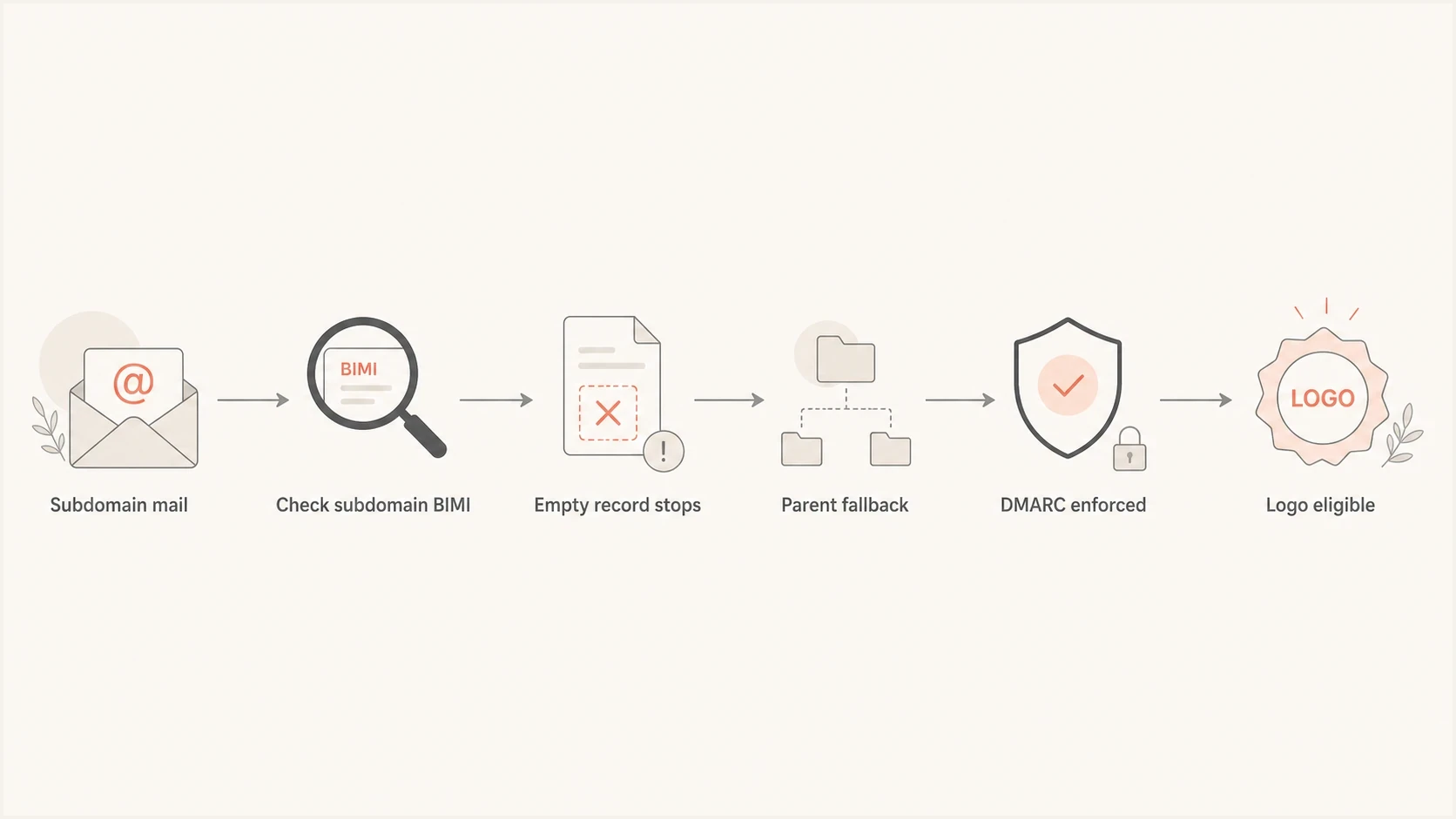
Flowchart showing how BIMI can fall back from a subdomain to a parent domain.
How BIMI lookup works for subdomains
BIMI records live in DNS at a selector under the domain being checked. The default selector is usually default. For a message using email.example.com in the visible From address, the receiver first checks the BIMI record at the subdomain. If no valid record exists there, the receiver checks the same selector at the organizational domain.
Subdomain BIMI lookup pathtext
default._bimi.email.example.com TXT
fallback to:
default._bimi.example.com TXT
This is why people describe BIMI as trickling down. The parent record can be used when the subdomain does not publish a valid BIMI record. But the subdomain can take control by publishing its own record at the more specific DNS name. A valid subdomain assertion, including an explicit declination, stops the fallback lookup for that selector.
A normal BIMI record points to the SVG logo with the l= tag and, where used, points to a certificate with the a= tag. If you want a subdomain to use the parent logo, leave the subdomain without a valid BIMI TXT record. If you want a subdomain to use a different logo, publish a complete record at that subdomain. If you want no logo, publish an explicit declination with empty l= and a= tags at that subdomain.
|
|
|
|---|---|---|
Parent logo | Parent | Can apply to subdomains |
Different logo | Subdomain | Overrides parent BIMI |
No logo | Subdomain | Explicit declination stops display |
Typical BIMI records by intent
The DMARC caveat that decides display
BIMI requires a strong DMARC policy on both the organizational domain and the visible From domain. The applicable policy must be quarantine or reject, and a quarantine policy must apply to 100% of mail. The message also needs to pass DMARC through SPF or DKIM domain matching. For subdomains, the sp tag sets the subdomain policy when a subdomain does not publish its own DMARC record.
Eligible pattern
- Policy: The parent domain uses p=reject or p=quarantine; pct=100.
- Subdomains: The organizational-domain record does not use sp=none, and any DMARC record published at the subdomain is also enforced.
- Authentication: SPF or DKIM passes with a domain match to the visible From domain.
Not eligible pattern
- Policy gap: The parent domain is enforced, but sp=none leaves subdomains relaxed.
- No domain match: SPF and DKIM fail DMARC domain matching for the subdomain sender.
- Receiver choice: The mailbox provider can still decline to show BIMI even when records are valid.
DMARC record that covers subdomainsdns
_dmarc.example.com TXT "v=DMARC1; p=reject; sp=reject;
rua=mailto:dmarc-reports@example.com; pct=100"
The example above puts the parent domain and subdomains under the same enforced posture. That does not mean every sender is ready for it. It means the policy shape is compatible with BIMI. Before using this in production, review aggregate reports for every source sending as the parent domain and every known subdomain.
?
What's your domain score?
Deep-scan SPF, DKIM & DMARC records for email deliverability and security issues.
For a quick DNS validation step before changing policy, run the domain through a domain health check and confirm the DMARC, SPF, DKIM, and BIMI DNS findings. That catches obvious failures before you investigate why a BIMI logo does not appear.
How to block BIMI on one subdomain
The cleanest way to stop inherited BIMI display on one subdomain is to publish an explicit declination-to-publish record at that subdomain. This gives the receiver a direct BIMI response for the subdomain, with empty logo and evidence locations.
BIMI declination to suppress inherited displaydns
default._bimi.email.example.com TXT "v=BIMI1; l=; a=;"
This is useful when one subdomain sends operational mail where a brand logo is unwanted, when a business unit is not ready for brand display, or when a subdomain uses a sender setup that passes DMARC but has not completed logo and certificate approvals. It also helps during staged rollouts, because you can keep the parent domain BIMI-ready while excluding individual subdomains.
Do not use DMARC relaxation as a BIMI off switch
Do not set sp=none just to stop BIMI on subdomains. That weakens authentication policy for every subdomain that relies on the parent record. Use an explicit BIMI declination for the specific subdomain instead.
If the subdomain already has a BIMI record with an l= URL, replace the existing assertion with v=BIMI1; l=; a=;. If there are multiple BIMI TXT records at the same name, fix that first. Multiple records stop assertion discovery and BIMI processing for the message.
For a deeper subdomain strategy, the more specific guide on excluding the parent is useful when BIMI needs to exist only on selected subdomains.
How to use a different BIMI logo on a subdomain
To show a different logo for a subdomain, publish a complete BIMI record at that subdomain. The subdomain record points to its own SVG file and, when required, its own certificate URL. This is common for separate brands, regional programs, product lines, or mail streams where the visual identity should not match the corporate parent.
Subdomain BIMI record with its own logodns
default._bimi.news.example.com TXT "v=BIMI1;
l=https://assets.example.com/bimi/news.svg;
a=https://assets.example.com/bimi/news.pem"
The certificate question is where many teams get stuck. An evidence document can cover several domains, but it is tied to one validated logo and must include the domain used for BIMI. Verify the certificate's subject details and the mailbox provider's current BIMI requirements before assuming the parent certificate covers a sending subdomain.
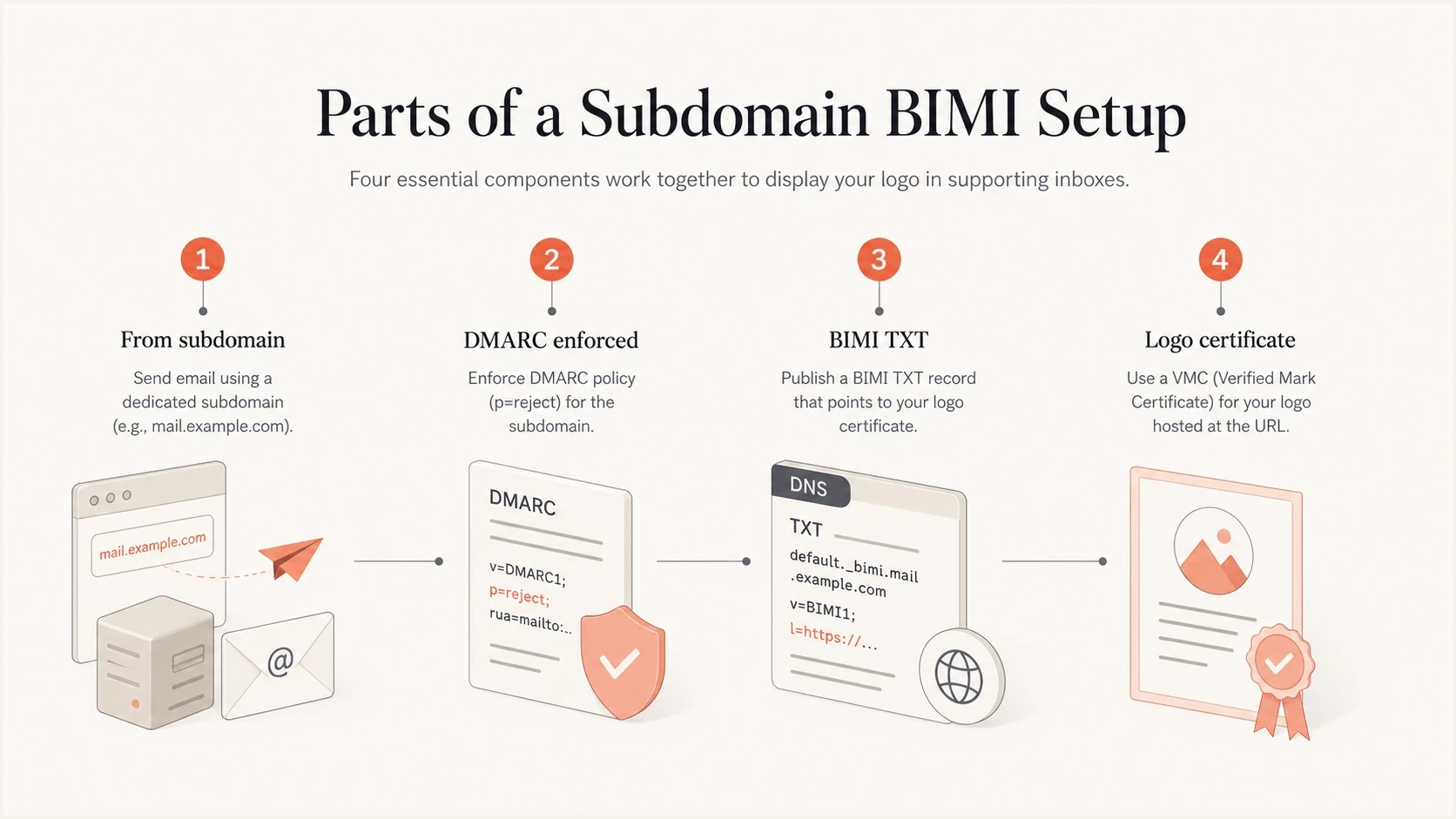
Four parts of a working subdomain BIMI setup.
The subdomain-specific record gives you precise control, but it also adds operational work. Each additional BIMI record means another SVG file, another certificate path if used, another HTTPS endpoint, and another DNS record to maintain. For small teams, parent fallback for ordinary subdomains and explicit records only for special cases is usually easier to manage.
How selectors control logos within one subdomain
A subdomain-specific record separates logos by visible From domain. BIMI selectors add control within that domain, so different mail streams can request different assertions without changing their From addresses. The sender adds a BIMI-Selector header, and the receiver looks up that selector instead of default.
Custom selector for a subdomain mail streamtext
From: offers@news.example.com
BIMI-Selector: v=BIMI1; s=offers;

DNS lookup:
offers._bimi.news.example.com TXT

Record:
"v=BIMI1; l=https://assets.example.com/bimi/news.svg; a=https://assets.example.com/bimi/news.pem;"
- Sign the header: Include the BIMI-Selector header in the DMARC-matched DKIM signature. A receiver can ignore an unsigned selector header.
- Match the fallback: If the custom selector is absent at the subdomain, lookup falls back to the same selector at the organizational domain, not to the parent's default selector.
- Plan for support differences: Mailbox providers decide whether to honor custom selectors, so test each target provider before relying on selector-specific display.
Use subdomain records when the visible From domains need different default logos. Use selectors when several streams share one From domain but need different logo choices. A selector can also point to an explicit declination record when one signed stream should request no BIMI indicator.
A practical rollout plan
The safest rollout starts with authentication visibility, followed by policy enforcement and BIMI publication. Starting with the logo hides the real dependency because BIMI problems are often DMARC problems with a visible symptom. If reporting shows that one sending platform still fails domain matching, a BIMI record will not fix it.
- Inventory: List every parent domain and subdomain that appears in visible From addresses.
- Authenticate: Confirm each sender passes SPF or DKIM domain matching for the domain it uses.
- Enforce: Move DMARC to quarantine at 100% or reject, including the subdomain policy BIMI will rely on.
- Publish: Add the parent BIMI record first if most subdomains should share the same logo.
- Exclude: Add explicit declination records where inherited display should stop.
Suped DMARC dashboard showing email volume, authentication health, and source breakdown
Suped supports this workflow in one operational view. Add the parent domain and sending subdomains, review aggregate DMARC results, fix sources that fail domain matching, then stage policy changes before publishing BIMI records.
For teams managing many domains, hosted DMARC keeps parent and subdomain policies consistent while BIMI rolls out. Suped places those policies beside aggregate reports and authentication issues, so teams can verify each change before publishing it.
Operational gates for BIMI rollout
Use report findings rather than a universal pass-rate cutoff, because BIMI has no standard readiness percentage.
Ready
Known mail passes
All legitimate senders are identified, pass domain matching, and are covered by enforcement.
Investigate
Known failures remain
A known sender still needs authentication or domain-matching remediation.
Not ready
Traffic unresolved
Unresolved legitimate or unknown traffic would be affected by enforcement.
Common DNS patterns
Most BIMI subdomain setups use a few repeatable patterns. Choose the pattern based on whether most mail should inherit the parent identity and whether any subdomain needs a separate identity or no BIMI display.
Pattern 1: parent BIMI applies broadlydns
_dmarc.example.com TXT "v=DMARC1; p=reject; sp=reject;
rua=mailto:dmarc-reports@example.com"

default._bimi.example.com TXT "v=BIMI1;
l=https://assets.example.com/bimi/logo.svg;
a=https://assets.example.com/bimi/vmc.pem"
Pattern 2: subdomain uses its own BIMIdns
_dmarc.example.com TXT "v=DMARC1; p=reject; sp=reject;
rua=mailto:dmarc-reports@example.com"

_dmarc.news.example.com TXT "v=DMARC1; p=reject;
rua=mailto:dmarc-reports@example.com"

default._bimi.news.example.com TXT "v=BIMI1;
l=https://assets.example.com/bimi/news.svg;
a=https://assets.example.com/bimi/news.pem"
Pattern 3: subdomain declines inherited BIMIdns
default._bimi.receipts.example.com TXT "v=BIMI1; l=; a=;"
Pattern 1 fits an organization with one brand logo and many sending subdomains. Pattern 2 fits a subdomain with a separate brand identity. Pattern 3 is the targeted opt-out when the parent assertion should remain active but a specific subdomain should not show a logo.
Validation order
- DNS: Confirm one BIMI TXT record exists at the intended selector and domain.
- DMARC: Confirm the visible From domain passes domain matching and has an effective enforcement policy.
- Logo: Confirm the SVG file is reachable over HTTPS, uses the correct MIME type, and follows BIMI formatting rules.
- Certificate: Confirm the VMC or CMC is valid and covers the domain where the mailbox provider requires evidence.
What can still stop the logo
A correct parent BIMI record does not guarantee a visible logo. Mailbox providers make the final display decision, and BIMI has several dependencies outside the TXT record itself. When a subdomain does not show the logo, work through the same failure points in order instead of changing unrelated DNS records.
|
|
|
|---|---|---|
No logo | Subdomain policy is relaxed | Enforce DMARC |
Parent works | Subdomain has a declination record | Remove the opt-out |
Intermittent display | Provider rules or caching | Test each mailbox provider |
Wrong logo | Parent fallback used | Publish subdomain BIMI |
Troubleshooting subdomain BIMI display
Also check caching and propagation before declaring a setup broken. Receivers can cache BIMI and DMARC DNS answers as well as hosted logo and certificate files. If you changed a DNS record, wait for its TTL to expire and send a fresh message after the record has propagated.
Another common issue is assuming BIMI display equals delivery improvement. BIMI is a brand display layer. It depends on domain authentication and sender reputation, but it does not replace list hygiene, complaint control, bounce handling, or blocklist (blacklist) monitoring. If the sending domain or IP is on a major blacklist or blocklist, fix that separately.

Issue steps to fix dialog showing the issue overview, tailored fix steps, and verification action
Suped's issues view helps separate policy, sender, DNS, and DKIM problems before BIMI troubleshooting begins. When a subdomain has a policy gap, an unverified sender, multiple TXT records, or a failing DKIM path, the issue includes the relevant remediation steps alongside the DMARC data.
Views from the trenches
Best practices
Check subdomain DMARC enforcement before treating parent BIMI as ready for display.
Use a BIMI declination record when a specific mail stream should not show a logo.
Keep parent fallback for shared brands, then override only the subdomains that differ.
Common pitfalls
Setting sp=none can leave subdomains outside enforcement even when the parent is strict.
Assuming one certificate covers every subdomain can delay launch during validation.
Relaxing DMARC to control BIMI weakens security when a declination record will work.
Expert tips
Test with fresh messages after DNS propagation because cached BIMI results can mislead.
Document each subdomain's intended display state so DNS changes do not restore logos.
Review DMARC reports before BIMI rollout to find senders failing domain matching.
Expert from Email Geeks says parent-domain BIMI can apply to subdomains when the authentication and policy conditions are also satisfied.
2023-05-08 - Email Geeks
Marketer from Email Geeks says the important caveat is subdomain DMARC enforcement, because p=reject with sp=none leaves the subdomain relaxed.
2023-05-08 - Email Geeks
The practical rule
Use the parent BIMI record when the same brand should appear across normal sending subdomains. Use a subdomain BIMI record when that subdomain needs its own logo. Use an explicit declination record when that subdomain should not display a logo at all.
The one rule not to skip is DMARC enforcement for the subdomain. BIMI inheritance only helps after the mail stream passes authenticated domain matching and the applicable DMARC policies are strict enough. Get that right first, then BIMI display becomes a control problem involving DNS, the logo file, certificate evidence, and provider policy rather than a guessing exercise.