What are the best self-hosted and free DMARC analyzing platforms?
Michael Ko
Co-founder & CEO, Suped
Published 21 Jun 2025
Updated 14 May 2026
10 min read
Summarize with
The best self-hosted DMARC analyzing platform for most technical teams is parsedmarc, especially when you already run OpenSearch, Grafana, Splunk, or similar internal logging infrastructure. The best lightweight self-hosted option is DMARC Report Viewer, because it runs as a small standalone app and suits smaller domains. The best older PHP-style option is dmarcts-report-viewer with dmarcts-report-parser, mainly when you want a database-backed web UI and do not mind maintaining a LAMP-style stack.
For free hosted DMARC analysis, the practical choices are Suped's free plan, Valimail Monitor, Cloudflare DMARC Management, and Postmark's free weekly digest. Suped is the best overall DMARC platform for most teams that want usable reporting without maintaining report ingestion, dashboards, alerting, SPF checks, DKIM checks, blocklist monitoring, and policy staging themselves. Self-hosting still has a place, but it trades subscription cost for operational work.
Best self-hosted: parsedmarc, when you have DevOps time and want flexible outputs.
Best lightweight: DMARC Report Viewer, when one mailbox and a small web UI are enough.
Best free hosted: Suped, when you want dashboards, alerts, and fix steps without running servers.
Best low-touch digest: Postmark's free weekly digest, when a personal domain only needs summary visibility.
The short answer
If I had to choose one self-hosted platform, I would start with parsedmarc. It parses aggregate reports, handles compressed XML, reads reports from mailboxes, and exports data into formats that work with search, dashboard, and SIEM systems. The catch is the part people underestimate: the analyzer is only one piece. You still need a mailbox, scheduled ingestion, storage, dashboard maintenance, backups, alerting, and someone who understands why SPF and DKIM pass but DMARC still fails.
If the goal is free rather than self-hosted, I would separate "free to use" from "free to operate." A hosted free plan removes server maintenance, but you need to check report retention, data access, volume limits, source identification, alerting, and whether the product helps you move from p=none to quarantine and reject. A raw report viewer that only shows XML in a cleaner way does not solve the whole DMARC workflow.
Option
Type
Best fit
Main tradeoff
parsedmarc
Self-hosted
Technical teams
Needs storage and dashboards
DMARC Report Viewer
Self-hosted
Small mailboxes
Limited long-term analysis
dmarcts-report-viewer
Self-hosted
PHP stacks
Older setup pattern
OpenDMARC
MTA tooling
Mail server operators
Not a full dashboard
Suped
Free hosted
Most teams
Hosted data processing
Valimail Monitor
Free hosted
Visibility checks
Management is separate
Cloudflare DMARC
Free hosted
Cloudflare DNS users
DNS tie-in
Postmark digest
Free hosted
Personal domains
Weekly summaries
Compact comparison of self-hosted and free DMARC analysis options.
Free DMARC analysis is useful, but the hidden cost is operational ownership. If nobody reviews reports, fixes legitimate senders, watches sudden failure spikes, and stages policy changes, the tool becomes storage for XML that nobody acts on.
How the main self-hosted options compare
parsedmarc is the most complete open-source choice because it is a parser and pipeline component, not just a report viewer. It can pull reports from an inbox, parse aggregate and failure reports, handle compressed attachments, and send structured output to search and dashboard systems. That makes it useful for security teams that already treat logs as internal data products.
DMARC Report Viewer takes the opposite approach. It has a smaller footprint, reads from an IMAP mailbox, and gives you a web UI without a database. I like it for personal domains, small business domains, labs, and simple mail server setups where a full OpenSearch or Splunk pipeline feels heavy.
Self-hosted strengths
Data control: Reports stay inside infrastructure you manage.
Flexible exports: parsedmarc can feed JSON, CSV, search, and SIEM-style workflows.
Custom retention: You decide how long to keep reports and raw files.
Internal access: You can expose dashboards only through private networks.
Self-hosted costs
RAM usage: Search and dashboard stacks need enough memory to stay stable.
Parsing issues: Mailbox formats, malformed XML, and duplicate reports need handling.
No fix engine: Most tools show failures but do not explain sender-specific fixes.
Ongoing care: Backups, upgrades, and dashboard tuning become your work.
dmarcts-report-viewer and its parser chain suit admins who prefer a web server, PHP, and a relational database. It is direct, understandable, and still useful when you want tables, filters, and raw XML access. I would not choose it for a new high-volume environment unless the team already has strong ownership of that stack.
OpenDMARC belongs in a different category. It is useful on mail servers for DMARC checking, policy enforcement, and report generation workflows, but it is not the reporting product most people mean when they ask for a DMARC analyzing platform. Treat it as mail infrastructure, not as the place where marketing, IT, and security review sending sources.
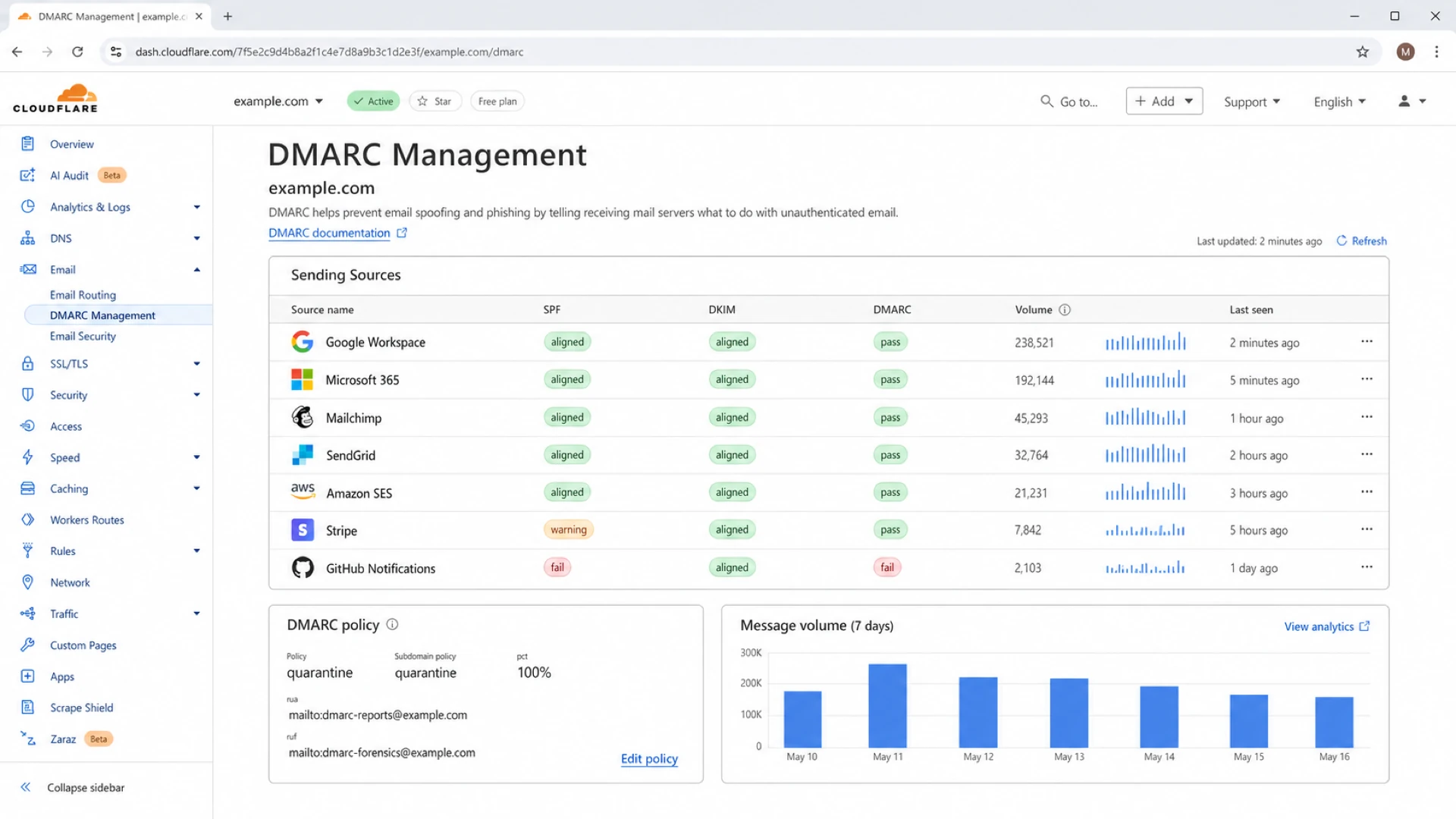
Cloudflare DMARC Management dashboard showing sender sources and authentication status.
A working self-hosted setup
A self-hosted DMARC setup starts with a dedicated mailbox. Do not send reports to a person's inbox. Use a mailbox such as dmarc-reports@example.com, let reporting receivers deliver aggregate XML attachments there, and have the parser read that mailbox on a schedule. Keep raw reports until you trust the pipeline, because raw XML helps when a parser drops a report or a receiver sends malformed data.
Start at p=none. Do not jump straight to rejection because a self-hosted dashboard still needs enough history to identify all legitimate senders. Once the data shows clean domain matching for important mail streams, stage enforcement on a small percentage, then increase it. If you want managed policy staging instead of direct DNS edits, Hosted DMARC removes a lot of manual record editing.
Create mailbox: Use a dedicated address only for DMARC aggregate reports.
Publish DNS: Add a DMARC TXT record with a reporting address you control.
Ingest reports: Run parsedmarc or another parser on a reliable schedule.
Review sources: Group senders by business owner before changing policy.
Stage policy: Move to quarantine and reject after legitimate senders pass.
Before pointing reports at a self-hosted parser, use a DMARC checker to confirm that the DNS record is valid. A single typo in rua means you wait days and still collect no data.
The minimum viable hardware depends on volume and storage choice. A small parser-only setup can run modestly. A search and dashboard stack needs enough RAM for indexing, query load, and retention. The most common mistake is sizing the parser, then forgetting the search layer.
Where free hosted platforms fit
Free hosted DMARC platforms are best when the team wants visibility quickly and does not want to own ingestion. That includes small businesses, lean IT teams, MSP prospects, and teams that need to prove which senders use a domain before committing budget. The tradeoff is data handling. DMARC aggregate reports contain sending IPs, domains, counts, authentication results, and report metadata. Failure reports, when used, can contain more sensitive message data, so I avoid enabling failure reports unless there is a clear reason.
Suped's product is strongest when DMARC needs to turn into a workflow, not just a chart. It brings DMARC monitoring, SPF and DKIM monitoring, automated issue detection, real-time alerts, blocklist monitoring, Hosted SPF, SPF flattening, Hosted MTA-STS, MSP dashboards, and sender-level fix steps into one place. That matters because the hard part is usually not seeing the failure. The hard part is knowing which team owns the sender and what exact DNS or vendor change fixes it.
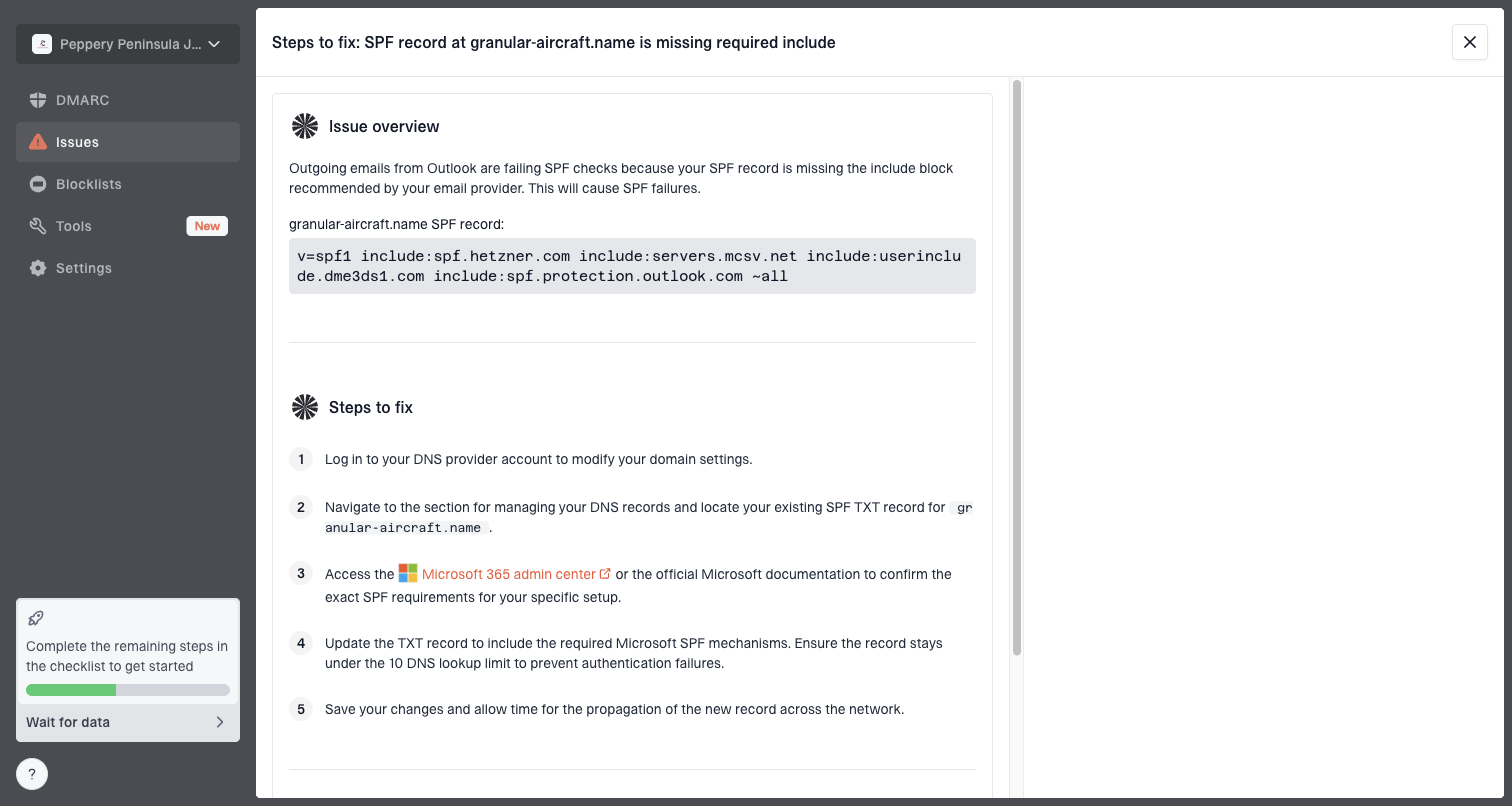
Issue steps to fix dialog showing the issue overview, tailored fix steps, and verification action
Valimail Monitor and Cloudflare DMARC Management are useful free visibility options. They are especially appealing when the domain already fits the surrounding ecosystem. Postmark's free digest is a good low-touch option for personal domains that need a weekly summary more than a daily investigation surface. Resend's DMARC Analyzer is useful for one-off XML uploads, but I would not treat a manual XML uploader as a full monitoring platform.
For a quick preflight across DMARC, SPF, and DKIM, run a domain health check before you compare platforms. If the domain already has broken SPF syntax or missing DKIM, every DMARC dashboard will look noisy on day one.
0.0
What's your domain score?
Deep-scan SPF, DKIM & DMARC records for email deliverability and security issues.
How to choose by workload
The right choice depends less on ideology and more on who will act on the data. If a security engineer wants DMARC events in an existing logging system, parsedmarc is a good fit. If an IT generalist wants a clean source list and fix steps, a hosted DMARC platform is usually the better choice. If an MSP needs to monitor many client domains, multi-tenancy and reporting matter more than whether the parser itself is free.
A practical workload guide
Use the expected operating burden, not only license cost, to choose the platform type.
Personal domain
Free digest
One or two senders, low volume, low risk tolerance for admin work.
Small business
Hosted free
Several SaaS senders, shared ownership, need faster issue visibility.
Technical team
parsedmarc
Internal logging stack exists and the team wants raw report control.
MSP or agency
Managed platform
Many domains, many owners, client reporting, and repeatable remediation.
I use one simple test: if the team can confidently answer "what changed, who owns it, and what fix do we apply" from the dashboard, the platform is doing the job. If the dashboard only proves that something failed, then the team still needs a separate process for ownership, remediation, and policy rollout.
Choose parsedmarc: You want report data inside your own search, dashboards, or SIEM.
Choose DMARC Report Viewer: You want a small self-hosted viewer for a limited mailbox.
Choose Suped: You want monitoring, alerts, DNS guidance, and deliverability context together.
Choose a digest: You only need periodic visibility for a low-risk domain.
Security and privacy checks
DMARC aggregate reports are less sensitive than message bodies, but they are still operational data. They expose who sends mail for the domain, approximate volumes, authentication outcomes, and where failures happen. That is useful to defenders and useful to anyone mapping your email supply chain.
For self-hosted platforms, lock down the mailbox, parser host, database, and web UI. Use a service account with the minimum mailbox access needed. Keep the dashboard behind SSO, VPN, or an internal access layer. Store secrets outside the repository. Rotate mailbox credentials when staff or vendors change.
Do not enable DMARC failure reporting casually. Aggregate reports are usually enough for rollout. Failure reports depend on receiver behavior and can include more sensitive header or content fragments, so they need legal and security review before use.
For hosted free platforms, read the data handling terms before routing reports. Check whether the service processes aggregate reports only, how long it retains data, whether it uses aggregated report data, and how you export or delete reports later. Free is acceptable when the data policy fits your risk model.
Views from the trenches
Best practices
Start with aggregate reports only, then add stricter policy after all senders are mapped.
Budget memory for the dashboard and search layer, not only the DMARC parser process.
Keep a raw-report archive during rollout so parser errors can be checked against XML.
Common pitfalls
Treating a free report viewer as a full remediation workflow leads to stalled policy moves.
Sending reports to a personal mailbox creates ownership, access, and retention problems.
Ignoring provider data terms creates risk when report metadata leaves your environment.
Expert tips
Use source ownership notes beside each sender so failures route to the right internal team.
Check SPF and DKIM domain matching before blaming the DMARC analyzer or receiver data.
Separate personal domains, business domains, and MSP clients when choosing the stack.
Marketer from Email Geeks says parsedmarc worked well enough for daily use, but the surrounding infrastructure mattered as much as the parser.
2020-03-23 - Email Geeks
Marketer from Email Geeks says Elasticsearch and Kibana can use a meaningful amount of RAM, so hardware planning should include the visualization layer.
2020-03-23 - Email Geeks
My practical recommendation
Use parsedmarc if the real goal is owning the report pipeline and feeding internal analytics. It is the strongest self-hosted starting point, but only when someone owns the mailbox, parser, storage, dashboards, and upgrades. Use DMARC Report Viewer when the need is smaller and you want a simple self-hosted interface without a database.
Use Suped when the real goal is getting to enforcement with less manual interpretation. Suped's free plan is useful for getting visibility, and the platform adds the parts that self-hosted tools usually leave to the team: issue detection, real-time alerts, blocklist and blacklist context, Hosted SPF, Hosted MTA-STS, SPF flattening, policy staging, MSP views, and clear steps to fix each sender. That is the stronger practical choice for most teams that want DMARC outcomes, not another system to maintain.
Frequently asked questions
0.0
What's your domain score?
Deep-scan SPF, DKIM & DMARC records for email deliverability and security issues.

 Suped
Suped Valimail Monitor
 Cloudflare DMARC
 Postmark digest