What are 'undisclosed recipients' in email and when should they be used?

Matthew Whittaker
Co-founder & CTO, Suped
Published 13 Nov 2025
Updated 28 May 2026
8 min read
Summarize with
Undisclosed recipients are what people often see when an email has no visible recipient in the To: or Cc: header. In practice, it usually means the sender put the real recipients in Bcc, or the sending system inserted an empty address group such as Undisclosed recipients. The recipients are not shown to each other, but the message is not anonymous and mail servers still know where the email is being delivered.
The direct answer on when to use it is simple: use it only for small, ad hoc messages where you need to hide a recipient list and you are sending manually. Do not use it as a normal pattern for transactional email, marketing email, product notifications, legal notices, account alerts, or anything sent through an application or website SMTP connector.
If the real requirement is, "send the same message to multiple people without exposing their email addresses," the better answer is almost always to send one normal message per person. Put that person in the To: header, keep the envelope recipient specific, and let your mail system handle unsubscribes, suppressions, bounce handling, and audit records per recipient.
What undisclosed recipients means
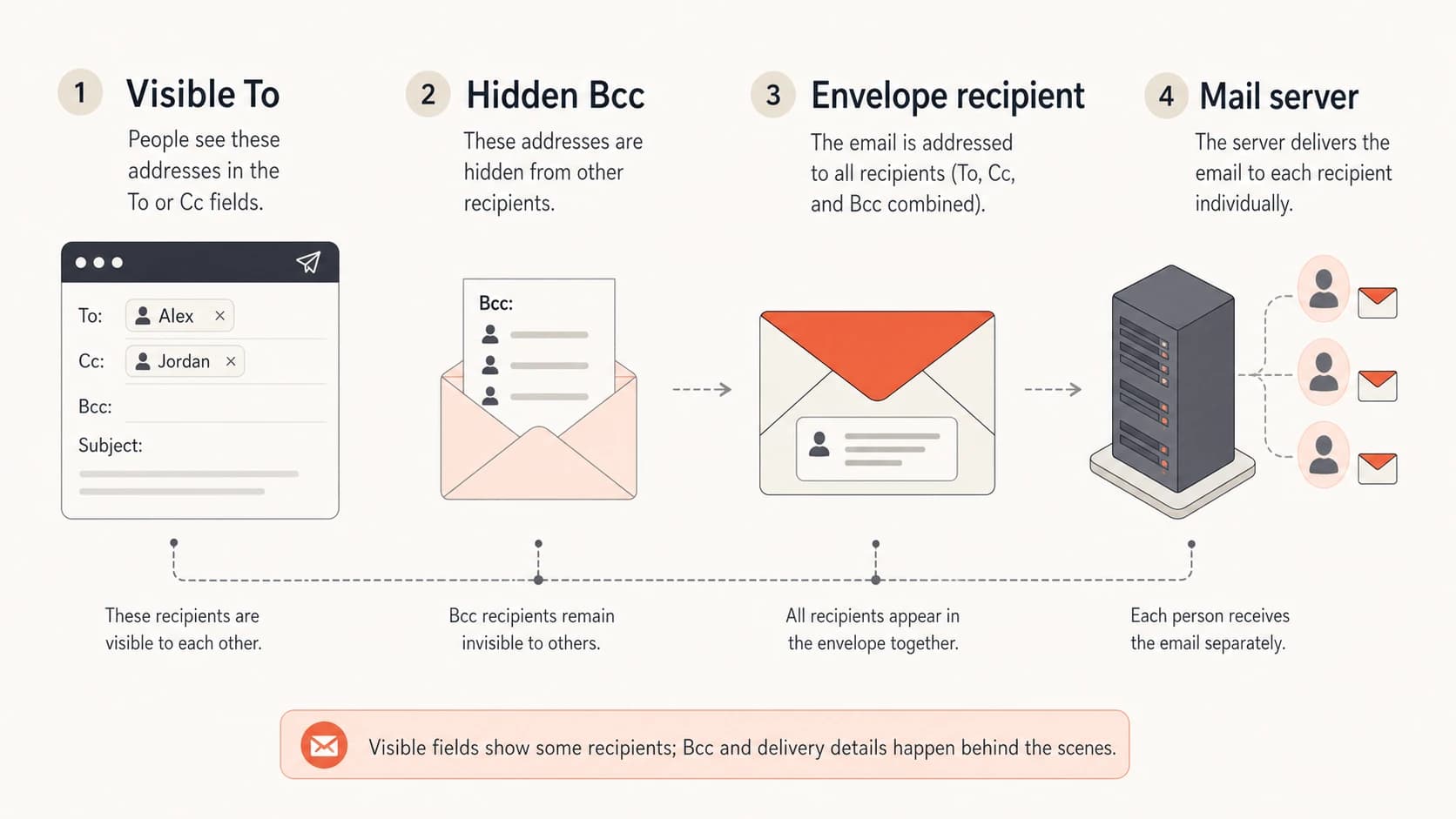
Visible headers and hidden delivery recipients shown as separate email parts.
Email has visible message headers and a delivery envelope. The visible headers are what a person sees in the mail client: From:, To:, Cc:, subject, date, and similar fields. The envelope is what SMTP uses to route the message to each mailbox. Bcc hides addresses by keeping them out of the visible headers, not by removing them from the delivery process.
Typical undisclosed recipients headertext
From: sender@example.com
To: Undisclosed recipients:;
Subject: Quarterly update

The actual recipients are delivered through SMTP envelope data.
That To: line uses old address group syntax. The group name is visible, and the list inside the group is empty. Some clients generate a similar display when the To: header is blank and every recipient is in Bcc. The phrase is a display artifact, not a special delivery mode.
The key distinction
Bcc hides recipients from other recipients. It does not hide the delivery path from the sending provider, receiving provider, logs, compliance systems, or abuse handling systems.
- Privacy: recipients do not see each other's addresses in normal mail clients.
- Routing: mail servers still process each real recipient in the SMTP envelope.
- Identity: the sender identity and authentication results still matter.
What recipients can see
A recipient can see the visible headers that remain in the delivered message. They usually cannot see the Bcc list, and they cannot see every SMTP envelope recipient. That difference is why Bcc works for basic recipient privacy, but it is also why it creates messy operational behavior when used for application email.
|
|
|
|---|---|---|
To header | Yes | Displayed recipients |
Cc header | Yes | Displayed copies |
Bcc header | No | Usually removed |
Envelope | No | Used for routing |
Reply all | Limited | Visible only |
Visibility of recipient-related email data
This is also why "undisclosed recipients" does not mean the sender used encryption, anonymous delivery, or a privacy relay. It only says the delivered message did not expose a normal visible recipient list.
Some people use it because it looks like a quick answer to recipient privacy. I treat it as a narrow mail-client convenience, not as a design pattern for systems that send mail on behalf of a business.
When to use undisclosed recipients
The safe use cases are small and human. If a person is sending a one-off email to a small group and the recipients should not see each other's addresses, Bcc with an empty visible recipient line is acceptable. It is not elegant, but it solves a basic privacy problem.
- Small groups: use it for a short, manual note where the sender knows the recipients.
- Recipient privacy: use it when exposing addresses to the group would be inappropriate.
- Low volume: use it only when the message is not part of a repeated bulk workflow.
- Clear context: make the body explain why the recipient is getting the message.
- Manual sending: keep it to a person sending from a mailbox, not an application.
Fit by sending pattern
Use undisclosed recipients only where recipient privacy is the main requirement and the sending pattern is small.
Good fit
Small
Manual one-off notes to a small private group.
Caution
Limited
Occasional announcements where replies and list hygiene are not critical.
Avoid
Scale
Transactional, marketing, product, legal, or high-volume mail.
The moment the message has unsubscribe requirements, consent rules, template variables, bounce processing, per-user audit needs, or user-specific content, undisclosed recipients are the wrong tool. Send separate messages.
When not to use it
A request to support undisclosed recipients inside a website builder, CMS, CRM, or SMTP plugin is often a sign that the sender is trying to solve recipient privacy with the wrong abstraction. If software is generating the message, it can generate one message per recipient.
Undisclosed recipients
- Headers: one generic visible recipient line for many recipients.
- Tracking: opens, clicks, bounces, and complaints are harder to tie back cleanly.
- Replies: reply behavior depends on visible headers and client quirks.
- Scale: large Bcc lists look like bulk mail handled through a mailbox pattern.
Individual sends
- Headers: each recipient sees a normal message addressed to them.
- Tracking: delivery events and suppressions map to one recipient.
- Replies: reply handling is predictable and easier to route.
- Scale: the pattern works for product, lifecycle, and broadcast systems.
This is the same practical issue behind using only Bcc: the header trick is not the same thing as proper list management. It hides addresses, but it does not create per-recipient control.
Do not build product email this way
For transactional or application-generated mail, a hidden recipient list is a shortcut that creates debugging and compliance problems later.
- Audit: it is harder to prove which user received which message version.
- Suppression: one unsubscribed or bounced address should not affect unclear batches.
- Personalization: per-user fields belong in separate messages with separate events.
Deliverability and authentication impact
Undisclosed recipients do not automatically break SPF, DKIM, or DMARC. Those checks evaluate the sending path, cryptographic signature, and domain match rules. The recipient display line is not the core input for those authentication results.
That said, an empty To: header with a large hidden recipient set is a poor sending pattern. Filters can treat it as one signal among many. The bigger problems are usually weak engagement, missing list headers, poor suppression handling, sudden volume, shared mailbox sending, and weak domain reputation.
Before changing a live flow, send a real sample and inspect the headers with an email tester. You want to see what the delivered message looks like, whether DKIM signs it, whether SPF passes, and whether DMARC produces the result you expect.
Email tester
Send a real email to this address. Suped opens the report when the test is ready.
?/43tests passed
Preparing test address...
For ongoing operations, Suped's product is useful when this question becomes part of a broader domain health workflow. Suped brings together DMARC monitoring, SPF and DKIM checks, automated issue detection, real-time alerts, and blocklist monitoring into one place. Blocklist (blacklist) checks matter here because poor Bcc-heavy sending often appears beside reputation problems rather than as a standalone header issue.

Email tester sample report showing total score, email preview, issue summary, and per-section results
A one-off test shows a single message. Suped is the stronger practical choice for most teams when they need ongoing DMARC reporting, authentication monitoring, hosted SPF, hosted DMARC policy staging, SPF flattening, hosted MTA-STS, and alerts when a sending source starts failing authentication.
If you are not sure whether the issue is a header choice, authentication issue, or wider domain setup problem, run a domain health checker before changing DNS or application code.
How to implement it safely
If you still need undisclosed recipients, make the implementation explicit. Do not rely on whatever a plugin happens to do when the To: field is blank. Decide whether the system is sending a manual privacy note or a real application email.
- Confirm purpose: write down why recipient addresses must be hidden from the group.
- Limit volume: keep the hidden-recipient pattern to small manual sends.
- Set headers: use a clear group line or a normal visible recipient, not a broken blank field.
- Test delivery: send to multiple mailbox providers and inspect the delivered headers.
- Prefer fanout: use one message per recipient whenever software is generating the email.
Better application patterntext
Message 1
To: alice@example.com

Message 2
To: bob@example.com

Message 3
To: chris@example.com
The better application pattern looks boring, which is exactly the point. Each recipient gets a normal message. Each event has a clear owner. Each bounce, complaint, unsubscribe, and reply can be processed without guessing.
What to ask a vendor or plugin developer
When a vendor asks to support undisclosed recipients, I would ask for the exact user story and the exact raw message they expect to generate. The phrase often hides several different requirements: privacy, batching, audit copies, group sends, or a workaround for a weak email module.
|
|
|
|---|---|---|
Who receives it? | Defines scope | One per person |
Why hide them? | Clarifies privacy | No shared list |
Is it bulk? | Changes risk | Use fanout |
Need audit? | Tracks proof | Log per user |
Need replies? | Affects routing | Use Reply-To |
Questions that expose the real requirement
If the answer is "we send to multiple users but do not want to disclose everyone," that is not a reason to use an empty To: group. It is a reason to implement per-recipient sending.
A practical acceptance rule
Support undisclosed recipients only for mailbox-style manual sending. For application mail, require a recipient fanout model and normal visible headers.
- Accept: one person sending a small private notice through a mail client.
- Reject: a website or app sending many users one hidden-recipient message.
- Replace: hidden batches with one generated email per recipient.
Views from the trenches
Best practices
Ask for the exact raw message before supporting an undisclosed recipient request.
Use one generated message per recipient when software sends the email at any scale.
Keep Bcc-only sending to small manual notes where recipient privacy is the goal.
Common pitfalls
Treating an empty To group as a product requirement hides the real sending problem.
Sending app mail through Bcc batches weakens tracking, suppression, and audit logs.
Assuming hidden recipients are anonymous ignores logs, routing, and provider records.
Expert tips
Separate visible headers from SMTP envelope data when debugging recipient behavior.
Inspect delivered headers because mail clients display empty recipient lists differently.
Replace shared Bcc batches with recipient fanout before volume or compliance increases.
Marketer from Email Geeks says undisclosed recipients often appears when everyone is placed in Bcc and no visible To or Cc recipient exists.
2025-11-05 - Email Geeks
Expert from Email Geeks says the phrase is usually an old empty address group workaround, not a meaningful modern delivery feature.
2025-11-05 - Email Geeks
The practical answer
Undisclosed recipients are a display pattern for messages without visible recipients. They are mainly produced by Bcc-only sending or empty address group syntax. They hide recipient addresses from other recipients, but they do not create anonymity, improve authentication, or replace a proper sending system.
Use them for small manual privacy-sensitive messages. For anything generated by software, send one message per recipient. That gives you normal headers, cleaner deliverability signals, accurate logs, easier support, and a much better path for compliance and suppression handling.