What are the requirements for RUA and RUF in DMARC policies?

Updated on 30 Jul 2026: We updated this guide for the RFC 9989 DMARC standard and its separate reporting specifications.
The direct answer is simple: a DMARC record does not need either RUA or RUF to be valid. Under RFC 9989, v=DMARC1 is the only required tag and it must appear first. The p tag is recommended; if it is omitted from an otherwise valid record, receivers treat the policy as p=none. For real deployments, publish p explicitly so the policy is unambiguous and meets mailbox provider requirements.
RUA is optional in the standard, but it is the practical minimum for an active sending domain because it provides aggregate visibility. RUF is optional, privacy-sensitive, and not sent by many receivers even when requested. Major mailbox provider requirements focus on an explicit DMARC policy, SPF and DKIM authentication, alignment, complaint rates, and unsubscribe handling. They do not require RUA or RUF.
- Standards minimum: Publish v=DMARC1 first. An omitted p defaults to none under RFC 9989.
- Provider-ready record: State p=none, p=quarantine, or p=reject explicitly.
- Recommended: Add RUA so aggregate reports show who is sending as your domain and whether SPF or DKIM passes in alignment with the visible From domain.
- Optional: Add RUF only for a controlled investigation, because failure reports can contain message-level details and personal data.
- Exception: A locked single-source sending subdomain at p=reject can run without RUA, but that should be a documented decision.
The direct requirement
RUA and RUF are reporting addresses. They do not make SPF, DKIM, or DMARC pass. They tell receivers where to send reports after DMARC evaluation. A policy record can be valid without reporting, but operating without reports leaves less evidence when delivery changes or a legitimate sender breaks authentication.
For day-to-day DMARC monitoring, RUA is the main signal. It provides aggregate XML reports grouped by source IP, authentication result, policy result, and message count. Combining reports over time and mapping source IPs to recognizable sending services makes lower-volume failures easier to find.
|
|
|
|---|---|---|
DMARC version | Required | v=DMARC1 must appear first. |
DMARC policy | Recommended by RFC 9989 | Omission defaults to none; state p explicitly. |
RUA | Optional | Strongly recommended for active senders. |
RUF | Optional | Use for controlled investigations. |
External RUA or RUF | Authorization required | Destination DNS must approve the source domain. |
Provider rules | Policy-focused | Do not require either report tag. |
How RUA and RUF compare in a DMARC policy.
Operational rule
If someone asks whether a client needs to publish both RUA and RUF, the answer is no. If they ask what to publish for normal operations, use an explicit policy and RUA.
- Use RUA: It catches broken senders, unknown mail streams, and unauthorized use at scale.
- Limit RUF: It has privacy implications and inconsistent receiver support.
- Avoid guessing: A domain that sends through several platforms should not run without aggregate evidence.
How RUA works
RUA means aggregate reporting URI. In a DMARC record, the rua tag asks receivers to send aggregate reports to one or more destinations. These reports are usually compressed XML files. They do not contain full message content. They summarize authentication outcomes and help map legitimate and unauthorized sending sources.
For a deeper breakdown of report fields, see RUA report content. RUA shows source IPs, volumes, pass and fail outcomes, header From domains, DKIM domains, SPF domains, and the policy disposition evaluated by the receiver.
Basic DMARC record with RUAdns
_dmarc.example.com TXT v=DMARC1; p=none;
rua=mailto:dmarc-agg@example.com
Use the mailto: scheme for reliable interoperability. RFC 9989 permits any valid URI, but receivers are only required to support mailto:. A raw email address is not a valid reporting URI. Separate multiple RUA destinations with commas, and keep the list limited because report delivery is still subject to receiver limits.
When reports go to a different organizational domain, the destination must publish an authorization TXT record for the domain requesting reports. This prevents a domain owner from directing report traffic at an unrelated mailbox. If authorization is missing, a conforming receiver does not send reports to that external destination.
External report authorizationdns
example.com._report._dmarc.reports.example.net TXT v=DMARC1
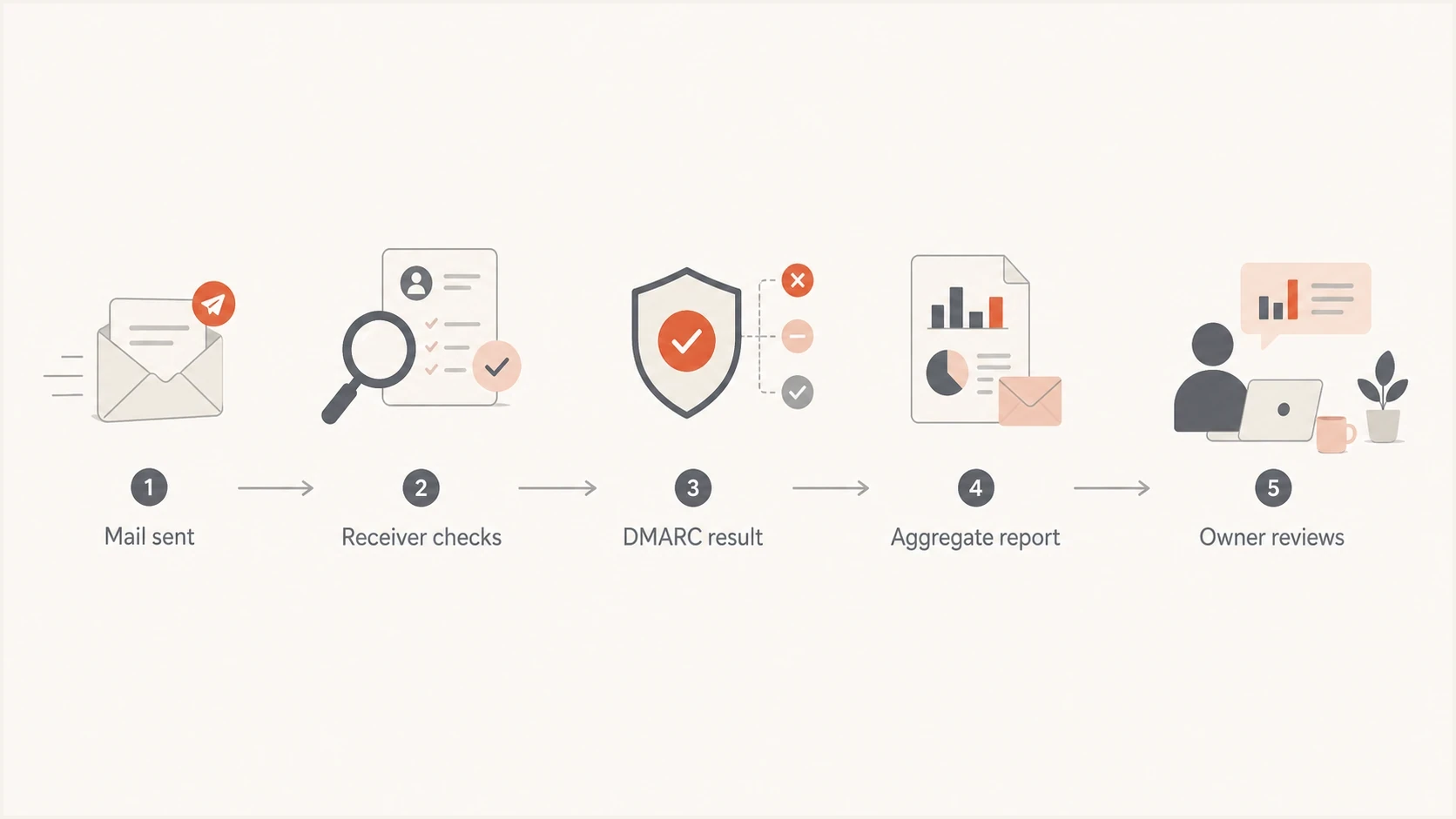
Flowchart showing mail sent, receiver checks, DMARC result, aggregate report, and owner review.
How RUF works
RUF means failure reporting URI. The ruf tag requests message-specific reports for authentication failures. The fo tag requests which failure conditions trigger a report; its default is fo=0, and receivers ignore fo when ruf is absent.
RUF is more sensitive than RUA because a report can include headers, authentication details, and redacted or partial message data. That creates privacy, retention, and security concerns for receivers and domain owners. External RUF destinations use the same DNS authorization process as external RUA destinations.
Receiver support remains the practical limit. Some receivers do not send RUF. Others send it only under narrow conditions, and redaction can remove the details needed for an investigation. The RUA versus RUF comparison explains the report fields in more detail.
RUA aggregate reports
- Scope: Domain-level summary data grouped by source and result.
- Privacy: Lower risk because message bodies are not included.
- Use: Supports rollout, audits, source discovery, and trend tracking.
- Coverage: Broadly sent by major receivers.
RUF failure reports
- Scope: Message-specific failure data for individual events.
- Privacy: Higher risk because personal data can appear.
- Use: Supports a limited incident investigation.
- Coverage: Inconsistent and often unavailable.
Treat RUF as sensitive data
RUF can create a data-sharing problem. A receiver can send failure details about a recipient who has no relationship with the domain owner. The domain owner then receives personal data it did not already have.
- Review access: Limit who can read RUF reports.
- Set retention: Delete reports when the investigation no longer needs them.
- Check contracts: Confirm processing terms before routing RUF to a third party.
- Avoid defaults: Do not add RUF just because the tag exists.
DMARC record with RUA and RUFdns
_dmarc.example.com TXT v=DMARC1; p=quarantine;
rua=mailto:dmarc-agg@example.com;
ruf=mailto:dmarc-fail@example.com; fo=1
What the current DMARC RFCs changed
- Required syntax: Only v=DMARC1 is required, and it must be the first tag.
- Policy default: The p tag is recommended, and omission is processed as p=none.
- Removed syntax: The pct, rf, and ri tags were removed, along with the URI suffix for requesting a maximum report size.
- Receiver discretion: Publishing rua or ruf requests reports. It does not guarantee that every receiver will send them.
Older examples that use pct for a staged rollout describe the previous specification. RFC 9989 introduces the optional t testing tag, but explicit policy changes combined with RUA review remain easier to audit.
A practical starting record
For a new DMARC rollout, start with RUA and no RUF. That provides operational visibility without pulling message-specific failure data into the process. After every legitimate source is known and SPF or DKIM passes in alignment with the visible From domain, move the policy toward enforcement.
Recommended starting recorddns
_dmarc.example.com TXT v=DMARC1; p=none;
rua=mailto:dmarc-agg@example.com
If the domain is already well controlled, the same RUA pattern works with p=quarantine or p=reject. The policy value tells receivers how the domain owner wants failing mail handled. The RUA value requests evidence about what receivers evaluated.
Recommended reporting posture
A practical scale for deciding how much DMARC reporting to request.
No reporting
Weak
Valid but low visibility.
RUA only
Recommended
The normal default for most senders.
RUA plus enforcement
Strong
A mature operational posture.
RUA plus RUF
Sensitive
Use for controlled investigations.
Validate a record before DNS changes go live. Suped has a DMARC checker for syntax and policy checks, plus a DMARC record generator for building a clean TXT value.
For teams that change senders often, Hosted DMARC reduces DNS changes because policy staging can happen in Suped after the initial setup. This is useful when several teams share the same domain.
DMARC record generator
Choose your policy, reporting addresses, and alignment settings.
DNS TXT record
v=DMARC1; p=quarantine; rua=mailto:dmarc@example.com
Do not treat a generated record as a one-time task. RUA reports should feed a repeatable process: identify sources, fix missing DKIM or broken SPF paths, move to enforcement, and keep watching for authentication drift.
Suped's product turns RUA XML into source-level findings, flags authentication issues, provides remediation steps, and alerts teams when results change. Its related controls cover SPF, DKIM, hosted SPF, hosted MTA-STS, SPF flattening, and blocklist (blacklist) monitoring.
DMARC record detail view showing SPF, DKIM, DMARC, rDNS diagnostics, and DNS records
Provider requirements and report tags
Mailbox provider sender rules have increased DMARC adoption, especially among bulk senders, but they do not require RUA or RUF. For covered bulk mail to personal Gmail accounts, Google requires SPF and DKIM, an explicit DMARC policy that can be p=none, and alignment between the visible From domain and at least one authenticated identity.
Yahoo also requires covered bulk senders to publish a valid DMARC policy with at least p=none and pass DMARC. Yahoo strongly recommends a properly configured rua tag for monitoring, but recommendation is different from a requirement.
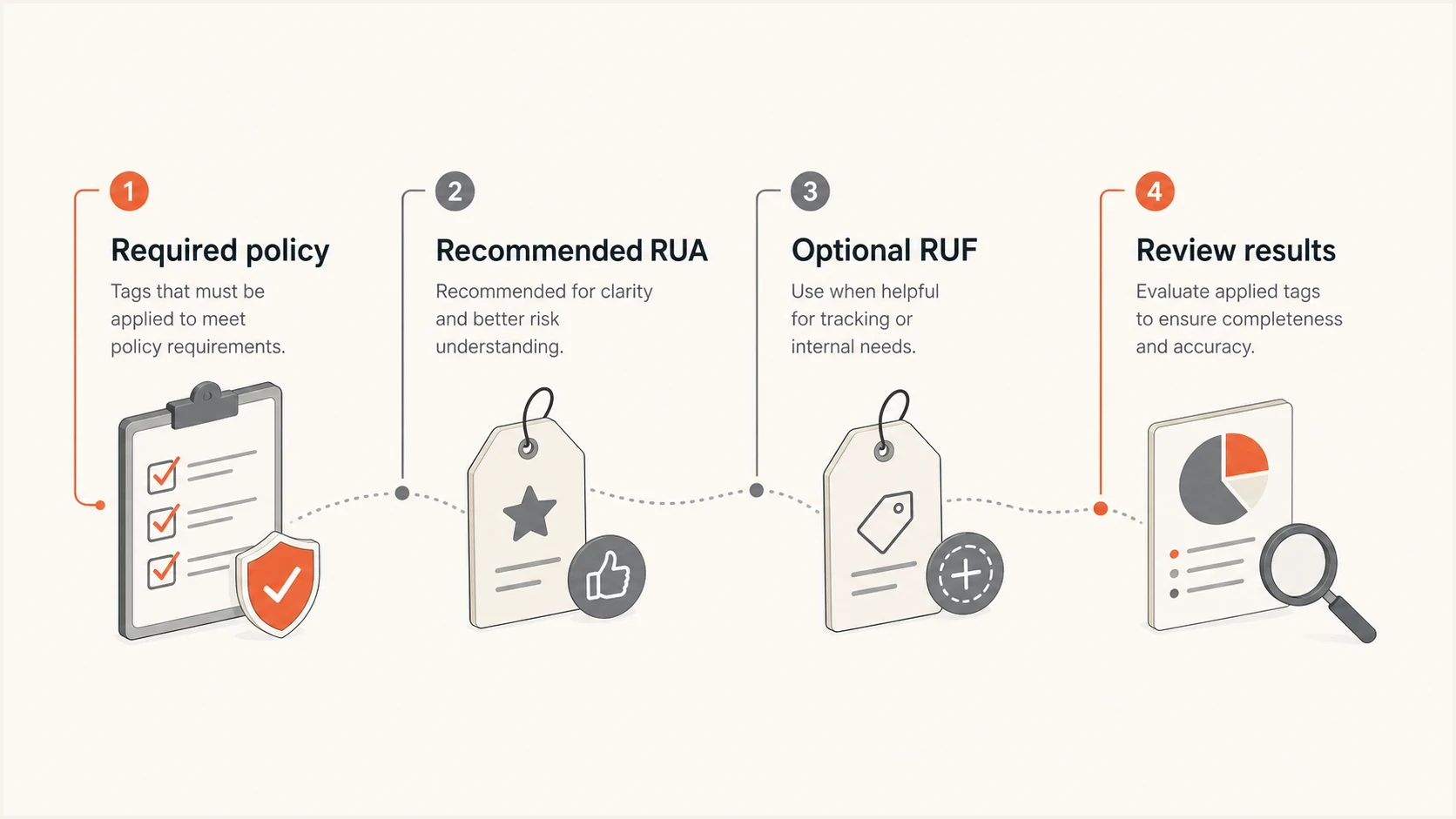
Infographic contrasting required DMARC policy tags with recommended RUA and optional RUF reporting.
RUA remains practical advice even when it is not required by record syntax or provider rules. RUA closes the feedback loop. Without it, teams often discover problems through delivery drops, support tickets, or a sending service reporting a failure after the fact.
Client-ready advice
The recommendation for most organizations is simple: publish an explicit policy with RUA, skip RUF by default, and revisit RUF only for a defined investigation with approved data handling.
- Baseline: Every active sending domain gets RUA reporting.
- Enforcement: Move toward reject after legitimate sources pass consistently.
- RUF review: Require privacy approval, access controls, and retention rules.
- Multi-domain use: Use tenant separation when managing reports across client domains.
When omitting RUA is acceptable
There are cases where no RUA is defensible. The most common is a dedicated subdomain used by one known sending platform, with SPF and DKIM already configured and a strict DMARC policy enforced. If nothing else sends from that subdomain, the value of ongoing reports is lower.
Keeping RUA is still the safer operational choice unless there is a reason to remove it. Domains and vendors change. A team adds a sending integration, or a billing platform starts sending receipts. RUA provides early evidence of those changes.
Keep RUA
- Shared domain: Several teams or vendors send mail.
- New rollout: Sources are still being discovered.
- Compliance work: Evidence is needed for controls and reviews.
- High volume: Small failures affect many messages.
Omit RUA only when
- Single source: One platform sends all mail.
- Strict policy: The subdomain already uses reject.
- Documented owner: One team owns the sender.
- Review path: Another control catches sending drift.
For organizations with many brands or client domains, reporting becomes an operations task. Suped's MSP and multi-tenancy dashboard keeps organizations separate while providing domain status, alerts, client reporting, and source-level findings in one place.
Apply the same logic to RUF in reverse. Ask what decision RUF would support that RUA cannot. If there is no concrete decision, leave RUF out.
Views from the trenches
Best practices
Publish RUA on every active sending domain unless a documented exception explains why.
Treat RUF as sensitive data and approve access, routing, and retention before use.
Use dedicated subdomains for narrow mail streams when teams need simpler enforcement.
Common pitfalls
Adding RUF by default creates privacy work without reliable report volume or coverage.
Leaving RUA out on shared domains hides legitimate senders until delivery breaks.
Publishing reports to another domain fails when the destination has no approval TXT.
Expert tips
Start with RUA-only reporting, fix known sources, then move policy to enforcement.
Keep RUA on enforced domains so later vendor or routing changes do not go unnoticed.
Use RUF only when the investigation needs message-level evidence and controls exist.
Expert from Email Geeks says neither RUA nor RUF is mandatory, but RUA is strongly recommended because it prevents blind operation.
2024-01-23 - Email Geeks
Marketer from Email Geeks says RUA matters more than RUF because failure reports are rare and most teams need aggregate visibility first.
2024-01-23 - Email Geeks
Practical bottom line
RUA and RUF are not required for a valid DMARC record. RUA is the practical minimum for most sending domains, while RUF is a specialist option. Start with an explicit policy and RUA, omit RUF, and move toward enforcement after reports confirm every legitimate source is passing. Suped's product supports that workflow by parsing RUA reports, identifying sending sources, surfacing authentication issues, and alerting when results change.