What are the new Microsoft email sender requirements and observed enforcement bounces?

Published 14 Jul 2025
Updated 6 Aug 2026
11 min read
Summarize with
Updated on 6 Aug 2026: We updated this guide for Microsoft's current high-volume definition, 5.7.515 rejections, sender hygiene, and forwarded mail.
The new Microsoft sender requirement is direct: domains sending 5,000 or more messages in a day to Outlook.com consumer mailboxes, using the same domain in the 5322.From address, need SPF, DKIM, and DMARC in place. Both SPF and DKIM must pass, and DMARC must pass through a matching SPF or DKIM domain. Direct rejection with a 550 5.7.515 bounce began on May 5, 2025.
The most useful observed bounce says the sending domain does not meet the required authentication level. Treat that as a Microsoft authentication enforcement failure, not a generic reputation issue. A separate 550 5.7.509 bounce says the domain failed DMARC while publishing p=reject. That second message is real and important, but it is older DMARC policy enforcement, not the cleanest marker of the high-volume sender requirement.
The short answer
Microsoft's official announcement brought Outlook.com closer to the same authentication baseline used by serious bulk senders for Gmail and Yahoo. If you send at high volume to Outlook.com, Hotmail.com, Live.com, or MSN consumer addresses, assume Microsoft expects every active sending stream to have working SPF, working DKIM, and a DMARC record with at least p=none.
- Who is covered: Domains sending 5,000 or more emails in a day to Microsoft consumer mailboxes, with the same domain in the 5322.From address.
- What must pass: Both SPF and DKIM need to pass, and DMARC needs a matching authenticated domain.
- Minimum DMARC policy: Microsoft accepts p=none as the baseline, although p=reject gives stronger domain protection after monitoring is clean.
- Scope after the threshold: Microsoft expects all messages using that From domain to meet the authentication checks.
- Observed enforcement: The 550 5.7.515 bounce is the key signal for the high-volume authentication requirement.
Observed 5.7.515 enforcement bouncetext
550 5.7.515 Access denied, sending domain EXAMPLE.COM doesn't meet the
required authentication level. The sender's domain in the 5322.From
address doesn't meet the authentication requirements defined for the sender.
Spf= Pass , Dkim= Pass , DMARC= Fail
A bounce that shows SPF Pass and DKIM Pass can still show DMARC Fail. DMARC does not ask only whether SPF or DKIM worked. It asks whether the authenticated domain matches the visible From domain closely enough to satisfy DMARC.
What Microsoft checks
The Microsoft rule has a few moving parts, but it does not need to be complicated. For each production sender, confirm that the DNS record exists, the provider is authorized, the DKIM selector signs mail, and the domain in the visible From address matches either the SPF-authenticated envelope domain or the DKIM d= domain at the organizational-domain level.
|
|
|
|---|---|---|
SPF | Pass | Unknown IP |
DKIM | Pass | Missing key |
DMARC | p=none+ | No domain match |
From | Stable domain | Vendor domain |
Compact view of the Microsoft authentication checks.
This is where a quick domain health check helps. It gives you the obvious DNS failures first, before you dig through message headers or sending-platform signing behavior.
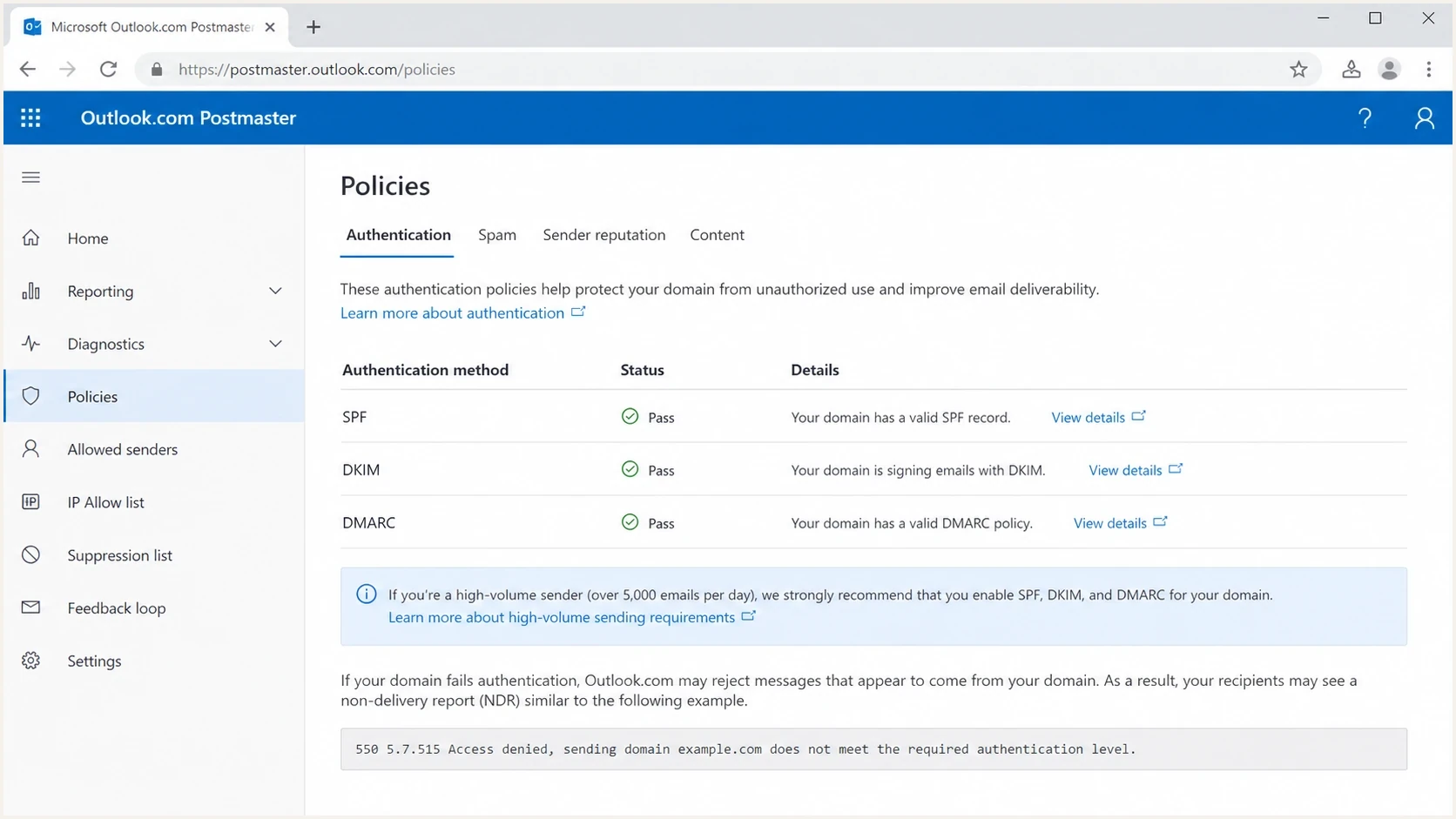
Outlook.com Postmaster authentication requirements for high-volume email senders.
Authentication and sending practices both matter
SPF, DKIM, and DMARC are the mandatory authentication checks for high-volume senders. Microsoft also publishes sending practices that affect filtering or blocking when authentication or email hygiene problems are severe. These practices apply to legitimate bulk mail even when all authentication checks pass.
- Sender identity: Use a valid primary From or Reply-To address that reflects the real sending domain and can receive replies.
- Unsubscribe handling: Give recipients a clear, functional way to unsubscribe from marketing or bulk messages.
- List maintenance: Remove invalid addresses, suppress bounces, and send only to recipients who consented.
- Message accuracy: Use accurate subject lines and headers so the message identity and purpose are clear.
- Forwarded mail: Forwarders and mailing lists should use ARC because forwarding can break SPF and complicate DMARC evaluation.
Authentication compliance does not guarantee inbox placement. A valid 5322.From domain, honest message identity, recipient consent, and reliable unsubscribe handling still affect how Microsoft treats bulk mail.
Observed bounce patterns
There are two Microsoft bounce families that get mixed together. The distinction matters because the fixes overlap but the diagnosis is different. The high-volume sender requirement is best identified by 5.7.515 and wording about the required authentication level. The older DMARC-policy rejection is best identified by wording about DMARC verification and a reject policy.
New requirement signal
A 550 5.7.515 bounce points to Microsoft's high-volume authentication requirement. Inspect the visible From domain first, then compare it with the SPF and DKIM authenticated domains.
- Reason code: 5.7.515
- Typical text: Required authentication level.
DMARC reject signal
A 550 5.7.509 bounce points to a message that failed DMARC while the sender's domain already published a reject policy. This can happen outside the Microsoft bulk-sender requirement.
- Reason code: 5.7.509
- Typical text: DMARC policy of reject.
Observed 5.7.509 DMARC reject bouncetext
550 5.7.509 Access denied, sending domain EXAMPLE.COM does not pass
DMARC verification and has a DMARC policy of reject.
Reports also show cases where only part of a campaign bounces, such as 10 percent rejected and 90 percent accepted. That does not prove the authentication result is random. It usually means the stream is not identical across all recipients: mail servers, headers, envelope domains, cached DNS, or sending services differ between messages.
Why SPF and DKIM can pass while DMARC fails
The confusing version of the Microsoft bounce is the one that reports Spf=Pass, Dkim=Pass, and DMARC=Fail. That result is technically consistent. SPF can pass for the bounce domain, DKIM can pass for a vendor domain, and DMARC can still fail because neither passing domain matches the visible From domain.
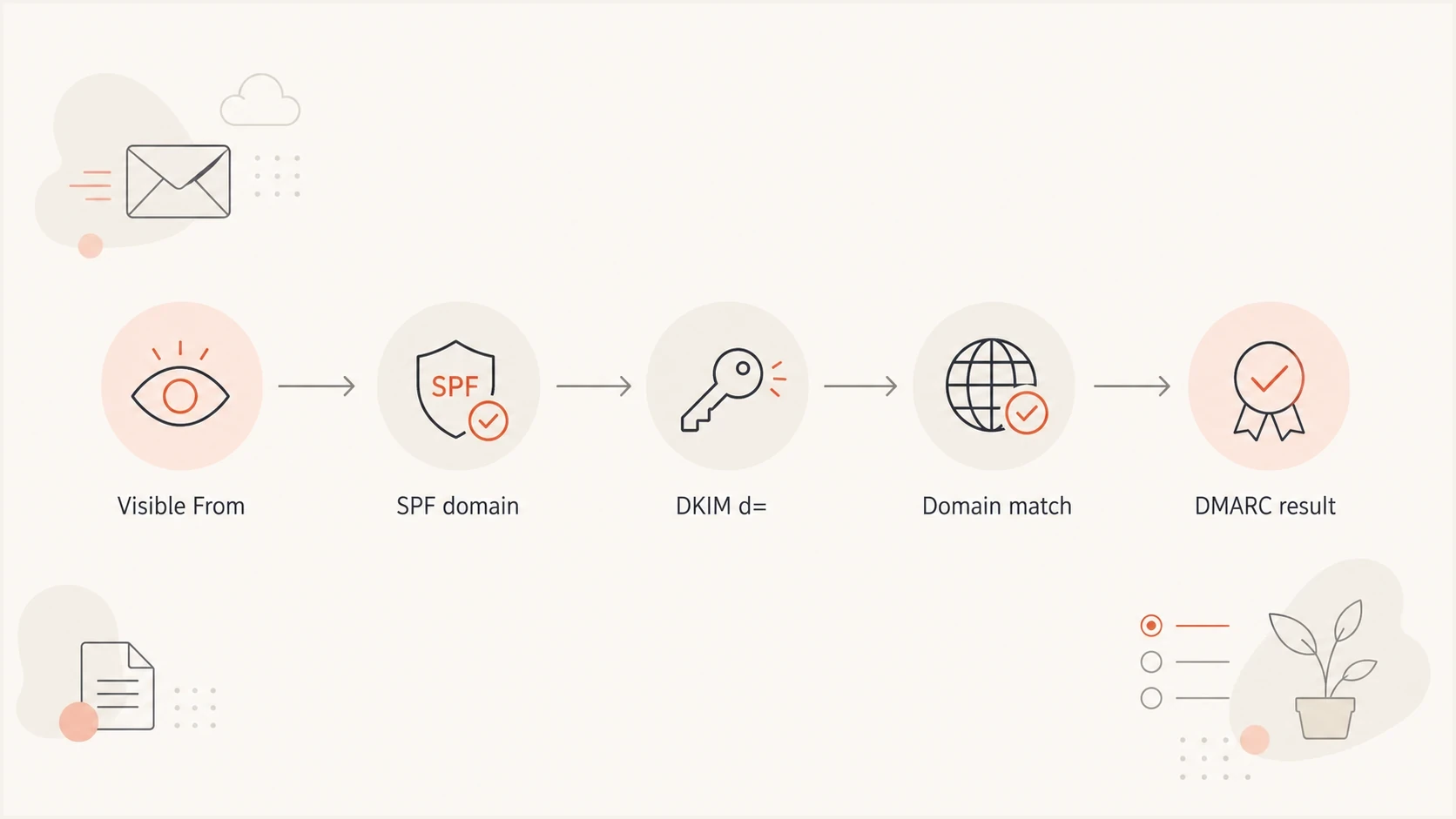
Flowchart showing how DMARC compares the visible From domain with SPF and DKIM domains.
Common causes are easy to miss when a marketing platform sends on behalf of a brand. The envelope sender uses the platform's domain, DKIM signs with the platform's domain, and the visible From address uses the brand domain. That mail can look authenticated at a glance, but it still fails DMARC for the brand.
- SPF mismatch: The return-path domain passes SPF, but it is not the same organizational domain as the visible From address.
- DKIM mismatch: The signature validates, but the d= domain belongs to the platform rather than the brand.
- Missing selector: The platform signs mail, but the brand has not published the required DKIM public key.
- Shared mailstream: One campaign uses several senders, and only one of them has correct DNS.
How to fix the failures
Start with the domain in the visible From address because DMARC uses that as the domain being protected. Then work outward to the provider, DNS, selectors, and reporting. If you operate many brands or client domains, manual spreadsheets quickly become hard to maintain.
Minimal DNS examplestext
example.com TXT "v=spf1 include:_spf.example-sender.net -all"
selector1._domainkey.example.com TXT "v=DKIM1; k=rsa; p=PUBLICKEY"
_dmarc.example.com TXT "v=DMARC1; p=none; rua=mailto:dmarc@example.com"
- Inventory senders: List every platform that sends using your domain, including billing, product, sales, support, and marketing systems.
- Publish SPF: Authorize each legitimate outbound source, then keep the SPF record under the 10 DNS lookup limit.
- Enable DKIM: Turn on DKIM signing in each sending platform and publish the provider's selector records in DNS.
- Publish DMARC: Use p=none to collect data first, then move toward quarantine or reject when legitimate streams pass.
- Check domain matching: Confirm either the SPF-authenticated domain or DKIM d= domain matches the visible From domain.
Suped's DMARC monitoring supports this workflow by showing verified and unverified sources, authentication pass rates, and the steps needed to fix each issue. Suped's hosted SPF and hosted DMARC controls help when DNS ownership is split across teams or clients.

Issue steps to fix dialog showing the issue overview, tailored fix steps, and verification action
How to test before the next send
A DNS check tells you whether the records exist. A real message test tells you whether the production email stream produces the headers Microsoft will evaluate. Run both before changing policy or resending a campaign that already produced bounces.
Use an email tester with the same platform, same From domain, same DKIM signing setup, and same campaign class. Do not test a personal mailbox and assume a marketing stream will behave the same way.
Email tester
Send a real email to this address. Suped shows a results button when the test is ready.
?/43tests passed
If SPF is the weak point, check the live SPF record, includes, and lookup count with an SPF checker. If DKIM is weak, inspect the selector in the Authentication-Results header and confirm that exact selector exists in DNS.
Best practice: test the exact production stream. The bounce text tells you the final recipient-side result, but the fix usually lives in DNS, platform signing settings, or the visible From domain.
What to do when bounces are intermittent
Intermittent Microsoft bounces usually point to DNS changes or mixed sending paths. Do not assume Microsoft is accepting and rejecting identical messages for no reason. Compare headers from an accepted Microsoft delivery against a bounced message and look for changes in the return-path, DKIM selector, DKIM signing domain, source IP, or From domain.
Triage priority for Microsoft bounces
Use the bounce reason and differences between sending paths to decide what to fix first.
Clean
No 5.7.515
SPF, DKIM, and DMARC pass for the production stream.
Investigate
Mixed paths
Some messages are accepted while authentication details differ across paths.
Fix now
Any 5.7.515
A 5.7.515 rejection shows missing authentication, a failed check, or a domain mismatch.
For a broader troubleshooting path, the Microsoft bounce guide is useful when the rejection text is not clearly 5.7.515. If the bounce says DMARC passed but policy still caused trouble, compare that case with DMARC policy bounces because Microsoft rejection text can be easy to misread.
If you are planning a full cleanup rather than one emergency fix, use an Outlook compliance checklist and move domain by domain. That keeps the work measurable and prevents one overlooked sender from breaking the next launch.
Where Suped fits
The practical problem is keeping every source correct after teams add systems, change sending platforms, rotate selectors, or use client-owned domains. Suped's product puts authentication results, source ownership, issue severity, and remediation steps in one place.
- Automated detection: Suped groups failures by source and explains the DNS or platform change needed.
- Real-time alerts: You can catch a new failing stream before it turns into a visible Microsoft bounce spike.
- Hosted controls: Suped's hosted SPF, DMARC, and MTA-STS controls reduce DNS friction for teams managing many domains.
- Multi-tenant work: MSPs and agencies can monitor client domains from one dashboard without losing source context.
Suped connects Microsoft 5.7.515 failures to the sending source and required authentication change. Use its DMARC reports to group failures by source and keep remediation work visible across domains.
Views from the trenches
Best practices
Audit every active sending domain before enforcement, including low-volume client streams.
Compare accepted and bounced headers side by side before changing DNS or sender policy.
Keep DMARC reporting active so new Microsoft failures map back to a real source quickly.
Common pitfalls
Treating any DMARC reject bounce as the new 5.7.515 Microsoft enforcement signal.
Assuming SPF Pass and DKIM Pass mean DMARC passes for the visible From domain in use.
Testing a personal mailbox instead of the exact production platform that sends campaigns.
Expert tips
Search logs for the Microsoft support link or 5.7.515 text, not one wording variant.
Short DNS TTLs help during controlled tests, but do not replace source-level validation.
Fix domain matching first when Microsoft shows SPF Pass, DKIM Pass, and DMARC Fail.
Expert from Email Geeks says the clean 5.7.515 wording is the stronger signal for the new Microsoft authentication requirement.
2025-05-15 - Email Geeks
Marketer from Email Geeks says early DMARC reject bounces were easy to mistake for the new Microsoft sender enforcement.
2025-05-05 - Email Geeks
What to do next
Do not pause all Microsoft sending. Separate 5.7.515 authentication enforcement from older DMARC reject bounces, then fix the exact stream that fails. Start with the visible From domain, prove SPF and DKIM on the real message, and confirm that DMARC passes through a matching authenticated domain.
Once the domain is clean, keep monitoring. Ongoing provider enforcement and configuration changes can expose weak authentication. Suped keeps that work continuous by turning DMARC reports and bounces into source-level issues with specific remediation steps.